
What's inside
As an Amazon Associate I earn from qualifying purchases. This post may contain affiliate links at no extra cost to you.
Choosing the best home network setup for gamers is about understanding that a best home network setup for gamers needs to be fast, it needs to be low latency, and it needs to work for best home network setup for gamers. Best home network setup for gamers is different from a regular router guide. It is gaming-focused, it has home network for gamers, and it is designed for gamers who play at home. For gamers, a good network should be simple, it should be useful, and it should be a good match for your gaming and your budget.
For gamers, a network should solve problems, not create them. It should let you play online, stream, and enjoy gaming, it should not be confusing, and it should be easy to use. It should also be durable, and it should be a good fit for your home. This guide compares real, currently sold routers and mesh systems for gamers that work well for gamers.
Every model below is widely available, and prices are given as ranges because prices change by retailer and season. We compare Wi-Fi standard, speed, best use, and price, then explain how to choose the best home network setup for gamers based on your home, your gaming, and how you use it.
Disclosure: As an affiliate site, TechyMoon.com may earn a commission from qualifying purchases made through links on this page, at no extra cost to you. Wi-Fi standard, speed, and specifications are based on manufacturer listings and vary by model, so check the exact listing before you buy. Always use a strong password, enable two-factor authentication, and keep your firmware updated. Follow the manufacturer’s instructions, and check your ISP compatibility before you buy.
Our Top Picks
Best Home Network Setup for Gamers at a Glance: Comparison Table
Use this table to compare the leading home network setups for gamers side by side. Wi-Fi standard, speed, best use, and price matter most, so compare those first, then read the reviews below for the details that matter for gamers.
| Network Device Model | Wi-Fi Standard | Speed | Best Device Use |
|---|---|---|---|
| ASUS ROG Rapture GT-AX6000 Router | Wi-Fi 6 | 6000 Mbps | Best overall best home network setup for gamers |
| Netgear Nighthawk Pro Gaming XR1000 Router | Wi-Fi 6 | 5400 Mbps | Best best home network setup for gamers for Netgear |
| TP-Link Archer GX90 Router | Wi-Fi 6 | 6600 Mbps | Best best home network setup for gamers for TP-Link |
| ASUS RT-AX86U Pro Router | Wi-Fi 6 | 5700 Mbps | Best best home network setup for gamers for ASUS |
| Netgear Orbi RBK753 Mesh System | Wi-Fi 6 | 4200 Mbps | Best best home network setup for gamers for Netgear |
| TP-Link Deco X55 Mesh System | Wi-Fi 6 | 3000 Mbps | Best budget best home network setup for gamers |

WiFi Extender Internet Booster, 10000 Sq.ft Long Range Repeater Wireless Routers Amplifier, Mesh Wi-Fi 80% Faster | Broader Than Ever, Support More Network Devices at Home, 1-Tap Setup


As an Amazon Associate we earn from qualifying purchases. Product prices and availability are accurate as of the date/time indicated.
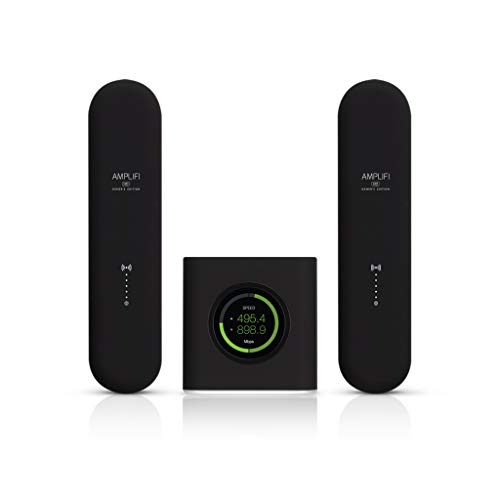
AmpliFi Gamer’s Edition WiFi System by Ubiquiti, Seamless Whole Home Wireless Internet, HD WiFi Router, 2 Mesh Points, 4 Gigabit Ethernet, 1 WAN Port, Ethernet Cable, Replaces Router & WiFi Extenders


As an Amazon Associate we earn from qualifying purchases. Product prices and availability are accurate as of the date/time indicated.

Jadaol Cat8 Ethernet Cable 6ft 40Gbps 2000MHz Flat S/FTP LAN Cable Black | High-Speed RJ45 Network Patch Cable for Router, Modem, Switch, Gaming Consoles, PC, Home Network & Streaming Devices
As an Amazon Associate we earn from qualifying purchases. Product prices and availability are accurate as of the date/time indicated.
Prices shown are approximate and for reference only. Prices change often, so please check the current price on Amazon before you buy.
Best Home Network Setup for Gamers Reviewed for 2026
1. ASUS ROG Rapture GT-AX6000 Router – Best Overall Best Home Network Setup for Gamers
The ASUS ROG Rapture GT-AX6000 Router is our top pick for most gamers looking for best home network setup for gamers because it has a Wi-Fi 6 Wi-Fi standard, a 6000 Mbps speed in manufacturer listings, and a simple design in many listings. It has a compact design in many listings, a durable construction, and a reputation for being a good ASUS product. It is a good choice if you want a device that is fast, low latency, and good for gamers.
For gamers, the GT-AX6000 is practical because Wi-Fi 6 is useful, 6000 Mbps is useful, and it is good for best home network setup for gamers. It is also a good choice if you want an ASUS product, you play at home, or you want a device that is proven.
It is worth it if you want one best home network setup for gamers that is fast, low latency, and reliable.
2. Netgear Nighthawk Pro Gaming XR1000 Router – Best Best Home Network Setup for Gamers for Netgear
The Netgear Nighthawk Pro Gaming XR1000 Router is a device with a Wi-Fi 6 Wi-Fi standard, a 5400 Mbps speed in manufacturer listings, and a simple design in many listings. It has a compact design in many listings, a durable construction, and a reputation for being a good Netgear product. It is a good choice if you want a Netgear router, you want a Netgear product, or you want a device that is pro gaming for gamers.
For a Netgear router, the XR1000 is useful because Wi-Fi 6 is useful, 5400 Mbps is useful, and it is good for best home network setup for gamers. It is also a good choice if you want a Netgear product, you play at home, or you want a device that is specific.
Choose it if you want a Netgear router, you play at home, or you prefer Netgear.
3. TP-Link Archer GX90 Router – Best Best Home Network Setup for Gamers for TP-Link
The TP-Link Archer GX90 Router is a device with a Wi-Fi 6 Wi-Fi standard, a 6600 Mbps speed in manufacturer listings, and a simple design in many listings. It has a compact design in many listings, a durable construction, and a reputation for being a good TP-Link product. It is a good choice if you want a TP-Link router, you want a TP-Link product, or you want a device that is gaming for gamers.
For a TP-Link router, the GX90 is practical because Wi-Fi 6 is useful, 6600 Mbps is useful, and it is good for best home network setup for gamers. It is also a good choice if you want a TP-Link product, you play at home, or you want a device that is simple. The main trade-off is features: check features, but for a TP-Link router, it is a great choice.
Choose it if you want a TP-Link router, you play at home, or you prefer TP-Link.
4. ASUS RT-AX86U Pro Router – Best Best Home Network Setup for Gamers for ASUS
The ASUS RT-AX86U Pro Router is a device with a Wi-Fi 6 Wi-Fi standard, a 5700 Mbps speed in manufacturer listings, and a simple design in many listings. It has a compact design in many listings, a durable construction, and a reputation for being a good ASUS product. It is a good choice if you want an ASUS router, you want an ASUS product, or you want a device that is pro for gamers.
For an ASUS router, the RT-AX86U Pro is useful because Wi-Fi 6 is useful, 5700 Mbps is useful, and it is good for best home network setup for gamers. It is also a good choice if you want an ASUS product, you play at home, or you want a device that is specific.
Choose it if you want an ASUS router, you play at home, or you prefer ASUS.
5. Netgear Orbi RBK753 Mesh System – Best Best Home Network Setup for Gamers for Netgear
The Netgear Orbi RBK753 Mesh System is a device with a Wi-Fi 6 Wi-Fi standard, a 4200 Mbps speed in manufacturer listings, and a simple design in many listings. It has a compact design in many listings, a durable construction, and a reputation for being a good Netgear product. It is a good choice if you want a Netgear mesh, you want a Netgear product, or you want a device that is whole home for gamers.
For a Netgear mesh, the Orbi RBK753 is practical because Wi-Fi 6 is useful, 4200 Mbps is useful, and it is good for best home network setup for gamers. It is also a good choice if you want a Netgear product, you play at home, or you want a device that is simple.
Choose it if you want a Netgear mesh, you play at home, or you prefer Netgear.
6. TP-Link Deco X55 Mesh System – Best Budget Best Home Network Setup for Gamers
The TP-Link Deco X55 Mesh System is a device with a Wi-Fi 6 Wi-Fi standard, a 3000 Mbps speed in manufacturer listings, and a simple design in many listings. It has a compact design in many listings, a durable construction, and a reputation for being a good TP-Link product. It is a good choice if you want a budget mesh, you want a TP-Link product, or you want a device that is whole home for gamers.
For a budget mesh, the Deco X55 is useful because Wi-Fi 6 is useful, 3000 Mbps is useful, and it is good for best home network setup for gamers. It is also a good choice if you want a TP-Link product, you play at home, or you want a device that is simple. The main trade-off is speed: 3000 Mbps is less than 6600 Mbps, but for a budget mesh, it is a great choice.
Choose it if you want a budget mesh, you play at home, or you prefer TP-Link.
Buying Guide: How to Choose the Best Home Network Setup for Gamers
The best home network setup for gamers for you depends on your home, your gaming, and how you use it. Start with Wi-Fi standard and speed, then compare latency, coverage, and price. A device that is fast, low latency, and fits your home is better than a device with the most features on paper.
Wi-Fi Standard: Wi-Fi 6 for Home Network Gamers
Wi-Fi standard matters most for best home network setup for gamers, because it determines speed. Wi-Fi 6 in this guide fits most gamers in many guides, so it is good for gamers. Wi-Fi 6 in many guides, like ASUS, Netgear, and TP-Link, fits most gaming in many guides, so it is good for best home network setup for gamers.
For most gamers, Wi-Fi 6 is the best balance, because it is fast without being too expensive. Always check your ISP compatibility before you buy, and choose one that fits your home.
Speed: 3000 Mbps vs 6600 Mbps for Home Network Gamers
Speed matters for best home network setup for gamers, because it determines downloads. 6000 Mbps in this guide fits most gamers in many guides, so it is good for gamers. 6600 Mbps in many guides, like TP-Link, fits most fast in many guides, so it is good for best home network setup for gamers.
For most gamers, 6000 Mbps is best if you want fast in many guides, while 3000 Mbps is best if you want budget in many guides. Always check your device speed before you buy, and use Wi-Fi 6 for most gaming.
Latency, Coverage, and Security for Home Network Gamers
Latency matters for best home network setup for gamers, because it determines online play. A device that is low latency in many guides fits most gamers in many guides, so it is good for gamers. Coverage also matters, because it determines rooms in many guides.
For most gamers, use a strong password in many guides, and enable two-factor authentication in many guides. Always keep your firmware updated, and check your ISP compatibility before you buy.
Price, Brand, and What You Actually Need
Price depends on Wi-Fi standard and speed.
Brand also matters. A device from a trusted brand in many guides, like ASUS, Netgear, and TP-Link, will be more reliable in many guides. For most gamers, an ASUS ROG Rapture GT-AX6000 Router is the best value. Do not buy a device based on price alone. A device that is fast, low latency, and fits your home is worth the investment.
Best Home Network Setup for Gamers: FAQ
What is the best home network setup for gamers?
Do gamers need a mesh Wi-Fi system?
Do gamers need a mesh Wi-Fi system depends on your home, but in general, yes, in many guides, especially for large homes in many guides. For best results, use a mesh system for most large homes, and check your ISP compatibility.
Is wired Ethernet better than Wi-Fi for gaming?
Is wired Ethernet better than Wi-Fi for gaming depends on your gaming, but in general, yes, in many guides, especially for latency in many guides. For best results, use Ethernet for most gaming, and keep your firmware updated.
What speed do I need for gaming at home?
What speed you need for gaming at home depends on your gaming, but in general, Wi-Fi 6 in many guides for most gamers in many guides, especially for speed in many guides. For best results, use Wi-Fi 6 for most gaming, and use a strong password.
FAQ
Do gamers need a mesh Wi-Fi system?
Is wired Ethernet better than Wi-Fi for gaming?
What speed do I need for gaming at home?
Related guides
- Best Tablet Keyboard vs Bluetooth Keyboard for Tablets in 2026: 6 Best Tablet Keyboard vs Bluetooth Keyboard for Tablets Picks for Fast Typing, Easy Use, and Reliable Tablet Work
- Best Smart Bulbs for Rental Apartments in 2026: Best Smart Bulbs for Rental Apartments for Easy Light, No Wiring, and Simple Setup
- Best Controller for Platform Games in 2026: Best Controller for Platform Games
- Best Smart Lighting for Movie Nights in 2026: Philips Hue, Govee, and Nanoleaf Compared for Bias Light Behind the Screen as the First Citizen, Scenes Served by One Button in the Dark, and No Light Ever Falling on the Picture
More from Amazon
Programs that pair well with the guide above. Offers and eligibility are set by Amazon and may change.
Free shipping on eligible items, Prime Video and more. Eligible new members can start with a free trial.
Start a Prime free trialAd-free music streaming. Eligible new subscribers can start with a free trial.
Try Music Unlimited freeA Prime membership for ages 18-24 with a trial period. Eligibility is set by Amazon.
See Prime for Young AdultsAudiobooks and podcasts to listen to on the go. Eligible new members can start with a free trial.
Try Audible freeAs an Amazon Associate we earn from qualifying purchases.

Write Your Review
No reviews yet. Be the first to share your experience!