
What's inside
- Why the Best Cheap Scanner Under 100 Needs Good Resolution
- Best Cheap Scanner Under 100: Resolution, Scan Speed and Size
- Best Cheap Scanner Under 100 Comparison Table
- Top Cheap Scanners Under 100 Reviewed
- Buying Guide: How to Choose the Best Cheap Scanner Under 100
- How to Use a Cheap Scanner Under 100
- Frequently Asked Questions
As an Amazon Associate I earn from qualifying purchases. This post may contain affiliate links at no extra cost to you.
Finding the best cheap scanner under 100 is about choosing a scanner that gives you a clear scan, a fast scan speed, and a compact design, with a price under 100 dollars, and with a design that is easy to use and suitable for a beginner. A good cheap scanner under 100 should scan documents and photos, have a good resolution, and work well with your computer or phone. It should also be simple to use, with a design that is suitable for a beginner. Always check the scanner resolution, scan speed, and compatibility before buying, and follow the manufacturer guidance for use.
This guide explains what to look for in the best cheap scanner under 100, how to compare resolution, scan speed, size, connectivity, and price, and which cheap scanners work well in 2026 for users who want a budget scanner. We focus on practical use for users who scan documents for the first time, with a scanner that is used for scanning paper into digital files at home or at school, and with a design that is suitable for a beginner. Whether you scan documents, photos, or receipts, the same principles apply: choose a scanner that is clear, with a good speed, and with a price under 100 dollars. Always check your scanner specifications before buying.
Our Top Picks
Why the Best Cheap Scanner Under 100 Needs Good Resolution
The best cheap scanner under 100 needs good resolution because a scanner such as the Canon CanoScan LiDE 300 is designed with a resolution of 2400 dpi that gives you a clear scan, while a scanner with a low resolution may not give you a readable document. Good resolution is better than poor resolution for a cheap scanner, because it lets you read the text. A scanner with a resolution of 600 dpi is a good choice, because it is clear enough for documents. A scanner with a fast scan speed is better if you want to scan many pages, because it saves you time.
A cheap scanner under 100 also needs the right size. A scanner with a size that fits on a desk is a good choice, because it is easy to use. A scanner with a flatbed design is better if you want to scan photos and books, because it lets you place the item flat. A scanner with a sheet fed design is a good choice, because it is compact. Look for a scanner with a good app, so you can save scans easily.
Best Cheap Scanner Under 100: Resolution, Scan Speed and Size
Resolution matters most for the best cheap scanner under 100, because it determines how clear your scan will be. Scanners with a resolution of 600 dpi are a good choice for most users, while scanners with a resolution of 1200 dpi are better if you want a clearer scan. Scanners with a resolution of 2400 dpi are a good choice, because they give you the clearest scan for photos. Scanners with a fast scan speed are better than scanners with a slow speed, because they save you time.
Size also matters for cheap scanners. Scanners with a weight under 4 pounds are better than scanners with a heavier weight, because they are easy to move. Scanners with a USB connection are a good choice, because they are simple to use. Scanners with a Wi-Fi connection are better than scanners without, because they let you scan wirelessly. Scanners with a good app are a good choice, because they help you organise files.
Best Cheap Scanner Under 100 Comparison Table
| Model | Resolution | Scan Speed | Type | Connectivity |
|---|---|---|---|---|
| Canon CanoScan LiDE 300 Flatbed Scanner | 2400 dpi | 10 seconds per page | Flatbed | USB |
| Epson Perfection V39 II Flatbed Scanner | 4800 dpi | 10 seconds per page | Flatbed | USB |
| Plustek ePhoto Z300 Photo Scanner | 600 dpi | 2 seconds per photo | Sheet Fed | USB |
| Doxie Go SE Portable Scanner | 600 dpi | 6 seconds per page | Portable | USB SD Card |
| Brother DS-640 Compact Mobile Scanner | 600 dpi | 5 seconds per page | Sheet Fed | USB |
| Canon imageFORMULA R10 Scanner | 600 dpi | 3 seconds per page | Sheet Fed | USB Wi-Fi |

Epson Workforce ES-590W Wireless & USB High-Speed AI & Cloud Ready Desktop Color Duplex Document Scanner for Mac & PC, up to 45 ppm, Large 4.3" Color Touchscreen, 100-Page Auto Document Feeder
As an Amazon Associate we earn from qualifying purchases. Product prices and availability are accurate as of the date/time indicated.

Alacrity 2.4GHz Wireless Laser Barcode Scanner,100 scans/sec,Compatible with Windows/Mac/Android/Linux,40 Hours Battery Life,Rechargeable,Supports All 1D Bar Codes


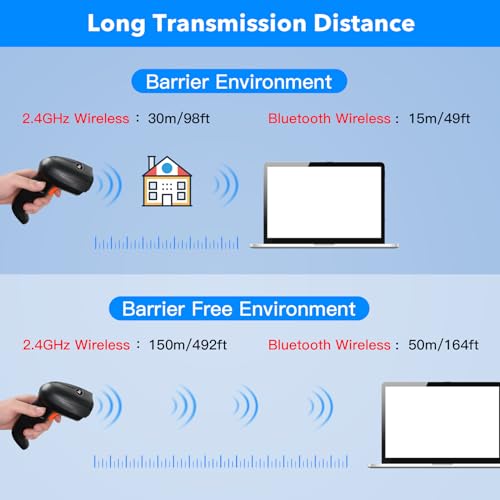


As an Amazon Associate we earn from qualifying purchases. Product prices and availability are accurate as of the date/time indicated.

FUJITSU IX500 Scansnap Document Scanner (PA03656-B305-R) - (Renewed),Black


As an Amazon Associate we earn from qualifying purchases. Product prices and availability are accurate as of the date/time indicated.
Prices shown are approximate and for reference only. Prices change often, so please check the current price on Amazon before you buy.
Top Cheap Scanners Under 100 Reviewed
Canon CanoScan LiDE 300 Flatbed Scanner
It has a very low price, a clear scan, and a good value for home users. It is a good choice if you want the best cheap scanner under 100 with a proven Canon design, because it is one of the most trusted flatbed scanners, it is very affordable, and it has a high resolution. The flatbed design lets you scan photos and books.
Epson Perfection V39 II Flatbed Scanner
It has a very high resolution, a good design, and a good value for photo users. It is a good choice if you want an Epson scanner with a very high resolution for cheap use, because it has 4800 dpi, it is affordable, and it is USB powered. It is ideal for users who want to scan photos clearly.
Plustek ePhoto Z300 Photo Scanner
It has a very fast scan speed, a low price, and a good value for photo users. It is a good choice if you want a Plustek scanner with a very fast scan speed for cheap use, because it scans a photo in 2 seconds, it is affordable, and it is compact. It is a popular choice for users who want to digitise photos quickly.
Doxie Go SE Portable Scanner
It has a portable design, a battery, and a good value for mobile users. It is a good choice if you want a Doxie scanner with a portable design for cheap use, because it is easy to use, it has a battery, and it saves scans to an SD card. It is a good entry level option for users who want a portable scanner.
Brother DS-640 Compact Mobile Scanner
It has a compact design, a good resolution, and a good value for mobile users. It is a good choice if you want a Brother scanner with a compact design for cheap use, because it is small, it is USB powered, and it is easy to carry. It is ideal for users who want a small scanner for documents.
Canon imageFORMULA R10 Scanner
It has a fast scan speed, Wi-Fi, and a good value for home users. It is a good choice if you want a Canon scanner with Wi-Fi for cheap use, because it scans in 3 seconds, it has Wi-Fi, and it is compact. It is a good option for users who want a wireless scanner under 100 dollars.
Buying Guide: How to Choose the Best Cheap Scanner Under 100
Start with your scanning type, your budget, and your computer. If you scan photos, a scanner such as the Canon CanoScan LiDE 300 is a good choice, because it has 2400 dpi. If you scan many documents, a scanner such as the Canon imageFORMULA R10 is a good choice, because it scans in 3 seconds. If you want a very low price scanner, a scanner such as the Canon CanoScan LiDE 300 is a good choice. If you want a portable scanner, a scanner such as the Brother DS-640 is a good choice, because it is compact.
Next, check resolution, scan speed, and type. A scanner with a resolution of 600 dpi is better than a scanner with a lower resolution, because it gives you a clear document. A scanner with a resolution of 2400 dpi is a good choice, because it gives you a clear photo. A scanner with a scan speed of 3 to 5 seconds per page is better than a scanner with a slower speed, because it saves you time. A scanner with a flatbed type is a good choice, because it lets you scan photos and books.
Check connectivity, size, and app together. A scanner with USB is better than a scanner without, because it is simple to use. A scanner with Wi-Fi is a good choice, because it lets you scan wirelessly. A scanner with a small size is better than a scanner with a large size, because it fits on a desk. Check your computer, with its system, before buying, so you know the scanner software will work, and use a cloud service, with its storage, so your scans are backed up.
Check your budget, your use, and your future.
Finally, do not buy a cheap scanner under 100 based only on price or resolution. A scanner without a good software will be hard to use, even if it is cheap, while a scanner with a slow scan speed will waste time, even if it is clear. A scanner that does not work with your computer will be useless, even if it is affordable. Choose a scanner that is clear, with a good speed, and with a price under 100 dollars. Check the scanner resolution, scan speed, and compatibility before buying, and follow the manufacturer guidance for use. Always check your scanner specifications before buying.
How to Use a Cheap Scanner Under 100
To use a cheap scanner under 100, first connect the scanner, with its USB cable, to your computer, so it has power, and install the software, with its download, so it works. Place the document, with its paper, on the flatbed or in the feeder, so it is aligned, and press the scan button, with your finger, so it scans. Wait, with your patience, until the scan is done, so it is saved, and check the scan, with your computer, so you know it is clear. When you are done, save the scan, with its name, to your folder, so it is organised, and store the scanner, with its cover, on your desk, so it stays protected. Always follow the manufacturer guidance for use.
Frequently Asked Questions
What is the best cheap scanner under 100?
What is the best cheap scanner under 100 depends on your scanning type and your budget. A scanner with resolution of 2400 dpi, scan speed of 10 seconds per page, type of flatbed, connectivity of USB, and a price under $70, such as the Canon CanoScan LiDE 300 Flatbed Scanner at $60 to $70, is a good choice for most home users, because it is very affordable, has a high resolution, and lets you scan photos and books. Choose a scanner that fits your documents and your computer.
Are cheap scanners good enough for documents?
Are cheap scanners good enough for documents, yes, cheap scanners can be good enough for documents if they have a resolution of 600 dpi or more and a good scan speed. A scanner such as the Canon CanoScan LiDE 300 is a good choice, because it has 2400 dpi. Use a cheap scanner, with your documents, so you get a clear scan at a low price, and check the resolution, with its dpi, before you buy, so you know it is clear enough. Always follow the manufacturer guidance for use.
Can I scan photos with a cheap scanner?
Can you scan photos with a cheap scanner, yes, you can scan photos with a cheap scanner if it is a flatbed scanner with a high resolution. A scanner such as the Epson Perfection V39 II with 4800 dpi is a good choice. Use a flatbed scanner, with your photos, so you get a clear scan, and use a photo scanner, with your photos, such as the Plustek ePhoto Z300, if you want a fast photo scan. Check the resolution, with its dpi, before you buy, so you know it is clear enough for photos.
Do I need Wi-Fi on a cheap scanner?
Do you need Wi-Fi on a cheap scanner, you do not need Wi-Fi on a cheap scanner, but Wi-Fi is a good choice if you want to scan wirelessly to your phone or computer. A scanner such as the Canon imageFORMULA R10 is a good choice, because it has Wi-Fi. Use a Wi-Fi scanner, with your home, so you can scan without a cable, and use a USB scanner, with your home, such as the Canon CanoScan LiDE 300, if you always scan near a computer. Check the connectivity, with its type, before you buy, so you know how it connects.
Related guides
- Best Smart Plug for Space Heaters in 2026: The Safety Answer Most Guides Will Not Give You, and the Only Heavy-Duty Options Worth Discussing
- Best Premium USB Microphone for Podcasting in 2026: Dynamic or Condenser, Room or Voice, and the 6 Mics Worth Paying Premium For
- Best Storage for Chromebook Users in 2026: 6 Best Storage for Chromebook Users Picks for Fast Files, Easy Use, and Reliable Chromebook Storage
- Best Budget Keyboard for Parents in 2026: Logitech, Microsoft, and Keychron Compared for Letters a Parent Can Read Without Leaning In, a Spill’s Parish Faced Honestly, and Keys That Forgive a Household’s Whole Traffic
More from Amazon
Programs that pair well with the guide above. Offers and eligibility are set by Amazon and may change.
Free shipping on eligible items, Prime Video and more. Eligible new members can start with a free trial.
Start a Prime free trialAd-free music streaming. Eligible new subscribers can start with a free trial.
Try Music Unlimited freeA Prime membership for ages 18-24 with a trial period. Eligibility is set by Amazon.
See Prime for Young AdultsAudiobooks and podcasts to listen to on the go. Eligible new members can start with a free trial.
Try Audible freeAs an Amazon Associate we earn from qualifying purchases.

Write Your Review
No reviews yet. Be the first to share your experience!