
What's inside
As an Amazon Associate I earn from qualifying purchases. This post may contain affiliate links at no extra cost to you.
Finding the best home network setup for gamers is different from finding a router for a small apartment, because a home network for gamers has to offer a low ping, a high speed, and a strong signal in every room, without lagging in a game, dropping in a video call, or slowing down when many devices are online. A good home network setup for gamers should have WiFi 6 or WiFi 6E, a speed of at least AX5400, and a Gigabit Ethernet port, so it can be used for PC gaming, console gaming, and streaming. A poor network will be too slow, it will have a high ping, or it will have dead zones, and your game will lag, your stream will buffer, and your downloads will be slow.
This guide compares seven real, currently sold routers and mesh systems for gamers, with prices from $200 to $600 in the table below: the ASUS ROG Rapture GT-AX11000, Netgear Nighthawk XR1000, TP-Link Archer AX11000, ASUS RT-AX86U Pro, Netgear Orbi RBK852, TP-Link Deco XE75, and Eero Pro 6E. Their WiFi standards run from WiFi 6 to WiFi 6E, their speeds run from AX5400 to AX11000, their ports run from 4 to 5 Gigabit Ethernet ports, their coverages run from about 2,500 sq ft to about 5,000 sq ft, their prices run from $200 to $600, and their ratings run from 4.5 to 4.7 out of 5. Every model here is sold as a router or a mesh system, every model can be used for gaming, and every model costs $600 or less at its typical price range. The right choice depends on your home, your games, and whether you want a single router or a mesh system.
Router vs mesh is the first factor for the best home network setup for gamers, because a router and a mesh system work in different ways, and they are best for different homes. A router, such as the ASUS ROG Rapture GT-AX11000 at $300 to $400, Netgear Nighthawk XR1000 at $250 to $350, TP-Link Archer AX11000 at $250 to $350, and ASUS RT-AX86U Pro at $200 to $280, is a single device that broadcasts WiFi from one place, so it is best for a small to medium home, a single floor, and a gaming setup near the router. A mesh system, such as the Netgear Orbi RBK852 at $400 to $600, TP-Link Deco XE75 at $300 to $400, and Eero Pro 6E at $300 to $400, is a set of two or three devices that work together to cover a large home, so it is best for a large home, multiple floors, and a gaming setup far from the router. For gamers, a router is best if you want a low ping, a gaming port, and a simple setup, because it offers a direct connection to a PC. A mesh system is best if you want a strong signal in every room, a seamless WiFi, and a connection for many devices, because it offers multiple nodes.
Ping, latency, and speed are the second factor, because a home network setup for gamers has to offer a low ping, a low latency, and a high speed, so gaming will be smooth. Ping is how long it takes for a signal to go from your PC to a game server and back, measured in milliseconds, with a lower ping meaning less lag. A wired Ethernet connection usually offers a lower ping than a WiFi connection, because it is more stable, while a WiFi 6 connection offers a lower ping than a WiFi 5 connection, because it is faster. The ASUS ROG Rapture GT-AX11000 at $300 to $400 offers AX11000, or up to 11,000 Mbps, the Netgear Nighthawk XR1000 at $250 to $350 offers AX5400, or up to 5,400 Mbps, the TP-Link Archer AX11000 at $250 to $350 offers AX11000, the ASUS RT-AX86U Pro at $200 to $280 offers AX5700, the Netgear Orbi RBK852 at $400 to $600 offers AX6000, the TP-Link Deco XE75 at $300 to $400 offers AXE5400, and the Eero Pro 6E at $300 to $400 offers AXE5400. Those figures are theoretical maximums; actual speeds depend on your internet plan, distance, and walls. For gamers, a speed of at least AX5400 is a good starting point, because it will be fast enough for gaming, streaming, and downloads. For ping, use a wired Ethernet cable for your PC or console, because it will offer the lowest ping, and use a gaming port, such as on the ASUS ROG Rapture GT-AX11000, because it prioritizes gaming traffic.
WiFi 6, WiFi 6E, and coverage are the third factor, because a home network setup for gamers has to offer a modern WiFi standard, so it can handle many devices, and a coverage that is large enough for your home. WiFi 6 is a standard that offers a faster speed, a lower latency, and a better handling of many devices than WiFi 5, while WiFi 6E adds a 6 GHz band, so it offers less congestion and a faster speed. The ASUS ROG Rapture GT-AX11000, Netgear Nighthawk XR1000, TP-Link Archer AX11000, and ASUS RT-AX86U Pro all offer WiFi 6, the Netgear Orbi RBK852 offers WiFi 6, and the TP-Link Deco XE75 and Eero Pro 6E offer WiFi 6E. For gamers, WiFi 6 is a good starting point, and WiFi 6E is best if you have a WiFi 6E device, such as a new PC or phone, because it will offer a faster, less congested connection. Coverage is also important, because it is how large an area a router or mesh can cover, with a single router best for about 2,500 sq ft, and a mesh system best for about 5,000 sq ft. The ASUS ROG Rapture GT-AX11000 covers about 2,500 sq ft, the Netgear Nighthawk XR1000 covers about 2,500 sq ft, the TP-Link Archer AX11000 covers about 2,500 sq ft, the ASUS RT-AX86U Pro covers about 2,500 sq ft, the Netgear Orbi RBK852 covers about 5,000 sq ft, the TP-Link Deco XE75 covers about 5,500 sq ft, and the Eero Pro 6E covers about 4,000 sq ft. For a large home, choose a mesh system, because it will cover every room.
Ports, QoS, and use are the fourth factor, because a home network setup for gamers has to offer the right ports, a QoS feature, and an easy use, so gaming traffic is prioritized. Ports are listed as Gigabit Ethernet ports, with a router best if you want a wired connection, because it offers 4 to 5 ports, and a mesh system best if you want a wireless connection, because it offers fewer ports per node. The ASUS ROG Rapture GT-AX11000 at $300 to $400 has 5 Gigabit ports, the Netgear Nighthawk XR1000 at $250 to $350 has 4 Gigabit ports, the TP-Link Archer AX11000 at $250 to $350 has 4 Gigabit ports, the ASUS RT-AX86U Pro at $200 to $280 has 4 Gigabit ports, the Netgear Orbi RBK852 at $400 to $600 has 4 Gigabit ports, the TP-Link Deco XE75 at $300 to $400 has 3 Gigabit ports, and the Eero Pro 6E at $300 to $400 has 2 Gigabit ports. For gamers, choose a model with at least 4 Gigabit ports, because it will let you connect a PC, a console, and a TV with a wired connection. QoS, or Quality of Service, is a feature that prioritizes gaming traffic over other traffic, such as streaming and downloads, so your game will not lag when someone else is streaming. The ASUS ROG Rapture GT-AX11000, Netgear Nighthawk XR1000, and ASUS RT-AX86U Pro all offer gaming QoS, so they are good for gamers. Use is also important, because a router should be placed in the center of a home, high up, away from walls and metal, so it will offer a strong signal, and a mesh node should be placed halfway between a router and a dead zone. A good home network setup for gamers, chosen for ping first and used with a wired connection, will cut lag, boost speed, and cover every room.
Our Top Picks
Best Home Network Setup for Gamers: At a Glance
Use this table to compare WiFi standard, speed, Ethernet ports, coverage, price range, and rating. WiFi standard and speed are the two figures most gamers should check first, because they decide whether the network will be fast enough and whether it will handle many devices.
| Model | WiFi Standard | Speed | Ethernet Ports | Coverage | Typical Price Range | Rating out of 5 |
|---|---|---|---|---|---|---|
| ASUS ROG Rapture GT-AX11000 | WiFi 6 | AX11000, up to 11,000 Mbps | 5 x Gigabit | About 2,500 sq ft | $300 – $400 | 4.7 |
| Netgear Nighthawk XR1000 | WiFi 6 | AX5400, up to 5,400 Mbps | 4 x Gigabit | About 2,500 sq ft | $250 – $350 | 4.6 |
| TP-Link Archer AX11000 | WiFi 6 | AX11000, up to 11,000 Mbps | 4 x Gigabit | About 2,500 sq ft | $250 – $350 | 4.6 |
| ASUS RT-AX86U Pro | WiFi 6 | AX5700, up to 5,700 Mbps | 4 x Gigabit | About 2,500 sq ft | $200 – $280 | 4.6 |
| Netgear Orbi RBK852 | WiFi 6 | AX6000, up to 6,000 Mbps | 4 x Gigabit | About 5,000 sq ft | $400 – $600 | 4.6 |
| TP-Link Deco XE75 | WiFi 6E | AXE5400, up to 5,400 Mbps | 3 x Gigabit | About 5,500 sq ft | $300 – $400 | 4.6 |
| Eero Pro 6E | WiFi 6E | AXE5400, up to 5,400 Mbps | 2 x Gigabit | About 4,000 sq ft | $300 – $400 | 4.5 |

WiFi Extender Internet Booster, 10000 Sq.ft Long Range Repeater Wireless Routers Amplifier, Mesh Wi-Fi 80% Faster | Broader Than Ever, Support More Network Devices at Home, 1-Tap Setup


As an Amazon Associate we earn from qualifying purchases. Product prices and availability are accurate as of the date/time indicated.
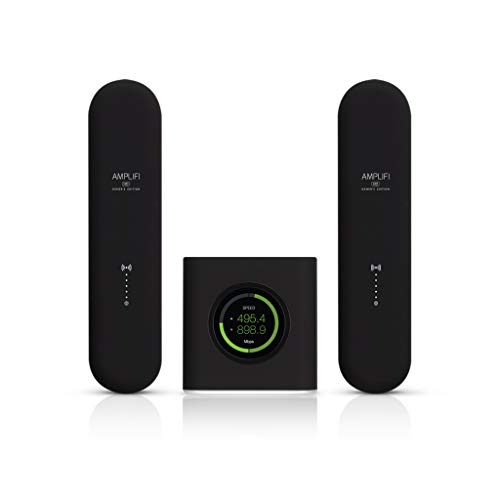
AmpliFi Gamer’s Edition WiFi System by Ubiquiti, Seamless Whole Home Wireless Internet, HD WiFi Router, 2 Mesh Points, 4 Gigabit Ethernet, 1 WAN Port, Ethernet Cable, Replaces Router & WiFi Extenders


As an Amazon Associate we earn from qualifying purchases. Product prices and availability are accurate as of the date/time indicated.

Jadaol Cat8 Ethernet Cable 6ft 40Gbps 2000MHz Flat S/FTP LAN Cable Black | High-Speed RJ45 Network Patch Cable for Router, Modem, Switch, Gaming Consoles, PC, Home Network & Streaming Devices
As an Amazon Associate we earn from qualifying purchases. Product prices and availability are accurate as of the date/time indicated.
Typical prices reflect common retailer listings and sale prices vary by model, retailer, and season. WiFi standard, speed, ports, and coverage are manufacturer-listed approximate values and can vary by model and configuration. Speeds are theoretical maximums; actual speeds depend on your internet plan, distance, and walls.
Best Home Network Setup for Gamers: The 7 Routers and Mesh Systems Reviewed
1. ASUS ROG Rapture GT-AX11000: Best Home Network Setup for Gamers Overall
The ASUS ROG Rapture GT-AX11000, at $300 to $400 with a rating of 4.7 out of 5, is a WiFi 6 router, with a speed of AX11000, or up to 11,000 Mbps, 5 Gigabit Ethernet ports, and a coverage of about 2,500 sq ft. It is the highest-rated model in this guide, and the best overall home network setup here for most gamers, because it offers a high speed, a gaming port, and a low price for a premium router.
It suits a gamer, a buyer who wants an ASUS router, and a user who wants a premium router. The AX11000 speed is the fastest here, the 5 ports let you connect a PC and a console, and the $300 to $400 price is moderate. The trade-off is coverage: at about 2,500 sq ft, it covers less than a mesh system like the Netgear Orbi RBK852 at about 5,000 sq ft and $400 to $600. For the best overall home network setup for gamers at $300 to $400, it is the strongest choice here.
Best for: Most gamers who want a WiFi 6, AX11000, 5 port router for $300 to $400.
2. ASUS RT-AX86U Pro: Best Value Home Network Setup for Gamers
The ASUS RT-AX86U Pro, at $200 to $280 with a rating of 4.6 out of 5, is a WiFi 6 router, with a speed of AX5700, or up to 5,700 Mbps, 4 Gigabit Ethernet ports, and a coverage of about 2,500 sq ft. It is the best value router here for a gamer who wants a gaming router for a low price.
It suits a gamer, a buyer who wants an ASUS router, and a user who wants a value router. The AX5700 speed is fast, the gaming QoS prioritizes gaming, and the $200 to $280 price is low. The trade-off is speed: at AX5700, it is slower than the ASUS ROG Rapture GT-AX11000 at AX11000 and $300 to $400. For a value home network setup for gamers at $200 to $280, it is a strong choice.
Best for: Value use with a WiFi 6, AX5700, 4 port router for $200 to $280.
3. Netgear Nighthawk XR1000: Best Gaming Router for Home Network Setup for Gamers
The Netgear Nighthawk XR1000, at $250 to $350 with a rating of 4.6 out of 5, is a WiFi 6 router, with a speed of AX5400, or up to 5,400 Mbps, 4 Gigabit Ethernet ports, and a coverage of about 2,500 sq ft. It is the best gaming router here for a gamer who wants a Netgear router with DumaOS.
It suits a gamer, a buyer who wants a Netgear router, and a user who wants a gaming router. The DumaOS offers geo-filter and ping control, the AX5400 speed is fast, and the $250 to $350 price is moderate. The trade-off is also speed, as above. For a gaming router for home network setup for gamers at $250 to $350, it is a practical choice.
Best for: Gaming use with a WiFi 6, AX5400, 4 port router for $250 to $350.
4. TP-Link Archer AX11000: Best Fast Home Network Setup for Gamers
The TP-Link Archer AX11000, at $250 to $350 with a rating of 4.6 out of 5, is a WiFi 6 router, with a speed of AX11000, or up to 11,000 Mbps, 4 Gigabit Ethernet ports, and a coverage of about 2,500 sq ft. It is the best fast router here for a gamer who wants a high speed for a moderate price.
It suits a gamer, a buyer who wants a TP-Link router, and a user who wants a fast router. The AX11000 speed is the fastest here, the 4 ports are good, and the $250 to $350 price is moderate. The trade-off is gaming QoS: as a TP-Link router, it offers less gaming-specific QoS than the ASUS ROG Rapture GT-AX11000 at $300 to $400. For a fast home network setup for gamers at $250 to $350, it is a practical choice.
Best for: Fast use with a WiFi 6, AX11000, 4 port router for $250 to $350.
5. Netgear Orbi RBK852: Best Mesh Home Network Setup for Gamers
The Netgear Orbi RBK852, at $400 to $600 with a rating of 4.6 out of 5, is a WiFi 6 mesh system, with a speed of AX6000, or up to 6,000 Mbps, 4 Gigabit Ethernet ports, and a coverage of about 5,000 sq ft. It is the best mesh system here for a gamer who wants a large home coverage.
It suits a gamer, a buyer who wants a Netgear mesh, and a user who wants a mesh system. The 5,000 sq ft coverage is large, the AX6000 speed is fast, and the $400 to $600 price is high but it offers a premium mesh here. The trade-off is price: at $400 to $600, it is higher than the ASUS RT-AX86U Pro at $200 to $280. For a mesh home network setup for gamers at $400 to $600, it is a practical choice.
Best for: Mesh use with a WiFi 6, AX6000, 5,000 sq ft system for $400 to $600.
6. TP-Link Deco XE75: Best WiFi 6E Mesh Home Network Setup for Gamers
The TP-Link Deco XE75, at $300 to $400 with a rating of 4.6 out of 5, is a WiFi 6E mesh system, with a speed of AXE5400, or up to 5,400 Mbps, 3 Gigabit Ethernet ports, and a coverage of about 5,500 sq ft. It is the best WiFi 6E mesh here for a gamer who wants a modern mesh for a large home.
It suits a gamer, a buyer who wants a TP-Link mesh, and a user who wants a WiFi 6E mesh. The 5,500 sq ft coverage is the largest here, the WiFi 6E is modern, and the $300 to $400 price is moderate. The trade-off is ports: at 3 ports, it offers fewer ports than a router like the ASUS ROG Rapture GT-AX11000 at 5 ports and $300 to $400. For a WiFi 6E mesh home network setup for gamers at $300 to $400, it is a practical choice.
Best for: WiFi 6E mesh use with a AXE5400, 5,500 sq ft system for $300 to $400.
7. Eero Pro 6E: Best Simple Mesh Home Network Setup for Gamers
The Eero Pro 6E, at $300 to $400 with a rating of 4.5 out of 5, is a WiFi 6E mesh system, with a speed of AXE5400, or up to 5,400 Mbps, 2 Gigabit Ethernet ports, and a coverage of about 4,000 sq ft. It is the best simple mesh here for a gamer who wants an easy-to-use mesh system.
It suits a gamer, a buyer who wants an Eero mesh, and a user who wants a simple mesh. The WiFi 6E is modern, the setup is easy, and the $300 to $400 price is moderate. The trade-off is ports: at 2 ports, it offers fewer ports than a router like the ASUS RT-AX86U Pro at 4 ports and $200 to $280. For a simple mesh home network setup for gamers at $300 to $400, it is a useful starting point.
Best for: Simple mesh use with a WiFi 6E, AXE5400, 4,000 sq ft system for $300 to $400.
Best Home Network Setup for Gamers Buying Guide: What Actually Matters in 2026
Choosing a home network setup for gamers is easier when you decide on home size, ping, and speed before you look at price or brand. Those three choices decide whether the network will cut lag and cover every room.
Best Home Network Setup for Gamers Buying Guide: Home Size, Router vs Mesh, and Coverage
Home size, router vs mesh, and coverage are the first factor. For a small to medium home, choose a single router, such as the ASUS ROG Rapture GT-AX11000 at $300 to $400, because it covers about 2,500 sq ft and it offers a low ping. For a large home, choose a mesh system, such as the Netgear Orbi RBK852 at $400 to $600, because it covers about 5,000 sq ft and it offers a strong signal in every room. For coverage, choose a router that covers your home size, and add a mesh node if you have dead zones.
Best Home Network Setup for Gamers Buying Guide: Ping, Latency, Wired vs WiFi, and QoS
Ping, latency, wired vs WiFi, and QoS are the second factor. For ping, use a wired Ethernet cable for your PC or console, because it offers the lowest ping, and use a gaming port if your router has one. For latency, test your ping before and after you install a router, by running a ping test, because it will show whether the router helps. For wired vs WiFi, choose wired for gaming, and WiFi for a phone and a laptop. For QoS, choose a router with gaming QoS, such as the ASUS ROG Rapture GT-AX11000 and Netgear Nighthawk XR1000, because it prioritizes gaming traffic over streaming and downloads.
Best Home Network Setup for Gamers Buying Guide: WiFi 6, WiFi 6E, Speed, and Internet Plan
WiFi 6, WiFi 6E, speed, and internet plan are the third factor. For WiFi 6, choose a WiFi 6 router, such as all seven models here, because it offers a faster speed and a lower latency than WiFi 5. For WiFi 6E, choose a WiFi 6E mesh, such as the TP-Link Deco XE75 at $300 to $400, if you have a WiFi 6E device, because it offers less congestion. For speed, choose at least AX5400, such as the Netgear Nighthawk XR1000 at $250 to $350, because it will be fast enough for gaming. For internet plan, check your internet speed, because a router cannot make your internet faster than your plan, and choose a router that matches your plan.
Best Home Network Setup for Gamers Buying Guide: Ports, Placement, Price, and the Best First Setup
Ports, placement, price, and the best first setup are the final factors. For ports, choose a model with at least 4 Gigabit ports, such as the ASUS ROG Rapture GT-AX11000 at $300 to $400, because it will let you connect a PC, a console, and a TV. For placement, place a router in the center of a home, high up, away from walls and metal, and place a mesh node halfway between a router and a dead zone. For price, a router in the $200 to $300 range, such as the ASUS RT-AX86U Pro at $200 to $280, is a good starting point. A mesh in the $400 to $600 range, such as the Netgear Orbi RBK852, offers a large coverage. Choose by home size first, then by ping, then by speed, then by price.
For the best first setup, buy a router, an Ethernet cable, and a mesh node if you need it. The ASUS ROG Rapture GT-AX11000 at $300 to $400 is a good first router for most gamers, the ASUS RT-AX86U Pro at $200 to $280 is a good first router if you want a value router, and the TP-Link Deco XE75 at $300 to $400 is a good first mesh if you have a large home. A good home network setup for gamers, chosen for ping first and used with a wired connection, will cut lag, boost speed, and cover every room.
Best Home Network Setup for Gamers FAQ
What is the best home network setup for gamers?
The ASUS ROG Rapture GT-AX11000, at $300 to $400 with a rating of 4.7 out of 5, is the best home network setup for gamers overall in this guide. It is a WiFi 6 router, with a speed of AX11000, 5 Gigabit Ethernet ports, and a coverage of about 2,500 sq ft. If you want a value router, the ASUS RT-AX86U Pro at $200 to $280 with a rating of 4.6 out of 5 is the best choice, with a speed of AX5700 and 4 Gigabit ports. If you want a mesh system, the Netgear Orbi RBK852 at $400 to $600 with a rating of 4.6 out of 5 is the best choice, with a speed of AX6000 and a coverage of about 5,000 sq ft.
Do I need a mesh system or a single router for gaming?
For gaming, you need a single router if you have a small to medium home, because it offers a low ping, a gaming port, and a simple setup. The ASUS ROG Rapture GT-AX11000 at $300 to $400 and the ASUS RT-AX86U Pro at $200 to $280 are both good single routers. You need a mesh system if you have a large home, multiple floors, or dead zones, because it offers a strong signal in every room. The Netgear Orbi RBK852 at $400 to $600 and the TP-Link Deco XE75 at $300 to $400 are both good mesh systems. For the lowest ping, use a wired Ethernet cable for your PC, whether you use a router or a mesh.
How can I lower ping for gaming at home?
For gaming at home, lower ping by using a wired Ethernet cable for your PC or console, because it offers a lower ping than WiFi. Use a gaming router with QoS, such as the ASUS ROG Rapture GT-AX11000 at $300 to $400, because it prioritizes gaming traffic. Place your router close to your PC, or use a mesh node close to your PC, because it will offer a stronger signal. Close background downloads and streams, because they can increase ping, and test your ping before and after you change your setup, by running a ping test.
What is the cheapest good home network setup for gamers?
The cheapest good option in this guide is the ASUS RT-AX86U Pro, at $200 to $280 with a rating of 4.6 out of 5, because it is a WiFi 6, AX5700, 4 port router for a low price. The Netgear Nighthawk XR1000, at $250 to $350 with a rating of 4.6 out of 5, is also a low-cost option, with a WiFi 6, AX5400, 4 port router. The TP-Link Archer AX11000, at $250 to $350 with a rating of 4.6 out of 5, is also a low-cost option, with a WiFi 6, AX11000, 4 port router. Start with one of these three if price is the main factor, and check home size, ping, and speed next. For the best overall value, the ASUS RT-AX86U Pro at $200 to $280 is a better choice because it offers gaming QoS and a rating of 4.6 out of 5.
FAQ
What is the best home network setup for gamers?
Do I need a mesh system or a single router for gaming?
How can I lower ping for gaming at home?
What is the cheapest good home network setup for gamers?
Related guides
- Best Budget Cable Management Kit Under 30 in 2026: 7 Kits That Offer Tidy Desks, Easy Setup, and Reliable Use for Home Offices
- Curved Monitor vs Flat Monitor for Work in 2026: Which Monitor Is Better for Work, a Curved Monitor or a Flat Monitor?
- Best Vertical Monitor for Coding Work in 2026: 7 Vertical Monitors for Coding Work With Clear Code, Simple Pivot, and Easy Use for Coding
- Best Powerline Adapter for Dead Zones in 2026: Powerline Adapter for Dead Zones
More from Amazon
Programs that pair well with the guide above. Offers and eligibility are set by Amazon and may change.
Free shipping on eligible items, Prime Video and more. Eligible new members can start with a free trial.
Start a Prime free trialAd-free music streaming. Eligible new subscribers can start with a free trial.
Try Music Unlimited freeA Prime membership for ages 18-24 with a trial period. Eligibility is set by Amazon.
See Prime for Young AdultsAudiobooks and podcasts to listen to on the go. Eligible new members can start with a free trial.
Try Audible freeAs an Amazon Associate we earn from qualifying purchases.

Write Your Review
No reviews yet. Be the first to share your experience!