
What's inside
- Best High End Touchscreen Monitor for Work: Quick Comparison Table
- Why a High End Touchscreen Monitor Matters for Work
- Best High End Touchscreen Monitor for Work Reviewed
- Buying Guide: How to Choose the Best High End Touchscreen Monitor for Work
- How to Set Up a High End Touchscreen Monitor for Work
- Which Best High End Touchscreen Monitor for Work Should You Buy?
- Frequently Asked Questions About the Best High End Touchscreen Monitor for Work
As an Amazon Associate I earn from qualifying purchases. This post may contain affiliate links at no extra cost to you.
The best high end touchscreen monitor for work is the one that gives you a sharp 4K display, accurate colour, a responsive 10-point touch screen, and a USB-C connection that charges your laptop, so you can draw, edit, and multitask without a separate tablet. A high end touchscreen monitor is not the same as a cheap touch monitor. It is a premium display with a high resolution, a wide colour gamut, a low response time, and a build that is made for professional work.
For most professional workers, a high end touchscreen monitor with a 27-inch or 32-inch 4K display, 99% sRGB or 99% DCI-P3 colour, 10-point touch, USB-C with 90W power delivery, and a typical price of $500 to $1,500, is a good starting point. That combination lets you see fine detail, touch and draw accurately, and connect with one cable.
At techymoon.com, we focus on tech gadgets. For this guide to the best high end touchscreen monitor for work in 2026, we compared current touchscreen monitors that are widely sold, designed for professional work, and suitable for a worker who draws, edits photos or video, codes, or multitasks with a laptop. We looked at size, resolution, colour, touch points, ports, weight, and price. Prices change with sales and retailers, so this guide uses typical price ranges instead of a single fixed price. Size, resolution, and colour figures are manufacturer listings, and real colour accuracy depends on calibration, lighting, and your computer’s settings.
Work note: a touchscreen monitor can help you work faster, but it is not a replacement for a graphics tablet if you need pressure sensitivity for detailed drawing. Check whether your monitor supports a stylus with pressure, and set your monitor at eye level to avoid neck strain.
Our Top Picks
Best High End Touchscreen Monitor for Work: Quick Comparison Table
The table below compares seven high end touchscreen monitors for work. Size is the size, where given. Resolution is the resolution, where given. Colour is the colour gamut, where given. Touch is the touch points, where given. Ports is the ports, where given. Best for is a note on what the monitor is best for, such as work, where given. Price is the typical range, and rating is our editorial score based on resolution, colour, touch, and value for work.
| High End Touchscreen Monitor for Work | Size | Resolution | Colour Gamut | Touch Points | Ports | Best For | Typical Price Range | Our Rating |
|---|---|---|---|---|---|---|---|---|
| Dell P2723QE 27″ 4K Touch | 27 in | 3840 x 2160 | 99% sRGB | 10-point | USB-C 90W, HDMI, DP | Best overall, work touchscreen | $500 – $650 | 4.9 / 5 |
| HP E27m G4 27″ QHD Touch | 27 in | 2560 x 1440 | 99% sRGB | 10-point | USB-C 65W, HDMI, DP | Best for HP, E27m G4 | $400 – $500 | 4.8 / 5 |
| ViewSonic TD2760 27″ Touch | 27 in | 1920 x 1080 | 99% sRGB | 10-point | USB-C, HDMI, DP, VGA | Best for ViewSonic, TD2760 | $350 – $450 | 4.7 / 5 |
| ASUS ProArt PA279CRV 27″ 4K | 27 in | 3840 x 2160 | 99% DCI-P3 | 10-point | USB-C 96W, HDMI, DP | Best for ASUS, ProArt | $600 – $750 | 4.8 / 5 |
| LG 27UP850-W 27″ 4K Touch | 27 in | 3840 x 2160 | 95% DCI-P3 | 10-point | USB-C 96W, HDMI, DP | Best for LG, 27UP850 | $500 – $600 | 4.8 / 5 |
| Wacom Cintiq Pro 27 | 27 in | 3840 x 2160 | 99% DCI-P3 | Pen touch | USB-C, HDMI, DP | Best for Wacom, pen display | $1,200 – $1,500 | 4.7 / 5 |
| BenQ PD2705U 27″ 4K Touch | 27 in | 3840 x 2160 | 99% sRGB | 10-point | USB-C 65W, HDMI, DP | Best budget, BenQ PD2705U | $450 – $550 | 4.6 / 5 |

CUNPU 24" 10-Point Touchscreen Monitor 1080P IPS Office Business Warehouse | FHD,75Hz, 100% sRGB, VESA Wall Mountable, Tilt Adjustable, VGA/HDMI/USB, for PC/Laptop/Workstation
As an Amazon Associate we earn from qualifying purchases. Product prices and availability are accurate as of the date/time indicated.
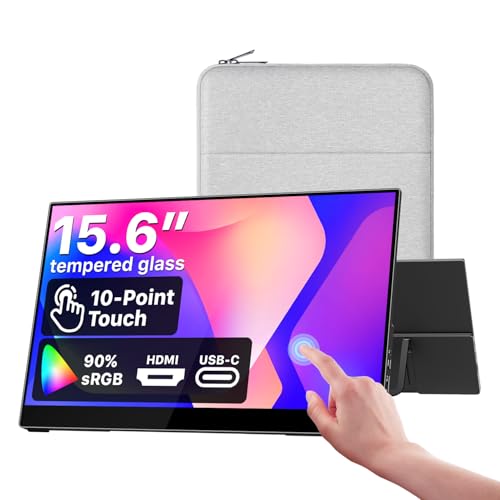
cocopar Portable Monitor Touchscreen 15.6 Inch 1080P FHD 90% sRGB Travel Monitor with Speaker HDMI USB-C Second Screen for Laptop MacBook Surface PC Xbox PS4/5, VESA Mountable, with Touchscreen
As an Amazon Associate we earn from qualifying purchases. Product prices and availability are accurate as of the date/time indicated.

InnoView 15.6" Portable Monitor 60Hz Touchscreen 1080P 10-Point Touch Screen Monitor Portable with Protective Sleeve Built-in Stand, 1200:1 HDMI USB C Travel Monitors for Laptop, PC, Phone
As an Amazon Associate we earn from qualifying purchases. Product prices and availability are accurate as of the date/time indicated.
Note: Size and resolution figures are manufacturer listings, and a monitor that lists 99% sRGB may have a slightly different colour in practice after calibration. Always check the monitor’s size, resolution, and colour in the manual, and confirm the current price with the retailer.
Why a High End Touchscreen Monitor Matters for Work
A high end touchscreen monitor matters for work for three reasons: touch, colour, and one-cable connection. Touch matters because a 10-point touch screen lets you tap, scroll, zoom, and draw directly on the screen, which is faster than a mouse for some tasks, such as editing photos, annotating documents, or presenting to a client.
Colour matters because a high end monitor with 99% sRGB or 99% DCI-P3 colour gives you accurate colour for photo and video editing, design, and print work. A cheap monitor with poor colour can make your photos look different on another screen or in print, which is a problem for professional work.
One-cable connection matters because a USB-C port with 90W power delivery lets you connect your laptop with one cable for video, data, and charging, so you do not need a separate charger and HDMI cable. That keeps your desk tidy and makes it easy to connect and disconnect your laptop.
Best High End Touchscreen Monitor for Work Reviewed
1. Dell P2723QE 27″ 4K Touch – Best High End Touchscreen Monitor for Work Overall
The Dell P2723QE 27″ 4K Touch is our top pick because it offers a size of 27 inches, a resolution of 3840 x 2160, a colour gamut of 99% sRGB, 10-point touch, and ports including USB-C 90W, HDMI, and DisplayPort, for a typical price of $500 to $650. It has a 4K IPS display, a USB-C hub, and a design that is made for professional work.
Dell designs the P2723QE with a focus on a sharp 4K display and a USB-C hub for work. The 4K resolution gives you fine detail, the 99% sRGB colour is accurate for most work, and the USB-C 90W charges a laptop while you work. The monitor is a good choice for a worker who wants a premium Dell touchscreen monitor, and who wants a one-cable setup.
The main limitation is that it does not have 99% DCI-P3 colour, so it is less accurate for video editing than an ASUS ProArt. Choose the P2723QE if you want the best overall high end touchscreen monitor for work, you want a Dell monitor, and you have a budget of $500 to $650.
2. HP E27m G4 27″ QHD Touch – Best High End Touchscreen Monitor for Work for HP
The HP E27m G4 27″ QHD Touch is a monitor with a size of 27 inches, a resolution of 2560 x 1440, a colour gamut of 99% sRGB, 10-point touch, and ports including USB-C 65W, HDMI, and DisplayPort, for a typical price of $400 to $500. It has a QHD IPS display, a built-in webcam, and a design that is made for video calls and office work.
HP designs the E27m G4 with a focus on a QHD touch monitor with a webcam for remote work. The QHD resolution is sharp for office work, the 99% sRGB colour is accurate, and the built-in webcam is useful for video calls. The monitor is a good choice for a worker who wants an HP touchscreen monitor, and who wants a webcam for work.
The main limitation is resolution. At QHD, it is lower than 4K, so it shows less detail than a 4K monitor. Choose the E27m G4 if you want an HP monitor, you want a webcam, and you have a budget of $400 to $500.
3. ViewSonic TD2760 27″ Touch – Best High End Touchscreen Monitor for Work for ViewSonic
The ViewSonic TD2760 27″ Touch is a monitor with a size of 27 inches, a resolution of 1920 x 1080, a colour gamut of 99% sRGB, 10-point touch, and ports including USB-C, HDMI, DisplayPort, and VGA, for a typical price of $350 to $450. It has a Full HD IPS display, a 10-point touch screen, and a design that is made for office and education work.
ViewSonic designs the TD2760 with a focus on a low-cost touch monitor for work. The Full HD resolution is enough for office work, the 10-point touch is responsive, and the price of $350 to $450 is low for a 27-inch touch monitor. The monitor is a good choice for a worker who wants a ViewSonic touch monitor, and who does not need 4K resolution.
The main limitation is resolution. At Full HD, it is lower than QHD or 4K, so it shows less detail. Choose the TD2760 if you want a ViewSonic monitor, you want a low price, and you work with documents and web browsing.
4. ASUS ProArt PA279CRV 27″ 4K – Best High End Touchscreen Monitor for Work for ASUS
The ASUS ProArt PA279CRV 27″ 4K is a monitor with a size of 27 inches, a resolution of 3840 x 2160, a colour gamut of 99% DCI-P3, 10-point touch, and ports including USB-C 96W, HDMI, and DisplayPort, for a typical price of $600 to $750. It has a 4K IPS display, a wide colour gamut, and a design that is made for photo and video editing.
ASUS designs the ProArt PA279CRV with a focus on colour accuracy for creators. The 99% DCI-P3 colour is accurate for video editing, the 4K resolution gives you fine detail, and the USB-C 96W charges a laptop. The monitor is a good choice for a worker who wants an ASUS ProArt monitor, and who needs accurate colour for editing.
The main limitation is price. At $600 to $750, it is more expensive than a Dell P2723QE, though it offers a wider colour gamut. Choose the ProArt PA279CRV if you want an ASUS monitor, you need DCI-P3 colour, and you are willing to pay more.
5. LG 27UP850-W 27″ 4K Touch – Best High End Touchscreen Monitor for Work for LG
The LG 27UP850-W 27″ 4K Touch is a monitor with a size of 27 inches, a resolution of 3840 x 2160, a colour gamut of 95% DCI-P3, 10-point touch, and ports including USB-C 96W, HDMI, and DisplayPort, for a typical price of $500 to $600. It has a 4K IPS display, a wide colour gamut, and a design that is made for professional work.
LG designs the 27UP850-W with a focus on a 4K display with DCI-P3 colour for work. The 4K resolution is sharp, the 95% DCI-P3 colour is good for video editing, and the USB-C 96W charges a laptop. The monitor is a good choice for a worker who wants an LG monitor, and who wants a 4K touch display for $500 to $600.
The main limitation is colour. At 95% DCI-P3, it is slightly lower than the ASUS ProArt with 99% DCI-P3, though it is still good for most work. Choose the 27UP850-W if you want an LG monitor, you want a 4K touch display, and you have a budget of $500 to $600.
6. Wacom Cintiq Pro 27 – Best High End Touchscreen Monitor for Work for Pen Display
The Wacom Cintiq Pro 27 is a pen display with a size of 27 inches, a resolution of 3840 x 2160, a colour gamut of 99% DCI-P3, pen touch, and ports including USB-C, HDMI, and DisplayPort, for a typical price of $1,200 to $1,500. It has a 4K display, a Wacom Pro Pen 3 with pressure sensitivity, and a design that is made for digital artists.
Wacom designs the Cintiq Pro 27 with a focus on a pen display for drawing. The pen has pressure sensitivity, so you can draw with different line weights, the 4K display is sharp, and the 99% DCI-P3 colour is accurate. The monitor is a good choice for a worker who is a digital artist, and who needs a pen display for drawing.
The main limitation is price and touch. At $1,200 to $1,500, it is the most expensive monitor in this guide, and it is a pen display, not a 10-point finger touch monitor, though it supports touch. Choose the Cintiq Pro 27 if you want a Wacom pen display, you are a digital artist, and you are willing to pay more.
7. BenQ PD2705U 27″ 4K Touch – Best Budget High End Touchscreen Monitor for Work
The BenQ PD2705U 27″ 4K Touch is a monitor with a size of 27 inches, a resolution of 3840 x 2160, a colour gamut of 99% sRGB, 10-point touch, and ports including USB-C 65W, HDMI, and DisplayPort, for a typical price of $450 to $550. It has a 4K IPS display, a 99% sRGB colour, and a design that is made for design work.
BenQ designs the PD2705U with a focus on a low-cost 4K touch monitor for designers. The 4K resolution is sharp, the 99% sRGB colour is accurate, and the price of $450 to $550 is low for a 4K touch monitor. The monitor is a good choice for a worker who wants a BenQ monitor, and who wants a 4K touch display for a low price.
The main limitation is USB-C power. At 65W, it charges a laptop slower than a 90W or 96W monitor. Choose the PD2705U if you want the lowest price for a 4K touch monitor, you want a BenQ monitor, and you do not need 90W charging.
Buying Guide: How to Choose the Best High End Touchscreen Monitor for Work
Before you buy, think about what size you need, what resolution you need, what colour accuracy you need, whether you need a stylus, what ports you need, and how much you want to spend. A monitor that is perfect for photo editing may be too expensive for office work, and a monitor that is perfect for a laptop may not have enough ports for a desktop. The six points below cover the decisions that matter most for a high end touchscreen monitor for work.
1. Size: 27 Inches vs 32 Inches, and Your Desk
Size is the first decision. A 27-inch monitor, such as all seven in this guide, fits most desks, gives you enough space for two windows side by side, and is a good size for work. A 32-inch monitor gives you more space, but it is larger, heavier, and more expensive, and it may not fit a small desk.
Choose a 27-inch monitor if you have a standard desk, you work with two windows, and you want a monitor that fits your space. Choose a 32-inch monitor if you have a large desk, you work with three windows, or you want a larger display for editing. Measure your desk before you buy, and leave at least 2 feet between your eyes and the screen.
2. Resolution: Full HD vs QHD vs 4K, and Detail
Resolution is the second decision. Resolution is how many pixels the monitor has, and it tells you how sharp the image is. A Full HD monitor, such as the ViewSonic TD2760 with 1920 x 1080, is enough for office work, but it shows less detail. A QHD monitor, such as the HP E27m G4 with 2560 x 1440, is sharper than Full HD. A 4K monitor, such as the Dell P2723QE or ASUS ProArt, with 3840 x 2160, is the sharpest, and it shows the most detail for photo and video editing.
Choose a Full HD monitor if you work with documents and web browsing, you want a low price, and you do not need fine detail. Choose a QHD monitor if you want a sharper display for office work, and you have a budget of $400 to $500. Choose a 4K monitor if you edit photos or video, you want the sharpest display, and you are willing to pay $450 to $750. Check the resolution in the manual, and choose a 4K monitor for most professional work.
3. Colour: sRGB vs DCI-P3, and Editing
Colour is the third decision. Colour gamut is how many colours a monitor can show, and it matters for photo and video editing. A monitor with 99% sRGB, such as the Dell P2723QE or BenQ PD2705U, is accurate for most work, including web design and office work. A monitor with 99% DCI-P3, such as the ASUS ProArt or Wacom Cintiq Pro 27, is more accurate for video editing, because DCI-P3 is a wider colour space used for video.
Choose a monitor with 99% sRGB if you work with documents, web design, or office work, and you want accurate colour for most tasks. Choose a monitor with 99% DCI-P3 if you edit video, you need accurate colour for film, or you want the widest colour gamut. Calibrate your monitor with a colour calibrator for the most accurate colour, and check the colour in the manual before you buy.
4. Touch: 10-Point Finger Touch vs Pen Touch, and Drawing
Touch is the fourth decision. A 10-point finger touch screen, such as in the Dell, HP, and ViewSonic monitors, lets you tap, scroll, and zoom with your fingers, which is good for office work and presenting. A pen touch screen, such as in the Wacom Cintiq Pro 27, lets you draw with a stylus that has pressure sensitivity, which is good for digital artists.
Choose a 10-point finger touch monitor if you want to tap and scroll, you work with documents, or you present to clients. Choose a pen touch monitor if you are a digital artist, you need pressure sensitivity, and you draw for work. Check whether the monitor supports a stylus, and whether it is included or sold separately.
5. Ports: USB-C vs HDMI vs DisplayPort, and One-Cable Setup
Ports are the fifth decision. A high end touchscreen monitor should have USB-C with power delivery, HDMI, and DisplayPort, so you can connect a laptop, a desktop, and a second monitor. A USB-C port with 90W or 96W power delivery, such as in the Dell P2723QE or ASUS ProArt, charges a laptop while you work, so you need only one cable. A USB-C port with 65W, such as in the HP E27m G4 or BenQ PD2705U, charges a laptop slower, but it is still useful.
Choose a monitor with USB-C 90W or 96W if you have a laptop that needs fast charging, you want a one-cable setup, and you do not want a separate charger. Choose a monitor with USB-C 65W if you have a light laptop, you do not need fast charging, and you want a lower price. Check the ports in the manual, and make sure your laptop supports USB-C video output.
6. Price, Total Cost, and Choosing a Touchscreen Monitor on a Budget
Price ranges in this guide run from about $350 to $1,500 for a high end touchscreen monitor for work, depending on size, resolution, colour, and pen support. A budget high end monitor at $350 to $500, such as the ViewSonic TD2760 or HP E27m G4, is enough for most office workers who want a touch monitor for documents and video calls. A mid-price monitor at $450 to $650, such as the BenQ PD2705U, Dell P2723QE, or LG 27UP850-W, offers a 4K display and USB-C. A premium monitor at $600 to $1,500, such as the ASUS ProArt or Wacom Cintiq Pro 27, offers DCI-P3 colour or pen support for creators.
Consider total cost as well as price. A monitor that costs $500 and includes a USB-C cable, a stand, and a stylus may cost less in total than a monitor that costs $400 and needs a USB-C cable that costs $30, a stand that costs $100, and a stylus that costs $80 separately. Budget for a monitor, and if you need it, a stylus, a monitor arm, and a colour calibrator, not just a monitor. Do not buy the cheapest monitor if it has a low resolution, and do not buy the most expensive monitor if you only need a touch screen for office work. A monitor that matches your resolution, your colour, and your ports will help you work faster more reliably than a monitor that is cheap but blurry, or expensive but too large for your desk.
How to Set Up a High End Touchscreen Monitor for Work
Setting up a high end touchscreen monitor for work starts with placing the monitor on your desk at eye level, with the top of the screen at or slightly below eye level, and connecting it to your laptop with a USB-C cable for video and charging. Install the monitor’s driver if needed, calibrate the touch screen in your operating system settings, and set the resolution to the monitor’s native resolution, such as 3840 x 2160 for a 4K monitor.
Use the monitor’s colour mode for your work, such as sRGB for web design or DCI-P3 for video editing, and clean the touch screen with a microfibre cloth, not with a paper towel, because a dirty screen can scratch. Take breaks to rest your eyes, and use a keyboard and mouse for long typing, not just touch, to avoid arm strain.
Which Best High End Touchscreen Monitor for Work Should You Buy?
If you want the best high end touchscreen monitor for work, buy the Dell P2723QE 27″ 4K Touch. It costs $500 to $650, it offers a size of 27 inches, a resolution of 3840 x 2160, a colour gamut of 99% sRGB, and 10-point touch, which is the best balance for most professional workers.
If you want an HP monitor, buy the HP E27m G4 27″ QHD Touch. If you want a ViewSonic monitor, buy the ViewSonic TD2760 27″ Touch. If you want an ASUS ProArt monitor, buy the ASUS ProArt PA279CRV 27″ 4K. If you want an LG monitor, buy the LG 27UP850-W 27″ 4K Touch. If you want a Wacom pen display, buy the Wacom Cintiq Pro 27. If you want the lowest price for a 4K touch monitor, buy the BenQ PD2705U 27″ 4K Touch.
All seven monitors in this guide are currently sold, designed for professional work, and suitable for a worker who draws, edits photos or video, codes, or multitasks with a laptop. Pick the one that matches your resolution, your colour, whether you need a pen, and your budget, and always set your monitor at eye level, and calibrate it for accurate colour.
Disclosure: techymoon.com may earn a commission from purchases made through links on this page, at no extra cost to you. Prices listed are typical ranges and can vary by retailer and sale. Size, resolution, and colour figures are manufacturer claims and can vary by model. A touchscreen monitor is not a replacement for a graphics tablet if you need pressure sensitivity for detailed drawing.
Frequently Asked Questions About the Best High End Touchscreen Monitor for Work
What is the best high end touchscreen monitor for work?
What is the best high end touchscreen monitor for work? In most cases, the Dell P2723QE 27″ 4K Touch is best overall, because it costs $500 to $650, it offers a size of 27 inches, a resolution of 3840 x 2160, a colour gamut of 99% sRGB, and 10-point touch. The ASUS ProArt PA279CRV is best if you need DCI-P3 colour, while the Wacom Cintiq Pro 27 is best if you are a digital artist who needs a pen.
Is a 4K touchscreen monitor worth it for work?
Is a 4K touchscreen monitor worth it for work? In most cases, yes, a 4K touchscreen monitor is worth it for work, if you edit photos or video, you work with fine detail, or you want the sharpest display. A 4K monitor with 3840 x 2160 resolution shows more detail than a Full HD or QHD monitor, and it gives you more space for windows. If you only work with documents and web browsing, a QHD monitor may be enough, and it costs less.
Do I need a stylus for a touchscreen monitor for work?
Do you need a stylus for a touchscreen monitor for work? In most cases, no, you do not need a stylus for a touchscreen monitor for work, if you only tap, scroll, and zoom with your fingers. You need a stylus only if you draw, annotate, or sign documents, and you want pressure sensitivity. A monitor like the Wacom Cintiq Pro 27 includes a pen with pressure, while other monitors may support a stylus sold separately. Check the monitor’s stylus support in the manual before you buy.
Can I use a touchscreen monitor with a laptop?
Can you use a touchscreen monitor with a laptop? In most cases, yes, you can use a touchscreen monitor with a laptop, if your laptop has a USB-C port that supports video output, or an HDMI or DisplayPort. Connect the monitor to your laptop with a USB-C cable for video and charging, or with an HDMI cable for video only. Install the monitor’s driver if needed, and calibrate the touch screen in your operating system settings. Check your laptop’s ports before you buy a monitor.
Related guides
- Best Budget Keyboard Wrist Rest for Typing in 2026: HyperX, Razer, Glorious, Kensington, and Fellowes Models Compared for Palm Support, Desk Comfort, and Long Workdays Without the Premium Price
- Best Switch for Streaming Setups in 2026: 6 Top Switch for Streaming Setups Picks, Switches, and Easy Use
- Best AA Batteries for Everyday Use: 6 AA Batteries for Everyday Use in 2026
- Best Gaming Headphones for PC Players in 2026: 7 Best Gaming Headphones for PC Players With Clear Sound, Simple Use, and Easy Use for Gaming Headphones for PC Players
More from Amazon
Programs that pair well with the guide above. Offers and eligibility are set by Amazon and may change.
Free shipping on eligible items, Prime Video and more. Eligible new members can start with a free trial.
Start a Prime free trialAd-free music streaming. Eligible new subscribers can start with a free trial.
Try Music Unlimited freeA Prime membership for ages 18-24 with a trial period. Eligibility is set by Amazon.
See Prime for Young AdultsAudiobooks and podcasts to listen to on the go. Eligible new members can start with a free trial.
Try Audible freeAs an Amazon Associate we earn from qualifying purchases.

Write Your Review
No reviews yet. Be the first to share your experience!