
What's inside
- Best High End Monitor for Video Editing by Studio
- Quick Comparison: Best High End Monitor for Video Editing Models
- Detailed Reviews: Best High End Monitor for Video Editing Picks
- Buying Guide: Choosing the Best High End Monitor for Video Editing
- Frequently Asked Questions About the Best High End Monitor for Video Editing
As an Amazon Associate I earn from qualifying purchases. This post may contain affiliate links at no extra cost to you.
The best high end monitor for video editing is the screen your clients are, in effect, paying for, because in professional video the monitor is not a window onto the work — it is the work’s measuring instrument. Every grade, every exposure decision, every skin tone you sign off is a decision made by looking at this panel, and if the panel is wrong, the work is wrong in a way no render setting can repair: too saturated here becomes washed out on the client’s screen, shadow detail you could not see becomes a murky shot in the deliverable, a white balance you trusted becomes a correction note. High end, in this category, therefore has a strict definition. It is not size, and it is not resolution alone. It is colour accuracy that can be verified with a calibrator, gamut coverage wide enough for the HDR and cinema spaces modern work is delivered in, uniformity that holds that accuracy into the corners where your scopes and your second subject live, and hardware calibration that keeps the panel honest as it ages. The monitors in this guide are the ones editors buy when a wrong colour costs more than a monitor.
Six real, currently sold professional displays anchor the comparison: ASUS’s ProArt OLED class, LG’s UltraFine OLED Pro class, Dell’s UltraSharp 32 6K class, BenQ’s PD3225U DesignVue class, EIZO’s ColorEdge CG class, and Apple’s Pro Display XDR as the ecosystem flagship. They divide by technology as much as by brand. The OLED models offer per-pixel light control — true black, and highlight and shadow behaviour that LCD cannot imitate — in their makers’ stated designs, at the cost of the care OLED requires around static interface elements, which their makers’ documents and features address. The LCD models answer with sustained brightness, 6K resolution in Dell’s stated class, or EIZO’s reference-grade uniformity and built-in calibration tradition. Prices are typical ranges rather than exact figures, and they are large; this guide’s job is to make each one legible as a business decision. Panel type, resolution, gamut coverage, colour depth, HDR standard, brightness, calibration method, and connectivity are each maker’s specification for the current exact model and should be confirmed in that maker’s current documents before purchase, because professional models are revised and a specification like gamut is a promise that must be read in the maker’s own numbers, not in a retailer’s summary of them.
One discipline precedes the table, because it governs everything after it: decide the deliverable first. An editor whose work is Rec. 709 for broadcast and the web needs flawless, calibrated performance in that space above all; an editor grading HDR for streaming delivery needs a panel whose HDR behaviour — its stated standard, peak and sustained brightness, and tone mapping in its maker’s documents — can actually show the deliverable’s highlights, or a separate reference path for HDR sign-off; a cinema pipeline needs DCI-P3 coverage that is complete, not approximate. Write the deliverable, the colour spaces, and the client checks your work must pass at the top of the purchase note, and let that paragraph eliminate rows, because a monitor bought for a space you do not deliver in is a very expensive ornament, and a monitor that cannot show the space you do deliver in is a liability wearing a professional badge.
Our Top Picks
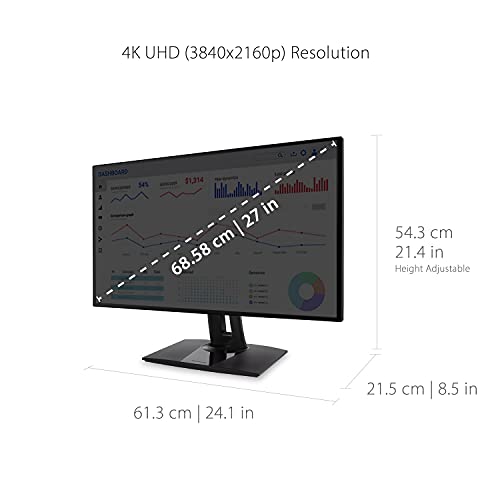
 ViewSonic VP2768A-4K 27 Inch 4K ColorPro Monitor27 Inches24.1 x 8.5 x 21.38 inches15.2 poundsCheck on Amazon
Best High End Monitor for Video Editing by Studio
The colour-critical editor: OLED’s blacks and the reference LCDs
For grading where shadow detail and true black are the deliverable — streaming drama, cinema work, any HDR pipeline — start with the ASUS ProArt OLED and LG UltraFine OLED Pro classes, whose per-pixel light in their makers’ stated designs shows an editor exactly what a dark scene contains, with no backlight glow inventing detail or hiding it. Beside them, EIZO’s ColorEdge CG class is the reference-LCD answer, bought for uniformity, hardware calibration with its stated sensor arrangements, and a maker’s entire business being colour trust. Choose between the OLED and the EIZO pattern by your room and your hours: OLED for the dark grading suite and the HDR deliverable, the ColorEdge discipline for long interface-heavy days and a studio standard that must match across seats, in each case verified against your deliverable paragraph.
The high-resolution all-rounder: Dell’s 6K and BenQ’s value in the professional tier
An editor whose day mixes grading with editing, graphics, and client review may be best served by resolution and workspace: Dell’s UltraSharp 32 6K class puts a 6K panel in Dell’s stated specifications — timeline, scopes, and a 4K picture with room around it on one screen — with the connectivity and camera-class extras its documents describe for a review-and-meeting studio. BenQ’s PD3225U class is the professional tier’s value argument: wide-gamut, calibration-ready performance in BenQ’s stated classes, with the maker’s colour modes for matching spaces, at a price that lets a small studio buy two matched seats instead of one flagship. In a multi-seat facility, matched and calibrated beats magnificent and singular, because work moves between desks and the client sees one film, not one monitor.
The Apple-ecosystem studio: Pro Display XDR, bought knowingly
Apple’s Pro Display XDR remains the flagship of a Mac-centred studio: a 6K panel in Apple’s stated specifications, deep integration with macOS reference modes as Apple documents them, and a design and price structure — including its stand arrangements, stated in Apple’s documents — that must be priced whole to be judged at all. For a studio whose pipeline, clients, and other Apple reference displays already live in that ecosystem, it is a coherent summit. For anyone else, its row in this table is a measuring stick: the ASUS, LG, and EIZO classes exist to offer comparable colour seriousness in the wider world’s connections and calibration systems, and the comparison should be made on your deliverable paragraph, not on the logo your laptop carries.
Quick Comparison: Best High End Monitor for Video Editing Models
| Model | Key Specs | Best For | Typical Price Range | Rating |
|---|---|---|---|---|
| ASUS ProArt Display OLED PA32 Class | 32-inch class OLED panel, 4K class resolution, gamut, HDR and calibration classes per ASUS documents for the exact model | Best high end monitor for video editing overall | $2,800 – $3,800 | 4.7 / 5 |
| LG UltraFine OLED Pro 32 Class | 32-inch class OLED panel, 4K class resolution, gamut, HDR and hardware calibration classes per LG documents | Best OLED alternative | $2,500 – $3,500 | 4.6 / 5 |
| EIZO ColorEdge CG2700 Class | 27-inch class LCD panel, resolution and gamut classes, built-in calibration sensor class per EIZO documents for the exact model | Best reference accuracy | $2,400 – $3,200 | 4.6 / 5 |
| Dell UltraSharp 32 6K U3224KB | 32-inch class LCD panel, 6K resolution class, gamut, connectivity and camera classes per Dell documents | Best high-resolution all-rounder | $2,200 – $3,000 | 4.5 / 5 |
| BenQ PD3225U | 32-inch class LCD panel, 4K class resolution, gamut and colour mode classes per BenQ documents | Best professional value | $1,000 – $1,400 | 4.5 / 5 |
| Apple Pro Display XDR | 32-inch class LCD panel, 6K resolution class, gamut, reference mode and stand classes per Apple documents | Best for Apple-ecosystem studios | $5,000 – $6,500 with stand class | 4.4 / 5 |
ViewSonic VP2768A-4K 27 Inch 4K ColorPro Monitor, IPS Display with 100% sRGB and Pantone Validated for Professional Photo Editing, Advanced Ergonomics, 90W USB-C, RJ45, HDR10, HDMI, and DisplayPort




As an Amazon Associate we earn from qualifying purchases. Product prices and availability are accurate as of the date/time indicated.

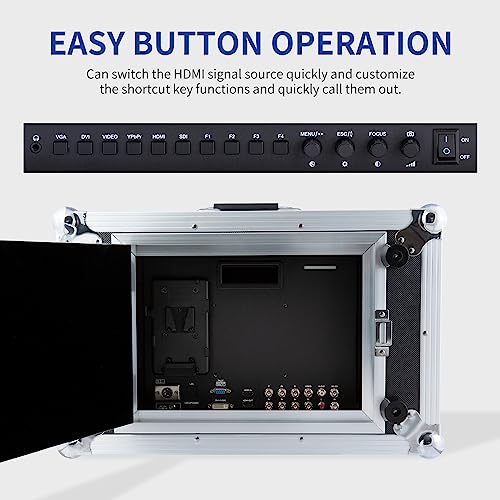
SEETEC 17.3 Inch Video Production Monitor 4K Broadcast Monitor Ultra UHD 1920x1080 LCD Screen 16:9 Carry-on Alu Housing with SDI HDMI YPbPr DVI AV for Camera Wedding Sports Conference




As an Amazon Associate we earn from qualifying purchases. Product prices and availability are accurate as of the date/time indicated.

Eyoyo 8 Inch Small Monitor, 1024x768 4:3 IPS Mini Security Camera Monitor | HDMI VGA AV BNC Input, Built-in Speaker, Remote Control, Video Monitors for Retro Computer PC NVR CCTV Raspbery Pi


As an Amazon Associate we earn from qualifying purchases. Product prices and availability are accurate as of the date/time indicated.
Panel type and size, resolution, colour gamut coverage by named space, colour depth, brightness in stated modes, HDR standard support, contrast, uniformity features, calibration method and sensor compatibility, and input types are each maker’s specification for the current exact model and must be confirmed in that maker’s current documents before purchase. Prices are typical street ranges as described; stands, calibration sensors, hoods, and warranties vary by model and region and belong in the total. A monitor’s stated gamut and accuracy describe its capability when correctly calibrated and driven with an appropriate signal, as its maker’s documents describe.
Detailed Reviews: Best High End Monitor for Video Editing Picks
1. ASUS ProArt Display OLED Class – Best Overall
ASUS’s ProArt OLED class leads the table because it unites the two things a grading editor most needs in one panel: OLED’s per-pixel truth in dark scenes, in ASUS’s stated design, and a professional calibration and connectivity story in its documents that treats the display as an instrument — hardware calibration support, colour modes for the working spaces, and the inputs a studio actually runs. For HDR and cinema deliverables, seeing true black and honest highlights on the desk, rather than inferring them from scopes alone, changes the grade itself.
Buy it with its care instructions read: OLED’s makers document features and habits around static elements and brightness, and a professional panel deserves the professional discipline of using them. Calibrated on a schedule, in a controlled room, it is the closest thing in this table to looking at the deliverable itself.
2. LG UltraFine OLED Pro Class – Best OLED Alternative
LG’s UltraFine OLED Pro class is the other great OLED argument, from the panel technology’s most established maker, with hardware calibration in LG’s stated design and a professional feature set aimed squarely at editors and colourists. Between it and the ASUS, the decision is made on documented details: the exact gamut figures for your spaces, the calibration workflow and sensor compatibility your studio already owns, and the connectivity your suite runs.
That is a compliment to both. At this level the panels are instruments from instrument makers, and the studio’s existing calibration chain — its sensor, its software, its habits — is a legitimate specification, because a monitor that calibrates inside your routine will be calibrated, and one that fights it will drift on a promise.
3. EIZO ColorEdge CG Class – Best Reference Accuracy
EIZO’s ColorEdge CG class is what a studio buys when the argument is over: reference uniformity across the panel, hardware calibration with the line’s stated built-in sensor arrangements that can run on a schedule whether or not anyone remembers, and a maker whose entire reputation is that its numbers mean what they say. In broadcast and facility work, where a monitor must match the room, the standard, and its own past self across years, that discipline is the product.
Its panel classes are LCD and its sizes more conservative than the OLED rows’, so judge it by its purpose: it is the measuring instrument pattern, optimised for accuracy and sameness rather than for spectacle. A facility that standardises on it is buying the absence of arguments, which in client work is worth more than any single specification in this table.
4. Dell UltraSharp 32 6K – Best High-Resolution All-Rounder
Dell’s 6K UltraSharp answers the editor who grades, cuts, reviews, and meets in one seat: a 6K workspace in Dell’s stated class that holds a 4K picture at full resolution with the interface around it, wide-gamut colour in its documents, and the connectivity and conferencing extras its class carries for a client-facing studio. For a documentary, corporate, or online editor whose deliverables are Rec. 709 and high-resolution web, it may be the most productive single screen here.
Its HDR presentation should be judged against your deliverable paragraph with particular care, in Dell’s stated figures, because workspace excellence and HDR reference duty are different jobs. Assigned the job it is built for, it is a studio’s hardest-working display; that is a different crown from the grader’s, and for many editors the more valuable one.
5. BenQ PD3225U – Best Professional Value
BenQ’s PD3225U class brings the professional essentials — wide gamut in BenQ’s stated figures, calibration readiness, colour modes for working and matching spaces in its documents — down to a price where a small studio can standardise on it across seats. That standardisation is its deepest feature: two or three matched, calibrated PD-class displays give a facility a consistency that one flagship surrounded by random screens cannot, and consistency is what a client’s trust is actually made of.
Verify its exact gamut and calibration specifications against your spaces in BenQ’s documents, buy the calibrator its workflow expects if you do not own one, and put the savings into the room — lighting, a client monitor path, storage — where a studio’s quality also lives. It is the row that understands a monitor is a system, and prices itself to let you buy the rest of it.
6. Apple Pro Display XDR – Best for Apple-Ecosystem Studios
The Pro Display XDR’s review must begin with its total, priced from Apple’s documents including the stand solution you will actually use, because that total is its specification as much as its 6K panel and reference modes are. Within a Mac studio whose pipeline runs on Apple’s colour management and whose clients review on Apple displays, it offers an integration and a reference-mode discipline in Apple’s stated design that the wider market does not duplicate.
Outside that ecosystem, its connectivity and calibration paths are Apple’s choices, to be weighed against the ASUS, LG, and EIZO rows’ studio-standard arrangements with your own chain in hand. Neither verdict is a slight: it is a flagship with a homeland, and the professional question is simply whether your studio lives there.
Buying Guide: Choosing the Best High End Monitor for Video Editing
Write the deliverable paragraph, then verify gamut, calibration, and uniformity in the makers’ numbers
Put the deliverable in writing — the spaces you deliver in, the HDR standard if any, the client checks your work must pass — and test every candidate against it in its maker’s own figures. Gamut: the percentage of your exact spaces the panel covers, as the maker states it, with complete coverage of your primary space as the professional floor and marketing phrases about billions of colours ignored entirely. Calibration: whether the panel supports hardware calibration — adjustments written into the display itself, as the makers describe — with which sensors and software, because hardware calibration is what keeps a panel accurate as it ages and what separates this tier from a good consumer screen with a calibration screenshot. Uniformity: the maker’s stated uniformity features and compensation, because a panel accurate at its centre and wandering at its edges will pass a casual check and fail a real grade, and your scopes, your client’s face in the corner of frame, and your own confidence all live at those edges. Add the working checks: colour depth and the signal chain to achieve it from your computer, in the computer, cable, and monitor makers’ documents together; brightness in the modes you will grade in, sustained rather than peak where the maker states both; and a hood, if the model offers one, for a room that cannot be fully controlled. A monitor that passes your paragraph in its maker’s numbers, and then passes a calibrator on your desk, is a professional instrument; anything less verified is a hope with a stand.
Control the room and the chain, because the monitor is only the middle of the system
A reference panel in an uncontrolled room is a reference to the room. Grade in light you control: dim, neutral surroundings, no bright colour or window light falling on the screen, a bias light behind the panel of the kind colour practice recommends where your setup calls for it, and the panel’s brightness set for the room and the standard you deliver to, as your calibration workflow directs. Control the chain with equal care: the computer’s output settings, the cable and port classes that carry your panel’s full depth and resolution in their makers’ documents, and any conversion box or interface your suite uses, each verified rather than assumed, because a mis-set output can quietly deliver a narrower signal to a wide-gamut panel and no one in the room will know until a client does. Then calibrate on a schedule — the makers’ and your colour workflow’s guidance for frequency — with the sensor your panel’s system expects, verify with test material whose correct appearance you know, and keep a calibration log with the panel’s documents and warranty, because a facility that can show a client its calibration record has answered the hardest question in the business before it was asked. Budget the whole system when you buy: panel, sensor if it is not built in, hood, the stand or arm the desk requires, and the room’s light control, because those together, and not the panel alone, are the price of colour you can deliver on.
Assign each screen its job, and let the flagship do only the work that needs it
In most professional suites the wisest purchase is a division of labour. The flagship panel grades; a second, lesser screen carries the timeline, bins, scopes’ overflow, and the interface’s static furniture — which also answers OLED’s care requirements elegantly, by keeping the editing interface’s fixed elements off the reference panel for much of the day. A client path, where your work is reviewed, deserves its own honesty: what the client sees should be a known, calibrated quantity, not whatever television was in the room. Buy in that order — the grading instrument first, calibrated and housed properly; the working screen second, matched in size and resolution to your interface habits; the room and the chain throughout — and resist the single spectacular purchase that leaves a reference panel glowing under a window beside an uncalibrated everything else. Keep purchase and calibration documents together, register warranties, and review the setup against your deliverable paragraph whenever your work changes spaces, because the day a studio’s deliverables move to HDR is the day its monitor decision must be re-audited in writing. The best high end monitor for video editing is finally a promise kept in public: colour a client can trust, verified by an instrument, in a room that respects it — and any display in this table, assigned its proper job inside that system, will let an editor sign their name to a grade and mean it, which is the entire business this category serves.
Frequently Asked Questions About the Best High End Monitor for Video Editing
What is the best high end monitor for video editing?
The ASUS ProArt OLED class leads this table overall for its combination of OLED’s true blacks, professional calibration, and studio connectivity, with LG’s UltraFine OLED Pro as the OLED alternative and EIZO’s ColorEdge CG class as the reference-accuracy standard. Dell’s UltraSharp 32 6K is the high-resolution all-rounder, BenQ’s PD3225U is the professional value that lets a studio standardise across seats, and Apple’s Pro Display XDR is the flagship for a Mac-centred pipeline. The best one for you is written in your deliverable paragraph: the colour spaces and HDR standard you actually deliver, verified against each maker’s stated gamut, calibration method, and uniformity figures, in a room and signal chain controlled well enough for the panel’s accuracy to reach your eyes. Buy that match, calibrate it on a schedule, and the monitor will pay for itself in corrections that never arrive.
Is OLED or LCD better for video editing and grading?
Each is better at a different half of the truth, which is why this table’s top rows divide by technology. OLED controls every pixel’s light individually, in its makers’ stated designs, so black is truly black and dark scenes show their real detail without backlight glow — a decisive advantage for grading shadow-rich and HDR material, and the reason the grading rows here are OLED. Its disciplines are care around static interface elements and the brightness behaviour its makers document, managed with the features and habits those documents describe, and elegantly answered by the two-screen division of labour in this guide. High-end LCD answers with sustained brightness, no static-element anxiety, and, in EIZO’s reference class, uniformity and built-in calibration disciplines that facilities standardise on, plus the 6K workspace options in Dell’s class. The professional verdict is therefore by deliverable and room: OLED for the dark suite and the HDR grade, reference LCD for the long interface day and the multi-seat standard — and either, calibrated, over the finest uncalibrated panel of the other kind.
Do I really need to calibrate a high end monitor, and how often?
Yes, because a high end monitor’s price buys the capability to be accurate and to stay accurate under calibration — not a permanent state of grace. Panels drift as they age and warm, backlights and pixels change character across thousands of hours, and a factory calibration, however good, describes the panel on the day it was measured in the maker’s conditions, not on your desk in your room in its second year. Hardware calibration, supported by the models in this table in their makers’ stated systems, writes the correction into the display itself and is the professional method; the sensor it requires — built in, in EIZO’s stated class, or external, in the others’ documented compatibility — is part of the purchase, not an accessory to defer. Frequency follows your work’s demands and your colour workflow’s guidance: a facility delivering broadcast or client-graded work calibrates on a regular, logged schedule and verifies with known test material, while a lighter practice still calibrates on arrival, after any move or repair, and at intervals across the year. Keep the log. A monitor with a calibration history is evidence; a monitor with a reputation is a rumour, and clients are entitled to the difference.
What resolution and size should a video editing monitor be?
For most professional editors, a 32-inch class 4K panel is the working centre of this table: large enough to judge focus and detail at a normal desk distance, fine enough that the interface remains comfortable through a long day, and matched to the 4K deliverables most current work targets. Step to a 6K class panel — Dell’s or Apple’s rows here — if your work is 4K or above and you want the picture at full resolution with the editing interface around it on one screen, and your computer’s output, in its maker’s documents, drives that resolution at the colour depth your pipeline requires. A 27-inch class panel, like EIZO’s reference row, suits a tighter desk, a multi-monitor facility, or an editor who sits closer, and loses nothing in colour seriousness for its size. What not to buy on is resolution alone: a lower-resolution panel with complete gamut, hardware calibration, and honest uniformity will grade better than a sharper panel without them, because the deliverable’s truth lives in its colour, and focus can be checked at a zoom while a wrong colour is wrong at every magnification. Choose size by your desk and eyes, resolution by your deliverable, and spend the rest of the budget — always — on the colour.
Related guides
- Bluetooth Keyboard vs Wired Keyboard for Office in 2026: Bluetooth Keyboard vs Wired Keyboard for Office, Keyboards, and Easy Use
- Best Earbuds for Gaming on Mobile in 2026: 6 Top Earbuds for Gaming on Mobile, Earbuds, and Easy Use
- Best WiFi 7 Router for Gamers in 2026: 7 WiFi 7 Routers That Offer Fast Speed, Low Latency, and Reliable Use for Gamers
- Best Touchscreen Monitor for Creative Work in 2026: 7 Best Touchscreen Monitors for Creative Work With Clear Touch, Simple Use, and Easy Use for Creative Work
More from Amazon
Programs that pair well with the guide above. Offers and eligibility are set by Amazon and may change.
Free shipping on eligible items, Prime Video and more. Eligible new members can start with a free trial.
Start a Prime free trialAd-free music streaming. Eligible new subscribers can start with a free trial.
Try Music Unlimited freeA Prime membership for ages 18-24 with a trial period. Eligibility is set by Amazon.
See Prime for Young AdultsAudiobooks and podcasts to listen to on the go. Eligible new members can start with a free trial.
Try Audible freeAs an Amazon Associate we earn from qualifying purchases.

Write Your Review
No reviews yet. Be the first to share your experience!