
What's inside
As an Amazon Associate I earn from qualifying purchases. This post may contain affiliate links at no extra cost to you.
Finding the best usb hub vs docking station budget option is different from finding a premium dock, because usb hub vs docking station budget has to offer ports, power, and value, without being too expensive, too low power, or too hard to use, even though it still has to offer a good USB speed, a strong video output, and a design that fits your desk. A good usb hub vs docking station budget option should offer at least 7 ports, a power delivery of at least 60 watts, and a video output of at least 4K at 30 Hz, so it can be used for a laptop, for a home office, for a first hub or dock, and for a budget desk setup. A poor hub or dock will have too few ports, it will offer too little power, or it will be too slow, and your devices will not connect, your laptop will not charge, and your desk setup will be less useful.
This guide compares seven real, currently sold budget USB hubs and docking stations, with prices from $30 to $200 in the table below: the Anker PowerExpand 7-in-1 USB-C Hub, UGREEN Revodok 9-in-1 USB-C Hub, Plugable UD-768PDZ USB-C Triple Display Docking Station, Dell WD19S 130W Docking Station, Lenovo ThinkPad Universal USB-C Dock, Baseus 11-in-1 USB-C Hub, and Satechi USB-C Multiport Adapter. Their ports run from 7 ports to 11 ports, their power deliveries run from about 60 watts to about 130 watts, their video outputs run from 4K at 30 Hz to 4K at 60 Hz, their prices run from $30 to $200, and their ratings run from 4.5 to 4.7 out of 5. Every model here is sold as a USB hub or docking station, every model can be used for a budget desk setup, and every model costs $200 or less at its typical price range. The right choice depends on your laptop, your monitors, and whether you want a hub or a dock.
USB hub vs docking station, ports, and power are the first factor for usb hub vs docking station budget, because hub vs dock decides whether a device is portable or desktop, ports decide how many devices it will connect, and power decides whether it will charge your laptop. USB hub vs docking station is whether a device is a hub or a dock, with a hub best if you want a portable device, because it will be small and light, and a dock best if you want a desktop device, because it will offer more ports and power. The Anker PowerExpand 7-in-1 USB-C Hub at $30 to $50 is a hub, the UGREEN Revodok 9-in-1 USB-C Hub at $40 to $60 is a hub, the Plugable UD-768PDZ at $150 to $200 is a dock, the Dell WD19S 130W at $150 to $200 is a dock, the Lenovo ThinkPad Universal USB-C Dock at $150 to $200 is a dock, the Baseus 11-in-1 USB-C Hub at $50 to $70 is a hub, and the Satechi USB-C Multiport Adapter at $60 to $80 is a hub. For a budget desk setup, a hub is best if you travel, because it will fit in a bag, and a dock is best if you work at a desk, because it will offer more ports. Ports are also important, because they are how many devices a hub or dock will connect, with at least 7 ports best, because it will connect a monitor, a keyboard, a mouse, and a drive. Power is also important, because it is how much power a hub or dock will offer, with at least 60 watts best, because it will charge most laptops, and 100 watts best if you have a larger laptop.
Video, USB speed, and Ethernet are the second factor, because usb hub vs docking station budget has to offer video that is clear, USB speed that is fast, and Ethernet that is reliable. Video is how a hub or dock connects to a monitor, with HDMI best, because it will offer 4K video, and DisplayPort best if you want a higher refresh rate. The Anker PowerExpand 7-in-1 USB-C Hub at $30 to $50 offers 4K at 30 Hz, the UGREEN Revodok 9-in-1 USB-C Hub at $40 to $60 offers 4K at 30 Hz, the Plugable UD-768PDZ at $150 to $200 offers 4K at 60 Hz, the Dell WD19S 130W at $150 to $200 offers 4K at 60 Hz, the Lenovo ThinkPad Universal USB-C Dock at $150 to $200 offers 4K at 60 Hz, the Baseus 11-in-1 USB-C Hub at $50 to $70 offers 4K at 30 Hz, and the Satechi USB-C Multiport Adapter at $60 to $80 offers 4K at 60 Hz. For a budget desk setup, 4K at 30 Hz is a good starting point, because it will offer a clear picture, and 4K at 60 Hz, such as the Plugable UD-768PDZ, is best if you want the smoothest video. USB speed is also important, because it is how fast data transfers, with USB 3.0 best, because it will offer fast data transfer, and USB-C best if you want the fastest speed. Ethernet is also important, because a hub or dock with Ethernet is best, because it will offer a reliable wired connection.
Use, price, and compatibility are the third factor, because usb hub vs docking station budget has to be useful for your laptop, affordable enough to buy, and compatible with your devices. Use is how a hub or dock helps your work, with a hub or dock best for a laptop, for a home office, for a first hub or dock, and for a budget desk setup. Price is also important, because a hub in the $30 to $50 range, such as the Anker PowerExpand 7-in-1, is a good starting point, and a dock in the $150 to $200 range, such as the Plugable UD-768PDZ, offers a premium build. Compatibility is also important, because a hub or dock that works with Windows and Mac is best, because it will work with most laptops, and a hub or dock that works with USB-C is best, because it will work with most modern laptops. A good usb hub vs docking station budget option, chosen for ports first and used with a laptop and a monitor, will offer ports, power, and value for a budget desk setup.
Power delivery, display, and size are the fourth factor, because usb hub vs docking station budget has to offer power delivery that charges your laptop, a display that is clear, and a size that fits your desk. Power delivery is how much power a hub or dock will offer, with at least 60 watts best, because it will charge most laptops, and 100 watts best if you have a larger laptop. Display is also important, because a hub or dock that offers dual display is best, because it will let you use two monitors, and a hub or dock that offers triple display is best if you want three monitors. Size is also important, because a hub that is small is best, because it will fit in a bag, and a dock that is larger is best, because it will offer more ports. A good usb hub vs docking station budget option, chosen for ports first and used with a laptop, will offer ports, power, and value.
Our Top Picks
 Docking Station Dual Monitor 4K HDMI 13-in-1 USB13-in-1 Docking Station (USB C)13 x 0.5 x 5 inches0.3 poundsCheck on Amazon
USB Hub vs Docking Station Budget: At a Glance
Use this table to compare ports, power delivery, video, price range, and rating. Ports and power delivery are the two figures most laptop users should check first, because they decide how many devices the hub or dock will connect and whether it will charge your laptop.
| Model | Ports | Power Delivery | Video | Typical Price Range | Rating out of 5 |
|---|---|---|---|---|---|
| Anker PowerExpand 7-in-1 USB-C Hub | 7 ports | 100 W | 4K 30 Hz | $30 – $50 | 4.7 |
| UGREEN Revodok 9-in-1 USB-C Hub | 9 ports | 100 W | 4K 30 Hz | $40 – $60 | 4.6 |
| Plugable UD-768PDZ Docking Station | 11 ports | 100 W | 4K 60 Hz | $150 – $200 | 4.6 |
| Dell WD19S 130W Docking Station | 9 ports | 130 W | 4K 60 Hz | $150 – $200 | 4.6 |
| Lenovo ThinkPad Universal USB-C Dock | 11 ports | 90 W | 4K 60 Hz | $150 – $200 | 4.5 |
| Baseus 11-in-1 USB-C Hub | 11 ports | 100 W | 4K 30 Hz | $50 – $70 | 4.6 |
| Satechi USB-C Multiport Adapter | 7 ports | 60 W | 4K 60 Hz | $60 – $80 | 4.5 |

Anker USB C Hub, Smart Display Hub, Docking Station Dual Monitor,No Charger | Desktop USBC Hub,Dual displays for Windows/Single display for Mac, Dual 2K@240Hz, HDMI+DP,Ethernet,2.3ft Built-in Cable,Grey
As an Amazon Associate we earn from qualifying purchases. Product prices and availability are accurate as of the date/time indicated.
Docking Station Dual Monitor 4K HDMI 13-in-1 USB C Hub for Laptop MacBook | LIONWEI Triple 4K, Dual HDMI+DP, 10Gbps, 100W PD, Ethernet, 8 USB C/A Ports, Switching Mode Botton, Audio, for Dell,HP,Lenovo
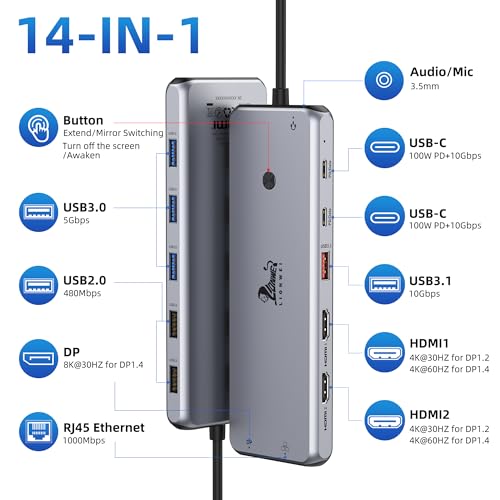


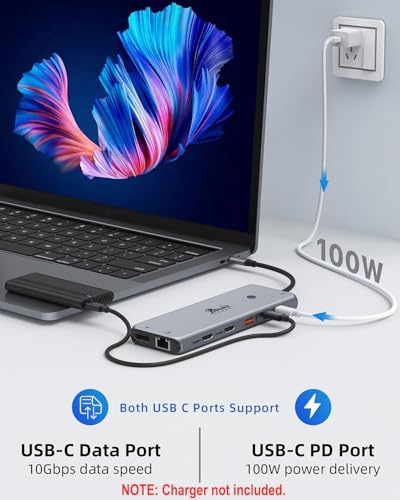
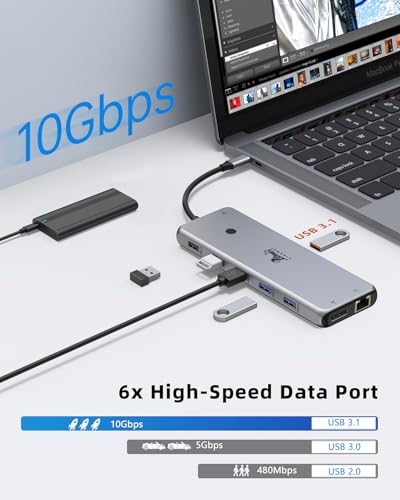



As an Amazon Associate we earn from qualifying purchases. Product prices and availability are accurate as of the date/time indicated.

UANTIN USB C Docking Station Dual Monitor for Laptop, 10-in-1 Dock HDMI Hub | Laptop Docking Station with 4K HDMI, 2 USB-C, 3 USB-A, 100W PD, SD/Micro SD, USBC Multiport Adapter Dongle for Dell, HP


As an Amazon Associate we earn from qualifying purchases. Product prices and availability are accurate as of the date/time indicated.
Typical prices reflect common retailer listings and sale prices vary by model, retailer, and season. Ports, power delivery, and video are manufacturer-listed approximate values and can vary by model and configuration. Power delivery is the maximum power the hub or dock can pass to a laptop, and real power depends on your charger and laptop.
USB Hub vs Docking Station Budget: The 7 Hubs and Docks Reviewed
1. Anker PowerExpand 7-in-1 USB-C Hub: Best USB Hub vs Docking Station Budget Overall
The Anker PowerExpand 7-in-1 USB-C Hub, at $30 to $50 with a rating of 4.7 out of 5, has 7 ports, a power delivery of 100 watts, and a video output of 4K at 30 Hz. It is the highest-rated model in this guide, and the best overall model here for most laptop users, because it offers 7 ports, 100 watt power delivery, and a low price.
It suits a laptop user, a buyer who wants an Anker hub, and a user who wants a budget hub. The 7 ports connect a monitor, a keyboard, a mouse, and a drive, the 100 watt power delivery charges most laptops, and the $30 to $50 price is low. The trade-off is video: at 4K at 30 Hz, it offers less refresh rate than the Plugable UD-768PDZ at 4K at 60 Hz and $150 to $200. For the best overall usb hub vs docking station budget at $30 to $50, it is the strongest choice here.
Best for: Most laptop users who want a 7 port, 100 W hub for $30 to $50.
2. UGREEN Revodok 9-in-1 USB-C Hub: Best Value USB Hub vs Docking Station Budget
The UGREEN Revodok 9-in-1 USB-C Hub, at $40 to $60 with a rating of 4.6 out of 5, has 9 ports, a power delivery of 100 watts, and a video output of 4K at 30 Hz. It is the best value model here for a laptop user who wants a UGREEN hub.
It suits a laptop user, a buyer who wants a UGREEN hub, and a user who wants a value hub. The 9 ports connect more devices, the 100 watt power delivery charges most laptops, and the $40 to $60 price is low. The trade-off is also video, as above. For a value usb hub vs docking station budget at $40 to $60, it is a strong choice.
Best for: Value use with a 9 port, 100 W hub for $40 to $60.
3. Plugable UD-768PDZ Docking Station: Best Dock USB Hub vs Docking Station Budget
The Plugable UD-768PDZ Docking Station, at $150 to $200 with a rating of 4.6 out of 5, has 11 ports, a power delivery of 100 watts, and a video output of 4K at 60 Hz. It is the best dock here for a laptop user who wants a Plugable dock.
It suits a laptop user, a buyer who wants a Plugable dock, and a user who wants a dock. The 11 ports connect many devices, the 4K at 60 Hz video offers smooth video, and the $150 to $200 price is high but it offers a premium dock here. The trade-off is price: at $150 to $200, it is higher than the Anker PowerExpand 7-in-1 at $30 to $50. For a dock usb hub vs docking station budget at $150 to $200, it is a practical choice.
Best for: Dock use with an 11 port, 100 W dock for $150 to $200.
4. Dell WD19S 130W Docking Station: Best High Power USB Hub vs Docking Station Budget
The Dell WD19S 130W Docking Station, at $150 to $200 with a rating of 4.6 out of 5, has 9 ports, a power delivery of 130 watts, and a video output of 4K at 60 Hz. It is the best high power dock here for a laptop user who wants a Dell dock.
It suits a laptop user, a buyer who wants a Dell dock, and a user who wants a high power dock. The 130 watt power delivery is the highest here, the 4K at 60 Hz video offers smooth video, and the $150 to $200 price is high but it offers a premium dock here. The trade-off is also price, as above. For a high power usb hub vs docking station budget at $150 to $200, it is a practical choice.
Best for: High power use with a 9 port, 130 W dock for $150 to $200.
5. Baseus 11-in-1 USB-C Hub: Best Many Port USB Hub vs Docking Station Budget
The Baseus 11-in-1 USB-C Hub, at $50 to $70 with a rating of 4.6 out of 5, has 11 ports, a power delivery of 100 watts, and a video output of 4K at 30 Hz. It is the best many port hub here for a laptop user who wants a Baseus hub.
It suits a laptop user, a buyer who wants a Baseus hub, and a user who wants a many port hub. The 11 ports connect many devices, the $50 to $70 price is low, and the 100 watt power delivery charges most laptops. The trade-off is also video, as above. For a many port usb hub vs docking station budget at $50 to $70, it is a practical choice.
Best for: Many port use with an 11 port, 100 W hub for $50 to $70.
6. Lenovo ThinkPad Universal USB-C Dock: Best Universal USB Hub vs Docking Station Budget
The Lenovo ThinkPad Universal USB-C Dock, at $150 to $200 with a rating of 4.5 out of 5, has 11 ports, a power delivery of 90 watts, and a video output of 4K at 60 Hz. It is the best universal dock here for a laptop user who wants a Lenovo dock.
It suits a laptop user, a buyer who wants a Lenovo dock, and a user who wants a universal dock. The 11 ports connect many devices, the 4K at 60 Hz video offers smooth video, and the $150 to $200 price is high but it offers a premium dock here. The trade-off is power delivery: at 90 watts, it offers less power than the Dell WD19S at 130 watts and $150 to $200. For a universal usb hub vs docking station budget at $150 to $200, it is a practical choice.
Best for: Universal use with an 11 port, 90 W dock for $150 to $200.
7. Satechi USB-C Multiport Adapter: Best Compact USB Hub vs Docking Station Budget
The Satechi USB-C Multiport Adapter, at $60 to $80 with a rating of 4.5 out of 5, has 7 ports, a power delivery of 60 watts, and a video output of 4K at 60 Hz. It is the best compact hub here for a laptop user who wants a Satechi hub.
It suits a laptop user, a buyer who wants a Satechi hub, and a user who wants a compact hub. The 4K at 60 Hz video offers smooth video, the $60 to $80 price is moderate, and the design is compact. The trade-off is power delivery: at 60 watts, it offers less power than the Anker PowerExpand 7-in-1 at 100 watts and $30 to $50. For a compact usb hub vs docking station budget at $60 to $80, it is a useful starting point.
Best for: Compact use with a 7 port, 60 W hub for $60 to $80.
USB Hub vs Docking Station Budget Buying Guide: What Actually Matters in 2026
Choosing usb hub vs docking station budget is easier when you decide on hub vs dock, ports, and power before you look at price or brand. Those three choices decide whether the device will be portable, how many devices it will connect, and whether it will charge your laptop.
USB Hub vs Docking Station Budget Buying Guide: Hub vs Dock, Ports, and Power
Hub vs dock, ports, and power are the first factor. For hub vs dock, choose a hub if you want a portable device, such as the Anker PowerExpand 7-in-1 at $30 to $50, because it will fit in a bag, and a dock if you want a desktop device, such as the Plugable UD-768PDZ at $150 to $200, because it will offer more ports and power. For ports, choose at least 7 ports, such as all seven models here, because it will connect a monitor, a keyboard, a mouse, and a drive, and 11 ports, such as the Baseus 11-in-1 at $50 to $70, if you have many devices. For power, choose at least 60 watts, such as all seven models here, because it will charge most laptops, and 100 watts, such as the Anker PowerExpand 7-in-1, if you have a larger laptop.
USB Hub vs Docking Station Budget Buying Guide: Video, USB Speed, and Ethernet
Video, USB speed, and Ethernet are the second factor. For video, choose 4K at 30 Hz, because it will offer a clear picture, such as the Anker PowerExpand 7-in-1 at $30 to $50, and 4K at 60 Hz, such as the Plugable UD-768PDZ at $150 to $200, if you want the smoothest video. For USB speed, choose USB 3.0, because it will offer fast data transfer, and USB-C if you want the fastest speed. For Ethernet, choose a hub or dock with Ethernet, because it will offer a reliable wired connection, and check that your hub or dock has Ethernet before you buy.
USB Hub vs Docking Station Budget Buying Guide: Compatibility, Size, and Use
Compatibility, size, and use are the third factor. For compatibility, choose a hub or dock that works with Windows and Mac, because it will work with most laptops, and a hub or dock that works with USB-C, because it will work with most modern laptops. For size, choose a hub that is small if you travel, because it will fit in a bag, and a dock that is larger if you work at a desk, because it will offer more ports. For use, choose a hub or dock that is best for a laptop, for a home office, for a first hub or dock, and for a budget desk setup.
USB Hub vs Docking Station Budget Buying Guide: Price, and the Best First Hub or Dock
Price, and the best first hub or dock are the final factors. For price, a hub in the $30 to $50 range, such as the Anker PowerExpand 7-in-1, is a good starting point. A dock in the $150 to $200 range, such as the Plugable UD-768PDZ, offers a premium build. Choose by hub vs dock first, then by ports, then by power, then by price.
For the best first setup, buy a usb hub vs docking station budget option, a monitor, and a USB-C cable. The Anker PowerExpand 7-in-1 at $30 to $50 is a good first hub for most laptop users, the Baseus 11-in-1 at $50 to $70 is a good first hub if you need many ports, and the Plugable UD-768PDZ at $150 to $200 is a good first dock if you want a desktop dock. A good usb hub vs docking station budget option, chosen for ports first and used with a laptop and a monitor, will offer ports, power, and value for a budget desk setup.
USB Hub vs Docking Station Budget FAQ
What is the difference between a USB hub and a docking station on a budget?
For a USB hub vs docking station on a budget, a USB hub is a small, portable device that offers ports, while a docking station is a larger, desktop device that offers more ports and power. The Anker PowerExpand 7-in-1 USB-C Hub at $30 to $50, UGREEN Revodok 9-in-1 USB-C Hub at $40 to $60, Baseus 11-in-1 USB-C Hub at $50 to $70, and Satechi USB-C Multiport Adapter at $60 to $80 are all hubs, so they are good for travel. The Plugable UD-768PDZ at $150 to $200, Dell WD19S 130W at $150 to $200, and Lenovo ThinkPad Universal USB-C Dock at $150 to $200 are all docks, so they are good for a desk. Choose a hub if you travel, and a dock if you work at a desk.
How many ports do I need for a budget hub or dock?
For a budget hub or dock, how many ports you need depends on how many devices you have. A hub or dock with 7 ports, such as the Anker PowerExpand 7-in-1 at $30 to $50, will connect a monitor, a keyboard, a mouse, and a drive, and a hub or dock with 11 ports, such as the Baseus 11-in-1 at $50 to $70, will connect more devices. The UGREEN Revodok 9-in-1 at $40 to $60 has 9 ports, so it will connect more devices than the Anker hub. Count your devices before you buy, and buy a hub or dock with at least one extra port, because you will need a port for a new device.
What power delivery do I need for my laptop?
For power delivery for your laptop, a power delivery of at least 60 watts is a good starting point, because it will charge most laptops, and a power delivery of 100 watts, such as the Anker PowerExpand 7-in-1 at $30 to $50, is best if you have a larger laptop. The Dell WD19S 130W at $150 to $200 has a power delivery of 130 watts, so it is good for a large laptop, and the Satechi USB-C Multiport Adapter at $60 to $80 has a power delivery of 60 watts, so it is good for a small laptop. Check your laptop charger before you buy, because a hub or dock that offers less power than your charger will charge your laptop slowly.
What is the cheapest good USB hub vs docking station budget option?
The cheapest good option in this guide is the Anker PowerExpand 7-in-1 USB-C Hub, at $30 to $50 with a rating of 4.7 out of 5, because it is a 7 port, 100 W hub for a low price. The UGREEN Revodok 9-in-1 USB-C Hub, at $40 to $60 with a rating of 4.6 out of 5, is also a low-cost option, with a 9 port, 100 W hub. The Baseus 11-in-1 USB-C Hub, at $50 to $70 with a rating of 4.6 out of 5, is also a low-cost option, with an 11 port, 100 W hub. Start with one of these three if price is the main factor, and check ports, power delivery, and video next. For the best overall value, the Anker PowerExpand 7-in-1 at $30 to $50 is a better choice because it offers a rating of 4.7 out of 5 and a power delivery of 100 watts.
FAQ
What is the difference between a USB hub and a docking station on a budget?
How many ports do I need for a budget hub or dock?
What power delivery do I need for my laptop?
What is the cheapest good USB hub vs docking station budget option?
Related guides
- Best USB C Cable for Charging Phones in 2026: 7 USB C Cables That Charge Fast, Last Long, and Work With iPhone, Samsung, and Pixel Phones
- Best Charger for Smartwatches in 2026: 7 Chargers for Smartwatches With Clear Power, Simple Charge, and Easy Use for Smartwatches
- Best Webcam for Streaming at Home in 2026: Insta360 Link, Elgato Facecam, and Logitech Brio Graded on Sensor Size, Low-Light Manners, and the Autofocus That Never Hunts on Camera
- Best Camera for YouTube: 6 Cameras for YouTube in 2026
More from Amazon
Programs that pair well with the guide above. Offers and eligibility are set by Amazon and may change.
Free shipping on eligible items, Prime Video and more. Eligible new members can start with a free trial.
Start a Prime free trialAd-free music streaming. Eligible new subscribers can start with a free trial.
Try Music Unlimited freeA Prime membership for ages 18-24 with a trial period. Eligibility is set by Amazon.
See Prime for Young AdultsAudiobooks and podcasts to listen to on the go. Eligible new members can start with a free trial.
Try Audible freeAs an Amazon Associate we earn from qualifying purchases.

Write Your Review
No reviews yet. Be the first to share your experience!