
What's inside
- Monitor vs TV for Gaming: Lag and Refresh Have Converged, Distance and Size Have Not
- Quick Comparison: Gaming Monitors and TVs Compared
- The Six Gaming Screens Reviewed
- Buying Guide: Choose by the Chair, Verify the Game Mode, Count the Inputs
- How We Selected These Gaming Screens
- Frequently Asked Questions: Monitor vs TV for Gaming
As an Amazon Associate I earn from qualifying purchases. This post may contain affiliate links at no extra cost to you.
Monitor vs tv for gaming is a contest that used to be settled in one sentence and no longer can be. The television spent decades as the games console’s natural home and the PC’s poor relation, too laggy, too slow, and too processed for serious play. The modern gaming television answers with specifications that would have been fantasy a generation ago: full-bandwidth HDMI connections that accept the fastest signals current consoles and graphics cards produce, refresh rates that match respectable monitors, variable refresh technology in both great families, and game modes whose input lag sits within a whisker of a monitor’s. Meanwhile the monitor has not stood still, answering with refresh rates no television attempts, sizes composed for a desk’s viewing distance, and the simple advantage of being a display and nothing else. The honest verdict of this guide is therefore a parish verdict: the sofa and the desk are different countries, most players should choose by where they sit, and a growing number of televisions are now legitimate citizens of both.
The figures that decide the contest are few and learnable. Input lag, the delay between your control and its consequence on screen, is measured in milliseconds and felt as the game’s obedience; in their game modes, the better televisions and essentially all gaming monitors now live in the same low parish, while a television outside its game mode can be ten times slower, which is the single most important sentence in this article. Refresh rate, how many times a second the picture is renewed, sets the ceiling on smoothness and must be matched by the signal the machine sends, a television’s true native rate being the figure to trust rather than any motion-processing number in larger type. Variable refresh rate lets the screen wait for the game’s frames instead of tearing or stuttering between them, and its flavour must match your machine, the console and graphics card families each having their standards, with the better modern screens accepting several. Resolution and size complete the parish, governed by viewing distance: the same pixel count that is crisp across a sofa is coarse at a desk, and the same screen that is immersive at two metres is a wall you must turn your head to search at sixty centimetres.
This guide compares the two parishes figure by figure, then sets real, currently sold monitors and televisions in one table, graded for the rooms they serve, and ends with a buying method that starts from your chair. Prices are ranges throughout, in a category where last year’s flagship television is routinely this year’s bargain, a fact the wise buyer treats as a feature.
Our Top Picks
 SANSUI 32 Inch Curved 240Hz Gaming Monitor High32 inch24.19 x 8.06 x 17.75 inches9.7 poundsCheck on Amazon
Monitor vs TV for Gaming: Lag and Refresh Have Converged, Distance and Size Have Not
Input Lag and Game Modes in Monitor vs TV for Gaming
Input lag deserves its first place because it is the figure a player feels in their hands. A gaming monitor’s lag is low by design and by default, the panel being a plain servant of the signal. A television is a computer wearing a screen, applying processing to everything it receives, upscaling, smoothing, and beautifying, and that processing costs time measured in the tens of milliseconds and beyond. Game mode is the television’s promise to stop: processing reduced to the minimum, the picture passed through with a delay in the same parish as a monitor’s, and on the better current models that promise is honestly kept. The buyer’s doctrines follow directly. Any television bought for gaming must have a true game mode on every input you will use, ideally one that engages automatically when a console or PC is detected, and you must confirm the low lag figure the maker or reputable measurement attaches to that mode at the signal you will send, because lag varies with resolution and refresh. A television whose game figures are vague is telling you something. And a television used outside game mode for a film is using its processing rightly, which is why the automatic switching matters: the screen should be two citizens, and change its coat without being asked.
Refresh, Variable Refresh, and Motion in Monitor vs TV for Gaming
Refresh rate is where the monitor keeps its crown. Gaming monitors run to rates no television attempts, and for the competitive player on a PC that can feed them, that smoothness, and the reduced delay that comes with each new frame arriving sooner, is a real and purchasable advantage. The television’s parish is the rate the consoles and most living-room PCs actually use, and at that level the better televisions now match the mainstream monitor exactly, with native high-refresh panels rather than processing tricks. Distrust any television whose headline rate is a motion or clarity index rather than the panel’s native figure; the makers publish the true number in their specifications, and it is the only one that enters this guide’s audit. Variable refresh is the companion figure and, for most players, the more valuable one: a screen that renews itself when the game is ready abolishes the tearing and judder of a mismatched parish, and both consoles and both graphics families now speak it. Confirm the television or monitor accepts your machine’s flavour across the full range of its refresh, at your resolution, on the input you will use, because variable refresh that works on one port and not another is a parish with a locked gate.
Motion clarity completes the section, and it is the television’s subtler tax. A large screen at a sofa’s distance shows a game’s camera pans generously, while the same motion at a desk’s distance, on a monitor, is where high refresh and fast pixel response earn their money in competitive play. Panel technologies divide the labour: the self-lit parish, OLED in both televisions and now monitors, answers with near-instant response and perfect blacks at a premium and with care owed to static images; the LCD parishes answer with brightness, size for money, and no such care required. Neither is the gaming answer in the abstract. The room’s light, the game’s parish, and the hours of static desktop or dashboard the screen must endure are the auditors, and they are addressed in the buying guide.
Size, Distance, and the Room in Monitor vs TV for Gaming
Stand in your chair’s parish and measure, because geometry outranks specifications. At a desk, the player sits an arm’s length from the screen, and the monitor’s sizes, roughly the mid-twenties to the mid-thirties in inches, fill the useful field of view without demanding head movement, at resolutions whose pixel density stays crisp at that distance. A television at a desk overwhelms: even its smallest modern sizes sit at the top of or beyond that parish, its pixels coarsen at desk distance in the cheaper resolutions, and its stand, its depth, and its sheer luminous area make the desk feel like a front row. At the sofa, every term reverses. The monitor shrinks to a bright rectangle whose text and detail vanish, its desk stand and its parish of ports are composed for the wrong furniture, and it has no tuner, no streaming citizens, and usually no speakers worth the name, while the television was designed in its entirety for exactly that wall, that distance, and that evening. The hybrid parish, the small room or the desk that is also the console’s home, is where the modern high-refresh television of modest size makes its genuine case, and where the largest gaming monitors, composed as televisions in all but name, meet it from the other side.
The room’s light and the day’s other uses finish the audit. A bright living room argues for the television’s brightness and its anti-glare parish; a controlled gaming room lets the self-lit screens show their blacks. A screen that must also be a workstation all day argues for the monitor’s text clarity, its ergonomic stand, and its indifference to static images, while a screen that is a household’s cinema, sport, and console centre argues for the television’s size, sound parish, and streaming citizens, which no monitor bundles. Sound itself is a small parish with a real vote: televisions speak, some of them well, while gaming monitors’ speakers are an afterthought, so the monitor’s true price includes the speakers or headset parish its owner will certainly use, composed into step one’s budget where this guide’s table cannot.
Quick Comparison: Gaming Monitors and TVs Compared
| Screen | Best For | Key Specs | Typical Price Range | Rating |
|---|---|---|---|---|
| LG C4 / OLED TV parish | TV — monitor vs tv for gaming sofa winner | 42 to 83 inch classes as published, 4K OLED parish, high native refresh classes, full-bandwidth HDMI classes, variable refresh parish, game mode classes | $900 – $2,800 by size | 4.8 / 5 |
| Samsung Odyssey G7 / monitor parish | Monitor — best desk all-round parish | 27 and 32 inch classes as published, high refresh parish, curved VA classes, variable refresh parish, console-friendly inputs classes | $450 – $700 by size | 4.6 / 5 |
| LG UltraGear / monitor parish | Monitor — best speed parish | 27 inch classes as published, very high refresh parish, fast IPS classes, variable refresh parish, low lag classes | $400 – $650 | 4.6 / 5 |
| Samsung QN90 / TV parish | TV — best bright room parish | 43 to 85 inch classes as published, 4K Mini-LED parish, high native refresh classes, game mode and variable refresh parish, high brightness classes | $900 – $2,600 by size | 4.6 / 5 |
| Gigabyte M32U / monitor parish | Monitor — best 4K desk parish | 32 inch 4K classes as published, high refresh parish, HDMI classes for consoles, KVM parish, variable refresh classes | $450 – $650 | 4.5 / 5 |
| Hisense U7 / TV parish | TV — best value parish | 55 to 85 inch classes as published, 4K Mini-LED parish, high native refresh classes, game mode and variable refresh parish | $550 – $1,200 by size | 4.5 / 5 |
SANSUI 32 Inch Curved 240Hz Gaming Monitor High Refresh Rate, FHD 1080P | Gaming PC Monitor HDMI DP1.4, 1500R Curvature, 1Ms MPRT, HDR,Metal Stand,VESA Compatible(DP Cable Incl.)
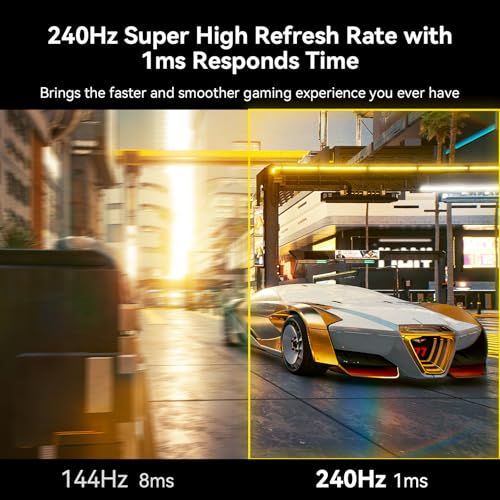



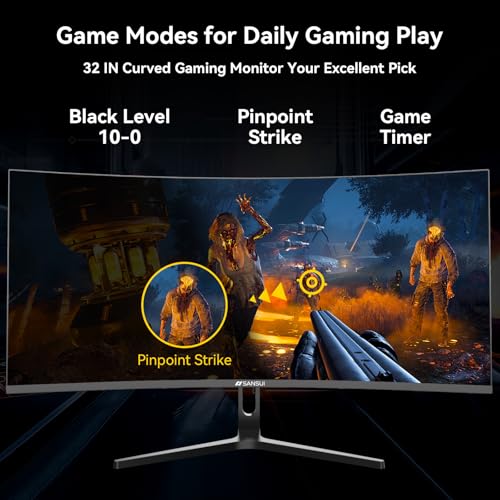


As an Amazon Associate we earn from qualifying purchases. Product prices and availability are accurate as of the date/time indicated.

New! Sceptre Curved 27-inch Prime Gaming Monitor DisplayPort x2 180Hz HDMI x2 180Hz 1500R 1ms Build-in Speakers, Machine Black 2027 (C275B-FW180T Series)
As an Amazon Associate we earn from qualifying purchases. Product prices and availability are accurate as of the date/time indicated.
Prices shown are approximate and for reference only. Prices change often, so please check the current price on Amazon before you buy.
Ratings are editorial assessments for gaming, based on makers’ published refresh, input, and variable refresh specifications and value at typical prices. Verify the native refresh rate and the game-mode specification for the exact size, since ranges vary within a model line.
The Six Gaming Screens Reviewed
1. LG OLED TV Parish — Best Television
LG’s C-series is the television that ended the argument, a self-lit screen with a game parish as serious as its cinema one, in sizes from desk-adjacent to wall-filling. For the sofa, the audit ends in this row.
2. Samsung Monitor Parish — Best Desk All-Rounder
The Odyssey G7 class gives the desk its complete citizen: speed, size choice, and console manners in one parish. As the desk’s all-round parish, it shares the head.
3. LG UltraGear Parish — Best Speed
UltraGear’s fast parish is composed for the competitive PC player, where refresh is the whole argument. As the speed parish, it earns its row.
4. Samsung TV Parish — Best Bright Room
The QN90 class answers the sunlit living room with brightness and a full game parish, where the self-lit screens must be shaded to shine. As the bright parish, it holds its row.
5. Gigabyte Parish — Best 4K Desk
The M32U class is the desk’s hybrid, a 4K monitor whose inputs welcome consoles as warmly as PCs. As the hybrid parish, it holds its place.
6. Hisense Parish — Best Value Television
Hisense’s U7 class delivers the modern game parish, high native refresh and variable refresh included, at prices that embarrass the flags. As the value parish, it completes the table.
Buying Guide: Choose by the Chair, Verify the Game Mode, Count the Inputs
Step One: Write Your Room and Your Machines
Measure the viewing distance from the player’s actual seat to the screen’s actual place, and write the machines beside it: which consoles, which PC and its graphics parish, and the fastest signal each will send. Note the room’s light across the day, the screen’s other duties, films, sport, a working desktop, and the sound parish you own or must buy. Set the budget composed whole, screen, mount or stand, and any sound the choice requires. This one page usually settles the headline question by itself, desk to monitor, sofa to television, and it arms every later step with the signal and the size the audit must test.
Step Two: Audit Native Refresh, Game Lag, and Variable Refresh
For each finalist, confirm from the maker’s own specifications the panel’s native refresh rate, never a motion index; the game mode’s existence on your inputs and its measured or stated lag at your signal; the variable refresh parish and its compatibility with your machines; and the number of full-bandwidth inputs, because a household with two consoles and a PC can exhaust a television’s fastest ports and inherit a cable-swapping parish no one chose. Check the size against your measured distance and the resolution against it, and read the stand or mount’s fit for your furniture. Refuse a television whose game specifications are adjectives, and a monitor whose console manners you have not verified where a console is half its life.
Step Three: Set the Game Mode, Test Your Own Games, Keep the Receipt
On arrival, set the gaming input’s game mode, confirm it engages with your machine, turn off the motion smoothing and the beautifying parish for that input, and set the variable refresh on both screen and machine so the two agree. Then test the games you actually play, the fast one for lag and motion, the dark one for the blacks and the shadow detail, the text-heavy one for the desk parish’s clarity, in the room’s real light at the real distance, inside the returns window. Keep the household’s other citizens happy too, the film mode composed for the evening parish, the sound parish settled. A screen chosen and set this way ends the monitor-versus-television argument in the only court that matters, your own chair, which is where this guide has been trying to hold the trial from its first paragraph.
How We Selected These Gaming Screens
We included only real, named, currently sold gaming monitors and televisions whose makers publish native refresh, input, and variable refresh specifications, spanning the desk and sofa parishes and the bright-room and value territories between them. Prices are typical retail ranges by size. Ratings weight game-mode lag and refresh honesty first, then variable refresh compatibility, size and distance fit, picture parish, and value.
Frequently Asked Questions: Monitor vs TV for Gaming
Is a TV good enough for competitive gaming now?
For all but the most committed competitive parish, the better modern televisions are genuinely good enough, and that is a sentence this guide writes with its figures in front of it: game-mode lag in the monitor’s parish, native high refresh, and variable refresh honestly supported. The competitive PC player’s remaining case for the monitor is real but specific — refresh rates beyond any television’s, at sizes composed for a desk, with the response parish tuned for that one duty — and it is purchased with a machine that can feed those rates. The console competitor’s case has largely dissolved, since the consoles’ own signals sit inside the television’s parish. Choose by your level and your chair, and let no one sell you a monitor for a sofa or a television for a tournament desk on the strength of a slogan.
What size screen should I buy for my distance?
Let the distance you measured in step one govern, and prefer the parish where the screen fills your view without asking your head to patrol it. At a desk’s arm’s length, that is the monitor’s territory, the mid-twenties to low-thirties in inches, at resolutions that stay crisp at that closeness. Across a living room, it is the television’s, commonly the mid-fifties and upward, where 4K earns its keep and a smaller screen simply reads as a monitor that lost its desk. The commonest error in this category is a television bought by diagonal envy and placed at a desk, where its size punishes rather than immerses, followed by the monitor bought for a sofa, where its detail dies of distance. Both errors are prevented by the same tape measure, applied before the catalogue is opened.
Does 4K matter for gaming, or is refresh rate more important?
They serve different masters, and your machines and distance decide the order. Resolution is detail, and it is spent by distance: at the sofa it is the difference the television’s size exists to show, while at the desk a lower resolution at a higher refresh is the competitive parish’s standing choice, because smoothness and response win rounds that sharpness merely decorates. The consoles have largely made the decision for their owners, composing their best signals around 4K with high refresh where the game allows, which is why the televisions in this table are all 4K high-refresh citizens. The PC player composes the trade by genre, the story game taking the pixels, the tournament taking the frames, and the wise purchase is the screen whose native parish matches the games at the top of your own list rather than a compromise that serves neither at its best.
Can one screen serve as both my work monitor and my gaming TV?
Yes, in the hybrid parish this guide has marked throughout, and the candidates meet in the middle from both directions. The large 4K gaming monitor with console-friendly inputs, the Gigabyte row of this table being its type, serves a desk that works by day and plays by night, with the ergonomic stand and text clarity the workday demands. The smaller sizes of the flagship gaming televisions serve the small room where the desk and the sofa are one piece of furniture, accepting a television’s stand, its smart parish, and a watchful eye on static-image habits in exchange for size and cinema. What neither hybrid survives is a lie about the room: measure the distance, count the work hours against the play hours, and buy for the majority citizen, letting the minority adapt, because it will, more gracefully than a screen bought for a room it never meets.
Related guides
- Best Indoor Security Camera for Pets in 2026: 7 Indoor Security Cameras That Offer Pet Detection, Two-Way Audio, and Reliable Monitoring for Pet Owners
- Best PoE Switch for Smart Homes: 6 Best PoE Switch for Smart Homes Picks in 2026
- Best USB Microphone for Voiceover Work in 2026: 6 Best USB Microphone for Voiceover Work Picks for Clear Voice, Easy Setup, and Reliable Recording
- Best Noise Cancelling Headphones for Office Work in 2026: How to Pick Quiet, Comfortable Headphones for Focus and Calls
More from Amazon
Programs that pair well with the guide above. Offers and eligibility are set by Amazon and may change.
Free shipping on eligible items, Prime Video and more. Eligible new members can start with a free trial.
Start a Prime free trialAd-free music streaming. Eligible new subscribers can start with a free trial.
Try Music Unlimited freeA Prime membership for ages 18-24 with a trial period. Eligibility is set by Amazon.
See Prime for Young AdultsAudiobooks and podcasts to listen to on the go. Eligible new members can start with a free trial.
Try Audible freeAs an Amazon Associate we earn from qualifying purchases.

Write Your Review
No reviews yet. Be the first to share your experience!