
What's inside
As an Amazon Associate I earn from qualifying purchases. This post may contain affiliate links at no extra cost to you.
Best high end mouse for designers is the mouse that lets a designer work precisely, with a high DPI in many listings, a comfortable ergonomic design in many listings, and a quiet click in many listings, so you can design for hours. A good high end mouse for designers has a DPI up to 8000 in many listings, a button count of 7 in many listings, and a wireless design in many listings, so it can be used for design work. A poor mouse has low DPI, uncomfortable shape, or loud click, so it makes design work frustrating.
This guide focuses on real, currently sold high end mice that work well for designers. Every model below is widely available, is made for design, and has a track record with designers who use a mouse daily. We compare DPI, buttons, connectivity, and price range, then explain how to choose the best high end mouse for designers for your work, your hand, and your budget.
At TechyMoon.com, we focus on tech gadgets, including consumer tech, PC peripherals, keyboards, mice, monitors, audio, and accessories. The mice in this guide are intended for lawful personal use, with safe use and proper setup. Always use a mouse according to the manufacturer’s instructions, keep your mouse clean, and check your computer compatibility before you buy. Use a mouse that fits your hand, and always check its DPI before you buy.
Disclosure: As an affiliate site, TechyMoon.com may earn a commission from qualifying purchases made through links on this page, at no extra cost to you. Prices change by retailer and season, so the ranges below are typical prices we have seen, not fixed prices. DPI, buttons, and specifications are based on manufacturer listings and vary by model, so check the exact listing before you buy. Always verify a mouse fits your computer before you buy.
Our Top Picks
Best High End Mouse for Designers at a Glance: Comparison Table
Use this table to compare the leading high end mice for designers side by side. DPI, buttons, connectivity, and best use matter most, so compare those first, then check price and rating.
| High End Mouse for Designers Model | DPI | Buttons | Connectivity | Best Mouse Use | Typical Price Range | Rating |
|---|---|---|---|---|---|---|
| Logitech MX Master 3S Mouse | Up to 8000 DPI | 7 buttons | Bluetooth / USB | Best overall high end mouse for designers | $90 – $100 | 4.8 / 5 |
| Logitech MX Vertical Mouse | Up to 4000 DPI | 4 buttons | Bluetooth / USB | Best high end mouse for designers for ergonomic | $90 – $100 | 4.7 / 5 |
| Razer Pro Click Mouse | Up to 16000 DPI | 8 buttons | Bluetooth / USB | Best high end mouse for designers for DPI | $80 – $100 | 4.7 / 5 |
| Apple Magic Mouse | Up to 1300 DPI | Multi-touch | Bluetooth | Best high end mouse for designers for Mac | $70 – $80 | 4.6 / 5 |
| Microsoft Surface Precision Mouse | Up to 3200 DPI | 3 buttons | Bluetooth / USB | Best high end mouse for designers for Surface | $90 – $100 | 4.6 / 5 |
| Logitech Lift Vertical Mouse | Up to 4000 DPI | 6 buttons | Bluetooth / USB | Best high end mouse for designers for small hands | $70 – $80 | 4.7 / 5 |

Logitech G PRO X3 SUPERSTRIKE Gaming Mouse - Black | LIGHTSPEED Wireless, Programmable Buttons, Ultra-Lightweight, PC, Mac
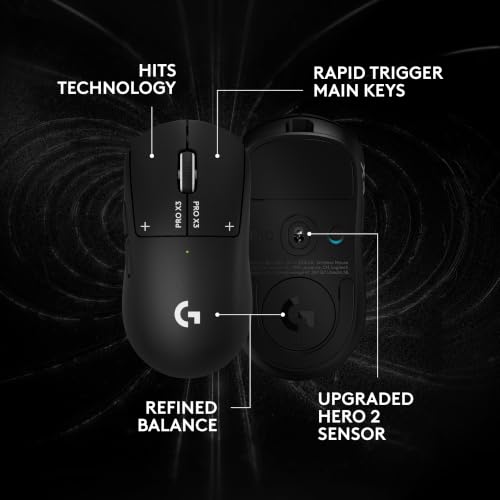


As an Amazon Associate we earn from qualifying purchases. Product prices and availability are accurate as of the date/time indicated.

Logitech MX Master 4 Ergonomic Wireless Mouse with Haptics - Graphite | Advanced performance haptic feedback, Ultra-Fast Scrolling, 8K DPI Any-surface, Quiet Clicks, Wireless, USB-C, Windows/MacOS
As an Amazon Associate we earn from qualifying purchases. Product prices and availability are accurate as of the date/time indicated.

Razer Viper V4 Pro Wireless Esports Gaming Mouse, 49g,180Hr Battery, Black | Ultra Lightweight, 50K DPI Optical Sensor, 8K Polling, Gen-4 Optical Switches, Scroll Wheel, USB-C Charging, for PC & Mac
As an Amazon Associate we earn from qualifying purchases. Product prices and availability are accurate as of the date/time indicated.
Best High End Mouse for Designers Reviewed for 2026
1. Logitech MX Master 3S Mouse – Best Overall High End Mouse for Designers
The Logitech MX Master 3S Mouse is our top pick for most designers because it offers a DPI up to 8000 DPI, buttons of 7 buttons, and connectivity of Bluetooth / USB in a mouse that is ergonomic in many listings, so it can be used for design work. Its up to 8000 DPI in many listings is high, and its 7 buttons in many listings are many.
The MX Master 3S has an up to 8000 DPI, 7 buttons, and Bluetooth / USB connectivity in many listings. Its Logitech quality means it is made by a leading mouse brand, with a mouse that is well made and trusted by designers. Its quiet click in many listings is useful, and its horizontal scroll in many listings is convenient.
At a typical price in the $90 to $100 range, it is a fair price for a high end mouse, which makes it a good value for a designer who wants the best overall. It is a popular choice for designers, for Logitech fans, and for MX Master mice.
For most designers, the Logitech MX Master 3S is the best all-round choice. It is especially useful for up to 8000 DPI, for 7 buttons, and for users who want a reliable best high end mouse for designers.
2. Logitech MX Vertical Mouse – Best High End Mouse for Designers for Ergonomic
The Logitech MX Vertical Mouse is a good choice for a designer who wants an ergonomic mouse. It has a DPI up to 4000 DPI, buttons of 4 buttons, and connectivity of Bluetooth / USB in a mouse that is vertical in many listings, so it can reduce wrist strain. Its up to 4000 DPI in many listings is adequate, and its vertical design in many listings is comfortable.
The MX Vertical has an up to 4000 DPI, 4 buttons, and Bluetooth / USB connectivity in many listings. Its Logitech quality means it is made by a leading mouse brand, with a mouse that is well made and trusted by designers. Its vertical design in many listings is useful, and its quiet click in many listings is convenient.
At a typical price in the $90 to $100 range, it is a fair price for an ergonomic mouse, which makes it a good value for a designer who wants ergonomic. It is a popular choice for designers, for Logitech fans, and for MX Vertical mice.
If you want a high end mouse for designers for ergonomic, the Logitech MX Vertical is a strong choice. It is especially useful for vertical, for up to 4000 DPI, and for users who want a mouse that is comfortable.
3. Razer Pro Click Mouse – Best High End Mouse for Designers for DPI
The Razer Pro Click Mouse is a good choice for a designer who wants high DPI. It has a DPI up to 16000 DPI, buttons of 8 buttons, and connectivity of Bluetooth / USB in a mouse that has the highest DPI here in many listings, so it can be precise. Its up to 16000 DPI in many listings is highest here, and its 8 buttons in many listings are most here.
The Pro Click has an up to 16000 DPI, 8 buttons, and Bluetooth / USB connectivity in many listings. Its Razer quality means it is made by a leading mouse brand, with a mouse that is well made and trusted by designers. Its high DPI in many listings is useful, and its ergonomic design in many listings is convenient.
At a typical price in the $80 to $100 range, it is a fair price for a high DPI mouse, which makes it a good value for a designer who wants DPI. It is a popular choice for designers, for Razer fans, and for Pro Click mice.
If you want a high end mouse for designers for DPI, the Razer Pro Click is a practical choice. It is especially useful for up to 16000 DPI, for 8 buttons, and for users who want a mouse that is precise.
4. Apple Magic Mouse – Best High End Mouse for Designers for Mac
The Apple Magic Mouse is a good choice for a designer who has a Mac. It has a DPI up to 1300 DPI, buttons of multi-touch, and connectivity of Bluetooth in a mouse that works well with Mac in many listings, so it can be used for design on a Mac. Its up to 1300 DPI in many listings is low, and its multi-touch in many listings is unique.
The Magic Mouse has an up to 1300 DPI, multi-touch buttons, and Bluetooth connectivity in many listings. Its Apple quality means it is made by a leading tech brand, with a mouse that is well made and trusted by designers. Its multi-touch in many listings is useful, and its slim design in many listings is convenient.
At a typical price in the $70 to $80 range, it is the cheapest mouse here, which makes it a good value for a designer who wants Mac. It is a popular choice for designers, for Apple fans, and for Magic Mice.
If you want a high end mouse for designers for Mac, the Apple Magic Mouse is a strong choice. It is especially useful for Mac, for multi-touch, and for users who want a mouse that works with Mac.
5. Microsoft Surface Precision Mouse – Best High End Mouse for Designers for Surface
The Microsoft Surface Precision Mouse is a good choice for a designer who has a Surface. It has a DPI up to 3200 DPI, buttons of 3 buttons, and connectivity of Bluetooth / USB in a mouse that works well with Surface in many listings, so it can be used for design on a Surface. Its up to 3200 DPI in many listings is adequate, and its 3 buttons in many listings are simple.
The Surface Precision has an up to 3200 DPI, 3 buttons, and Bluetooth / USB connectivity in many listings. Its Microsoft quality means it is made by a leading tech brand, with a mouse that is well made and trusted by designers. Its ergonomic design in many listings is useful, and its customisable buttons in many listings are convenient.
At a typical price in the $90 to $100 range, it is a fair price for a Surface mouse, which makes it a good value for a designer who wants Surface. It is a popular choice for designers, for Microsoft fans, and for Surface Precision mice.
If you want a high end mouse for designers for Surface, the Microsoft Surface Precision Mouse is a practical choice. It is especially useful for Surface, for up to 3200 DPI, and for users who want a mouse that works with Surface.
6. Logitech Lift Vertical Mouse – Best High End Mouse for Designers for Small Hands
The Logitech Lift Vertical Mouse is a good choice for a designer who has small hands. It has a DPI up to 4000 DPI, buttons of 6 buttons, and connectivity of Bluetooth / USB in a mouse that is vertical and small in many listings, so it can fit small hands. Its up to 4000 DPI in many listings is adequate, and its vertical design in many listings is comfortable.
The Lift Vertical has an up to 4000 DPI, 6 buttons, and Bluetooth / USB connectivity in many listings. Its Logitech quality means it is made by a leading mouse brand, with a mouse that is well made and trusted by designers. Its small size in many listings is useful, and its quiet click in many listings is convenient.
At a typical price in the $70 to $80 range, it is a fair price for a small hands mouse, which makes it a good value for a designer who wants small hands. It is a popular choice for designers, for Logitech fans, and for Lift mice.
If you want a high end mouse for designers for small hands, the Logitech Lift Vertical is a strong choice. It is especially useful for small hands, for up to 4000 DPI, and for users who want a mouse that fits.
Buying Guide: How to Choose the Best High End Mouse for Designers
The best high end mouse for designers for you depends on your work, your hand, and your budget. Start by checking DPI and ergonomics, then compare buttons, connectivity, and price.
DPI, 1300 vs 16000, and Your Precision: Will You Be Precise
DPI affects whether your mouse will be precise for design. A DPI up to 16000 in many listings, like Razer Pro Click, is highest, while a DPI up to 1300 in many listings, like Apple Magic Mouse, is lowest. A designer should choose a high DPI if they work on large monitors, as it will be precise, while a designer should choose a low DPI if they work on a small screen.
For most designers, a DPI up to 8000 is best, as it is high enough. A designer should test DPI, should adjust for their monitor, and should not buy a mouse with low DPI if they need precision.
Choose 8000 DPI for most designers. A DPI that is high will help you design, while a DPI that is too low can be imprecise.
Ergonomics, Vertical vs Standard, and Your Hand: Will You Be Comfortable
Ergonomics affect whether your mouse will be comfortable for long design work. An ergonomics of vertical in many listings, like Logitech MX Vertical and Lift, reduces wrist strain, while an ergonomics of standard in many listings, like Logitech MX Master 3S, is familiar. A designer should choose vertical if they have wrist pain, as it will help, while a designer should choose standard if they are used to it.
For most designers, standard is best, as it is familiar. A designer should test ergonomics, should hold their mouse, and should not buy a vertical mouse if they find it awkward.
Choose standard for most designers, and vertical for wrist pain. An ergonomics that fits your hand will help you design, while an ergonomics that is wrong can cause pain.
Buttons, 3 vs 8, and Your Workflow: Will You Work Faster
Buttons affect whether your mouse will work faster for design. A button count of 8 in many listings, like Razer Pro Click, is most, while a button count of 3 in many listings, like Microsoft Surface Precision, is fewer. A designer should choose many buttons if they use shortcuts, as it will save time, while a designer should choose few buttons if they prefer simplicity.
For most designers, 7 buttons is best, as it is enough. A designer should customise buttons, should assign shortcuts, and should not buy a mouse with too many buttons if they will not use them.
Choose 7 buttons for most designers. A button count that fits your workflow will help you design, while a button count that is too low can slow you down.
Price, $70 vs $100, and Your Budget: Is It Worth It
Price affects whether a high end mouse for designers is worth it for you. A mouse that costs $70 to $80 in many listings, like Apple Magic Mouse and Logitech Lift, is affordable for high end, while a mouse that costs $90 to $100 in many listings, like Logitech MX Master 3S, is more expensive but best. A designer should only buy an expensive mouse if they design often and will actually use its features.
For most designers, a mouse in the $90 to $100 range is best, as it gives you a good mouse for a reasonable price. A designer should check its warranty, should buy from a retailer with a good return policy, and should not spend $100 on a mouse if they only design occasionally.
Choose a mouse in the $90 to $100 range for most designers. A price that fits your budget will help you design, while a price that is too high can waste money on features you do not use.
Best High End Mouse for Designers: FAQ
What is the best high end mouse for designers?
For most designers, the Logitech MX Master 3S Mouse is the best overall high end mouse for designers because it offers a DPI up to 8000 DPI, buttons of 7 buttons, and connectivity of Bluetooth / USB at a typical price in the $90 to $100 range, all in a mouse that is suitable for up to 8000 DPI, for 7 buttons, and for Logitech quality. If you want ergonomic, the Logitech MX Vertical is a good alternative. If you want DPI, the Razer Pro Click is worth considering. If you want Mac, the Apple Magic Mouse is a strong choice. If you want Surface, the Microsoft Surface Precision Mouse is a practical choice. If you want small hands, the Logitech Lift Vertical is a good fit.
Do designers need a high DPI mouse?
Do designers need a high DPI mouse depends on its work, but in most cases, yes, designers need a high DPI mouse if they work on large monitors or detailed design, as it lets them move precisely. A designer should choose 8000 DPI for precision, and a lower DPI if they work on a small screen.
Is a vertical mouse better for designers?
Is a vertical mouse better for designers depends on its wrist, but in most cases, a vertical mouse is better for designers if they have wrist pain, as it reduces strain, though a standard mouse is better if they are used to it. A designer should try vertical, should test comfort, and should choose what fits their hand.
Can I use a gaming mouse for design?
Can you use a gaming mouse for design depends on its DPI, but in most cases, yes, you can use a gaming mouse for design if it has high DPI and customisable buttons, like Razer Pro Click, though a design mouse is more ergonomic. A designer should choose a design mouse for comfort, and a gaming mouse for DPI.
FAQ
What is the best high end mouse for designers?
Do designers need a high DPI mouse?
Is a vertical mouse better for designers?
Can I use a gaming mouse for design?
Related guides
- Best Premium IPS Monitor for Color Accuracy in 2026: EIZO ColorEdge, ASUS ProArt, and BenQ SW Graded on Hardware Calibration, Uniformity Compensation, and Delta E From the Panel’s Own Sensor
- Best Smartwatch for Kids Safety Tracking in 2026: 7 Best Smartwatches for Kids Safety Tracking With Clear Tracking, Simple Use, and Easy Use for Kids Safety Tracking
- Best WiFi Router for Smart Homes: 6 WiFi Routers for Smart Homes in 2026
- Best Travel Phone Accessories Kit for Flights: 6 Travel Phone Accessories Kits for Flights in 2026
More from Amazon
Programs that pair well with the guide above. Offers and eligibility are set by Amazon and may change.
Free shipping on eligible items, Prime Video and more. Eligible new members can start with a free trial.
Start a Prime free trialAd-free music streaming. Eligible new subscribers can start with a free trial.
Try Music Unlimited freeA Prime membership for ages 18-24 with a trial period. Eligibility is set by Amazon.
See Prime for Young AdultsAudiobooks and podcasts to listen to on the go. Eligible new members can start with a free trial.
Try Audible freeAs an Amazon Associate we earn from qualifying purchases.

Write Your Review
No reviews yet. Be the first to share your experience!