
What's inside
- What Makes the Best Scanner for Archiving Documents Different
- Quick Comparison: Best Scanner for Archiving Documents Models
- Detailed Reviews: Best Scanner for Archiving Documents Picks
- Buying Guide: Building an Archive With the Best Scanner for Archiving Documents
- Frequently Asked Questions About Best Scanner for Archiving Documents
As an Amazon Associate I earn from qualifying purchases. This post may contain affiliate links at no extra cost to you.
The best scanner for archiving documents is not the fastest scanner in the shop. It is the one that turns a filing cabinet into a searchable, backed-up, trustworthy archive: clean scans at archival quality, text the computer can read and search, files named and filed by a system rather than by hope, and a feeder that survives the thousand-page weekend when a household or a small office finally does the job properly. This guide compares real, currently sold document scanners from Fujitsu’s ScanSnap line, Epson, Brother, Raven, and Canon, explains the archiving decisions that outlive any hardware, resolution, file format, OCR, and the naming and backup discipline, and gives the workflow that turns scanning from a dreaded project into a finished one.
Define the archive before the products, because the scanner serves the system. An archive is not a pile of images of paper; it is a collection of PDF files, text-searchable through OCR in the scanners’ and software’s stated functions, named by a convention a stranger could follow, dated, and stored with the redundancy the buying guide sets out, because a scan that cannot be found is a document thrown away slowly. The paper’s fate belongs in the definition too: most household and office paper, once scanned and verified, is recyclable or shreddable under the owner’s own retention judgement and any legal, tax, or institutional requirements that apply to them, which the owner checks for their own records rather than assuming, while a defined class, originals with legal or sentimental standing, is kept as paper in proper storage with the scan as its working copy. The scanners below are rated as engines of that system: feeder reliability, scan quality, OCR and filing software, and the speed that makes the project finishable.
Prices are typical retail ranges, and specifications, stated scan speeds, feeder capacities, resolutions, and software features, are each maker’s details for the current version, so confirm them before you buy, because scanner speeds are stated under the makers’ test conditions and your mixed, real-world paper will run slower, which is normal and planned for in this guide.
Our Top Picks
What Makes the Best Scanner for Archiving Documents Different
Feeder, Speed, and the Thousand-Page Weekend
An archiving scanner is a sheet-fed machine, and its heart is the automatic document feeder in the makers’ designs: a stack of mixed paper, receipts, letters, statements, the odd photograph, drawn through one sheet at a time, scanned on both sides in a single pass in the duplex models that this guide recommends without reservation, and stacked in order at the other end. Feeder capacity and stated speed, in the makers’ pages-per-minute terms, decide the project’s rhythm: a 50-sheet feeder at the class’s typical speeds empties a banker’s box in an afternoon of loading and checking rather than in a week of attendance, and the difference between a finished archive and an abandoned one is usually that arithmetic. Reliability inside the feeder is the specification beneath the specifications: ultrasonic double-feed detection in several makers’ stated features, which catches the two sheets stuck together that would silently eat a page of the record, and rollers that are replaceable in the makers’ parts systems, because an archiving scanner is a machine with consumables and the honest makers say so.
Scan Quality and OCR: Archival Settings That Stay Readable
Archive at settings chosen for the document’s whole life. Resolution in the 300 dpi class is the working standard for office documents in common archiving practice, sharp enough for OCR accuracy and for reprinting, at file sizes a lifetime collection can carry; 600 dpi in the scanners’ stated optical ranges serves small print, photographs, and documents whose detail is their value. Colour is the setting beginners economise wrongly: scan in colour or greyscale for anything whose stamps, signatures, annotations, or ageing carry meaning, because the storage saved by bitonal black and white is repaid in information destroyed, and storage is the cheap part of an archive. OCR, the text recognition in the scanners’ bundled software in the makers’ terms, is what makes the archive an archive: the output should be searchable PDF, PDF/A in the software that offers the archival variant in its stated formats, with the text layer invisible beneath an image that still looks like the page. Test the OCR on your own worst document, a faded thermal receipt, a dot-matrix statement, before committing the collection, because recognition quality is a property of the software and the original together.
Software and Filing: Where Archives Are Actually Made
The hardware in this table is closer in quality than the software that drives it, and the software is where the archive is won. Judge the bundled system, ScanSnap Home, Epson’s and Brother’s and Raven’s platforms in their makers’ terms, on the filing work: automatic naming from the document’s own content and date in the stated features of the better systems, profiles for the household’s recurring documents, bank statements to one folder, guarantees to another, receipts to a third, in one button press each, and direct output to the folder structure, the cloud service, or the document system the owner actually keeps. A scanner whose software files brilliantly to a service you do not use is a scanner that produces a downloads folder of scan001.pdf, which is an archive in the way a skip is a filing cabinet. The buying guide therefore starts with the filing system on paper, folders, names, and backup, and only then chooses the machine that feeds it.
Quick Comparison: Best Scanner for Archiving Documents Models
| Model | Key Specs in Maker’s Terms | Best For | Typical Price Range | Rating |
|---|---|---|---|---|
| Fujitsu ScanSnap iX1600 class | Sheet-fed duplex, stated speed and 50-sheet class feeder, ScanSnap Home software, WiFi and USB | Best all-round home and small office archive | $380 – $480 | 4.8 / 5 |
| Fujitsu ScanSnap iX1400 class | Sheet-fed duplex, USB, ScanSnap software in maker’s line | Best simple wired archive, one-computer households | $280 – $360 | 4.6 / 5 |
| Epson WorkForce ES-580W class | Sheet-fed duplex, stated speed, touchscreen and wireless in maker’s terms | Fast office archiving, shared use | $350 – $450 | 4.5 / 5 |
| Brother ADS-3300W class | Sheet-fed duplex, stated speed and feeder, wireless in maker’s line | Best value office archive | $280 – $380 | 4.4 / 5 |
| Raven Pro Scanner class | Sheet-fed duplex, large touchscreen, direct cloud filing in maker’s terms | Computer-light archiving, direct to cloud workflows | $450 – $600 | 4.4 / 5 |
| Canon imageFORMULA R40 class | Sheet-fed duplex, bundled software in maker’s terms | Budget complete archive setup | $220 – $320 | 4.2 / 5 |

Epson Workforce ES-590W Wireless & USB High-Speed AI & Cloud Ready Desktop Color Duplex Document Scanner for Mac & PC, up to 45 ppm, Large 4.3" Color Touchscreen, 100-Page Auto Document Feeder
As an Amazon Associate we earn from qualifying purchases. Product prices and availability are accurate as of the date/time indicated.

Visioneer Xerox Duplex Combo Flatbed Scanner with Automatic Document Feeder | 25 ppm duplex scanner with 600 dpi resolution and 35-sheet ADF for digitization, archiving and document management
As an Amazon Associate we earn from qualifying purchases. Product prices and availability are accurate as of the date/time indicated.

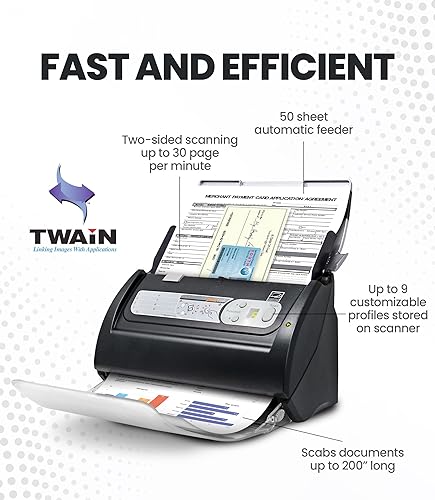
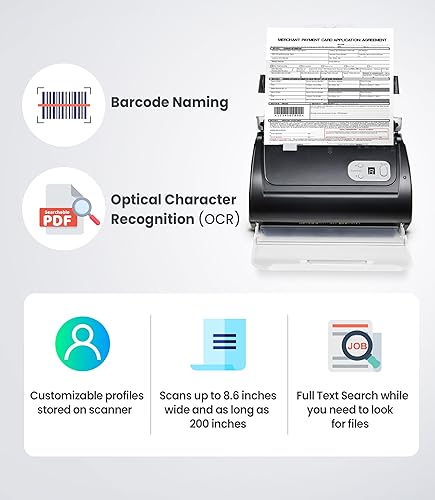
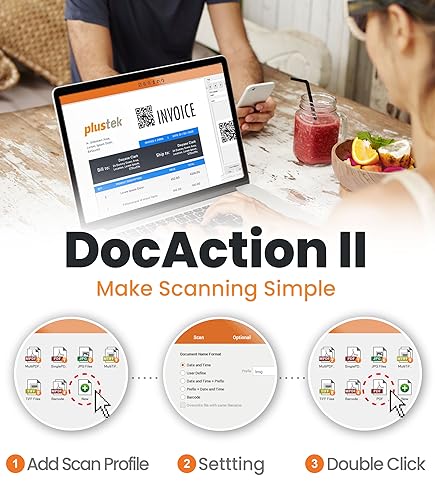
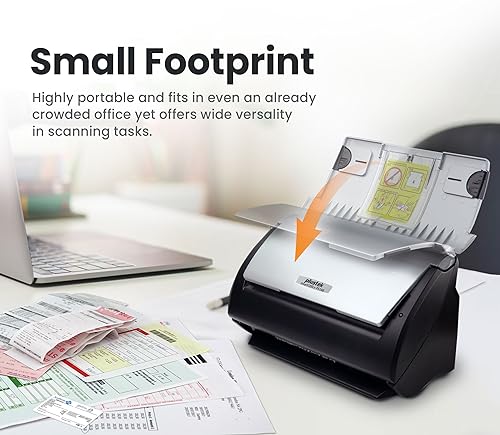
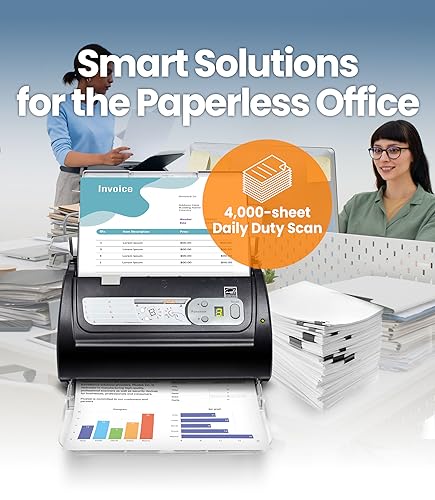
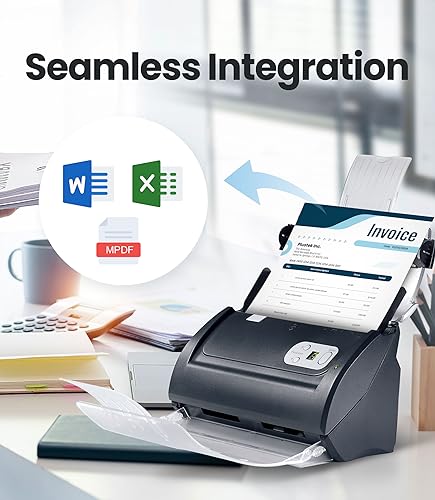
Plustek PS188 - High Speed Document Scanner 30 ppm with 50 Sheet Capacity | Color Duplex with one touch scan button - Software Support customize 255 scan task, Support Windows 7 / 8 / 10 / 11
As an Amazon Associate we earn from qualifying purchases. Product prices and availability are accurate as of the date/time indicated.
Speeds, feeder capacities, resolutions, and software features are each maker’s stated details under their test conditions for the current version. Price ranges are typical retail ranges and vary by retailer and promotion. Ratings are editorial ratings for archiving: feeder reliability and double-feed protection, scan and OCR quality through the bundled software, filing workflow, build for a large project, and value.
Detailed Reviews: Best Scanner for Archiving Documents Picks
1. Fujitsu ScanSnap iX1600 Class – Best Scanner for Archiving Documents Overall
The ScanSnap line is the archiving default for reasons a decade of owners can recite: a feeder that takes mixed paper with the least drama in the class, duplex scanning in one pass, and the ScanSnap Home software in its maker’s design, whose profiles and content-based naming and dating turn a stack of household paper into filed, searchable PDFs with the least filing labour per page of any system here. Its touchscreen profiles put the household’s recurring jobs, statements, school, guarantees, on the machine itself, which is how an archive stays current after the project weekend, one envelope at a time. For a home or a small office building its archive once and maintaining it forever, it is the first recommendation in this guide by a clear margin.
2. Fujitsu ScanSnap iX1400 Class – Best Simple Scanner for Archiving Documents
The iX1400 class keeps the ScanSnap feeder and software virtues and removes the wireless and touchscreen layers for a wired, one-computer archive at a lower price: the same one-button filing discipline, the same searchable output, driven from the computer it is attached to. For the household whose archive lives on one desk and one machine, which is most households, the removed features are the ones it would not have used, and the saving belongs in the backup drives the buying guide insists on. It is the connoisseur’s ScanSnap, bought by people who read the comparison and chose the workflow over the screen.
3. Epson WorkForce ES-580W Class – Best Fast Scanner for Archiving Documents
Epson’s WorkForce class competes on throughput and shared-office manners: stated speeds at the class’s brisk end, a touchscreen in its maker’s design for walk-up scanning to the office’s destinations, and software in its line that files to the folders and services a small business actually runs. Its feeder and double-feed behaviour suit the mixed, imperfect paper of a real office archive, old invoices, folded letters, the occasional card, and its wireless design lets the scanner live where the paper is rather than where the computer is. An office clearing a backlog against a deadline should start here and with the iX1600, and choose on the software’s fit to its filing.
4. Raven Pro Class – Best Scanner for Archiving Documents Direct to Cloud
Raven’s proposition is the computer removed: a large touchscreen on the scanner itself, direct filing to the cloud services in its maker’s stated integrations, and OCR in its system, so the archive is built at the machine, in the room where the paper lives, by a person who never opens a scanning application. For a household digitising a parent’s papers, a small organisation without an IT habit, or an owner whose filing system is a cloud drive entire, it is the most approachable system in the table. Its ongoing service terms in its maker’s arrangements should be read as part of the purchase, as with any cloud-centred device, and inside its intended workflow it earns its premium.
5. Brother ADS-3300W Class – Best Value Scanner for Archiving Documents
Brother’s ADS class delivers the archiving essentials, a duplex feeder with stated speeds in the competitive class, wireless in its line, and software that files and OCRs in the maker’s terms, at prices that regularly undercut the leaders it performs beside. Its software polish stands a step below ScanSnap’s, which is the honest trade at its price, and its hardware serves a household or small office archive completely. A buyer whose filing system is a disciplined folder tree of their own, who needs the machine to feed it reliably rather than to think for them, will find this the sharpest value in the guide.
6. Canon imageFORMULA R40 Class – Best Budget Scanner for Archiving Documents
Canon’s R40 class is the complete archive at the budget end: a duplex sheet-fed scanner with bundled software in its maker’s terms that produces searchable PDFs and files them by profile, in a package priced for a household doing one great project and a lifetime of envelopes. Its speeds and feeder finish stand below the leaders, and for a few thousand pages of household history that difference is measured in an afternoon, not in quality, because its scans and OCR are entirely archival. Bought with the backup discipline in the buying guide, it produces an archive indistinguishable in use from the summit rows’, which is the highest praise a budget row can earn.
Buying Guide: Building an Archive With the Best Scanner for Archiving Documents
Design the Filing System Before the First Scan
Spend one hour on paper before the scanner is unboxed. Decide the folder structure by the way the documents will be sought, by person and by kind in the common household pattern, finance, property, vehicles, health, guarantees, correspondence, with a year inside each where volume demands it. Decide the naming convention, date first in the year-month-day pattern so files sort themselves, then the source, then the subject, and write it down where the scanner lives. Decide the retention rule with your own obligations in mind, which originals are kept as paper after scanning, deeds, certificates, signed and sentimental documents in most households’ judgement, and which are shredded once their scans are verified, and check any tax, legal, or institutional requirements that apply to your records rather than assuming a scan replaces an original everywhere. Then set the scanner’s profiles to execute exactly that system, because an archive’s quality is decided in this hour and merely produced by the machine.
Scan in Batches, Verify, and Keep the Rhythm
Work the project as a production line. Sort the paper first, by document kind and size, staples and clips removed, tears repaired with the care a feeder deserves, and scan in batches that match the profiles, a box of statements, a folder of guarantees, checking each batch’s output as it lands: every page present, in order, legible, searchable, correctly named and filed, while the paper is still in your hand to rescan the one crumpled page the feeder disliked. Only verified batches release their paper to the shredder or the recycling, in the retention rule’s terms, and the paper that is kept is filed as paper in its own order. Set the working settings once, 300 dpi class, colour or greyscale for anything with meaning in its marks, searchable PDF as the output, and resist per-document fussing, because the archive that finishes beats the archive that was going to be perfect. An hour a day on that rhythm clears a household’s history in a month, and the scanner then takes its permanent job, the envelope opened at the desk and scanned the day it arrives.
Back the Archive Up Like It Matters, Because It Is the Only Copy
The moment the paper is shredded, the scan becomes the record, and it must be stored like one. Keep the archive in at least two places with one of them elsewhere, the classic pattern: the working copy on the computer or the home system, a copy on an external drive kept in another room or with family, and a copy in a cloud service in the owner’s own account, with the copies refreshed on a rhythm and checked, because an untested backup is a rumour. Use formats that will outlive their software, PDF and searchable PDF/A where the system offers it in its stated formats, in folders a future computer opens without the scanner’s application. Include the archive in the household’s digital estate thinking, the account access and the location noted where the family’s important information lives, because an archive’s purpose is to be found by the people who will need it, including a future you who has forgotten the folder’s name. Do that, and the scanner in this guide has done something larger than digitise paper: it has made the household’s history survive fire, flood, and forgetting, which was the project all along.
Frequently Asked Questions About Best Scanner for Archiving Documents
What is the best scanner for archiving documents?
The Fujitsu ScanSnap iX1600 class is the best overall: the most reliable feeder in the class, one-pass duplex scanning, and filing software whose profiles and automatic naming turn paper into a searchable archive with the least labour. The iX1400 class is its best simple wired sibling, Epson’s WorkForce class is the fast office pick, Raven Pro is the best direct-to-cloud system, Brother’s ADS class is the value pick, and Canon’s R40 class completes an archive on a budget. The filing system and backup discipline in the buying guide matter as much as the machine.
What resolution and format should I use for archiving documents?
Scan ordinary documents at 300 dpi class resolution, in colour or greyscale where stamps, signatures, or annotations carry meaning, and output searchable PDF, or PDF/A where your software offers the archival variant in its stated formats, so the text is findable by search for the archive’s whole life. Use 600 dpi class settings for small print, photographs, and documents whose fine detail is their value. Avoid bitonal black and white for anything but the plainest text; the storage it saves is cheap, and the information it destroys is not recoverable.
Can I throw away the paper after scanning it?
Often, but not by assumption. Many household and business records are accepted in scanned form, and many owners shred routine paper once its scan is verified, but some documents carry legal, tax, institutional, or sentimental standing as originals, deeds, certificates, signed agreements, and requirements differ by jurisdiction and institution. Check the rules that apply to your own records, keep the originals class in proper paper storage with the scans as working copies, and shred only verified scans of documents you have confirmed you may. When in doubt, keep the paper; storage of a folder is cheaper than replacing an original.
How do I keep a scanning project from stalling halfway?
Design the filing system first, folders, naming, and retention, in one hour on paper; set the scanner’s profiles to execute it in one button press per document kind; then work in verified batches, sorted paper, staples out, each batch checked for completeness and searchability while the paper is still in hand. An hour a day on that rhythm finishes a household archive in weeks. The projects that stall are the ones scanning into a pile of unnamed files awaiting a filing decision, so make the decision first and let the machine, any machine in this guide, do the rest.
Related guides
- Best Gaming Console for Families in 2026: 7 Best Gaming Consoles for Families That Play Together, Stay Safe, and Fit Every Age
- Best Soundbar for Movie Nights in 2026: 7 Best Soundbars for Movie Nights With Clear Sound, Simple Setup, and Easy Use for Movies
- Best USB C Hub for Laptop Users in 2026: 6 Top USB C Hubs for Laptop Users, USB C Hubs, and Easy Use
- Best Selfie Stick vs Tripod for Travel Photos in 2026: 7 Selfie Sticks and Tripods for Travel Photos That Are Light, Stable, and Easy to Pack
More from Amazon
Programs that pair well with the guide above. Offers and eligibility are set by Amazon and may change.
Free shipping on eligible items, Prime Video and more. Eligible new members can start with a free trial.
Start a Prime free trialAd-free music streaming. Eligible new subscribers can start with a free trial.
Try Music Unlimited freeA Prime membership for ages 18-24 with a trial period. Eligibility is set by Amazon.
See Prime for Young AdultsAudiobooks and podcasts to listen to on the go. Eligible new members can start with a free trial.
Try Audible freeAs an Amazon Associate we earn from qualifying purchases.

Write Your Review
No reviews yet. Be the first to share your experience!