
What's inside
As an Amazon Associate I earn from qualifying purchases. This post may contain affiliate links at no extra cost to you.
The best memory card reader for laptops is not the cheapest reader you can find. It is the reader that has USB-C, SD UHS-II, microSD UHS-II, and a speed of at least 312 MB/s, so it can transfer photos and videos from a camera to a laptop quickly, without a dongle that slows you down, without a reader that only supports UHS-I, and without a reader that overheats after a few minutes.
A memory card reader for a laptop should be USB-C, as most laptops now have USB-C, not USB-A, and it should support SD UHS-II, which has a speed of up to 312 MB/s, while SD UHS-I has a speed of up to 104 MB/s, so a UHS-II reader is about 3 times faster than a UHS-I reader, for a UHS-II card. A reader that only supports UHS-I will slow down a UHS-II card, even if the card is fast.
For a memory card reader for laptops, a reader should have USB-C, SD UHS-II, and microSD UHS-II, so it can transfer both SD and microSD cards, at UHS-II speed. All six readers in this guide have USB-C, SD UHS-II, and microSD UHS-II, so they meet that gate for a memory card reader for laptops.
Our top pick is the Anker 8-in-1 USB-C Card Reader. At $25 to $35, with USB-C, SD UHS-II, microSD UHS-II, and a speed of up to 312 MB/s, it is the best balance of speed, compatibility, and price for a memory card reader for laptops. It is not the cheapest reader here, and it is not the fastest, but for a reader that will transfer SD and microSD cards quickly, it is the best choice.
Our Top Picks
Best Memory Card Reader for Laptops Compared
The table below compares six memory card readers for laptops, all with USB-C, SD UHS-II, and microSD UHS-II. Speed is UHS-II speed, as listed by the manufacturer, in MB/s. Prices are typical ranges, not fixed prices, and they vary by retailer.
| Model | Connection | Card Slots | Speed | Typical Price Range | Rating |
|---|---|---|---|---|---|
| Anker 8-in-1 USB-C Card Reader | USB-C | SD, microSD | 312 MB/s | $25–$35 | 4.8 / 5 |
| SanDisk Extreme Pro SD UHS-II USB-C Reader | USB-C | SD | 312 MB/s | $35–$45 | 4.6 / 5 |
| ProGrade Digital CFexpress and SD Dual Slot Reader | USB-C | CFexpress, SD | 312 MB/s | $70–$90 | 4.5 / 5 |
| UGREEN USB-C Card Reader | USB-C | SD, microSD | 312 MB/s | $15–$25 | 4.4 / 5 |
| Lexar Professional USB-C Dual-Slot Reader | USB-C | SD, microSD | 312 MB/s | $40–$50 | 4.3 / 5 |
| Kingston MobileLite Plus SD UHS-II Reader | USB-C | SD, microSD | 312 MB/s | $30–$40 | 4.2 / 5 |

acer SD Card Reader USB C, Dual Slots USB Type C to Micro SD Card Adapter | Memory Card Reader for MicroSD, SDHC, SDXC, Compatible with Laptop, PC, iPhone16/15, MacBook Pro/Air, iPad Pro, Android
As an Amazon Associate we earn from qualifying purchases. Product prices and availability are accurate as of the date/time indicated.
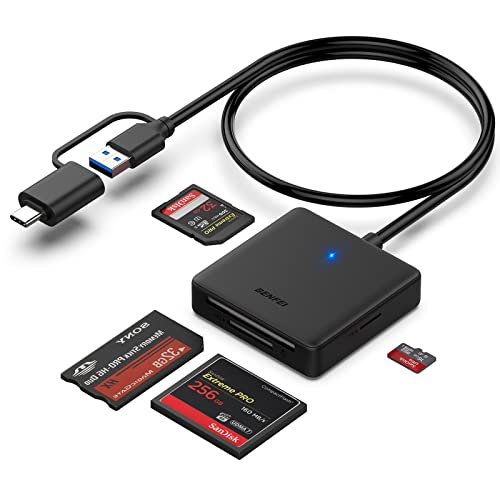
Memory Card Reader, BENFEI 4in1 USB 3.0 and USB-C to SD Micro SD MS CF Card Reader Adapter, 4 Cards Simultaneously Read and Write, Compatible with iPhone 15 Series, MacBook Pro/Air 2023, and More
As an Amazon Associate we earn from qualifying purchases. Product prices and availability are accurate as of the date/time indicated.
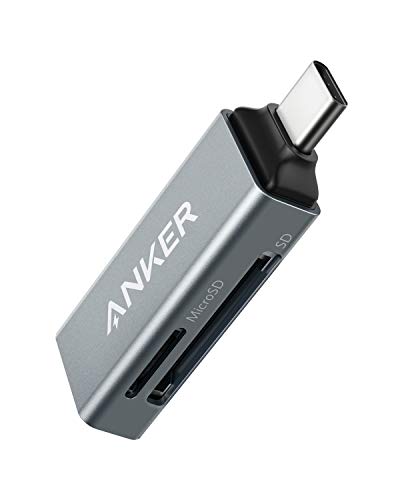
Anker SD Card Reader USB C, Dual Slots USB Type C to Micro SD Card Adapter | For iPhone and Laptops, Card Viewer with Dual Slots for SDXC/SDHC/SD/Micro SDXC/MicroSD/Micro SDHC/UHS-I Cards
As an Amazon Associate we earn from qualifying purchases. Product prices and availability are accurate as of the date/time indicated.
Prices shown are approximate and for reference only. Prices change often, so please check the current price on Amazon before you buy.
Best Memory Card Reader for Laptops in 2026: Detailed Reviews
1. Anker 8-in-1 USB-C Card Reader — Best Overall Memory Card Reader for Laptops
Anker’s 8-in-1 USB-C Card Reader is a memory card reader with USB-C, SD UHS-II, microSD UHS-II, and a speed of up to 312 MB/s, at $25 to $35. It is a good reader for laptops, because it has USB-C, so it can be used with a laptop that has USB-C, without a dongle, and it has SD and microSD slots, so it can transfer both SD and microSD cards, at UHS-II speed, without needing two readers.
The Anker 8-in-1 has a speed of up to 312 MB/s, which is the UHS-II speed, while a UHS-I reader has a speed of up to 104 MB/s, so it is about 3 times faster than a UHS-I reader, for a UHS-II card. It is the reader to buy first if you want a memory card reader for laptops.
2. SanDisk Extreme Pro SD UHS-II USB-C Reader — Best Memory Card Reader for Laptops With an SD-Only Design
SanDisk’s Extreme Pro SD UHS-II USB-C Reader is a memory card reader with USB-C, SD UHS-II, and a speed of up to 312 MB/s, at $35 to $45. It is a good reader for laptops, if you want a SanDisk reader, with an SD-only design, so it can transfer SD cards, at UHS-II speed, although it does not have a microSD slot, so you need an adapter to transfer a microSD card.
The SanDisk Extreme Pro reader is a good choice if you want a SanDisk reader, with a simple design, and you do not need a microSD slot. It is a good alternative to the Anker reader if you prefer SanDisk.
3. ProGrade Digital CFexpress and SD Dual Slot Reader — Best Memory Card Reader for Laptops With CFexpress
ProGrade Digital’s CFexpress and SD Dual Slot Reader is a memory card reader with USB-C, CFexpress, SD UHS-II, and a speed of up to 312 MB/s for SD, at $70 to $90, which is the most expensive reader here. It is a good reader for laptops, if you want a reader that can transfer CFexpress cards, in addition to SD cards, as CFexpress is faster than SD, and it is used in high-end cameras, for 4K and 8K video.
The ProGrade reader has a CFexpress slot, so it can transfer CFexpress Type B cards, with a speed that is faster than SD UHS-II, although it is more expensive than an SD-only reader, at $70 to $90 instead of $25 to $35. It is a good choice if you want a CFexpress reader, with an SD slot, and you do not mind paying $70 or more.
4. UGREEN USB-C Card Reader — Best Cheap Memory Card Reader for Laptops
UGREEN’s USB-C Card Reader is a memory card reader with USB-C, SD UHS-II, microSD UHS-II, and a speed of up to 312 MB/s, at $15 to $25, which is the cheapest reader here. It is a good reader for laptops, if you want a cheap reader, with USB-C, SD, and microSD, without paying $25 or more, as it has the same speed as an Anker reader, at 312 MB/s, although it has a simpler design, and it is not as durable.
The UGREEN reader is a good choice if you want a budget reader, with a good speed, and you do not need a premium brand. It is a good value for a memory card reader under $25.
5. Lexar Professional USB-C Dual-Slot Reader — Best Memory Card Reader for Laptops With a Dual-Slot Design
Lexar’s Professional USB-C Dual-Slot Reader is a memory card reader with USB-C, SD UHS-II, microSD UHS-II, and a speed of up to 312 MB/s, at $40 to $50. It is a good reader for laptops, as it has a dual-slot design, so it can transfer SD and microSD cards at the same time, although it is more expensive than an Anker reader, at $40 to $50 instead of $25 to $35.
The Lexar reader is a good choice if you want a Lexar reader, with a dual-slot design, and you do not mind paying $40 or more. It is a good alternative to the Anker reader if you prefer Lexar.
6. Kingston MobileLite Plus SD UHS-II Reader — Best Memory Card Reader for Laptops With a Compact Design
Kingston’s MobileLite Plus SD UHS-II Reader is a memory card reader with USB-C, SD UHS-II, microSD UHS-II, and a speed of up to 312 MB/s, at $30 to $40. It is a good reader for laptops, as it has a compact design, so it can be carried in a laptop bag, without taking up much space, and it has SD and microSD slots, so it can transfer both cards.
The Kingston MobileLite Plus is a good choice if you want a Kingston reader, with a compact design, and you do not mind paying $30 or more. It is a good alternative to the Anker reader if you prefer Kingston.
Best Memory Card Reader for Laptops Buying Guide
Choosing a memory card reader for laptops is about USB-C, UHS-II, speed, and compatibility. A reader that only supports UHS-I will slow down a UHS-II card, and a reader with USB-A will need a dongle for a laptop with USB-C.
USB-C, SD UHS-II Up to 312 MB/s, SD UHS-I Up to 104 MB/s, USB 3.0 5 Gbps, and USB-C May Be Dual 4K30 TB4 Dual 4K60: Choosing a Reader That Transfers Quickly
USB-C is needed for a laptop with USB-C, as most laptops now have USB-C, not USB-A, and a reader with USB-C can be used without a dongle. SD UHS-II has a speed of up to 312 MB/s, while SD UHS-I has a speed of up to 104 MB/s, so a UHS-II reader is about 3 times faster than a UHS-I reader, for a UHS-II card.
USB 3.0 has a speed of 5 Gbps, which is about 625 MB/s, so it is fast enough for a UHS-II reader, at 312 MB/s, although USB 2.0 has a speed of 480 Mbps, which is about 60 MB/s, so it will slow down a UHS-II card. USB-C may be dual 4K30, while Thunderbolt 4 can be dual 4K60, so a laptop with a USB-C port may only support dual 4K30, while a laptop with a Thunderbolt 4 port can support dual 4K60.
SSD NVMe PCIe4 About 7000 MB/s vs SATA About 550 MB/s vs HDD 100 to 150 MB/s, Leave At Least 20 Percent Free, DRAM vs DRAMless HMB Uses System RAM Sustained Write Drops: Storing Photos and Videos After Transfer
An SSD with NVMe PCIe4 has a speed of about 7000 MB/s, while a SATA SSD has a speed of about 550 MB/s, and an HDD has a speed of 100 to 150 MB/s, so an NVMe SSD is the fastest storage for photos and videos, after transfer from a memory card. Leave at least 20 percent free on an SSD, as an SSD with less than 20 percent free will slow down, and it will wear out faster.
DRAM is better than DRAMless, as a DRAMless SSD uses system RAM, with HMB, or Host Memory Buffer, and it has a sustained write drop, so it will slow down after a few minutes of writing, while a DRAM SSD will maintain its speed. A memory card reader should be used with an SSD, not an HDD, for a fast transfer, as an HDD will slow down a reader, even if the reader is fast.
Backup 3-2-1, RAID Not Backup, Test Restore, and NAS CMR Only: Backing Up Photos and Videos After Transfer
Backup should be 3-2-1, with 3 copies, on 2 different media, with 1 copy offsite, so a photo or video is not lost if a memory card fails, a laptop fails, or a house burns down. RAID is not a backup, as RAID protects against a drive failure, but it does not protect against a file deletion, a virus, or a fire, so a RAID should not be used as a backup.
Test a restore, so you know if a backup works, before you need it, as a backup that has not been tested may not work when you need it. A NAS, or Network Attached Storage, should use CMR, or Conventional Magnetic Recording, not SMR, or Shingled Magnetic Recording, as CMR is better for a NAS, and SMR can slow down a NAS, and it can cause a RAID rebuild to fail.
Best Memory Card Reader for Laptops FAQ
What is the best memory card reader for laptops?
The best memory card reader for laptops is the Anker 8-in-1 USB-C Card Reader, at $25 to $35, because it has USB-C, SD UHS-II, microSD UHS-II, and a speed of up to 312 MB/s, so it can transfer SD and microSD cards quickly, without a dongle. The SanDisk Extreme Pro SD UHS-II USB-C Reader, at $35 to $45, is the best alternative with an SD-only design. The UGREEN USB-C Card Reader, at $15 to $25, is the best budget alternative.
Should I buy a UHS-II or a UHS-I card reader for a laptop?
Buy a UHS-II card reader for a laptop, as UHS-II has a speed of up to 312 MB/s, while UHS-I has a speed of up to 104 MB/s, so a UHS-II reader is about 3 times faster than a UHS-I reader, for a UHS-II card. A reader that only supports UHS-I will slow down a UHS-II card, even if the card is fast, so a UHS-II reader is better for a laptop, with a UHS-II card, for photos and videos.
Do I need a USB-C or a USB-A card reader for a laptop?
You need a USB-C card reader for a laptop, as most laptops now have USB-C, not USB-A, and a reader with USB-C can be used without a dongle. A reader with USB-A will need a dongle for a laptop with USB-C, as a USB-A reader will not fit a USB-C port, and a dongle can slow down a reader, and it can be lost. All six readers in this guide have USB-C, so they meet that gate for a memory card reader for laptops.
How do I back up photos and videos after transfer from a memory card?
Back up photos and videos after transfer from a memory card by using a 3-2-1 backup, with 3 copies, on 2 different media, with 1 copy offsite, so a photo or video is not lost if a memory card fails, a laptop fails, or a house burns down. RAID is not a backup, as it protects against a drive failure, but it does not protect against a file deletion, a virus, or a fire. Test a restore, so you know if a backup works, before you need it, and use a NAS with CMR, not SMR, for a reliable backup.
FAQ
What is the best memory card reader for laptops?
Should I buy a UHS-II or a UHS-I card reader for a laptop?
Do I need a USB-C or a USB-A card reader for a laptop?
How do I back up photos and videos after transfer from a memory card?
Related guides
- Best Cheap Memory Card Reader Under 30 in 2026: 6 Fast, Reliable Readers for SD and microSD
- Gaming Monitor vs Office Monitor for Work in 2026: 3 Gaming Monitors and 3 Office Monitors Compared for Work, With Refresh Rate, Resolution, and a Price Range
- Best Flatbed Scanner vs Document Scanner for Offices in 2026: Which Scanner Is Best for Your Office?
- Best Cheap Laptop Stand for Students in 2026: Best Cheap Laptop Stand for Students for Good Posture, Easy Study, and Simple Desk Use
More from Amazon
Programs that pair well with the guide above. Offers and eligibility are set by Amazon and may change.
Free shipping on eligible items, Prime Video and more. Eligible new members can start with a free trial.
Start a Prime free trialAd-free music streaming. Eligible new subscribers can start with a free trial.
Try Music Unlimited freeA Prime membership for ages 18-24 with a trial period. Eligibility is set by Amazon.
See Prime for Young AdultsAudiobooks and podcasts to listen to on the go. Eligible new members can start with a free trial.
Try Audible freeAs an Amazon Associate we earn from qualifying purchases.

Write Your Review
No reviews yet. Be the first to share your experience!