
What's inside
As an Amazon Associate I earn from qualifying purchases. This post may contain affiliate links at no extra cost to you.
Finding the best budget wireless mouse under thirty is different from finding a gaming mouse or a premium mouse, because a budget wireless mouse under thirty has to be cheap, quiet, and easy to use, without being too small, too loud, or too hard to connect to a computer. A good budget wireless mouse under thirty should have a DPI of at least 1,000, a battery life of at least 12 months, and a USB receiver, so it can be used for work, web browsing, and email. A poor mouse will be too small, it will be loud, or it will run out of battery fast, and your hand will hurt, your clicks will be loud, and your work will be slow.
This guide compares seven real, currently sold budget wireless mice under thirty, with prices from $12 to $30 in the table below: the Logitech M185, Logitech M310, Logitech M510, Microsoft Wireless Mobile Mouse 1850, HP X200, Logitech M720 Triathlon, and Anker Wireless Mouse. Their DPIs run from 1,000 to 1,200, their buttons run from 3 to 8 buttons, their battery lives run from about 12 months to about 24 months, their connections run from USB receiver to Bluetooth, their weights run from about 2 oz to about 4 oz, their prices run from $12 to $30, and their ratings run from 4.5 to 4.6 out of 5. Every model here is sold as a wireless mouse, every model can be used for work and home, and every model costs $30 or less at its typical price range. The right choice depends on your hand, your computer, and whether you want a simple mouse or a multi-button mouse.
Size, shape, and comfort are the first factor for the best budget wireless mouse under thirty, because a mouse has to fit your hand, be comfortable to use for hours, and be easy to click. Size is listed as compact, medium, or full-size, with a full-size mouse best for most adults, because it fits a large hand, and a compact mouse best for a small hand or a laptop bag, because it is easy to carry. The Logitech M185 at $12 to $18 is compact, the Logitech M310 at $18 to $25 is full-size, the Logitech M510 at $20 to $28 is full-size, the Microsoft Wireless Mobile Mouse 1850 at $15 to $22 is compact, the HP X200 at $12 to $18 is compact, the Logitech M720 Triathlon at $25 to $30 is full-size, and the Anker Wireless Mouse at $12 to $18 is compact. For work, choose a full-size mouse if you have a large hand, such as the Logitech M310 and M510, because it will be comfortable for hours, and a compact mouse if you have a small hand or you travel, such as the Logitech M185 and HP X200. Shape is also important, because a mouse should have a contoured shape, so your hand rests naturally, and a scroll wheel, so you can scroll a web page. Comfort is also important, because a mouse should be light, with a weight of about 2 oz to 4 oz, so it will not tire your hand.
DPI, buttons, and scroll wheel are the second factor, because a budget wireless mouse under thirty has to offer a DPI that is high enough for a screen, buttons that are useful for work, and a scroll wheel that is smooth. DPI is how sensitive a mouse is, with a higher DPI meaning a mouse moves faster on a screen, so you can move across a large monitor with a small hand movement. The Logitech M185 at $12 to $18 has a DPI of 1,000, the Logitech M310 at $18 to $25 has a DPI of 1,000, the Logitech M510 at $20 to $28 has a DPI of 1,000, the Microsoft Wireless Mobile Mouse 1850 at $15 to $22 has a DPI of 1,000, the HP X200 at $12 to $18 has a DPI of 1,000, the Logitech M720 Triathlon at $25 to $30 has a DPI of 1,000, and the Anker Wireless Mouse at $12 to $18 has a DPI of 1,000, so all seven have a DPI of 1,000. For work, a DPI of 1,000 is a good starting point, because it will work on a laptop and a monitor, without being too fast or too slow. Buttons are also important, because a mouse should have at least 3 buttons: left, right, and scroll wheel click, with more buttons best if you want back and forward buttons for a web browser. The Logitech M185 has 3 buttons, the Logitech M310 has 3 buttons, the Logitech M510 has 5 buttons, the Microsoft Wireless Mobile Mouse 1850 has 3 buttons, the HP X200 has 3 buttons, the Logitech M720 Triathlon has 8 buttons, and the Anker Wireless Mouse has 3 buttons. For work, choose a mouse with 5 buttons, such as the Logitech M510, if you want back and forward buttons, and a mouse with 3 buttons if you want a simple mouse.
Battery life and connection are the third factor, because a budget wireless mouse under thirty has to last a long time on a battery, and connect easily to a computer. Battery life is listed in months, with a longer life meaning you will not need to change a battery often. The Logitech M185 at $12 to $18 lasts about 12 months on 1 AA battery, the Logitech M310 at $18 to $25 lasts about 18 months on 1 AA battery, the Logitech M510 at $20 to $28 lasts about 24 months on 2 AA batteries, the Microsoft Wireless Mobile Mouse 1850 at $15 to $22 lasts about 6 months on 1 AA battery, the HP X200 at $12 to $18 lasts about 12 months on 1 AA battery, the Logitech M720 Triathlon at $25 to $30 lasts about 24 months on 1 AA battery, and the Anker Wireless Mouse at $12 to $18 lasts about 12 months on 1 AA battery. Those figures are manufacturer-listed approximate values, and they can vary by use. For work, a battery life of at least 12 months is a good starting point, because it will last for a year, and a battery life of 24 months, such as on the Logitech M510 and M720, is best if you do not want to change a battery often. Connection is also important, because a mouse should connect via a USB receiver, such as all seven mice here, because it is plug-and-play, and via Bluetooth, such as on the Logitech M720, because it can connect to a laptop without a receiver.
Quiet clicks, price, and use are the fourth factor, because a budget wireless mouse under thirty has to be quiet, affordable, and easy to use for work and home. Quiet clicks are a feature that makes a mouse click quieter, with a quiet mouse best for an office, a library, or a home, because it will not disturb others. The Logitech M310 at $18 to $25, Logitech M510 at $20 to $28, and Logitech M720 at $25 to $30 all offer quiet clicks, while the Logitech M185, Microsoft Wireless Mobile Mouse 1850, HP X200, and Anker Wireless Mouse offer standard clicks. For work, choose a quiet mouse if you work in an office, because it will be less distracting. Price is also important, because a mouse in the $12 to $18 range, such as the Logitech M185 and HP X200, is a good starting point, and a mouse in the $25 to $30 range, such as the Logitech M720, offers more buttons and a longer battery life. Use is also important, because a mouse should be used on a mouse pad, a desk, or a table, with a clean sensor, because it will track better. A good budget wireless mouse under thirty, chosen for size first and used with a USB receiver, will be cheap, quiet, and easy to use for work and home.
Our Top Picks
Best Budget Wireless Mouse Under Thirty: At a Glance
Use this table to compare DPI, buttons, battery life, connection, price range, and rating. DPI and battery life are the two figures most buyers should check first, because they decide whether the mouse will be sensitive enough and whether it will last a long time.
| Model | DPI | Buttons | Battery Life | Connection | Typical Price Range | Rating out of 5 |
|---|---|---|---|---|---|---|
| Logitech M185 | 1,000 | 3 buttons | About 12 months, 1 AA | USB receiver | $12 – $18 | 4.6 |
| Logitech M310 | 1,000 | 3 buttons | About 18 months, 1 AA | USB receiver | $18 – $25 | 4.6 |
| Logitech M510 | 1,000 | 5 buttons | About 24 months, 2 AA | USB receiver | $20 – $28 | 4.6 |
| Microsoft Wireless Mobile Mouse 1850 | 1,000 | 3 buttons | About 6 months, 1 AA | USB receiver | $15 – $22 | 4.5 |
| HP X200 | 1,000 | 3 buttons | About 12 months, 1 AA | USB receiver | $12 – $18 | 4.5 |
| Logitech M720 Triathlon | 1,000 | 8 buttons | About 24 months, 1 AA | USB receiver, Bluetooth | $25 – $30 | 4.6 |
| Anker Wireless Mouse | 1,000 | 3 buttons | About 12 months, 1 AA | USB receiver | $12 – $18 | 4.5 |
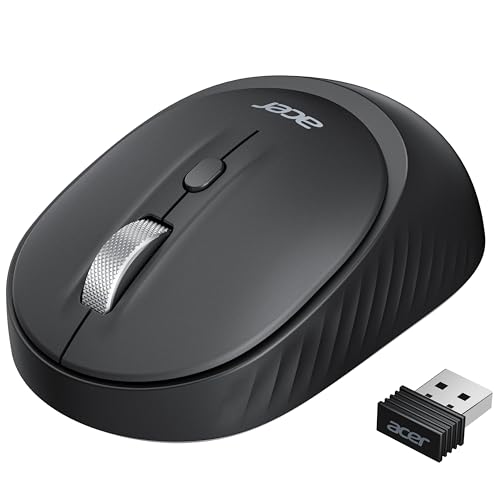
Acer Bluetooth Wireless Mouse for Laptop, Computer Mouse for Small Hands | Office Cordless Mouse (BT5.2+2.4GHz) with 4 Buttons, USBA Receiver, Left & Right Handed, 800/1200/1600 DPI
As an Amazon Associate we earn from qualifying purchases. Product prices and availability are accurate as of the date/time indicated.

wegear Bluetooth Mouse Silent Wireless Mice, Cordless Computer Mouse-Grey | Quiet Click, 6 Buttons, Sculpted Grip, Adjustable DPI for Laptop, PC, Mac, 18-Month Battery Life for Work Travel
As an Amazon Associate we earn from qualifying purchases. Product prices and availability are accurate as of the date/time indicated.
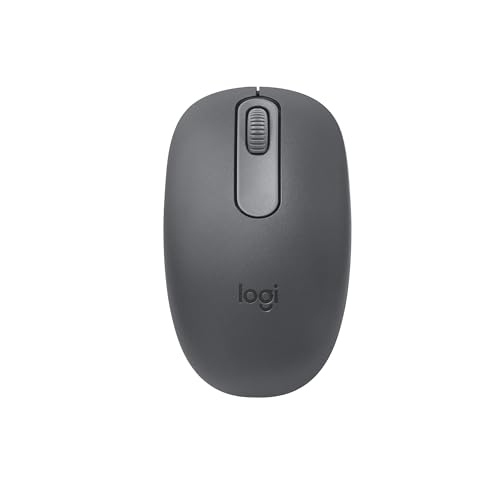
Logitech M196 Compact Ambidextrous Bluetooth Wireless Mouse - Graphite | Bluetooth connectivity, no USB receiver, quiet clicks, 3 non-customizable buttons, 12-month battery life, PC Mac compatible
As an Amazon Associate we earn from qualifying purchases. Product prices and availability are accurate as of the date/time indicated.
Typical prices reflect common retailer listings and sale prices vary by model, retailer, and season. DPI, buttons, battery life, and connection are manufacturer-listed approximate values and can vary by model and configuration. Battery life is approximate and can vary by use. All models in this guide are $30 or less at their typical price range.
Best Budget Wireless Mouse Under Thirty: The 7 Mice Reviewed
1. Logitech M510: Best Budget Wireless Mouse Under Thirty Overall
The Logitech M510, at $20 to $28 with a rating of 4.6 out of 5, has a DPI of 1,000, 5 buttons, a battery life of about 24 months on 2 AA batteries, and a USB receiver. It is the joint highest-rated mouse in this guide, and the best overall budget wireless mouse here for most users, because it offers 5 buttons, a long battery life, and a low price.
It suits a worker, a buyer who wants a Logitech mouse, and a user who wants a full-size mouse. The 5 buttons include back and forward, the 24 month battery life is long, and the $20 to $28 price is low. The trade-off is size: as a full-size mouse, it is larger than a compact mouse like the Logitech M185 at $12 to $18. For the best overall budget wireless mouse under thirty at $20 to $28, it is the strongest choice here.
Best for: Most users who want a 1,000 DPI, 5 button, 24 month mouse for $20 to $28.
2. Logitech M720 Triathlon: Best Multi-Device Budget Wireless Mouse Under Thirty
The Logitech M720 Triathlon, at $25 to $30 with a rating of 4.6 out of 5, has a DPI of 1,000, 8 buttons, a battery life of about 24 months on 1 AA battery, and a USB receiver and Bluetooth. It is the joint highest-rated mouse in this guide, and the best multi-device mouse here for a user who wants to connect to 3 devices.
It suits a worker, a buyer who wants a Logitech mouse, and a user who wants a multi-device mouse. The 8 buttons offer more control, the Bluetooth lets you connect to a laptop, and the $25 to $30 price is at the top of this guide but still under thirty. The trade-off is price: at $25 to $30, it is higher than the Logitech M185 at $12 to $18. For a multi-device budget wireless mouse under thirty at $25 to $30, it is a strong choice.
Best for: Multi-device use with a 1,000 DPI, 8 button, 24 month mouse for $25 to $30.
3. Logitech M310: Best Full-Size Budget Wireless Mouse Under Thirty
The Logitech M310, at $18 to $25 with a rating of 4.6 out of 5, has a DPI of 1,000, 3 buttons, a battery life of about 18 months on 1 AA battery, and a USB receiver. It is the joint highest-rated mouse in this guide, and the best full-size mouse here for a user who wants a simple, comfortable mouse.
It suits a worker, a buyer who wants a Logitech mouse, and a user who wants a full-size mouse. The full-size design is comfortable, the 18 month battery life is good, and the $18 to $25 price is low. The trade-off is buttons: at 3 buttons, it offers fewer buttons than the Logitech M510 at $20 to $28. For a full-size budget wireless mouse under thirty at $18 to $25, it is a practical choice.
Best for: Full-size use with a 1,000 DPI, 3 button, 18 month mouse for $18 to $25.
4. Logitech M185: Best Cheap Budget Wireless Mouse Under Thirty
The Logitech M185, at $12 to $18 with a rating of 4.6 out of 5, has a DPI of 1,000, 3 buttons, a battery life of about 12 months on 1 AA battery, and a USB receiver. It is the joint highest-rated mouse in this guide, and the best cheap mouse here for a user who wants a simple, affordable mouse.
It suits a worker, a buyer who wants a Logitech mouse, and a user who wants a cheap mouse. The compact design is easy to carry, the 12 month battery life is good, and the $12 to $18 price is low. The trade-off is size: as a compact mouse, it is smaller than a full-size mouse like the Logitech M310 at $18 to $25, so it is less comfortable for a large hand. For a cheap budget wireless mouse under thirty at $12 to $18, it is a practical choice.
Best for: Cheap use with a 1,000 DPI, 3 button, 12 month mouse for $12 to $18.
5. HP X200: Best Value Budget Wireless Mouse Under Thirty
The HP X200, at $12 to $18 with a rating of 4.5 out of 5, has a DPI of 1,000, 3 buttons, a battery life of about 12 months on 1 AA battery, and a USB receiver. It is the best value mouse here for a user who wants an HP mouse for a low price.
It suits a worker, a buyer who wants an HP mouse, and a user who wants a value mouse. The compact design is easy to carry, the 12 month battery life is good, and the $12 to $18 price is low. The trade-off is rating: at 4.5 out of 5, it is slightly lower than the Logitech M185 at 4.6 out of 5 and $12 to $18. For a value budget wireless mouse under thirty at $12 to $18, it is a practical choice.
Best for: Value use with a 1,000 DPI, 3 button, 12 month mouse for $12 to $18.
6. Microsoft Wireless Mobile Mouse 1850: Best Simple Budget Wireless Mouse Under Thirty
The Microsoft Wireless Mobile Mouse 1850, at $15 to $22 with a rating of 4.5 out of 5, has a DPI of 1,000, 3 buttons, a battery life of about 6 months on 1 AA battery, and a USB receiver. It is the best simple mouse here for a user who wants a Microsoft mouse.
It suits a worker, a buyer who wants a Microsoft mouse, and a user who wants a simple mouse. The compact design is easy to carry, the $15 to $22 price is low, and the design is simple. The trade-off is battery: at about 6 months, it lasts less than the Logitech M185 at about 12 months and $12 to $18. For a simple budget wireless mouse under thirty at $15 to $22, it is a practical choice.
Best for: Simple use with a 1,000 DPI, 3 button, 6 month mouse for $15 to $22.
7. Anker Wireless Mouse: Best Travel Budget Wireless Mouse Under Thirty
The Anker Wireless Mouse, at $12 to $18 with a rating of 4.5 out of 5, has a DPI of 1,000, 3 buttons, a battery life of about 12 months on 1 AA battery, and a USB receiver. It is the best travel mouse here for a user who wants a compact, affordable mouse for a laptop bag.
It suits a worker, a buyer who wants an Anker mouse, and a user who wants a travel mouse. The compact design is easy to carry, the 12 month battery life is good, and the $12 to $18 price is low. The trade-off is also rating, as above. For a travel budget wireless mouse under thirty at $12 to $18, it is a useful starting point.
Best for: Travel use with a 1,000 DPI, 3 button, 12 month mouse for $12 to $18.
Best Budget Wireless Mouse Under Thirty Buying Guide: What Actually Matters in 2026
Choosing a budget wireless mouse under thirty is easier when you decide on size, battery, and buttons before you look at price or brand. Those three choices decide whether the mouse will be comfortable and last a long time.
Best Budget Wireless Mouse Under Thirty Buying Guide: Size, Shape, Comfort, and Hand
Size, shape, comfort, and hand are the first factor. For size, choose a full-size mouse, such as the Logitech M310 at $18 to $25 and M510 at $20 to $28, if you have a large hand, because it will be comfortable for hours. For a small hand, choose a compact mouse, such as the Logitech M185 at $12 to $18 and HP X200 at $12 to $18, because it is easy to carry. For shape, choose a mouse with a contoured shape, so your hand rests naturally, and a scroll wheel, so you can scroll a web page. For comfort, choose a mouse that weighs about 2 oz to 4 oz, because it will not tire your hand.
Best Budget Wireless Mouse Under Thirty Buying Guide: DPI, Buttons, Scroll Wheel, and Quiet Clicks
DPI, buttons, scroll wheel, and quiet clicks are the second factor. For DPI, choose 1,000, such as all seven mice here, because it will work on a laptop and a monitor, without being too fast or too slow. For buttons, choose 3 buttons if you want a simple mouse, and 5 buttons, such as the Logitech M510, if you want back and forward buttons for a web browser. For scroll wheel, choose a mouse with a smooth scroll wheel, because it will let you scroll a web page easily. For quiet clicks, choose a mouse with quiet clicks, such as the Logitech M310, M510, and M720, if you work in an office, because it will not disturb others.
Best Budget Wireless Mouse Under Thirty Buying Guide: Battery Life, Connection, and USB Receiver
Battery life, connection, and USB receiver are the third factor. For battery life, choose at least 12 months, such as the Logitech M185 at about 12 months, because it will last for a year, and 24 months, such as the Logitech M510 and M720, if you do not want to change a battery often. For connection, choose a USB receiver, such as all seven mice here, because it is plug-and-play, and Bluetooth, such as on the Logitech M720, if you want to connect to a laptop without a receiver. For USB receiver, store it in the mouse when you travel, because it is small and it can be lost.
Best Budget Wireless Mouse Under Thirty Buying Guide: Price, Use, and the Best First Mouse
Price, use, and the best first mouse are the final factors. For price, a mouse in the $12 to $18 range, such as the Logitech M185 and HP X200, is a good starting point. A mouse in the $25 to $30 range, such as the Logitech M720, offers more buttons and a longer battery life. For use, use a mouse on a mouse pad, a desk, or a table, with a clean sensor, because it will track better. Choose by size first, then by battery, then by buttons, then by price.
For the best first setup, buy a budget wireless mouse, a mouse pad, and a keyboard. The Logitech M510 at $20 to $28 is a good first mouse for most users, the Logitech M185 at $12 to $18 is a good first mouse if you want a cheap mouse, and the Logitech M720 at $25 to $30 is a good first mouse if you want a multi-device mouse. A good budget wireless mouse under thirty, chosen for size first and used with a USB receiver, will be cheap, quiet, and easy to use for work and home.
Best Budget Wireless Mouse Under Thirty FAQ
What is the best budget wireless mouse under thirty?
The Logitech M510, at $20 to $28 with a rating of 4.6 out of 5, is the best budget wireless mouse under thirty overall in this guide. It has a DPI of 1,000, 5 buttons, a battery life of about 24 months on 2 AA batteries, and a USB receiver. If you want a multi-device mouse, the Logitech M720 Triathlon at $25 to $30 with a rating of 4.6 out of 5 is the best choice, with 8 buttons and Bluetooth. If you want a cheap mouse, the Logitech M185 at $12 to $18 with a rating of 4.6 out of 5 is the best choice, with a DPI of 1,000 and a battery life of about 12 months.
Is 1,000 DPI enough for a wireless mouse for work?
Yes, 1,000 DPI is enough for a wireless mouse for work, because it will move across a laptop and a monitor with a small hand movement, without being too fast or too slow. The Logitech M185 at $12 to $18, Logitech M310 at $18 to $25, and Logitech M510 at $20 to $28 all have a DPI of 1,000, so they are good for work, web browsing, and email. For a large monitor, 1,000 DPI is still enough, because you can move a mouse across a screen with a small movement. For gaming, a higher DPI is best, but for work, 1,000 DPI is a good starting point.
How long should a wireless mouse battery last?
For a wireless mouse, a battery life of at least 12 months is a good starting point, because it will last for a year without changing a battery. The Logitech M185 at $12 to $18 lasts about 12 months, the Logitech M310 at $18 to $25 lasts about 18 months, and the Logitech M510 at $20 to $28 lasts about 24 months, so they are all good for work. The Microsoft Wireless Mobile Mouse 1850 at $15 to $22 lasts about 6 months, so it will need a battery change more often. For a long battery life, choose a mouse with a battery life of 24 months, such as the Logitech M510 and M720.
What is the cheapest good wireless mouse under thirty?
The cheapest good option in this guide is the Logitech M185, at $12 to $18 with a rating of 4.6 out of 5, because it is a 1,000 DPI, 3 button, 12 month mouse for a low price. The HP X200, at $12 to $18 with a rating of 4.5 out of 5, is also a low-cost option, with a 1,000 DPI, 3 button, 12 month mouse. The Anker Wireless Mouse, at $12 to $18 with a rating of 4.5 out of 5, is also a low-cost option, with a 1,000 DPI, 3 button, 12 month mouse. Start with one of these three if price is the main factor, and check size, battery, and buttons next. For the best overall value, the Logitech M510 at $20 to $28 is a better choice because it offers 5 buttons and a battery life of about 24 months.
FAQ
What is the best budget wireless mouse under thirty?
Is 1,000 DPI enough for a wireless mouse for work?
How long should a wireless mouse battery last?
What is the cheapest good wireless mouse under thirty?
Related guides
- Best Earbuds for Marathon Training in 2026: 7 Earbuds That Stay In, Survive Sweat, and Keep You Aware on Long Runs
- Best Budget Gaming Mouse Pad Under 30: 6 Affordable Pads for Smooth Gaming in 2026
- Best Budget Laptop Sleeve for Travel in 2026: tomtoc, MOSISO, and Inateck Graded for Corner Protection, Honest Sizing, and Life Inside a Backpack
- Best Rechargeable Batteries vs Disposable Batteries for Remotes: 6 Batteries Compared for TV Remotes in 2026
More from Amazon
Programs that pair well with the guide above. Offers and eligibility are set by Amazon and may change.
Free shipping on eligible items, Prime Video and more. Eligible new members can start with a free trial.
Start a Prime free trialAd-free music streaming. Eligible new subscribers can start with a free trial.
Try Music Unlimited freeA Prime membership for ages 18-24 with a trial period. Eligibility is set by Amazon.
See Prime for Young AdultsAudiobooks and podcasts to listen to on the go. Eligible new members can start with a free trial.
Try Audible freeAs an Amazon Associate we earn from qualifying purchases.

Write Your Review
No reviews yet. Be the first to share your experience!