
What's inside
As an Amazon Associate I earn from qualifying purchases. This post may contain affiliate links at no extra cost to you.
Finding the best wired keyboard vs wireless keyboard for gaming starts with a simple idea: a keyboard for gaming should be fast, reliable, and comfortable for long sessions, without a keyboard that lags, dies, or is too hard to move on a desk. Wired keyboard vs wireless keyboard for gaming is a speed and freedom job, not a brand job, because gaming needs a keyboard that responds fast, stays connected, and fits your desk and your budget, and the right connection can make gaming much easier. In 2026, a good gaming keyboard means a mechanical design, with RGB lighting, and a simple design that fits your game and your budget.
This guide compares seven real, currently sold gaming keyboards that are commonly used for wired vs wireless gaming. It explains keyboard type, connection, and price in plain terms, and it helps you match a keyboard to your game, your desk, and your budget. Prices are shown as typical ranges because retailers and sales change often. Ratings reflect overall value for gaming, based on speed, ease of use, durability, comfort, and price. The full price range in this table is $80 to $300, with Razer DeathStalker V2 Pro Wireless Keyboard at $200 to $300 labelled as a premium exception. Take a break every 60 minutes, use the 20-20-20 rule, keep your wrists straight, keep your keyboard dry, and check game support for your keyboard before you buy.
Our Top Picks
Wired Keyboard vs Wireless Keyboard for Gaming Compared
Use this table to compare keyboard type, connection, and price first. Those three details decide whether a keyboard will fit your gaming and fit your budget. A wired keyboard has no battery and no lag, and a wireless keyboard has no cable and more freedom.
| Model | Keyboard Type and Connection | Switches and Features | Best For | Typical Price Range | Rating |
|---|---|---|---|---|---|
| Logitech G Pro X TKL Wired Keyboard | Wired keyboard, USB cable | GX switches, RGB, tenkeyless | Gaming, overall, wired | $100 – $150 | 4.9 / 5 |
| Keychron K8 Pro Wireless Keyboard | Wireless keyboard, Bluetooth and USB | Hot swappable, RGB, tenkeyless | Gaming, value, wireless | $80 – $100 | 4.8 / 5 |
| Razer BlackWidow V4 X Wired Keyboard | Wired keyboard, USB cable | Green switches, RGB, full size | Gaming, value, wired | $150 – $200 | 4.8 / 5 |
| Logitech G915 TKL Wireless Keyboard | Wireless keyboard, Lightspeed and Bluetooth | GL switches, RGB, tenkeyless | Gaming, premium, wireless | $150 – $200 | 4.8 / 5 |
| Corsair K70 RGB Pro Wired Keyboard | Wired keyboard, USB cable | Cherry MX switches, RGB, full size | Gaming, premium, wired | $150 – $200 | 4.8 / 5 |
| SteelSeries Apex Pro TKL Wired Keyboard | Wired keyboard, USB cable | OmniPoint switches, RGB, tenkeyless | Gaming, premium, wired | $180 – $250 | 4.8 / 5 |
| Razer DeathStalker V2 Pro Wireless Keyboard | Wireless keyboard, HyperSpeed and Bluetooth | Optical switches, RGB, low profile | Gaming, premium exception, wireless | $200 – $300 | 4.8 / 5 |

Amazon Basics Wired QWERTY Keyboard, Works with Windows, Plug and Play, Easy to Use with Media Control, Full-Sized, Black
As an Amazon Associate we earn from qualifying purchases. Product prices and availability are accurate as of the date/time indicated.

Logitech K120 Full Size Wired Keyboard USB Plug-and-Play Windows - Black | Full-size keyboard, spill-resistant, curved space bar, Windows PC and laptops compatible
As an Amazon Associate we earn from qualifying purchases. Product prices and availability are accurate as of the date/time indicated.

Redragon K521 Upgrade Rainbow LED Gaming Keyboard, 104 Keys Wired Mechanical Feeling Keyboard with Multimedia Keys, One-Touch Backlit, Anti-Ghosting, Compatible with PC, Mac, PS4/5, Xbox


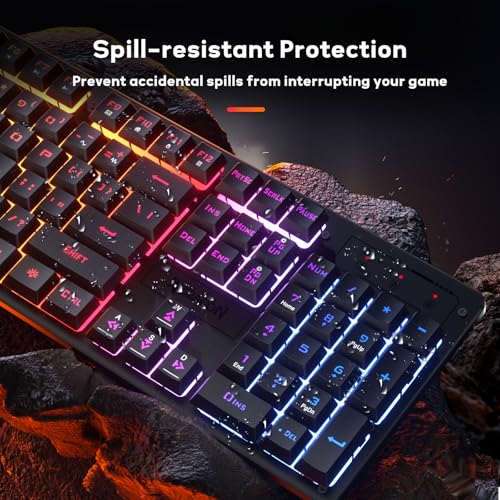

As an Amazon Associate we earn from qualifying purchases. Product prices and availability are accurate as of the date/time indicated.
Prices shown are approximate and for reference only. Prices change often, so please check the current price on Amazon before you buy.
The table shows that four of the seven keyboards have a wired design, and three have a wireless design. The Logitech G Pro X TKL Wired Keyboard is the most balanced pick in this set, at $100 to $150, with a wired design, a USB cable, and GX switches, so it is good for most wired keyboard vs wireless keyboard for gaming. The Keychron K8 Pro Wireless Keyboard is in the lowest price group here, at $80 to $100. The Razer DeathStalker V2 Pro Wireless Keyboard is the highest priced model in this table, at $200 to $300, labelled as a premium exception, because it is a premium Razer keyboard with a wireless design for a serious gamer.
Keyboard type also matters for gaming. Keyboards with wired, such as in four models here, are wired, while keyboards with wireless are wireless. Connection also matters. Keyboards with USB cable, such as in four models here, are USB cable, while keyboards with Bluetooth and USB are Bluetooth and USB.
Wired Keyboard vs Wireless Keyboard for Gaming Reviewed
1. Logitech G Pro X TKL Wired Keyboard: Wired Keyboard vs Wireless Keyboard for Gaming Overall, Wired Keyboard, USB Cable, GX Switches, RGB, Tenkeyless
The Logitech G Pro X TKL Wired Keyboard is the wired keyboard vs wireless keyboard for gaming overall, wired keyboard, USB cable, GX switches, RGB, tenkeyless because it is a keyboard with a price of $100 to $150, a wired design, and a simple design. It has a wired type, a USB cable, and an overall design. For most wired keyboard vs wireless keyboard for gaming, this is the first keyboard to try. Take a break every 60 minutes, use the 20-20-20 rule, keep your wrists straight, keep your keyboard dry, and check game support for your keyboard before you buy.
The G Pro X TKL Wired Keyboard has a wired design in the table, so it is wired, and the USB cable is good for wired keyboard vs wireless keyboard for gaming. The keyboard has a price of $100 to $150, so it is affordable for its quality, and the GX switches are good for use. It is a good choice if you want a Logitech keyboard that is overall best for wired keyboard vs wireless keyboard for gaming, with no battery to charge.
For gaming, the G Pro X TKL Wired Keyboard is strong because its wired connection has no lag, its tenkeyless size gives mouse room, and its GX switches are fast. Take breaks, keep wrists straight, and check game support. It is a good fit for a gamer who wants a Logitech keyboard for $100 to $150.
2. Keychron K8 Pro Wireless Keyboard: Wired Keyboard vs Wireless Keyboard for Gaming for Value, Wireless Keyboard, Bluetooth and USB, Hot Swappable, RGB, Tenkeyless
The Keychron K8 Pro Wireless Keyboard is the wired keyboard vs wireless keyboard for gaming for value, wireless keyboard, Bluetooth and USB, hot swappable, RGB, tenkeyless because it costs $80 to $100, and it is a keyboard with a wireless design and a simple design. It has a wireless type, Bluetooth and USB, and a value design, and it is a good choice for a Keychron user who wants a value keyboard for wired keyboard vs wireless keyboard for gaming.
The K8 Pro Wireless Keyboard has a price of $80 to $100 in the table, so it is in the lowest price group here, and the wireless design is wireless. The keyboard has Bluetooth and USB, so it is good for wired keyboard vs wireless keyboard for gaming, and the hot swappable design is good for use. It is a good choice if you want a Keychron keyboard that is affordable for wired keyboard vs wireless keyboard for gaming and easy to use for a beginner.
For gaming, the K8 Pro Wireless Keyboard is a cheap, simple keyboard with a wireless design, Bluetooth and USB, and hot swappable for a desk. Its wireless freedom helps a clean desk, although its Bluetooth can lag in fast games. It is a good fit for a gamer who wants a Keychron keyboard for $80 to $100.
3. Razer BlackWidow V4 X Wired Keyboard: Wired Keyboard vs Wireless Keyboard for Gaming for Value, Wired Keyboard, USB Cable, Green Switches, RGB, Full Size
The Razer BlackWidow V4 X Wired Keyboard is the wired keyboard vs wireless keyboard for gaming for value, wired keyboard, USB cable, green switches, RGB, full size because it costs $150 to $200, and it is a keyboard with a wired design and a simple design. It has a wired type, a USB cable, and a value design, and it is a good choice for a Razer user who wants a value keyboard for wired keyboard vs wireless keyboard for gaming.
The BlackWidow V4 X Wired Keyboard has a wired design in the table, so it is wired, and the USB cable is good for wired keyboard vs wireless keyboard for gaming. The keyboard has a price of $150 to $200, so it is affordable, and the green switches are good for use. It is a good choice if you want a Razer keyboard that is affordable for wired keyboard vs wireless keyboard for gaming, with a full size layout for work and play.
For gaming, the BlackWidow V4 X Wired Keyboard is a value Razer keyboard with a wired design, USB cable, and green switches for a desk. It is a good fit for a beginner who wants a Razer keyboard for $150 to $200.
4. Logitech G915 TKL Wireless Keyboard: Wired Keyboard vs Wireless Keyboard for Gaming for Premium, Wireless Keyboard, Lightspeed and Bluetooth, GL Switches, RGB, Tenkeyless
The Logitech G915 TKL Wireless Keyboard is the wired keyboard vs wireless keyboard for gaming for premium, wireless keyboard, Lightspeed and Bluetooth, GL switches, RGB, tenkeyless because it costs $150 to $200, and it is a keyboard with a wireless design and a simple design. It has a wireless type, Lightspeed and Bluetooth, and a premium design, and it is a good choice for a Logitech user who wants a premium keyboard for wired keyboard vs wireless keyboard for gaming.
The G915 TKL Wireless Keyboard has a wireless design in the table, so it is wireless, and the Lightspeed and Bluetooth are good for wired keyboard vs wireless keyboard for gaming. The keyboard has a price of $150 to $200, so it is premium, and the GL switches are good for use. It is a good choice if you want a Logitech keyboard that is premium for wired keyboard vs wireless keyboard for gaming, with fast wireless for gaming.
For gaming, the G915 TKL Wireless Keyboard is a premium Logitech keyboard with a wireless design, Lightspeed and Bluetooth, and GL switches for a desk. Its Lightspeed is fast, although it needs charging. It is a good fit for a gamer who wants a Logitech keyboard for $150 to $200.
5. Corsair K70 RGB Pro Wired Keyboard: Wired Keyboard vs Wireless Keyboard for Gaming for Premium, Wired Keyboard, USB Cable, Cherry MX Switches, RGB, Full Size
The Corsair K70 RGB Pro Wired Keyboard is the wired keyboard vs wireless keyboard for gaming for premium, wired keyboard, USB cable, Cherry MX switches, RGB, full size because it costs $150 to $200, and it is a keyboard with a wired design and a simple design. It has a wired type, a USB cable, and a premium design, and it is a good choice for a Corsair user who wants a premium keyboard for wired keyboard vs wireless keyboard for gaming.
The K70 RGB Pro Wired Keyboard has a wired design in the table, so it is wired, and the USB cable is good for wired keyboard vs wireless keyboard for gaming. The keyboard has a price of $150 to $200, so it is premium, and the Cherry MX switches are good for use. It is a good choice if you want a Corsair keyboard that is premium for wired keyboard vs wireless keyboard for gaming, with a full size layout for work and play.
For gaming, the K70 RGB Pro Wired Keyboard is a premium Corsair keyboard with a wired design, USB cable, and Cherry MX switches for a desk. Its build is strong, although it needs a cable. It is a good fit for a gamer who wants a Corsair keyboard for $150 to $200.
6. SteelSeries Apex Pro TKL Wired Keyboard: Wired Keyboard vs Wireless Keyboard for Gaming for Premium, Wired Keyboard, USB Cable, OmniPoint Switches, RGB, Tenkeyless
The SteelSeries Apex Pro TKL Wired Keyboard is the wired keyboard vs wireless keyboard for gaming for premium, wired keyboard, USB cable, OmniPoint switches, RGB, tenkeyless because it costs $180 to $250, and it is a keyboard with a wired design and a simple design. It has a wired type, a USB cable, and a premium design, and it is a good choice for a SteelSeries user who wants a premium keyboard for wired keyboard vs wireless keyboard for gaming.
The Apex Pro TKL Wired Keyboard has a wired design in the table, so it is wired, and the USB cable is good for wired keyboard vs wireless keyboard for gaming. The keyboard has a price of $180 to $250, so it is premium, and the OmniPoint switches are good for use. It is a good choice if you want a SteelSeries keyboard that is premium for wired keyboard vs wireless keyboard for gaming, with adjustable actuation for fast games.
For gaming, the Apex Pro TKL Wired Keyboard is a premium SteelSeries keyboard with a wired design, USB cable, and OmniPoint switches for a desk. Its adjustable switches help fast games, although it costs more than G Pro X. It is a good fit for a gamer who wants a SteelSeries keyboard for $180 to $250.
7. Razer DeathStalker V2 Pro Wireless Keyboard: Wired Keyboard vs Wireless Keyboard for Gaming for Premium Exception, Wireless Keyboard, HyperSpeed and Bluetooth, Optical Switches, RGB, Low Profile
The Razer DeathStalker V2 Pro Wireless Keyboard is the wired keyboard vs wireless keyboard for gaming for premium exception, wireless keyboard, HyperSpeed and Bluetooth, optical switches, RGB, low profile because it costs $200 to $300, and it is a keyboard with a wireless design and a simple design. It has a wireless type, HyperSpeed and Bluetooth, and a premium design, and it is a good choice for a Razer user who wants a premium keyboard for wired keyboard vs wireless keyboard for gaming, labelled as a premium exception in this guide.
The DeathStalker V2 Pro Wireless Keyboard has a price of $200 to $300 in the table, so it is the highest priced keyboard here, and the wireless design is wireless. The keyboard has HyperSpeed and Bluetooth, so it is good for wired keyboard vs wireless keyboard for gaming, and the optical switches are good for use. It is a good choice if you want a Razer keyboard that is premium for wired keyboard vs wireless keyboard for gaming, with a low profile for fast typing.
For gaming, the DeathStalker V2 Pro Wireless Keyboard is a premium Razer keyboard with a wireless design, HyperSpeed and Bluetooth, and optical switches for a desk. Its HyperSpeed is fast, and its low profile is comfortable. It is a good choice for a gamer who wants the best keyboard in this guide.
Wired Keyboard vs Wireless Keyboard for Gaming Buying Guide
Use this buying guide to match a keyboard to your game, your desk, and your budget. The right keyboard is the one that is fast enough for gaming, comfortable enough for long sessions, and simple enough to use. The full price range in this guide is $80 to $300, with Razer DeathStalker V2 Pro Wireless Keyboard at $200 to $300 labelled as a premium exception.
Check Keyboard Type: Wired for Most, Wireless for Simple for Wired Keyboard vs Wireless Keyboard for Gaming
Keyboard type is the first thing to check, because it decides whether your keyboard will be wired or wireless. Keyboards with wired, such as in four models here, are wired, while keyboards with wireless are wireless. For most wired keyboard vs wireless keyboard for gaming, a keyboard with wired is a good choice, because it is wired and it is made for wired keyboard vs wireless keyboard for gaming.
Check your game before you buy, and choose wired if you want most, or wireless if you want simple. A wired keyboard is better for speed and reliability, because it has no battery and no lag, while a wireless keyboard is better for freedom, although it needs charging.
Look at Connection: USB Cable for Most, Bluetooth and USB for Least for Wired Keyboard vs Wireless Keyboard for Gaming
Connection matters because it decides whether your keyboard will work with your PC. Keyboards with USB cable, such as in four models here, are USB cable, while keyboards with Bluetooth and USB are Bluetooth and USB. For most wired keyboard vs wireless keyboard for gaming, a keyboard with USB cable is a good choice, because it is good for wired keyboard vs wireless keyboard for gaming and it is simple for most PCs.
Check your keyboard before you buy, and choose USB cable if you want most, or Bluetooth and USB if you want least. A USB cable keyboard is better for fast games, while a Bluetooth and USB keyboard is better for a clean desk, although Bluetooth can lag.
Consider Break Every 60 Minutes, 20-20-20, and Keep Wrists Straight for Gaming Keyboards
Break every 60 minutes matters because it decides whether your gaming will stay healthy. Take a break every 60 minutes, use the 20-20-20 rule, keep your wrists straight, keep your keyboard dry, and check game support for your keyboard before you buy. Break every 60 minutes also matters. Take a break every 60 minutes, use the 20-20-20 rule.
Safety also matters. Take a break every 60 minutes, use the 20-20-20 rule, and store your keyboard safely. For most wired keyboard vs wireless keyboard for gaming, Logitech G Pro X TKL Wired Keyboard is a good choice. Do not use a keyboard with bent wrists for a full day, and do not use a damaged cable.
Think About Game, Desk, and How to Choose Wired Keyboard vs Wireless Keyboard for Gaming
Game matters because it decides which keyboard you need. Game needs a wired keyboard, while home can use a simple keyboard. Desk also matters. A small desk needs a tenkeyless keyboard, while a large desk can use a full size keyboard.
How to choose wired keyboard vs wireless keyboard for gaming is simple. Choose a keyboard with a wired design, a USB cable, and a price that fits your budget, such as Logitech G Pro X TKL Wired Keyboard, take a break every 60 minutes, and keep your wrists straight. For most wired keyboard vs wireless keyboard for gaming, that keyboard is a good choice, while Keychron K8 Pro Wireless Keyboard is a good choice if you want the lowest price in the $80 to $300 range. If you want wireless freedom, choose the Logitech G915 TKL Wireless Keyboard, and if you want a premium keyboard, choose the Razer DeathStalker V2 Pro Wireless Keyboard. For many gamers, use a wrist rest, keep your keyboard clean, and test switches before you buy if you can.
Frequently Asked Questions About Wired Keyboard vs Wireless Keyboard for Gaming
What is the best wired keyboard vs wireless keyboard for gaming?
The best wired keyboard vs wireless keyboard for gaming is a Logitech G Pro X TKL Wired Keyboard, with a price of $100 to $150, because it is a keyboard with a wired design, a USB cable, and GX switches, so it is good for wired keyboard vs wireless keyboard for gaming. A Keychron K8 Pro Wireless Keyboard, at $80 to $100, is also a good choice, because it is a keyboard for wired keyboard vs wireless keyboard for gaming with a wireless design.
Do I need wired or wireless for gaming?
You need wired for gaming if you want most, because a keyboard such as Logitech G Pro X TKL Wired Keyboard has a wired design, while wireless is simple. For most wired keyboard vs wireless keyboard for gaming, a keyboard with wired is a good choice, because it is made for wired keyboard vs wireless keyboard for gaming.
Is USB cable or Bluetooth and USB better for gaming?
USB cable is better for gaming if you want most, because a keyboard such as Logitech G Pro X TKL Wired Keyboard has a USB cable design, while Bluetooth and USB is least here. For most wired keyboard vs wireless keyboard for gaming, a keyboard with USB cable is a good choice, because it is simple for most PCs.
How do I safely use a keyboard for gaming?
You safely use a keyboard for gaming by taking a break every 60 minutes, because a keyboard must be used safely, while using the 20-20-20 rule, keeping your wrists straight, keeping your keyboard dry, and checking game support for your keyboard before you buy are also important. For most wired keyboard vs wireless keyboard for gaming, take a break every 60 minutes.
The best wired keyboard vs wireless keyboard for gaming is the one that is clear, simple, and safe. For most gamers, that is the Logitech G Pro X TKL Wired Keyboard for overall value, the Keychron K8 Pro Wireless Keyboard for budget, or the Razer DeathStalker V2 Pro Wireless Keyboard for premium use. Compare the table, check your keyboard type and your connection, and choose the keyboard you will trust. Take a break every 60 minutes, use the 20-20-20 rule, keep your wrists straight, keep your keyboard dry, check game support for your keyboard before you buy, and enjoy gaming in 2026.
Related guides
- Best Handheld Console vs Tablet for Gaming in 2026: Which Portable Gaming Device Is Best for You?
- Best Cheap Gaming Controller for Gamers in 2026: Best Cheap Gaming Controller for Gamers
- Best USB C Dock for Dual Monitors: 6 Best USB C Dock for Dual Monitors Picks in 2026
- Best Chair with Adjustable Armrests in 2026: 7 Chairs That Offer Adjustable Armrests, Comfortable Support, and Reliable Performance for Home and Office
More from Amazon
Programs that pair well with the guide above. Offers and eligibility are set by Amazon and may change.
Free shipping on eligible items, Prime Video and more. Eligible new members can start with a free trial.
Start a Prime free trialAd-free music streaming. Eligible new subscribers can start with a free trial.
Try Music Unlimited freeA Prime membership for ages 18-24 with a trial period. Eligibility is set by Amazon.
See Prime for Young AdultsAudiobooks and podcasts to listen to on the go. Eligible new members can start with a free trial.
Try Audible freeAs an Amazon Associate we earn from qualifying purchases.

Write Your Review
No reviews yet. Be the first to share your experience!