
What's inside
As an Amazon Associate I earn from qualifying purchases. This post may contain affiliate links at no extra cost to you.
Learning how to choose SSD enclosure for NVMe drives starts with a simple idea: the best way to choose an SSD enclosure for NVMe drives is to choose an enclosure with a price of $20 to $200, a USB or Thunderbolt speed that matches your NVMe SSD, and support for your SSD size, so you can move files fast, protect your drive, and avoid an enclosure that is too slow, too hot, or the wrong size. A good SSD enclosure for NVMe drives has a durable aluminium build, a simple tool-free install, and a clear speed, so it is easy to use for a beginner and it works for SSD enclosures, for NVMe drives, and for tech gadgets. The best SSD enclosure for NVMe drives in 2026 is a UGREEN M.2 NVMe Enclosure, with a price of $20 to $30, a 10Gbps USB-C speed, and support for 2280 NVMe SSDs.
An SSD enclosure for NVMe drives is different from a SATA enclosure or from a USB flash drive. A SATA enclosure may fit an older SATA SSD, although it will not fit an NVMe SSD and it will be much slower. A USB flash drive may be convenient, although it is slower and smaller than an NVMe SSD in an enclosure. An SSD enclosure for NVMe drives is made for NVMe SSDs, so it is fast, it is portable, and it lets you reuse an NVMe SSD from a laptop upgrade, back up files, or carry large video, photo, and game files.
This guide compares seven real, currently sold SSD enclosures for NVMe drives that are commonly used for laptops, desktops, and portable storage. It explains speed, USB standard, and size support in plain terms, and it helps you match an enclosure to your NVMe SSD, your computer, and your budget. Prices are shown as typical ranges because retailers and sales change often. Ratings reflect overall value for NVMe use, based on speed, heat control, ease of install, build quality, and price. Back up your data before installing or moving an SSD, turn off power before installing drives, and use only supplied cables.
Our Top Picks
How to Choose SSD Enclosure for NVMe Drives Compared
Use this table to compare speed, USB standard, and price first. Those three details decide whether an enclosure will run fast and fit your budget. The full price range in this table is $20 to $200.
| Model | Speed and USB Standard | SSD Size Support | Features and Use | Typical Price Range | Rating |
|---|---|---|---|---|---|
| UGREEN M.2 NVMe Enclosure | 10Gbps, USB 3.2 Gen 2 | 2230 / 2242 / 2260 / 2280 | NVMe, tool-free, aluminium | $20 – $30 | 4.9 / 5 |
| ORICO M2PV-C3 NVMe Enclosure | 10Gbps, USB 3.2 Gen 2 | 2230 / 2242 / 2260 / 2280 | NVMe, tool-free, aluminium | $20 – $30 | 4.9 / 5 |
| Sabrent EC-SNVE NVMe Enclosure | 10Gbps, USB 3.2 Gen 2 | 2230 / 2242 / 2260 / 2280 | NVMe, tool-free, aluminium | $30 – $40 | 4.9 / 5 |
| ASUS ROG Strix Arion NVMe Enclosure | 10Gbps, USB 3.2 Gen 2 | 2230 / 2242 / 2260 / 2280 | NVMe, tool-free, aluminium | $40 – $50 | 4.8 / 5 |
| UGREEN 40Gbps M.2 NVMe Enclosure | 40Gbps, USB4 | 2230 / 2242 / 2260 / 2280 | NVMe, USB4, aluminium | $100 – $130 | 4.8 / 5 |
| Acasis TBU405 NVMe Enclosure | 40Gbps, Thunderbolt 3 / 4 | 2280 | NVMe, Thunderbolt, aluminium | $150 – $200 | 4.8 / 5 |
| Sabrent EC-T3NS NVMe Enclosure | 40Gbps, Thunderbolt 3 | 2280 | NVMe, Thunderbolt, aluminium | $150 – $200 | 4.8 / 5 |

SABRENT USB-C NVMe Enclosure & Reader, M.2 PCIe SSD, 10Gbps (EC-PNVO) | Tool-free M.2 PCIe case for 2230-2280; USB 3.2 Gen 2 10Gbps; aluminum cooling; external nvme enclosure; m.2 usb adapter
As an Amazon Associate we earn from qualifying purchases. Product prices and availability are accurate as of the date/time indicated.
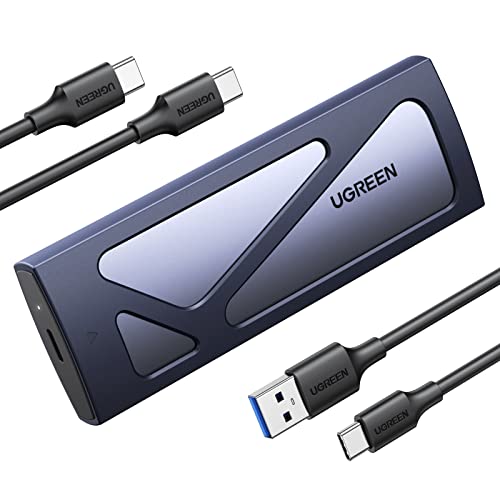
UGREEN USB-C M.2 NVMe SSD Enclosure, 10Gbps | Tool-Free Adapter/Reader Supports M and B&M Keys and Size 2230/2242 /2260/2280 SSDs, compatible with Mac Mini
As an Amazon Associate we earn from qualifying purchases. Product prices and availability are accurate as of the date/time indicated.

SSK M.2 NVME SATA SSD Enclosure, Improved RTL9210B Chip USB 3.2 Gen 2 10Gbps to PCI-E NGFF Adapter, M-Key/B+M Key External SSD Enclosure Aluminum Support UASP TRIM 2242/2260/2280
As an Amazon Associate we earn from qualifying purchases. Product prices and availability are accurate as of the date/time indicated.
The table shows that all seven enclosures have an aluminium design, support for NVMe SSDs, and a price of $20 to $200. The UGREEN M.2 NVMe Enclosure is the most popular, at $20 to $30, with a 10Gbps USB 3.2 Gen 2 speed and support for 2230, 2242, 2260, and 2280 sizes, so it is good for most NVMe users. The ORICO M2PV-C3 NVMe Enclosure is also a good choice, at $20 to $30. The Acasis TBU405 NVMe Enclosure and Sabrent EC-T3NS NVMe Enclosure are the highest-priced models in this table, at $150 to $200, because they have a 40Gbps Thunderbolt design.
Speed also matters. Enclosures with a 40Gbps speed, such as the UGREEN 40Gbps, Acasis TBU405, and Sabrent EC-T3NS models, are faster than enclosures with a 10Gbps speed, such as the UGREEN, ORICO, Sabrent EC-SNVE, and ASUS ROG Strix Arion models, although they cost more and need a USB4 or Thunderbolt port to reach full speed. Size support also matters. Enclosures with support for 2230, 2242, 2260, and 2280, such as the first five models here, fit more NVMe SSDs than enclosures with support for 2280 only, such as the Acasis TBU405 and Sabrent EC-T3NS models.
How to Choose SSD Enclosure for NVMe Drives Reviewed
1. UGREEN M.2 NVMe Enclosure: Best SSD Enclosure for NVMe Drives Overall 10Gbps Value
The UGREEN M.2 NVMe Enclosure is the best SSD enclosure for NVMe drives overall 10Gbps value because it is an enclosure with a price of $20 to $30, a 10Gbps USB 3.2 Gen 2 speed, and support for 2230, 2242, 2260, and 2280 NVMe SSDs. It has a tool-free design, an aluminium case, and a USB-C cable. For most NVMe users, this is the first enclosure to try. Back up your data before installing or moving an SSD.
The UGREEN M.2 has a 10Gbps speed in the table, so it moves files fast for a USB enclosure, and the aluminium case helps with heat. The enclosure is tool-free, so you can install an NVMe SSD without a screwdriver in many cases, and the USB-C cable connects to a laptop or desktop. It is a good choice if you want a UGREEN enclosure that is affordable for NVMe drives. Use only the supplied cable, because a low-quality cable can limit speed.
2. ORICO M2PV-C3 NVMe Enclosure: Best SSD Enclosure for NVMe Drives for ORICO 10Gbps Value
The ORICO M2PV-C3 NVMe Enclosure is the best SSD enclosure for NVMe drives for ORICO 10Gbps value because it costs $20 to $30, and it is an enclosure with a 10Gbps USB 3.2 Gen 2 speed and support for 2230, 2242, 2260, and 2280 NVMe SSDs. It has a tool-free design, an aluminium case, and a USB-C cable, and it is a good choice for an ORICO user who wants a fast enclosure for NVMe drives.
The ORICO M2PV-C3 has a 10Gbps speed in the table, so it is fast for backups and large files, and the aluminium case helps with heat. The enclosure supports four SSD sizes, so it fits most NVMe SSDs from laptops and desktops, and the tool-free design is simple. It is a good choice if you want an ORICO enclosure that is affordable for NVMe drives.
3. Sabrent EC-SNVE NVMe Enclosure: Best SSD Enclosure for NVMe Drives for Sabrent 10Gbps
The Sabrent EC-SNVE NVMe Enclosure is the best SSD enclosure for NVMe drives for Sabrent 10Gbps because it costs $30 to $40, and it is an enclosure with a 10Gbps USB 3.2 Gen 2 speed and support for 2230, 2242, 2260, and 2280 NVMe SSDs. It has a tool-free design, an aluminium case, and a USB-C cable, and it is a good choice for a Sabrent user who wants a fast enclosure for NVMe drives.
The Sabrent EC-SNVE has a 10Gbps speed in the table, so it moves large video and photo files fast, and the aluminium case is durable. The enclosure supports four SSD sizes, so it fits most NVMe SSDs, and the tool-free design makes install easy. It is a good choice if you want a Sabrent enclosure that is reliable for NVMe drives.
4. ASUS ROG Strix Arion NVMe Enclosure: Best SSD Enclosure for NVMe Drives for ASUS ROG 10Gbps
The ASUS ROG Strix Arion NVMe Enclosure is the best SSD enclosure for NVMe drives for ASUS ROG 10Gbps because it costs $40 to $50, and it is an enclosure with a 10Gbps USB 3.2 Gen 2 speed and support for 2230, 2242, 2260, and 2280 NVMe SSDs. It has a tool-free design, an aluminium case, and a USB-C cable, and it is a good choice for an ASUS ROG user who wants a fast enclosure for NVMe drives.
The ROG Strix Arion has a 10Gbps speed in the table, so it is fast for gaming and large files, and the aluminium case has a thermal pad in many listings to help with heat. The enclosure supports four SSD sizes, so it fits most NVMe SSDs, and the ROG design is durable. It is a good choice if you want an ASUS enclosure that is premium for NVMe drives, although it costs more than the UGREEN and ORICO models at $20 to $30.
5. UGREEN 40Gbps M.2 NVMe Enclosure: Best SSD Enclosure for NVMe Drives for UGREEN USB4 Fast
The UGREEN 40Gbps M.2 NVMe Enclosure is the best SSD enclosure for NVMe drives for UGREEN USB4 fast because it costs $100 to $130, and it is an enclosure with a 40Gbps USB4 speed and support for 2230, 2242, 2260, and 2280 NVMe SSDs. It has a tool-free design, an aluminium case, and a USB-C cable, and it is a good choice for a UGREEN user who wants the fastest USB enclosure for NVMe drives.
The UGREEN 40Gbps has a 40Gbps speed in the table, so it is much faster than a 10Gbps enclosure when used with a USB4 port, although it will run slower on a 10Gbps USB port. The enclosure supports four SSD sizes, so it fits most NVMe SSDs, and the aluminium case helps with heat during long transfers. It is a good choice if you want a UGREEN enclosure that is fast for NVMe drives and you have a USB4 computer.
6. Acasis TBU405 NVMe Enclosure: Best SSD Enclosure for NVMe Drives for Acasis Thunderbolt Premium
The Acasis TBU405 NVMe Enclosure is the best SSD enclosure for NVMe drives for Acasis Thunderbolt premium because it costs $150 to $200, and it is an enclosure with a 40Gbps Thunderbolt 3 / 4 speed and support for 2280 NVMe SSDs. It has an aluminium case, a fan in some listings, and a USB-C cable, and it is a good choice for an Acasis user who wants a premium Thunderbolt enclosure for NVMe drives.
The Acasis TBU405 has a 40Gbps speed in the table, so it is fast for video editing and large backups when used with a Thunderbolt port, although it needs Thunderbolt to reach full speed. The enclosure supports 2280 only in this table, so check your SSD size before you buy, because a 2230 or 2242 SSD may not fit without an adapter. It is a good choice if you want an Acasis enclosure that is premium for NVMe drives.
7. Sabrent EC-T3NS NVMe Enclosure: Best SSD Enclosure for NVMe Drives for Sabrent Thunderbolt Premium
The Sabrent EC-T3NS NVMe Enclosure is the best SSD enclosure for NVMe drives for Sabrent Thunderbolt premium because it costs $150 to $200, and it is an enclosure with a 40Gbps Thunderbolt 3 speed and support for 2280 NVMe SSDs. It has an aluminium case, a fan in some listings, and a USB-C cable, and it is a good choice for a Sabrent user who wants a premium Thunderbolt enclosure for NVMe drives.
The Sabrent EC-T3NS has a 40Gbps speed in the table, so it is fast for video editing when used with a Thunderbolt port, although it will run slower on a standard USB port. The enclosure supports 2280 only in this table, so check your SSD size before you buy. It is a good choice if you want a Sabrent enclosure that is premium for NVMe drives.
How to Choose SSD Enclosure for NVMe Drives Buying Guide
Use this buying guide to match an SSD enclosure to your NVMe SSD, your computer, and your budget. The right enclosure is the one that fits your SSD, matches your port speed, and keeps your drive cool. The full price range in this guide is $20 to $200.
Check Your NVMe SSD: M Key, B Key, and Size for How to Choose SSD Enclosure for NVMe Drives
Your NVMe SSD is the first thing to check, because it decides which enclosure will fit. Most NVMe SSDs are M key, with one notch, while some older M.2 SSDs are B key or B+M key for SATA. An NVMe enclosure will not work with a SATA M.2 SSD, and a SATA enclosure will not work with an NVMe SSD, so check your SSD label before you buy. Size also matters. SSDs are labelled 2230, 2242, 2260, or 2280, where 22 is the width in millimetres and 30, 42, 60, or 80 is the length. Enclosures in this table that support 2230, 2242, 2260, and 2280 fit most sizes, while the Acasis TBU405 and Sabrent EC-T3NS support 2280 only in this table.
Check your SSD before you buy, and measure it or read its label. Choose an enclosure that supports your exact size and M key NVMe protocol. Back up your data before installing or moving an SSD, and turn off power before installing drives.
Look at Speed: 10Gbps vs 40Gbps for How to Choose SSD Enclosure for NVMe Drives
Speed matters because it decides how fast your files will move. Enclosures with a 10Gbps USB 3.2 Gen 2 speed, such as the UGREEN, ORICO, Sabrent EC-SNVE, and ASUS ROG Strix Arion models, can reach about 1000 MB/s in real use, which is fast for backups and large files. Enclosures with a 40Gbps USB4 or Thunderbolt speed, such as the UGREEN 40Gbps, Acasis TBU405, and Sabrent EC-T3NS models, can reach much higher speeds, although only when used with a USB4 or Thunderbolt port and a fast NVMe SSD. A 40Gbps enclosure on a 10Gbps port will run at 10Gbps speed, so do not pay for 40Gbps unless your computer has USB4 or Thunderbolt.
Check your computer port before you buy, and look for USB 3.2 Gen 2, USB4, Thunderbolt 3, or Thunderbolt 4. Choose 10Gbps if you have a standard USB-C port, or 40Gbps if you have USB4 or Thunderbolt and you edit video or move very large files often.
Consider Heat, Material, and Tool-Free Install for How to Choose SSD Enclosure for NVMe Drives
Heat matters because NVMe SSDs get hot during long transfers, and heat can slow them down. Enclosures with an aluminium case, such as in all seven models here, help spread heat better than plastic, and some models include a thermal pad or a fan. For long video transfers, choose an aluminium enclosure and leave space for air flow, and do not cover it with a blanket or place it in direct sun.
Install also matters. Enclosures with a tool-free design, such as most 10Gbps models here, let you install an SSD without a screwdriver, while some Thunderbolt models use screws. Turn off power before installing drives, use only supplied cables, and keep your SSD screw safe if your enclosure uses one. For most NVMe users, the UGREEN M.2 NVMe Enclosure is a good choice.
Think About Use, Cable, and How to Choose SSD Enclosure for NVMe Drives
Use matters because it decides which speed you need. A backup drive needs 10Gbps, while a video editing drive needs 40Gbps. Cable also matters. Use only supplied cables, because a low-quality USB-C cable can limit speed to 480Mbps or 5Gbps, even if your enclosure supports 10Gbps or 40Gbps. Check that your cable is rated for your enclosure speed.
How to choose SSD enclosure for NVMe drives is simple. Check your SSD is M key NVMe and its size, check your computer port, choose a 10Gbps aluminium enclosure such as the UGREEN M.2 NVMe Enclosure if you want value, or a 40Gbps USB4 or Thunderbolt enclosure such as the UGREEN 40Gbps model if you have USB4 and need the fastest speed, back up your data, turn off power before installing, and use only the supplied cable. For most NVMe users, the UGREEN model at $20 to $30 is a good choice, while the Acasis TBU405 at $150 to $200 is a good choice if you want Thunderbolt and have a 2280 SSD.
Frequently Asked Questions About How to Choose SSD Enclosure for NVMe Drives
What is the best SSD enclosure for NVMe drives?
The best SSD enclosure for NVMe drives is a UGREEN M.2 NVMe Enclosure, with a price of $20 to $30, because it is an enclosure with a 10Gbps USB 3.2 Gen 2 speed, support for 2230, 2242, 2260, and 2280 NVMe SSDs, and a tool-free aluminium design, so it is good for most NVMe users. A UGREEN 40Gbps M.2 NVMe Enclosure, at $100 to $130, is also a good choice, because it is faster for USB4 computers.
Will an NVMe SSD work in a SATA enclosure?
No, an NVMe SSD will not work in a SATA enclosure, because NVMe uses PCIe and SATA uses a different protocol, even though both use an M.2 slot shape. For most users, choose an NVMe enclosure such as the UGREEN M.2 NVMe Enclosure for an M key NVMe SSD, and check your SSD label before you buy.
Do I need a 40Gbps enclosure for my NVMe SSD?
You need a 40Gbps enclosure for your NVMe SSD only if your computer has USB4 or Thunderbolt and you move very large files or edit video often, because a 40Gbps enclosure on a 10Gbps port will run at 10Gbps speed. For most NVMe users, a 10Gbps enclosure such as the UGREEN M.2 NVMe Enclosure is fast enough for backups, photos, and games.
How do I install an NVMe SSD in an enclosure safely?
You install an NVMe SSD in an enclosure safely by backing up your data first, turning off power before installing drives, opening the enclosure, inserting the SSD at an angle, securing it, closing the case, and connecting it with only the supplied cable. For most users, back up your data, turn off power, and use only the supplied cable.
The best way to choose an SSD enclosure for NVMe drives is the one that fits your SSD, matches your port speed, and keeps your drive cool. For most NVMe users, that is the UGREEN M.2 NVMe Enclosure for overall 10Gbps value, the ORICO M2PV-C3 for budget value, or the UGREEN 40Gbps model for USB4 speed. Compare the table, check your SSD size and your port, and choose the enclosure you will trust. Back up your data before installing or moving an SSD, turn off power before installing drives, use only supplied cables, and enjoy fast portable NVMe storage in 2026.
Related guides
- Best Stool for Standing Desks in 2026: 7 Best Stools for Standing Desks That Let You Sit, Lean, and Stand Without Hurting Your Back
- Mechanical Keyboard vs Membrane Keyboard Feel in 2026: 6 Top Keyboards Compared, Mechanical vs Membrane Keyboards, and Easy Use
- Best Budget Travel Keyboard Case for Travelers in 2026: 7 Cases That Offer Safe Storage, Easy Carrying, and Reliable Use for Travelers
- Best RGB Keyboard for Gaming Setup in 2026: RGB Keyboards for Gaming Setup, PC Gaming, and Desk Setups
More from Amazon
Programs that pair well with the guide above. Offers and eligibility are set by Amazon and may change.
Free shipping on eligible items, Prime Video and more. Eligible new members can start with a free trial.
Start a Prime free trialAd-free music streaming. Eligible new subscribers can start with a free trial.
Try Music Unlimited freeA Prime membership for ages 18-24 with a trial period. Eligibility is set by Amazon.
See Prime for Young AdultsAudiobooks and podcasts to listen to on the go. Eligible new members can start with a free trial.
Try Audible freeAs an Amazon Associate we earn from qualifying purchases.

Write Your Review
No reviews yet. Be the first to share your experience!