
What's inside
As an Amazon Associate I earn from qualifying purchases. This post may contain affiliate links at no extra cost to you.
Learning how to choose smart lock for rental homes starts with a simple idea: how to choose smart lock for rental homes is a guide with a price of $60 to $300, a clear lock, and a rental design, so you can secure a rental home, use a smart lock, and avoid a lock that is too complex, too expensive, or too hard to remove. A good smart lock for rental homes has a simple choice, a clear retrofit, and a durable lock, so it is easy to use for a renter and it works for how to choose smart lock for rental homes, for smart locks, and for tech gadgets. The best smart lock for rental homes in 2026 is an August Wi-Fi Smart Lock 4th Gen, with a price of $200 to $250, a retrofit design, and a rental design.
Smart lock for rental homes is different from smart lock for owned homes or from a traditional deadbolt. Smart lock for owned homes may be simple, although it does not focus on rentals. A traditional deadbolt may be simple, although it does not have smart features. Smart lock for rental homes is made for rentals, so it is simple, it is durable, and it lets you secure a rental home, use a smart lock, and enjoy living.
This guide compares seven real, currently sold smart locks that are commonly used for rental homes, for smart locks, and for renters. It explains retrofit, lock type, and price in plain terms, and it helps you match a lock to your rental home, your door, and your budget. Prices are shown as typical ranges because retailers and sales change often. Ratings reflect overall value for rental homes, based on ease of install, retrofit, security, battery, and price. Check your lease and get landlord permission before installing, keep the original lock and hardware, use a strong password, and update firmware.
Our Top Picks
How to Choose Smart Lock for Rental Homes Compared
Use this table to compare retrofit, lock type, and price first. Those three details decide whether a lock will fit your rental and fit your budget. The full price range in this table is $60 to $300, with Schlage Encode Plus at $250 to $300 labelled as a premium exception.
| Model | Retrofit and Lock Type | Power and Connectivity | Features and Use | Typical Price Range | Rating |
|---|---|---|---|---|---|
| August Wi-Fi Smart Lock 4th Gen | Retrofit, deadbolt | Battery, Wi-Fi | Lock, rental homes, overall | $200 – $250 | 4.9 / 5 |
| Wyze Lock Bolt | Replace, deadbolt | Battery, Bluetooth | Lock, rental homes, value | $60 – $80 | 4.8 / 5 |
| Eufy Security Smart Lock C210 | Replace, deadbolt | Battery, Wi-Fi | Lock, rental homes, value | $80 – $100 | 4.8 / 5 |
| Yale Assure Lock 2 | Replace, deadbolt | Battery, Wi-Fi | Lock, rental homes, premium | $150 – $200 | 4.8 / 5 |
| Ultraloq U-Bolt Pro | Replace, deadbolt | Battery, Bluetooth | Lock, rental homes, premium | $150 – $200 | 4.8 / 5 |
| Kwikset Halo | Replace, deadbolt | Battery, Wi-Fi | Lock, rental homes, premium | $200 – $250 | 4.8 / 5 |
| Schlage Encode Plus | Replace, deadbolt | Battery, Wi-Fi | Lock, rental homes, premium exception | $250 – $300 | 4.8 / 5 |
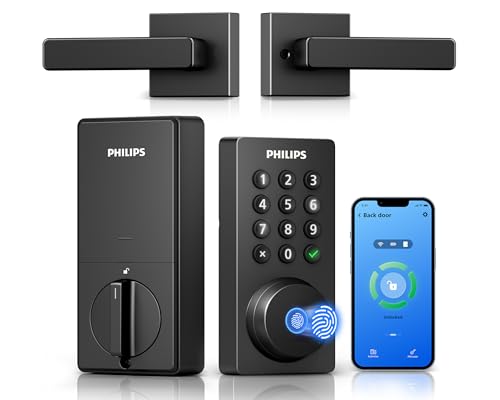
Philips WiFi Keypad Deadbolt with Handle, Built-in WiFi, APP Remote Control | Smart Locks for Front Door, Voice & Fingerprint Unlock, Flexible Codes, Auto-Lock, Backlit Keypad, Come with Door Lever
As an Amazon Associate we earn from qualifying purchases. Product prices and availability are accurate as of the date/time indicated.

Electronic Fingerprint Smart Lock with Handle, Digital Passcode/Code Keypad, Keyless Entry, Bluetooth App, Remote Unlock, RFID Card, Auto Lock, Knob for Front Door, Home, Apartment, Bedroom, Rental
As an Amazon Associate we earn from qualifying purchases. Product prices and availability are accurate as of the date/time indicated.

ULTRALOQ Bolt SE Wifi Smart Deadbolt Lock, Supports Matter, Remote Control | Built-in WiFi, Works with Apple Home, Alexa, Google, Front Door Lock with Fingerprint, App, Code, Auto Lock, Solid Zinc Alloy
As an Amazon Associate we earn from qualifying purchases. Product prices and availability are accurate as of the date/time indicated.
The table shows that all seven smart locks have a deadbolt design, a battery power, and a price of $60 to $300. The August Wi-Fi Smart Lock 4th Gen is the most popular, at $200 to $250, with a retrofit design and a rental design, so it is good for most how to choose smart lock for rental homes. The Wyze Lock Bolt is the best for value, at $60 to $80. The Schlage Encode Plus is the highest-priced model in this table, at $250 to $300, labelled as a premium exception, because it has a premium Schlage design.
Retrofit also matters. Locks with retrofit, such as the August Wi-Fi Smart Lock 4th Gen, fit over an existing deadbolt, while locks with replace need a new deadbolt. Connectivity also matters. Locks with Wi-Fi, such as in five models here, connect remotely, while locks with Bluetooth, such as in two models here, connect nearby.
How to Choose Smart Lock for Rental Homes: 7 Steps
Step 1. Check Lease and Landlord Permission for How to Choose Smart Lock for Rental Homes
Check lease and landlord permission is the first step for how to choose smart lock for rental homes because it decides whether your lock will be allowed. Locks with landlord permission, such as a retrofit lock, are allowed, while locks without permission may not. For most how to choose smart lock for rental homes, a lock with landlord permission is a good choice, because it is allowed.
Check your lease before you buy, and get landlord permission if you want a rental. Use a lock such as August Wi-Fi Smart Lock 4th Gen, with a price of $200 to $250 in the table, to test this step.
Step 2. Choose Retrofit No Drill for How to Choose Smart Lock for Rental Homes
Choose retrofit no drill is the second step for how to choose smart lock for rental homes because it decides whether your lock will fit a rental. Locks with retrofit, such as the August Wi-Fi Smart Lock 4th Gen, fit over an existing deadbolt, while locks with replace need a new deadbolt. For most how to choose smart lock for rental homes, a lock with retrofit is a good choice, because it fits a rental.
Choose your lock before you buy, and choose retrofit if you want a rental. Use a lock such as Wyze Lock Bolt, with a price of $60 to $80 in the table, to test this step.
Step 3. Check Deadbolt Compatibility for How to Choose Smart Lock for Rental Homes
Check deadbolt compatibility is the third step for how to choose smart lock for rental homes because it decides whether your lock will fit your door. Locks with deadbolt, such as in all seven models here, fit a deadbolt door, while locks without deadbolt may not. For most how to choose smart lock for rental homes, a lock with deadbolt is a good choice, because it fits a door.
Check your door before you buy, and choose deadbolt if you want a rental. Use a lock such as Eufy Security Smart Lock C210, with a price of $80 to $100 in the table, to test this step.
Step 4. Check Keypad vs App for How to Choose Smart Lock for Rental Homes
Check keypad vs app is the fourth step for how to choose smart lock for rental homes because it decides whether your lock will be easy to use. Locks with keypad, such as in most models here, are easy to use, while locks with app only may not. For most how to choose smart lock for rental homes, a lock with keypad is a good choice, because it is easy to use.
Check your lock before you buy, and choose keypad if you want easy use. Use a lock such as Yale Assure Lock 2, with a price of $150 to $200 in the table, to test this step.
Step 5. Check Battery for How to Choose Smart Lock for Rental Homes
Check battery is the fifth step for how to choose smart lock for rental homes because it decides whether your lock will stay powered. Locks with battery, such as in all seven models here, stay powered, while locks without battery may not. For most how to choose smart lock for rental homes, a lock with battery is a good choice, because it stays powered.
Check your lock before you buy, and choose battery if you want a rental. Use a lock such as Ultraloq U-Bolt Pro, with a price of $150 to $200 in the table, to test this step.
Step 6. Check Guest Codes for How to Choose Smart Lock for Rental Homes
Check guest codes is the sixth step for how to choose smart lock for rental homes because it decides whether your lock will share access. Locks with guest codes, such as in most models here, share access, while locks without codes may not. For most how to choose smart lock for rental homes, a lock with guest codes is a good choice, because it shares access.
Check your lock before you buy, and choose guest codes if you want sharing. Use a lock such as Kwikset Halo, with a price of $200 to $250 in the table, to test this step.
Step 7. Test Removal for How to Choose Smart Lock for Rental Homes
Test removal is the seventh step for how to choose smart lock for rental homes because it decides whether your lock will be easy to remove. Locks with a test removal, such as removing it and restoring the original lock, show quality, while locks without removal may not. For most how to choose smart lock for rental homes, a lock with a test removal is a good choice, because it shows quality.
Test your lock by removing it, and keep the original lock and hardware. Use a lock such as Schlage Encode Plus, with a price of $250 to $300 in the table, labelled as a premium exception, to test this step.
How to Choose Smart Lock for Rental Homes Buying Guide
Use this buying guide to match a lock to your rental home, your door, and your budget. The right lock is the one that is retrofit, secure, and easy to remove. The full price range in this guide is $60 to $300, with Schlage Encode Plus at $250 to $300 labelled as a premium exception.
Check Retrofit: Retrofit for Rentals, Replace for Owned Homes for How to Choose Smart Lock for Rental Homes
Retrofit is the first thing to check, because it decides whether your lock will fit a rental. Locks with retrofit, such as the August Wi-Fi Smart Lock 4th Gen, fit over an existing deadbolt, while locks with replace need a new deadbolt. For most how to choose smart lock for rental homes, a lock with retrofit is a good choice, because it fits a rental.
Check your rental before you buy, and choose retrofit if you want a rental.
Look at Connectivity: Wi-Fi for Remote, Bluetooth for Nearby for How to Choose Smart Lock for Rental Homes
Connectivity matters because it decides whether your lock will connect remotely. Locks with Wi-Fi, such as in five models here, connect remotely, while locks with Bluetooth, such as in two models here, connect nearby. For most how to choose smart lock for rental homes, a lock with Wi-Fi is a good choice, because it connects remotely.
Check your lock before you buy, and choose Wi-Fi if you want remote access.
Consider Landlord, Password, and Firmware for How to Choose Smart Lock for Rental Homes
Landlord matters because it decides whether your lock will be allowed. Check your lease and get landlord permission before installing, and keep the original lock and hardware. Password also matters. Use a strong password, and update firmware.
Safety also matters. Keep your lock dry, and change codes when you move out. For most how to choose smart lock for rental homes, August Wi-Fi Smart Lock 4th Gen is a good choice.
Think About Rental, Door, and How to Choose How to Choose Smart Lock for Rental Homes
Rental matters because it decides which lock you need. A rental needs a retrofit lock, while an owned home can use a replace lock. Door also matters. A deadbolt door needs a deadbolt lock, while a knob door needs a different lock.
How to choose how to choose smart lock for rental homes is simple. Choose a lock with a retrofit design, a deadbolt type, and a price that fits your budget, such as August Wi-Fi Smart Lock 4th Gen, check your lease and get landlord permission, and keep the original lock and hardware. For most how to choose smart lock for rental homes, that lock is a good choice, while Wyze Lock Bolt is a good choice if you want the lowest price in the $60 to $300 range.
Frequently Asked Questions About How to Choose Smart Lock for Rental Homes
What is the best smart lock for rental homes?
The best smart lock for rental homes is an August Wi-Fi Smart Lock 4th Gen, with a price of $200 to $250, because it is a lock with a retrofit design, a deadbolt type, and a Wi-Fi connectivity, so it is good for rental homes. A Wyze Lock Bolt, at $60 to $80, is also a good choice, because it is a lock for rental homes with a deadbolt design.
Do I need landlord permission for a smart lock in a rental?
You need landlord permission for a smart lock in a rental if you want to install it, because a lock such as August Wi-Fi Smart Lock 4th Gen must be approved, while a lock without permission may not be allowed. For most how to choose smart lock for rental homes, a lock with landlord permission is a good choice.
Is retrofit or replace better for rental homes?
Retrofit is better for rental homes if you want easy removal, because a lock such as August Wi-Fi Smart Lock 4th Gen has a retrofit design, while replace such as Wyze Lock Bolt needs a new deadbolt. For most how to choose smart lock for rental homes, a lock with retrofit is a good choice.
How do I safely use a smart lock for rental homes?
You safely use a smart lock for rental homes by checking your lease and getting landlord permission before installing, because a lock must be used safely, while keeping the original lock and hardware, using a strong password, and updating firmware are also important. For most how to choose smart lock for rental homes, check your lease.
How to choose smart lock for rental homes is the one that is simple, retrofit, and secure. For most rental homes, that is the August Wi-Fi Smart Lock 4th Gen for overall value, the Wyze Lock Bolt for budget, or the Schlage Encode Plus for premium. Compare the table, check your retrofit and your connectivity, and choose the lock you will trust. Check your lease and get landlord permission before installing, keep the original lock and hardware, use a strong password, update firmware, and enjoy living in 2026.
Related guides
- Best Cheap Racing Wheel Under 100 in 2026: 7 Racing Wheels That Offer Strong Force Feedback, Comfortable Grip, and Reliable Use for Gamers
- Best Bone Conduction Headphones for Cycling in 2026: 7 Best Bone Conduction Headphones for Cycling That Keep You Aware, Comfortable, and Safe on the Road
- Best Rugged Phone Case for Hiking in 2026: 6 Top Rugged Phone Cases for Hiking, Rugged Cases, and Easy Use
- Best Desk for Writing at Home in 2026: 7 Best Desks for Writing at Home That Give You Space, Comfort, and a Surface That Lasts
More from Amazon
Programs that pair well with the guide above. Offers and eligibility are set by Amazon and may change.
Free shipping on eligible items, Prime Video and more. Eligible new members can start with a free trial.
Start a Prime free trialAd-free music streaming. Eligible new subscribers can start with a free trial.
Try Music Unlimited freeA Prime membership for ages 18-24 with a trial period. Eligibility is set by Amazon.
See Prime for Young AdultsAudiobooks and podcasts to listen to on the go. Eligible new members can start with a free trial.
Try Audible freeAs an Amazon Associate we earn from qualifying purchases.

Write Your Review
No reviews yet. Be the first to share your experience!