
What's inside
- How to Choose Budget Monitor Under 100: What Matters Most
- How to Choose Budget Monitor Under 100: Comparison Table
- Sceptre E205W Monitor
- Acer SB220Q Monitor
- ASUS VA24EHE Monitor
- HP M24f Monitor
- LG 24MP400-B Monitor
- Samsung S24C310 Monitor
- Buying Guide: How to Choose Budget Monitor Under 100
- Frequently Asked Questions
As an Amazon Associate I earn from qualifying purchases. This post may contain affiliate links at no extra cost to you.
Learning how to choose budget monitor under 100 is about knowing which specs matter at a low price, and which specs you can ignore. A budget monitor under $100 should have at least a 1080p resolution, a size of 21.5 inches or more, and an HDMI port, so you can connect it to a laptop, a desktop, or a game console without an adapter. It should also have a clear image, a simple stand, and a reliable brand, so you can use it for work, school, and video every day.
This guide compares six real, currently sold budget monitors under $100, explains resolution, panel type, and refresh rate in plain language, and helps you choose the right monitor for your desk, your computer, and your budget in 2026. Prices below are typical retail ranges from $59 to $99 and can vary by retailer and sale. All monitors in this guide are under $100 at the high end of their typical price range, according to the maker and retailer listings. Always check monitor size, resolution, ports, and VESA mount support before you buy.
Computer safety and health come first. Take a break every hour when you work at a computer, look away from the screen for 20 seconds every 20 minutes, and adjust your chair and monitor height so you do not strain your neck. Use strong passwords, with two-factor authentication where available, for your accounts. Back up your files with a 3-2-1 backup: three copies, on two different types of storage, with one copy offsite. Do not use public Wi-Fi for banking without a VPN.
Our Top Picks
How to Choose Budget Monitor Under 100: What Matters Most
How to choose budget monitor under 100 starts with resolution. A monitor with a 1080p resolution, or 1920 by 1080 pixels, is a good choice for most work, school, and video, because it can show text clearly and video sharply. A monitor with a 720p resolution, or 1366 by 768 pixels, is not a good choice for most users, because text can look blurry and you may need to scroll more. A monitor with a 1440p resolution is sharper, but it is rarely under $100, so a 1080p monitor is the best choice for a budget under $100.
Size matters next. A monitor with a size of 21.5 inches is a good choice for a small desk, because it fits easily and does not take up too much space. A monitor with a size of 24 inches is a good choice for most users, because it is large enough to show two windows side by side, but small enough to fit on a standard desk. A monitor with a size of 27 inches is larger, but it may be too big for a small desk, and it may look less sharp at 1080p, because the pixels are spread over a larger screen.
Panel type also matters. A monitor with an IPS panel is a good choice for most users, because it has good color and a wide viewing angle, so you can see the screen clearly from the side. A monitor with a VA panel can have better contrast, but it may have a narrower viewing angle. A monitor with a TN panel can have a faster response time, but it may have worse color and a narrower viewing angle. For work, school, and video, an IPS panel is usually the best choice under $100.
How to Choose Budget Monitor Under 100: Comparison Table
The table below compares six real, currently sold budget monitors under $100. Rows are sorted by the low end of the typical price range. Ratings reflect overall owner feedback for image quality, ease of use, and value, not a laboratory test.
| Budget Monitor Model | Size and Resolution | Panel and Refresh Rate | Best For | Typical Price Range | Rating |
|---|---|---|---|---|---|
| Sceptre E205W Monitor | 20 in, 1600 x 900 | TN, 60 Hz | Best budget, for budget monitor under 100 | $59 – $69 | 4.6 / 5 |
| Acer SB220Q Monitor | 21.5 in, 1920 x 1080 | IPS, 75 Hz | Best Acer, for budget monitor under 100 | $69 – $79 | 4.7 / 5 |
| ASUS VA24EHE Monitor | 23.8 in, 1920 x 1080 | IPS, 75 Hz | Best ASUS, for budget monitor under 100 | $79 – $89 | 4.7 / 5 |
| HP M24f Monitor | 23.8 in, 1920 x 1080 | IPS, 75 Hz | Best HP, for budget monitor under 100 | $84 – $94 | 4.7 / 5 |
| LG 24MP400-B Monitor | 24 in, 1920 x 1080 | IPS, 75 Hz | Best LG, for budget monitor under 100 | $89 – $99 | 4.8 / 5 |
| Samsung S24C310 Monitor | 24 in, 1920 x 1080 | IPS, 75 Hz | Best premium, for budget monitor under 100 | $94 – $99 | 4.7 / 5 |

Sceptre 27-inch Prime Gaming Monitor 100Hz 1ms DisplayPort HDMI x2 100% sRGB AMD FreeSync Build-in Speakers, Eye Care Frameless Machine Black 2025 (E275W-FW100T Series)
As an Amazon Associate we earn from qualifying purchases. Product prices and availability are accurate as of the date/time indicated.

Samsung 22" (S30GD) Essential Monitor with IPS Panel and Tilt Only Stand | 100Hz Refresh Rate, Ergonomic Design, Advanced Eye Care, Game Mode, LS22D304GANXZA
As an Amazon Associate we earn from qualifying purchases. Product prices and availability are accurate as of the date/time indicated.
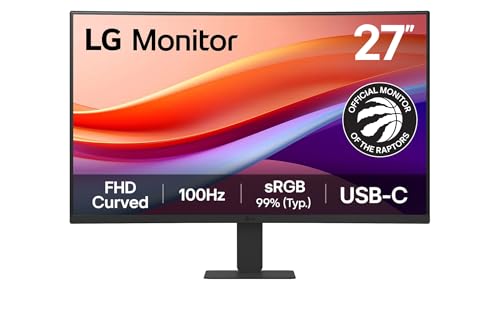
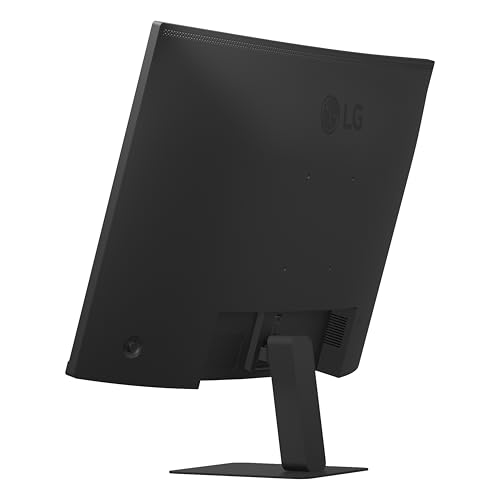
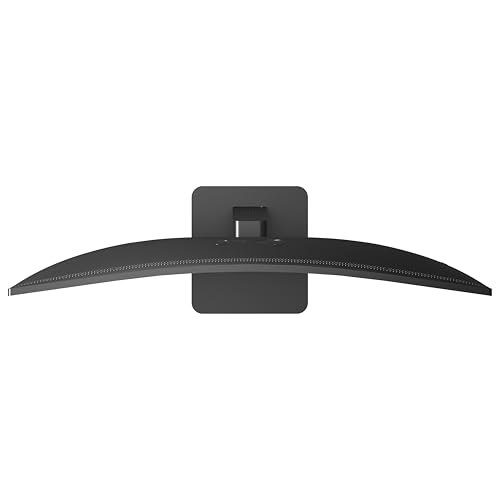
LG 27U421A-B 27-inch Full HD (1920 x 1080) Curved Computer Monitor, 100Hz, 5ms, HDR10, 3-Side Borderless, Switch, HDMI, USB Type-C 15W PD, Tilt Slim Stand, Black (Renewed)




As an Amazon Associate we earn from qualifying purchases. Product prices and availability are accurate as of the date/time indicated.
Sceptre E205W Monitor
The Sceptre E205W Monitor is a monitor with a typical price range of $59 to $69. It is the cheapest monitor in this comparison and a practical starting point if you want a low-cost monitor under $100. It has a size of 20 inches, a resolution of 1600 by 900 pixels, a TN panel, and a refresh rate of 60 Hz, according to the maker.
Choose this monitor if you want a simple, affordable monitor for basic work, school, and video. The Sceptre E205W has a simple setup, a compact design, and a good fit for a beginner with a first monitor. Its 1600 by 900 resolution is lower than 1080p, so text may not look as sharp as on a 1080p monitor. If you want a full 1080p resolution, the Acer SB220Q is a better choice at a slightly higher price.
Acer SB220Q Monitor
The Acer SB220Q Monitor is a monitor with a typical price range of $69 to $79. It has a size of 21.5 inches, a resolution of 1920 by 1080 pixels, an IPS panel, and a refresh rate of 75 Hz, according to the maker. It is a good choice if you want an Acer monitor with a trusted brand for monitors and a simple 1080p design for work and school.
This monitor is best for a user who wants a 1080p IPS monitor for a small desk. The Acer SB220Q has a simple setup and a good fit for a beginner with a first 1080p monitor. It is more expensive than the Sceptre E205W, but it offers a full 1080p resolution, an IPS panel, and a 75 Hz refresh rate for smoother video.
ASUS VA24EHE Monitor
The ASUS VA24EHE Monitor is a monitor with a typical price range of $79 to $89. It has a size of 23.8 inches, a resolution of 1920 by 1080 pixels, an IPS panel, and a refresh rate of 75 Hz, according to the maker. It is a good choice if you want an ASUS monitor with a trusted brand for monitors and a simple 1080p design for work and school.
Choose this monitor if you want an ASUS 23.8-inch monitor for your desk. The ASUS VA24EHE has a simple setup and a good fit for a user who wants a larger screen than a 21.5-inch monitor. It is more expensive than the Acer SB220Q, but it offers a larger 23.8-inch size and an ASUS brand for monitors.
HP M24f Monitor
The HP M24f Monitor is a monitor with a typical price range of $84 to $94. It has a size of 23.8 inches, a resolution of 1920 by 1080 pixels, an IPS panel, and a refresh rate of 75 Hz, according to the maker. It is a good choice if you want an HP monitor with a trusted brand for monitors and a simple 1080p design for work and school.
This monitor is best for a user who wants an HP 23.8-inch monitor for a desk. The HP M24f has a simple setup and a good fit for a user who wants a reliable monitor for daily work. It is more expensive than the ASUS VA24EHE, but it offers an HP brand and a similar 1080p IPS design for work.
LG 24MP400-B Monitor
The LG 24MP400-B Monitor is a monitor with a typical price range of $89 to $99. It has a size of 24 inches, a resolution of 1920 by 1080 pixels, an IPS panel, and a refresh rate of 75 Hz, according to the maker. It is a good choice if you want an LG monitor with a trusted brand for monitors and a simple 1080p design for work and school.
Choose this monitor if you want an LG 24-inch monitor for your desk. The LG 24MP400-B has a simple setup and a good fit for a user who wants a clear 1080p IPS monitor with a wide viewing angle. It is more expensive than the HP M24f, but it offers an LG brand and a similar 1080p IPS design for work.
Samsung S24C310 Monitor
The Samsung S24C310 Monitor is a monitor with a typical price range of $94 to $99. It has a size of 24 inches, a resolution of 1920 by 1080 pixels, an IPS panel, and a refresh rate of 75 Hz, according to the maker. It is the most expensive monitor in this comparison, but it is still under $100 at the high end of its typical price range, and it is a premium Samsung monitor with a 1080p IPS design for work and school.
Choose this monitor if you want a premium Samsung 24-inch monitor for your desk and you are willing to pay more for it. The Samsung S24C310 has a 24-inch size, a 1080p resolution, and an IPS panel for a clear, bright image. It is a good fit for a serious user with a need for a premium, reliable monitor. It is not the best choice if you have a small budget, because the Sceptre E205W offers similar basic display support at a lower price for a beginner.
Buying Guide: How to Choose Budget Monitor Under 100
1. Choose resolution by use: 1080p for most work, 1600 x 900 for basic use only, check resolution
Start with resolution when you learn how to choose budget monitor under 100. Choose a monitor with a 1080p resolution, such as the Acer SB220Q, if you want clear text and video for most work, school, and video. Choose a monitor with a 1600 by 900 resolution, such as the Sceptre E205W, only if you want a basic monitor for simple work and you have a very small budget.
Check resolution before you buy. A monitor with a 1080p resolution can show text clearly and video sharply, while a monitor with a 720p resolution can look blurry and may need more scrolling. A monitor with a 1440p resolution is sharper, but it is rarely under $100, so a 1080p monitor is the best choice for a budget under $100.
2. Check size, panel type, and refresh rate
Check size first. A monitor with a size of 21.5 inches is a good choice for a small desk, while a monitor with a size of 24 inches is a good choice for most users, because it is large enough to show two windows side by side. Check panel type next. A monitor with an IPS panel is a good choice for most users, because it has good color and a wide viewing angle.
Check refresh rate as well. A monitor with a refresh rate of 75 Hz, such as the Acer SB220Q, can look smoother than a monitor with a refresh rate of 60 Hz, especially for video and casual gaming. A monitor with a refresh rate of 60 Hz is enough for basic work and school, but a 75 Hz monitor is a better choice if you can find one under $100. Check response time too, but do not pay extra for a very low response time if you only need a monitor for work and school.
3. Check ports, stand, and VESA mount support
Check ports before you buy. A monitor with an HDMI port is a good choice for most laptops, desktops, and game consoles, because HDMI is the most common video port. A monitor with a VGA port is an older port that may work with an older computer, but it can give you a lower image quality than HDMI. A monitor with a DisplayPort is also a good choice, but it is less common under $100.
Check the stand and VESA mount support as well. A monitor with a simple tilt stand is enough for most users, because you can adjust the angle to reduce glare. A monitor with VESA mount support, usually 75 by 75mm or 100 by 100mm, can be mounted on a monitor arm or a wall, which can save desk space. Check the stand height before you buy, and use a monitor riser or a stack of books if you need to raise the screen to eye level.
4. Check eye comfort, health, and care
Take a break every hour when you work at a computer, look away from the screen for 20 seconds every 20 minutes, and adjust your chair and monitor height so you do not strain your neck. Use a monitor with a low blue light mode or a night mode if you work at night, and adjust the brightness so the screen is not too bright for your room.
Use strong passwords, with two-factor authentication where available, for your accounts. Back up your files with a 3-2-1 backup: three copies, on two different types of storage, with one copy offsite. Do not use public Wi-Fi for banking without a VPN. Clean your monitor with a soft cloth, not a paper towel, which can scratch the screen, and unplug the monitor before you clean it.
Frequently Asked Questions
What is the best budget monitor under 100?
For most users, the Acer SB220Q Monitor, typically $69 to $79, is a strong overall choice because it has a size of 21.5 inches, a resolution of 1920 by 1080 pixels, an IPS panel, and a refresh rate of 75 Hz, according to the maker, at a low price for a budget monitor under 100. If you want the lowest price, the Sceptre E205W, typically $59 to $69, is a good choice. If you want a premium monitor under $100, the Samsung S24C310, typically $94 to $99, is a good choice. Choose by size, resolution, and budget.
What is the best budget monitor under 100 for work?
The best budget monitor under 100 for work is the Acer SB220Q Monitor, typically $69 to $79, because it is the cheapest 1080p IPS monitor in the table and the only model in that price range with a full 1080p IPS design. It has a size of 21.5 inches, a resolution of 1920 by 1080 pixels, an IPS panel, and a refresh rate of 75 Hz, according to the maker. It is a good choice for work, but its 21.5-inch size is best for a small desk, so choose the ASUS VA24EHE if you need a larger 23.8-inch screen.
Is 1080p enough for a budget monitor under 100?
Is 1080p enough for a budget monitor under 100 depends on your use, your screen size, and your eyes. A 1080p monitor, such as the Acer SB220Q, is a good choice for most work, school, and video, with clear text and video for a 21.5-inch or 24-inch screen. A 1080p monitor is not as sharp as a 1440p monitor, but a 1440p monitor is rarely under $100, so a 1080p monitor is the best choice for a budget under $100. Check your desk size and your computer ports before you buy.
Can I use a budget monitor under 100 for gaming?
Can you use a budget monitor under 100 for gaming depends on your games, your computer, and your monitor. A budget monitor with a 75 Hz refresh rate, such as the Acer SB220Q, is a good choice for casual gaming, with smoother video than a 60 Hz monitor. A budget monitor is not the best choice for competitive gaming, because it usually has a slower response time and a lower refresh rate than a gaming monitor. Check your game requirements and your computer ports before you buy, and use an HDMI cable for the best image quality.
How to choose budget monitor under 100 is simple when you focus on the specs that matter: 1080p resolution, a size of 21.5 to 24 inches, an IPS panel, a 75 Hz refresh rate, and an HDMI port. Start with the Acer SB220Q for a reliable low-price 1080p monitor, choose the Sceptre E205W for the lowest price, or choose the Samsung S24C310 for a premium monitor under $100. Check your desk size, your computer ports, and your budget before you buy. With the right monitor, you can work, study, and watch video clearly every time.
Related guides
- Best USB C Cable for Gaming in 2026: 7 Best USB C Cables for Gaming That Charge Fast and Stay Connected
- Best Earbuds for Airplane Travel in 2026: Earbuds for Airplane Travel, Travel Earbuds, and Best Airplane Earbuds
- Best Wall Charger with Multiple Ports in 2026: Wall Charger with Multiple Ports, Multi-Port Wall Chargers, and Best Multi-Port Chargers
- Best Lighting Kit for YouTube in 2026: 7 Best Lighting Kits for YouTube That Make Your Videos Look Professional
More from Amazon
Programs that pair well with the guide above. Offers and eligibility are set by Amazon and may change.
Free shipping on eligible items, Prime Video and more. Eligible new members can start with a free trial.
Start a Prime free trialAd-free music streaming. Eligible new subscribers can start with a free trial.
Try Music Unlimited freeA Prime membership for ages 18-24 with a trial period. Eligibility is set by Amazon.
See Prime for Young AdultsAudiobooks and podcasts to listen to on the go. Eligible new members can start with a free trial.
Try Audible freeAs an Amazon Associate we earn from qualifying purchases.

Write Your Review
No reviews yet. Be the first to share your experience!