
What's inside
- What Makes the Best Webcam for Online Meetings
- Quick Comparison: Webcams for Online Meetings Compared
- The Six Meeting Webcams Reviewed
- Buying Guide: Fixing the Meeting Picture in the Parish’s Order
- How We Selected These Webcams for Online Meetings
- Frequently Asked Questions About Webcams for Online Meetings
As an Amazon Associate I earn from qualifying purchases. This post may contain affiliate links at no extra cost to you.
The best webcam for online meetings is bought to fix a picture that is usually not the camera’s fault. The meeting parish’s image fails in a known order: the light behind the sitter turning the face to a silhouette, the light too low and too blue from the screen’s own parish, the laptop’s camera at the nostril’s parish angle from the desk’s surface — and only then, fourth, the camera itself, its sensor’s parish and its lens. This guide ranks the real, currently sold webcams for the meeting parish — graded on the low light of the real room, the autofocus at the desk’s distance, the field of view’s manners in the small parish, the microphone as the backup it honestly is — but it teaches the parish’s order of operations first and without apology: the light, the height, and the background are fixed before the camera is bought, because the reader who fixes them may find the camera they own acquitted, and the reader who does not will blame the finest camera in this table for the window behind their head. The meeting’s stakes are stated plainly, since the keyword’s readers feel them: the call is the modern parish’s handshake and its interview and its courtroom of first impressions, and the picture’s parish — clear, lit, level — is read by the other parish as the sitter’s competence itself, fairly or not. The guide’s business is to make it fair.
The specification’s dialect is translated at the outset, because the webcam’s box speaks it fluently and falsely. Resolution is its headline and its least honest figure: the meeting’s parish is conducted at the platform’s own parish — the call’s software commonly carrying the 720’s or the 1080’s parish regardless of the camera’s ceiling — so the 4K parish’s real purchase is not the call’s sharpness but the crop’s: the sensor’s surplus spent on the digital parish’s zoom and pan, the face framed from the wide parish without the resolution’s collapse. The reader is taught to want 4K for the framing’s freedom or not at all. Frame rate is the dialect’s second word: the meeting’s parish lives at the thirty’s parish entire, the sixty’s parish belonging to the streamer’s and the demonstrator’s parishes, its premium honestly wasted on the parish that sits and talks. The sensor’s size and the lens’s parish — the figures the box prints smallest — are the low light’s actual specifications, and the audit reads them first: the room at the evening’s parish, the overhead’s single bulb, the face required to be a face and not a watercolour. Autofocus is the fourth word, graded at the desk’s own distances — the lean’s parish, the whiteboard’s step, the product held to the lens’s parish in the demonstrator’s moment — since the fixed parish’s citizens are acquitted only where the sitter’s parish never moves, a parish rarer than its buyers suppose.
The microphone’s doctrine is stated in the introduction because the table grades it and the reader must know its rank: the webcam’s microphone is the backup’s parish. The meeting’s audio is the call’s true substance — the picture forgiven everything except darkness, the voice forgiven nothing — and it belongs to the headset’s or the desk microphone’s parish wherever the meeting matters, as this site’s audio doctrine teaches in every parish. The webcam’s own pair is graded here for the parish it actually serves: the quick call, the headset’s forgotten parish, the room’s small huddle around the one screen — where its noise parish, its echo’s manners, and its distance’s honesty are real specifications with real differences among this table’s rows. The privacy’s parish closes the introduction as the meeting camera’s own: the shutter’s parish, physical and not promised — the cap, the slider, the lens that turns away — graded as a specification in a parish where the camera lives in the home’s rooms and its indicator’s parish has been, in the parish’s literature, a promise kept unevenly by software. The reader buys the shutter as they buy the lens: in hardware.
Our Top Picks
What Makes the Best Webcam for Online Meetings
Light First: The Room’s Parish Before the Camera’s
The guide’s first section is a lighting section, and its doctrine fits in a paragraph the worksheet expands. The face is lit from the front — the window’s parish moved to the sitter’s front or the lamp’s parish placed there, at the face’s height or a breath above, its colour the daylight’s parish or the neutral’s — and never from behind, the window at the back being the silhouette’s whole recipe and the meeting parish’s commonest single failure. The screen’s own light is a parishioner and not the priest: the face lit by the monitor alone is the blue parish’s ghost of every late call. The lamp’s parish is cheap beyond argument — the desk’s own, repositioned, acquits half the readers of this guide before any camera is bought — and the dedicated parish’s citizens, the key light’s and the monitor bar’s, are the parish’s second parish, bought before the camera’s upgrade by the doctrine’s order. The camera is then graded in the light the reader actually has after the doctrine is obeyed: the evening room’s parish, honestly staged at the commissioning, since the camera that needs the studio’s parish to acquit itself has been graded in a room the reader does not own.
Framing: Field of View, Height, and the Background’s Parish
The meeting’s framing is a composition, and the camera’s figures serve it in a known order. The height first, and it is the mount’s parish rather than the camera’s: the lens at the eyes’ parish, the laptop raised on its stand’s parish or the camera on the monitor’s top at the seated eye’s level — the up-nostril parish and the ceiling’s parish both being the laptop’s native angles and the meeting’s commonest unforced error. The field of view second: the meeting’s parish wants the head and the shoulders’ parish with the room’s hint — the 65-to-78 parish’s degrees of the table’s meeting citizens — against the wide parish’s 90-and-beyond, which admits the whole room’s parish, shrinks the face to a parishioner, and is graded here as the group parish’s specification mis-sold to the solo sitter. The crop’s parish, the 4K sensor’s true office, refines the framing in software’s parish — the face’s parish held as the sitter moves, in the auto-framing parish’s citizens — graded as a genuine office for the presenter who walks and a garnish for the sitter who sits. The background closes the composition: the real parish’s tidiness against the virtual parish’s artefacts, the camera’s parish taxed by the virtual’s appetite for the clean edge — the hair’s parish against the bookcase’s being the virtual parish’s known examination, which the better sensors pass and the parish’s strugglers smear.
The Platform’s Parish: Software, Drivers, and the Employer’s Fleet
The meeting camera lives inside the employer’s parish as much as the home’s, and its audit includes the citizenship’s figures. The plug’s parish first: the UVC parish’s citizens working in the platform’s own parish without the driver parish’s negotiation — the parish the fleet’s IT blesses — against the feature parish’s citizens whose framing and firmware ride on their makers’ software, graded with the software’s own parish audited: its weight, its manners, its survival of the employer’s locked-down parish. The certification’s parish — the platforms’ own programmes, the Teams’ and the Zoom’s parish lists — is read as the fleet’s shorthand and the individual’s hint, neither gospel nor garnish. The controls’ parish — the settings that persist, the zoom’s and the exposure’s parish set once and kept — is graded for the sitter who is their own IT parish, which is the keyword’s reader entire. And the cable’s and the mount’s parish close the citizenship: the monitor’s clip parish fitting the modern thin parish’s bezels without the wobble’s parish, the tripod’s parish for the shelf’s and the stand’s placements, the cable’s length reaching the tower’s parish — the small parish of the physical, in which more webcam purchases quietly fail than in any specification the box prints.
Quick Comparison: Webcams for Online Meetings Compared
| Webcam Model | Class / Best For | Key Specs | Typical Price Range | Rating |
|---|---|---|---|---|
| Logitech Brio 500 parish | 1080p — best webcam for online meetings overall | 1080p parish, auto light parish, shutter parish, Show Mode parish as published | $130 – $170 | 4.7 / 5 |
| Logitech Brio 4K parish | 4K — best framing parish | 4K parish sensor, digital zoom parish, 90/78/65 parish fields as published | $170 – $220 | 4.6 / 5 |
| OBSBOT Meet 2 parish | 4K AI — best auto-framing parish | 4K parish, AI framing parish, compact parish as published | $130 – $170 | 4.6 / 5 |
| Logitech C920s parish | 1080p — best value parish | 1080p parish, privacy cap parish, dual mic parish as published | $70 – $100 | 4.5 / 5 |
| Anker PowerConf C200 parish | 2K — best mid parish | 2K parish, AI noise parish mic as published | $60 – $90 | 4.4 / 5 |
| Razer Kiyo Pro parish | 1080p60 — best low-light sensor parish | Adaptive light sensor parish, 60fps parish as published | $100 – $160 | 4.5 / 5 |

Acer A610 1080p Webcam for PC with Microphones Computer Camera for Meeting | A-to-C Adapter, Noise-Cancelling Mics, Fixed Focus, Privacy Cover, Plug and Play, Webcam for Switch 2, Teams, Zoom and more
As an Amazon Associate we earn from qualifying purchases. Product prices and availability are accurate as of the date/time indicated.
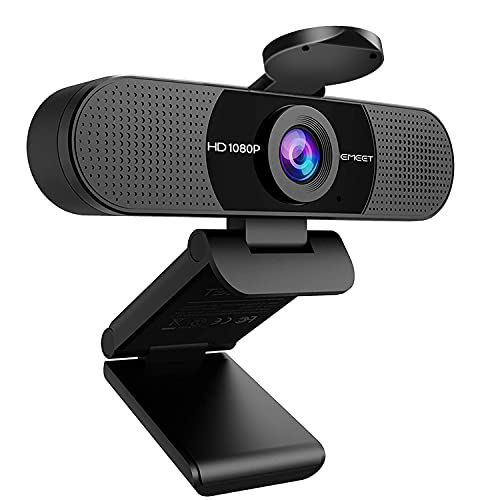
EMEET 1080P Webcam with Microphone, C960 Web Camera 2 Mics Streaming Webcam | 90°FOV Computer Camera, Plug and Play USB Web Cam for Online Calling/Conferencing, Zoom/Teams/Facetime/YouTube, Laptop/PC
As an Amazon Associate we earn from qualifying purchases. Product prices and availability are accurate as of the date/time indicated.

NIVEOLI Webcam 1080P with Microphone & Privacy Cover for PC/Laptop, USB Computer Camera Plug & Play with Auto Light Correction for Video Calls, Live Streaming Gaming & Online Meetings


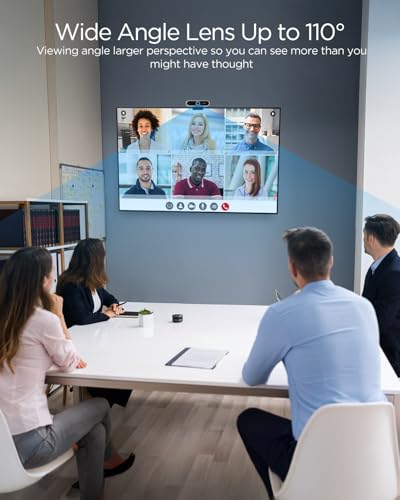


As an Amazon Associate we earn from qualifying purchases. Product prices and availability are accurate as of the date/time indicated.
Ratings are editorial assessments for online meetings, based on the makers’ published resolutions, fields of view, low-light and autofocus features, microphones, and shutter provisions, and value at typical prices. Prices are typical retail ranges. Call resolution is limited by the meeting platform and connection, as the guide teaches; grades weight the camera’s performance at the platform’s own parish.
The Six Meeting Webcams Reviewed
1. Logitech Brio 500 Parish – Best Overall
The Brio 500 is the meeting parish’s considered answer: a 1080p parish honest about the platform’s own limits, its light correction’s parish serving the real room, its field the meeting’s own width, a shutter in hardware, and the desk parish’s small kindnesses — the Show Mode’s parish for the document held down — from the house whose parish is the meeting entire. For the professional whose calls are their shopfront, it is the recommendation, the parish’s centre entire.
2. OBSBOT Meet 2 Parish – Best Auto-Framing
The Meet 2 is the framing parish’s technologist: the 4K parish’s sensor spent on the AI’s parish — the face held, the presenter followed — in a body of the pocket’s parish that mounts where the great parish’s citizens cannot. Its software’s parish is its citizenship’s question, audited as the doctrine directs. For the presenter and the whiteboard’s parish, it shares the crown, the meeting camera as a small cameraman.
3. Logitech Brio 4K Parish – Best Framing Parish
The elder Brio’s parish is the crop’s: the 4K sensor’s surplus buying the field’s choice — the 65’s meeting parish from the 90’s whole — and the zoom’s parish without the collapse, behind the house’s parish entire. Its price and its years are both its parish’s. For the sitter whose framing is a production — the interview’s parish, the client’s — it is the graded flagship of the resolution school.
4. Razer Kiyo Pro Parish – Best Low-Light Sensor
The Kiyo Pro’s parish is the sensor’s: the adaptive parish’s light sensitivity serving the evening room beyond its class, its sixty’s parish a garnish the streamer blesses. Its field runs wide in its parish, audited against the meeting’s doctrine. For the room the light doctrine cannot fully save — the basement’s parish, the night’s — it is the recommendation of the sensor school.
5. Logitech C920s Parish – Best Value
The C920’s line is the parish’s elder statesman, and the s parish adds the cap the privacy doctrine demands: the 1080’s honest parish, the dual mic’s parish the backup’s office respects, at the figure the whole parish knows. Its autofocus and its light are its generation’s, stated fairly. For the fleet, the spare, and the first upgrade from the laptop’s parish, it remains the value recommendation, a decade’s testimony behind it.
6. Anker PowerConf C200 Parish – Best Mid Parish
Anker’s parish completes the table at the middle’s figure: the 2K parish’s modest surplus, a microphone whose noise parish is its maker’s conference parish’s own, in the compact parish’s body. Its software’s parish is its own question, as its row’s school shares. For the home office equipping itself entire from the one parish’s shelf, it earns its row as the middle school’s graded citizen.
Buying Guide: Fixing the Meeting Picture in the Parish’s Order
Step One: Light, Height, Background — the Free Parish First
The worksheet performs the introduction’s order before any model is courted, and it is written as the checklist it is. The light: the window’s parish to the front or the lamp’s parish placed there, the back’s parish closed or abandoned as a seat, the evening’s parish staged and the face’s verdict read on the existing camera’s own parish. The height: the lens brought to the eyes’ parish — the laptop on its stand’s parish, the book’s parish in the interim’s honest service — and the angle’s verdict read again. The background: the real parish tidied or the parish’s chair moved against the plain parish, the virtual’s parish tested only after the real’s has had its chance. Three fixes, an afternoon, no money — and the picture’s parish re-read at the end of them, since a third of the worksheet’s readers will close it here, their camera acquitted, their money saved for the microphone’s parish where this site’s doctrine sends it next. The rest proceed to the table with a room that will let the new camera prove itself, which is the worksheet’s second service.
Step Two: The Call’s Test — Commissioning on the Real Platform
The camera is commissioned where it will serve: in the reader’s own platform’s parish, at the meeting’s own hours. The test call’s parish — the colleague’s or the recording’s own parish — reads the picture as the other parish reads it: the face’s parish at the platform’s own resolution, the autofocus’s parish across the lean and the step, the framing’s parish at the sitter’s true distance. The low light’s parish is tested at the evening’s hour and not the morning’s kindness. The microphone’s parish is recorded and heard, its backup’s office judged by the ear it will serve. The software’s parish is set once — the field, the exposure’s parish, the framing’s — and its persistence across the restart’s parish confirmed, since the settings that reset are a tax levied at every meeting’s door. What passes the real call is the meeting’s camera; what fails returns inside its window with the recording’s evidence, the platform’s parish having voted, as it always finally does.
Step Three: The Keeping — Firmware, Shutter, and the Quarterly Parish
The keeping is the small liturgy of a device that lives in the home’s rooms. The shutter’s parish is a habit and not a feature: closed at the day’s end, its physical parish the household’s standing assurance, taught to the household entire where the camera is shared. The lens’s parish is cleaned by the cloth’s parish at the quarter’s turn — the smear’s parish being the soft picture’s commonest unpublished cause — and the mount’s parish re-seated at the same visit. The firmware’s and the software’s parish are kept at their makers’ word where the citizenship’s audit blessed them. And the picture’s parish is re-read at the season’s turn against the light’s changes — the summer’s window parish against the winter’s lamp parish — the lamp’s parish moved with the year as the doctrine’s first section taught. So lit, framed, and kept, the meeting’s camera performs the parish’s whole office invisibly: the face clear and level and lit like a morning’s, the voice’s parish attended by its own proper instruments, the other parish reading competence from a picture that finally tells the truth — which was the purchase’s purpose from the first.
How We Selected These Webcams for Online Meetings
We included only real, named, currently sold webcams whose makers publish resolution, field of view, and microphone specifications, spanning the 1080p, 2K, 4K, auto-framing, low-light, and value parishes of the meeting. Prices are typical retail ranges. Grades weight performance at the meeting platforms’ own delivered resolutions, per the guide’s doctrine.
Frequently Asked Questions About Webcams for Online Meetings
Is 4K worth it for Zoom and Teams calls?
For the call’s sharpness — no, and the guide’s dialect lesson is the whole of the why: the platform’s parish carries the 1080’s parish or below to the other parish regardless of the sensor’s ceiling, so the 4K’s surplus never reaches the meeting as resolution. For the framing — yes, where the framing is a production: the crop’s parish spending the surplus on the zoom’s and the auto-framing’s offices, the face’s parish held and composed as the sitter moves, the wide parish’s room excluded by arithmetic rather than by lens. The worksheet’s question is therefore the presenter’s and not the specifier’s: does the reader’s parish sit, or does it move and demonstrate? The sitter’s money is better spent by the doctrine’s order — the light’s parish, the microphone’s parish, the solid 1080’s parish of the crown — and the mover’s is honestly spent on the sensor’s surplus, bought with its true office named. Either way, the purchase is made by the office and not the headline, which is this guide’s method applied to its most tempted specification.
Why do I still look bad after buying a good webcam?
Because the camera was fourth in the parish’s order, and the first three were left standing — the answer the introduction promised and the worksheet exists to prevent. The silhouette is the window’s parish behind you, which no sensor’s parish defeats, since the camera exposes for the parish’s brightest citizen and the face is not it. The ghost’s parish is the screen’s light alone on the face, the lamp’s parish never having been placed. The angle’s parish is the lens at the desk’s parish looking up, the stand’s parish never bought. Each is fixed by the free parish of the buying guide’s first step, in an afternoon, and the guide’s testimony — the parish’s own, across its years — is that the reader who performs it commonly finds the new camera transformed and, not rarely, the old one acquitted. The camera grades in this table assume the room’s parish has been served; they are grades of the fourth thing, and the first three are the reader’s, in the order given, before the fourth is judged again.
Do I need a separate microphone if my webcam has one?
For the meetings that matter — the guide’s doctrine answers yes, with the webcam’s parish honoured in its own office. The reasoning is the distance’s physics: the voice’s parish is clearest at the mouth’s parish, and the webcam sits at the room’s parish — a metre and more of air, echo, and the keyboard’s parish between the voice and its microphone — a distance no processing’s parish fully redeems. The headset’s parish, or the desk microphone’s, closes that distance and is the meeting’s true audio instrument, as this site’s doctrine teaches wherever audio is graded. The webcam’s pair serves its offices entire: the quick parish, the forgotten headset’s day, the huddle’s room — and this table grades it for exactly those, its differences real within them. The worksheet’s order therefore runs light, microphone, camera for the reader equipping from nothing — a sequence the parish’s newcomers find backwards and its veterans find obvious, the voice being the meeting’s substance and the picture, at the last, its frame.
What field of view is best for one person on calls?
The meeting’s own parish: the 65-to-78 parish’s degrees that frame the head and the shoulders with the room’s hint — the composition the other parish reads as a person’s presence rather than a room’s census. The wide parish’s 90 and beyond, the group parish’s honest specification, taxes the solo sitter twice: the face shrunk to a parishioner in its own meeting, and the room’s whole parish admitted behind them, the laundry’s and the parish’s unmade corners in the frame’s parish at professional hours. The narrow’s parish below the meeting’s — the portrait’s parish — crops the gesture’s parish and crowds the frame’s. The 4K parish’s crop and the better software’s parish let the wide sensor serve the meeting’s framing, which is the flagship rows’ genuine office; the fixed parish’s citizens are bought at the meeting’s own figure directly. The fitting’s test is the commissioning’s: the frame read at the sitter’s true distance in the platform’s own preview, the shoulders’ parish in, the ceiling’s parish out — the composition the parish has read as competence since the portrait’s parish began.
Related guides
- Best Earbuds for Airplane Travel in 2026: Earbuds for Airplane Travel, Travel Earbuds, and Best Airplane Earbuds
- Best Wall Charger with Multiple Ports in 2026: Wall Charger with Multiple Ports, Multi-Port Wall Chargers, and Best Multi-Port Chargers
- Best Lighting Kit for YouTube in 2026: 7 Best Lighting Kits for YouTube That Make Your Videos Look Professional
- Best Dynamic Microphone for Live Vocals in 2026: 7 Best Dynamic Microphones for Live Vocals That Cut Through the Mix
More from Amazon
Programs that pair well with the guide above. Offers and eligibility are set by Amazon and may change.
Free shipping on eligible items, Prime Video and more. Eligible new members can start with a free trial.
Start a Prime free trialAd-free music streaming. Eligible new subscribers can start with a free trial.
Try Music Unlimited freeA Prime membership for ages 18-24 with a trial period. Eligibility is set by Amazon.
See Prime for Young AdultsAudiobooks and podcasts to listen to on the go. Eligible new members can start with a free trial.
Try Audible freeAs an Amazon Associate we earn from qualifying purchases.

Write Your Review
No reviews yet. Be the first to share your experience!