
What's inside
- Why a Tablet Stand for Desk Viewing Improves Your Posture
- Best Tablet Stand for Desk Viewing: Stability and Adjustability Matter Most
- Best Tablet Stand for Desk Viewing Comparison Table
- Top Tablet Stands for Desk Viewing Reviewed
- Buying Guide: How to Choose the Best Tablet Stand for Desk Viewing
- How to Set Up a Tablet Stand for Desk Viewing
- Frequently Asked Questions
As an Amazon Associate I earn from qualifying purchases. This post may contain affiliate links at no extra cost to you.
Finding the best tablet stand for desk viewing is about choosing a stand that holds your tablet at eye level, with a design that is stable, adjustable, and comfortable for watching videos, reading, video calls, and working, without holding your tablet in your hand, without straining your neck, and without a stand that tips over. A tablet stand for desk viewing should be sturdy, with a design that fits your iPad, Samsung Galaxy Tab, or other tablet, and with a stand that is easy to adjust for your viewing angle.
This guide explains what to look for in a tablet stand for desk viewing, how to compare material, adjustability, stability, and compatibility, and which models work well in 2026. We focus on practical use for remote workers, students, and creators who use a tablet on their desk, with a stand that is used for Zoom calls, for watching movies, and for reading, and with a design that is ergonomic, durable, and affordable. Whether you use an iPad Pro 12.9, an iPad Air, or a Samsung Galaxy Tab S9, the same principles apply: choose a stand that is stable, with a design that is adjustable, and with a stand that fits your tablet.
Our Top Picks
Why a Tablet Stand for Desk Viewing Improves Your Posture
A tablet stand for desk viewing improves your posture because it raises your tablet to eye level, with a design that prevents you from bending your neck down to look at a tablet lying flat on your desk, which can cause neck pain, shoulder pain, and eye strain. A stand that holds your tablet at a comfortable angle, with your screen at eye level, lets you work for longer, with a design that is ergonomic, and with a stand that is better for your health. A stand that is adjustable, with a design that lets you set your viewing angle from 30 to 80 degrees, is also important, because different tasks need different angles, with a design that is versatile.
A tablet stand for desk viewing also frees your hands, because you can type on a keyboard, take notes, or use a stylus, with your tablet held securely, and with a stand that is stable. A stand that is made from aluminium, with a design that is heavy and stable, is better than a stand that is made from plastic, with a design that is light and can tip over. A stand with a non-slip base, with a design that grips your desk, is also important, because it prevents your tablet from sliding, with a design that is safe.
Best Tablet Stand for Desk Viewing: Stability and Adjustability Matter Most
Stability matters most for a tablet stand for desk viewing, because a stand that wobbles or tips over will be frustrating to use, with a tablet that falls, and with a stand that can damage your tablet. A stand with a wide base, with a design that is heavy, is more stable than a stand with a narrow base, with a design that is light. A stand such as the Lamicall Tablet Stand, with a wide aluminium base, is very stable, with a design that holds a 12.9-inch iPad Pro securely, while a stand such as a cheap plastic stand, with a narrow base, can tip over easily.
Adjustability also matters, because a stand with an adjustable angle, from 30 to 80 degrees, lets you set your tablet for different tasks, with a design that is versatile. A stand with a fixed angle, with a design that is not adjustable, is less useful, because it may not be comfortable for all tasks. A stand with a height adjustment, with a design that lets you raise your tablet to eye level, is even better, because it improves your posture, with a design that is ergonomic. A stand such as the Twelve South Compass Pro, with a folding design that adjusts to many angles, is a good choice for a traveller, with a design that is portable.
Best Tablet Stand for Desk Viewing Comparison Table
| Model | Compatibility | Material | Adjustable Angle | Weight | Typical Price Range | Rating |
|---|---|---|---|---|---|---|
| Lamicall Tablet Stand | 4-13 in tablets | Aluminium alloy | 30-80 degrees | About 1.1 lbs | $20-$30 | 4.8/5 |
| OMOTON Tablet Stand | 4-13 in tablets | Aluminium alloy | 30-75 degrees | About 0.9 lbs | $15-$25 | 4.7/5 |
| Twelve South Compass Pro | Up to 12.9 in iPad | Aluminium | Multiple angles | About 0.6 lbs | $50-$60 | 4.7/5 |
| Nulaxy A5 Tablet Stand | 4-13 in tablets | Aluminium alloy | 30-80 degrees | About 1.0 lbs | $20-$30 | 4.6/5 |
| UGREEN Tablet Stand Holder | 4-12.9 in tablets | Aluminium alloy | 30-70 degrees | About 0.8 lbs | $15-$25 | 4.6/5 |
| Lisen Tablet Stand for iPad | 4-13 in tablets | Aluminium alloy | 30-80 degrees | About 1.0 lbs | $20-$30 | 4.6/5 |
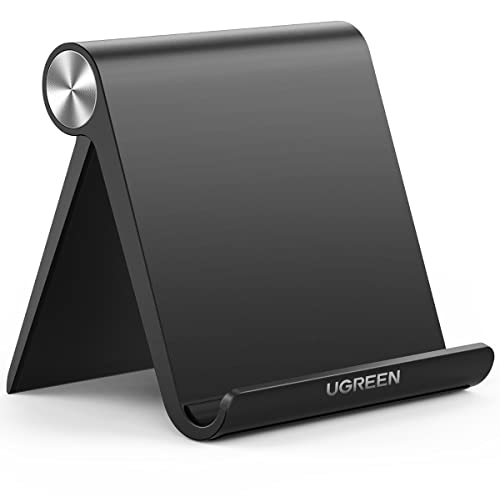
UGREEN Tablet Stand Holder Adjustable Portable Desktop Dock Office Compatible with iPad Pro 11 9.7 10.5 Air Mini 5 4 3 2 iPhone 17 16 15 14 13 12 Black
As an Amazon Associate we earn from qualifying purchases. Product prices and availability are accurate as of the date/time indicated.

LISEN iPad Stand Tablet Holder for Desk, iPad Holder Accessories Foldable | iPad Accessories for Apple, Office Desk Accessories Home Essentials, Kindle Stand Gifts for Men, Portable Monitor Stand
As an Amazon Associate we earn from qualifying purchases. Product prices and availability are accurate as of the date/time indicated.
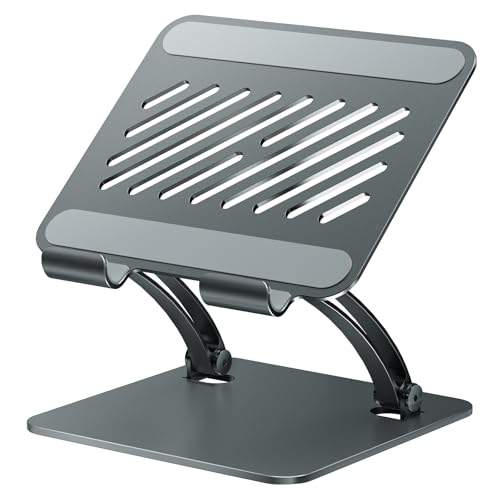
tounee Tablet Holder Stand, Dual Rod Adjustable Aluminum Desktop Stand, Compatible with 4.7-16.9" iPads, Surface Tablets, Portable Monitors, Kindle & More (Gray)
As an Amazon Associate we earn from qualifying purchases. Product prices and availability are accurate as of the date/time indicated.
Top Tablet Stands for Desk Viewing Reviewed
Lamicall Tablet Stand
The Lamicall Tablet Stand is a stand for tablets from 4 to 13 inches, with a material of aluminium alloy, an adjustable angle of 30 to 80 degrees, a weight of about 1.1 pounds, and a price of $20 to $30. It has a wide base, with a design that is very stable, and with a stand that is known for Lamicall quality. It is a good choice if you want the best tablet stand for desk viewing, with a design that is popular, and with a stand that holds a 12.9-inch iPad Pro securely.
OMOTON Tablet Stand
The OMOTON Tablet Stand is a stand for tablets from 4 to 13 inches, with a material of aluminium alloy, an adjustable angle of 30 to 75 degrees, a weight of about 0.9 pounds, and a price of $15 to $25. It has a design that is similar to Lamicall, with a wide base, and with a stand that is affordable. It is a good choice if you want a tablet stand for desk viewing that is good value, with a design that is stable and with a stand that is easy to use.
Twelve South Compass Pro
The Twelve South Compass Pro is a stand for iPad up to 12.9 inches, with a material of aluminium, multiple adjustable angles, a weight of about 0.6 pounds, and a price of $50 to $60. It has a folding design, with a design that is portable, and with a stand that is known for Twelve South quality. It is a good choice if you want a premium tablet stand for desk viewing that is portable, with a design that is elegant and with a stand that is ideal for travel.
Nulaxy A5 Tablet Stand
The Nulaxy A5 Tablet Stand is a stand for tablets from 4 to 13 inches, with a material of aluminium alloy, an adjustable angle of 30 to 80 degrees, a weight of about 1.0 pounds, and a price of $20 to $30. It has a design that is stable, with a wide base, and with a stand that is popular with tablet users. It is a good choice if you want a tablet stand for desk viewing that is affordable, with a design that is similar to Lamicall, and with a stand that is good for an iPad or Samsung tablet.
UGREEN Tablet Stand Holder
The UGREEN Tablet Stand Holder is a stand for tablets from 4 to 12.9 inches, with a material of aluminium alloy, an adjustable angle of 30 to 70 degrees, a weight of about 0.8 pounds, and a price of $15 to $25. It has a design that is compact, with a stand that is stable, and with a design that is known for UGREEN quality. It is a good choice if you want a tablet stand for desk viewing that is cheap, with a design that is good and with a stand that is ideal for a desk.
Lisen Tablet Stand for iPad
The Lisen Tablet Stand for iPad is a stand for tablets from 4 to 13 inches, with a material of aluminium alloy, an adjustable angle of 30 to 80 degrees, a weight of about 1.0 pounds, and a price of $20 to $30. It has a design that is stable, with a wide base, and with a stand that is popular on Amazon. It is a good choice if you want a tablet stand for desk viewing that is affordable, with a design that is similar to other aluminium stands, and with a stand that is good for daily use.
Buying Guide: How to Choose the Best Tablet Stand for Desk Viewing
Start with compatibility, stability, and your tablet size. Look for a stand that fits your tablet, with a design that holds a 12.9-inch iPad Pro if you have one, or a stand that fits a 10-inch tablet if you have a smaller tablet. A stand that fits tablets from 4 to 13 inches, such as the Lamicall, is versatile, with a design that works for most tablets, with a stand that has hooks that are deep enough to hold your tablet with a case on. A stand with a wide base, with a design that is heavy, is more stable than a stand with a narrow base, with a design that can tip over. Test your stand with your tablet, with your case on, to make sure it fits securely, and that it does not wobble when you tap your screen.
Next, check adjustability, height, and viewing angle. Look for a stand with an adjustable angle of at least 30 to 80 degrees, because it lets you set your tablet for different tasks, with a design that is versatile. A stand with a low angle, such as 30 degrees, is good for drawing or writing with a stylus, with a design that is comfortable, while a stand with a high angle, such as 80 degrees, is good for watching videos or for video calls, with a design that is upright. A stand with a height adjustment, with a design that raises your tablet to eye level, is even better, because it improves your posture, although most tablet stands in this list do not adjust height, only angle, so you may need a stand with a taller design, or a monitor riser, to raise your tablet higher.
Check material, non-slip, and cable management. Look for a stand made from aluminium alloy, because it is durable, heavy, and stable, with a design that is better than plastic, which can break or tip over. A stand with rubber pads on its base and on its hooks, with a design that prevents your tablet from scratching, and with a design that prevents your stand from sliding on your desk, is also important. A stand with a cable hole, with a design that lets you charge your tablet while it is on the stand, is also useful, because you can keep your tablet charged during a long video call, with a design that is convenient.
Consider your desk, your use, and your portability. If you have a small desk, a stand with a compact base, with a design that does not take up much space, is better, while if you have a large desk, a stand with a wide base, with a design that is stable, is better. If you use your tablet for video calls, choose a stand that holds your tablet upright, with a design that is stable, and with a stand that positions your camera at eye level. If you travel, choose a folding stand, such as the Twelve South Compass Pro, with a design that is portable, and with a stand that fits in your bag. A stand that is easy to fold, with a design that is light, is ideal for travel.
Finally, set a realistic budget. Tablet stands for desk viewing typically cost $15 to $60, depending on material and brand. A budget stand from $15 to $25, such as the OMOTON or UGREEN, offers good stability at a low price, with a design that is affordable. A mid-range stand from $20 to $30, such as the Lamicall, Nulaxy, or Lisen, offers a good balance of stability, adjustability, and price, and it is worth it if you use your tablet daily. A premium stand from $50 to $60, such as the Twelve South Compass Pro, offers a folding design, with a premium aluminium finish, and with a stand that is worth it if you travel or if you want the best design. Do not buy a stand based only on price. Choose one that is stable, with a design that fits your tablet, and with a stand that is adjustable, so you can view your tablet comfortably, without neck pain.
How to Set Up a Tablet Stand for Desk Viewing
To set up a tablet stand for desk viewing, first place your stand on your desk, with its base flat, and with a design that is stable. Adjust its angle to about 60 to 70 degrees for watching videos, or to about 30 to 40 degrees for drawing, with a design that is comfortable. Place your tablet in your stand, with its bottom edge in the hooks, and with its back against the stand, and make sure it is secure, with no wobble. Connect your charger, with a cable that goes through your stand’s cable hole, if it has one, and position your tablet at eye level, with a design that is comfortable. Use your tablet for a video call, with your camera at eye level, and adjust your stand until your posture is comfortable, with your neck straight, and with your eyes looking slightly down at your screen. A stand that is set up correctly, with the right angle, will help you work comfortably, without pain.
Frequently Asked Questions
What is the best angle for a tablet stand for desk viewing?
The best angle for a tablet stand for desk viewing is 60 to 70 degrees for watching videos and for video calls, with a design that is upright, and with a stand that holds your tablet at a comfortable viewing angle. For drawing or writing with a stylus, a lower angle of 30 to 40 degrees is better, with a design that is more like a desk, and with a stand that is comfortable for your hand. For reading, an angle of 45 to 60 degrees is a good balance, with a design that is comfortable for your neck, and with a stand that is easy to adjust. A stand with an adjustable angle of 30 to 80 degrees, such as the Lamicall, lets you set the angle that is best for your task, with a design that is versatile.
Will a tablet stand fit an iPad with a case?
Yes, a tablet stand will fit an iPad with a case, if the stand’s hooks are deep enough, with a design that is at least 0.5 inches deep, and with a stand that is made for tablets up to 13 inches. A stand such as the Lamicall, with hooks that are deep, can hold an iPad with a slim case, such as an Apple Smart Cover, with a design that is secure, although it may not fit an iPad with a thick, rugged case, such as an OtterBox, with a design that is bulky. Always check your stand’s hook depth, and test it with your iPad and case on, before you buy, to make sure it fits securely, and that it does not wobble. If your case is very thick, remove it, or choose a stand with deeper hooks.
Is an aluminium tablet stand better than a plastic stand?
Yes, an aluminium tablet stand is better than a plastic stand, because aluminium is heavier, more durable, and more stable, with a design that holds a large tablet securely, and with a stand that is less likely to tip over. A plastic stand is lighter, with a design that is cheaper, although it can break, with a design that is less stable, and with a stand that may not hold a 12.9-inch iPad Pro securely. For desk viewing, an aluminium stand, such as the Lamicall or OMOTON, is the best choice, with a design that is premium and with a stand that will last for many years. A plastic stand is a good choice only if you need a very cheap, portable stand, with a design that is light.
Can I use a tablet stand for a Samsung Galaxy Tab?
Yes, you can use a tablet stand for a Samsung Galaxy Tab, because most tablet stands, such as the Lamicall, OMOTON, Nulaxy, and UGREEN, are universal, with a design that fits tablets from 4 to 13 inches, regardless of brand. A Samsung Galaxy Tab S9, with a size of 11 inches, will fit on a universal stand, with a design that is secure, and with a stand that holds it at a comfortable angle. A Samsung Galaxy Tab S9 Ultra, with a size of 14.6 inches, may be too large for a standard stand, with a design that is too wide, so you may need a stand that is made for a larger tablet, or a laptop stand, with a design that is wider. Always check your stand’s compatibility, with a design that fits your tablet’s size, before you buy.
Related guides
- How to Choose Cheap Gaming Headset in 2026: 7 Steps for Cheap Gaming Headset, Gaming, and Simple Audio for Gamers
- How to Choose Phone Charger for Fast Charging: 6 Best Fast Chargers in 2026
- Best Tablet Holder for Bed Use in 2026: 7 Tablet Holders With Flexible Arm, Stable Base, and Simple Use for Bed
- Best High End Laptop Dock for Remote Work in 2026: High End Laptop Docks for Remote Work
More from Amazon
Programs that pair well with the guide above. Offers and eligibility are set by Amazon and may change.
Free shipping on eligible items, Prime Video and more. Eligible new members can start with a free trial.
Start a Prime free trialAd-free music streaming. Eligible new subscribers can start with a free trial.
Try Music Unlimited freeA Prime membership for ages 18-24 with a trial period. Eligibility is set by Amazon.
See Prime for Young AdultsAudiobooks and podcasts to listen to on the go. Eligible new members can start with a free trial.
Try Audible freeAs an Amazon Associate we earn from qualifying purchases.

Write Your Review
No reviews yet. Be the first to share your experience!