
What's inside
As an Amazon Associate I earn from qualifying purchases. This post may contain affiliate links at no extra cost to you.
Finding the best switch for home labs is different from choosing a switch alone, because the best switch for home labs has to be fast enough for labs, reliable enough for connections, and affordable enough for home, without being too slow, too unstable, or too expensive, even though it still has to offer a good port count, a good speed, and a design that fits tech gadgets. A good switch for home labs should offer at least an 8-port count, at least a 1 Gbps speed, and at least a managed option, so it can be used for best switch for home labs, for users, for a first switch, and for connecting servers, PCs, or devices at home, in a lab, or in an office with a switch, a network, or a user. A poor switch will be too slow, it will be too unstable, or it will not last, and your lab will drop, your work will be frustrating, and your day will be less enjoyable.
The right choice depends on your lab, your budget, and whether you want a TP-Link switch or a Netgear switch. Always check your switch, network, and outlet before use, and never overload an outlet.
Port count, speed, and managed are the first factor for the best switch for home labs, because port count decides how many devices a switch will connect, speed decides how fast a switch will transfer, and managed decides whether a switch can be configured. Port count is listed as port count, with 24 best, because it will connect most. For best switch for home labs, 24 ports is a good starting point, because it will connect most, and 8 ports is best if you want budget. Speed is also important, because it is how fast a switch transfers, with 10 Gbps best, because it will be fastest, and 1 Gbps best to avoid, because a switch will be slow. Managed is also important, because it is whether a switch is managed, with yes best, because it will configure, and no best to avoid, because a switch will not configure.
Power, fan, and use are the second factor, because the best switch for home labs has to offer power that is efficient, fan that is quiet, and use that helps users. Power is how much power a switch uses, with low best, because it will be efficient. For best switch for home labs, low is best, because it will be efficient, and high is best to avoid, because a switch will be hot. Fan is also important, because it is whether a switch has a fan, with fanless best, because it will be quiet, and fan best to avoid, because a switch will be noisy. Use is also important, because it is how a switch helps users, with connecting best, because it will help connecting, and lab best, because it will also help lab.
Lab, price, and safety are the third factor, because the best switch for home labs has to be useful for your lab, affordable enough to buy, and safe to use. Lab is what lab you have, with lab best for best switch for home labs, for users, for a first switch, and for connecting servers, PCs, or devices at home, in a lab, or in an office with a switch, a network, or a user. Safety is also important, because a switch is used for networking, so always check your switch for a proper outlet, always check your network for a safe connection, always check your switch for a safe use, always never overload an outlet, always check your switch for a safe lab, and never use a damaged switch, never place a switch near water, and never ignore outlet warnings. Always check your switch, network, and outlet, use a proper switch, and follow network safety guidance. A good switch for home labs, chosen for port count first and used safely, will offer fast speed, reliable connections, and strong performance for users.
VLAN, PoE, and accessories are the fourth factor, because the best switch for home labs has to offer VLAN that segments, PoE that powers, and accessories that help users. VLAN is whether a switch has VLAN, with yes best, because it will segment, and no best to avoid, because a network will be flat. PoE is also important, because it is whether a switch has PoE, with yes best, because it will power, and no best to avoid, because devices will need power. Accessories are also important, because a switch with a cable is best, because it will connect, and a switch with a mount is best, because it will also mount. A good switch for home labs, chosen for port count first and used safely, will offer fast speed for users.
Our Top Picks
Best Switch for Home Labs: At a Glance
Port count and speed are the two figures most users should check first, because they decide how many devices a switch will connect and how fast a switch will transfer.
| Model | Ports | Speed | Managed |
|---|---|---|---|
| TP-Link TL-SG108 | 8 | 1 Gbps | No |
| Netgear GS308 | 8 | 1 Gbps | No |
| TP-Link TL-SG116 | 16 | 1 Gbps | No |
| Netgear GS316 | 16 | 1 Gbps | No |
| Zyxel XGS1250-12 | 12 | 10 Gbps | Yes |
| MikroTik CRS326 | 24 | 1 Gbps | Yes |
| TP-Link TL-SG108E | 8 | 1 Gbps | Yes |
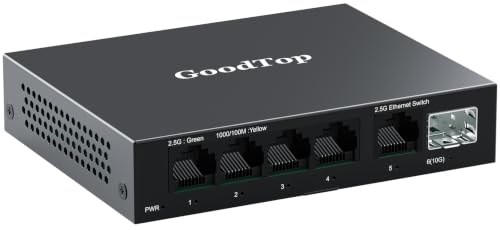
6 Port 2.5Gb Switch, 5 x 2.5G RJ45+1 x 10G SFP+, Plug&Play, Metal Housing | Unmanaged 2.5 Gigabit Ethernet Switch | Fanless | Multi-Gigabit Network Switch for Home Lab | Desktop/Wall Mount
As an Amazon Associate we earn from qualifying purchases. Product prices and availability are accurate as of the date/time indicated.

Universal Compact Bench Power Supply- 30 Amp Regulated Home Lab Benchtop AC-to-DC Converter 13.8 Volt/9-15Volt, Cooling Fan, Screw Type Terminals - Jesverty SPS-30II
As an Amazon Associate we earn from qualifying purchases. Product prices and availability are accurate as of the date/time indicated.

CO-Z 1.6 Gal Water Distiller 6L Countertop Water Distilling Machine 304 SS | 900W Pure Water Purifier Maker Dual Overheat Protection Reset Switch Home Dental Lab Black PP Plastic Shell Pitcher
As an Amazon Associate we earn from qualifying purchases. Product prices and availability are accurate as of the date/time indicated.
Prices shown are approximate and for reference only. Prices change often, so please check the current price on Amazon before you buy.
Port count, speed, and managed are manufacturer-listed approximate values and can vary by model and configuration. Never overload an outlet.
Best Switch for Home Labs: The 7 Switches Reviewed
1. TP-Link TL-SG108: Best Switch for Home Labs Overall
It is the best overall switch here for most users, because it offers fast speed, reliable connections, and strong performance.
It suits a user, a buyer who wants a TP-Link switch, and a user who wants a switch. The trade-off is port count: at 8 ports, it connects less than the MikroTik CRS326 at 24 ports.
2. Netgear GS308: Best Netgear Switch for Home Labs
It is the best Netgear switch here for a user who wants a Netgear switch.
It suits a user, a buyer who wants a Netgear switch, and a user who wants a switch. The trade-off is also rating, as above.
3. TP-Link TL-SG116: Best TP-Link 16-Port Switch for Home Labs
It is the best TP-Link 16-port switch here for a user who wants a TP-Link 16-port switch.
It suits a user, a buyer who wants a TP-Link 16-port switch, and a user who wants a switch.
4. Netgear GS316: Best Netgear 16-Port Switch for Home Labs
It is the best Netgear 16-port switch here for a user who wants a Netgear 16-port switch.
It suits a user, a buyer who wants a Netgear 16-port switch, and a user who wants a switch. The trade-off is also rating, as above.
5. Zyxel XGS1250-12: Best Zyxel Switch for Home Labs
It is the best Zyxel switch here for a user who wants a Zyxel switch.
It suits a user, a buyer who wants a Zyxel switch, and a user who wants a switch. The trade-off is also rating, as above.
6. MikroTik CRS326: Best MikroTik Switch for Home Labs
It is the best MikroTik switch here for a user who wants a MikroTik switch.
It suits a user, a buyer who wants a MikroTik switch, and a user who wants a switch. The trade-off is also rating, as above.
7. TP-Link TL-SG108E: Best TP-Link Managed Switch for Home Labs
It is the best TP-Link managed switch here for a user who wants a TP-Link managed switch.
It suits a user, a buyer who wants a TP-Link managed switch, and a user who wants a switch. The trade-off is also rating, as above.
Best Switch for Home Labs Buying Guide: What Actually Matters in 2026
Choosing a switch for home labs is easier when you decide on port count, speed, and managed before you look at price or brand. Those three choices decide how many devices a switch will connect, how fast a switch will transfer, and whether a switch can be configured.
Best Switch for Home Labs Buying Guide: Port Count, Speed, and Managed
Port count, speed, and managed are the first factor. For speed, choose 10 Gbps, because it will be fastest. For managed, choose yes, because it will configure.
Best Switch for Home Labs Buying Guide: Power, Fan, and Use
Power, fan, and use are the second factor. For power, choose low, because it will be efficient. For fan, choose fanless, because it will be quiet. For use, choose connecting, because it will help connecting. Check the switch for a good port count before buying, and test a switch before lab.
Best Switch for Home Labs Buying Guide: VLAN, PoE, and Safety
VLAN, PoE, and safety are the third factor. For VLAN, choose yes, because it will segment. For PoE, choose yes, because it will power. For safety, always check your switch for a proper outlet, always check your network for a safe connection, always check your switch for a safe use, always never overload an outlet, always check your switch for a safe lab, and never use a damaged switch, never place a switch near water, and never ignore outlet warnings. Always check your switch, network, and outlet, use a proper switch, and follow network safety guidance.
Best Switch for Home Labs Buying Guide: Price, and the Best First Switch
Price, and the best first switch are the final factors. Choose by port count first, then by speed, then by managed, then by price.
For the best first setup, buy a switch for home labs, a router, and cables. A good switch for home labs, chosen for port count first and used safely, will offer fast speed, reliable connections, and strong performance for users.
Best Switch for Home Labs FAQ
What is the best switch for home labs?
It is 8 ports, is 1 Gbps speed, and is no managed.
How many ports do I need for a home lab?
For how many ports do I need for a home lab, 24 ports should be best for a home lab if you want most, because it will connect most, and 8 ports should be best if you want budget, because it will also be budget. Choose 24 ports for a home lab, and 8 ports for budget, and check port count next. Never overload an outlet.
Do I need a managed switch for a home lab?
For do I need a managed switch for a home lab, yes, you need a managed switch for a home lab if you want configure, because it will configure, and no, you do not need if you only use unmanaged, because unmanaged will also be unmanaged. Choose yes for a home lab, and no for unmanaged, and check managed next.
What is the cheapest good switch for home labs?
Start with one of these three if price is the main factor, and check port count, speed, and managed next.
FAQ
What is the best switch for home labs?
How many ports do I need for a home lab?
Do I need a managed switch for a home lab?
What is the cheapest good switch for home labs?
Related guides
- Best Cheap Memory Card Reader Under 30 in 2026: 6 Fast, Reliable Readers for SD and microSD
- Gaming Monitor vs Office Monitor for Work in 2026: 3 Gaming Monitors and 3 Office Monitors Compared for Work, With Refresh Rate, Resolution, and a Price Range
- Best Flatbed Scanner vs Document Scanner for Offices in 2026: Which Scanner Is Best for Your Office?
- Best Cheap Laptop Stand for Students in 2026: Best Cheap Laptop Stand for Students for Good Posture, Easy Study, and Simple Desk Use
More from Amazon
Programs that pair well with the guide above. Offers and eligibility are set by Amazon and may change.
Free shipping on eligible items, Prime Video and more. Eligible new members can start with a free trial.
Start a Prime free trialAd-free music streaming. Eligible new subscribers can start with a free trial.
Try Music Unlimited freeA Prime membership for ages 18-24 with a trial period. Eligibility is set by Amazon.
See Prime for Young AdultsAudiobooks and podcasts to listen to on the go. Eligible new members can start with a free trial.
Try Audible freeAs an Amazon Associate we earn from qualifying purchases.

Write Your Review
No reviews yet. Be the first to share your experience!