
What's inside
- Best SSD Enclosure for Old Drives: Identification, Rescue, and the Second Life
- Quick Comparison: Best SSD Enclosure for Old Drives Models
- Detailed Reviews: Best SSD Enclosure for Old Drives Picks
- Buying Guide: How to Choose the Best SSD Enclosure for Old Drives
- Frequently Asked Questions About the Best SSD Enclosure for Old Drives
As an Amazon Associate I earn from qualifying purchases. This post may contain affiliate links at no extra cost to you.
Every household that has upgraded a computer owns the same small estate: a retired drive in a drawer, holding photographs, documents, and a past self’s whole filing system, and the best SSD enclosure for old drives is the citizen that turns that drawer back into a library. Its doctrine is stated here in one sentence, and the sentence is mostly about order: the drive’s interface is identified before any enclosure is bought, since the category divides absolutely between its two parishes and no adapter inside a listing can marry them after the fact; the drive’s contents are rescued before the drive is repurposed, the rescue being a copy, verified, onto a living citizen, performed while the old drive is still merely old and not yet failed; and the enclosure that results is then graded as a working citizen, its controller’s manners, its cable, and its case’s parish, rather than as a rescue’s afterthought, since a drive that survives its rescue deserves a second life specified as seriously as its first. The interface’s division is the guide’s opening fact: older solid-state drives from laptops and desktops of the last decade and a half are overwhelmingly of the SATA parish, flat citizens in a 2.5-inch shape or, in a thinner generation, a SATA card in a stick’s clothing, while the current generation speaks the NVMe parish on a stick of similar outline, the two sharing a silhouette and nothing else, a distinction this guide prints in its largest care because it is the category’s entire returns history in one sentence.
Identification is therefore the audit’s first citizen, performed on the drive itself rather than on a memory of the machine it left. Its label is read, its connector examined, its model entered into its maker’s documents where any doubt remains, a SATA card’s connector differing from an NVMe citizen’s in a notch’s parish that photographs in every maker’s guide describe. The drive’s size follows: the 2.5-inch parish taking its own enclosures, the stick parishes theirs, a retired spinning drive from an old laptop being, in this guide’s honesty, a different article’s citizen in spirit, though several rows here will house it, its fragility and its appetite graded as its own documents describe rather than as an SSD’s. Health is the third identification: a drive that left service because its machine died is a library awaiting a reader, while a drive that left service because it was failing is an evidence locker, handled in the rescue’s order this guide prescribes, imaged or copied once, gently, its most precious citizens first, and never asked to audition as a working drive until its contents are safe elsewhere, a distinction whose tuition, in the owners’ record, is a library.
The enclosures compared here are real, currently sold models from Ugreen, Sabrent, Inateck, SSK, and ORICO, spanning the 2.5-inch SATA parish, the NVMe stick parish, and the dual citizens that serve a household with both generations in its drawer. They are graded on the interface first, matched to the drive in hand as an exact fitting; the controller second, its stated provisions for the protocols a working drive wants, read in its maker’s terms, a modern citizen’s manners across a long copy being where cheap parishes announce themselves; construction third, a metal case’s parish conducting a working drive’s warmth to the air, a tool-free citizen’s convenience against a screwed citizen’s security, each graded for the life the drive will actually live, drawer, desk, or travel; the cable fourth, short, rated, and married to its enclosure as this site directs for every system’s parish, a rescue performed across a tired cable being a copy that cannot be trusted; and value and support last, because an enclosure is a small figure asked to guard a large estate, and its maker’s parish is part of what the figure buys.
Our Top Picks
Best SSD Enclosure for Old Drives: Identification, Rescue, and the Second Life
The Rescue’s Order: Copy, Verify, and Only Then Repurpose
The rescue is performed as a liturgy, in this order, because its order is its safety. The old drive is seated in its enclosure and connected, and its contents are surveyed before they are moved, the household learning what the library actually holds while the drive is under no obligation. The precious citizens are copied first, photographs and documents before libraries and caches, onto a living drive with room stated and checked, each copy verified as this site’s storage doctrine directs, a file that opens, a folder whose contents count as they should, since a copy that was never opened is a hope wearing a progress bar. The whole drive follows where the household wants the whole, a clone or a plain copy performed by the tools their makers describe, at a sitting rather than across a week of plugging and forgetting, an old citizen being graded, throughout, as a drive whose remaining life is unknown and therefore spent on the rescue first and on nothing else. Only with the contents safe and verified does the repurposing conversation begin, the drive wiped or formatted as its new profession requires, its health read by the tools its maker provides, a citizen with a doubtful report being retired to the drawer of honour rather than promoted to a backup’s parish, since a backup that cannot be trusted is worse than none, in the standing doctrine of every storage guide on this site: copies are graded by their verification, and a second life is a copy’s citizen, never a single point of faith.
The second life’s professions are enumerated so the enclosure can be bought for one of them. The desk’s archive is the commonest: the old drive as a library’s annex, holding the photographs and the projects, connected when consulted, its enclosure’s case and cable graded for a drawer-and-desk life. The travel citizen follows, the drive as a portable estate beside a laptop, its enclosure’s construction and its connector’s strain relief graded for a bag’s parish. The media parish, a drive married to a television or a small computer’s citizen, asks for manners across long, warm evenings. And the backup’s parish, entered with the doctrine above attached, asks for the drive’s health report as its entry ticket and a second copy elsewhere as its continuing condition, a single old drive being a copy and not a strategy, in the arithmetic this site prints wherever storage is sold: precious citizens live in more than one place, or they live at risk, whatever their enclosure’s figure.
Controllers, Cables, and the Speed the Old Drive Actually Owns
Speed is graded with a candour the category’s headlines resist: an enclosure cannot make an old drive faster than its own parish, a SATA citizen’s ceiling being its generation’s, whatever the connector’s figure on the box, and the audit therefore prices speed as a matching exercise, the enclosure’s stated parish meeting the drive’s without paying for a summit neither the drive nor the household’s ports can use. The modern connector’s parish is bought for its convenience and its future, its citizens riding the ports current machines actually offer, an older port’s enclosure being graded as a sentence about the household’s present machines, read honestly in the audit. The controller’s provisions, as its maker states them, govern the working manners that matter across a long copy and a drive’s own housekeeping, a parish whose details belong in the maker’s documents and whose absence from them is itself a finding at this guide’s desk.
Construction closes the file in the parish where these citizens actually live. A metal case conducts a working drive’s warmth and survives a bag; a tool-free opening serves the household rescuing several drives in an afternoon, its convenience graded against a screwed citizen’s security for a drive that will travel; a stick parish’s thermal citizens, the pads its maker provides, are seated as directed, a small form’s heat being its known tax. The cable is married and labelled with its enclosure, its length chosen for a desk’s geography, and the whole second life is rehearsed, inside a returns window that contains an evening, as a working citizen: a large copy performed and verified, the drive consulted, closed, and consulted again, its manners across a warm hour read, because an enclosure, like a zero in this site’s rifle guides, is a property evidenced, and a rescue’s success is the beginning of its evidence rather than the end.
Quick Comparison: Best SSD Enclosure for Old Drives Models
| Model | Interface, Form and Key Specs | Best For | Typical Price Range |
|---|---|---|---|
| Ugreen 2.5-Inch SATA Enclosure Class | SATA parish patterns in Ugreen’s line for 2.5-inch drives, provisions in maker’s stated terms by pattern | Best SSD enclosure for old drives overall | $12 – $20 by pattern |
| Sabrent NVMe Enclosure Class | NVMe parish patterns in Sabrent’s line, case and provisions in maker’s stated terms by pattern | Best NVMe parish | $25 – $40 by pattern |
| Inateck 2.5-Inch Enclosure Class | SATA patterns in Inateck’s line, provisions in maker’s terms by pattern | Best rescue parish | $10 – $18 by pattern |
| SSK NVMe and SATA Dual Class | Dual-parish patterns in SSK’s line, provisions in maker’s stated terms by pattern | Best mixed drawer | $22 – $35 by pattern |
| ORICO 2.5-Inch Transparent Class | SATA patterns in ORICO’s line, case provisions in maker’s terms by pattern | Best value | $8 – $15 by pattern |
| Ugreen NVMe Enclosure Class | NVMe patterns in Ugreen’s line, case and provisions in maker’s stated terms by pattern | Best travel parish | $20 – $32 by pattern |

BENFEI 2.5 Inch SATA to USB Tool Free External Hard Drive Enclosure (6Gbps, Optimized for SSD, Support UASP SATA III)
As an Amazon Associate we earn from qualifying purchases. Product prices and availability are accurate as of the date/time indicated.

SABRENT USB-C NVMe Enclosure & Reader, M.2 PCIe SSD, 10Gbps (EC-PNVO) | Tool-free M.2 PCIe case for 2230-2280; USB 3.2 Gen 2 10Gbps; aluminum cooling; external nvme enclosure; m.2 usb adapter
As an Amazon Associate we earn from qualifying purchases. Product prices and availability are accurate as of the date/time indicated.
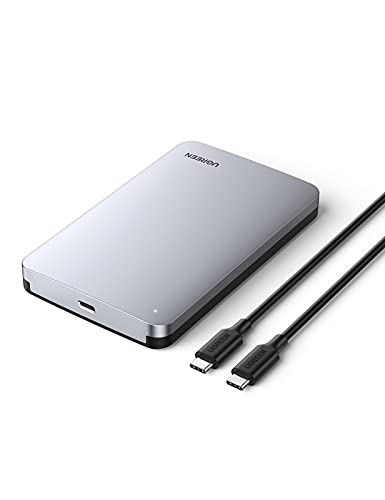
UGREEN USB C Hard Drive Enclosure for 2.5" SATA SSD HDD,Aluminum | USB C to SATA Adapter USB 3.1 Gen 2 Support UASP - Compatible with MacBook Pro Air,WD,Seagate,Toshiba,Samsung,Hitachi
As an Amazon Associate we earn from qualifying purchases. Product prices and availability are accurate as of the date/time indicated.
Prices shown are approximate and for reference only. Prices change often, so please check the current price on Amazon before you buy.
Interface, supported form, and provisions are each maker’s stated details for the current version and pattern, and the interface must be confirmed against the exact drive before purchase, SATA and NVMe being separate parishes. Ratings are editorial for old drives: exact interface fit, controller manners across a long verified copy, construction for the second life’s parish, cable citizenship, and value and support.
Detailed Reviews: Best SSD Enclosure for Old Drives Picks
1. Ugreen 2.5-Inch SATA Enclosure – Best Overall
Ugreen’s SATA parish takes the overall rating as the drawer’s reference citizen in its line: the interface the old estate overwhelmingly speaks, a case and cable graded for a desk’s second life, and a rescue performed across it without a tremor, the category’s doctrine in a small metal box.
Rescue-proven, it earns its place outright.
2. Sabrent NVMe Enclosure – Best NVMe Parish
Sabrent’s parish serves the current generation’s retired citizens in its line, its case’s thermal manners graded for a stick’s warm working life, for the household whose drawer holds the newer parish.
For that drawer, it stands.
3. Ugreen NVMe Enclosure – Best Travel Parish
Ugreen’s NVMe citizen brings a traveller’s construction in its line, for the drive whose second life is a bag’s, its connector’s and case’s citizens graded for the road’s ordinary insults.
Within its parish, it earns its place.
4. SSK Dual-Parish Enclosures – Best Mixed Drawer
SSK’s dual citizens serve the household in its line whose drawer holds both generations, one enclosure auditioned against each drive’s own interface as its documents describe, a convenience graded per drive and never assumed.
For the mixed drawer, it is soundly placed.
5. Inateck 2.5-Inch Enclosure – Best Rescue Parish
Inateck’s parish has served the rescue afternoon in its line across a long record, a tool-friendly citizen for the household working through several retired drives in one sitting, each rescued in this guide’s order.
For the rescue, it is soundly placed.
6. ORICO 2.5-Inch Transparent – Best Value
ORICO’s parish closes the table at the value’s figure in its line, its clear case letting a household read a drive’s label without opening a citizen, a small honesty a rescue afternoon appreciates.
As the budget row, it completes the table.
Buying Guide: How to Choose the Best SSD Enclosure for Old Drives
The Household’s Audit: The Drive in Hand, the Rescue Planned, the Second Life Named
Write the audit’s five facts before a listing is opened, with the drive itself on the desk. The interface: read from the drive’s label and connector and confirmed in its maker’s documents, SATA or NVMe stated as a fact and not as a memory of the machine it left, the single fact on which the whole purchase stands. The form: the 2.5-inch parish or the stick’s, measured rather than assumed, a spinning citizen from an old laptop identified as its own parish with its own documents’ terms. The health: the drive’s history stated honestly, retired with its machine or retired for its own failures, the second history prescribing the rescue’s gentle order and refusing the drive a working promotion until its contents are safe. The rescue: its destination named, a living drive with room checked, the precious citizens listed for the first copy, verification as the plan’s closing step rather than its hope. And the second life: named as a profession, archive, travel, media, or a backup’s parish under the doctrine that a single old drive is a copy and not a strategy, the enclosure’s construction bought for that life. Order against the five, a proper cable in the same order where one is not provided, and perform the rescue before any formatting is discussed, since an enclosure bought for a repurposing and used first for a wiping is the category’s one unforgivable order of operations.
Spend by the estate’s priorities, which are the guide’s: the interface first, exact, since a wrong parish is a total loss at a small figure; the controller second, its stated provisions read; construction third, for the second life’s parish; the cable fourth, as a copy’s citizen; and a speed’s headline never, a summit neither the old drive nor the household’s ports can use wearing a performance’s clothes. Refuse, in the same pass, the parish’s two frauds: the silhouette’s assumption, a stick bought by its outline for the wrong generation, and the rescue skipped, a drive formatted for its second life with its first life’s library still aboard, because a drawer of photographs, like a range in this site’s guides, is graded by its worst unsupervised second, a dialog box’s confirm clicked in haste, and that second belongs, by doctrine, to a verified copy already sitting elsewhere.
Keeping the Second Life: Labels, Health, and the Household’s Diary
Maintain the repurposed drive as a working citizen with a light liturgy. It is labelled with its contents and its date, on its case in a hand the household can read, since an unlabelled drive is a future afternoon’s mystery. Its health is read at the season by the tools its maker provides, its report entered in the diary, a declining citizen’s contents moved while moving is a copy and not a rescue. Its cable stays married to it, its parish, drawer or desk, kept temperate and dry.
Keep the record with the household’s papers, drive and enclosure as one sentence, what was rescued, what the second life holds, where its fellow copies live, so a future hand inherits a library rather than an archaeology. Do that, the interface matched, the rescue verified, the second life named, and the best SSD enclosure for old drives becomes what its buyer wanted from a small box with a large responsibility: a drawer’s past, readable again, working again, and safe in more than one place, which is the whole of what the drive was kept for.
Frequently Asked Questions About the Best SSD Enclosure for Old Drives
What is the best SSD enclosure for old drives?
Ugreen’s 2.5-inch SATA parish overall for the estate most drawers actually hold, with Sabrent’s and Ugreen’s NVMe citizens serving the current generation’s retired sticks, SSK’s dual parish the mixed drawer, Inateck’s the rescue afternoon, and ORICO’s the value. Fit yours by the household’s audit in this guide: your drive’s interface read from its label and connector and confirmed in its maker’s documents, SATA and NVMe being separate parishes that share only a silhouette; its form measured; its history stated honestly, a failing drive rescued gently and never promoted on hope; its rescue planned to a named, roomy destination with verification as the closing step; and its second life named, archive, travel, media, or one copy among several, so the enclosure’s construction is bought for a profession, because an enclosure is graded by a verified copy and a decade of second life, and both begin with the right interface.
How do I tell whether my old drive is SATA or NVMe?
From the drive itself, by the three witnesses this guide grades in order. Its label is the first, its model and its terms printed by its maker, entered into the maker’s documents where any term is unfamiliar, a minute’s reading that settles the question for nearly every citizen. Its connector is the second, the two parishes differing in a notch’s position that the makers’ own guides photograph and describe, compared with the drive in hand rather than from a memory of a similar stick. Its origin is the third and weakest, the machine and year it left suggesting a parish without proving it, the generations having overlapped in the market’s own history, which is why this guide grades it last and never buys on it. A 2.5-inch citizen is its own plain case, overwhelmingly of the SATA parish in its flat form. Read the label, check the notch, buy the matching parish, and keep the drive’s model in the household diary, since the next drive in the drawer will ask the same question and deserves a written answer.
Can I recover files from an old drive with an enclosure?
Where the drive still lives, yes, and the enclosure is exactly the instrument, used in the rescue’s order this guide prescribes. Seat the drive, survey its contents without asking it to work, copy the precious citizens first onto a living drive with room checked, verify each copy by opening it, and only then take the whole estate at a sitting. A drive that left service for its own failures is handled as an evidence locker throughout, one gentle pass, no experiments, no formatting dialogues entertained, and a drive that will not appear, or whose sounds or reports announce a deeper failure, is referred to the professional recovery parish rather than persuaded at home, since each home attempt can spend part of what a professional might have saved, a tuition the owners’ record prices in libraries. Where the drive lives and the copy verifies, the enclosure has performed the finest service in this guide, and the drive’s second life can then be discussed with its past already safe elsewhere.
Should I use an old SSD as a backup drive?
As one copy among several, yes, and as a backup on its own, no, the distinction being this site’s standing doctrine for every storage citizen it grades. An old drive whose health its maker’s tools report soundly, whose rescue is complete and verified, and whose enclosure is a working citizen can hold a genuine copy, of photographs, of documents, of a library’s annex, and hold it honourably for years. What it cannot be is the only other place those citizens live, since its age is a fact, its remaining life is an estimate, and a backup strategy built on a single retired drive is a hope with a cable. Keep the precious estate in more than one place, one of them apart from the house’s own parish where the household’s means allow, read the old drive’s health at the season and enter it in the diary, and move its contents on evidence of decline while moving is a copy. Graded so, the old drive’s second life is a real citizen of the household’s safety, which is a finer ending than a drawer, and a more honest one than a promise.
Related guides
- Best Desktop Speakers for Music Production in 2026: 7 Desktop Speakers That Offer Flat Sound, Clear Detail, and Reliable Performance for Music Producers
- Over Ear Headphones vs On Ear Headphones for Comfort in 2026: 6 Over Ear Headphones vs On Ear Headphones for Comfort Picks for Long Listening, Easy Use, and Reliable Comfort
- Best Power Bank for Commuters in 2026: Best Power Bank for Commuters
- Best USB Cable for Fast Charging in 2026: Anker, Belkin, UGREEN, and Cable Matters Compared for a Chain That Charges at Its Slowest Citizen, a Rating Read as a Certified Sentence, and a Phone’s Own Protocol Read Before Either Is Blamed
More from Amazon
Programs that pair well with the guide above. Offers and eligibility are set by Amazon and may change.
Free shipping on eligible items, Prime Video and more. Eligible new members can start with a free trial.
Start a Prime free trialAd-free music streaming. Eligible new subscribers can start with a free trial.
Try Music Unlimited freeA Prime membership for ages 18-24 with a trial period. Eligibility is set by Amazon.
See Prime for Young AdultsAudiobooks and podcasts to listen to on the go. Eligible new members can start with a free trial.
Try Audible freeAs an Amazon Associate we earn from qualifying purchases.

Write Your Review
No reviews yet. Be the first to share your experience!