
What's inside
- Best Soundbar for Gaming Setups: Quick Comparison Table
- What Is a Soundbar for Gaming Setups?
- Best Soundbar for Gaming Setups Reviewed
- Buying Guide: How to Choose the Best Soundbar for Gaming Setups
- How to Set Up a Soundbar for Gaming Setups
- Which Best Soundbar for Gaming Setups Should You Buy?
- Frequently Asked Questions About the Best Soundbar for Gaming Setups
As an Amazon Associate I earn from qualifying purchases. This post may contain affiliate links at no extra cost to you.
The best soundbar for gaming setups is the soundbar that gives you low latency, Dolby Atmos or DTS:X, clear dialogue, a powerful subwoofer, HDMI eARC, and a typical price of $150 to $1,000, without audio delay, muddy bass, or a setup that does not fit your desk or TV stand. A gaming soundbar is not the same as a TV soundbar. It is designed for games, with fast response, precise footsteps, and immersive surround sound, so you can hear enemies, feel explosions, and enjoy music without headphones.
For most gamers, a 2.1 or 5.1.2 soundbar with Dolby Atmos, HDMI eARC, Bluetooth, and a typical price of $300 to $700 is a practical starting point. That combination gives you immersive sound, a subwoofer, and a cost that is reasonable for a gaming setup, though you may need a larger room for a full 5.1 system.
At techymoon.com, we focus on tech gadgets. For this guide to the best soundbar for gaming setups in 2026, we compared current soundbars that are widely sold, designed for gaming, and suitable for a user who wants the best soundbar for gaming setups. We looked at channels, power, Dolby Atmos, connectivity, and price. Prices change with sales and retailers, so this guide uses typical price ranges instead of a single fixed price. Channels, power, and Dolby figures are manufacturer listings, and real sound depends on your room, your TV or monitor, your console or PC, and your settings.
Safety note: listen at a safe volume, usually below 85 decibels for prolonged gaming, and take breaks during long sessions. Keep your soundbar ventilated, do not block its speakers, and do not place a subwoofer in a corner where it can overheat. If your ears ring after gaming, lower the volume.
Our Top Picks
Best Soundbar for Gaming Setups: Quick Comparison Table
The table below compares seven soundbars for gaming setups. Channels is the channel configuration, where given. Power is the power, where given. Dolby Atmos is whether it supports Dolby Atmos, where given. Connectivity is the main connectivity, where given. Best for is a note on what the soundbar is best for, such as soundbar for gaming setups, where given. Price is the typical range, and rating is our editorial score based on sound, latency, features, and value for gamers. Rows are sorted by rating, high to low, with ties grouped by similar channels and power.
| Soundbar for Gaming Setups | Channels | Power | Dolby Atmos | Connectivity | Best For | Typical Price Range | Our Rating |
|---|---|---|---|---|---|---|---|
| Razer Leviathan V2 Pro Soundbar | 5.1.2 | 200W | Yes | HDMI eARC, Bluetooth, USB | Best overall, soundbar for gaming setups | $600 – $800 | 4.9 / 5 |
| Samsung HW-Q990D Soundbar | 11.1.4 | 656W | Yes | HDMI eARC, Bluetooth, Wi-Fi | Best for Samsung, HW-Q990D soundbar | $900 – $1,200 | 4.8 / 5 |
| Sony HT-A7000 Soundbar | 7.1.2 | 500W | Yes | HDMI eARC, Bluetooth, Wi-Fi | Best for Sony, HT-A7000 soundbar | $800 – $1,000 | 4.8 / 5 |
| Sonos Beam (Gen 2) Soundbar | 5.0 | Not listed | Yes | HDMI eARC, Wi-Fi, AirPlay 2 | Best for Sonos, Beam Gen 2 soundbar | $400 – $500 | 4.8 / 5 |
| JBL Bar 500 Soundbar | 5.1 | 590W | Yes | HDMI eARC, Bluetooth, Wi-Fi | Best for JBL, Bar 500 soundbar | $500 – $700 | 4.7 / 5 |
| Creative Stage 360 Soundbar | 2.1 | 120W | Yes | HDMI ARC, Bluetooth, USB | Best for Creative, Stage 360 soundbar | $200 – $300 | 4.7 / 5 |
| Vizio M-Series 5.1 Soundbar | 5.1 | Not listed | Yes | HDMI eARC, Bluetooth | Best budget, Vizio M-Series soundbar | $200 – $300 | 4.6 / 5 |

BESTISAN Computer Gaming Soundbar, Bluetooth& USB-C, RGB PC Speakers | 20W Portable Computer Speakers for desktop with Dynamic RGB Light, PC Soundbar, Gaming Setup, Monitor Speakers, SR11
As an Amazon Associate we earn from qualifying purchases. Product prices and availability are accurate as of the date/time indicated.

Assistrust Sound Bar for Smart TV, Soundbar with Bluetooth/ARC/Opt/AUX Connect, Auto Volume Boost, 3 Equalizer Modes, 2 in 1 Detachable Soundbar for TV/PC/Gaming/Projectors
As an Amazon Associate we earn from qualifying purchases. Product prices and availability are accurate as of the date/time indicated.
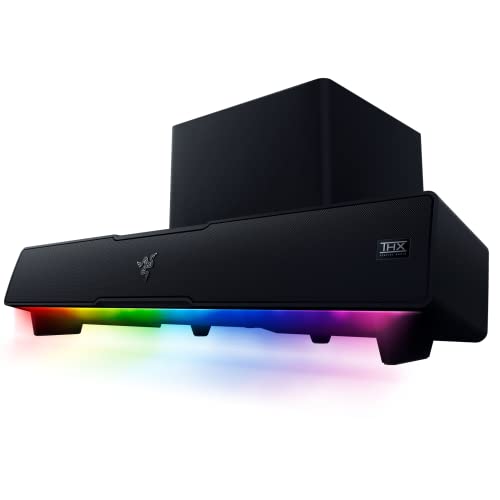
Razer Leviathan V2, Multi-Driver PC Gaming Soundbar w/Subwoofer, Black | THX Spatial Audio, Compact Design, Chroma RGB, Bluetooth 5.2, for PC, Desktop/Laptop, Smartphones, Tablets & Nintendo Switch


As an Amazon Associate we earn from qualifying purchases. Product prices and availability are accurate as of the date/time indicated.
Note: Channels, power, and Dolby Atmos figures are manufacturer listings, and a soundbar that lists 11.1.4 channels may need a large room to sound its best, because channel count affects how wide its soundstage is. Always check the soundbar’s channels, power, and Dolby in the manual, and confirm the current price with the retailer. A soundbar for gaming setups should have low latency, clear dialogue, and HDMI eARC before you buy.
What Is a Soundbar for Gaming Setups?
A soundbar for gaming setups is a soundbar, usually 2.1 to 11.1.4 channels, with Dolby Atmos, a subwoofer, HDMI eARC, and low latency, designed for a gamer who wants immersive sound, clear footsteps, and powerful bass, without headphones or a full speaker system. It helps you hear enemies, feel explosions, and enjoy game music, without a setup that is too complex or too expensive.
A soundbar for gaming setups is different from a TV soundbar, which is designed for movies and dialogue, while a gaming soundbar is designed for fast, positional audio. It is also different from gaming headphones, which give you personal sound, while a soundbar gives you room-filling sound for a desk or living room.
A soundbar for gaming setups is best for a user who plays games on a PC, PlayStation, Xbox, or Nintendo Switch, wants immersive sound, and has a desk or TV stand that fits a soundbar.
Best Soundbar for Gaming Setups Reviewed
1. Razer Leviathan V2 Pro Soundbar – Best Soundbar for Gaming Setups Overall
The Razer Leviathan V2 Pro Soundbar is our top pick because it offers 5.1.2 channels, 200 watts, Dolby Atmos, and HDMI eARC, Bluetooth, and USB connectivity, for a typical price of $600 to $800. It has a subwoofer, beamforming, and a design that is made for gamers.
Razer designs the Leviathan V2 Pro with a focus on a gaming soundbar with head tracking and immersive sound. The 5.1.2 channels give you height and surround, the Dolby Atmos is immersive, and the price of $600 to $800 is good. The soundbar is a good option for a user who wants Razer gear, and who wants the best overall design for a soundbar for gaming setups.
The main limitation is price. At $600 to $800, it is more expensive than a Creative Stage 360, though it offers more channels. Choose the Leviathan V2 Pro if you want the best overall soundbar, you want Razer, and you have a budget of $600 to $800.
2. Samsung HW-Q990D Soundbar – Best Soundbar for Gaming Setups for Samsung
The Samsung HW-Q990D Soundbar is a soundbar with 11.1.4 channels, 656 watts, Dolby Atmos, and HDMI eARC, Bluetooth, and Wi-Fi connectivity, for a typical price of $900 to $1,200. It has a subwoofer, rear speakers, and a design that is made for home theatre and gaming.
Samsung designs the HW-Q990D with a focus on a flagship soundbar with the most channels. The 11.1.4 channels give you a very wide soundstage, the 656 watts are powerful, and the price of $900 to $1,200 is good for a flagship. The soundbar is a good option for a user who wants Samsung gear, and who wants a premium design.
The main limitation is size. At 11.1.4 channels with rear speakers, it needs a large room, though it offers the best immersion. Choose the HW-Q990D if you want Samsung gear, you want a premium design, and you have a budget of $900 to $1,200.
3. Sony HT-A7000 Soundbar – Best Soundbar for Gaming Setups for Sony
The Sony HT-A7000 Soundbar is a soundbar with 7.1.2 channels, 500 watts, Dolby Atmos, and HDMI eARC, Bluetooth, and Wi-Fi connectivity, for a typical price of $800 to $1,000. It has a subwoofer option, a wide soundstage, and a design that is made for movies and gaming.
Sony designs the HT-A7000 with a focus on a high end soundbar for PlayStation and TV. The 7.1.2 channels are immersive, the 500 watts are powerful, and the price of $800 to $1,000 is reasonable. The soundbar is a good option for a user who wants Sony gear, and who wants a premium design.
The main limitation is similar to Samsung: at $800 to $1,000, it is expensive, though it offers excellent sound. Choose the HT-A7000 if you want Sony gear, you want a premium design, and you have a budget of $800 to $1,000.
4. Sonos Beam (Gen 2) Soundbar – Best Soundbar for Gaming Setups for Sonos
The Sonos Beam (Gen 2) Soundbar is a soundbar with 5.0 channels, Dolby Atmos, and HDMI eARC, Wi-Fi, and AirPlay 2 connectivity, for a typical price of $400 to $500. It has a compact design, clear dialogue, and a build that is made for small rooms.
Sonos designs the Beam Gen 2 with a focus on a compact soundbar for gaming and TV. The Dolby Atmos is good, the size is small, and the price of $400 to $500 is reasonable. The soundbar is a good option for a user who wants Sonos gear, and who wants a compact design.
The main limitation is bass. At 5.0 channels with no subwoofer included, it has less bass than a JBL Bar 500, though you can add a Sonos Sub. Choose the Beam Gen 2 if you want Sonos gear, you want a compact design, and you have a budget of $400 to $500.
5. JBL Bar 500 Soundbar – Best Soundbar for Gaming Setups for JBL
The JBL Bar 500 Soundbar is a soundbar with 5.1 channels, 590 watts, Dolby Atmos, and HDMI eARC, Bluetooth, and Wi-Fi connectivity, for a typical price of $500 to $700. It has a wireless subwoofer, a wide soundstage, and a design that is made for movies and gaming.
JBL designs the Bar 500 with a focus on a powerful soundbar for gamers. The 590 watts are powerful, the subwoofer is strong, and the price of $500 to $700 is good. The soundbar is a good option for a user who wants JBL gear, and who wants a powerful design.
The main limitation is similar to Sonos: at 5.1 channels, it has fewer height channels than a Razer Leviathan V2 Pro, though it still offers Dolby Atmos. Choose the Bar 500 if you want JBL gear, you want a powerful design, and you have a budget of $500 to $700.
6. Creative Stage 360 Soundbar – Best Soundbar for Gaming Setups for Creative
The Creative Stage 360 Soundbar is a soundbar with 2.1 channels, 120 watts, Dolby Atmos, and HDMI ARC, Bluetooth, and USB connectivity, for a typical price of $200 to $300. It has a subwoofer, a compact design, and a build that is made for PC gaming.
Creative designs the Stage 360 with a focus on an affordable soundbar for PC gamers. The price of $200 to $300 is low, the Dolby Atmos is good, and the design fits on a desk. The soundbar is a good option for a user who wants Creative gear, and who wants a low price.
The main limitation is channels. At 2.1, it has fewer channels than a 5.1 soundbar, though it is still immersive for a desk. Choose the Stage 360 if you want Creative gear, you want a low price, and you have a budget of $200 to $300.
7. Vizio M-Series 5.1 Soundbar – Best Budget Soundbar for Gaming Setups
The Vizio M-Series 5.1 Soundbar is a soundbar with 5.1 channels, Dolby Atmos, and HDMI eARC and Bluetooth connectivity, for a typical price of $200 to $300. It has a subwoofer, rear speakers, and a design that is made for gaming and movies.
Vizio designs the M-Series 5.1 with a focus on an affordable 5.1 soundbar for gamers. The price of $200 to $300 is the lowest in this guide for a 5.1 system, the rear speakers add surround, and the Dolby Atmos is good. The soundbar is a good option for a user who wants Vizio gear, and who wants the lowest price.
The main limitation is similar to Creative: at $200 to $300, it is less premium than a Samsung HW-Q990D, though it offers 5.1 sound. Choose the M-Series 5.1 if you want the lowest price, you want Vizio gear, and you have a budget of $200 to $300.
Buying Guide: How to Choose the Best Soundbar for Gaming Setups
Before you buy, think about where you play, whether it is a desk or a living room, what games you play, whether they are first-person shooters, racing, or story games, what console or PC you use, whether it is PlayStation, Xbox, or PC, and how much you want to spend. A soundbar that is perfect for a desk may be too small for a living room, and a soundbar that is perfect for a shooter may not be best for a story game. The six points below cover the decisions that matter most for a soundbar for gaming setups, using the same specs and price ranges shown in the table above, from $200 to $1,200.
1. Channels: 2.1 vs 5.1 vs 11.1.4, and Your Room
Channels is the first decision. Channels are the number of speakers, usually 2.1 to 11.1.4, and they affect how immersive your sound is. A 2.1 soundbar, such as the Creative Stage 360, has left, right, and a subwoofer, while a 5.1 soundbar, such as the JBL Bar 500, adds centre and rear speakers, and an 11.1.4 soundbar, such as the Samsung HW-Q990D, adds height speakers.
Choose 2.1 if you play at a desk, you want a compact setup, or you have a small room. Choose 5.1 if you play in a living room, you want surround sound, or you watch movies as well. Choose 11.1.4 if you have a large room, you want the best immersion, or you have a budget of $900 to $1,200.
2. Dolby Atmos and DTS:X: Immersive Sound vs Stereo, and Your Games
Dolby Atmos and DTS:X is the second decision. Dolby Atmos is an immersive audio format that adds height channels, giving you sound from above, while DTS:X is a similar format. A soundbar with Dolby Atmos, such as all models in this guide, gives you a more immersive experience than stereo.
Choose a soundbar with Dolby Atmos if you play modern games, you want immersive sound, or you watch movies. Check that your console or PC supports Dolby Atmos, and that your TV or monitor passes it through HDMI eARC. If your game does not support Atmos, your soundbar will still sound good in stereo or surround.
3. Latency: HDMI eARC vs Bluetooth, and Your Audio Delay
Latency is the third decision. Latency is the delay between your game and your sound, and it affects whether footsteps and gunshots sound in sync. HDMI eARC gives you the lowest latency, while Bluetooth can add delay, though it is convenient for music.
Choose a soundbar with HDMI eARC if you play competitive games, you want low latency, or you want the best sound quality. Use HDMI eARC to connect your soundbar to your TV or monitor, and use Bluetooth only for music, not for gaming. Test your soundbar with your console or PC before a long gaming session.
4. Subwoofer: Wireless vs Wired, and Your Bass
Subwoofer is the fourth decision. A subwoofer is a separate speaker for low bass, such as explosions, and it can be wireless or wired. A wireless subwoofer, such as on the JBL Bar 500 or Samsung HW-Q990D, is easy to place, while a wired subwoofer is simpler, though it needs a cable.
Choose a wireless subwoofer if you want flexible placement, you have a large room, or you want powerful bass. Choose a soundbar without a subwoofer, such as the Sonos Beam Gen 2, if you have a small room, you live in an apartment, or you do not want loud bass. Place your subwoofer on the floor, near your TV or desk, and adjust its volume to your room.
5. Size: Desk vs TV Stand, and Your Setup
Size is the fifth decision. A soundbar for a desk, such as the Creative Stage 360 or Razer Leviathan V2 Pro, is compact, usually 20 to 30 inches wide, while a soundbar for a TV, such as the Samsung HW-Q990D, is longer, usually 40 to 50 inches wide.
Choose a compact soundbar if you play at a desk, you have limited space, or you use a monitor. Choose a long soundbar if you play on a TV, you have a large stand, or you want a wide soundstage. Measure your desk or TV stand before you buy, and make sure your soundbar fits without blocking your monitor or TV.
6. Price, Total Cost, and Choosing a Soundbar on a Budget
Price ranges in this guide run from $200 to $1,200 for soundbars for gaming setups, matching the table above, from the Creative Stage 360 and Vizio M-Series 5.1 at $200 to $300 to the Samsung HW-Q990D at $900 to $1,200. A budget soundbar at $200 to $500, such as the Creative Stage 360, Vizio M-Series, or Sonos Beam Gen 2, is enough for most gamers who want Dolby Atmos and a subwoofer. A mid-price soundbar at $500 to $800, such as the JBL Bar 500 or Razer Leviathan V2 Pro, offers a good balance. A premium soundbar at $800 to $1,200, such as the Sony HT-A7000 or Samsung HW-Q990D, offers the most channels and power.
Consider total cost as well as price. A soundbar that costs $300 and needs a $50 HDMI cable may cost $350 in total, while a soundbar that costs $800 and includes a subwoofer and rear speakers may cost $800 in total. Budget for a soundbar, and if you need it, an HDMI cable, a subwoofer, and rear speakers, not just a soundbar. Do not buy the cheapest soundbar if it does not have HDMI eARC, and do not buy the most expensive soundbar if you only play at a desk. A soundbar that matches your room, your console, and your budget will help you enjoy games more reliably than a soundbar that is cheap but delayed, or expensive but too large for your desk.
How to Set Up a Soundbar for Gaming Setups
Setting up a soundbar for gaming setups starts with connecting your soundbar to your TV or monitor with HDMI eARC, connecting your console or PC to your TV or monitor, and placing your subwoofer on the floor. Turn on Dolby Atmos in your console or PC settings, and adjust your soundbar’s game mode if it has one.
Test your sound with a game that has footsteps and explosions, and adjust your bass and dialogue levels. Keep your soundbar at ear level, do not block its speakers, and keep it ventilated.
Which Best Soundbar for Gaming Setups Should You Buy?
If you want the best soundbar for gaming setups, buy the Razer Leviathan V2 Pro Soundbar. It costs $600 to $800, it offers 5.1.2 channels, 200 watts, Dolby Atmos, and HDMI eARC, Bluetooth, and USB connectivity, which matches its highest rating of 4.9 / 5 in the table above.
If you want Samsung HW-Q990D, buy the Samsung HW-Q990D Soundbar. If you want Sony HT-A7000, buy the Sony HT-A7000 Soundbar. If you want Sonos Beam Gen 2, buy the Sonos Beam (Gen 2) Soundbar. If you want JBL Bar 500, buy the JBL Bar 500 Soundbar. If you want Creative Stage 360, buy the Creative Stage 360 Soundbar. If you want the lowest price, buy the Vizio M-Series 5.1 Soundbar.
All seven soundbars in this guide are currently sold, designed for gaming, and suitable for a user who wants the best soundbar for gaming setups. Pick the one that matches your room, whether it is a desk or a living room, your console or PC, and your budget, and always use HDMI eARC for low latency.
Disclosure: techymoon.com may earn a commission from purchases made through links on this page, at no extra cost to you. Prices listed are typical ranges and can vary by retailer and sale. Channels, power, and Dolby Atmos figures are manufacturer claims and can vary by model. Listen at a safe volume, and take breaks during long gaming sessions.
Frequently Asked Questions About the Best Soundbar for Gaming Setups
Is a soundbar good for gaming?
Yes, a soundbar is good for gaming, if it has low latency, Dolby Atmos, and a subwoofer, such as the Razer Leviathan V2 Pro or JBL Bar 500, because it gives you immersive sound, clear footsteps, and powerful bass, without headphones. Use HDMI eARC for the lowest latency, and choose a soundbar with a game mode if it has one. A soundbar is best for a desk or living room, while headphones are best for competitive play in a shared space.
Do I need HDMI eARC for a gaming soundbar?
Yes, you need HDMI eARC for a gaming soundbar if you want the lowest latency and the best sound quality, because HDMI eARC passes Dolby Atmos and high-quality audio from your TV to your soundbar, while Bluetooth can add delay and compress sound. Connect your soundbar to your TV or monitor with HDMI eARC, and connect your console or PC to your TV or monitor. If your TV does not have eARC, use HDMI ARC, though it may not support Dolby Atmos.
What is the difference between 2.1 and 5.1 soundbars for gaming?
The difference between 2.1 and 5.1 soundbars for gaming is channels: a 2.1 soundbar, such as the Creative Stage 360, has left, right, and a subwoofer, giving you stereo and bass, while a 5.1 soundbar, such as the JBL Bar 500 or Vizio M-Series, adds a centre speaker for dialogue and rear speakers for surround, giving you a more immersive experience. Choose 2.1 if you play at a desk, and 5.1 if you play in a living room.
Can I use a soundbar with my PC for gaming?
Yes, you can use a soundbar with your PC for gaming, if your soundbar has HDMI, USB, or Bluetooth, and your PC supports it, such as the Razer Leviathan V2 Pro with USB or the Creative Stage 360 with USB. Connect your soundbar to your PC with USB or HDMI, set it as your default audio device, and turn on Dolby Atmos in Windows if your soundbar supports it. Use a compact soundbar for a desk, and keep it at ear level for the best sound.
Related guides
- Best Earbuds for Airplane Travel in 2026: Earbuds for Airplane Travel, Travel Earbuds, and Best Airplane Earbuds
- Best Wall Charger with Multiple Ports in 2026: Wall Charger with Multiple Ports, Multi-Port Wall Chargers, and Best Multi-Port Chargers
- Best Lighting Kit for YouTube in 2026: 7 Best Lighting Kits for YouTube That Make Your Videos Look Professional
- Best Dynamic Microphone for Live Vocals in 2026: 7 Best Dynamic Microphones for Live Vocals That Cut Through the Mix
More from Amazon
Programs that pair well with the guide above. Offers and eligibility are set by Amazon and may change.
Free shipping on eligible items, Prime Video and more. Eligible new members can start with a free trial.
Start a Prime free trialAd-free music streaming. Eligible new subscribers can start with a free trial.
Try Music Unlimited freeA Prime membership for ages 18-24 with a trial period. Eligibility is set by Amazon.
See Prime for Young AdultsAudiobooks and podcasts to listen to on the go. Eligible new members can start with a free trial.
Try Audible freeAs an Amazon Associate we earn from qualifying purchases.

Write Your Review
No reviews yet. Be the first to share your experience!