
What's inside
- Smart Home Hub vs Voice Assistant for Control: Hubs and Assistants Explained
- Best Smart Home Hub vs Voice Assistant for Control: Protocols and Compatibility
- Best Smart Home Hub vs Voice Assistant for Control Comparison Table
- Top Smart Home Hubs and Voice Assistants Reviewed
- Buying Guide: Smart Home Hub vs Voice Assistant for Control
- How to Set Up a Smart Home Hub vs Voice Assistant
- Frequently Asked Questions
As an Amazon Associate I earn from qualifying purchases. This post may contain affiliate links at no extra cost to you.
Choosing the best smart home hub vs voice assistant for control is about deciding whether you want a dedicated hub that connects your devices locally, or a voice assistant that lets you control devices with your voice. A good smart home hub vs voice assistant choice should be easy to use, compatible with your devices, and reliable for daily control. It should also be affordable, with a price that fits a homeowner who wants smart control without a large, complex system.
This guide explains the difference between a smart home hub vs voice assistant for control, how to compare hubs and assistants, and which models work well in 2026. We focus on practical use for homeowners who control lights, locks, cameras, and thermostats, with a hub or assistant that is used for a home, and with a design that is suitable for a beginner and for an experienced user. Whether you use Alexa, Google, or Apple, the same principles apply: choose a system that works with your devices, with local control if you want reliability, and with voice if you want convenience.
Our Top Picks
Smart Home Hub vs Voice Assistant for Control: Hubs and Assistants Explained
A smart home hub vs voice assistant for control choice starts with what each does. A smart home hub, such as the Samsung SmartThings Hub, is a device that connects your smart devices, such as Zigbee and Z-Wave lights, locks, and sensors, and lets you automate them, even without the internet. A voice assistant, such as Amazon Alexa on an Echo Hub, is a device that lets you control devices with your voice, such as saying “turn on the lights,” but it usually needs the internet to work.
A smart home hub is better for automation and local control, because it can run routines without the cloud, while a voice assistant is better for convenience, because you can control devices hands-free. Many devices, such as the Amazon Echo Hub, combine both: it is a hub with Zigbee and Thread, and a voice assistant with Alexa, with a touchscreen for control.
Best Smart Home Hub vs Voice Assistant for Control: Protocols and Compatibility
Protocols matter most for a smart home hub vs voice assistant, because they determine which devices work with your system. A hub with Zigbee, Z-Wave, Matter, and Thread, such as the Aqara Hub M3, works with many devices, while a hub with only WiFi works with fewer devices. A voice assistant with Alexa works with many devices, while a voice assistant with Google Assistant works with a different set. Check your devices before you buy a hub or assistant.
Compatibility also matters. A hub that works with Alexa, Google, and Apple HomeKit, such as the Samsung SmartThings Hub, is more flexible than a hub that works with only one system. A voice assistant that works with Matter, such as the Google Nest Hub, is better for future devices, because Matter is a new standard that lets devices work across systems.
Best Smart Home Hub vs Voice Assistant for Control Comparison Table
| Model | Type | Protocols | Voice Assistant | Display | Typical Price Range | Rating |
|---|---|---|---|---|---|---|
| Amazon Echo Hub, 8-Inch Smart Home Control Panel | Hub, voice assistant | Zigbee, Matter, Thread, Bluetooth, WiFi | Alexa | Yes, 8 in touchscreen | $150-$180 | 4.7/5 |
| Google Nest Hub, 2nd Gen | Voice assistant, hub | Matter, Thread, Bluetooth, WiFi | Google Assistant | Yes, 7 in touchscreen | $80-$100 | 4.7/5 |
| Apple HomePod mini | Voice assistant, hub | Matter, Thread, Bluetooth, WiFi | Siri | No | $90-$100 | 4.8/5 |
| Samsung SmartThings Hub, v3 | Hub | Zigbee, Z-Wave, Matter, WiFi | Alexa, Google, via app | No | $80-$90 | 4.7/5 |
| Aqara Hub M3 | Hub | Zigbee, Matter, Thread, Bluetooth, WiFi | Alexa, Google, Apple, via app | No | $100-$120 | 4.7/5 |
| Hubitat Elevation C-8 Hub | Hub, local | Zigbee, Z-Wave, Matter, WiFi | Alexa, Google, via app | No | $130-$150 | 4.8/5 |

Amazon Echo Hub (newest model), 8", Redesigned with customizable control and Alexa+, Smart home hub compatible with thousands of devices
As an Amazon Associate we earn from qualifying purchases. Product prices and availability are accurate as of the date/time indicated.

Home Assistant Green | Smart Home hub with Advanced Automation | Official Home Assistant Hardware
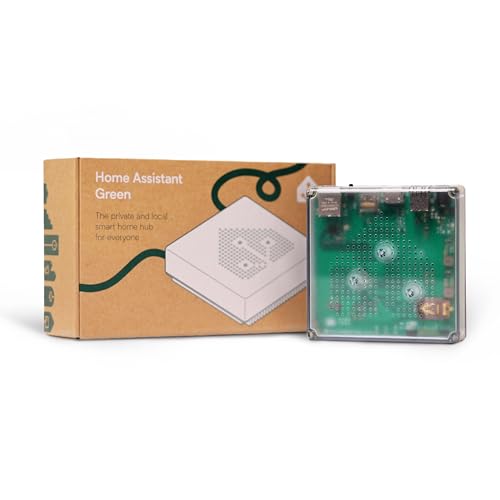

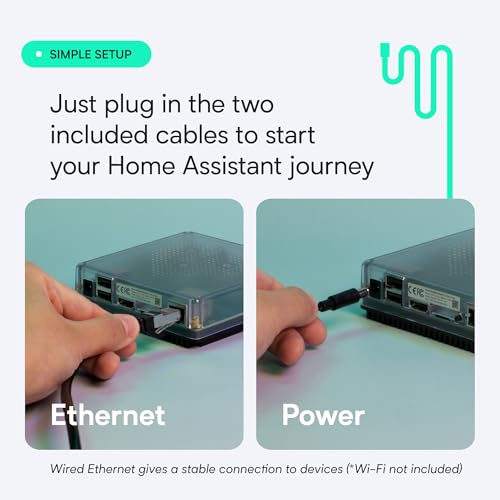


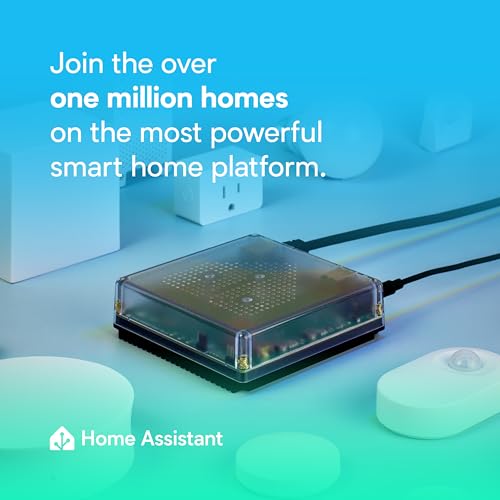
As an Amazon Associate we earn from qualifying purchases. Product prices and availability are accurate as of the date/time indicated.
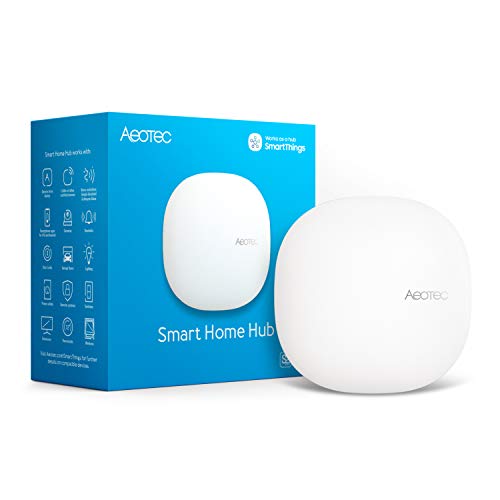
Aeotec Smart Home Hub, Works as a SmartThings Hub, Z-Wave, Zigbee, Matter Gateway, Compatible with Alexa, Google Assistant, WiFi
As an Amazon Associate we earn from qualifying purchases. Product prices and availability are accurate as of the date/time indicated.
Top Smart Home Hubs and Voice Assistants Reviewed
Amazon Echo Hub, 8-Inch Smart Home Control Panel
The Amazon Echo Hub, 8-Inch Smart Home Control Panel is a device with a hub and voice assistant type, Zigbee, Matter, Thread, Bluetooth, and WiFi protocols, Alexa voice assistant, an 8-inch touchscreen display, and a price of $150 to $180. It has a touchscreen for control, a built-in hub, and a good value. It is a good choice if you want the best smart home hub vs voice assistant for control with Alexa and a display.
Google Nest Hub, 2nd Gen
The Google Nest Hub, 2nd Gen is a device with a voice assistant and hub type, Matter, Thread, Bluetooth, and WiFi protocols, Google Assistant voice assistant, a 7-inch touchscreen display, and a price of $80 to $100. It has a simple design, a good value, and a touchscreen. It is a good choice if you want a Google hub with a display.
Apple HomePod mini
The Apple HomePod mini is a device with a voice assistant and hub type, Matter, Thread, Bluetooth, and WiFi protocols, Siri voice assistant, no display, and a price of $90 to $100. It has a compact design, a good sound, and a premium build. It is a good choice if you want an Apple hub with Siri for a HomeKit home.
Samsung SmartThings Hub, v3
The Samsung SmartThings Hub, v3 is a device with a hub type, Zigbee, Z-Wave, Matter, and WiFi protocols, Alexa and Google via app, no display, and a price of $80 to $90. It has a simple design, a good value, and a wide compatibility. It is a good choice if you want a SmartThings hub for a mixed smart home.
Aqara Hub M3
The Aqara Hub M3 is a device with a hub type, Zigbee, Matter, Thread, Bluetooth, and WiFi protocols, Alexa, Google, and Apple via app, no display, and a price of $100 to $120. It has a premium design, a wide compatibility, and a good value. It is a good choice if you want an Aqara hub with Matter and Thread.
Hubitat Elevation C-8 Hub
The Hubitat Elevation C-8 Hub is a device with a hub and local type, Zigbee, Z-Wave, Matter, and WiFi protocols, Alexa and Google via app, no display, and a price of $130 to $150. It has local control, a durable design, and a good value for advanced users. It is a good choice if you want a hub with local control and no cloud dependency.
Buying Guide: Smart Home Hub vs Voice Assistant for Control
Start with your devices, your voice, and your automation. If you have many Zigbee devices, such as lights and sensors, a hub, such as the Samsung SmartThings Hub or Aqara Hub M3, is a good choice, because it connects them locally. If you want to control devices with your voice, a voice assistant, such as the Amazon Echo Hub or Google Nest Hub, is better, because you can say “turn on the lights” hands-free. If you want both, a device that combines a hub and a voice assistant, such as the Amazon Echo Hub, is a good choice.
Next, check protocols, compatibility, and privacy. A hub with Matter and Thread, such as the Aqara Hub M3, is better for future devices, because Matter is a new standard. A hub that works with Alexa, Google, and Apple, such as the SmartThings Hub, is more flexible than a hub that works with only one system. A hub with local control, such as the Hubitat Elevation, is better for privacy, because it does not need the cloud, while a voice assistant needs the internet to work.
Check your budget, your home, and your future. Smart home hubs and voice assistants typically cost $80 to $180. A device from $80 to $100, such as the Google Nest Hub, Samsung SmartThings Hub, or Apple HomePod mini, offers a good way to start. A device from $100 to $150, such as the Aqara Hub M3 or Hubitat Elevation, offers Matter, Thread, or local control. A device from $150 to $180, such as the Amazon Echo Hub, offers a touchscreen and a built-in hub.
Finally, do not choose a hub vs voice assistant based only on price or brand. A hub that does not work with your devices will not help you, even if it is cheap, while a voice assistant that does not understand your voice will be frustrating. Choose a system that works with your devices, with the protocols you need, and with a voice assistant you like. Test the system with your lights and locks before you rely on it for your home.
How to Set Up a Smart Home Hub vs Voice Assistant
To set up a smart home hub vs voice assistant, first place the hub or assistant in a central location, near your router, with a power outlet. Connect it to WiFi, and set up the app, such as Alexa, Google Home, or SmartThings, on your phone. Add your devices one by one, with the app, and test each device with voice or with the app. Create routines, such as “good night” to turn off lights and lock doors, and test them. Update the hub’s software regularly, and check that devices work when the internet is down, if you use local control.
Frequently Asked Questions
Do I need a smart home hub if I have a voice assistant?
Do you need a smart home hub if you have a voice assistant, it depends on your devices. A voice assistant, such as Alexa on an Echo, can control WiFi devices without a hub, but it cannot control Zigbee or Z-Wave devices without a hub. A smart home hub, such as the Samsung SmartThings Hub, connects Zigbee and Z-Wave devices, and lets you automate them locally. A device that combines both, such as the Amazon Echo Hub, has a built-in hub, so you do not need a separate hub. Check your devices’ protocols before you buy.
What is the difference between a hub and a voice assistant?
What is the difference between a hub and a voice assistant, a hub is a device that connects your smart devices, such as Zigbee lights, and lets you automate them, usually locally, while a voice assistant is a software, such as Alexa or Google Assistant, that lets you control devices with your voice. A hub is hardware, a voice assistant is software, and many devices, such as the Amazon Echo Hub, combine both. A hub is better for automation, while a voice assistant is better for hands-free control. Choose a hub for local control, and a voice assistant for convenience.
Which smart home system is best for beginners?
Which smart home system is best for beginners depends on your phone and devices. A system with Alexa, such as the Amazon Echo Hub, is a good choice for most beginners, because it is easy to set up, works with many devices, and has a touchscreen. A system with Google, such as the Google Nest Hub, is also good, especially if you use Android. A system with Apple, such as the HomePod mini, is best if you use iPhone and HomeKit. Choose a system that matches your phone and your devices, and start with a few lights.
Can I use Alexa, Google, and Apple together?
Can you use Alexa, Google, and Apple together, yes, you can use Alexa, Google, and Apple together, with a hub that supports Matter, such as the Aqara Hub M3 or Samsung SmartThings Hub, because Matter lets devices work across systems. A device with Matter can be controlled by Alexa, Google, and Apple, without a separate hub for each. A hub with Matter is a good choice if you have a mixed home, with an iPhone and an Echo. Check that your devices support Matter before you buy a hub.
Related guides
- Best Soundbar for Dialogue Clarity in 2026: 6 Top Soundbars for Dialogue Clarity, Clear TV Speech, and Easy Use
- How to Choose Webcam Lighting for Calls in 2026: Key-Light Placement, Colour Temperature, and Six Lights That Fix the Cave-Look on Any Budget
- Best Console Charging Station for Controllers in 2026: 7 Charging Stations That Charge Your Xbox and PlayStation Controllers Fast, Keep Them Organized, and Fit on Your Desk
- Best Wireless Charger for Bedside Tables in 2026: 7 Chargers That Offer Fast Charging, Compact Size, and Reliable Use for Bedside Tables
More from Amazon
Programs that pair well with the guide above. Offers and eligibility are set by Amazon and may change.
Free shipping on eligible items, Prime Video and more. Eligible new members can start with a free trial.
Start a Prime free trialAd-free music streaming. Eligible new subscribers can start with a free trial.
Try Music Unlimited freeA Prime membership for ages 18-24 with a trial period. Eligibility is set by Amazon.
See Prime for Young AdultsAudiobooks and podcasts to listen to on the go. Eligible new members can start with a free trial.
Try Audible freeAs an Amazon Associate we earn from qualifying purchases.

Write Your Review
No reviews yet. Be the first to share your experience!