
What's inside
As an Amazon Associate I earn from qualifying purchases. This post may contain affiliate links at no extra cost to you.
The best mouse for left handed users starts with a vocabulary problem, because the word most listings use — ambidextrous — often describes only the shell. A mouse can be perfectly symmetrical in shape and still be a right-handed product in every way that matters across a working day: side buttons placed for a right thumb only, software that assumes the primary click is on the left, a cable or dongle arrangement designed around a right-side desk. A left-handed user who buys that mouse has not bought an ambidextrous mouse. They have bought a right-handed mouse they are allowed to hold in the other hand. This guide separates the category into its three honest groups: true left-handed models, built as mirror images with buttons under the left thumb; true ambidextrous models, with buttons on both sides or none to argue about; and vertical or ergonomic models in a genuine left version, for users whose wrist, not their games, is making the decision.
Six real, currently sold mice anchor the comparison: Razer’s Naga Left-Handed Edition, the clearest true left-handed gaming mouse on the market; Logitech’s Lift Left, a vertical ergonomic mouse made in a left version; Razer’s Viper line in its ambidextrous form; SteelSeries’ Sensei Ten; Logitech’s G Pro X Superlight 2 in its symmetrical esports form; and Keychron’s ambidextrous productivity and gaming models in the M-series class. Prices are typical ranges rather than exact figures because prices vary by market, colour, and sale, and because a left-handed model is sometimes sold through fewer retailers than its right-handed twin. Sensor, weight, button layout, connection, and battery specifications are each maker’s specification for the current exact model and should be confirmed in that maker’s current documents before purchase — button placement above all, checked in photographs and the maker’s own diagrams, not in a listing’s headline.
Fit is the second half of the purchase, and it is personal in a way no specification settles. Hand size, grip style — palm, claw, or fingertip — and the work itself decide which shell serves you: a twelve-button side panel is a professional tool for an MMO player or a shortcut-heavy editor and dead weight for a spreadsheet user, while a 58-gram esports shell is a revelation for a competitive player and a fatiguing, featureless pebble for someone who needs programmable buttons across an eight-hour shift. Wherever you can, test a mouse in your left hand, at your own desk height, doing your own work, within a retailer’s return terms. A left-handed buyer has historically been told to be grateful for whatever exists; this guide’s position is the opposite — the category now contains real choices, and you should make yours with evidence.
Our Top Picks
Best Mouse for Left Handed Users by Hand and Work
True left-handed gaming and shortcut work: buttons under the left thumb
If side buttons matter to your games or your software, the Razer Naga Left-Handed Edition is the reference in this table because it does not ask you to adapt: it is a mirror-image build with its multi-button side panel under the left thumb, where a left-handed user’s thumb actually is. For an MMO, MOBA, video editing, CAD, or any workflow built on thumb shortcuts, that single fact outweighs small differences in sensor or weight between it and every ambidextrous alternative.
Ergonomic and office use: a left vertical mouse, bought for the wrist
For office work, study, and long general use, Logitech’s Lift Left puts a genuine left-handed vertical shape in the category — a handshake-style grip in a left version, with its buttons and wheel arranged for the left hand. It is not a gaming mouse and does not pretend to be. Buy it when comfort across a working day is the specification, set your desk, chair, and screen up as a system around it, and if you have persistent wrist, hand, or shoulder pain, take that to a clinician rather than expecting any mouse, however well shaped, to be a treatment.
Competitive and general ambidextrous use: symmetrical shells, checked honestly
The Razer Viper class, SteelSeries Sensei Ten, Logitech G Pro X Superlight 2, and Keychron’s ambidextrous models serve left-handed players and workers who use few or no side buttons, or who can use buttons on both sides of a true ambidextrous shell. Read each maker’s documents for exactly which side buttons exist and whether they can be disabled, because a button under your left ring finger that fires by accident is worse than no button. In your software and operating system, swap the primary and secondary click to suit your left hand, and confirm your main applications respect that setting before a workday depends on it.
Quick Comparison: Best Mouse for Left Handed Users Models
| Model | Key Specs | Best For | Typical Price Range | Rating |
|---|---|---|---|---|
| Razer Naga Left-Handed Edition | True left-handed build, multi-button side panel for left thumb, wired gaming class, sensor and switch specs per maker documents | Best mouse for left handed users overall | $90 – $120 | 4.6 / 5 |
| Logitech Lift Left | True left vertical ergonomic class, wireless connection classes, battery class per maker, productivity button layout for left hand | Best ergonomic left mouse | $65 – $85 | 4.5 / 5 |
| Razer Viper 8KHz | Ambidextrous shell with side buttons on both sides, wired esports class, sensor and polling specs per maker documents | Best ambidextrous gaming mouse | $70 – $100 | 4.4 / 5 |
| Logitech G Pro X Superlight 2 | Symmetrical esports shell, very light weight class, wireless connection class, side buttons on left side of shell per maker documents | Best lightweight competitive mouse | $140 – $180 | 4.4 / 5 |
| SteelSeries Sensei Ten | Ambidextrous shell with side buttons on both sides, wired gaming class, sensor specs per maker documents | Best governed ambidextrous value | $50 – $80 | 4.3 / 5 |
| Keychron M6 | Ambidextrous-leaning ergonomic class, wireless connection classes, productivity and light gaming positioning per maker | Best productivity alternative | $45 – $70 | 4.3 / 5 |
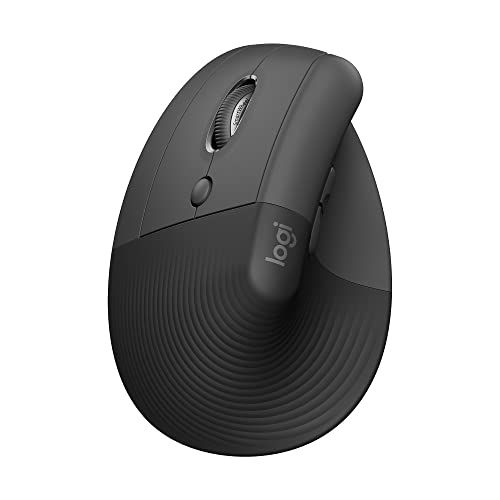
Logitech Left Handed Lift Vertical Ergonomic Wireless Mouse - Graphite | Connect via Bluetooth or included Logi Bolt USB-A receiver, quiet clicks, 4 of 6 buttons customizable, Windows Mac compatible
As an Amazon Associate we earn from qualifying purchases. Product prices and availability are accurate as of the date/time indicated.

ELECOM EX-G Left Handed Thumb Control Trackball Mouse Wireless M-XT4DRBK-G | 2.4 GHz USB Wireless, Ergonomic, Thumb Control, Tracking Roller Ball, 6 Programmable Buttons, Tilt Scroll
As an Amazon Associate we earn from qualifying purchases. Product prices and availability are accurate as of the date/time indicated.

Lekvey Left Handed Mouse, Wireless USB Ergonomic Vertical Lefty Mouse | Only for Left-Hand Users, Quiet Click, 2.4G Wireless, 3 DPI 800/1200/1600, Comfort Grip, Lefty Mouse for Laptop, Mac, PC
As an Amazon Associate we earn from qualifying purchases. Product prices and availability are accurate as of the date/time indicated.
Shape, side button placement, sensor, weight, connection type, and battery life are each maker’s specification for the current exact model and should be confirmed in that maker’s current documents and product diagrams before purchase. Note the distinction this guide is built on: a true left-handed model places its main side buttons for the left thumb, a true ambidextrous model provides buttons on both sides or none, and a symmetrical shell with buttons on one side only is a right-handed layout in a neutral shape. Prices are typical street ranges as described.
Detailed Reviews: Best Mouse for Left Handed Users Picks
1. Razer Naga Left-Handed Edition – Best Overall
The Naga Left-Handed Edition leads because it is the real article: a gaming mouse engineered from the start for the left hand, with its twelve-button side panel where a left thumb can use it, a capable sensor, and mechanical switches in Razer’s stated classes. For left-handed MMO and shortcut-driven players, it has no direct rival in this table.
It is wired and it is specialised, and both facts should be accepted knowingly. If your work uses thumb buttons daily, this is your mouse; if it does not, its panel is weight and cost you will carry for nothing, and the ambidextrous rows below will serve you better.
2. Logitech Lift Left – Best Ergonomic
The Lift Left brings a vertical, handshake-style shape to a genuine left version, sized for small to medium hands in Logitech’s stated classes, with quiet clicks and wireless connections suited to office and home work. For a left-handed user whose current pain point is a flat mouse twisting their wrist across a long day, it is the most direct answer here.
Give any vertical mouse an honest adjustment period of days, not minutes, and set your chair and desk height so your forearm is supported as you use it. Persistent pain deserves professional advice; a better mouse is good ergonomics, not a diagnosis or a cure.
3. Razer Viper 8KHz – Best Ambidextrous Gaming
The Viper class is a true ambidextrous esports shell with side buttons on both sides, a top-tier sensor class, and a wired connection built for competitive play. A left-handed player can use the buttons their thumb can reach and disable the others in Razer’s software, which is the correct way to run any both-sides design.
Its high polling specification needs a system and games that can use it, as Razer’s documents describe, and its wired tether will not suit every desk. As a competitive left-hand option without compromise on performance, it is the strongest ambidextrous row here.
4. Logitech G Pro X Superlight 2 – Best Lightweight Competitive
Logitech’s flagship esports mouse offers a refined symmetrical shell at a very light weight, with wireless performance in the top class and a shape a generation of professional players, including left-handed ones using it in the left hand, have adopted. Its side buttons sit on one side of the shell, so a left-handed user should confirm in Logitech’s documents and diagrams exactly what their thumb will and will not have.
Buy it for weight, wireless, and shape, with your eyes open about buttons. For a player whose game is aim, movement, and two reliable clicks, it is an elite tool; for a shortcut user, the Naga above remains the honest recommendation.
5. SteelSeries Sensei Ten – Best Governed Ambidextrous Value
The Sensei Ten carries one of the longest-running ambidextrous shapes in gaming, with buttons on both sides, a proven sensor class, and a price well below the flagships. For a left-handed player who wants a legitimate both-sides shell without paying esports-flagship money, it is the value row of this table.
It is wired and its design is deliberately conservative. Set it up in SteelSeries’ software, disable the side buttons your grip presses by accident, and it will disappear into your hand — which, for a mouse at this price, is high praise.
6. Keychron M6 – Best Productivity Alternative
Keychron’s M-series brings its keyboard audience a mouse line with wireless flexibility, a comfortable general-use shape, and pricing that suits a home office or study desk. For a left-handed general user who does not need a thumb panel or esports performance, it is a sensible, modern alternative to adapting a big-brand right-handed model.
Confirm the exact model’s shape and button layout in Keychron’s current documents, because the line spans several designs and not all of them suit a left hand equally. Matched correctly to your grip, it covers work, browsing, and casual play in one purchase.
Buying Guide: Choosing the Best Mouse for Left Handed Users
Check the buttons, not the headline: a three-question test for any listing
Before any other specification, answer three questions from the maker’s own product page and diagrams. Where are the side buttons — left side of the shell, right side, both, or none — and which of them will your left thumb actually reach? Can the buttons you do not want be disabled or remapped in the maker’s software, on your operating system? And is the shape truly symmetrical or a mirror-image left build, rather than a right-handed ergonomic shell described loosely as suitable for either hand? If a listing cannot answer the first question clearly, treat the mouse as right-handed until proven otherwise. Then set your system up for your hand: swap primary and secondary buttons in your operating system if that is your preference, confirm your main games and applications honour it or offer their own setting, and save your profiles in the maker’s software so a system update does not quietly hand your desk back to the right-handed default.
Fit the shell to your hand, grip, and working day
Measure your hand’s length and width, note your grip style, and compare both with each maker’s stated dimensions and weight. A large palm-grip user and a small fingertip-grip user can both be left-handed and need opposite mice. Test, where you can, across a real session of your own work: an hour of your game, a morning of your documents, with your own chair and desk height, because a mouse is graded by the fourth hour, not the fourth minute. Check the practicalities in the same test — cable drag or wireless reliability on your desk, scroll wheel feel for long documents, button placement for the shortcuts you actually use, and whether your ring and little fingers rest comfortably or drag. Keep packaging and receipts and use return terms fairly and within their conditions while you decide; fit is evidence, and you are entitled to gather it.
Budget for the whole desk, and keep the setup maintained
Price the system around the mouse: a mouse pad sized for your sensitivity and games, a wrist or forearm support only if it genuinely helps your posture, and for a wireless model, the charging habit or cable its maker specifies. Keep the sensor lens clean as the maker directs, update firmware and software from the maker’s official support pages, and keep a wired fallback or your previous mouse in a drawer — a left-handed replacement cannot always be bought same-day locally, which is a practical argument for owning a spare you already know fits. Keep your purchase documents and settings profiles backed up. The best mouse for left handed users is finally a small act of insistence: a tool built or honestly configured for the hand you actually use, fitted by evidence, and maintained as part of a desk that was set up for you — not adapted, apologetically, from somebody else’s.
Frequently Asked Questions About the Best Mouse for Left Handed Users
What is the best mouse for left handed users?
The Razer Naga Left-Handed Edition leads this table overall because it is a true left-handed build with its side panel under the left thumb. The Logitech Lift Left is the best ergonomic and office choice in a genuine left version, the Razer Viper class is the best true ambidextrous gaming option, the Logitech G Pro X Superlight 2 is the lightweight competitive pick for users who do not depend on thumb buttons, the SteelSeries Sensei Ten is the governed ambidextrous value, and the Keychron M6 class is a flexible productivity alternative. The best model for you depends on whether your left hand needs thumb buttons, a vertical shape, or simply a symmetrical shell it can hold without compromise — decide that first, from the makers’ diagrams, before comparing sensors.
What is the difference between a left-handed and an ambidextrous mouse?
A left-handed mouse is a mirror image of a right-handed one: its ergonomic shaping, where it has any, curves for the left hand, and its side buttons sit under the left thumb. An ambidextrous mouse has a symmetrical shell that either hand can hold, but that alone says nothing about buttons — a true ambidextrous model offers side buttons on both sides or none, while many symmetrical mice carry buttons on one side only, arranged for a right thumb, and are therefore right-handed in function. The test is always the same: find the maker’s diagram, locate every side button, and ask which thumb can use them. Then confirm the buttons you cannot use can be disabled in software, so they do not fire under your fingers during a game or a workday.
Can left handed users use a right-handed ergonomic mouse in the left hand?
Generally no, and trying usually explains itself within an hour. A right-handed ergonomic shell is sculpted to support a right hand’s palm and thumb; held in the left hand, its curves press in the wrong places, its thumb rest sits under your fingers, and its side buttons are unreachable or pressed by accident. The honest options are the ones in this table: a true left-handed model, a true ambidextrous shell, or a vertical mouse made in a left version such as the Lift Left. If you are switching hands because of pain or injury, make the change gradually, expect an adjustment period for speed and accuracy, set your desk ergonomics up for the new side, and take persistent symptoms to a clinician rather than shopping through them.
How do I set up my computer for a left-handed mouse?
Start in your operating system’s mouse settings, where you can swap the primary and secondary buttons so your left index finger performs the main click, and set pointer speed to a starting point you can refine over a week of real use. In your mouse maker’s software, assign the side buttons your left thumb can reach, disable any buttons your other fingers press by accident, and save the result as a named profile. Check your main games and professional applications individually, because some keep their own button settings that override the system. Position the mouse on the left of your keyboard with room for your forearm to rest in line, move your mouse pad and any wrist support with it, and if you use a keyboard with a number pad, consider whether a compact keyboard gives your left arm a more natural position. Give the new arrangement at least several days of normal work before judging it; a lifetime of right-side habits does not transfer in an afternoon, and that adjustment says nothing about whether the setup is right.
Related guides
- Best Desk for Small Apartments in 2026: Desks for Small Apartments
- Best Premium Monitor for Photo Editing in 2026: Premium Monitors for Photo Editing
- Best Smart Light Strip for TV Backlight in 2026: TV Backlights That Sync with Your Screen
- Best Sit Stand Desk for Laptops in 2026: 7 Sit Stand Desks That Are Perfect for Laptop Users, With Easy Height Adjustment and Enough Space for a Laptop and Monitor
More from Amazon
Programs that pair well with the guide above. Offers and eligibility are set by Amazon and may change.
Free shipping on eligible items, Prime Video and more. Eligible new members can start with a free trial.
Start a Prime free trialAd-free music streaming. Eligible new subscribers can start with a free trial.
Try Music Unlimited freeA Prime membership for ages 18-24 with a trial period. Eligibility is set by Amazon.
See Prime for Young AdultsAudiobooks and podcasts to listen to on the go. Eligible new members can start with a free trial.
Try Audible freeAs an Amazon Associate we earn from qualifying purchases.

Write Your Review
No reviews yet. Be the first to share your experience!