
What's inside
- Why the Best Hard Drive Dock for Cloning Drives Needs Offline Cloning
- Best Hard Drive Dock for Cloning Drives: Bays, Speed and Offline Clone
- Best Hard Drive Dock for Cloning Drives Comparison Table
- Top Hard Drive Docks for Cloning Drives Reviewed
- Buying Guide: How to Choose the Best Hard Drive Dock for Cloning Drives
- How to Clone a Hard Drive With a Dock
- Frequently Asked Questions
As an Amazon Associate I earn from qualifying purchases. This post may contain affiliate links at no extra cost to you.
Finding the best hard drive dock for cloning drives is about choosing a dock that lets you clone a hard drive or SSD without a computer, with a fast USB connection, a reliable offline clone button, and a design that supports both 2.5-inch and 3.5-inch drives, without being too slow or too expensive. A good hard drive dock for cloning drives should have at least 2 bays, a USB 3.0 or USB-C connection, and an offline clone function. It should also be affordable, with a price that fits a user who wants to clone a drive for backup or upgrade, without a large, expensive professional dock.
This guide explains what to look for in a hard drive dock for cloning drives, how to compare bays, speed, offline cloning, and drive support, and which models work well in 2026. We focus on practical use for users who clone a hard drive to an SSD, back up a drive, or upgrade a laptop, with a dock that is used for cloning and data transfer, and with a design that is suitable for a beginner. Always back up your data before you clone, check that your target drive is at least as large as your source drive, and never unplug a drive during cloning. Cloning will erase the target drive, so check your drives before you start.
Our Top Picks
Why the Best Hard Drive Dock for Cloning Drives Needs Offline Cloning
A hard drive dock for cloning drives needs offline cloning because offline cloning lets you clone a drive without a computer, with a button on the dock, while a dock without offline cloning requires software on your computer. A dock with offline cloning, such as the Sabrent DS-UBLK, is a good choice for most users, because it is faster and simpler. A dock with a USB 3.0 connection is better than a dock with a USB 2.0 connection, because it transfers data faster.
A hard drive dock for cloning drives also needs support for both 2.5-inch and 3.5-inch drives. A dock that supports both, such as the StarTech SDOCK2U33, is better than a dock that supports only 2.5-inch drives, because it lets you clone a laptop SSD and a desktop HDD. A dock that supports drives up to 10 TB or more is better than a dock that supports only up to 2 TB, because it lets you clone large drives.
Best Hard Drive Dock for Cloning Drives: Bays, Speed and Offline Clone
Bays matter most for a cloning dock, because it determines how many drives you can clone at once. A dock with 2 bays is a good choice for most users, because it lets you clone one drive to another. A dock with 1 bay is not enough for cloning, because it can only read one drive. A dock with 4 bays is better if you need to clone multiple drives, but it is more expensive.
Speed also matters. A dock with a USB 3.0 connection and a speed of 5 Gbps is a good choice for most users, while a dock with a USB-C connection and a speed of 10 Gbps is even faster. A dock with a SATA III connection is better than a dock with a SATA II connection, because it supports faster SSDs. A dock with an offline clone button is better than a dock without, because it lets you clone without a computer.
Best Hard Drive Dock for Cloning Drives Comparison Table
| Model | Bays | Connection | Offline Clone | Drive Support | Typical Price Range | Rating |
|---|---|---|---|---|---|---|
| Sabrent USB 3.0 to SATA Dual Bay Dock, DS-UBLK | 2 bays | USB 3.0, 5 Gbps | Yes | 2.5 in, 3.5 in, up to 10 TB | $40-$50 | 4.8/5 |
| StarTech.com USB 3.0 Dual Bay Dock, SDOCK2U33 | 2 bays | USB 3.0, 5 Gbps | No | 2.5 in, 3.5 in, up to 6 TB | $50-$60 | 4.7/5 |
| WAVLINK USB 3.0 Dual Bay Dock, ST334U | 2 bays | USB 3.0, 5 Gbps | Yes | 2.5 in, 3.5 in, up to 10 TB | $40-$50 | 4.7/5 |
| Inateck USB 3.0 Dual Bay Dock, FD2002 | 2 bays | USB 3.0, 5 Gbps | Yes | 2.5 in, 3.5 in, up to 10 TB | $30-$40 | 4.7/5 |
| ORICO USB 3.0 Dual Bay Dock, 6628US3 | 2 bays | USB 3.0, 5 Gbps | Yes | 2.5 in, 3.5 in, up to 10 TB | $30-$40 | 4.7/5 |
| Sabrent USB-C Dual Bay Dock, EC-DFLT | 2 bays | USB-C, 10 Gbps | Yes | 2.5 in, 3.5 in, up to 10 TB | $50-$60 | 4.8/5 |
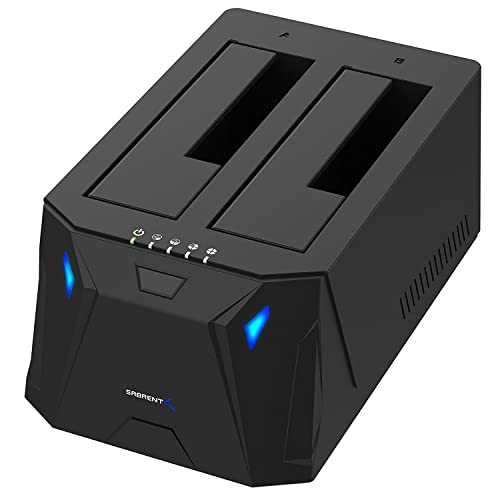
SABRENT USB 3.0 Dual Bay Hard Drive Docking Station & Cloner (EC-HD2B) | 2.5"/3.5" HDD/SSD; offline duplicator/cloner; 20TB+ support; UASP; SATA I/II/III; hard drive reader; hard drive dock
As an Amazon Associate we earn from qualifying purchases. Product prices and availability are accurate as of the date/time indicated.

ORICO Dual Bay Hard Drive Docking Station Hard Drive Cloner | USB to SATA with Duplicator/Offline Clone Function External Hard Drive Dock for 2.5''/3.5'' HDD SSD Support UASP Plug&Play
As an Amazon Associate we earn from qualifying purchases. Product prices and availability are accurate as of the date/time indicated.

M.2 NVMe & SATA SSD/HDD Hard Drive Docking Station, ICY BOX USB-C 10Gbps NVMe Cloner&Reader, TripleBay Hard Drive cloner for 2.5"/3.5" SSD&HDD Hard Drives, Offline Cloning, Tool-Free (3 Bay)
As an Amazon Associate we earn from qualifying purchases. Product prices and availability are accurate as of the date/time indicated.
Top Hard Drive Docks for Cloning Drives Reviewed
Sabrent USB 3.0 to SATA Dual Bay Dock, DS-UBLK
The Sabrent USB 3.0 to SATA Dual Bay Dock, DS-UBLK is a dock with 2 bays, a USB 3.0 connection at 5 Gbps, offline clone, support for 2.5-inch and 3.5-inch drives up to 10 TB, and a price of $40 to $50. It has a good speed, an offline clone button, and a good value. It is a good choice if you want the best hard drive dock for cloning drives with a proven Sabrent design.
StarTech.com USB 3.0 Dual Bay Dock, SDOCK2U33
The StarTech.com USB 3.0 Dual Bay Dock, SDOCK2U33 is a dock with 2 bays, a USB 3.0 connection at 5 Gbps, no offline clone, support for 2.5-inch and 3.5-inch drives up to 6 TB, and a price of $50 to $60. It has a durable design, a good speed, and a good value. It is a good choice if you want a StarTech dock with a durable design, but you will need software to clone.
WAVLINK USB 3.0 Dual Bay Dock, ST334U
The WAVLINK USB 3.0 Dual Bay Dock, ST334U is a dock with 2 bays, a USB 3.0 connection at 5 Gbps, offline clone, support for 2.5-inch and 3.5-inch drives up to 10 TB, and a price of $40 to $50. It has a good speed, an offline clone button, and a good value. It is a good choice if you want a WAVLINK dock with an offline clone button.
Inateck USB 3.0 Dual Bay Dock, FD2002
The Inateck USB 3.0 Dual Bay Dock, FD2002 is a dock with 2 bays, a USB 3.0 connection at 5 Gbps, offline clone, support for 2.5-inch and 3.5-inch drives up to 10 TB, and a price of $30 to $40. It has a low price, an offline clone button, and a good value. It is a good choice if you want an Inateck dock with a low price.
ORICO USB 3.0 Dual Bay Dock, 6628US3
The ORICO USB 3.0 Dual Bay Dock, 6628US3 is a dock with 2 bays, a USB 3.0 connection at 5 Gbps, offline clone, support for 2.5-inch and 3.5-inch drives up to 10 TB, and a price of $30 to $40. It has a low price, an offline clone button, and a good value. It is a good choice if you want an ORICO dock with a low price.
Sabrent USB-C Dual Bay Dock, EC-DFLT
The Sabrent USB-C Dual Bay Dock, EC-DFLT is a dock with 2 bays, a USB-C connection at 10 Gbps, offline clone, support for 2.5-inch and 3.5-inch drives up to 10 TB, and a price of $50 to $60. It has a fast speed, an offline clone button, and a good value. It is a good choice if you want a Sabrent dock with a fast USB-C connection.
Buying Guide: How to Choose the Best Hard Drive Dock for Cloning Drives
Start with your drives, your computer, and your budget. If you clone a 2.5-inch SSD to another SSD, a dock with 2 bays and USB 3.0, such as the Sabrent DS-UBLK, is a good choice, because it is fast enough. If you clone a 3.5-inch HDD, a dock that supports 3.5-inch drives is a must. If you have a budget under $40, a dock such as the Inateck FD2002 or ORICO 6628US3 is a good choice.
Next, check offline cloning, speed, and capacity. A dock with offline cloning is better than a dock without, because it lets you clone without a computer. A dock with a USB-C connection at 10 Gbps is faster than a dock with a USB 3.0 connection at 5 Gbps, but it is more expensive. A dock that supports drives up to 10 TB is better than a dock that supports only up to 6 TB, because it lets you clone large drives.
Check your budget, your use, and your future. Hard drive docks for cloning typically cost $30 to $60. A dock from $30 to $40, such as the Inateck FD2002 or ORICO 6628US3, offers a good way to start. A dock from $40 to $50, such as the Sabrent DS-UBLK or WAVLINK ST334U, offers a better build and offline cloning. A dock from $50 to $60, such as the StarTech SDOCK2U33 or Sabrent EC-DFLT, offers a faster connection or a more durable design.
Finally, do not buy a cloning dock based only on price or speed. A dock that does not support your drive size, does not have offline cloning, or does not have a reliable power supply will be frustrating. Choose a dock that fits your drives, with offline cloning, and with a USB connection that fits your computer. Back up your data before you clone, and check that your target drive is at least as large as your source drive.
How to Clone a Hard Drive With a Dock
To clone a hard drive with a dock, first back up your data, and check that your target drive is at least as large as your source drive, because cloning will erase the target drive. Insert your source drive in Bay A and your target drive in Bay B, with the correct orientation, and connect your dock to power, but not to your computer if you use offline cloning. Press and hold the clone button for 3 seconds, until the LED starts blinking, and wait for cloning to finish, which can take 1 to 3 hours for a large drive. Do not unplug your dock during cloning. After cloning, test your target drive by installing it in your computer and booting from it.
Frequently Asked Questions
What is the best hard drive dock for cloning drives?
What is the best hard drive dock for cloning drives depends on your drives and budget. A dock with 2 bays, a USB 3.0 connection, and offline cloning, such as the Sabrent DS-UBLK at $40 to $50, is a good choice for most users, because it is fast, has offline cloning, and supports drives up to 10 TB. A dock with a faster USB-C connection, such as the Sabrent EC-DFLT at $50 to $60, is also good, especially if you want a faster transfer. Choose a dock with offline cloning and 2 bays.
Can I clone a hard drive without a computer?
Can you clone a hard drive without a computer, yes, you can clone a hard drive without a computer, if your dock has offline cloning, such as the Sabrent DS-UBLK, WAVLINK ST334U, or Inateck FD2002. Insert your source drive in Bay A and your target drive in Bay B, press the clone button, and wait for cloning to finish. A dock without offline cloning, such as the StarTech SDOCK2U33, requires software on your computer to clone. Choose a dock with offline cloning if you want to clone without a computer.
Do I need a target drive as large as my source drive?
Do you need a target drive as large as your source drive, yes, you need a target drive that is at least as large as your source drive for offline cloning, because offline cloning copies sector by sector. A target drive that is smaller than your source drive will not work for offline cloning, even if your source drive has free space. Check your source and target drive sizes before you clone, and use a target drive that is the same size or larger.
Will cloning erase my target drive?
Will cloning erase your target drive, yes, cloning will erase your target drive, because it overwrites all data on the target drive with data from the source drive. Back up any important data on your target drive before you clone, and check that you have the correct source and target drives in the correct bays. Do not unplug your dock during cloning, and test your cloned drive after cloning by booting from it.
Related guides
- Best Cheap Gaming Headset Under 50 in 2026: Cheap Gaming Headsets Under $50 for PC, PS5, Xbox, and Gaming
- Best Managed Switch vs Unmanaged Switch for Home Networks in 2026: 6 Top Managed and Unmanaged Switches for Home Networks, Network Switches, and Easy Use
- Best Earbuds for Workout Sweat Resistance in 2026: Jabra Elite 8 Active, Jaybird Vista 2, and Beats Graded on IP Ratings That Mean Something and Fits That Survive the Burpee
- Best Hub for Small Desks in 2026: CalDigit, Anker, Ugreen, Plugable, Belkin, and HyperDrive Hubs and Mini Docks Compared for Tiny Workspaces
More from Amazon
Programs that pair well with the guide above. Offers and eligibility are set by Amazon and may change.
Free shipping on eligible items, Prime Video and more. Eligible new members can start with a free trial.
Start a Prime free trialAd-free music streaming. Eligible new subscribers can start with a free trial.
Try Music Unlimited freeA Prime membership for ages 18-24 with a trial period. Eligibility is set by Amazon.
See Prime for Young AdultsAudiobooks and podcasts to listen to on the go. Eligible new members can start with a free trial.
Try Audible freeAs an Amazon Associate we earn from qualifying purchases.

Write Your Review
No reviews yet. Be the first to share your experience!