
What's inside
- Best Desk With Cable Management: The Tray Is the Desk, Everything Else Is a Worktop
- Quick Comparison: Desks With Cable Management Compared
- The Six Managed Desks Reviewed
- Buying Guide: Count Your Cables, Compose the Whole Weight, Test the Full Travel
- How We Selected These Managed Desks
- Frequently Asked Questions: Desks With Cable Management
As an Amazon Associate I earn from qualifying purchases. This post may contain affiliate links at no extra cost to you.
The best desk with cable management is not the desk with the most holes in it. It is the desk whose design answers, before you buy it, the four questions every working setup asks within a month: where does the power strip live, how do the cables get from the desktop to that strip without crossing the room’s sightlines, how much slack does each device get when the desk moves or the monitor arm swings, and how do you change one cable in a year without dismantling the whole arrangement? A desk that answers those questions with a proper under-desk tray or raceway, a cable path from the surface that lands where the tray is, and enough depth behind the monitors for the thick parish of display and power leads will look calm for years. A desk that answers them with a single decorative grommet in the wrong corner will look tidy in the showroom photograph and chaotic by the second week, because the cables were always going somewhere and the desk simply declined to say where.
Start with the load, because cable management is a weight and volume problem before it is an aesthetic one. Count your setup honestly: the monitor or monitors with a power brick each, the computer or its dock, the laptop charger, the speakers, the lamp, the phone charger, the hub, and the network parish, and notice that their cables divide into two nations. Power cables are thick, stiff, and terminate in bricks that need air and a home; signal cables are thinner, more numerous, and travel between desktop devices. A serious desk gives the power nation a tray or channel, sized for a real strip and real bricks, mounted where a hand can reach it for the one switch or plug that always needs attention, and it gives the signal nation a short, shared path, so the desktop’s edge is crossed once, in one place, by a bundle rather than at six places by six strays. Standing desks add the final test, and it is the one most often failed: the whole parish must travel, with a managed umbilical from the moving desktop to the floor and the wall, enough slack composed as a gentle service loop, and nothing that pulls taut, drags, or saws at its full height.
This guide grades the current field of desks that take management seriously — standing and fixed, premium and honest mid-range — on tray capacity, surface cable access, depth and modesty parish, frame and motor quality where they rise, and the total price composed whole with the accessories the desk’s own system needs. Prices are ranges throughout, and the models named are real and currently sold.
Our Top Picks
Best Desk With Cable Management: The Tray Is the Desk, Everything Else Is a Worktop
Trays, Raceways, and Access for the Best Desk With Cable Management
The tray is the heart of the system, and it should be audited like a shelf you will load once and trust for years. Its length should span most of the desk’s working width, because a short tray exiles the second brick to the floor it was bought to escape; its depth and height should swallow a full-size power strip and the largest brick in your parish without forcing the lid of the arrangement into the desk’s underside; and its construction should be steel or seriously built, with ventilation, since a tray full of warm bricks in a sealed plastic box is a small oven with ambitions. Some desks integrate this as a proper cable channel or a flip-access raceway along the rear underside, which is the premium parish, giving the strip a home that can be opened from above or behind without crawling. Others provide a modesty panel with a channel, which manages sightlines from the front as well as cables. The desks that merely accept an aftermarket tray are graded on the honesty of their underside, a flat, unobstructed rear zone with frame members placed so a tray can actually be screwed where the cables are.
Surface access is the second figure, and alignment is its whole secret. A grommet, slot, or rear scallop is worth exactly the distance between it and the tray below: the good designs place the opening directly over the channel, so a monitor cable drops a few inches and disappears, while the poor ones place a handsome grommet at the front corner for a photograph and leave the tray, if any, at the back, guaranteeing a cable’s long public journey across the underside. On a multi-monitor desk, a continuous rear slot or scalloped back edge is often the better parish, letting each display drop its cables where it stands and accommodating the monitor arm’s clamp, which a grommet’s fixed position cannot. Judge the desktop’s depth in the same breath, because a shallow desk puts the monitors, their cables, and your keyboard in one another’s laps, while a deeper top gives the cable parish its own rear territory that your hands never enter.
Standing Desks and the Moving Parish for the Best Desk With Cable Management
A standing desk must manage two cable runs, not one: the parish on the desk, and the umbilical between the desk and the world. The on-desk run belongs in the tray, with the governing doctrine that everything that can live on the desk should, including the power strip itself, so that exactly one power cable, and ideally one network cable, makes the journey to the wall. That single umbilical then needs its own management, a flexible spine or a composed service loop with slack for full height, secured so it neither drags on the floor at sitting height nor pulls at standing height, and routed away from the lifting columns’ moving parts. Test any standing desk you buy at both extremes of its travel on the first day, with the full setup aboard, because a cable that is perfect at sitting height and a trip hazard or a taut wire at standing height is a defect discovered, not a quirk endured.
The frame and motors are the other half of a standing purchase, and they are graded on the unglamorous figures: lifting capacity composed with your whole setup’s weight and a margin, stability at full height under a tall monitor stack, where the wobble that is nothing at sitting height becomes a sway that makes text swim, and a control parish with memory positions that the household can share. Cable management interacts with all of it, because a heavy tray, a computer mounted under the desk, and a full parish of bricks are part of the load the motors lift and the frame must keep steady. Compose the whole weight before you fall for a frame, in step one of the buying guide, and prefer the desk whose published capacity swallows your setup with room to spare.
Building the Run: One Bundle, Labelled, With Slack for the Best Desk With Cable Management
Even the best desk rewards a method, and the method is short enough to write on the tray itself. Fit the strip in the tray first, then bring each power cable down to it by the shortest calm route, coiling each one’s excess in the tray rather than at the device, so the desktop carries no nests. Bring the signal cables down together through the one chosen access point, in a single sleeved or tied bundle, with a hand’s width of composed slack at each device for the monitor that swivels and the laptop that leaves. Label both ends of every cable with a tag or a band, because the person who will thank you is yourself in eighteen months, under the desk with a torch, changing one device. Keep the power and signal parishes loosely separate where they run together, avoid strangling any cable with an over-tight tie, and leave the network and any audio runs the gentlest bends in the bundle, since they are the citizens most offended by being kinked.
Then keep the round light. When a device changes, change its cable at the tray, using the labels, rather than adding the new one alongside the old one’s ghost. Blow or wipe the tray’s dust at the season’s turn, because a tray is a shelf and collects a shelf’s parish, and check the umbilical’s slack after any rearrangement of the room. A desk managed this way stays the photograph it was bought as, which is the whole commercial point of the category, and it stays something better than a photograph: a setup that can be understood, changed, and repaired by its owner in minutes, at any point in its long life.
Quick Comparison: Desks With Cable Management Compared
| Desk | Best For | Key Specs | Typical Price Range | Rating |
|---|---|---|---|---|
| Fully Jarvis parish | Standing — best desk with cable management overall | Electric standing parish as published, size range classes, cable tray and management accessory parish, lifting capacity classes as published | $550 – $900 by size | 4.7 / 5 |
| Uplift V2 parish | Standing — best accessory parish | Electric standing parish as published, wide size and finish range, cable tray, spine and management classes, capacity classes as published | $600 – $950 by size | 4.6 / 5 |
| Secretlab Magnus Pro parish | Gaming — best integrated parish | Electric standing parish as published, full-width rear cable channel with top access classes, magnetic management parish, size classes as published | $800 – $1,050 | 4.6 / 5 |
| IKEA Bekant parish | Fixed and sit-stand — best value parish | Cable net parish under the top as published, size classes, manual and electric versions classes, modesty options as published | $250 – $600 by version | 4.4 / 5 |
| FlexiSpot E7 parish | Standing — best frame value parish | Electric standing parish as published, capacity classes, cable tray accessory parish, size and finish classes as published | $450 – $700 by size | 4.5 / 5 |
| IKEA Mittcirkel / simple parish | Fixed — best simple parish | Fixed desk parish as published, cable outlet classes, size classes, honest underside for an added tray as published | $120 – $250 | 4.1 / 5 |

DeskShow 60 x 30 Inch Electric Standing Desk with Flip-Top Cable Management | Height 27.7-45.5in, 250lbs, 3 Presets, Dual-Beam. Mouse Pad & Clamp Power Strip Incl. Home Office Desk & Gaming Desk.
As an Amazon Associate we earn from qualifying purchases. Product prices and availability are accurate as of the date/time indicated.
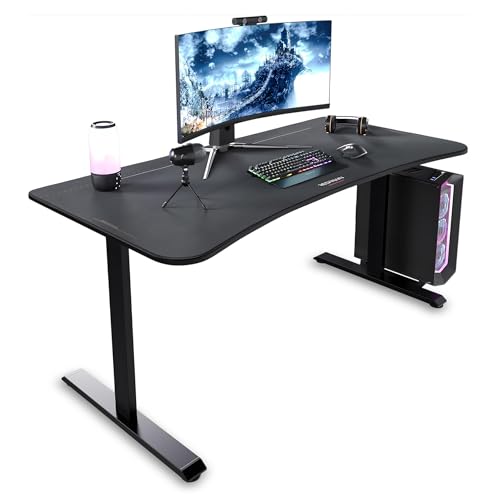
Respawn 1063 Gaming Desk, 63 Inch, Cable Management and Full Desk Mouse Pad | 63 inch gaming desk with cable management and full desk mousepad, dual monitor support for work, gaming, or study.
As an Amazon Associate we earn from qualifying purchases. Product prices and availability are accurate as of the date/time indicated.

FLEXISPOT EN2 55"x28" Standing Desk with Power Strip Bundle, Black | One-Piece Desktop, Easy-Access Clamp Power Strip Bundle, Organized Cable Management, Modern Home Office Setup
As an Amazon Associate we earn from qualifying purchases. Product prices and availability are accurate as of the date/time indicated.
Prices shown are approximate and for reference only. Prices change often, so please check the current price on Amazon before you buy.
Ratings are editorial assessments based on makers’ published size, capacity, and cable-management specifications and value at typical prices. Accessory trays and spines are included in some bundles and sold separately in others; compose the total before comparing.
The Six Managed Desks Reviewed
1. Fully Jarvis Parish — Best Overall
The Jarvis pairs a serious standing frame with a management accessory parish composed for real setups, trays and grommets that align as this guide demands. For most working desks, the audit ends in this row.
2. Uplift Parish — Best Accessory System
Uplift’s strength is the breadth of its own management ecosystem, trays, spines, and mounts that fit its desks without improvisation. As the system parish, it shares the head.
3. Secretlab Parish — Best Integrated Channel
The Magnus Pro builds the cable channel into the desk’s rear with access from above, the tidiest parish in this table for a gaming or studio setup. As the integrated parish, it earns its row.
4. FlexiSpot Parish — Best Frame Value
FlexiSpot’s E7 class delivers a strong, stable frame at a mid price, with management added from its own accessory parish. As the value standing parish, it holds its row.
5. IKEA Bekant Parish — Best Honest Value
The Bekant’s simple under-top net has quietly managed offices for years, and its parish remains the value benchmark for fixed and sit-stand buyers. As the honest parish, it holds its place.
6. IKEA Simple Parish — Best Starter
The simple fixed desks earn their row where their underside honestly accepts a tray and their top gives a cable its one clean drop. As the starter parish, they complete the table.
Buying Guide: Count Your Cables, Compose the Whole Weight, Test the Full Travel
Step One: Write Your Setup’s Census
List every device the desk will carry, with its power brick’s size, its cables’ count, and its weight, and add the parish you know is coming, the second monitor or the larger machine, because a desk is a five-to-ten-year purchase and its tray and frame should be bought for the setup’s future as well as its present. Decide fixed or standing from your working life rather than fashion, choose the desktop size from the room and the monitors with depth given its due, and set the whole budget composed complete: desk, tray or channel accessories, spine or loop for a standing parish, the strip the tray will hold, and the sleeves, ties, and labels of the run itself.
Step Two: Audit Tray, Access Alignment, and Capacity
For each finalist, audit in this guide’s order: the tray or channel’s length and appetite against your strip and largest brick; the surface access and its alignment over that tray; the underside’s freedom for mounting where management is an accessory; the frame’s lifting capacity against your census with margin, and its stability at full height where it stands; and the umbilical parish the maker provides or expects. Read the total price with every necessary accessory in the basket. Refuse a desk whose management is a grommet and a promise, or whose capacity your setup already crowds, because both failures are permanent residents of a purchase meant to last a decade.
Step Three: Build the Run Once, Properly, and Photograph It
Assemble the desk, fit the tray and strip first, and build the run by the method in this guide: power down to the tray with its excess coiled there, signal down in one labelled bundle through the one access point, slack composed at every moving device, and, for a standing desk, the single umbilical spined or looped and tested at both extremes of travel before anything is declared finished. Photograph the finished underside and keep the picture with the desk’s documents, because it is the map your future self will want when a device changes. Keep the seasonal round, dust, labels, and slack, and the desk will remain what its photograph promised, a calm surface over an understood parish, which is the entire ambition of this category.
How We Selected These Managed Desks
We included only real, named, currently sold desks whose makers publish size, capacity, and cable-management specifications, spanning integrated-channel, accessory-system, and honest-value parishes in fixed and standing forms. Prices are typical retail ranges by size and version. Ratings weight tray capacity and access alignment first, then frame quality and stability, accessory honesty, and value.
Frequently Asked Questions: Desks With Cable Management
Is built-in cable management worth paying for, or should I add a tray to a plain desk?
Both routes are honest, and the choice is made by the underside and the arithmetic. A plain desk with a flat, unobstructed rear underside, fitted with a good steel tray, a spine where it stands, and a well-placed access point, can equal a managed desk’s result for less money, and the value rows of this table are graded with exactly that path in mind. Built-in management earns its premium where it does what accessories cannot: the integrated rear channel with top access, the tray composed for the frame’s own geometry, the system whose parts were designed together and arrive in one box with one warranty. Price both honestly, accessories included, and be suspicious only of the middle parish, the desk that charges for management and delivers a grommet. That desk is the category’s one true villain, and this guide’s audit exists to expose it before the purchase rather than after.
Where should the power strip go, and how many sockets do I need?
In the tray, on the desk, travelling with it if the desk stands, with exactly one power cable descending to the wall. That arrangement is the foundation of every tidy setup in this guide, because it converts a dozen floor cables into a single managed umbilical and puts the strip’s switch within a hand’s reach under the desk’s rear edge. For sockets, count your census and add room for the parish’s growth and for the bricks that cruelly cover their neighbours; a strip with widely spaced sockets, or a short extender for the worst brick, is worth more than raw socket count. Choose a strip with surge protection from a reputable maker for the equipment’s sake, replace it if it is ever damaged or overheats, and never chain strips together or run the tray’s load through an unrated extension, because cable management that tidies an electrical hazard has improved the photograph and worsened the desk.
How do I manage cables on a standing desk without anything pulling?
By obeying the one-umbilical doctrine and testing it at full height. Everything that can live on the desk lives on it, strip in tray included, so the only travellers are one power cable and, where you use one, one network cable. Give those travellers a flexible spine from desktop to floor or a composed service loop with genuine slack, secured at both ends, routed clear of the lifting columns, and long enough that at maximum height nothing is taut and nothing drags. Then test the whole travel, slowly, watching the umbilical and every device’s slack, before the desk’s first working day. The failures in this parish are always the same two, a loop sized for sitting height that stands up into a tripwire, and a cable pinched by a column it was routed against, and both are prevented by the ten minutes of testing in step three, which is the cheapest insurance in this entire guide.
What do I do about the monitor arm’s cables and the laptop that leaves every day?
Give movement its slack and its own small parish. A monitor arm’s cables should run along the arm itself, in its channels or clips where it provides them, with a gentle loop at the pivot that lets the screen swing and tilt without tugging the bundle, joining the main drop at the desk’s access point. The travelling laptop is best served by a dock or a single hub connection at a fixed place on the desk, its charger living permanently in the tray, so the daily ritual is one connector rather than a harvest of cables, and the desk’s parish stays composed while its citizen commutes. Where no dock is in the budget, dedicate one labelled bundle, power and display and hub, coiled neatly at the laptop’s place and left behind when it leaves. The principle governs both: a managed desk is not a desk where nothing moves, but a desk where everything that moves has been given its measured freedom, and everything else has been persuaded to be still.
Related guides
- Best Desktop Speakers for Music Production in 2026: 7 Desktop Speakers That Offer Flat Sound, Clear Detail, and Reliable Performance for Music Producers
- Over Ear Headphones vs On Ear Headphones for Comfort in 2026: 6 Over Ear Headphones vs On Ear Headphones for Comfort Picks for Long Listening, Easy Use, and Reliable Comfort
- Best Power Bank for Commuters in 2026: Best Power Bank for Commuters
- Best USB Cable for Fast Charging in 2026: Anker, Belkin, UGREEN, and Cable Matters Compared for a Chain That Charges at Its Slowest Citizen, a Rating Read as a Certified Sentence, and a Phone’s Own Protocol Read Before Either Is Blamed
More from Amazon
Programs that pair well with the guide above. Offers and eligibility are set by Amazon and may change.
Free shipping on eligible items, Prime Video and more. Eligible new members can start with a free trial.
Start a Prime free trialAd-free music streaming. Eligible new subscribers can start with a free trial.
Try Music Unlimited freeA Prime membership for ages 18-24 with a trial period. Eligibility is set by Amazon.
See Prime for Young AdultsAudiobooks and podcasts to listen to on the go. Eligible new members can start with a free trial.
Try Audible freeAs an Amazon Associate we earn from qualifying purchases.

Write Your Review
No reviews yet. Be the first to share your experience!