
What's inside
- What Makes the Best Cheap Gaming Headset Stand for Gamers Worth Buying?
- Quick Comparison: Best Cheap Gaming Headset Stand for Gamers Models
- Detailed Reviews: Best Cheap Gaming Headset Stand for Gamers Picks
- Buying Guide: Choosing the Best Cheap Gaming Headset Stand for Gamers
- Gaming Headset Stands Matched to Different Desk Setups
- Frequently Asked Questions About the Best Cheap Gaming Headset Stand for Gamers
As an Amazon Associate I earn from qualifying purchases. This post may contain affiliate links at no extra cost to you.
The best cheap gaming headset stand for gamers solves a small problem that has outsized daily consequences: a gaming headset is an awkward, expensive object with a headband that should not be crushed, earcups that should not sit in a spill, a cable or a charging lead that should end in the same place every night, and a microphone that should not be bent by being thrown over a monitor. Left without a home, it lives on the desk pile, on the PC tower, on the arm of the chair, or on the floor beside the setup, and each of those places costs it lifespan and costs you a minute of untangling at the start of every session. A stand gives it a vertical home that takes almost no desk, presents it ready to wear, and, in the better cheap models, quietly adds the USB hub or the cable management your desk was missing. Cheap is the correct ambition here. A headset stand is a shaped support, not an amplifier, and the money saved against a premium stand buys games, a better mouse pad, or the replacement earpads your headset will need before it needs a monument.
Stability is the first specification, because a stand holds an expensive object above a hard desk and often above a PC, a keyboard, or a drink. Look for a weighted or wide base relative to the stand’s height, a low center of gravity, and a top support that cradles the headband across a curve or a bar rather than balancing it on a point, which can dent a headband’s padding over time. Tall, thin, featherweight stands are the category’s false economy: they photograph well and fall over when a cable is tugged, a desk is bumped, or a cat conducts its inspection. Test any stand by loading your own headset, with its cable arranged as you will actually leave it, and giving the desk the small bump of real life. If the stand walks, rocks, or tips in the test, it is not cheap. It is a down payment on a broken headset.
Height and headband fit come next. The stand must be tall enough that the earcups clear the desk with the headband at its top, for your headset at its adjusted size, including large headsets with thick cups and attached microphones. A stand that is too short leaves an earcup resting on the desk, which defeats the object, and a support that is too narrow concentrates the headband’s weight on a small area. Some stands add a hook or a rest for a second item — earbuds, a controller, a cable — and those are worth having only if they do not compromise the main job. Dual headset stands suit a two-headset desk, a shared setup, or a work and gaming pair, and they need a proportionally more serious base, because two headsets double the leverage in a fall.
The extras are where cheap stands divide into useful and gimmicky. A built-in USB hub can be genuinely valuable if it is a real hub with the ports and speed its maker states, positioned so cables do not drag the stand around, and powered appropriately for what you plug into it; it can also be a slow, underpowered ornament that adds a cable across the desk to save a cable across the desk. RGB lighting on a stand is a taste decision with a power cost and a software or button routine; buy it if your desk’s look is a real pleasure to you, and do not let it substitute for base weight in the budget. Cable management — a channel, a hook, a place to wrap the excess — is the unglamorous extra that pays every day, because a headset whose cable has a route is a headset that does not pull its stand over. For wireless headsets, the stand’s job expands to charging discipline: some premium stands charge, most cheap stands do not, and a cheap stand beside a consistent charging cable, in the same place every night, achieves most of the benefit for a fraction of the price.
This guide compares six real, currently sold cheap headset stands that cover the honest market: New bee aluminum and RGB classes as the budget benchmark, Havit RGB hub classes, Razer Base Station classes as the premium end of cheap-adjacent, Turtle Beach and HyperX accessory classes in their stand offerings, Fiodio and similar dual and hub classes from value brands, and simple weighted desk stands from established peripheral accessory lines. Confirm the exact model’s height, base, ports, and lighting before buying, because value brands reuse names across designs that share nothing but a silhouette.
What Makes the Best Cheap Gaming Headset Stand for Gamers Worth Buying?
Materials: aluminum, plastic, and the base that decides
Aluminum uprights and weighted bases dominate the good cheap end because they put mass where stability lives and resist the flex that makes a plastic stand feel like it is apologizing. A fully plastic stand can be perfectly serviceable if its base is wide and its joints are honest, but it should be priced as the lightest duty option and placed where it will not be bumped. Detachable designs ship and store well and dominate online value brands; assembled correctly and tightened fully, they are sound, while a stand assembled loosely will wobble in a way its reviews will blame on its materials. Whatever you buy, assemble it on the desk it will serve, load it, and judge it there, because a stand is a piece of furniture and furniture is judged in place.
Desk footprint and the setup around the stand
Measure the place the stand will live before choosing it: beside the monitor, behind the keyboard, on a shelf above the desk, or on the PC case side where some gamers use a magnetic or clamp hook instead of a stand at all. A stand’s base competes with your mouse’s travel, your drink’s safe zone, and your monitor’s feet, and a stand placed in the mouse’s territory will be moved within a week to a worse place. Vertical is the stand’s gift to a small desk, so protect it: choose the smallest base that is genuinely stable for your headset, and route its hub or charging cable behind the desk rather than across the working surface.
What a stand cannot do
A stand will not repair a headset’s clamp force, silence a noisy desk, or charge a wireless headset unless it is a charging model with the correct connector or pad for your exact headset. It will not protect a headset from a fall it causes by being unstable, from sunlight fading its fabrics on a windowsill desk, or from dust in an open room, which a drawer or a case handles better for long storage. Buy it for the daily home and the ready-to-wear ritual, and let other products do their own jobs. That clarity is how a cheap accessory stays cheap.
Quick Comparison: Best Cheap Gaming Headset Stand for Gamers Models
| Model | Key Specs | Best For | Typical Price Range | Rating |
|---|---|---|---|---|
| New bee Aluminum Headset Stand Classes | Aluminum upright and base classes as maker states, headband bar classes, simple classes, color classes | Best cheap gaming headset stand for gamers overall | $12 – $20 by model | 4.4 / 5 |
| Havit RGB Headset Stand Classes | Stand with USB hub and RGB classes as maker states by model, port classes, lighting mode classes | Best hub and RGB value | $25 – $40 by model | 4.3 / 5 |
| Razer Base Station Classes | Premium stand classes as maker states, hub classes in relevant models, RGB classes in relevant models, weighted base classes | Best premium step-up | $50 – $80 by model | 4.5 / 5 |
| New bee RGB and Dual Classes | RGB classes and dual headset classes by model as maker states, hub classes in some models | Best dual and RGB budget | $18 – $35 by model | 4.2 / 5 |
| Fiodio Gaming Headset Stand Classes | Value stand and hub classes by model as maker states, RGB classes in some models, port classes | Best budget hub alternative | $20 – $35 by model | 4.1 / 5 |
| Simple Weighted Accessory Stand Classes | Weighted base and metal upright classes from accessory makers as stated, no hub classes, compact classes | Best no-extras stand | $10 – $18 by model | 4.2 / 5 |
Height, base dimensions, hub port count and speed, RGB features, and materials are each maker’s specification for the current exact model. Prices are typical street ranges. Ratings reflect cheap-stand suitability: stability with a real gaming headset, headband support, useful extras, build, and value.
Detailed Reviews: Best Cheap Gaming Headset Stand for Gamers Picks
1. New bee Aluminum Classes – Best Overall Cheap
The New bee aluminum stand is the budget benchmark because it does the main job with the right materials at the right price: a metal upright, a stable base for its class, a headband support that does not abuse padding, and no extras inflating the cost or the cable count. For most gaming desks, this is the stand to buy first and the stand other cheap stands must beat.
Assemble it fully tight, place it out of the mouse’s territory, and route the headset’s cable so a tug pulls slack rather than the stand. Treated as furniture rather than as a gadget, it will serve for years at a price that makes its service almost unfair.
2. Razer Base Station Classes – Best Premium Step-Up
Razer’s Base Station classes sit at the top of this table’s prices and earn a row by showing what the extra money buys: a more finished base, hub features in the relevant models, and lighting that matches a Razer desk’s ecosystem. For a gamer whose setup is a considered object, that coherence is a legitimate purchase.
It is not the cheap recommendation, and it should not pretend to be. Buy it when the stand is part of the desk’s design and the hub will genuinely be used, and buy the New bee row when the job is simply to hold a headset well, because it does that job at a third of the price.
3. Havit RGB Hub Classes – Best Hub Value
Havit’s stand classes add the two extras gamers actually ask for — USB ports at the desk’s edge and RGB that matches the rest of the setup — at a value price. The hub suits a receiver, a charging lead, or a drive that is swapped often, and the stand’s lighting can be set or switched off by the model’s own controls when the room needs to be a bedroom again.
Check the hub’s stated speed and power against your use, because a hub bought for fast drives and used for a dongle is fine, while the reverse is a disappointment with a spec sheet to blame. Keep the stand’s own cable managed, or the hub will have added a wire to save wires.
4. New bee RGB and Dual Classes – Best Two-Headset and RGB Budget
The same value brand’s RGB and dual classes serve the desks this article’s first row cannot: a gaming and a work headset, a player’s and a partner’s, or a single headset on a stand whose lighting is part of the room’s evening character. A dual stand, correctly based, is better than two cheap stands competing for the same corner.
Dual means double load, so the bump test matters twice as much. Load both headsets, arrange both cables, and then decide, because a dual stand that only passes empty is a photograph, not a product.
5. Fiodio Classes – Best Budget Hub Alternative
Fiodio’s value hub stands give a second source for the stand-plus-ports combination, which matters in a market where a single model’s stock and price wander. Judged by the same tests — base, height, hub honesty, assembly — a good unit in this class is a perfectly rational buy.
Value brands vary more between production runs, so use the return window as part of the purchase: assemble, load, test the ports with your real devices, and keep or return on evidence gathered in the first week rather than on hope.
6. Simple Weighted Accessory Classes – Best No-Extras
The simplest weighted stands from accessory makers close the table as a reminder that a stand can be a single, well-made object with no ports, no lights, and no app, and that for a wireless headset on a tidy desk that object may be the entire requirement. Their low prices also make them the right second stand for a bedside, a console corner, or a travel-adjacent setup.
Judge them by mass in the hand and stability under load, because at this price the specification sheet is short and the physics is the review. A heavy, plain stand that never falls is a better accessory than a light, glowing one that falls monthly.
Buying Guide: Choosing the Best Cheap Gaming Headset Stand for Gamers
Measure your headset and its home
Measure your headset’s height at its normal adjustment, from desk to the top of the headband, with earcups hanging as they will on the stand, and choose a stand whose stated height clears it with the cups off the surface. Measure the desk space the base may occupy without entering the mouse’s range or the drink’s zone. If your headset is unusually large, heavy, or has a fixed microphone that changes its balance, favor the heavier and taller end of the cheap market and test the loaded stand before the return window closes.
Decide extras by cables you will actually plug in
List what would live in a stand’s hub — a wireless receiver, a charging cable, a swap drive — and buy the hub only if the list is real and the hub’s stated speed and power serve it. Choose RGB only if you will enjoy it weekly, because a light you switch off in the first month was a tax on a stand. Choose a dual stand only for two headsets that both need a daily home. Every extra skipped is money and desk clarity saved, which is the spirit of a cheap accessory bought well.
Place, load, and live with it for a week
Assemble fully, place it in its measured home, route every cable behind or beneath the desk where possible, and use it for a full week of sessions before deciding. The verdict of a stand is written in small events: whether the headset is on it every morning, whether it has ever rocked, whether the cable has a route your hand knows in the dark. Keep it if those events are good. Return it without sentiment if they are not, because a cheap stand’s greatest virtue is that a mistake costs little to correct.
Gaming Headset Stands Matched to Different Desk Setups
Gamers tend to want a stand that does a little more than hold a headband. These options add lighting, charging, or controller storage while keeping the desk tidy and the headset within reach.
New Bee RGB Headset Stand with USB-C Ports
A sturdy aluminum stand with lighting and extra charging ports on the base. It works as a small hub for a phone or a wireless mouse dock. The weighted base keeps a heavy headset from tipping.
As an Amazon Associate we earn from qualifying purchases at no extra cost to you.
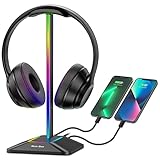
charlxee RGB Headphone Stand with USB-C Data Port
Seven lighting modes and a data connection alongside three charging ports. It is a compact way to add ports at the edge of a crowded desk. The light modes can be set to match a keyboard or monitor glow.

UPERGO Solid Wood Headset Stand with Controller Holder
A natural-wood stand with a wide tray that holds a controller beside the headset. It suits console players who want both pieces parked in one spot. The wood finish softens the look of a plastic-heavy setup.

KDD RGB Headset Stand with Detachable Controller Holder
Nine light modes and a rotatable head, with a controller rest that can be removed when desk space gets tight. A flexible pick for a setup that changes between PC and console. Cable routing stays out of sight.

Frequently Asked Questions About the Best Cheap Gaming Headset Stand for Gamers
What is the best cheap gaming headset stand for gamers?
New bee’s aluminum stand classes lead this table for most gamers, combining a metal build, a stable base, and a headband-friendly support at a genuinely cheap price. Havit classes add a useful hub and RGB at value prices, Razer’s Base Station classes are the premium step-up for a matched setup, New bee’s dual and RGB classes serve two-headset and lighting-led desks, Fiodio classes are a budget hub alternative, and simple weighted accessory stands suit a no-extras desk. Every choice should pass a loaded bump test with your own headset and cables arranged as you will leave them, because stability in use is the whole product.
Will a headset stand damage my headband?
A good stand supports the headband across a bar or a gentle curve and is kinder to it than a desk pile, a monitor corner, or a hook that concentrates the load on one small point. A poor stand with a narrow, hard point can dent padding over time, especially on heavy headsets, so choose a support shape that spreads the load and check the headband’s padding in the first weeks for any deepening impression. If your headset’s maker offers guidance on storage, follow it, and for long storage rather than daily use, a case or a drawer that keeps dust and sunlight off the headset may serve it better than any stand.
Is a USB hub headset stand worth it?
It is worth it if you have real, named devices that will live in those ports — a wireless receiver that benefits from a clear position, a charging lead you use nightly, a drive or a controller dongle you swap — and if the hub’s stated speed and power match those devices. It is not worth it as a vague promise of tidiness, because the stand itself needs a cable to the PC, and a hub used by nothing has added a wire and a cost to hold a headset. Decide from your list, test the ports with your devices in the return window, and keep the stand’s own cable routed behind the desk so the hub genuinely reduces surface cables rather than relocating them.
Where should I put a headset stand on my desk?
Put it where the headset can be reached and replaced without crossing the keyboard or the mouse’s travel, outside the drink’s spill zone, and close enough to the PC or its charging point that the cable route is short and behind the working surface. Common good homes are beside the monitor on your non-mouse side, behind the keyboard line if depth allows, or on a shelf directly above the desk. Avoid the edge of the desk, where a stand can be knocked off entirely, and avoid placing it on top of a PC case unless the stand is designed for it and the case’s heat and vibration are acceptable for the headset. The right place is the one where the stand is still, untouched, and used every day.
Related guides
- How to Choose Console Storage for Games in 2026: Seagate, WD Black, and Samsung Ranked by Your Console’s Rules Read First — Each Parish Guards Its Own Gate — Library Counted, and Playable-vs-Archived Understood
- Best Webcam for Laptop Users in 2026: 6 Top Webcams for Laptop Users, Clear Video, and Easy Meetings
- Best Handheld Console Bag for Travel in 2026: 7 Protective Bags for Steam Deck, Switch, and ROG Ally
- Best USB C Cable vs Lightning Cable for Phones in 2026: Which Cable Should You Buy Now?
More from Amazon
Programs that pair well with the guide above. Offers and eligibility are set by Amazon and may change.
Free shipping on eligible items, Prime Video and more. Eligible new members can start with a free trial.
Start a Prime free trialAd-free music streaming. Eligible new subscribers can start with a free trial.
Try Music Unlimited freeA Prime membership for ages 18-24 with a trial period. Eligibility is set by Amazon.
See Prime for Young AdultsAudiobooks and podcasts to listen to on the go. Eligible new members can start with a free trial.
Try Audible freeAs an Amazon Associate we earn from qualifying purchases.

Write Your Review
No reviews yet. Be the first to share your experience!