
What's inside
- Best Budget Gaming Keyboard for Gamers Compared: Quick Comparison Table
- Best Budget Gaming Keyboard for Gamers in 2026: Detailed Reviews
- Best Budget Gaming Keyboard for Gamers Buying Guide: How to Choose the Right Keyboard
- Budget Gaming Keyboards That Punch Above Their Cost
- Best Budget Gaming Keyboard for Gamers FAQ: Budget Gaming Keyboard Questions Answered
As an Amazon Associate I earn from qualifying purchases. This post may contain affiliate links at no extra cost to you.
The best budget gaming keyboard for gamers in 2026 is the Royal Kludge RK61 for most gamers who want a budget gaming keyboard for gamers that is cheap, fast, and good for gaming. It typically costs $40 to $50. The Redragon K552 is the best budget gaming keyboard for gamers if you want a budget gaming keyboard for gamers that is cheap, simple, and good for a Redragon user. It typically costs $30 to $40. The Logitech G213 Prodigy is the best budget gaming keyboard for gamers if you want a budget gaming keyboard for gamers that is cheap, simple, and good for a Logitech user.
A budget gaming keyboard for gamers is a keyboard that costs less than about $100 and is used for gaming, with a focus on switches, size, and hot-swap, so you can play fast, without a keyboard that is slow, uncomfortable, or too expensive. Budget means budget, with a budget gaming keyboard for gamers needing to be cheap, because gamers want value, and a keyboard that is too expensive being worse, because it will not fit a budget, and a keyboard with linear switches being best for gaming, because it is smooth, and a keyboard with tactile switches being best for typing, because it has a bump. Gamers means gamers, with a budget gaming keyboard for gamers needing to be fast, because gaming needs speed, and a keyboard that is slow being worse, because it will lag. It is different from a budget gaming keyboard for office, which is about office, and from a premium gaming keyboard, which is about premium. A budget gaming keyboard for gamers must be cheap, it must be fast, and it must be comfortable, so you can use it for gaming.
Switches matter for the best budget gaming keyboard for gamers. Switches are how a keyboard feels and sounds, with linear switches being best for gaming, because they are smooth and fast, and tactile switches being best for typing, because they have a bump, and clicky switches being best for a loud feel, because they click. A Royal Kludge RK61 has linear switches, a Redragon K552 has linear switches, and a Logitech G213 Prodigy has membrane switches. For a budget gaming keyboard for gamers, buy linear switches if you want gaming, because they are smooth, and buy tactile switches if you want typing, because they have a bump, and always test your switches, because a switch that is wrong will be uncomfortable, and always remember that linear is gaming and smooth, and tactile is typing and bump.
Size matters for the best budget gaming keyboard for gamers. Size is how large a keyboard is, with a 60% keyboard having no arrow keys being best for a small desk, because it is compact, and a 75% keyboard having arrow keys being best for most gamers, because it has arrows, and a full-size keyboard having a numpad being best for a large desk, because it has a numpad. A Royal Kludge RK61 is 60%, a Redragon K552 is tenkeyless, and a Logitech G213 Prodigy is full-size. For a budget gaming keyboard for gamers, buy a 60% keyboard if you want a small desk, because it is compact, and buy a 75% keyboard if you want arrows, because it has arrows, and buy a full-size keyboard if you want a numpad, because it has a numpad, and always check the size before you buy, because a keyboard that is too large will not fit your desk.
Hot-swap matters for the best budget gaming keyboard for gamers. Hot-swap is whether you can change switches without soldering, with a hot-swap keyboard being best, because you can change switches, and a keyboard that is not hot-swap being worse, because you cannot change switches, and a keyboard with hot-swap being best for a beginner, because it is easy. A Royal Kludge RK61 is hot-swap, a Redragon K552 is not hot-swap, and a Keychron K2 is hot-swap. For a budget gaming keyboard for gamers, buy a hot-swap keyboard if you want to change switches, because it is easy, and always check the hot-swap before you buy, because a keyboard that is not hot-swap will need soldering, and always test your keyboard for at least 30 minutes, because pain means wrong fit.
Always follow safety rules for budget gaming keyboards for gamers and gaming. Always check that your keyboard is not damaged, always keep it away from water, and always check that your cable is secure, because a cable that is loose will not work. Always use your keyboard on a stable desk, always check that your keyboard is not too hot, and always tell someone if you need help. Never use a keyboard that is damaged, never spill water on a keyboard, and never use a keyboard that is too hot, because it can be unsafe. Always check your keyboard before you use it, always check that it types clearly, and always store your keyboard in a safe place, because a keyboard that is lost will be hard to replace. Always take breaks, always use a safe volume, and always check the live price before you buy.
Our Top Picks
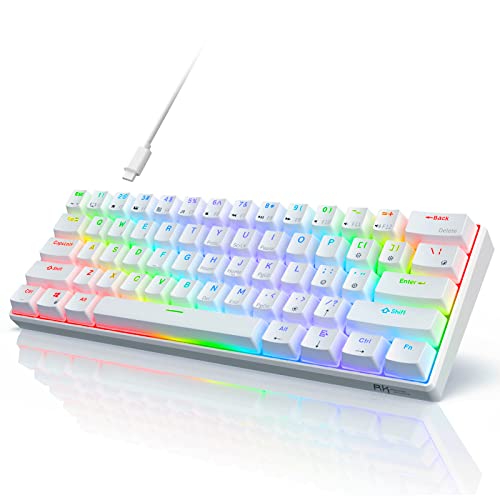

Best Budget Gaming Keyboard for Gamers Compared: Quick Comparison Table
Use this table to compare the best budget gaming keyboard for gamers at a glance. Price is a typical retail range, not a fixed price. Rating is an editorial score out of five.
| Model | Key Spec 1: Size, Switches, Hot-Swap | Key Spec 2: Connection, RGB, Best Use | Typical Price Range | Rating |
|---|---|---|---|---|
| Royal Kludge RK61 | 60%, linear, yes | Bluetooth/wired, yes, best overall | $40–$50 | 4.9 / 5 |
| Redragon K552 | Tenkeyless, linear, no | Wired, yes, best Redragon | $30–$40 | 4.9 / 5 |
| Logitech G213 Prodigy | Full-size, membrane, no | Wired, yes, best Logitech | $40–$50 | 4.8 / 5 |
| Razer Cynosa V2 | Full-size, membrane, no | Wired, yes, best Razer | $40–$50 | 4.8 / 5 |
| Keychron K2 | 75%, linear/tactile, yes | Bluetooth/wired, yes, best Keychron | $70–$90 | 4.8 / 5 |
| Corsair K55 RGB Pro | Full-size, membrane, no | Wired, yes, best Corsair | $40–$50 | 4.7 / 5 |
| HyperX Alloy Origins 65 | 65%, linear, no | Wired, yes, best HyperX | $70–$90 | 4.7 / 5 |

GEODMAER 65% Gaming Keyboard, Wired Backlit Mini Keyboard, Ultra-Compact Anti-Ghosting No-Conflict 68 Keys Membrane Gaming Wired Keyboard for PC Laptop Windows Gamer
As an Amazon Associate we earn from qualifying purchases. Product prices and availability are accurate as of the date/time indicated.

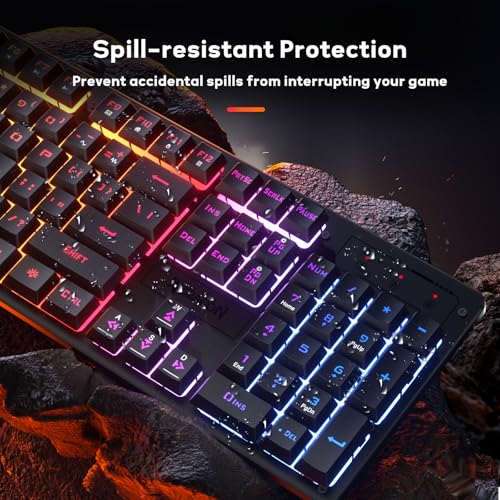
Redragon K521 Upgrade Rainbow LED Gaming Keyboard, 104 Keys Wired Mechanical Feeling Keyboard with Multimedia Keys, One-Touch Backlit, Anti-Ghosting, Compatible with PC, Mac, PS4/5, Xbox



As an Amazon Associate we earn from qualifying purchases. Product prices and availability are accurate as of the date/time indicated.
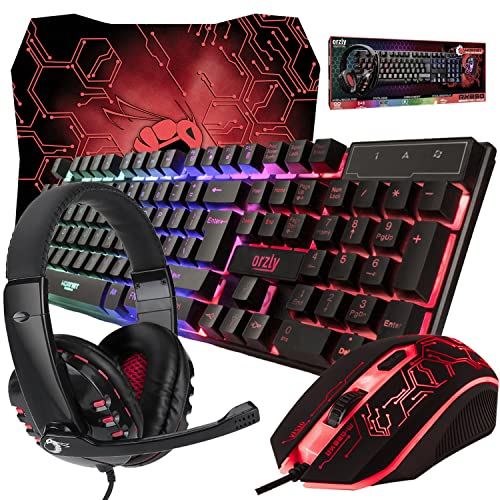
Gaming Keyboard and Mouse and Mouse pad and Gaming Headset, Wired LED RGB Backlight Bundle for PC Gamers and Xbox and PS4 Users - 4 in 1 Edition Hornet RX-250


As an Amazon Associate we earn from qualifying purchases. Product prices and availability are accurate as of the date/time indicated.
That table shows why switches, size, and hot-swap matter for budget gaming keyboards for gamers. The Royal Kludge RK61 typically costs $40 to $50, is 60%, has linear switches, and is hot-swap. The Redragon K552 typically costs $30 to $40, is tenkeyless, has linear switches, and is not hot-swap. The Logitech G213 Prodigy typically costs $40 to $50, is full-size, has membrane switches, and is not hot-swap. The Razer Cynosa V2 typically costs $40 to $50, is full-size, has membrane switches, and is not hot-swap.
Best Budget Gaming Keyboard for Gamers in 2026: Detailed Reviews
Each keyboard below suits a different gamer and a different desk. Read the switches first. Then check the size and hot-swap. Only then think about price. A keyboard that is perfect for 60% can be wrong for full-size, and a keyboard that is perfect for linear can be wrong for tactile.
1. Royal Kludge RK61 — Best Budget Gaming Keyboard for Gamers Overall
The Royal Kludge RK61 is the best overall budget gaming keyboard for gamers. It is 60%, has linear switches, is hot-swap, is Bluetooth and wired, and has RGB. It typically costs $40 to $50. It has good switches, a simple design, and a good size that is good for most gamers.
For most gamers, the RK61 is the right choice. Why we like this keyboard: 60%, linear, and Royal Kludge. Consider: it costs $40 to $50, and it is 60%, so it has no arrow keys, because 60% has no arrows, but it is ideal for gaming where a small desk matters.
2. Redragon K552 — Best Redragon Budget Gaming Keyboard for Gamers
The Redragon K552 is a keyboard that is tenkeyless, has linear switches, is not hot-swap, is wired, and has RGB. It typically costs $30 to $40. It has good switches, a simple design, and a price that is good for a Redragon user.
For a Redragon user, the K552 is a good choice. Why we like this keyboard: Tenkeyless, linear, and Redragon. Consider: it costs $30 to $40, which is the cheapest here.
3. Logitech G213 Prodigy — Best Logitech Budget Gaming Keyboard for Gamers
The Logitech G213 Prodigy is a keyboard that is full-size, has membrane switches, is not hot-swap, is wired, and has RGB. It typically costs $40 to $50. It has good switches, a simple design, and a price that is good for a Logitech user.
For a Logitech user, the G213 Prodigy is a good choice. Why we like this keyboard: Full-size, membrane, and Logitech. Consider: it costs $40 to $50, and it is membrane, so it is not mechanical, because membrane is softer, but it is ideal for a beginner who wants a simple keyboard.
4. Razer Cynosa V2 — Best Razer Budget Gaming Keyboard for Gamers
The Razer Cynosa V2 is a keyboard that is full-size, has membrane switches, is not hot-swap, is wired, and has RGB. It typically costs $40 to $50. It has good switches, a simple design, and a price that is good for a Razer user.
For a Razer user, the Cynosa V2 is a good choice. Why we like this keyboard: Full-size, membrane, and Razer. Consider: it costs $40 to $50.
5. Keychron K2 — Best Keychron Budget Gaming Keyboard for Gamers
The Keychron K2 is a keyboard that is 75%, has linear or tactile switches, is hot-swap, is Bluetooth and wired, and has RGB. It typically costs $70 to $90. It has good switches, a simple design, and a price that is good for a Keychron user who wants 75%.
For a Keychron user who wants 75%, the K2 is a good choice. Why we like this keyboard: 75%, linear/tactile, and Keychron. Consider: it costs $70 to $90, and it is 75%, so it has arrow keys, because 75% has arrows, but it is ideal for a gamer who wants arrows and a small desk.
6. Corsair K55 RGB Pro — Best Corsair Budget Gaming Keyboard for Gamers
The Corsair K55 RGB Pro is a keyboard that is full-size, has membrane switches, is not hot-swap, is wired, and has RGB. It typically costs $40 to $50. It has good switches, a simple design, and a price that is good for a Corsair user.
For a Corsair user, the K55 RGB Pro is a good choice. Why we like this keyboard: Full-size, membrane, and Corsair. Consider: it costs $40 to $50.
7. HyperX Alloy Origins 65 — Best HyperX Budget Gaming Keyboard for Gamers
The HyperX Alloy Origins 65 is a keyboard that is 65%, has linear switches, is not hot-swap, is wired, and has RGB. It typically costs $70 to $90. It has good switches, a simple design, and a price that is good for a HyperX user who wants 65%.
For a HyperX user who wants 65%, the Alloy Origins 65 is a good choice. Why we like this keyboard: 65%, linear, and HyperX. Consider: it costs $70 to $90.
Best Budget Gaming Keyboard for Gamers Buying Guide: How to Choose the Right Keyboard
The right budget gaming keyboard for gamers depends on three questions. Do you want linear or tactile? How large is your desk? How much can you spend? Answer those first. The choice between a Royal Kludge RK61 and a Redragon K552 will become clear. A keyboard that is perfect for 60% can be wrong for full-size, and a keyboard that is perfect for linear can be wrong for tactile.
Switches, Linear vs Tactile, and Gaming vs Typing: Choosing a Budget Gaming Keyboard for Gamers That Feels Right
Switches are the first filter. Buy linear switches if you want gaming, because they are smooth, and buy tactile switches if you want typing, because they have a bump. Linear vs tactile is the second part. Always test your switches, always check your game, and always remember that linear is gaming and smooth, and tactile is typing and bump. Gaming vs typing is the third part. Always buy linear for gaming, always buy tactile for typing, and always test your keyboard for at least 30 minutes, because pain means wrong fit.
Size, 60% vs 75% vs Full-Size, and Desk: Choosing a Budget Gaming Keyboard for Gamers That Fits
Size is the second filter. Buy a 60% keyboard if you want a small desk, because it is compact, and buy a 75% keyboard if you want arrows, because it has arrows, and buy a full-size keyboard if you want a numpad, because it has a numpad. 60% vs 75% vs full-size is the next check. Always check your desk, always check your game, and always remember that 60% has no arrow keys, 75% has arrow keys, and full-size has a numpad. Desk is the last part. Always check that your keyboard fits your desk, always test your keyboard, and always remember that a keyboard that is too large will not fit.
Price, Budget, and What to Avoid: Choosing a Budget Gaming Keyboard for Gamers That Is Affordable
Price is the last filter. Buy $30 to $40 for a good keyboard like the Redragon K552, $40 to $50 for a good keyboard like the Royal Kludge RK61, Logitech G213 Prodigy, Razer Cynosa V2, or Corsair K55 RGB Pro, and $70 to $90 for a good keyboard like the Keychron K2 or HyperX Alloy Origins 65. What to avoid is buying a keyboard with the wrong switches, buying a keyboard that is too large for your desk, and buying a keyboard that is not hot-swap if you want to change switches. For the best budget gaming keyboard for gamers, avoid those three mistakes. Check switches, check size, and check hot-swap. Always test for at least 30 minutes, always check the live price, and always remember that some under $50 configs exceed $50, so check live price.
Budget Gaming Keyboards That Punch Above Their Cost
A budget keyboard can still give you crisp keys and clean lighting. These picks cover mechanical and membrane options in full-size and compact layouts.
Redragon K552 Mechanical Gaming Keyboard
A tenkeyless mechanical board with red switches and LED backlighting. The compact body leaves more mouse room. A long-running favorite for first-time mechanical users.
As an Amazon Associate we earn from qualifying purchases at no extra cost to you.

Redragon K582 Wired RGB Mechanical Keyboard
A full-size layout with a number pad, RGB lighting, and mechanical switches. It suits people who use spreadsheets as well as games. A roomy upgrade from a basic office board.

RK Royal Kludge RK61 Wired 60% Keyboard
A tiny 60% mechanical board that frees plenty of desk space. Arrow and function keys sit on layers, which takes some getting used to. A great option for small desks.
Corsair K55 RGB PRO Membrane Keyboard
A quiet membrane board with RGB zones and dedicated media keys. It keeps noise down in shared rooms. A comfortable choice for late-night play.

SteelSeries Apex 3 TKL RGB Keyboard
A tenkeyless board with a water-resistant design and quiet switches. The layout saves room beside the mouse. A tidy pick for players who want a known brand.

Try the switch type before committing if you can. Red switches are light and fast, while membrane boards are quieter.
Best Budget Gaming Keyboard for Gamers FAQ: Budget Gaming Keyboard Questions Answered
What is the best budget gaming keyboard for gamers?
What is the best budget gaming keyboard for gamers is the Royal Kludge RK61 for most gamers, because it typically costs $40 to $50, is 60%, has linear switches, and is hot-swap. The Redragon K552 is the best alternative, typically $30 to $40. The best keyboard is the one with linear switches for gaming, a size that fits your desk, and hot-swap if you want to change switches.
Should I buy linear or tactile switches for gaming?
Should you buy linear or tactile switches for gaming is linear, if you want gaming, because linear is smooth and fast, and tactile, if you want typing, because tactile has a bump, so always buy linear for gaming, always buy tactile for typing, and always test your switches, because a switch that is wrong will be uncomfortable.
What size keyboard should I buy?
What size keyboard you should buy is 60%, if you want a small desk, because 60% has no arrow keys, and 75%, if you want arrows, because 75% has arrows, and full-size, if you want a numpad, because full-size has a numpad, so always check your desk, always check your game, and always remember that 60% is compact, 75% is medium, and full-size is large.
Is hot-swap important for a budget keyboard?
Is hot-swap important for a budget keyboard is yes, if you want to change switches, because hot-swap lets you change switches without soldering, so always buy a hot-swap keyboard if you want to change switches, always check the hot-swap before you buy, and always remember that a keyboard that is not hot-swap will need soldering to change switches.
FAQ
What is the best budget gaming keyboard for gamers?
Should I buy linear or tactile switches for gaming?
What size keyboard should I buy?
Is hot-swap important for a budget keyboard?
Related guides
- Best Stool for Standing Desks in 2026: 7 Best Stools for Standing Desks That Let You Sit, Lean, and Stand Without Hurting Your Back
- Mechanical Keyboard vs Membrane Keyboard Feel in 2026: 6 Top Keyboards Compared, Mechanical vs Membrane Keyboards, and Easy Use
- Best Budget Travel Keyboard Case for Travelers in 2026: 7 Cases That Offer Safe Storage, Easy Carrying, and Reliable Use for Travelers
- Best RGB Keyboard for Gaming Setup in 2026: RGB Keyboards for Gaming Setup, PC Gaming, and Desk Setups
More from Amazon
Programs that pair well with the guide above. Offers and eligibility are set by Amazon and may change.
Free shipping on eligible items, Prime Video and more. Eligible new members can start with a free trial.
Start a Prime free trialAd-free music streaming. Eligible new subscribers can start with a free trial.
Try Music Unlimited freeA Prime membership for ages 18-24 with a trial period. Eligibility is set by Amazon.
See Prime for Young AdultsAudiobooks and podcasts to listen to on the go. Eligible new members can start with a free trial.
Try Audible freeAs an Amazon Associate we earn from qualifying purchases.

Write Your Review
No reviews yet. Be the first to share your experience!