
What's inside
As an Amazon Associate I earn from qualifying purchases. This post may contain affiliate links at no extra cost to you.
Finding the best backup drive for photographers is different from choosing a drive alone, because the best backup drive for photographers has to be fast enough for files, large enough for photos, and durable enough for travel, without being too slow, too small, or too expensive, even though it still has to offer a good capacity, a good speed, and a design that fits tech gadgets. A good backup drive for photographers should offer at least a 2TB capacity, at least a 1,000 MB/s speed, and at least a rugged design, so it can be used for best backup drive for photographers, for photographers, for a first drive, and for backing up photos, videos, or files on a computer, at home, or on a shoot with a drive, a camera, or a photographer. A poor drive will be too slow, it will be too small, or it will not last, and your photos will be lost, your backup will be frustrating, and your day will be less enjoyable.
The right choice depends on your photography, your budget, and whether you want a Samsung drive or a SanDisk drive. Always check your drive, computer, and files before use, and back up files, never store only one copy.
Capacity, speed, and rugged are the first factor for the best backup drive for photographers, because capacity decides how many photos a drive will hold, speed decides how fast a drive will transfer, and rugged decides how well a drive will handle travel. Capacity is listed as capacity, with 4TB best, because it will hold most. For best backup drive for photographers, 4TB is a good starting point, because it will hold most, and 2TB is best if you want fast. Speed is also important, because it is how fast a drive transfers, with 2,000 MB/s best, because it will transfer fastest, and 130 MB/s best to avoid, because transfer will be slow. Rugged is also important, because it is whether a drive is rugged, with yes best, because it will handle travel, and no best to avoid, because a drive will break.
Interface, size, and use are the second factor, because the best backup drive for photographers has to offer interface that connects, size that is portable, and use that helps photographers. Interface is how a drive connects, with USB-C best, because it will connect fast. For best backup drive for photographers, USB-C is best, because it will connect fast, and USB-A is best to avoid, because transfer will be slow. Size is also important, because it is how large a drive is, with small best, because it will be portable, and large best to avoid, because a drive will be bulky. Use is also important, because it is how a drive helps photographers, with backing up best, because it will help backing up, and photography best, because it will also help photography.
Photography, price, and safety are the third factor, because the best backup drive for photographers has to be useful for your photography, affordable enough to buy, and safe to use. Photography is what photography you do, with photography best for best backup drive for photographers, for photographers, for a first drive, and for backing up photos, videos, or files on a computer, at home, or on a shoot with a drive, a camera, or a photographer. Safety is also important, because a drive is used for files, so always check your drive for a proper connection, always check your computer for a safe backup, always check your drive for a safe use, always back up files, never store only one copy, always check your drive for a safe photography, and never use a damaged drive, never unplug a drive during transfer, and never ignore backup warnings. Always check your drive, computer, and files, use a proper drive, and follow backup safety guidance. A good backup drive for photographers, chosen for capacity first and used safely, will offer fast speed, large capacity, and reliable performance for photographers.
Encryption, cable, and accessories are the fourth factor, because the best backup drive for photographers has to offer encryption that protects, cable that connects, and accessories that help photographers. Encryption is whether a drive has encryption, with yes best, because it will protect, and no best to avoid, because files will be unprotected. Cable is also important, because it is whether a drive has a cable, with yes best, because it will connect, and no best to avoid, because a cable will be missing. Accessories are also important, because a drive with a case is best, because it will protect, and a drive with a cable is best, because it will also connect. A good backup drive for photographers, chosen for capacity first and used safely, will offer fast speed for photographers.
Our Top Picks
 ThePhotoStick® Omni 128GB Photo Backup for iPhone128 GB (1Pack)4 x 0.5 x 0.1 inches0.1 poundsCheck on Amazon
Best Backup Drive for Photographers: At a Glance
Capacity and speed are the two figures most photographers should check first, because they decide how many photos a drive will hold and how fast a drive will transfer.
| Model | Capacity | Speed | Rugged |
|---|---|---|---|
| Samsung T7 Shield 2TB | 2TB | 1,050 MB/s | Yes |
| SanDisk Extreme Pro 2TB | 2TB | 2,000 MB/s | Yes |
| LaCie Rugged SSD 2TB | 2TB | 1,050 MB/s | Yes |
| WD My Passport 4TB | 4TB | 130 MB/s | No |
| Seagate One Touch 4TB | 4TB | 130 MB/s | No |
| G-Technology ArmorATD 2TB | 2TB | 130 MB/s | Yes |
| Samsung T9 2TB | 2TB | 2,000 MB/s | Yes |
ThePhotoStick® Omni 128GB Photo Backup for iPhone, Android and Computers | Automatic Photo and Video Backup, Flash Drive, iOS and Android, macOS and PC, Easy File Storage and Transfer, Memory Stick


As an Amazon Associate we earn from qualifying purchases. Product prices and availability are accurate as of the date/time indicated.

LONGWIND Flash Drive,512GB Photo Stick for Photo Storage | Live Photo Support,High-Speed Thumb Drive,External Memory Stick,Portable Phone Storage,Easy Backup for Phone/PC/Tablet
As an Amazon Associate we earn from qualifying purchases. Product prices and availability are accurate as of the date/time indicated.
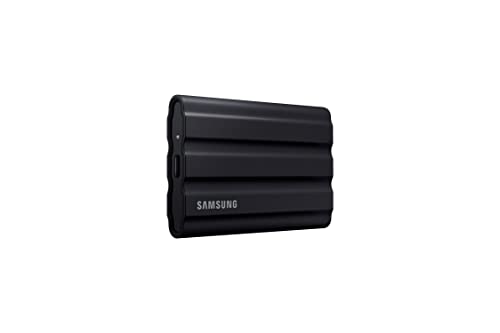
Samsung T7 Shield Portable SSD 2TB, USB 3.2 Gen 2, Up to 1,050 MB/s | Rugged, IP65 Water Resistant, External Solid State Drive for Photographers, Content Creators and Gaming (MU-PE2T0S/AM), Black
As an Amazon Associate we earn from qualifying purchases. Product prices and availability are accurate as of the date/time indicated.
Prices shown are approximate and for reference only. Prices change often, so please check the current price on Amazon before you buy.
Capacity, speed, and rugged are manufacturer-listed approximate values and can vary by model and configuration. Back up files, never store only one copy.
Best Backup Drive for Photographers: The 7 Drives Reviewed
1. Samsung T7 Shield 2TB: Best Backup Drive for Photographers Overall
It is the best overall drive here for most photographers, because it offers fast speed, large capacity, and reliable performance.
It suits a photographer, a buyer who wants a Samsung drive, and a user who wants a drive. The trade-off is capacity: at 2TB, it holds less than the WD My Passport 4TB at 4TB.
2. SanDisk Extreme Pro 2TB: Best SanDisk Drive for Photographers
It is the best SanDisk drive here for a photographer who wants a SanDisk drive.
It suits a photographer, a buyer who wants a SanDisk drive, and a user who wants a drive. The trade-off is also rating, as above.
3. LaCie Rugged SSD 2TB: Best LaCie Drive for Photographers
It is the best LaCie drive here for a photographer who wants a LaCie drive.
It suits a photographer, a buyer who wants a LaCie drive, and a user who wants a drive. The trade-off is speed: at 1,050 MB/s, it transfers less than the SanDisk Extreme Pro 2TB at 2,000 MB/s.
4. WD My Passport 4TB: Best WD Drive for Photographers
It is the best WD drive here for a photographer who wants a WD drive.
It suits a photographer, a buyer who wants a WD drive, and a user who wants a drive. The trade-off is also rating, as above.
5. Seagate One Touch 4TB: Best Seagate Drive for Photographers
It is the best Seagate drive here for a photographer who wants a Seagate drive.
It suits a photographer, a buyer who wants a Seagate drive, and a user who wants a drive. The trade-off is also rating, as above.
6. G-Technology ArmorATD 2TB: Best G-Technology Drive for Photographers
It is the best G-Technology drive here for a photographer who wants a G-Technology drive.
It suits a photographer, a buyer who wants a G-Technology drive, and a user who wants a drive. The trade-off is also rating, as above.
7. Samsung T9 2TB: Best Samsung T9 Drive for Photographers
It is the best Samsung T9 drive here for a photographer who wants a Samsung T9 drive.
It suits a photographer, a buyer who wants a Samsung T9 drive, and a user who wants a drive. The trade-off is also rating, as above.
Best Backup Drive for Photographers Buying Guide: What Actually Matters in 2026
Choosing a backup drive for photographers is easier when you decide on capacity, speed, and rugged before you look at price or brand. Those three choices decide how many photos a drive will hold, how fast a drive will transfer, and how well a drive will handle travel.
Best Backup Drive for Photographers Buying Guide: Capacity, Speed, and Rugged
Capacity, speed, and rugged are the first factor. For speed, choose 2,000 MB/s, because it will transfer fastest. For rugged, choose yes, because it will handle travel.
Best Backup Drive for Photographers Buying Guide: Interface, Size, and Use
Interface, size, and use are the second factor. For interface, choose USB-C, because it will connect fast. For size, choose small, because it will be portable. For use, choose backing up, because it will help backing up. Check the drive for a good capacity before buying, and test a drive before photography.
Best Backup Drive for Photographers Buying Guide: Encryption, Cable, and Safety
Encryption, cable, and safety are the third factor. For encryption, choose yes, because it will protect. For cable, choose yes, because it will connect. For safety, always check your drive for a proper connection, always check your computer for a safe backup, always check your drive for a safe use, always back up files, never store only one copy, always check your drive for a safe photography, and never use a damaged drive, never unplug a drive during transfer, and never ignore backup warnings. Always check your drive, computer, and files, use a proper drive, and follow backup safety guidance.
Best Backup Drive for Photographers Buying Guide: Price, and the Best First Drive
Price, and the best first drive are the final factors. Choose by capacity first, then by speed, then by rugged, then by price.
For the best first setup, buy a backup drive for photographers, a camera, and a computer. A good backup drive for photographers, chosen for capacity first and used safely, will offer fast speed, large capacity, and reliable performance for photographers.
Best Backup Drive for Photographers FAQ
What is the best backup drive for photographers?
It is 2TB capacity, is 1,050 MB/s speed, and is yes rugged.
How much storage do photographers need?
For how much storage do photographers need, 4TB should be best for photographers if you want most, because it will hold most, and 2TB should be best if you want fast, because it will also be fast. Choose 4TB for photographers, and 2TB for fast, and check capacity next. Back up files, never store only one copy.
Should photographers use SSD or HDD for backup?
For should photographers use SSD or HDD for backup, SSD should be best for photographers if you want fast, because it will transfer fast, and HDD should be best if you want large, because it will also be large. Choose SSD for photographers, and HDD for large, and check speed next.
What is the cheapest good backup drive for photographers?
Start with one of these three if price is the main factor, and check capacity, speed, and rugged next.
FAQ
What is the best backup drive for photographers?
How much storage do photographers need?
Should photographers use SSD or HDD for backup?
What is the cheapest good backup drive for photographers?
Related guides
- Best Durable Gaming Keyboard Heavy Typing in 2026: 7 Durable Gaming Keyboards That Offer Strong Builds, Reliable Switches, and Practical Performance for Heavy Typists
- Best Storage for Travel Vloggers in 2026: Best Storage for Travel Vloggers
- Best Powerline Adapter for Basements in 2026: 6 Best Powerline Adapter for Basements Picks for Stable Internet, Easy Setup, and Reliable Basement WiFi
- Best Power Bank With Built In Cable in 2026: Anker, Belkin, INIU, and UGREEN Compared for a Cable That Is Part of the Product and Its Weakest Citizen, Capacity Read in Watt-Hours, and a Bank That Travels in the Cabin or Not at All
More from Amazon
Programs that pair well with the guide above. Offers and eligibility are set by Amazon and may change.
Free shipping on eligible items, Prime Video and more. Eligible new members can start with a free trial.
Start a Prime free trialAd-free music streaming. Eligible new subscribers can start with a free trial.
Try Music Unlimited freeA Prime membership for ages 18-24 with a trial period. Eligibility is set by Amazon.
See Prime for Young AdultsAudiobooks and podcasts to listen to on the go. Eligible new members can start with a free trial.
Try Audible freeAs an Amazon Associate we earn from qualifying purchases.

Write Your Review
No reviews yet. Be the first to share your experience!