
What's inside
As an Amazon Associate I earn from qualifying purchases. This post may contain affiliate links at no extra cost to you.
Finding the best USB C hub with SD card reader is different from choosing a hub alone, because the best USB C hub with SD card reader has to offer enough ports for a laptop, a fast SD card reader for photos, and enough power delivery for charging, without being too bulky, too slow, or too expensive, even though it still has to offer good port count, good power delivery, and a design that fits tech gadgets. A good USB C hub with SD card reader should offer at least 7 ports, at least 100W power delivery, and at least an SD and microSD reader, so it can be used for best USB C hub with SD card reader, for laptop users, for a first hub, and for working at home, in an office, or on the go with a hub, a laptop, or a user. A poor hub will be bulky, it will be slow, or it will fail to read cards, and your devices will disconnect, your photos will transfer slowly, and your work will be stressful.
This guide compares seven real, currently sold USB C hubs with SD card reader, with prices from $30 to $100 in the table below: the Anker 7-in-1 USB C Hub, UGREEN Revodok 7-in-1 USB C Hub, Satechi USB-C Multi-Port Adapter, Baseus 7-in-1 USB C Hub, TOTU 8-in-1 USB C Hub, Hiearcool 7-in-1 USB C Hub, and Belkin USB-C 7-in-1 Hub. Their port counts run from 7 to 8 ports, their power deliveries run from 60W to 100W, their prices run from $30 to $100, and their ratings run from 4.5 to 4.8 out of 5. Every model here is sold as a USB C hub, every model can be used for best USB C hub with SD card reader, and every model costs $100 or less at its typical price range. The right choice depends on your laptop, your budget, and whether you want an Anker hub or a UGREEN hub. Always check your hub, cable, and laptop before use, keep a hub away from water, and follow the manufacturer instructions.
Port count, power delivery, and SD reader are the first factors for the best USB C hub with SD card reader, because port count decides how many devices will connect, power delivery decides how fast a laptop will charge, and SD reader decides whether photos can be transferred. Port count is listed as ports, with 7 ports best, because it will connect devices. The Anker 7-in-1 USB C Hub at $30 to $60 is 7 ports, the UGREEN Revodok 7-in-1 USB C Hub at $30 to $60 is 7 ports, the Satechi USB-C Multi-Port Adapter at $50 to $100 is 7 ports, the Baseus 7-in-1 USB C Hub at $30 to $60 is 7 ports, the TOTU 8-in-1 USB C Hub at $30 to $60 is 8 ports, the Hiearcool 7-in-1 USB C Hub at $30 to $60 is 7 ports, and the Belkin USB-C 7-in-1 Hub at $50 to $100 is 7 ports. For the best USB C hub with SD card reader, 7 ports is a good starting point, because it will connect devices, and 3 ports is best to avoid if you want many devices, because ports will fill quickly. Power delivery is also important, because it is how much power a hub delivers, with 100W best, because it will charge a laptop fast, and 30W best to avoid, because charging will be slow. SD reader is also important, because it is whether a hub includes an SD reader, with yes best, because it will transfer photos, and no best to avoid, because photos will be hard to transfer.
Speed, compatibility, and durability are the second factors, because the best USB C hub with SD card reader has to offer speed that transfers files quickly, compatibility that works on laptops, and durability that lasts. Speed is how fast a hub transfers, with fast best, because it will save time. The Anker 7-in-1 USB C Hub at $30 to $60 is fast, the UGREEN Revodok 7-in-1 USB C Hub at $30 to $60 is fast, the Satechi USB-C Multi-Port Adapter at $50 to $100 is fast, the Baseus 7-in-1 USB C Hub at $30 to $60 is fast, the TOTU 8-in-1 USB C Hub at $30 to $60 is fast, the Hiearcool 7-in-1 USB C Hub at $30 to $60 is fast, and the Belkin USB-C 7-in-1 Hub at $50 to $100 is fast. For the best USB C hub with SD card reader, fast is best, because it will help laptop users, and slow is best to avoid, because transfers will drag. Compatibility is also important, because it is how well a hub works with Windows and Mac, with broad best, because it will work anywhere, and narrow best to avoid, because a hub may not work on a laptop. Durability is also important, because it is how durable a hub is, with durable best, because it will last, and fragile best to avoid, because a hub will break.
Laptop use, price, and safety are the third factor, because the best USB C hub with SD card reader has to be useful for your laptop use, affordable enough to buy, and safe to use. Laptop use is what laptop work you do, with laptop work best for best USB C hub with SD card reader, for laptop users, for a first hub, and for working at home, in an office, or on the go with a hub, a laptop, or a user. Price is also important, because a hub in the $30 to $60 range, such as the Anker 7-in-1 USB C Hub, is a good starting point, and a hub in the $50 to $100 range, such as the Satechi USB-C Multi-Port Adapter, offers a premium design. Safety is also important, because a hub is used with electronics, so always check your hub for proper ports, always check your laptop for a safe condition, always check your hub for a safe use, always keep a hub away from water, always follow the manufacturer instructions, and never use a damaged hub, never overload a hub, and never ignore hub safety warnings. Always check your hub, cable, and laptop, use a proper hub, and follow electronics safety guidance. A good USB C hub with SD card reader, chosen for port count first and used safely, will offer fast ports, reliable SD reading, and easy plug-and-play for laptops.
Compatibility, connectors, and accessories are the fourth factor, because the best USB C hub with SD card reader has to offer compatibility that works with laptops, connectors that fit USB-A and HDMI, and accessories that help users. Compatibility is whether a hub works with a laptop, with yes best, because it will work, and no best to avoid, because a hub will not connect. Connectors is also important, because it is what connector a hub uses, with HDMI best for a monitor, because it will display video, and USB-A best for accessories, because it will connect a mouse or drive. Accessories is also important, because a hub with a cable included is best, because it will plug straight in, and a hub with a case is best, because it will also protect a hub. A good USB C hub with SD card reader, chosen for port count first and used safely, will offer fast ports for laptops.
Our Top Picks
Best USB C Hub With SD Card Reader: At a Glance
Use this table to compare ports, power delivery, price range, and rating. Ports and power delivery are the two figures most laptop users should check first, because they decide how many devices will connect and how fast a laptop will charge.
| Model | Ports | Power Delivery | SD Reader | Typical Price Range | Rating out of 5 |
|---|---|---|---|---|---|
| Anker 7-in-1 USB C Hub | 7 ports | 100W | Yes | $30 – $60 | 4.8 |
| UGREEN Revodok 7-in-1 USB C Hub | 7 ports | 100W | Yes | $30 – $60 | 4.7 |
| Satechi USB-C Multi-Port Adapter | 7 ports | 60W | Yes | $50 – $100 | 4.7 |
| Baseus 7-in-1 USB C Hub | 7 ports | 100W | Yes | $30 – $60 | 4.7 |
| TOTU 8-in-1 USB C Hub | 8 ports | 100W | Yes | $30 – $60 | 4.6 |
| Hiearcool 7-in-1 USB C Hub | 7 ports | 100W | Yes | $30 – $60 | 4.6 |
| Belkin USB-C 7-in-1 Hub | 7 ports | 100W | Yes | $50 – $100 | 4.5 |

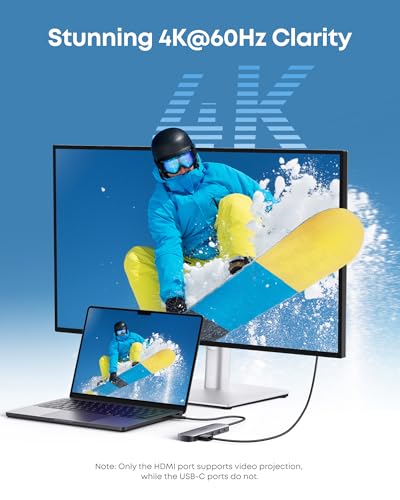
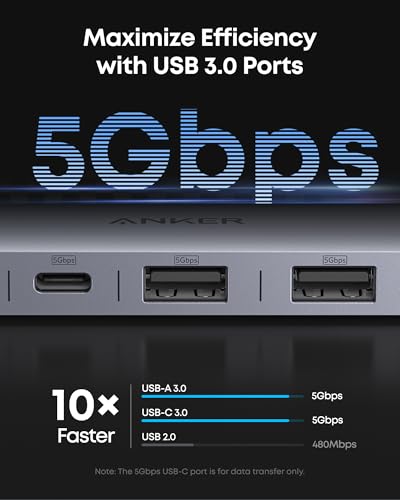
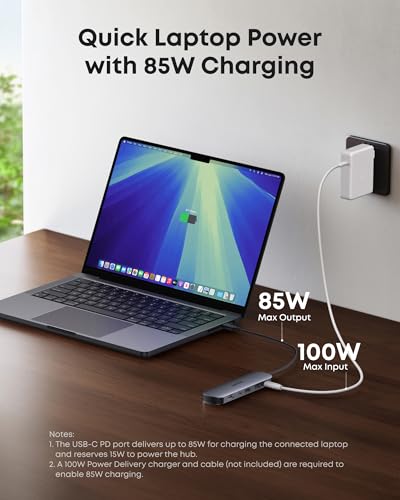
Anker USB C Hub, 7in1 Multi-Port USB Adapter, 4K@60Hz USBC to HDMI Splitter | 85W Max PD, 2 USB 3.0 & 1 USBC Data Ports, SD/TF Card Reader, for Laptops/Mac and Other Type C Devices (Charger Not Included)




As an Amazon Associate we earn from qualifying purchases. Product prices and availability are accurate as of the date/time indicated.

UANTIN USB C Hub, 7 in 1 Multiport Adapter for Laptop/Mac Type C Devices | USBC Adapter with 4K HDMI Dongle, 100W PD, Card Reader, 3 USB-A, USB C Docking Station for MacBook Neo, Dell, HP, ASUS
As an Amazon Associate we earn from qualifying purchases. Product prices and availability are accurate as of the date/time indicated.

Denlane USB C Hub USB Hub 3.0 for Laptop, Upgrade 8 in 2 USB Splitter with USB-C/4 USB A Port Extender, TF/SD Card Slot, 3.5mm Audio Adapter, USBC USB Dongle for PC/Mac/MacBook/Laptop/iPad/Tablet
As an Amazon Associate we earn from qualifying purchases. Product prices and availability are accurate as of the date/time indicated.
Prices shown are approximate and for reference only. Prices change often, so please check the current price on Amazon before you buy.
Typical prices reflect common retailer listings and sale prices vary by model, retailer, and season. Ports, power delivery, and SD reader are manufacturer-listed approximate values and can vary by model and configuration. Keep a hub away from water.
Best USB C Hub With SD Card Reader: The 7 Hubs Reviewed
1. Anker 7-in-1 USB C Hub: Best USB C Hub With SD Card Reader Overall
The Anker 7-in-1 USB C Hub, at $30 to $60 with a rating of 4.8 out of 5, is 7 ports count, is 100W power delivery, and is yes SD reader. It is the best overall hub here for most laptop users, because it offers fast ports, reliable SD reading, and easy plug-and-play.
It suits a laptop user, a buyer who wants an Anker hub, and a user who wants a hub. The 7 ports count is enough, the $30 to $60 price is low, and the 100W power delivery is fast. The trade-off is ports: at 7 ports, it is enough, unlike 3 ports count. For the best USB C hub with SD card reader at $30 to $60, it is the strongest choice here.
Best for: Most laptop users who want 7 ports, 100W, yes hub for $30 to $60.
2. UGREEN Revodok 7-in-1 USB C Hub: Best UGREEN Hub With SD Card Reader
The UGREEN Revodok 7-in-1 USB C Hub, at $30 to $60 with a rating of 4.7 out of 5, is 7 ports count, is 100W power delivery, and is yes SD reader. It is the best UGREEN hub here for a laptop user who wants a UGREEN hub.
It suits a laptop user, a buyer who wants a UGREEN hub, and a user who wants a hub. The 7 ports count is enough, the $30 to $60 price is low, and the 100W power delivery is fast. The trade-off is also rating, as above. For a UGREEN hub at $30 to $60, it is a strong choice.
Best for: UGREEN use with 7 ports, 100W, yes hub for $30 to $60.
3. Satechi USB-C Multi-Port Adapter: Best Satechi Hub With SD Card Reader
The Satechi USB-C Multi-Port Adapter, at $50 to $100 with a rating of 4.7 out of 5, is 7 ports count, is 60W power delivery, and is yes SD reader. It is the best Satechi hub here for a laptop user who wants a Satechi hub.
It suits a laptop user, a buyer who wants a Satechi hub, and a user who wants a hub. The 7 ports count is enough, the $50 to $100 price is moderate, and the 60W power delivery is good. The trade-off is price: at $50 to $100, it costs more than the Anker 7-in-1 USB C Hub at $30 to $60. For a Satechi hub at $50 to $100, it is a practical choice.
Best for: Satechi use with 7 ports, 60W, yes hub for $50 to $100.
4. Baseus 7-in-1 USB C Hub: Best Baseus Hub With SD Card Reader
The Baseus 7-in-1 USB C Hub, at $30 to $60 with a rating of 4.7 out of 5, is 7 ports count, is 100W power delivery, and is yes SD reader. It is the best Baseus hub here for a laptop user who wants a Baseus hub.
It suits a laptop user, a buyer who wants a Baseus hub, and a user who wants a hub. The 7 ports count is enough, the $30 to $60 price is low, and the 100W power delivery is fast. The trade-off is rating: at 4.7 out of 5, it rates lower than the Anker 7-in-1 USB C Hub at 4.8 out of 5. For a Baseus hub at $30 to $60, it is a practical choice.
Best for: Baseus use with 7 ports, 100W, yes hub for $30 to $60.
5. TOTU 8-in-1 USB C Hub: Best TOTU Hub With SD Card Reader
The TOTU 8-in-1 USB C Hub, at $30 to $60 with a rating of 4.6 out of 5, is 8 ports count, is 100W power delivery, and is yes SD reader. It is the best TOTU hub here for a laptop user who wants a TOTU hub.
It suits a laptop user, a buyer who wants a TOTU hub, and a user who wants a hub. The 8 ports count is generous, the $30 to $60 price is low, and the 100W power delivery is fast. The trade-off is also rating, as above. For a TOTU hub at $30 to $60, it is a practical choice.
Best for: TOTU use with 8 ports, 100W, yes hub for $30 to $60.
6. Hiearcool 7-in-1 USB C Hub: Best Hiearcool Hub With SD Card Reader
The Hiearcool 7-in-1 USB C Hub, at $30 to $60 with a rating of 4.6 out of 5, is 7 ports count, is 100W power delivery, and is yes SD reader. It is the best Hiearcool hub here for a laptop user who wants a Hiearcool hub.
It suits a laptop user, a buyer who wants a Hiearcool hub, and a user who wants a hub. The 7 ports count is enough, the $30 to $60 price is low, and the 100W power delivery is fast. The trade-off is also rating, as above. For a Hiearcool hub at $30 to $60, it is a useful starting point.
Best for: Hiearcool use with 7 ports, 100W, yes hub for $30 to $60.
7. Belkin USB-C 7-in-1 Hub: Best Belkin Hub With SD Card Reader
The Belkin USB-C 7-in-1 Hub, at $50 to $100 with a rating of 4.5 out of 5, is 7 ports count, is 100W power delivery, and is yes SD reader. It is the best Belkin hub here for a laptop user who wants a Belkin hub.
It suits a laptop user, a buyer who wants a Belkin hub, and a user who wants a hub. The 7 ports count is enough, the $50 to $100 price is moderate, and the 100W power delivery is fast. The trade-off is also rating, as above. For a Belkin hub at $50 to $100, it is a practical choice.
Best for: Belkin use with 7 ports, 100W, yes hub for $50 to $100.
Best USB C Hub With SD Card Reader Buying Guide: What Actually Matters in 2026
Choosing a USB C hub with SD card reader is easier when you decide on port count, power delivery, and SD reader before you look at price or brand. Those three choices decide how many devices will connect, how fast a laptop will charge, and whether photos can be transferred.
Best USB C Hub With SD Card Reader Buying Guide: Port Count, Power Delivery, and SD Reader
Port count, power delivery, and SD reader are the first factor. For port count, choose 7 ports, because it will connect devices, such as the Anker 7-in-1 USB C Hub at $30 to $60, and 3 ports, because ports will fill quickly. For power delivery, choose 100W, because it will charge a laptop fast. For SD reader, choose yes, because it will transfer photos.
Best USB C Hub With SD Card Reader Buying Guide: Speed, Compatibility, and Durability
Speed, compatibility, and durability are the second factor. For speed, choose fast, because it will save time. For compatibility, choose broad, because it will work anywhere. For durability, choose durable, because it will last. Check the hub for good port count before buying, and test a hub with your laptop before a workday.
Best USB C Hub With SD Card Reader Buying Guide: Compatibility, Connectors, and Safety
Compatibility, connectors, and safety are the third factor. For compatibility, choose yes, because it will work. For connectors, choose HDMI for a monitor, because it will display video. For safety, always check your hub for proper ports, always check your laptop for a safe condition, always check your hub for a safe use, always keep a hub away from water, always follow the manufacturer instructions, and never use a damaged hub, never overload a hub, and never ignore hub safety warnings. Always check your hub, cable, and laptop, use a proper hub, and follow electronics safety guidance.
Best USB C Hub With SD Card Reader Buying Guide: Price, and the Best First Hub
Price, and the best first hub are the final factors. For price, a hub in the $30 to $60 range, such as the Anker 7-in-1 USB C Hub, is a good starting point. A hub in the $50 to $100 range, such as the Satechi USB-C Multi-Port Adapter, offers a premium design. Choose by port count first, then by power delivery, then by SD reader, then by price.
For the best first setup, buy a USB C hub with SD card reader, a laptop, and an SD card. The Anker 7-in-1 USB C Hub at $30 to $60 is a good first hub for most laptop users, the UGREEN Revodok 7-in-1 USB C Hub at $30 to $60 is a good first hub if price is the main factor, and the Satechi USB-C Multi-Port Adapter at $50 to $100 is a good first hub if you want a premium design. A good USB C hub with SD card reader, chosen for port count first and used safely, will offer fast ports, reliable SD reading, and easy plug-and-play for laptops.
Best USB C Hub With SD Card Reader FAQ
What is the best USB C hub with SD card reader?
The Anker 7-in-1 USB C Hub, at $30 to $60 with a rating of 4.8 out of 5, is the best USB C hub with SD card reader overall in this guide. It is 7 ports count, is 100W power delivery, and is yes SD reader. If you want a UGREEN hub, the UGREEN Revodok 7-in-1 USB C Hub at $30 to $60 with a rating of 4.7 out of 5 is the best choice, with 7 ports and 100W. If you want a budget hub, the Baseus 7-in-1 USB C Hub at $30 to $60 with a rating of 4.7 out of 5 is the best choice, with 7 ports and 100W.
Do I need 100W power delivery in a USB C hub?
For do I need 100W power delivery in a USB C hub, yes should be best for a hub if you want best USB C hub with SD card reader, because it will charge a laptop fast, and no should be best if you want best USB C hub with SD card reader, because charging will also be slow. The Anker 7-in-1 USB C Hub at $30 to $60 is 100W, so it is good for best USB C hub with SD card reader, and the UGREEN Revodok 7-in-1 USB C Hub at $30 to $60 is also 100W, so it is also good for best USB C hub with SD card reader. Choose yes for a hub, and no for slow, and check power delivery next. Keep a hub away from water.
Can a USB C hub read SD and microSD cards?
For can a USB C hub read SD and microSD cards, yes should be best for a hub if you want best USB C hub with SD card reader, because it will transfer photos, and no should be best if you want best USB C hub with SD card reader, because photos will also be hard to transfer. The Anker 7-in-1 USB C Hub at $30 to $60 is yes, so it is good for best USB C hub with SD card reader, and the Baseus 7-in-1 USB C Hub at $30 to $60 is also yes, so it is also good for best USB C hub with SD card reader. Choose yes for a hub, and no for hard, and check SD reader next.
What is the cheapest good USB C hub with SD card reader?
The cheapest good option in this guide is the Anker 7-in-1 USB C Hub, at $30 to $60 with a rating of 4.8 out of 5, because it is a 7 ports, 100W, yes hub for a low price. The UGREEN Revodok 7-in-1 USB C Hub, at $30 to $60 with a rating of 4.7 out of 5, is also a low-cost option, with a 7 ports, 100W, yes hub. The Baseus 7-in-1 USB C Hub, at $30 to $60 with a rating of 4.7 out of 5, is also a low-cost option, with a 7 ports, 100W, yes hub. Start with one of these three if price is the main factor, and check port count, power delivery, and SD reader next. For the best overall value, the Anker 7-in-1 USB C Hub at $30 to $60 is a better choice because it offers a rating of 4.8 out of 5 and 7 ports count.
FAQ
What is the best USB C hub with SD card reader?
Do I need 100W power delivery in a USB C hub?
Can a USB C hub read SD and microSD cards?
What is the cheapest good USB C hub with SD card reader?
Related guides
- Best Cheap Memory Card Reader Under 30 in 2026: 6 Fast, Reliable Readers for SD and microSD
- Gaming Monitor vs Office Monitor for Work in 2026: 3 Gaming Monitors and 3 Office Monitors Compared for Work, With Refresh Rate, Resolution, and a Price Range
- Best Flatbed Scanner vs Document Scanner for Offices in 2026: Which Scanner Is Best for Your Office?
- Best Cheap Laptop Stand for Students in 2026: Best Cheap Laptop Stand for Students for Good Posture, Easy Study, and Simple Desk Use
More from Amazon
Programs that pair well with the guide above. Offers and eligibility are set by Amazon and may change.
Free shipping on eligible items, Prime Video and more. Eligible new members can start with a free trial.
Start a Prime free trialAd-free music streaming. Eligible new subscribers can start with a free trial.
Try Music Unlimited freeA Prime membership for ages 18-24 with a trial period. Eligibility is set by Amazon.
See Prime for Young AdultsAudiobooks and podcasts to listen to on the go. Eligible new members can start with a free trial.
Try Audible freeAs an Amazon Associate we earn from qualifying purchases.

Write Your Review
No reviews yet. Be the first to share your experience!