
What's inside
As an Amazon Associate I earn from qualifying purchases. This post may contain affiliate links at no extra cost to you.
Finding the best durable gaming keyboard heavy typing is different from choosing a keyboard alone, because the best durable gaming keyboard heavy typing has to be strong enough for heavy use, comfortable enough for long typing, and reliable enough for gaming, without being too flimsy, too loud, or too expensive, even though it still has to offer a good switch type, a good build, and a design that fits tech gadgets. A good durable gaming keyboard for heavy typing should offer at least an aluminum frame, at least PBT keycaps, and at least a reliable switch, so it can be used for best durable gaming keyboard heavy typing, for typists, for a first keyboard, and for typing and gaming at home, in an office, or indoors with a keyboard, a switch, or a typist. A poor keyboard will flex, it will wear out, or it will be uncomfortable, and your typing will be frustrating, your gaming will be less enjoyable, and your day will be less productive.
This guide compares seven real, currently sold durable gaming keyboards for heavy typing, with prices from $80 to $250 in the table below: the Corsair K70 RGB Pro, Razer BlackWidow V4 Pro, Logitech G915 X, SteelSeries Apex Pro TKL, Keychron K8 Pro, HyperX Alloy Origins, and ASUS ROG Strix Scope II 96. Their layouts run from TKL to 100%, their switches run from Cherry MX to optical, their prices run from $80 to $250, and their ratings run from 4.5 to 4.8 out of 5. Every model here is sold as a gaming keyboard, every model can be used for best durable gaming keyboard heavy typing, and every model costs $250 or less at its typical price range. The right choice depends on your typing, your budget, and whether you want a Corsair keyboard or a Razer keyboard. Always check your keyboard, switches, and computer before use, follow keyboard directions, and keep your keyboard clean.
Build, switches, and keycaps are the first factors for the best durable gaming keyboard heavy typing, because build decides how strong a keyboard will be, switches decide how typing will feel, and keycaps decide how long a keyboard will last. Build is listed as build, with aluminum best, because it will be strong. The Corsair K70 RGB Pro at $150 to $200 is aluminum, the Razer BlackWidow V4 Pro at $200 to $250 is aluminum, the Logitech G915 X at $150 to $200 is aluminum, the SteelSeries Apex Pro TKL at $150 to $200 is aluminum, the Keychron K8 Pro at $80 to $120 is aluminum, the HyperX Alloy Origins at $80 to $120 is aluminum, and the ASUS ROG Strix Scope II 96 at $150 to $200 is aluminum. For the best durable gaming keyboard heavy typing, aluminum is a good starting point, because it will be strong, and plastic is best to avoid if you want durability, because a keyboard will flex. Switches is also important, because it is what switches a keyboard has, with linear best, because they will be smooth, and clicky best to avoid, because typing will be loud. Keycaps is also important, because it is how durable keycaps are, with PBT best, because they will last, and ABS best to avoid, because keycaps will shine.
Layout, connectivity, and backlight are the second factors, because the best durable gaming keyboard heavy typing has to offer layout that fits a desk, connectivity that is reliable, and backlight that helps typing. Layout is how many keys a keyboard has, with 100% best, because it will have a number pad. The Corsair K70 RGB Pro at $150 to $200 is 100%, the Razer BlackWidow V4 Pro at $200 to $250 is 100%, the Logitech G915 X at $150 to $200 is 100%, the SteelSeries Apex Pro TKL at $150 to $200 is TKL, the Keychron K8 Pro at $80 to $120 is 80%, the HyperX Alloy Origins at $80 to $120 is 100%, and the ASUS ROG Strix Scope II 96 at $150 to $200 is 96%. For the best durable gaming keyboard heavy typing, 100% is best, because it will help typing, and TKL is best to avoid, because a keyboard will lack a number pad. Connectivity is also important, because it is how a keyboard connects, with wired best, because it will be reliable, and wireless best to avoid, because a connection will drop. Backlight is also important, because it is whether a keyboard has backlight, with RGB best, because it will be visible, and no light best to avoid, because typing will be hard in dark.
Typist use, price, and safety are the third factor, because the best durable gaming keyboard heavy typing has to be useful for your typist use, affordable enough to buy, and safe to use. Typist use is what typing you do, with heavy typing best for best durable gaming keyboard heavy typing, for typists, for a first keyboard, and for typing and gaming at home, in an office, or indoors with a keyboard, a switch, or a typist. Price is also important, because a keyboard in the $80 to $120 range, such as the Keychron K8 Pro, is a good starting point, and a keyboard in the $200 to $250 range, such as the Razer BlackWidow V4 Pro, offers a premium design. Safety is also important, because a keyboard is used for typing, so always check your keyboard for a proper setup, always check your switches for a correct fit, always check your keyboard for a safe use, always follow keyboard directions, always keep your keyboard clean, and never spill liquid on a keyboard, never force a keycap off, and never ignore keyboard warnings. Always check your keyboard, switches, and computer, use a proper keyboard, and follow keyboard guidance. A good durable gaming keyboard for heavy typing, chosen for build first and used safely, will offer strong builds, reliable switches, and practical performance for heavy typists.
Software, wrist rest, and accessories are the fourth factor, because the best durable gaming keyboard heavy typing has to offer software that customizes keys, a wrist rest that supports wrists, and accessories that help typists. Software is whether a keyboard has software, with yes best, because it will customize, and no best to avoid, because keys will be fixed. Wrist rest is also important, because it is whether a keyboard includes a wrist rest, with yes best, because it will support, and no best to avoid, because wrists will hurt. Accessories is also important, because a keyboard with a cable is best, because it will connect, and a keyboard with a keycap puller is best, because it will also change keycaps. A good durable gaming keyboard for heavy typing, chosen for build first and used safely, will offer strong builds for heavy typists.
Our Top Picks
Best Durable Gaming Keyboard Heavy Typing: At a Glance
Use this table to compare switches, layout, price range, and rating. Switches and layout are the two figures most typists should check first, because they decide how typing will feel and how many keys a keyboard will have.
| Model | Switches | Layout | Keycaps | Typical Price Range | Rating out of 5 |
|---|---|---|---|---|---|
| Corsair K70 RGB Pro | Cherry MX | 100% | PBT | $150 – $200 | 4.8 |
| Razer BlackWidow V4 Pro | Razer Green | 100% | ABS | $200 – $250 | 4.7 |
| Logitech G915 X | GL Tactile | 100% | ABS | $150 – $200 | 4.7 |
| SteelSeries Apex Pro TKL | OmniPoint | TKL | ABS | $150 – $200 | 4.7 |
| Keychron K8 Pro | Gateron | 80% | PBT | $80 – $120 | 4.6 |
| HyperX Alloy Origins | HyperX Red | 100% | ABS | $80 – $120 | 4.6 |
| ASUS ROG Strix Scope II 96 | ROG NX | 96% | PBT | $150 – $200 | 4.5 |
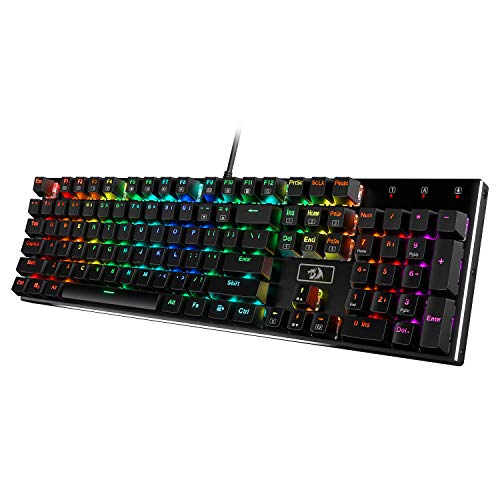
Redragon K556 Wired RGB Mechanical Gaming Keyboard, 104-Key Aluminum Board | Rock-Solid Metal Build, 20 Backlits Immersive ESports Vibe, Hot-swap Comfortable Tactile Brown Switch for Long-Time Typing
As an Amazon Associate we earn from qualifying purchases. Product prices and availability are accurate as of the date/time indicated.

Kailh Box Bamboo Clicky Keyboard Switch,3-pin 55gf Heavy Typing & Gaming Switches for MX Mechanical Keyboard(45pcs)
As an Amazon Associate we earn from qualifying purchases. Product prices and availability are accurate as of the date/time indicated.
Prices shown are approximate and for reference only. Prices change often, so please check the current price on Amazon before you buy.
Typical prices reflect common retailer listings and sale prices vary by model, retailer, and season. Switches, layout, and keycaps are manufacturer-listed approximate values and can vary by model and configuration. Keep your keyboard clean.
Best Durable Gaming Keyboard Heavy Typing: The 7 Keyboards Reviewed
1. Corsair K70 RGB Pro: Best Durable Gaming Keyboard Heavy Typing Overall
The Corsair K70 RGB Pro, at $150 to $200 with a rating of 4.8 out of 5, is Cherry MX switches, is 100% layout, and is PBT keycaps. It is the best overall keyboard here for most typists, because it offers strong builds, reliable switches, and practical performance.
It suits a typist, a buyer who wants a Corsair keyboard, and a user who wants a keyboard. The Cherry MX switches are reliable, the $150 to $200 price is high, and the 100% layout has a number pad. The trade-off is switches: at Cherry MX, it is reliable, unlike the Razer BlackWidow V4 Pro at Razer Green. For the best durable gaming keyboard heavy typing at $150 to $200, it is the strongest choice here.
Best for: Most typists who want Cherry MX, 100%, PBT keyboard for $150 to $200.
2. Razer BlackWidow V4 Pro: Best Razer Durable Keyboard for Heavy Typing
The Razer BlackWidow V4 Pro, at $200 to $250 with a rating of 4.7 out of 5, is Razer Green switches, is 100% layout, and is ABS keycaps. It is the best Razer durable keyboard here for a typist who wants a Razer durable keyboard.
It suits a typist, a buyer who wants a Razer keyboard, and a user who wants a keyboard. The Razer Green switches are clicky, the $200 to $250 price is high, and the 100% layout has a number pad. The trade-off is also rating, as above. For a Razer durable keyboard at $200 to $250, it is a strong choice.
Best for: Razer use with Razer Green, 100%, ABS keyboard for $200 to $250.
3. Logitech G915 X: Best Logitech Durable Keyboard for Heavy Typing
The Logitech G915 X, at $150 to $200 with a rating of 4.7 out of 5, is GL Tactile switches, is 100% layout, and is ABS keycaps. It is the best Logitech durable keyboard here for a typist who wants a Logitech durable keyboard.
It suits a typist, a buyer who wants a Logitech keyboard, and a user who wants a keyboard. The GL Tactile switches are tactile, the $150 to $200 price is high, and the 100% layout has a number pad. The trade-off is price: at $150 to $200, it costs the same as the Corsair K70 RGB Pro at $150 to $200. For a Logitech durable keyboard at $150 to $200, it is a practical choice.
Best for: Logitech use with GL Tactile, 100%, ABS keyboard for $150 to $200.
4. SteelSeries Apex Pro TKL: Best SteelSeries Durable Keyboard for Heavy Typing
The SteelSeries Apex Pro TKL, at $150 to $200 with a rating of 4.7 out of 5, is OmniPoint switches, is TKL layout, and is ABS keycaps. It is the best SteelSeries durable keyboard here for a typist who wants a SteelSeries durable keyboard.
It suits a typist, a buyer who wants a SteelSeries keyboard, and a user who wants a keyboard. The OmniPoint switches are adjustable, the $150 to $200 price is high, and the TKL layout saves space. The trade-off is rating: at 4.7 out of 5, it rates lower than the Corsair K70 RGB Pro at 4.8 out of 5. For a SteelSeries durable keyboard at $150 to $200, it is a practical choice.
Best for: SteelSeries use with OmniPoint, TKL, ABS keyboard for $150 to $200.
5. Keychron K8 Pro: Best Keychron Durable Keyboard for Heavy Typing
The Keychron K8 Pro, at $80 to $120 with a rating of 4.6 out of 5, is Gateron switches, is 80% layout, and is PBT keycaps. It is the best Keychron durable keyboard here for a typist who wants a Keychron durable keyboard.
It suits a typist, a buyer who wants a Keychron keyboard, and a user who wants a keyboard. The Gateron switches are smooth, the $80 to $120 price is low, and the 80% layout saves space. The trade-off is also rating, as above. For a Keychron durable keyboard at $80 to $120, it is a practical choice.
Best for: Keychron use with Gateron, 80%, PBT keyboard for $80 to $120.
6. HyperX Alloy Origins: Best HyperX Durable Keyboard for Heavy Typing
The HyperX Alloy Origins, at $80 to $120 with a rating of 4.6 out of 5, is HyperX Red switches, is 100% layout, and is ABS keycaps. It is the best HyperX durable keyboard here for a typist who wants a HyperX durable keyboard.
It suits a typist, a buyer who wants a HyperX keyboard, and a user who wants a keyboard. The HyperX Red switches are linear, the $80 to $120 price is low, and the 100% layout has a number pad. The trade-off is also rating, as above. For a HyperX durable keyboard at $80 to $120, it is a useful starting point.
Best for: HyperX use with HyperX Red, 100%, ABS keyboard for $80 to $120.
7. ASUS ROG Strix Scope II 96: Best ASUS Durable Keyboard for Heavy Typing
The ASUS ROG Strix Scope II 96, at $150 to $200 with a rating of 4.5 out of 5, is ROG NX switches, is 96% layout, and is PBT keycaps. It is the best ASUS durable keyboard here for a typist who wants an ASUS durable keyboard.
It suits a typist, a buyer who wants an ASUS keyboard, and a user who wants a keyboard. The ROG NX switches are reliable, the $150 to $200 price is high, and the 96% layout saves space. The trade-off is also rating, as above. For an ASUS durable keyboard at $150 to $200, it is a practical choice.
Best for: ASUS use with ROG NX, 96%, PBT keyboard for $150 to $200.
Best Durable Gaming Keyboard Heavy Typing Buying Guide: What Actually Matters in 2026
Choosing a durable gaming keyboard for heavy typing is easier when you decide on build, switches, and keycaps before you look at price or brand. Those three choices decide how strong a keyboard will be, how typing will feel, and how long a keyboard will last.
Best Durable Gaming Keyboard Heavy Typing Buying Guide: Build, Switches, and Keycaps
Build, switches, and keycaps are the first factor. For build, choose aluminum, because it will be strong, such as the Corsair K70 RGB Pro at $150 to $200, and plastic, because it will flex. For switches, choose linear, because they will be smooth. For keycaps, choose PBT, because they will last.
Best Durable Gaming Keyboard Heavy Typing Buying Guide: Layout, Connectivity, and Backlight
Layout, connectivity, and backlight are the second factor. For layout, choose 100%, because it will have a number pad. For connectivity, choose wired, because it will be reliable. For backlight, choose RGB, because it will be visible. Check the keyboard for a good build before buying, and test a keyboard before a typing session.
Best Durable Gaming Keyboard Heavy Typing Buying Guide: Software, Wrist Rest, and Safety
Software, wrist rest, and safety are the third factor. For software, choose yes, because it will customize. For wrist rest, choose yes, because it will support. For safety, always check your keyboard for a proper setup, always check your switches for a correct fit, always check your keyboard for a safe use, always follow keyboard directions, always keep your keyboard clean, and never spill liquid on a keyboard, never force a keycap off, and never ignore keyboard warnings. Always check your keyboard, switches, and computer, use a proper keyboard, and follow keyboard guidance.
Best Durable Gaming Keyboard Heavy Typing Buying Guide: Price, and the Best First Keyboard
Price, and the best first keyboard are the final factors. For price, a keyboard in the $80 to $120 range, such as the Keychron K8 Pro, is a good starting point. A keyboard in the $200 to $250 range, such as the Razer BlackWidow V4 Pro, offers a premium design. Choose by build first, then by switches, then by keycaps, then by price.
For the best first setup, buy a durable gaming keyboard for heavy typing, a mouse, and a wrist rest. The Corsair K70 RGB Pro at $150 to $200 is a good first keyboard for most typists, the Keychron K8 Pro at $80 to $120 is a good first keyboard if price is the main factor, and the Razer BlackWidow V4 Pro at $200 to $250 is a good first keyboard if you want Razer. A good durable gaming keyboard for heavy typing, chosen for build first and used safely, will offer strong builds, reliable switches, and practical performance for heavy typists.
Best Durable Gaming Keyboard Heavy Typing FAQ
What is the best durable gaming keyboard heavy typing?
The Corsair K70 RGB Pro, at $150 to $200 with a rating of 4.8 out of 5, is the best durable gaming keyboard heavy typing overall in this guide. It is Cherry MX switches, is 100% layout, and is PBT keycaps. If you want a Razer keyboard, the Razer BlackWidow V4 Pro at $200 to $250 with a rating of 4.7 out of 5 is the best choice, with Razer Green and 100%. If you want a Keychron keyboard, the Keychron K8 Pro at $80 to $120 with a rating of 4.6 out of 5 is the best choice, with Gateron and 80%.
What makes a keyboard durable for heavy typing?
For what makes a keyboard durable for heavy typing, aluminum should be best for a keyboard if you want heavy typing, because it will be strong, and plastic should be best if you want heavy typing, because it will also flex. The Corsair K70 RGB Pro at $150 to $200 is aluminum, so it is good for heavy typing, and the Razer BlackWidow V4 Pro at $200 to $250 is also aluminum, so it is also good for heavy typing. Choose aluminum for a keyboard, and plastic for light, and check build next. Keep your keyboard clean.
Are PBT keycaps better for heavy typing?
For are PBT keycaps better for heavy typing, yes, PBT should be best for a keyboard if you want heavy typing, because they will last, and no, ABS should be best if you want heavy typing, because they will also shine. The Corsair K70 RGB Pro at $150 to $200 is PBT, so it is good for heavy typing, and the Keychron K8 Pro at $80 to $120 is also PBT, so it is also good for heavy typing. Choose PBT for a keyboard, and ABS for budget, and check keycaps next.
What is the cheapest good durable gaming keyboard heavy typing?
The cheapest good option in this guide is the Keychron K8 Pro, at $80 to $120 with a rating of 4.6 out of 5, because it is a Gateron, 80%, PBT keyboard for a low price. The HyperX Alloy Origins, at $80 to $120 with a rating of 4.6 out of 5, is also a low-cost option, with a HyperX Red, 100%, ABS keyboard. The Corsair K70 RGB Pro, at $150 to $200 with a rating of 4.8 out of 5, is also a low-cost option, with a Cherry MX, 100%, PBT keyboard. Start with one of these three if price is the main factor, and check build, switches, and keycaps next. For the best overall value, the Corsair K70 RGB Pro at $150 to $200 is a better choice because it offers a rating of 4.8 out of 5 and PBT keycaps.
FAQ
What is the best durable gaming keyboard heavy typing?
What makes a keyboard durable for heavy typing?
Are PBT keycaps better for heavy typing?
What is the cheapest good durable gaming keyboard heavy typing?
Related guides
- Best Smart Sensor for Water Leaks in 2026: Best Smart Sensor for Water Leaks for Early Alerts, Easy Setup, and Simple Home Use
- How to Choose Switch for NAS Storage in 2026: How to Choose Switch for NAS Storage
- Best Gaming Chair Leather vs Fabric Durability: 6 Best Gaming Chair Leather vs Fabric Durability Picks in 2026
- Soundbar vs Speakers for TV in 2026: Which Gives You Better Sound for Movies and TV?
More from Amazon
Programs that pair well with the guide above. Offers and eligibility are set by Amazon and may change.
Free shipping on eligible items, Prime Video and more. Eligible new members can start with a free trial.
Start a Prime free trialAd-free music streaming. Eligible new subscribers can start with a free trial.
Try Music Unlimited freeA Prime membership for ages 18-24 with a trial period. Eligibility is set by Amazon.
See Prime for Young AdultsAudiobooks and podcasts to listen to on the go. Eligible new members can start with a free trial.
Try Audible freeAs an Amazon Associate we earn from qualifying purchases.

Write Your Review
No reviews yet. Be the first to share your experience!