
What's inside
- Best Cheap Docking Station Under 100: Your Laptop’s Sentences, the Brick’s Arithmetic, and One Cable as the Product
- Quick Comparison: Best Cheap Docking Station Under 100 Models
- Detailed Reviews: Best Cheap Docking Station Under 100 Picks
- Buying Guide: How to Choose the Best Cheap Docking Station Under 100
- Frequently Asked Questions About the Best Cheap Docking Station Under 100
As an Amazon Associate I earn from qualifying purchases. This post may contain affiliate links at no extra cost to you.
The best cheap docking station under 100 begins with an honest naming, printed before any model because the whole comparison depends on it: under this figure, the citizens in this table are powered USB-C hubs wearing a dock’s working clothes, and several of them earn the clothes. A true dock in the catalogue’s upper parishes brings its own power supply, its display citizens by the handful, and a figure to match; the under-100 parish brings a hub with power pass-through, one honest external display for most laptops, a parish of ports, and, in the box, commonly no brick at all, the laptop’s own charger being conscripted through the hub’s pass-through with a tax this guide prices below. None of that is a scandal; it is a specification, and a buyer who reads it as one gets, at this figure, a genuinely transforming desk citizen: one cable at the laptop, a monitor, a keyboard, a drive, and power arriving together. A buyer who reads a listing’s headline instead gets the parish’s two classic disappointments, a second display that their laptop was never going to give them, and a dock that charges at a stroll because the brick was an assumption. Both are refused in this guide by the audit, which begins, as every display parish on this site begins, with the laptop’s own documents.
The display sentence is the laptop’s and not the dock’s, in the standing doctrine of this site’s hub coverage, repeated here because this price parish is where it is most often sold past. A Windows parish with the right ports commonly serves two external displays through a citizen of this class, its exact sentence read in the laptop maker’s documents; a base Apple silicon parish serves one native external display whatever the dock promises, the workaround citizens being a different and costlier parish that this figure does not buy; a laptop whose USB-C parish carries no display sentence at all serves none, its port being a data citizen wearing a promising shape. The audit therefore reads the laptop first, model, ports, and display sentence, in its maker’s own terms, and only then opens a listing, a dock being, in this doctrine, a parish that reveals a laptop’s sentences rather than one that writes them. The power sentence is read in the same sitting: the hub’s pass-through delivers less than the brick provides, the difference being the hub’s own keep, the laptop’s documents stating its appetite, a hungry parish under a light brick being a battery that drains politely through a working day while plugged in, a failure that presents as a mystery and is diagnosed as arithmetic.
The docks compared here are real, currently sold products from Anker, UGREEN, Plugable, and Baseus, spanning the powered hub parishes in their several port counts and display sentences. They are graded on the display first, the citizen’s honest sentence against your laptop’s own, one screen served well being worth more than two promised loosely; power second, the pass-through’s figure read against the laptop’s appetite with the brick’s absence priced into every row; the ports third, counted as a desk’s actual citizens, drives, keys, a network parish where the desk’s WiFi is a rumour, each at the speed its documents state and not its connector’s shape; heat and keeping fourth, a small citizen working all day being read at its parish’s temperature and its cable’s strain, the captive cable being this parish’s classic mortality; and value last, per year, with the brick’s figure added where a household must buy one, the true price of the row being its desk-ready total. The desk’s other laws stand in their places: a dock is a convenience citizen and not a backup, its drives governed by the copy-and-verify doctrine of this site’s storage coverage, and a parish’s cables are citizens, dressed off the desk’s edge roads and never under a chair’s parish.
Our Top Picks
Best Cheap Docking Station Under 100: Your Laptop’s Sentences, the Brick’s Arithmetic, and One Cable as the Product
The Display and Power Audit: Documents Before Listings, a Screen Counted on Fingers, and Watts In Minus Watts Kept
The audit is performed at the laptop with its maker’s documents open. Its display sentence is read entire: how many external parishes this exact model serves, through which ports, at what sentences, the answer entered in the diary as the dock search’s constitution, a second display being struck from the shopping list at this sitting where the laptop refuses it, however many ports a listing photographs. Its power appetite is read in the same terms, the figure its maker states for its charger, against which every candidate’s pass-through is priced: the brick’s figure, minus the hub’s keep as its documents state it, must clear the laptop’s working appetite with a margin, a parish that merely breaks even being a battery’s slow negotiation. Where the household’s brick is the laptop’s own and its figure is modest, a dedicated brick for the desk is entered in the order as a citizen, its figure making the row’s true total, the audit preferring an honest total to a cheap headline.
The desk rehearsal then grades what documents cannot: the dock installed with the desk’s actual citizens aboard, monitor, keys, drive, network, the laptop closed or open as the day will run it, a working hour served, the dock’s heat read by a hand, the cable’s road dressed, the one-cable promise performed, undock and redock at a meeting’s notice, each sentence entered in the diary. A citizen that drops a display on waking, that runs its parish hot against a leg, that charges backwards under the day’s load, has been graded by the only referee this site recognises for a desk, a working day, and is exchanged inside its window on that evidence. The ports are counted in the same hour against the desk’s real estate, a parish short one socket being a daily tax and a parish with three citizens no desk owns being a figure spent on photographs.
Keeping the Dock: Heat, the Captive Cable, and a Parish That Wakes Cleanly
A cheap dock’s keeping is a short liturgy with two senior citizens. Heat is the first: the citizen works in the open air of the desk, never under a pile’s parish or inside a drawer’s, its parish read by a hand at the season, a dock that has grown hotter across its biography being retired on that evidence, small powered citizens announcing their retirements thermally before they announce them functionally. The captive cable is the second: it is dressed with a slack parish at both ends, never bent at its root by a desk’s edge, never the handle by which the dock is moved, its root read at the season for the fray that retires the whole citizen, since in this parish the cable is not a replaceable citizen and its failure is the dock’s.
The wake audit is served at the season with the rest: the laptop slept and woken a dozen times across a day, its displays and its citizens returning as one parish, a dock whose waking manners have decayed being re-read against the laptop’s own updates before it is blamed, in the standing doctrine that a desk is a system of two makers’ citizens and its faults are assigned by evidence. The diary keeps the system’s biography, laptop, dock, brick, and their figures together, so a successor, a new laptop above all, is audited against a document, its display sentence read before the old dock is assumed into its service, a parish whose port shape matches and whose sentences differ being the desk’s most elegant trap.
Quick Comparison: Best Cheap Docking Station Under 100 Models
| Model | Ports, Display Sentence, Power Pass-Through and Key Specs | Best For | Typical Price Range |
|---|---|---|---|
| Anker 555 and 563 USB-C Hub Class | Hub patterns in Anker’s line, port and power provisions in maker’s stated terms by pattern | Best cheap docking station under 100 overall | $60 – $100 by pattern |
| UGREEN Revodok Class | Patterns in UGREEN’s line, provisions in maker’s stated terms by pattern | Best port parish | $55 – $95 by pattern |
| Plugable USB-C Hub and Dock Class | Patterns in Plugable’s line, provisions in maker’s stated terms by pattern | Best documents parish | $70 – $100 by pattern |
| Baseus Docking Station Class | Patterns in Baseus’s line, provisions in maker’s stated terms by pattern | Best value parish | $45 – $80 by pattern |
| UGREEN Revodok Pro Class | Patterns in UGREEN’s line, provisions in maker’s stated terms by pattern | Best network parish | $70 – $100 by pattern |
| Anker 341 and 332 Class | Patterns in Anker’s line, provisions in maker’s stated terms by pattern | Best small parish | $35 – $60 by pattern |

UANTIN USB C Docking Station Dual Monitor for Laptop, 10-in-1 Dock HDMI Hub | Laptop Docking Station with 4K HDMI, 2 USB-C, 3 USB-A, 100W PD, SD/Micro SD, USBC Multiport Adapter Dongle for Dell, HP


As an Amazon Associate we earn from qualifying purchases. Product prices and availability are accurate as of the date/time indicated.

Anker Nano Laptop Docking Station, 13in1 Dock with Detachable 6in1 USBC Hub | 3 Display USB C Dock (2 HDMI+1 DP), 10 Gbps USBC, 3 USBA, Audio, SD/TF, Ethernet, 100W Max PD for Dell/Lenovo/HP Home Office
As an Amazon Associate we earn from qualifying purchases. Product prices and availability are accurate as of the date/time indicated.
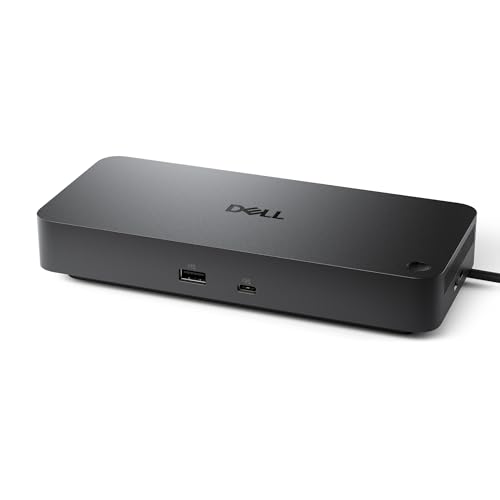
Dell Pro Laptop Docking Station WD25, USB-C, 100W, DisplayPort, HDMI | Universal Dock, Ethernet, USB-A Ports, USB-C Ports, Power Delivery Charging, Quad Display, Plug and Play, Office Ready, WD25
As an Amazon Associate we earn from qualifying purchases. Product prices and availability are accurate as of the date/time indicated.
Prices shown are approximate and for reference only. Prices change often, so please check the current price on Amazon before you buy.
Ports, display sentences, and power provisions are each maker’s stated details for the current version and pattern; the external displays actually served depend on your laptop’s own documented sentence, as this guide’s audit describes, and most patterns in this parish are supplied without a power brick. Ratings are editorial at this figure: the display sentence served honestly, power arithmetic with the hub’s keep priced, ports counted against a real desk, heat and cable keeping, and desk-ready value with a brick added where needed.
Detailed Reviews: Best Cheap Docking Station Under 100 Picks
1. Anker USB-C Hubs – Best Overall
Anker’s parish takes the overall rating as the cheap dock’s reference citizen in its line: a power sentence stated plainly, a display parish served as documented, and a desk rehearsal it commonly passes.
On one cable, it earns its place outright.
2. UGREEN Revodok – Best Port Parish
UGREEN’s parish grades its ports in its line for the desk with an estate, drives and keys and cards in one citizen at the figure’s kindest count.
For the ports, it stands.
3. Plugable Hubs – Best Documents Parish
Plugable’s parish serves the buyer in its line who reads documents, its sentences stated with a clarity the audit rewards, compatibility a parish rather than a hope.
Within its papers, it earns its place.
4. UGREEN Revodok Pro – Best Network Parish
UGREEN’s wired parish answers the desk in its line whose WiFi is a rumour, a network citizen aboard with the rest of the estate.
For the wire, it is soundly placed.
5. Baseus Docks – Best Value Parish
Baseus’s parish brings the one-cable desk in its line at the value’s own figure, its sentences read by the same audit as every row’s.
For the value, it is soundly placed.
6. Anker Small Hubs – Best Small Parish
Anker’s small parish closes the table in its line for the travelling desk and the light estate, a citizen whose parish is a bag as much as a desk.
As the small row, it completes the table.
Buying Guide: How to Choose the Best Cheap Docking Station Under 100
The Desk Audit: Laptop’s Documents First, Brick Priced, a Working Hour Served
Write the audit’s five facts before a listing is opened, with the laptop’s documents on the screen. The display sentence: your exact model’s external parishes read in its maker’s terms, the count entered as a constitution, a base Apple silicon parish’s one native screen and a display-less port’s zero both accepted at this sitting. The power: your laptop’s appetite in its documents’ figure, the candidate’s pass-through and its keep priced against it, a desk brick entered in the order where the arithmetic asks one, its figure in the row’s true total. The ports: your desk’s citizens listed by name, drive, keys, network, card, each matched to a socket at its stated speed, the count performed against the estate and not against a photograph. The heat and cable: the dock’s parish on the desk planned, open air, its captive cable’s road dressed with slack. And the rehearsal, a working hour with the whole estate aboard, sleep and wake served a dozen times, because a cheap dock, like a zero in this site’s rifle guides, is a property evidenced, and its evidence is a working day. Order against the five, and let a listing that promises your laptop a display its own documents refuse be closed on that evidence however many ports it counts.
Spend by the desk’s priorities, which are the guide’s: the display sentence first, served as documented; power second, with its margin; the ports third, counted against citizens you own; the network fourth where the WiFi asks it; and a port-count headline never, a dozen sockets wearing a system’s clothes over an estate of four. Refuse, in the same pass, the parish’s two frauds: the universal dock, a citizen sold to every laptop with its sentences stated for none, and the brick assumption, a total priced without the power its own parish requires, because a desk, like a range in this site’s guides, is graded by its worst unsupervised moment, a morning meeting, a waking laptop, a battery at yesterday’s figure, and that moment belongs, by doctrine, to a dock whose arithmetic was done in documents before it was done in a basket.
Keeping the Dock: Air Around It, Slack at Its Roots, and the Desk Diary
Maintain the dock by the small powered citizen’s liturgy in this guide’s second section. It works in open air, its cable dressed with slack and never bent at its root, its parish read by a hand at the season, its waking manners audited, a citizen grown hot or forgetful being retired or re-read against the laptop’s updates on evidence.
Keep the record as the desk diary, laptop, dock, and brick with their figures together, so a new laptop is audited against the document before the dock is assumed into its service. Do that, the sentences read, the watts priced, the hour served, and the best cheap docking station under 100 becomes what its buyer wanted from a modest figure: a desk that assembles itself at one cable, which is the whole of what it was for.
Frequently Asked Questions About the Best Cheap Docking Station Under 100
What is the best cheap docking station under 100?
Anker’s hub parish overall, a powered citizen whose sentences are stated plainly and served as documented, with UGREEN’s rows the ports’ and the network’s answers, Plugable’s citizens the documents’ own, Baseus’s the value’s, and Anker’s small patterns the travelling desk’s. Fit yours by the desk audit in this guide: your laptop’s display sentence read in its maker’s documents before a listing opens, its count accepted as a constitution; your power priced as arithmetic, the brick’s figure minus the hub’s keep against the laptop’s appetite, a desk brick bought where the margin asks it; your desk’s citizens listed and matched socket by socket; and a rehearsal served, a working hour with sleep and wake, because a cheap dock is graded on a Monday morning’s waking, and that grade is rehearsed on a quiet afternoon or collected in a meeting.
Can a docking station under $100 run two external monitors?
Where your laptop’s own documents say it can, yes, and nowhere else, the dock being a parish that reveals a laptop’s sentences rather than one that writes them. A Windows laptop whose ports carry the right display sentences commonly serves two external parishes through a citizen of this class, its exact terms read in its maker’s documents; a base Apple silicon laptop serves one native external display through any dock at any figure in this guide’s doctrine, the workaround parishes being different and costlier citizens; and a laptop whose USB-C parish carries no display sentence serves none, its port’s shape notwithstanding. The audit’s discipline is to read the laptop first and shop second, entering the count in the diary as a constitution, since the parish’s commonest disappointment is a second screen bought three times, once in a dock, once in a cable, and once in a monitor, for a laptop that stated its sentence plainly all along. Where two displays are the desk’s true requirement and the laptop refuses them, the honest purchase is the workaround’s parish or a different laptop’s, priced as such, never a fourth dock.
Why does my laptop battery drain while it is plugged into the dock?
Because the arithmetic is negative, in this guide’s diagnosis, and it is priced in the audit precisely so it can be fixed with a figure rather than with folklore. The hub passes through less than the brick provides, keeping a parish for its own work as its documents state; a laptop whose appetite under its day’s load exceeds what arrives spends the difference from its battery, politely and continuously, arriving at the evening plugged in and diminished. The corrections are the audit’s, in order: read the three figures, the brick’s, the hub’s delivered sentence, and the laptop’s appetite, in their makers’ documents; give the desk its own brick of an honest figure where the margin is thin, the laptop’s travelling charger being commonly sentenced for a lighter parish than a docked day; and read a hungry laptop’s heaviest citizens, a discrete graphics parish at full song being an appetite no pass-through in this table was sentenced for. Enter the working figures in the desk diary once they are proven, since a docked desk, like a zero, is a system whose sentences should be documents and not surprises.
Is a cheap docking station worth it over just plugging things in?
For a desk the laptop leaves and returns to, yes, and the audit’s rehearsal is the instrument that prices it: the one-cable parish is the product, a monitor, keys, a drive, a network, and power arriving and departing as one gesture, against a handful of cables negotiated at every arrival with a tired owner’s patience as the currency. A laptop that lives on its desk untouched for months buys less, its cables already a settled parish, and a travelling laptop buys the small row’s version of the same sentence for its bag. The figure’s honesty is this guide’s opening naming: at under a hundred you are buying a powered hub that serves a dock’s daily work for most desks, one display for most laptops, power with an arithmetic, and ports counted against a real estate, a citizen graded generously when its sentences are read and bitterly when its listing was believed instead. Bought by the audit, documents first and a working hour as its evidence, it is commonly the highest-value citizen on the desk it serves, which is the parish’s whole reputation in one sentence.
Related guides
- Best Mouse for CAD Design Work in 2026: Best Mouse for CAD Design Work, CAD Mice, and Best Design Mice
- Best Budget Gaming Microphone for Gamers in 2026: HyperX, FIFINE, Samson, and Razer Compared for a Voice Graded by Its Own Recording, Placement Sentenced Above Price, and a Keyboard Kept Out of the Parish
- Best Smart Plug vs Smart Switch for Lamps in 2026: Which One Is Better for a Lamp, a Renter, and a Homeowner Who Wants a Lamp to Turn On Automatically
- Best Desktop Speakers for Music Production in 2026: 7 Desktop Speakers That Offer Flat Sound, Clear Detail, and Reliable Performance for Music Producers
More from Amazon
Programs that pair well with the guide above. Offers and eligibility are set by Amazon and may change.
Free shipping on eligible items, Prime Video and more. Eligible new members can start with a free trial.
Start a Prime free trialAd-free music streaming. Eligible new subscribers can start with a free trial.
Try Music Unlimited freeA Prime membership for ages 18-24 with a trial period. Eligibility is set by Amazon.
See Prime for Young AdultsAudiobooks and podcasts to listen to on the go. Eligible new members can start with a free trial.
Try Audible freeAs an Amazon Associate we earn from qualifying purchases.

Write Your Review
No reviews yet. Be the first to share your experience!