
What's inside
- Why Choosing the Best Monitor Light Bar for Eye Strain Matters
- Best Monitor Light Bar for Eye Strain: Comparison Table
- Quntis Monitor Light Bar
- Baseus Monitor Light Bar
- Xiaomi Mi Computer Monitor Light Bar
- Yeelight Monitor Light Bar Pro
- BenQ ScreenBar Monitor Light Bar
- BenQ ScreenBar Halo Monitor Light Bar
- Buying Guide: How to Choose the Best Monitor Light Bar for Eye Strain
- Frequently Asked Questions
As an Amazon Associate I earn from qualifying purchases. This post may contain affiliate links at no extra cost to you.
Choosing the best monitor light bar for eye strain is about finding a light bar that lights your desk evenly, fits your monitor, and works for long work sessions, without being too expensive, without creating glare on your screen, and without being too hard to use. Best monitor light bar for eye strain is a light bar for a person who wants a monitor light bar for eye strain, so they need best monitor light bar for eye strain. A good monitor light bar for eye strain should have a simple design, a colour temperature that fits evening work, a brightness control that fits your room, and a price that fits a budget. It should also be easy to mount, and reliable enough to use every time you work at a desk.
This guide compares six real, currently sold monitor light bars for eye strain. Always check monitor light bar monitor fit, colour temperature, brightness, and eye strain fit before you buy. Best monitor light bar for eye strain is best for a person who wants a desk light bar, while a desk lamp may be better for a user who wants a traditional lamp, and a bias light may be better for a user who wants light behind a monitor.
Note on best monitor light bar for eye strain: a monitor light bar may help reduce glare and even out desk lighting, but it is not medical advice. A light bar cannot diagnose or treat eye strain, headaches, or vision problems. Talk to an eye clinician for persistent eye strain, and follow the 20-20-20 habit when you work at a screen: every 20 minutes, look at something about 20 feet away for about 20 seconds, if that works for your work. Check your monitor, your light bar, and your budget before you buy, and choose a light bar by brightness for your desk. Use a safe volume for audio, and keep a spare light bar in a safe place.
Desk safety comes first. Always use a strong password, keep your light bar in a dry place, and use a light bar that fits your monitor. Keep your desk in a dry place, and do not use a light bar that is damaged. Take regular breaks from screen work, and talk to an eye clinician for persistent eye strain.
Our Top Picks
Why Choosing the Best Monitor Light Bar for Eye Strain Matters
Best monitor light bar for eye strain matters because a good light bar can help you work comfortably, by giving you even light on your desk without glare on your screen, while a weak light bar can be too dim, too harsh, or hard to adjust. A good light bar can also help you save time, by letting you work in a dark room without a bulky lamp, while a weak light bar can need frequent adjustment. A light bar with too little brightness may not light your keyboard, while a light bar with the wrong colour temperature may feel too cold at night.
Glare matters most. Best monitor light bar for eye strain with a design that fits glare control is a good choice, because it can light your desk without reflecting on your screen. An asymmetrical light design is a good choice if you want a monitor light bar. Check the glare control before you buy, and choose a light bar by design for your monitor.
Colour temperature also matters. Best monitor light bar for eye strain with a colour temperature that fits evening work is a good choice, because it can feel warmer at night. A light bar with adjustable colour temperature is a good choice if you want day and night work. Check the colour temperature before you buy, and choose a light bar by Kelvin for your desk.
Best Monitor Light Bar for Eye Strain: Comparison Table
The table below compares six real, currently sold monitor light bars for eye strain. Check the maker notes for monitor light bar monitor fit, colour temperature, brightness, and eye strain fit before you buy.
| Monitor Light Bar Model for Eye Strain | Colour Temperature and Brightness | Monitor Fit and Use | Best For |
|---|---|---|---|
| Quntis Monitor Light Bar | 3000-6500K, Adjustable | Clamp, desk work | Best budget, for best monitor light bar for eye strain |
| Baseus Monitor Light Bar | 3000-6500K, Adjustable | Clamp, desk work | Best Baseus Light Bar, for best monitor light bar for eye strain |
| Xiaomi Mi Computer Monitor Light Bar | 2700-6500K, Adjustable | Clamp, desk work | Best Xiaomi Mi Light Bar, for best monitor light bar for eye strain |
| Yeelight Monitor Light Bar Pro | 2700-6500K, Adjustable | Clamp, desk work | Best Yeelight Light Bar Pro, for best monitor light bar for eye strain |
| BenQ ScreenBar Monitor Light Bar | 2700-6500K, Adjustable | Clamp, desk work | Best BenQ ScreenBar, for best monitor light bar for eye strain |
| BenQ ScreenBar Halo Monitor Light Bar | 2700-6500K, Adjustable | Clamp, desk work | Best premium, for best monitor light bar for eye strain |

Quntis Computer Monitor Lamp, Screen Monitor Light Bar for Eye Caring, USB Reading LED Task Lamp with Auto-Dimming, Dimmable Light Bar, Touch Control, No Glare Space Saving Home Office Desk Lamps
As an Amazon Associate we earn from qualifying purchases. Product prices and availability are accurate as of the date/time indicated.
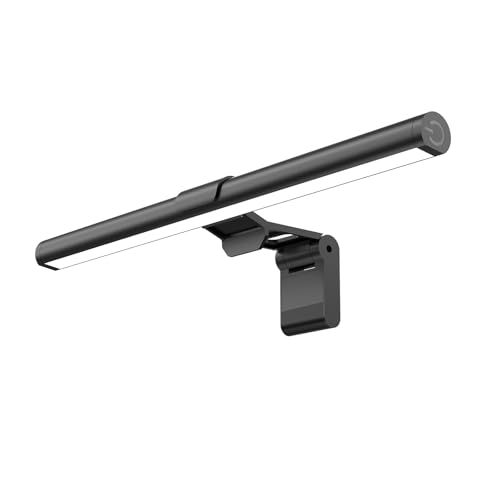
Samphon Monitor Light Bar, Eye-Care USB Reading Mnitor lamp, 11.8'' LED Computer Lights with Ultrawide Lighting, 3 Color Temperature Dimmable Desk Light for Home Office Gaming
As an Amazon Associate we earn from qualifying purchases. Product prices and availability are accurate as of the date/time indicated.

LYMAX Monitor Light Bar, Eye-Care USB Computer Lamp Dimmable Screen Light Bar, Fit for All Monitor with Wireless Controller, No Screen Glare, Space Saving for Home Office Desk Light
As an Amazon Associate we earn from qualifying purchases. Product prices and availability are accurate as of the date/time indicated.
Prices shown are approximate and for reference only. Prices change often, so please check the current price on Amazon before you buy.
Quntis Monitor Light Bar
It is the cheapest light bar in this comparison and a practical starting point if you want a low-cost monitor light bar for eye strain. It has a colour temperature of 3000-6500K, brightness of Adjustable, monitor fit of Clamp, and use of desk work, according to the maker.
Choose this light bar if you want a simple, affordable light bar for your desk. The Quntis Monitor Light Bar has a simple design, a good adjustable colour temperature for day and night, and a good fit for a beginner with a first monitor light bar. Its clamp is good for most monitors, but its build may be less premium than a BenQ bar. If you need a premium bar, the BenQ ScreenBar Halo is a better choice at a higher price, because it is premium. A light bar may help reduce glare, but it is not medical advice, and you should talk to an eye clinician for persistent eye strain.
Baseus Monitor Light Bar
It has a colour temperature of 3000-6500K, brightness of Adjustable, monitor fit of Clamp, and use of desk work, according to the maker. It is a good choice if you want a Baseus light bar with a trusted brand for desk accessories and a simple design for desk work.
This light bar is best for a person who wants a Baseus Light Bar for best monitor light bar for eye strain. The Baseus Light Bar has a simple design and a good fit for a user who wants a reliable light bar for regular use. It is more expensive than the Quntis Monitor Light Bar, but it offers a Baseus brand and a similar adjustable design for desk work. A light bar may help reduce glare, but it is not medical advice, and you should talk to an eye clinician for persistent eye strain.
Xiaomi Mi Computer Monitor Light Bar
It has a colour temperature of 2700-6500K, brightness of Adjustable, monitor fit of Clamp, and use of desk work, according to the maker. It is a good choice if you want a Xiaomi light bar with a trusted brand for smart home and a simple design for desk work.
Choose this light bar if you want a Xiaomi Mi Light Bar for your desk. The Mi Light Bar has a simple design and a good fit for a user who wants a durable light bar for regular use. It is more expensive than the Baseus Monitor Light Bar, but it offers a wider colour temperature range and a Xiaomi brand for desk work. A light bar may help reduce glare, but it is not medical advice, and you should talk to an eye clinician for persistent eye strain.
Yeelight Monitor Light Bar Pro
It has a colour temperature of 2700-6500K, brightness of Adjustable, monitor fit of Clamp, and use of desk work, according to the maker. It is a good choice if you want a Yeelight light bar with a trusted brand for smart lighting and a simple design for desk work.
This light bar is best for a person who wants a Yeelight Light Bar Pro for best monitor light bar for eye strain. The Light Bar Pro has a simple design and a good fit for a user who wants a reliable light bar for regular use. It is more expensive than the Xiaomi Mi Light Bar, but it offers a Yeelight brand and a similar adjustable design for desk work. A light bar may help reduce glare, but it is not medical advice, and you should talk to an eye clinician for persistent eye strain.
BenQ ScreenBar Monitor Light Bar
It has a colour temperature of 2700-6500K, brightness of Adjustable, monitor fit of Clamp, and use of desk work, according to the maker. It is a good choice if you want a BenQ light bar with a trusted brand for monitors and a simple design for desk work.
Choose this light bar if you want a BenQ ScreenBar for your desk. The ScreenBar has a simple design and a good fit for a user who wants a durable light bar for regular use. It is more expensive than the Yeelight Light Bar Pro, but it offers a BenQ brand and a similar adjustable design for desk work. Its asymmetrical optical design is intended to light the desk while limiting light on the screen, according to the maker. A light bar may help reduce glare, but it is not medical advice, and you should talk to an eye clinician for persistent eye strain.
BenQ ScreenBar Halo Monitor Light Bar
It has a colour temperature of 2700-6500K, brightness of Adjustable, monitor fit of Clamp, and use of desk work, according to the maker. It is the most expensive light bar in this comparison, but it is a premium BenQ light bar with a durable design for desk work.
Choose this light bar if you want a premium BenQ ScreenBar Halo for your desk and you are willing to pay more for it. The ScreenBar Halo has a colour temperature of 2700-6500K, brightness of Adjustable, and monitor fit of Clamp for a clear, useful light bar. It adds a rear light for ambient desk lighting, according to the maker, which may help even out the light in a dark room. It is a good fit for a serious user with a need for a premium, high-quality light bar. It is not the best choice if you have a small budget, because the Quntis Monitor Light Bar offers similar basic best monitor light bar for eye strain support at a lower price for a beginner, with an adjustable design for best monitor light bar for eye strain. A light bar may help reduce glare, but it is not medical advice, and you should talk to an eye clinician for persistent eye strain.
Buying Guide: How to Choose the Best Monitor Light Bar for Eye Strain
1. Check glare control first: asymmetrical, clamp, check design
Start with glare control when you choose best monitor light bar for eye strain. Choose a light bar with an asymmetrical design, such as BenQ ScreenBar, if you want best monitor light bar for eye strain, because it can light your desk without shining directly on your screen. Check the design before you buy, and choose a light bar by optics for your monitor.
Check glare control before you buy. A light bar that shines on your screen may create reflections, while a light bar that shines only on your desk can keep your screen clear. Use an asymmetrical bar, and test your screen before a long work session. A light bar may help reduce glare, but it is not medical advice, and you should talk to an eye clinician for persistent eye strain.
2. Check colour temperature, brightness, and auto-dimming
Check colour temperature first. A range of 2700K to 6500K is a good choice, because it can feel warm at night and cool during the day. Check brightness next. An adjustable brightness control is a good choice, because it can match your room light. Check auto-dimming as well. A light bar with an ambient light sensor is a good choice, because it can adjust brightness automatically.
Check colour temperature and brightness before you buy. A light bar without adjustable colour temperature may feel too cold at night, while a light bar without adjustable brightness may be too bright in a dark room. Use 2700K at night, and test your brightness before a long work session. A light bar may help reduce glare, but it is not medical advice, and you should talk to an eye clinician for persistent eye strain.
3. Check monitor fit, USB power, and desk space
Check monitor fit before you buy. A clamp that fits a thin monitor is a good choice, because it can mount securely. Check USB power next. A USB-powered light bar is a good choice, because it can run from your monitor or PC. Check desk space as well. A light bar that sits on top of your monitor is a good choice, because it can save desk space.
Check monitor fit and USB power before you buy. A light bar that does not fit a curved monitor may not mount correctly, while a light bar without USB power may need a separate adapter. Use a clamp, and test your monitor fit before a long work session. Check the maker notes for curved or ultrawide monitor compatibility, because fit can vary by model.
4. Check habits, breaks, and care
Always take regular breaks from screen work, blink often, and keep your screen at a comfortable distance. Talk to an eye clinician for persistent eye strain, and do not rely on a light bar alone for eye comfort. Keep your light bar in a dry place, and do not use a light bar that is damaged.
Clean your light bar with a dry cloth if it gets dusty, and store it in a dry place when you are not using it. Do not use a light bar that is damaged, and do not use a light bar that does not work correctly. Replace your light bar if it is damaged, or if it does not work safely. Use the 20-20-20 habit when you work at a screen, and talk to an eye clinician for persistent eye strain. A light bar may help reduce glare, but it is not medical advice.
Frequently Asked Questions
What is the best monitor light bar for eye strain?
Choose by glare control, colour temperature, and budget. A light bar may help reduce glare, but it is not medical advice, and you should talk to an eye clinician for persistent eye strain.
What is the best budget monitor light bar for eye strain?
It has a colour temperature of 3000-6500K, brightness of Adjustable, monitor fit of Clamp, and use of desk work, according to the maker. It is a good choice for a low-cost light bar, but its build may be less premium than a BenQ bar, so choose the BenQ ScreenBar if you need a more premium bar.
Do monitor light bars reduce screen glare?
Do monitor light bars reduce screen glare depends on your light bar, your monitor, and your room. A monitor light bar may help reduce glare, if you use a bar with an asymmetrical design, because that design can light your desk without shining directly on your screen. Use an asymmetrical bar, and test your screen before a long work session. A light bar may help reduce glare, but it is not medical advice, and you should talk to an eye clinician for persistent eye strain.
Will a monitor light bar fit a curved monitor?
Will a monitor light bar fit a curved monitor depends on your light bar, your monitor, and your curve. Some monitor light bars can fit a curved monitor, if you use a clamp that fits your monitor thickness and curve, because fit can vary by model. Check the maker notes for your exact monitor model before you buy, and test your clamp before a long work session. A light bar may help reduce glare, but it is not medical advice, and you should talk to an eye clinician for persistent eye strain.
Best monitor light bar for eye strain is about finding a light bar that lights your desk evenly, fits your monitor, and works for long work sessions, without being too expensive, without creating glare on your screen, and without being too hard to use. Take regular breaks from screen work, and talk to an eye clinician for persistent eye strain. With the right light bar, you can work more comfortably every time.
Related guides
- Best Handheld Console vs Tablet for Gaming in 2026: Which Portable Gaming Device Is Best for You?
- Best Cheap Gaming Controller for Gamers in 2026: Best Cheap Gaming Controller for Gamers
- Best USB C Dock for Dual Monitors: 6 Best USB C Dock for Dual Monitors Picks in 2026
- Best Chair with Adjustable Armrests in 2026: 7 Chairs That Offer Adjustable Armrests, Comfortable Support, and Reliable Performance for Home and Office
More from Amazon
Programs that pair well with the guide above. Offers and eligibility are set by Amazon and may change.
Free shipping on eligible items, Prime Video and more. Eligible new members can start with a free trial.
Start a Prime free trialAd-free music streaming. Eligible new subscribers can start with a free trial.
Try Music Unlimited freeA Prime membership for ages 18-24 with a trial period. Eligibility is set by Amazon.
See Prime for Young AdultsAudiobooks and podcasts to listen to on the go. Eligible new members can start with a free trial.
Try Audible freeAs an Amazon Associate we earn from qualifying purchases.

Write Your Review
No reviews yet. Be the first to share your experience!