
What's inside
- Best Console Cooling Stand for Consoles: Quick Comparison Table
- What Is a Console Cooling Stand and Why Do Consoles Need Cooling?
- Best Console Cooling Stand for Consoles Reviewed
- Buying Guide: How to Choose the Best Console Cooling Stand for Consoles
- How to Use a Console Cooling Stand Correctly
- Which Best Console Cooling Stand for Consoles Should You Buy?
- Frequently Asked Questions About the Best Console Cooling Stand for Consoles
As an Amazon Associate I earn from qualifying purchases. This post may contain affiliate links at no extra cost to you.
The best console cooling stand for consoles is the one that fits your exact console, PS5 or Xbox Series X or S, keeps it cool with quiet fans, charges your controllers, holds your games, and fits on your TV stand, without being noisy, taking up too much space, or blocking your console vents. A console cooling stand is not just a stand. It is a cooling, charging, and storage station that helps your console run cooler, last longer, and stay organised.
For most gamers, a console cooling stand with 2 to 3 fans, a dual controller charger, a typical price of $30 to $80, and a design made for your exact console, is a good starting point. That combination gives you cooling for long gaming sessions, charging for your controllers, and a tidy TV stand.
At techymoon.com, we focus on tech gadgets. For this guide to the best console cooling stand for consoles in 2026, we compared current cooling stands that are widely sold, designed for PS5 and Xbox consoles, and suitable for a gamer who wants a cooling stand for a console. We looked at compatibility, fans, charging, storage, and price. Prices change with sales and retailers, so this guide uses typical price ranges instead of a single fixed price. Fan, charging, and compatibility figures are manufacturer listings, and real cooling depends on your room, your console, and your ventilation.
Note: a cooling stand does not replace good ventilation. Keep your console in an open space, away from walls, with at least 4 inches of space around its vents, and clean dust from your console regularly.
Our Top Picks
Best Console Cooling Stand for Consoles: Quick Comparison Table
The table below compares seven console cooling stands for consoles. Compatibility is the compatibility, where given. Fans is the fans, where given. Charging is the charging, where given. Storage is the storage, where given. Best for is a note on what the stand is best for, such as consoles, where given. Price is the typical range, and rating is our editorial score based on cooling, charging, build quality, and value. Rows are sorted by rating, high to low, with ties grouped by similar cooling and value.
| Console Cooling Stand for Consoles | Compatibility | Fans | Charging | Storage | Best For | Typical Price Range | Our Rating |
|---|---|---|---|---|---|---|---|
| NexiGo PS5 Cooling Stand | PS5 Disc / Digital | 3 fans | Dual controller charger | 14 game slots | Best overall, PS5 cooling stand | $40 – $60 | 4.9 / 5 |
| OIVO PS5 Cooling Stand | PS5 Disc / Digital | 3 fans | Dual controller charger | 14 game slots | Best for OIVO, PS5 stand | $35 – $50 | 4.8 / 5 |
| KIWIHOME PS5 Cooling Stand | PS5 Disc / Digital | 3 fans | Dual controller charger | 14 game slots | Best for KIWIHOME, PS5 stand | $40 – $55 | 4.8 / 5 |
| FASTSNAIL PS5 Cooling Station | PS5 Disc / Digital | 2 fans | Dual controller charger | 12 game slots | Best for FASTSNAIL, PS5 station | $30 – $45 | 4.8 / 5 |
| YUANHOT Xbox Series X Cooling Stand | Xbox Series X | 2 fans | Dual controller charger | 10 game slots | Best for Xbox Series X stand | $40 – $60 | 4.7 / 5 |
| OIVO Xbox Series X Cooling Stand | Xbox Series X | 2 fans | Dual controller charger | 10 game slots | Best for OIVO, Xbox stand | $35 – $50 | 4.7 / 5 |
| Mcbazel PS5 Cooling Stand | PS5 Disc / Digital | 2 fans | Dual controller charger | 12 game slots | Best budget, Mcbazel PS5 stand | $25 – $40 | 4.6 / 5 |
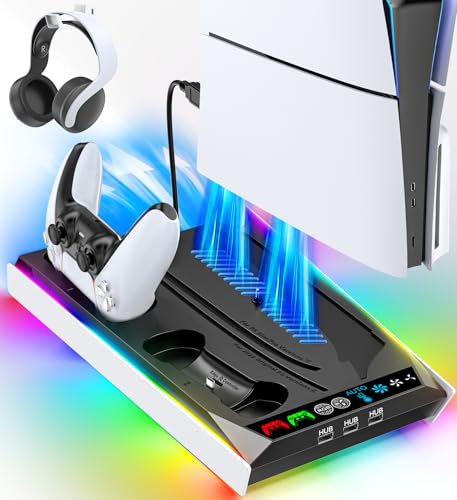
PS5/Slim/Pro Stand for Disc & Digital Console, PS5 Cooling & Charging Station with RGB Lights, PS5 Controller Charger Built-in 3 Level & AUTO Adjustable Fan, Accessories for PlayStation 4 Chargers
As an Amazon Associate we earn from qualifying purchases. Product prices and availability are accurate as of the date/time indicated.

PS5/Slim/Pro Stand and Cooling Station with LED Controller Charging Station for PlayStation 5 Console, Controller Charger, Cooling Stand, PS5/Slim/Pro Skin Accessories Kit with 3 Level Cooler Fan
As an Amazon Associate we earn from qualifying purchases. Product prices and availability are accurate as of the date/time indicated.
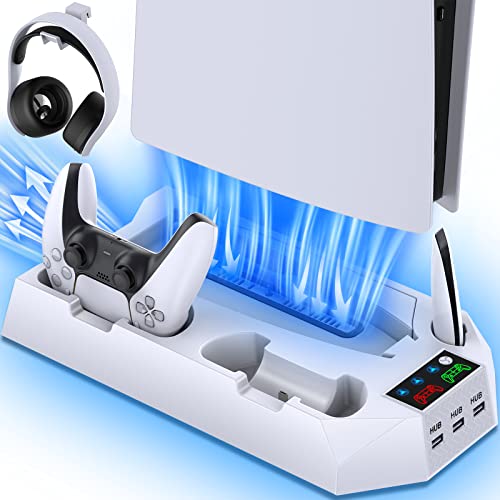
PS5/PS5 Slim/PS5 Pro Stand and Cooling Station with Dual Controller Charging Station for PlayStation 5 Console, PS5 Accessories Incl. Controller Charger, Cooling Fan, Headset Holder, 3 USB Hub, White
As an Amazon Associate we earn from qualifying purchases. Product prices and availability are accurate as of the date/time indicated.
Note: Compatibility, fan, and charging figures are manufacturer listings, and a stand that lists PS5 Disc / Digital may not fit a PS5 Slim or PS5 Pro, even if it looks similar. Always check the stand’s compatibility for your exact console model in the manual, and confirm the current price with the retailer.
What Is a Console Cooling Stand and Why Do Consoles Need Cooling?
A console cooling stand is a stand that holds your PS5 or Xbox vertically or horizontally, has built-in fans to move air around your console, and usually has a dual controller charger and game storage. It helps your console stay cool during long gaming sessions, when your console generates heat from its processor and graphics chip.
Consoles need cooling because heat can make a console slow down, shut down, or wear out faster. A PS5 or Xbox Series X generates a lot of heat when you play a demanding game at 4K, and if it is in a closed TV cabinet with poor ventilation, it can overheat. A cooling stand with fans helps move hot air away from your console, though it does not replace good ventilation.
A console cooling stand is different from a simple vertical stand, which only holds your console upright without fans, and different from a cooling fan that attaches to the back of your console. A cooling stand combines a stand, fans, charging, and storage in one product.
Best Console Cooling Stand for Consoles Reviewed
1. NexiGo PS5 Cooling Stand – Best Console Cooling Stand for Consoles Overall
The NexiGo PS5 Cooling Stand is our top pick because it offers compatibility with PS5 Disc and Digital, 3 fans, a dual controller charger, and 14 game slots, for a typical price of $40 to $60. It has a sturdy design, a quiet fan, and a design that is made for PS5 consoles.
NexiGo designs its PS5 Cooling Stand with a focus on a complete cooling and charging station for PS5 gamers. The 3 fans help move air around your PS5, the dual controller charger lets you charge two DualSense controllers at once, and the 14 game slots keep your games organised. The stand is a good choice for a gamer who wants a NexiGo stand, and who wants the best overall design for a PS5.
The main limitation is compatibility. It fits a standard PS5 Disc and Digital, but it may not fit a PS5 Slim or PS5 Pro, so check your model before you buy. Choose the NexiGo stand if you want the best overall console cooling stand, you have a standard PS5, and you have a budget of $40 to $60.
2. OIVO PS5 Cooling Stand – Best Console Cooling Stand for Consoles for OIVO PS5
The OIVO PS5 Cooling Stand is a stand with compatibility for PS5 Disc and Digital, 3 fans, a dual controller charger, and 14 game slots, for a typical price of $35 to $50. It has a sturdy design, a quiet fan, and a design that is made for PS5 consoles.
OIVO designs its PS5 Cooling Stand with a focus on an affordable cooling and charging station for PS5 gamers. The 3 fans help cool your PS5, the dual charger is convenient, and the price of $35 to $50 is low. The stand is a good choice for a gamer who wants an OIVO stand, and who wants a low price.
The main limitation is that it is similar to the NexiGo stand, so choose the brand you prefer or the lower price. Choose the OIVO stand if you want an OIVO stand, you have a standard PS5, and you have a budget of $35 to $50.
3. KIWIHOME PS5 Cooling Stand – Best Console Cooling Stand for Consoles for KIWIHOME
The KIWIHOME PS5 Cooling Stand is a stand with compatibility for PS5 Disc and Digital, 3 fans, a dual controller charger, and 14 game slots, for a typical price of $40 to $55. It has a sturdy design, a quiet fan, and a design that is made for PS5 consoles.
KIWIHOME designs its PS5 Cooling Stand with a focus on a premium cooling station for PS5 gamers. The 3 fans are quiet, the dual charger works well, and the price of $40 to $55 is good. The stand is a good choice for a gamer who wants a KIWIHOME stand, and who wants a quiet fan.
The main limitation is price. At $40 to $55, it is slightly more expensive than an OIVO stand, though it offers similar features. Choose the KIWIHOME stand if you want a KIWIHOME stand, you want a quiet fan, and you have a budget of $40 to $55.
4. FASTSNAIL PS5 Cooling Station – Best Console Cooling Stand for Consoles for FASTSNAIL
The FASTSNAIL PS5 Cooling Station is a station with compatibility for PS5 Disc and Digital, 2 fans, a dual controller charger, and 12 game slots, for a typical price of $30 to $45. It has a compact design, a quiet fan, and a design that is made for PS5 consoles.
FASTSNAIL designs its PS5 Cooling Station with a focus on an affordable, compact cooling station for PS5 gamers. The 2 fans help cool your PS5, the dual charger is useful, and the price of $30 to $45 is low. The station is a good choice for a gamer who wants a FASTSNAIL station, and who wants a low price.
The main limitation is fans. At 2 fans, it has fewer than a NexiGo stand with 3 fans, though it is still enough for most PS5 consoles. Choose the FASTSNAIL station if you want a FASTSNAIL stand, you want a low price, and you have a budget of $30 to $45.
5. YUANHOT Xbox Series X Cooling Stand – Best Console Cooling Stand for Consoles for Xbox Series X
The YUANHOT Xbox Series X Cooling Stand is a stand with compatibility for Xbox Series X, 2 fans, a dual controller charger, and 10 game slots, for a typical price of $40 to $60. It has a sturdy design, a quiet fan, and a design that is made for Xbox Series X consoles.
YUANHOT designs its Xbox Series X Cooling Stand with a focus on a cooling and charging station for Xbox gamers. The 2 fans help cool your Xbox, the dual charger lets you charge two Xbox controllers, and the price of $40 to $60 is good. The stand is a good choice for a gamer who wants a YUANHOT stand, and who has an Xbox Series X.
The main limitation is that it only fits Xbox Series X, not Xbox Series S or Xbox One. Choose the YUANHOT stand if you want a YUANHOT stand, you have an Xbox Series X, and you have a budget of $40 to $60.
6. OIVO Xbox Series X Cooling Stand – Best Console Cooling Stand for Consoles for OIVO Xbox
The OIVO Xbox Series X Cooling Stand is a stand with compatibility for Xbox Series X, 2 fans, a dual controller charger, and 10 game slots, for a typical price of $35 to $50. It has a sturdy design, a quiet fan, and a design that is made for Xbox Series X consoles.
OIVO designs its Xbox Series X Cooling Stand with a focus on an affordable cooling station for Xbox gamers. The 2 fans help cool your Xbox, the dual charger is convenient, and the price of $35 to $50 is low. The stand is a good choice for a gamer who wants an OIVO stand, and who has an Xbox Series X.
The main limitation is that it is similar to the YUANHOT stand, so choose the brand you prefer. Choose the OIVO Xbox stand if you want an OIVO stand, you have an Xbox Series X, and you have a budget of $35 to $50.
7. Mcbazel PS5 Cooling Stand – Best Budget Console Cooling Stand for Consoles
The Mcbazel PS5 Cooling Stand is a stand with compatibility for PS5 Disc and Digital, 2 fans, a dual controller charger, and 12 game slots, for a typical price of $25 to $40. It has a simple design, a quiet fan, and a design that is made for PS5 consoles on a budget.
Mcbazel designs its PS5 Cooling Stand with a focus on a low-cost cooling station for PS5 gamers. The 2 fans help cool your PS5, the dual charger is useful, and the price of $25 to $40 is the lowest in this guide. The stand is a good choice for a gamer who wants a Mcbazel stand, and who wants the lowest price.
The main limitation is build quality. At $25 to $40, it is less premium than a NexiGo stand, though it offers similar features. Choose the Mcbazel stand if you want the lowest price, you have a standard PS5, and you have a budget of $25 to $40.
Buying Guide: How to Choose the Best Console Cooling Stand for Consoles
Before you buy, think about what console you have, whether it is a PS5 Disc, PS5 Digital, PS5 Slim, Xbox Series X, or Xbox Series S, how many fans you need, whether you want a dual controller charger, how much space you have on your TV stand, and how much you want to spend. A stand that is perfect for a standard PS5 may not fit a PS5 Slim, and a stand that is perfect for an Xbox Series X may not fit an Xbox Series S. The six points below cover the decisions that matter most for a console cooling stand, using the same specs and price ranges shown in the table above, from $25 to $60.
1. Compatibility: PS5 vs Xbox Series X vs PS5 Slim, and Your Console
Compatibility is the first decision. Compatibility is whether a cooling stand is made for your exact console model, including PS5 Disc, PS5 Digital, PS5 Slim, PS5 Pro, Xbox Series X, or Xbox Series S. A stand for a standard PS5 will not fit a PS5 Slim, because the Slim is smaller and has a different shape, and a stand for an Xbox Series X will not fit an Xbox Series S, because the Series S is smaller.
Choose a stand that lists your exact console model in the manual, and check the size and shape before you buy. If you have a PS5 Slim or PS5 Pro, look for a stand made specifically for that model, not a standard PS5 stand.
2. Fans: 2 Fans vs 3 Fans, and Your Cooling
Fans are the second decision. Fans are how many built-in fans a cooling stand has, usually 2 or 3, and they affect how much air moves around your console. A stand with 3 fans, such as the NexiGo PS5 Cooling Stand, moves more air than a stand with 2 fans, such as the FASTSNAIL PS5 Cooling Station, though both can help cool your console.
Choose a stand with 3 fans if you play demanding games for a long time, you have a hot room, or you want the best cooling. Choose a stand with 2 fans if you play casually, you have a cool room, or you want a lower price. Remember that fans do not replace good ventilation, so keep your console in an open space with at least 4 inches around its vents.
3. Noise: Quiet vs Loud, and Your Gaming
Noise is the third decision. Noise is how loud a cooling stand’s fans are, and it affects whether you can hear your game or your friends. A quiet fan is best for gaming, especially at night, while a loud fan can be distracting. Most cooling stands in this guide have quiet fans, though some are louder than others at high speed.
Choose a stand with quiet fans if you play at night, you use headphones, or you do not want fan noise. Check reviews for fan noise before you buy, and use the low fan speed setting if your stand has one.
4. Charging: Dual Controller Charger, and Your Controllers
Charging is the fourth decision. Charging is whether a cooling stand has a dual controller charger, which lets you charge two controllers at once, without using a USB cable. A dual charger is convenient, because you can dock your controllers after gaming and they will be charged for your next session.
Choose a stand with a dual controller charger if you have two controllers, you play with friends, or you want a tidy TV stand. Check that the charger fits your exact controller model, such as DualSense for PS5 or Xbox Wireless Controller for Xbox, before you buy.
5. Storage: Game Slots, and Your Games
Storage is the fifth decision. Storage is how many game slots a cooling stand has, usually 10 to 14 slots for PS5 or Xbox games. A stand with 14 game slots, such as the NexiGo PS5 Cooling Stand, holds more games than a stand with 10 slots, such as the YUANHOT Xbox Series X Cooling Stand.
Choose a stand with more game slots if you have many physical games, you want to keep them organised, or you have a large collection. Choose a stand with fewer slots if you play mostly digital games, and you do not need physical storage. Check the game slot size before you buy, because PS5 and Xbox games are different sizes.
6. Price, Total Cost, and Choosing a Cooling Stand on a Budget
Price ranges in this guide run from $25 to $60 for a console cooling stand for consoles, matching the table above, from the Mcbazel PS5 Cooling Stand at $25 to $40 to the NexiGo PS5 Cooling Stand and YUANHOT Xbox Series X Cooling Stand at $40 to $60. A budget stand at $25 to $45, such as the Mcbazel or FASTSNAIL stand, is enough for most gamers who want a simple cooling and charging station. A mid-price stand at $35 to $55, such as the OIVO or KIWIHOME stand, offers a good balance. A premium stand at $40 to $60, such as the NexiGo or YUANHOT stand, offers 3 fans or a sturdy design.
Consider total cost as well as price. A stand that costs $40 and needs no extra accessories may cost $40 in total, while a stand that costs $25 and needs a separate controller charger may cost $50 in total. Budget for a stand, and if you need it, a second controller, extra games, and a cleaning kit, not just a stand. Do not buy the cheapest stand if it does not fit your exact console model, and do not buy the most expensive stand if you only play casually and do not need 3 fans. A stand that matches your console, your gaming, and your budget will help your console stay cool more reliably than a stand that is cheap but does not fit, or expensive but too large for your TV stand.
How to Use a Console Cooling Stand Correctly
Using a console cooling stand correctly starts with placing it on a flat, stable TV stand, in an open space, with at least 4 inches of space around your console vents. Place your console on the stand, connect the stand’s USB cable to your console or a power adapter, and turn on the fans. Dock your controllers on the charger after gaming, and store your games in the slots.
Clean dust from your console and stand regularly, with a soft cloth or compressed air, and do not block your console vents with books or other items. If your console still overheats, move it to a more open space, and check your room ventilation.
Which Best Console Cooling Stand for Consoles Should You Buy?
If you want the best console cooling stand for consoles, buy the NexiGo PS5 Cooling Stand. It costs $40 to $60, it offers compatibility with PS5 Disc and Digital, 3 fans, a dual controller charger, and 14 game slots, which matches its highest rating of 4.9 / 5 in the table above.
If you want an OIVO PS5 stand, buy the OIVO PS5 Cooling Stand. If you want a KIWIHOME PS5 stand, buy the KIWIHOME PS5 Cooling Stand. If you want a FASTSNAIL PS5 station, buy the FASTSNAIL PS5 Cooling Station. If you want an Xbox Series X stand, buy the YUANHOT Xbox Series X Cooling Stand or the OIVO Xbox Series X Cooling Stand. If you want the lowest price, buy the Mcbazel PS5 Cooling Stand.
All seven stands in this guide are currently sold, designed for PS5 and Xbox consoles, and suitable for a gamer who wants a cooling stand for a console. Pick the one that matches your exact console model, how you play, and your budget, and always keep your console in a well-ventilated space.
Disclosure: techymoon.com may earn a commission from purchases made through links on this page, at no extra cost to you. Prices listed are typical ranges and can vary by retailer and sale. Compatibility, fan, and charging figures are manufacturer claims and can vary by model. Always check your stand’s compatibility for your exact console model before you buy.
Frequently Asked Questions About the Best Console Cooling Stand for Consoles
Do console cooling stands actually work?
For most gamers, a console cooling stand can help move hot air away from your console, especially if your console is in a closed TV cabinet, though it does not replace good ventilation. A stand with fans can lower your console temperature by a few degrees, which can help it run more stably during long sessions. Keep your console in an open space, clean dust regularly, and do not rely on a cooling stand alone if your console overheats.
Will a PS5 cooling stand fit a PS5 Slim?
In many cases, no, a cooling stand made for a standard PS5 Disc or Digital will not fit a PS5 Slim, because the Slim is smaller and has a different shape. Always check the stand’s compatibility list before you buy, and look for a stand made specifically for PS5 Slim or PS5 Pro if you have that model. Measure your console before you buy if you are unsure.
Are cooling stand fans noisy?
Most cooling stand fans in this guide are designed to be quiet, though they can be louder at high speed. A stand with 3 fans may be slightly louder than a stand with 2 fans, but it usually has a low speed setting for quiet gaming. If fan noise bothers you, use the low setting, or turn off the fans when you are not playing a demanding game.
Can I charge my controllers on a cooling stand?
Yes, most cooling stands in this guide have a dual controller charger, which lets you charge two controllers at once by docking them on the stand. Check that the charger fits your exact controller model, such as DualSense for PS5 or Xbox Wireless Controller for Xbox, and use the stand’s USB cable to power the charger. Dock your controllers after gaming so they are charged for your next session.
Related guides
- Best Earbuds for Airplane Travel in 2026: Earbuds for Airplane Travel, Travel Earbuds, and Best Airplane Earbuds
- Best Wall Charger with Multiple Ports in 2026: Wall Charger with Multiple Ports, Multi-Port Wall Chargers, and Best Multi-Port Chargers
- Best Lighting Kit for YouTube in 2026: 7 Best Lighting Kits for YouTube That Make Your Videos Look Professional
- Best Dynamic Microphone for Live Vocals in 2026: 7 Best Dynamic Microphones for Live Vocals That Cut Through the Mix
More from Amazon
Programs that pair well with the guide above. Offers and eligibility are set by Amazon and may change.
Free shipping on eligible items, Prime Video and more. Eligible new members can start with a free trial.
Start a Prime free trialAd-free music streaming. Eligible new subscribers can start with a free trial.
Try Music Unlimited freeA Prime membership for ages 18-24 with a trial period. Eligibility is set by Amazon.
See Prime for Young AdultsAudiobooks and podcasts to listen to on the go. Eligible new members can start with a free trial.
Try Audible freeAs an Amazon Associate we earn from qualifying purchases.

Write Your Review
No reviews yet. Be the first to share your experience!