
What's inside
- Why Choosing the Best Budget Ethernet Switch Under 50 Matters
- Best Budget Ethernet Switch Under 50: Comparison Table
- TP-Link TL-SG105 Ethernet Switch
- NETGEAR GS305 Ethernet Switch
- TP-Link TL-SG108 Ethernet Switch
- NETGEAR GS308 Ethernet Switch
- TRENDnet TEG-S80g Ethernet Switch
- D-Link DGS-108 Ethernet Switch
- TP-Link TL-SG116 Ethernet Switch
- Buying Guide: How to Choose the Best Budget Ethernet Switch Under 50
- Frequently Asked Questions
As an Amazon Associate I earn from qualifying purchases. This post may contain affiliate links at no extra cost to you.
Choosing the best budget ethernet switch under 50 is about finding a switch that can give you more wired ports for your home network without slowing down your internet, without needing a complicated setup, and without costing more than $50. A good budget ethernet switch under $50 should have at least 5 gigabit ports, a simple plug-and-play design, and a reliable brand, so you can connect a computer, a game console, a smart TV, and a printer to your router with a wired connection. It should also be quiet, cool, and easy to place on a desk or a shelf.
This guide compares seven real, currently sold budget ethernet switches under $50. Prices below are typical retail ranges from $19 to $49 and can vary by retailer and sale. All switches in this guide are under $50 at the high end of their typical price range. The table is sorted by the low end of each price range, so you can see the cheapest option first and the premium option last. Always check switch port count, speed, power type, and managed vs unmanaged design before you buy.
Network safety comes first. Use strong passwords, with two-factor authentication where available, for your router and your accounts. Change the default router password, keep your router firmware updated, and use a wired connection for devices that need a stable connection, such as a work computer or a game console. Back up your files with a 3-2-1 backup: three copies, on two different types of storage, with one copy offsite. Do not use public Wi-Fi for banking without a VPN.
Our Top Picks
 NETGEAR 5-Port Gigabit Ethernet Unmanaged Network Switch Plug5 Port6.2 x 4 x 1.1 inches0.22 poundsCheck on Amazon
Why Choosing the Best Budget Ethernet Switch Under 50 Matters
A budget ethernet switch under $50 matters because most home routers have only 4 wired ports, which may not be enough if you have a computer, a game console, a smart TV, a printer, and a streaming device all in one room. A switch can give you more ports, so you can connect more devices with a wired connection, which is usually faster and more stable than Wi-Fi, especially for gaming, video calls, and large file transfers.
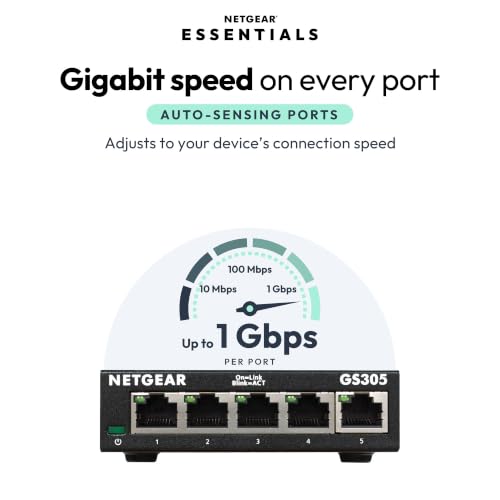
Speed matters most. A gigabit switch can transfer data at up to 1,000 Mbps, or 1 Gbps, per port, which is fast enough for most home internet plans and for local file transfers. A fast ethernet switch, which only supports 100 Mbps, is not a good choice for most users, because it can slow down a gigabit internet connection. Check the switch speed before you buy, and choose a gigabit switch, not a fast ethernet switch, for a home network in 2026.
Port count also matters. A switch with 5 ports is a good choice for a small desk, because it can add 4 extra ports to your router, after you use one port to connect the switch to the router. A switch with 8 ports is a good choice for a home office or a living room, because it can add 7 extra ports. A switch with 16 ports is a good choice for a larger home network, but it may be larger and need more power. Choose a switch by port count for your devices and your room.
Best Budget Ethernet Switch Under 50: Comparison Table
The table below compares seven real, currently sold budget ethernet switches under $50. Rows are sorted by the low end of the typical price range. Ratings reflect overall owner feedback for speed, reliability, and value, not a laboratory test. All switches in this guide are unmanaged, plug-and-play gigabit switches, unless noted.
| Ethernet Switch Model | Ports and Speed | Power and Design | Best For | Typical Price Range | Rating |
|---|---|---|---|---|---|
| TP-Link TL-SG105 Ethernet Switch | 5 ports, Gigabit | Power adapter, metal case, unmanaged | Best budget, for budget ethernet switch under 50 | $19 – $24 | 4.7 / 5 |
| NETGEAR GS305 Ethernet Switch | 5 ports, Gigabit | Power adapter, plastic case, unmanaged | Best NETGEAR 5-Port, for budget ethernet switch under 50 | $21 – $26 | 4.7 / 5 |
| TP-Link TL-SG108 Ethernet Switch | 8 ports, Gigabit | Power adapter, metal case, unmanaged | Best TP-Link 8-Port, for budget ethernet switch under 50 | $24 – $29 | 4.8 / 5 |
| NETGEAR GS308 Ethernet Switch | 8 ports, Gigabit | Power adapter, metal case, unmanaged | Best NETGEAR 8-Port, for budget ethernet switch under 50 | $29 – $34 | 4.8 / 5 |
| TRENDnet TEG-S80g Ethernet Switch | 8 ports, Gigabit | Power adapter, metal case, unmanaged | Best TRENDnet, for budget ethernet switch under 50 | $34 – $39 | 4.7 / 5 |
| D-Link DGS-108 Ethernet Switch | 8 ports, Gigabit | Power adapter, metal case, unmanaged | Best D-Link, for budget ethernet switch under 50 | $39 – $44 | 4.7 / 5 |
| TP-Link TL-SG116 Ethernet Switch | 16 ports, Gigabit | Power adapter, metal case, unmanaged | Best premium, for budget ethernet switch under 50 | $44 – $49 | 4.8 / 5 |

TP-Link 8 Port Gigabit Ethernet Network Switch - Ethernet Splitter | Plug & Play | Fanless | Sturdy Metal w/ Shielded Traffic Optimization | Unmanaged | Lifetime Protection (TL-SG108)
As an Amazon Associate we earn from qualifying purchases. Product prices and availability are accurate as of the date/time indicated.

UGREEN Ethernet Switch, 10-Port PoE Switch, 8 PoE+@60W + 2 Gigabit Uplink | Plug & Play, Standard/Port Isolation(VLAN)/Extend Mode, PoE Auto Recovery, Metal Unmanaged Network Hub for Security Camera
As an Amazon Associate we earn from qualifying purchases. Product prices and availability are accurate as of the date/time indicated.
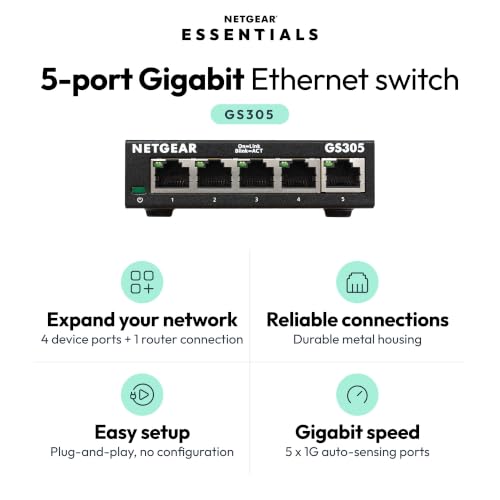
NETGEAR 5-Port Gigabit Ethernet Unmanaged Network Switch Plug & Play GS305 | Home & Office, 5 x 1G Ports, Reliable Wired Connection, Metal Case, Fanless & Silent, Compact, Desktop or Wall Mount




As an Amazon Associate we earn from qualifying purchases. Product prices and availability are accurate as of the date/time indicated.
TP-Link TL-SG105 Ethernet Switch
The TP-Link TL-SG105 Ethernet Switch is a switch with a typical price range of $19 to $24. It is the cheapest switch in this comparison and a practical starting point if you want a low-cost budget ethernet switch under $50. It has 5 gigabit ports, a power adapter, a metal case, and an unmanaged, plug-and-play design, according to the maker.
Choose this switch if you want a simple, affordable switch for a small desk or a home office. The TL-SG105 has a simple setup, a compact design, and a good fit for a beginner with a first ethernet switch. Its 5-port design is good for a small network, but it may not have enough ports for a large home network. If you need more ports, the TP-Link TL-SG108 is a better choice at a slightly higher price.
NETGEAR GS305 Ethernet Switch
The NETGEAR GS305 Ethernet Switch is a switch with a typical price range of $21 to $26. It has 5 gigabit ports, a power adapter, a plastic case, and an unmanaged, plug-and-play design, according to the maker. It is a good choice if you want a NETGEAR switch with a trusted brand for home networking and a simple 5-port design.
This switch is best for a user who wants a NETGEAR 5-port switch for a small desk. The GS305 has a simple setup and a good fit for a beginner with a first ethernet switch. It is more expensive than the TP-Link TL-SG105, but it offers a NETGEAR brand and a similar 5-port gigabit design for a home network.
TP-Link TL-SG108 Ethernet Switch
The TP-Link TL-SG108 Ethernet Switch is a switch with a typical price range of $24 to $29. It has 8 gigabit ports, a power adapter, a metal case, and an unmanaged, plug-and-play design, according to the maker. It is a good choice if you want a TP-Link switch with more ports for a home office or a living room.
Choose this switch if you want a TP-Link 8-port switch for your home network. The TL-SG108 has a simple setup and a good fit for a user who needs more ports than a 5-port switch. It is more expensive than the NETGEAR GS305, but it offers 8 ports instead of 5, and a metal case for better durability.
NETGEAR GS308 Ethernet Switch
The NETGEAR GS308 Ethernet Switch is a switch with a typical price range of $29 to $34. It has 8 gigabit ports, a power adapter, a metal case, and an unmanaged, plug-and-play design, according to the maker. It is a good choice if you want a NETGEAR switch with 8 ports and a metal case for a home network.
This switch is best for a user who wants a NETGEAR 8-port switch for a home office. The GS308 has a simple setup and a good fit for a user who wants a reliable switch for gaming, video calls, and streaming. It is more expensive than the TP-Link TL-SG108, but it offers a NETGEAR brand and a similar 8-port gigabit design for a home network.
TRENDnet TEG-S80g Ethernet Switch
The TRENDnet TEG-S80g Ethernet Switch is a switch with a typical price range of $34 to $39. It has 8 gigabit ports, a power adapter, a metal case, and an unmanaged, plug-and-play design, according to the maker. It is a good choice if you want a TRENDnet switch with a trusted brand for networking and a simple 8-port design for a home network.
Choose this switch if you want a TRENDnet 8-port switch for your home network. The TEG-S80g has a simple setup and a good fit for a user who wants a durable switch for regular use. It is more expensive than the NETGEAR GS308, but it offers a TRENDnet brand and a similar 8-port gigabit design for a home network.
D-Link DGS-108 Ethernet Switch
The D-Link DGS-108 Ethernet Switch is a switch with a typical price range of $39 to $44. It has 8 gigabit ports, a power adapter, a metal case, and an unmanaged, plug-and-play design, according to the maker. It is a good choice if you want a D-Link switch with a trusted brand for home networking and a simple 8-port design.
This switch is best for a user who wants a D-Link 8-port switch for a home office. The DGS-108 has a simple setup and a good fit for a user who wants a reliable switch for work and gaming. It is more expensive than the TRENDnet TEG-S80g, but it offers a D-Link brand and a similar 8-port gigabit design for a home network.
TP-Link TL-SG116 Ethernet Switch
The TP-Link TL-SG116 Ethernet Switch is a switch with a typical price range of $44 to $49. It has 16 gigabit ports, a power adapter, a metal case, and an unmanaged, plug-and-play design, according to the maker. It is the most expensive switch in this comparison, but it is still under $50 at the high end of its typical price range, and it is a premium TP-Link switch with 16 ports for a larger home network.
Choose this switch if you want a premium TP-Link 16-port switch for your home network and you are willing to pay more for it. The TL-SG116 has 16 gigabit ports, a metal case, and a simple plug-and-play design for a large home network. It is a good fit for a serious user with a need for many wired ports. It is not the best choice if you have a small budget, because the TP-Link TL-SG105 offers similar basic gigabit speed at a lower price for a small network.
Buying Guide: How to Choose the Best Budget Ethernet Switch Under 50
1. Choose port count by devices: 5 ports for small desk, 8 ports for home office, 16 ports for large network, check port count
Start with port count when you choose a budget ethernet switch under $50. Choose a switch with 5 ports, such as the TP-Link TL-SG105, if you want a switch for a small desk with a computer, a game console, and a printer. Choose a switch with 8 ports, such as the TP-Link TL-SG108, if you want a switch for a home office or a living room with more devices.
Check port count before you buy. A switch with 5 ports can add 4 extra ports to your router, after you use one port to connect the switch to the router. A switch with 8 ports can add 7 extra ports, and a switch with 16 ports can add 15 extra ports. Count your wired devices before you buy, and choose a switch with at least 2 extra ports for future devices.
2. Check speed, managed vs unmanaged, and power
Check speed first. A gigabit switch can transfer data at up to 1,000 Mbps per port, which is fast enough for most home internet plans and for local file transfers. A fast ethernet switch, which only supports 100 Mbps, is not a good choice for most users, because it can slow down a gigabit internet connection. Choose a gigabit switch, not a fast ethernet switch, for a home network in 2026.
Check managed vs unmanaged next. An unmanaged switch is a good choice for most home users, because it is plug-and-play and does not need any setup. A managed switch can offer more control, such as VLANs and QoS, but it is more expensive and more complicated to set up, and it is rarely under $50. Check power as well. A switch with a power adapter is a good choice for most home networks, because it can power all ports reliably. A switch with PoE, or Power over Ethernet, can power devices such as cameras and access points, but it is usually more expensive than $50.
3. Check cables, placement, and airflow
Check cables before you buy. A Cat5e or Cat6 ethernet cable is a good choice for gigabit speed, because it can support up to 1,000 Mbps over a short distance. A Cat5 cable may only support 100 Mbps, so check your cable type before you use it with a gigabit switch. Use a cable that is long enough to reach from your router to your switch, and from your switch to your devices, without pulling tight.
Check placement as well. A switch with a metal case is usually more durable than a switch with a plastic case, and it can help dissipate heat better. Place your switch on a desk or a shelf with good airflow, away from heat sources and direct sunlight. Do not stack a switch on top of a router or a modem without ventilation, because it can overheat. Clean dust from your switch regularly, and check that the power adapter is plugged in securely.
4. Check security, firmware, and care
Use strong passwords, with two-factor authentication where available, for your router and your accounts. Change the default router password, keep your router firmware updated, and use a wired connection for devices that need a stable connection, such as a work computer or a game console. Back up your files with a 3-2-1 backup: three copies, on two different types of storage, with one copy offsite.
Do not use public Wi-Fi for banking without a VPN. Test your switch speed with a speed test after you install it, so you know it is working correctly. If your switch is slow, check your cables, your router, and your internet plan before you blame the switch. Unplug the switch before you clean it, and do not use water to clean a switch.
Frequently Asked Questions
What is the best budget ethernet switch under 50?
For most home users, the TP-Link TL-SG108 Ethernet Switch, typically $24 to $29, is a strong overall choice because it has 8 gigabit ports, a power adapter, a metal case, and an unmanaged, plug-and-play design, according to the maker, at a low price for a budget ethernet switch under 50. If you want the lowest price, the TP-Link TL-SG105, typically $19 to $24, is a good choice. If you want a premium 16-port switch under $50, the TP-Link TL-SG116, typically $44 to $49, is a good choice. Choose by port count, speed, and budget.
What is the best budget ethernet switch under 50 for gaming?
The best budget ethernet switch under 50 for gaming is the TP-Link TL-SG108 Ethernet Switch, typically $24 to $29, because it is the cheapest 8-port gigabit switch in the table and the only model in that price range with 8 gigabit ports and a metal case. It has 8 gigabit ports, a power adapter, a metal case, and an unmanaged, plug-and-play design, according to the maker. It is a good choice for gaming, but its 8-port design is best for a home office, so choose the TP-Link TL-SG116 if you need 16 ports for a larger gaming setup.
Do I need a gigabit switch under 50?
Do you need a gigabit switch under 50 depends on your internet plan, your devices, and your home network. A gigabit switch is a good choice for most home users, with a speed of up to 1,000 Mbps per port, which is fast enough for most internet plans and for local file transfers. A fast ethernet switch, which only supports 100 Mbps, is not a good choice for most users, because it can slow down a gigabit internet connection. Check your internet speed and your router ports before you buy, and choose a gigabit switch for a home network in 2026.
Can I use a budget ethernet switch with any router?
Can you use a budget ethernet switch with any router depends on your router, your switch, and your cables. A budget ethernet switch, such as the TP-Link TL-SG105, is a good choice for most routers, with a simple plug-and-play design that works with any router that has an ethernet port. Connect one port on the switch to a LAN port on your router with a Cat5e or Cat6 cable, then connect your devices to the other ports on the switch. Check your router manual for LAN port locations, and test your connection after you install the switch.
The best budget ethernet switch under 50 is the one that can give you more wired ports for your home network without slowing down your internet, without needing a complicated setup, and without costing more than $50. Start with the TP-Link TL-SG108 for a reliable 8-port gigabit switch, choose the TP-Link TL-SG105 for the lowest price, or choose the TP-Link TL-SG116 for a premium 16-port switch under $50. Check your port count, use Cat5e or Cat6 cables, and test your speed after installation. With the right switch, you can connect more devices with a stable wired connection every time.
Related guides
- Best Budget Keyboard Wrist Rest for Typing in 2026: HyperX, Razer, Glorious, Kensington, and Fellowes Models Compared for Palm Support, Desk Comfort, and Long Workdays Without the Premium Price
- Best Switch for Streaming Setups in 2026: 6 Top Switch for Streaming Setups Picks, Switches, and Easy Use
- Best AA Batteries for Everyday Use: 6 AA Batteries for Everyday Use in 2026
- Best Gaming Headphones for PC Players in 2026: 7 Best Gaming Headphones for PC Players With Clear Sound, Simple Use, and Easy Use for Gaming Headphones for PC Players
More from Amazon
Programs that pair well with the guide above. Offers and eligibility are set by Amazon and may change.
Free shipping on eligible items, Prime Video and more. Eligible new members can start with a free trial.
Start a Prime free trialAd-free music streaming. Eligible new subscribers can start with a free trial.
Try Music Unlimited freeA Prime membership for ages 18-24 with a trial period. Eligibility is set by Amazon.
See Prime for Young AdultsAudiobooks and podcasts to listen to on the go. Eligible new members can start with a free trial.
Try Audible freeAs an Amazon Associate we earn from qualifying purchases.

Write Your Review
No reviews yet. Be the first to share your experience!