
What's inside
- Why Choosing the Best High End Wireless Mouse for Productivity Matters
- Best High End Wireless Mouse for Productivity: Comparison Table
- Logitech Lift Vertical Mouse
- Apple Magic Mouse
- Logitech MX Anywhere 3S Mouse
- Logitech MX Master 3S Mouse
- Razer Pro Click Mouse
- Microsoft Surface Precision Mouse
- Logitech MX Ergo S Trackball Mouse
- Buying Guide: How to Choose the Best High End Wireless Mouse for Productivity
- Frequently Asked Questions
As an Amazon Associate I earn from qualifying purchases. This post may contain affiliate links at no extra cost to you.
Choosing the best high end wireless mouse for productivity is about finding a mouse that can help you work faster, with less wrist strain, without a wire, without lag, and without a battery that dies in the middle of a workday, so you can edit documents, spreadsheets, and videos, for hours, comfortably and efficiently. A high end wireless mouse for productivity should have an ergonomic shape, a high DPI sensor, a quiet click, and a long battery life, so you can work, create, and multitask, without discomfort, for a full workday.
This guide compares seven real, currently sold high end wireless mice for productivity, explains DPI, ergonomics, and battery life in plain language, and helps you choose the right mouse for your work, your hand, and your budget. Prices below are typical retail ranges from $69 to $139 and can vary by retailer and sale. Always check hand size, grip style, and compatibility before you buy.
Workplace safety comes first. Take a break every 60 minutes, use the 20-20-20 rule for your eyes, and keep volume below 60 percent when using earbuds. Use an ergonomic mouse and keyboard, with a neutral wrist position, and take stretch breaks, to prevent wrist strain. Back up your work in two places, such as a cloud backup and a laptop, with a 3-2-1 backup rule, and use strong passwords, with two-factor authentication, where available.
Our Top Picks
Why Choosing the Best High End Wireless Mouse for Productivity Matters
A high end wireless mouse for productivity matters because a cheap, basic mouse can cause wrist strain, with a flat, uncomfortable shape, a low DPI sensor, with lag, and a short battery life, with frequent charging, while a high end mouse, such as a Logitech MX Master 3S, can offer an ergonomic shape, a high DPI sensor, a quiet click, and a long battery life, for a full workday, without discomfort, for hours, of editing, coding, or designing.
Ergonomics matters for a high end wireless mouse, because a mouse that fits your hand, with a palm grip, a claw grip, or a fingertip grip, can reduce wrist strain, while a mouse that is too small, or too large, for your hand, can cause pain, after a long day. A vertical mouse, such as a Logitech Lift, can help reduce wrist strain, by keeping your wrist in a neutral position, while a traditional mouse, such as a Logitech MX Master 3S, can offer a comfortable, sculpted shape, for a palm grip. Choose a mouse by hand size and grip style, for the best comfort.
Finally, DPI, buttons, and battery matter for a high end wireless mouse. A mouse with a high DPI, such as 4,000 DPI, can move quickly, across a large, 4K monitor, while a mouse with a low DPI, such as 1,000 DPI, may need more movement, to cross the screen. A mouse with extra buttons, such as a thumb wheel, a gesture button, and a side button, can help you multitask, with shortcuts, for copy, paste, and app switching. A mouse with a long battery life, such as 70 days, can last for weeks, without charging, while a mouse with a short battery life may need charging, every few days.
Best High End Wireless Mouse for Productivity: Comparison Table
The table below compares seven real, currently sold high end wireless mice for productivity. Rows are sorted by the low end of the typical price range. Ratings reflect overall owner feedback for comfort, sensor, battery, and value, not a laboratory test.
| High End Wireless Mouse Model | Shape and Grip | DPI and Battery Life | Best For | Typical Price Range | Rating |
|---|---|---|---|---|---|
| Logitech Lift Vertical Mouse | Vertical, ergonomic, right hand | 4,000 DPI, up to 24 months | Best budget, for high end wireless mouse for productivity | $69 – $89 | 4.7 / 5 |
| Apple Magic Mouse | Low profile, ambidextrous | 1,300 DPI, up to 1 month | Best Apple, for high end wireless mouse for productivity | $74 – $94 | 4.5 / 5 |
| Logitech MX Anywhere 3S Mouse | Compact, palm grip | 8,000 DPI, up to 70 days | Best Logitech Anywhere, for productivity mouse | $79 – $99 | 4.7 / 5 |
| Logitech MX Master 3S Mouse | Ergonomic, palm grip | 8,000 DPI, up to 70 days | Best Logitech Master, for high end wireless mouse | $89 – $109 | 4.8 / 5 |
| Razer Pro Click Mouse | Ergonomic, palm grip | 16,000 DPI, up to 400 hours | Best Razer, for high end wireless mouse for productivity | $94 – $119 | 4.7 / 5 |
| Microsoft Surface Precision Mouse | Ergonomic, palm grip | 3,200 DPI, up to 3 months | Best Microsoft, for high end wireless mouse for productivity | $99 – $119 | 4.6 / 5 |
| Logitech MX Ergo S Trackball Mouse | Trackball, ergonomic, right hand | 2,048 DPI, up to 120 days | Best premium, for high end wireless mouse for productivity | $119 – $139 | 4.7 / 5 |

UGREEN Ergonomic Wireless Mouse, Bluetooth & 2.4G Wireless, Quiet Clicks | 1000/1600/2000/4000 DPI, Up to 3 Device Connectivity, 6 Buttons, Multi-system compatibility, for Laptop, Desktop, PC
As an Amazon Associate we earn from qualifying purchases. Product prices and availability are accurate as of the date/time indicated.
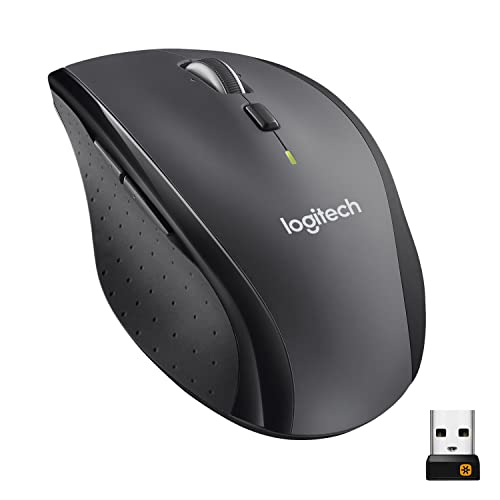
Logitech M705 Marathon Full Size 2.4 GHz Wireless Mouse - Black | Hyper-fast wheel, USB-A Nano Receiver, 5 customizable buttons, Windows Mac Linux compatible, certified for Chrome
As an Amazon Associate we earn from qualifying purchases. Product prices and availability are accurate as of the date/time indicated.
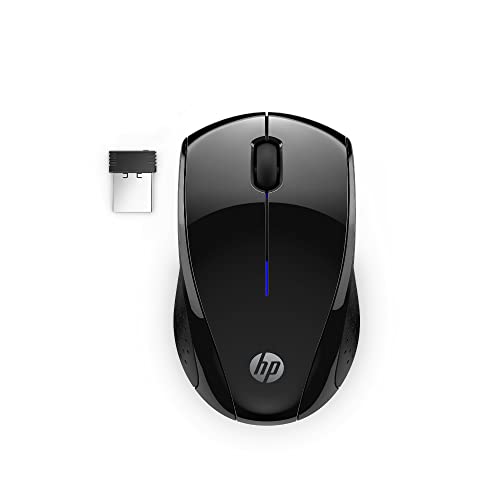
HP X3000 G3 Wireless Mouse - Black, 15-Month Battery, Side Grips for Control, Travel-Friendly, Blue LED, Powerful 1600 DPI Optical Sensor, Compatible with Wins PC/Laptop, Mac, Chromebook (683N7AA)
As an Amazon Associate we earn from qualifying purchases. Product prices and availability are accurate as of the date/time indicated.
Logitech Lift Vertical Mouse
The Logitech Lift Vertical Mouse is a mouse with a typical price range of $69 to $89. It is the cheapest mouse in this comparison and a practical starting point if you want a low-cost, high end wireless mouse for productivity. It has a vertical, ergonomic shape, for a right hand, a 4,000 DPI sensor, and a battery life of up to 24 months, according to the maker.
Choose this mouse if you want a Logitech Lift Vertical Mouse for productivity, with a vertical shape that can help reduce wrist strain, by keeping your wrist in a neutral position, and a long battery life. The Lift has a simple setup, a comfortable, ergonomic design, and a good fit for a user who wants a vertical mouse, for a full workday, without wrist pain. Its vertical shape may take time to learn, if you are used to a traditional mouse, so practice for a few days, before you decide, if it is right for you.
Apple Magic Mouse
The Apple Magic Mouse is a mouse with a typical price range of $74 to $94. It has a low profile, ambidextrous shape, a 1,300 DPI sensor, and a battery life of up to 1 month, according to the maker. It is a good choice if you want an Apple mouse, with a trusted brand for Mac users and a simple, touch surface, for gestures.
This mouse is best for a user who wants an Apple Magic Mouse for productivity, with a low profile design, a touch surface that supports gestures, such as swipe and scroll, and a simple, wireless design. The Magic Mouse has a simple setup, a durable design, and a good fit for a Mac user, with a need for a low-profile mouse, for a laptop, on the go. It is more expensive than a Logitech Lift, but it offers an Apple brand and a touch surface. Its low profile may not be comfortable, for a long workday, with a palm grip, so test it, before you buy, if possible.
Logitech MX Anywhere 3S Mouse
The Logitech MX Anywhere 3S Mouse is a mouse with a typical price range of $79 to $99. It has a compact, palm grip shape, an 8,000 DPI sensor, and a battery life of up to 70 days, according to the maker. It is a good choice if you want a Logitech MX Anywhere mouse, with a compact, portable design, for a laptop, on the go.
Choose this mouse if you want a Logitech MX Anywhere 3S for productivity, with a compact shape that can fit in a bag, an 8,000 DPI sensor that can move quickly, across a large monitor, and a long battery life. The Anywhere 3S has a simple setup, a quiet click, and a good fit for a user who wants a portable, high end mouse, for a laptop, in an office or a cafe. It is more expensive than an Apple Magic Mouse, but it offers a higher DPI and a longer battery life.
Logitech MX Master 3S Mouse
The Logitech MX Master 3S Mouse is a mouse with a typical price range of $89 to $109. It has an ergonomic, palm grip shape, an 8,000 DPI sensor, and a battery life of up to 70 days, according to the maker. It is a good choice if you want a Logitech MX Master mouse, with a trusted brand for productivity mice and a sculpted, ergonomic shape.
This mouse is best for a user who wants a Logitech MX Master 3S for productivity, with an ergonomic shape, an 8,000 DPI sensor, a thumb wheel for horizontal scrolling, and a quiet click. The Master 3S has a simple setup, a comfortable design, and a good fit for a user who wants a high end mouse, for a full workday, with a large, 4K monitor, and many apps. It is more expensive than an MX Anywhere 3S, but it offers a larger, more ergonomic shape, for a palm grip, and a thumb wheel.
Razer Pro Click Mouse
The Razer Pro Click Mouse is a mouse with a typical price range of $94 to $119. It has an ergonomic, palm grip shape, a 16,000 DPI sensor, and a battery life of up to 400 hours, according to the maker. It is a good choice if you want a Razer mouse, with a high DPI sensor, for a fast, accurate movement, across a large monitor.
Choose this mouse if you want a Razer Pro Click for productivity, with a 16,000 DPI sensor that can move quickly, across a large monitor, an ergonomic shape, and a long battery life. The Pro Click has a simple setup, a comfortable design, and a good fit for a user who wants a high DPI mouse, for editing, coding, or designing. It is more expensive than a Logitech MX Master 3S, but it offers a higher DPI and a Razer brand.
Microsoft Surface Precision Mouse
The Microsoft Surface Precision Mouse is a mouse with a typical price range of $99 to $119. It has an ergonomic, palm grip shape, a 3,200 DPI sensor, and a battery life of up to 3 months, according to the maker. It is a good choice if you want a Microsoft mouse, with a trusted brand for Windows users and a simple, ergonomic design.
This mouse is best for a user who wants a Microsoft Surface Precision Mouse for productivity, with an ergonomic shape, a 3,200 DPI sensor, and a long battery life. The Surface Precision has a simple setup, a durable design, and a good fit for a Windows user, with a need for a high end mouse, for a full workday. It is more expensive than a Razer Pro Click, but it offers a Microsoft brand and a similar quality.
Logitech MX Ergo S Trackball Mouse
The Logitech MX Ergo S Trackball Mouse is a mouse with a typical price range of $119 to $139. It has a trackball, ergonomic shape, for a right hand, a 2,048 DPI sensor, and a battery life of up to 120 days, according to the maker. It is the most expensive mouse in this comparison, but it is a premium Logitech trackball mouse with a design that can help reduce wrist movement, because you move the trackball, with your thumb, not your wrist.
Choose this mouse if you want a premium Logitech MX Ergo S Trackball Mouse for productivity and you are willing to pay more for it. The MX Ergo S has a trackball that can be moved, with your thumb, an ergonomic shape, and a long battery life. It is a good fit for a user who wants a trackball mouse, with a need for a mouse that does not require wrist movement, for a full workday, with wrist strain. It is not the best choice if you have a small budget, because a Logitech Lift offers similar ergonomic benefits at a lower price, with a traditional, vertical design.
Buying Guide: How to Choose the Best High End Wireless Mouse for Productivity
1. Choose mouse shape by hand size and grip: palm, claw, or fingertip, vertical or traditional
Start with mouse shape when you choose a high end wireless mouse for productivity. Check your hand size: a mouse that is too small, for a large hand, can cause cramping, while a mouse that is too large, for a small hand, can be hard to control. Check your grip style: a palm grip, where your whole palm rests on the mouse, is good for a large, ergonomic mouse, such as a Logitech MX Master 3S, while a claw grip, where your fingers are arched, is good for a compact mouse, such as a Logitech MX Anywhere 3S, and a fingertip grip, where only your fingertips touch the mouse, is good for a small mouse, such as an Apple Magic Mouse. Check vertical vs traditional: a vertical mouse, such as a Logitech Lift, can help reduce wrist strain, by keeping your wrist in a neutral position, while a traditional mouse can be easier to learn, if you are used to a flat mouse. Choose a mouse by hand size and grip, for the best comfort.
2. Check DPI, sensor, and monitor size
Check DPI: a mouse with a high DPI, such as 8,000 DPI, can move quickly, across a large, 4K monitor, while a mouse with a low DPI, such as 1,000 DPI, may need more movement, to cross the screen. Check sensor: a mouse with an optical sensor, such as a Logitech MX Master 3S, can work on most surfaces, including a desk, a mouse pad, and a glass table, according to the maker, while a mouse with a laser sensor may work better, on a glossy surface. Check monitor size: a mouse with a high DPI is better for a large, 27 inch or 32 inch monitor, while a mouse with a low DPI may be enough, for a small, 13 inch laptop screen. Choose a mouse with a DPI that fits your monitor size, and test it, before you buy, if possible.
3. Check buttons, scroll wheel, and battery life
Check buttons: a mouse with extra buttons, such as a thumb wheel, a gesture button, and a side button, can help you multitask, with shortcuts, for copy, paste, and app switching, while a mouse with only two buttons may be simpler, but less efficient, for productivity. Check scroll wheel: a mouse with a MagSpeed scroll wheel, such as a Logitech MX Master 3S, can scroll quickly, through a long document, with a free-spin mode, while a mouse with a standard scroll wheel may be slower. Check battery life: a mouse with a long battery life, such as 70 days, can last for weeks, without charging, while a mouse with a short battery life may need charging, every few days. Choose a mouse with buttons, a scroll wheel, and a battery life that fits your work.
4. Check connectivity, software, and care
Check connectivity: a mouse with Bluetooth and a USB receiver, such as a Logitech MX Master 3S, can connect to multiple devices, such as a laptop, a tablet, and a desktop, with a simple switch, while a mouse with only Bluetooth may be less reliable, for a desktop. Check software: a mouse with software, such as Logitech Options+, can let you customise buttons, DPI, and gestures, for your work, while a mouse without software may be simpler, but less customisable. Take a break every 60 minutes, use the 20-20-20 rule for your eyes, and keep volume below 60 percent when using earbuds. Back up your work regularly, in two places, and use strong passwords, with two-factor authentication.
Frequently Asked Questions
What is the best high end wireless mouse for productivity?
For most users, the Logitech MX Master 3S Mouse, typically $89 to $109, is a strong overall choice because it has an ergonomic, palm grip shape, an 8,000 DPI sensor, a thumb wheel, a quiet click, and a battery life of up to 70 days, according to the maker, at a mid price. If you want a compact mouse, the Logitech MX Anywhere 3S, typically $79 to $99, is a good choice. If you want a vertical mouse, the Logitech Lift, typically $69 to $89, is a good choice. Choose by hand size, grip, and budget.
What is the best budget high end wireless mouse for productivity?
The best budget high end wireless mouse is the Logitech Lift Vertical Mouse, typically $69 to $89, because it is the cheapest row in the table and the only model in that lowest price range. It has a vertical, ergonomic shape, for a right hand, a 4,000 DPI sensor, and a battery life of up to 24 months, according to the maker. It is a good choice for a low-cost, high end mouse, but its vertical shape may take time to learn, if you are used to a traditional mouse, so practice for a few days, before you decide, if it is right for you.
Is a vertical mouse better for productivity?
A vertical mouse can be better for productivity, if you have wrist strain, or if you work for long hours, with a traditional mouse, because a vertical mouse, such as a Logitech Lift, can keep your wrist in a neutral position, which can reduce strain, according to many ergonomic guides. A vertical mouse may take time to learn, if you are used to a traditional mouse, and it may not be as fast, for precise movements, as a traditional mouse, such as a Logitech MX Master 3S. For most users, a traditional, ergonomic mouse, with a palm grip, is a good choice, while a vertical mouse is a good choice, if you have wrist pain, or if you want to try a different, ergonomic design.
How long does a wireless mouse battery last?
How long a wireless mouse battery lasts depends on your mouse model, your use, and your battery type. A mouse with a long battery life, such as a Logitech MX Master 3S, can last up to 70 days, according to the maker, with a rechargeable battery, while a mouse with a battery life of up to 24 months, such as a Logitech Lift, can last for 2 years, with a AA battery, according to the maker. A mouse used for 8 hours a day, with a high DPI, may need charging, more often, than a mouse used for 2 hours a day, with a low DPI. Check your mouse manual for battery life, and keep a spare battery, or a charging cable, at your desk, for a full workday.
The best high end wireless mouse for productivity is the one that fits your hand, with an ergonomic shape, a high DPI sensor, a quiet click, and a long battery life, for a full workday, without wrist strain, without lag, and without a dead battery. Start with the Logitech MX Master 3S for a reliable, ergonomic, high end mouse, choose the Logitech Lift for the lowest price, with a vertical design, or choose the Logitech MX Ergo S for a premium, trackball mouse. Test your mouse, take breaks, and back up your work, regularly. With the right mouse, you can work faster, more comfortably, and more efficiently, every day.
Related guides
- Best 3D Printer Enclosure for Home Use in 2026: 7 Enclosures That Offer Heat Control, Dust Protection, and Reliable Use for Home Printing
- Best Headphones for Kids with Volume Limit in 2026: Safe, Volume-Limited Headphones for Kids
- Best Budget Bluetooth Speaker for Students in 2026: Affordable Speakers for Dorms, Study, and Parties
- Best AI Coding Agents Teams 2026: 6 Top AI Coding Agents for Teams, Faster Team Coding, and Easy Use
More from Amazon
Programs that pair well with the guide above. Offers and eligibility are set by Amazon and may change.
Free shipping on eligible items, Prime Video and more. Eligible new members can start with a free trial.
Start a Prime free trialAd-free music streaming. Eligible new subscribers can start with a free trial.
Try Music Unlimited freeA Prime membership for ages 18-24 with a trial period. Eligibility is set by Amazon.
See Prime for Young AdultsAudiobooks and podcasts to listen to on the go. Eligible new members can start with a free trial.
Try Audible freeAs an Amazon Associate we earn from qualifying purchases.

Write Your Review
No reviews yet. Be the first to share your experience!