
What's inside
- Why Choosing the Best Budget USB Flash Drive Under 30 Matters
- Best Budget USB Flash Drive Under 30: Comparison Table
- PNY Turbo Attache 128GB Flash Drive
- SanDisk Ultra Shift 128GB Flash Drive
- Kingston DataTraveler Kyson 128GB Flash Drive
- Samsung FIT Plus 128GB Flash Drive
- SanDisk Ultra Dual Drive USB-C 128GB Flash Drive
- Samsung BAR Plus 128GB Flash Drive
- Kingston DataTraveler Exodia 256GB Flash Drive
- Buying Guide: How to Choose the Best Budget USB Flash Drive Under 30
- Frequently Asked Questions
As an Amazon Associate I earn from qualifying purchases. This post may contain affiliate links at no extra cost to you.
Choosing the best budget USB flash drive under 30 is about finding a drive that is fast enough to transfer large files, large enough to hold your documents, photos, and videos, and reliable enough to last for many uses, without spending more than $30. A budget flash drive under $30 can be a good choice for school, work, and backup, if you choose the right capacity, speed, and connector.
This guide compares seven real, currently sold budget USB flash drives under $30, explains capacity, USB speed, and USB-A vs USB-C in plain language, and helps you choose the right drive for your computer, your files, and your budget. Prices below are typical retail ranges from $9 to $27 and can vary by retailer and sale. Always check capacity, speed, and connector before you buy.
Data safety is simple but important. Back up your files in at least two places, such as a flash drive and a cloud service, and do not store the only copy of an important file on a single flash drive. Eject the drive safely before you remove it, keep it dry and away from heat, and do not use a damaged drive. Take breaks every 60 minutes, use the 20-20-20 rule for your eyes, and keep volume below 60 percent when using a headset.
Our Top Picks
Why Choosing the Best Budget USB Flash Drive Under 30 Matters
A budget USB flash drive under $30 matters because it lets you carry files between computers, back up documents, and share photos and videos, without needing a large external hard drive or a cloud subscription. A flash drive that is too slow can take a long time to transfer a large video, while a flash drive that is too small can fill up quickly with photos. A flash drive that is reliable, with a good warranty, is better than a flash drive that is cheap but fails after a few uses.
Capacity matters for a flash drive under $30, because a 128GB drive can hold about 25,000 photos, or about 30 hours of video, or many documents, while a 64GB drive can hold about half that. A 256GB drive can hold even more, but it may be more expensive. For most school and work use, a 128GB drive is enough, while a 256GB drive is better for video, backup, and large files. Check your file sizes before you choose a capacity.
Finally, speed and connector matter for a flash drive under $30. A USB 3.0 or USB 3.2 drive is faster than a USB 2.0 drive, with a transfer speed of up to 100 MB/s or more, compared to 10 to 20 MB/s for USB 2.0. A USB-C drive is better for a new laptop, phone, or tablet, while a USB-A drive is better for an older computer. A dual drive, with both USB-A and USB-C, works with both types of devices, which is useful if you have a laptop and a phone.
Best Budget USB Flash Drive Under 30: Comparison Table
The table below compares seven real, currently sold budget USB flash drives under $30. Rows are sorted by the low end of the typical price range. Ratings reflect overall owner feedback for speed, capacity, durability, portability, and value, not a laboratory test.
| USB Flash Drive Model | Capacity and Speed | Connector and Design | Best For | Typical Price Range | Rating |
|---|---|---|---|---|---|
| PNY Turbo Attache 128GB Flash Drive | 128GB, USB 3.0, up to 100 MB/s | USB-A, slide design | Best budget, for flash drive under 30 | $9 – $14 | 4.6 / 5 |
| SanDisk Ultra Shift 128GB Flash Drive | 128GB, USB 3.0, up to 100 MB/s | USB-A, slide design | Best SanDisk Shift, for under 30 | $11 – $17 | 4.7 / 5 |
| Kingston DataTraveler Kyson 128GB Flash Drive | 128GB, USB 3.2, up to 200 MB/s | USB-A, metal design | Best Kingston Kyson, for under 30 | $12 – $18 | 4.7 / 5 |
| Samsung FIT Plus 128GB Flash Drive | 128GB, USB 3.1, up to 300 MB/s | USB-A, small plug-in design | Best Samsung FIT, for under 30 | $14 – $19 | 4.8 / 5 |
| SanDisk Ultra Dual Drive USB-C 128GB Flash Drive | 128GB, USB 3.1, up to 150 MB/s | USB-C and USB-A, dual design | Best SanDisk Dual, for under 30 | $16 – $22 | 4.7 / 5 |
| Samsung BAR Plus 128GB Flash Drive | 128GB, USB 3.1, up to 300 MB/s | USB-A, metal design | Best Samsung BAR, for under 30 | $19 – $25 | 4.8 / 5 |
| Kingston DataTraveler Exodia 256GB Flash Drive | 256GB, USB 3.2, up to 100 MB/s | USB-A, slide design | Best premium, for flash drive under 30 | $21 – $27 | 4.7 / 5 |
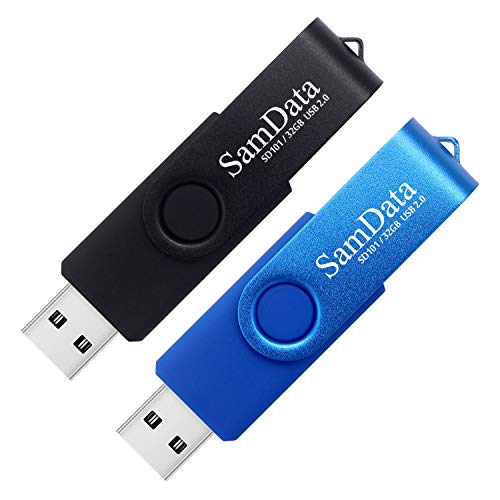
SamData 32GB USB Flash Drives 2 Pack 32GB Thumb Drives Memory Stick Jump Drive with LED Light for Storage and Backup (2 Colors: Black Blue)
As an Amazon Associate we earn from qualifying purchases. Product prices and availability are accurate as of the date/time indicated.
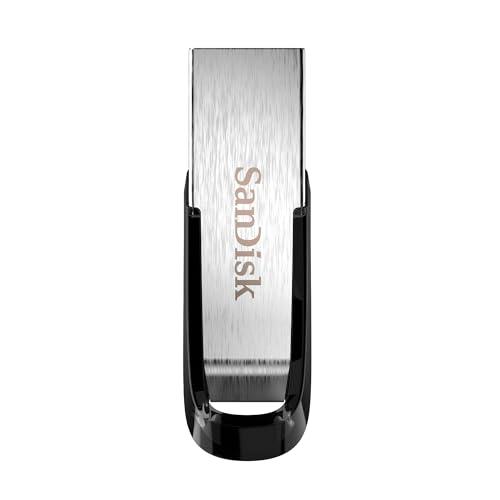
SANDISK 128GB Ultra Flair, USB-A Flash Drive, Up to 150MB/s Read Speeds | USB Flash Drive, Up to 15x Faster than standard 2.0, Password Protection, Durable, Sleek Metal Casing, USB 3.0, Silver/Black
As an Amazon Associate we earn from qualifying purchases. Product prices and availability are accurate as of the date/time indicated.
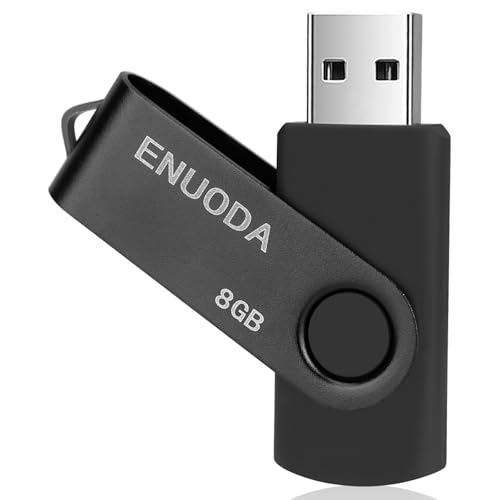
8GB Flash Drive ENUODA 1 Pack Thumb Drive 8GB USB 2.0 Memory Stick Jump Drive Pen Drive for File Storage and Data Transfer (Black)
As an Amazon Associate we earn from qualifying purchases. Product prices and availability are accurate as of the date/time indicated.
PNY Turbo Attache 128GB Flash Drive
The PNY Turbo Attache 128GB Flash Drive is a USB flash drive with a typical price range of $9 to $14. It is the cheapest drive in this comparison and a practical starting point if you want a low-cost flash drive under $30. It has a capacity of 128GB, a USB 3.0 speed of up to 100 MB/s, a USB-A connector, and a slide design.
Choose this drive if you want a PNY Turbo Attache for school or work, with a low price and a large 128GB capacity. The Turbo Attache has a slide design that protects the connector when not in use, and a USB 3.0 speed that is fast enough for documents, photos, and videos. It is a good fit for a student on a budget, with a drive for assignments and backup. It is not the fastest drive in this guide, but it is fast enough for most everyday use.
SanDisk Ultra Shift 128GB Flash Drive
The SanDisk Ultra Shift 128GB Flash Drive is a USB flash drive with a typical price range of $11 to $17. It has a capacity of 128GB, a USB 3.0 speed of up to 100 MB/s, a USB-A connector, and a slide design. It is a good choice if you want a SanDisk drive under $30, with a trusted brand and a simple design.
This drive is best for a user who wants a SanDisk Ultra Shift for school or work, with a 128GB capacity and a slide design that is easy to use. The Ultra Shift has a USB 3.0 speed, a compact size, and a durable plastic body. It is a good fit for a student or office worker who needs a reliable drive for documents and photos. It is more expensive than a PNY drive, but it offers a trusted brand and a simple, reliable design.
Kingston DataTraveler Kyson 128GB Flash Drive
The Kingston DataTraveler Kyson 128GB Flash Drive is a USB flash drive with a typical price range of $12 to $18. It has a capacity of 128GB, a USB 3.2 speed of up to 200 MB/s, a USB-A connector, and a metal design. It is a good choice if you want a Kingston drive under $30, with a faster speed and a metal body.
Choose this drive if you want a Kingston Kyson for school or work, with a 200 MB/s speed that is faster than a basic USB 3.0 drive, and a metal design that is durable and premium. The Kyson has a 128GB capacity, a USB-A connector, and a capless design with a metal loop for a keychain. It is a good fit for a user who wants a fast, durable drive for large files, without spending more than $20.
Samsung FIT Plus 128GB Flash Drive
The Samsung FIT Plus 128GB Flash Drive is a USB flash drive with a typical price range of $14 to $19. It has a capacity of 128GB, a USB 3.1 speed of up to 300 MB/s, a USB-A connector, and a small plug-in design. It is a good choice if you want a Samsung drive under $30, with a very fast speed and a tiny size.
This drive is best for a user who wants a Samsung FIT Plus for a laptop, with a small design that stays plugged in without sticking out much, and a 300 MB/s speed that is the fastest in this comparison, tied with the Samsung BAR Plus. The FIT Plus is good for a laptop that needs extra storage, or for a user who wants to leave a drive plugged in. It is a good fit for a student or worker who needs a fast, compact drive for large files. It is small, so keep it in a safe place to avoid losing it.
SanDisk Ultra Dual Drive USB-C 128GB Flash Drive
The SanDisk Ultra Dual Drive USB-C 128GB Flash Drive is a USB flash drive with a typical price range of $16 to $22. It has a capacity of 128GB, a USB 3.1 speed of up to 150 MB/s, and both USB-C and USB-A connectors, in a dual design. It is a good choice if you want a SanDisk dual drive for a laptop and a phone, with both connectors in one drive.
Choose this drive if you want a SanDisk Ultra Dual Drive for a new laptop with USB-C, and an older computer with USB-A, without carrying two drives. The dual design has a USB-C connector on one end and a USB-A connector on the other, so you can transfer files between a phone, a tablet, and a computer. It is a good fit for a student who uses a phone and a laptop, with a drive that works with both. It is more expensive than a basic USB-A drive, but it offers more flexibility.
Samsung BAR Plus 128GB Flash Drive
The Samsung BAR Plus 128GB Flash Drive is a USB flash drive with a typical price range of $19 to $25. It has a capacity of 128GB, a USB 3.1 speed of up to 300 MB/s, a USB-A connector, and a metal design. It is a good choice if you want a Samsung BAR Plus drive under $30, with a fast speed and a durable metal body.
This drive is best for a user who wants a Samsung BAR Plus for school or work, with a 300 MB/s speed, a metal body that is durable and premium, and a keychain loop for carrying. The BAR Plus has a 128GB capacity, a USB-A connector, and a design that is resistant to water, shock, and temperature. It is a good fit for a user who wants a durable, fast drive for everyday use, with a trusted brand. It is more expensive than a PNY drive, but it offers a faster speed and a stronger body.
Kingston DataTraveler Exodia 256GB Flash Drive
The Kingston DataTraveler Exodia 256GB Flash Drive is a USB flash drive with a typical price range of $21 to $27. It has a capacity of 256GB, a USB 3.2 speed of up to 100 MB/s, a USB-A connector, and a slide design. It is the most expensive drive in this comparison, but it is a premium Kingston drive with the largest capacity in this guide, at 256GB, for under $30.
Choose this drive if you want a Kingston Exodia with a 256GB capacity for large files, backup, and video, and you are willing to pay more for it. The Exodia has a slide design, a USB-A connector, and a 100 MB/s speed, which is slower than a Samsung FIT Plus, but it offers twice the capacity of a 128GB drive. It is a good fit for a user who needs a large drive for backup, with many photos, videos, and documents. It is not the best choice if you need a very fast drive, because a Samsung drive offers a faster speed at a similar price.
Buying Guide: How to Choose the Best Budget USB Flash Drive Under 30
1. Choose capacity by your files: 128GB for most, 256GB for video and backup
Start with capacity. A 128GB drive is enough for most school and work use, because it can hold about 25,000 photos, or about 30 hours of video, or many documents. A 256GB drive is better for video, backup, and large files, because it can hold twice as much. A 64GB drive is cheaper, but it may fill up quickly with photos and videos. Check your file sizes: if you have many large videos, choose a 256GB drive, such as a Kingston Exodia 256GB. If you have mostly documents and photos, a 128GB drive is enough.
2. Check speed, USB version, and connector
Check speed: a USB 3.0 or USB 3.2 drive with a speed of 100 to 300 MB/s is much faster than a USB 2.0 drive, with a speed of 10 to 20 MB/s. A drive with a speed of 300 MB/s, such as a Samsung FIT Plus, can transfer a 1GB file in about 3 seconds, while a drive with a speed of 100 MB/s can transfer the same file in about 10 seconds. Check USB version: USB 3.0, USB 3.1, and USB 3.2 are all faster than USB 2.0, and they work with USB 2.0 ports, but at a slower speed. Check connector: a USB-A drive works with most older computers, a USB-C drive works with new laptops and phones, and a dual drive works with both.
3. Check design, durability, and warranty
Check design: a drive with a slide design protects the connector when not in use, while a drive with a cap can lose the cap. A drive with a small plug-in design, such as a Samsung FIT Plus, is good for a laptop, but it can be easy to lose. Check durability: a metal drive, such as a Samsung BAR Plus or Kingston Kyson, is more durable than a plastic drive, and it is resistant to water, shock, and temperature. Check warranty: a drive with a 5 year warranty is better than a drive with a 1 year warranty, because it shows the maker trusts the drive. Keep your drive dry and away from heat.
4. Check backup, safety, and care
Back up your files in at least two places, such as a flash drive and a cloud service, and do not store the only copy of an important file on a single flash drive. Eject the drive safely before you remove it, by using the eject option on your computer, to avoid corrupting files. Keep your drive in a safe place, with a keychain or a case, and do not leave it in a hot car. Take breaks every 60 minutes, use the 20-20-20 rule for your eyes, and keep volume below 60 percent when using a headset. If your drive is damaged, do not use it, and replace it with a new drive.
Frequently Asked Questions
What is the best budget USB flash drive under 30?
For most users, the Samsung FIT Plus 128GB Flash Drive, typically $14 to $19, is a strong overall choice because it has a capacity of 128GB, a USB 3.1 speed of up to 300 MB/s, a USB-A connector, and a small plug-in design, at a low price. If you want the largest capacity, the Kingston DataTraveler Exodia 256GB, typically $21 to $27, is a good choice. If you want a dual drive, the SanDisk Ultra Dual Drive USB-C 128GB, typically $16 to $22, is a good choice. Choose by capacity, speed, and connector.
What is the best budget USB flash drive under 30 for school?
The best budget USB flash drive is the PNY Turbo Attache 128GB Flash Drive, typically $9 to $14, because it is the cheapest row in the table and the only model in that lowest price range. It has a capacity of 128GB, a USB 3.0 speed of up to 100 MB/s, a USB-A connector, and a slide design. It is a good choice for a low-cost drive for school, but it is not the fastest drive in this guide, so it is best for documents and photos, not for very large videos.
How much storage do I need in a flash drive?
For most school and work use, 128GB is enough, because it can hold about 25,000 photos, or about 30 hours of video, or many documents. For video, backup, and large files, 256GB is better, because it can hold twice as much. A 64GB drive can hold about 12,000 photos, or about 15 hours of video, but it may fill up quickly. Check your file sizes in your computer, and choose a drive with at least twice the space you need now, so you have room for future files.
Is USB-C better than USB-A for a flash drive?
USB-C is better than USB-A for a new laptop, phone, or tablet, because most new devices use USB-C, and USB-C is smaller and reversible, so you can plug it in either way. USB-A is better for an older computer, because most older computers have USB-A ports. A dual drive, with both USB-C and USB-A, is the best choice if you have both types of devices, because it works with both. Check your computer ports before you buy, and choose a drive with the connector that matches your devices.
The best budget USB flash drive under 30 is the one that is large enough for your files, fast enough to transfer them quickly, and reliable enough to last for many uses, without spending more than $30. Start with the Samsung FIT Plus 128GB for a fast, compact drive, choose the PNY Turbo Attache 128GB for a low-cost drive, or choose the Kingston DataTraveler Exodia 256GB for the largest capacity. Back up your files in two places, eject the drive safely, and keep it dry. With the right flash drive, you can carry your files anywhere, with speed and reliability.
Related guides
- Best Smart Light Strip for TV Backlight in 2026: TV Backlights That Sync with Your Screen
- Best Sit Stand Desk for Laptops in 2026: 7 Sit Stand Desks That Are Perfect for Laptop Users, With Easy Height Adjustment and Enough Space for a Laptop and Monitor
- Best Controller vs Keyboard for Console Gaming in 2026: 6 Top Controllers vs Keyboards for Console Gaming, Comfortable Console Play, and Easy Use
- Best Bluetooth Speaker for Shower Use in 2026: 7 Speakers With Waterproof Design, Clear Sound, and Simple Use for Showers
More from Amazon
Programs that pair well with the guide above. Offers and eligibility are set by Amazon and may change.
Free shipping on eligible items, Prime Video and more. Eligible new members can start with a free trial.
Start a Prime free trialAd-free music streaming. Eligible new subscribers can start with a free trial.
Try Music Unlimited freeA Prime membership for ages 18-24 with a trial period. Eligibility is set by Amazon.
See Prime for Young AdultsAudiobooks and podcasts to listen to on the go. Eligible new members can start with a free trial.
Try Audible freeAs an Amazon Associate we earn from qualifying purchases.

Write Your Review
No reviews yet. Be the first to share your experience!