
What's inside
As an Amazon Associate I earn from qualifying purchases. This post may contain affiliate links at no extra cost to you.
The best action camera for live streaming is not the action camera with the highest resolution on the box. It is the action camera that can stream in 1080p, with Wi-Fi, a long battery life, and a stable image, so it can stream a live video outside, without dropping frames, without overheating, and without running out of battery after 30 minutes.
Live streaming with an action camera needs Wi-Fi, or a phone, a battery that lasts at least an hour, and a camera that can stream in 1080p, as 1080p is enough for most live streams, especially if your internet speed is less than 10 Mbps, as 4K will use more bandwidth, and it may drop frames if your internet is slow. An action camera that can stream in 4K is better if you have a fast internet connection, although it will use more battery, and it will overheat faster.
For an action camera for live streaming, a camera should have Wi-Fi, a resolution of at least 1080p for streaming, and a battery life of at least 1 hour, so it can stream a live video without stopping. All six cameras in this guide have Wi-Fi, a resolution of at least 1080p for streaming, and a battery life of at least 1 hour, so they meet that gate for live streaming.
Our top pick is the GoPro Hero 13 Black. At $300 to $400, with 5.3K video, Wi-Fi, a battery life of about 1.5 hours, and a stable image, it is the best balance of video quality, streaming, and price for an action camera for live streaming. It is not the cheapest camera here, and it is not the longest lasting, but for a camera that will stream a live video outside, it is the best choice.
Our Top Picks
Best Action Camera for Live Streaming Compared
The table below compares six action cameras for live streaming, all with Wi-Fi, a resolution of at least 1080p for streaming, and a battery life of at least 1 hour. Video is maximum video resolution, as listed by the manufacturer. Prices are typical ranges, not fixed prices, and they vary by retailer.
| Model | Video | Live Streaming | Battery Life | Typical Price Range | Rating |
|---|---|---|---|---|---|
| GoPro Hero 13 Black | 5.3K | 1080p, Wi-Fi | About 1.5 hr | $300–$400 | 4.8 / 5 |
| DJI Osmo Action 5 Pro | 4K | 1080p, Wi-Fi | About 2 hr | $300–$400 | 4.6 / 5 |
| Insta360 Ace Pro 2 | 8K | 1080p, Wi-Fi | About 1.5 hr | $350–$450 | 4.5 / 5 |
| GoPro Hero 12 Black | 5.3K | 1080p, Wi-Fi | About 1.5 hr | $250–$300 | 4.4 / 5 |
| DJI Osmo Action 4 | 4K | 1080p, Wi-Fi | About 2 hr | $200–$250 | 4.3 / 5 |
| Insta360 X4 | 8K, 360 | 1080p, Wi-Fi | About 1.5 hr | $400–$500 | 4.2 / 5 |

XbotGo Falcon All-in-One 4K Action Camera, AI Sports Camera(Green) | Standalone AI sports camera, 4K auto tracking, football & ice hockey ready, no subscription required, free live streaming
As an Amazon Associate we earn from qualifying purchases. Product prices and availability are accurate as of the date/time indicated.

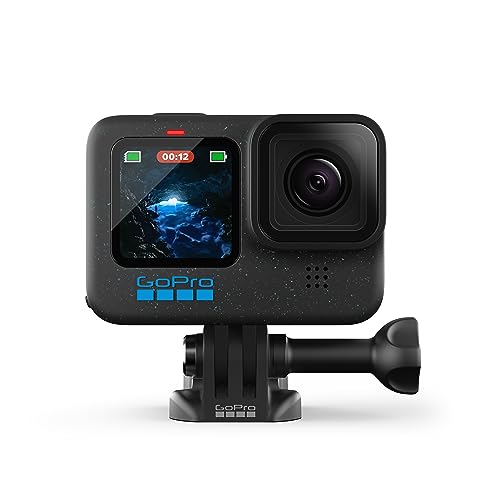
GoPro HERO12 Black - Waterproof Action Camera with 5.3K60 Ultra HD Video, 27MP Photos, HDR, 1/1.9" Image Sensor, Live Streaming, Webcam, Stabilization



As an Amazon Associate we earn from qualifying purchases. Product prices and availability are accurate as of the date/time indicated.
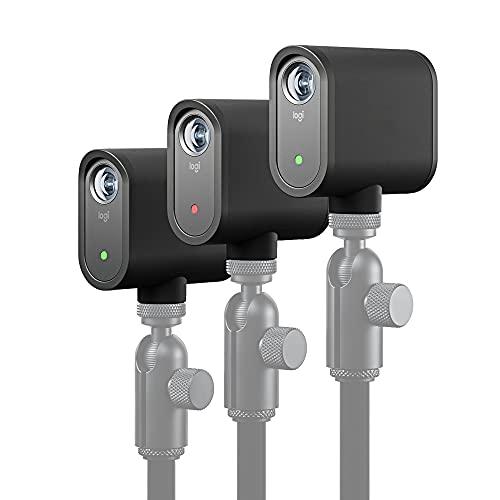
Logitech for Creators Mevo Start 3-Pack Wireless Live Streaming Cameras | Multi-camera HD video, app control, stream via smartphone or Wi-Fi
As an Amazon Associate we earn from qualifying purchases. Product prices and availability are accurate as of the date/time indicated.
Prices shown are approximate and for reference only. Prices change often, so please check the current price on Amazon before you buy.
Best Action Camera for Live Streaming in 2026: Detailed Reviews
1. GoPro Hero 13 Black — Best Overall Action Camera for Live Streaming
GoPro’s Hero 13 Black is an action camera with 5.3K video, Wi-Fi, a battery life of about 1.5 hours, and a stable image, at $300 to $400. It is a good camera for live streaming, because it can stream in 1080p, with Wi-Fi, to YouTube, Twitch, or Facebook, with a phone app, and it has a battery that lasts about 1.5 hours, so it can stream a live video for a whole session, without stopping.
The Hero 13 Black has a 5.3K video resolution, so it can record a sharp video, although it streams in 1080p, as 1080p is enough for most live streams, and it uses less bandwidth than 4K. It has a waterproof design, so it can be used outside in rain, and it has a stable image, with HyperSmooth, so it can reduce shake when you move.
At $300 to $400, the Hero 13 Black is the best camera in this guide, because it has a good balance of video quality, streaming, and price. It is the camera to buy first if you want an action camera for live streaming.
2. DJI Osmo Action 5 Pro — Best Action Camera for Live Streaming With a Long Battery Life
DJI’s Osmo Action 5 Pro is an action camera with 4K video, Wi-Fi, a battery life of about 2 hours, and a stable image, at $300 to $400. It is a good camera for live streaming, if you want a long battery life, at about 2 hours instead of 1.5 hours for a GoPro Hero 13 Black, so it can stream a longer live video, without needing a spare battery.
The Osmo Action 5 Pro has a 4K video resolution, so it can record a sharp video, although it streams in 1080p, as 1080p is enough for most live streams. It has a waterproof design, and a stable image, with RockSteady, so it can reduce shake when you move. It is a good choice if you want a DJI camera, with a long battery life.
3. Insta360 Ace Pro 2 — Best Action Camera for Live Streaming With 8K Video
Insta360’s Ace Pro 2 is an action camera with 8K video, Wi-Fi, a battery life of about 1.5 hours, and a stable image, at $350 to $450, which is the most expensive camera here after the Insta360 X4. It is a good camera for live streaming, if you want an 8K video, with a large sensor, so it can record a clear video in low light, although it streams in 1080p, as 1080p is enough for most live streams.
The Ace Pro 2 has a flip screen, so it can be used for a selfie, or for a live stream where you need to see yourself, and it has a waterproof design. It is a good choice if you want an Insta360 camera, with 8K video, and you do not mind paying $350 or more.
4. GoPro Hero 12 Black — Best Cheap Action Camera for Live Streaming With 5.3K Video
GoPro’s Hero 12 Black is an action camera with 5.3K video, Wi-Fi, a battery life of about 1.5 hours, and a stable image, at $250 to $300, which is the cheapest GoPro here. It is a good camera for live streaming, if you want a GoPro, with 5.3K video, without paying $300 or more for a Hero 13 Black, as it has the same video resolution, and the same streaming, although it has a slightly shorter battery life in some modes.
The Hero 12 Black is a good choice if you want a cheap GoPro, with 5.3K video, and you do not need the latest model. It is a good alternative to the Hero 13 Black if you want to save money.
5. DJI Osmo Action 4 — Best Budget Action Camera for Live Streaming
DJI’s Osmo Action 4 is an action camera with 4K video, Wi-Fi, a battery life of about 2 hours, and a stable image, at $200 to $250, which is the cheapest camera here. It is a good camera for live streaming, if you want a DJI camera, with a long battery life, without paying $300 or more, as it has the same battery life as the Osmo Action 5 Pro, at about 2 hours, although it has a smaller sensor, and it is not as good in low light.
The Osmo Action 4 is a good choice if you want a budget action camera, with a long battery life, and you do not need the latest model. It is a good value for an action camera under $250.
6. Insta360 X4 — Best Action Camera for Live Streaming With 360 Video
Insta360’s X4 is an action camera with 8K 360 video, Wi-Fi, a battery life of about 1.5 hours, and a stable image, at $400 to $500, which is the most expensive camera here. It is a good camera for live streaming, if you want a 360 video, so you can stream a live video in 360 degrees, and a viewer can look around, although it streams in 1080p, as 1080p is enough for most live streams, and it uses less bandwidth than 4K.
The X4 has a 360 video, so it can record in all directions, and it can be reframed after recording, although it is more expensive than a regular action camera, and it needs a phone app to stream in 360. It is a good choice if you want a 360 camera, for a live stream where a viewer can look around.
Best Action Camera for Live Streaming Buying Guide
Choosing an action camera for live streaming is about Wi-Fi, resolution, battery life, and stabilisation. A camera that does not have Wi-Fi will not stream, and a camera with a short battery life will stop streaming after 30 minutes.
Wi-Fi, 1080p Enough Most Live Streams 4K Uses More Bandwidth, and Test At Least 30 Minutes: Choosing a Camera That Streams Without Dropping Frames
Wi-Fi is needed for live streaming, as an action camera streams to a phone app, via Wi-Fi, and then to YouTube, Twitch, or Facebook, via a phone’s internet connection. A camera that can stream in 1080p is enough for most live streams, especially if your internet speed is less than 10 Mbps, as 4K will use more bandwidth, and it may drop frames if your internet is slow.
Test a camera for at least 30 minutes, with a live stream, before you keep it, the same as you would test a mouse, a keyboard, or a speaker, to make sure it does not overheat, it does not drop frames, and it does not run out of battery. A camera that works for 5 minutes may overheat after 30 minutes, and it may stop streaming, so test it for a full live stream.
Mesh Wi-Fi At Least 2500 Square Feet Centre Placement, Wi-Fi 6, 5GHz Faster Shorter vs 2.4GHz Slower Longer Most Smart Devices 2.4GHz Only: Placing a Camera for a Stable Live Stream
Mesh Wi-Fi should cover at least 2,500 square feet, with a centre placement, so the signal is even. Wi-Fi 6 is faster than Wi-Fi 5, and 5GHz is faster but shorter range than 2.4GHz, which is slower but longer range. Most smart devices use 2.4GHz only, so an action camera should be placed where it can reach a router on 2.4GHz, or on 5GHz, if it is near a router, as 5GHz is faster, and it will give a clearer live stream.
Change the default password on a router, as a default password is a security risk, and check dorm or office router rules before you use an action camera for live streaming, as some networks do not allow live streaming, or they require a separate network. Use 5GHz for a live stream, when you are near a router, as it is faster, and it will give a clearer image.
Microphone Dynamic Noisy Condenser Quiet, Dynamic About 6 Inches Condenser 8 to 12 Inches, WAV 44.1 16 Peaks Minus 12 to Minus 6, SM7B Needs At Least 60 dB Gain: Audio for Live Streaming Outdoors
A microphone for a live stream outdoors should be dynamic, as a dynamic microphone is less sensitive to background noise, while a condenser microphone is more sensitive, and it will pick up every car, every bird, and every gust of wind outside. A dynamic microphone should be used at about 6 inches, while a condenser microphone should be used at 8 to 12 inches, so a dynamic microphone is better for a close, outdoor recording.
Audio should be recorded as WAV, at 44.1 kHz and 16-bit, with peaks at minus 12 to minus 6 decibels, so it does not clip, and it is loud enough to hear. A Shure SM7B microphone needs at least 60 decibels of gain, so it needs a preamp, or an audio interface with enough gain, to work correctly, although an action camera has a built-in microphone, so it does not need an external microphone for a simple live stream.
Best Action Camera for Live Streaming FAQ
What is the best action camera for live streaming?
The best action camera for live streaming is the GoPro Hero 13 Black, at $300 to $400, because it has 5.3K video, Wi-Fi, a battery life of about 1.5 hours, and a stable image, so it can stream in 1080p, with a clear image, outside. The DJI Osmo Action 5 Pro, at $300 to $400, is the best alternative with a long battery life, at about 2 hours. The DJI Osmo Action 4, at $200 to $250, is the best budget alternative.
Do I need 4K or is 1080p enough for live streaming?
1080p is enough for most live streams, especially if your internet speed is less than 10 Mbps, as 4K will use more bandwidth, and it may drop frames if your internet is slow. A 4K camera, like the DJI Osmo Action 5 Pro, at $300 to $400, is better if you want a sharper video, and you have a fast internet connection, although it streams in 1080p, as 1080p is enough for most live streams, and it uses less bandwidth than 4K.
How long can an action camera live stream?
An action camera can live stream for about 1.5 to 2 hours, depending on the model, with a battery life of about 1.5 hours for a GoPro Hero 13 Black, and about 2 hours for a DJI Osmo Action 5 Pro, although it will use more battery if it streams in 4K, and it may overheat if it is used in direct sun. Use a spare battery, or a power bank, with a capacity of less than 100Wh, so it can be carried on a plane without approval, and it can charge a camera while it streams.
How do I test an action camera for live streaming?
Test an action camera for live streaming for at least 30 minutes, with a live stream, so you know if it stays in focus, if it overheats, and if it drops frames. Place a camera near a router, with a Wi-Fi signal, and use 5GHz for speed, when you are near a router, and use 2.4GHz for range, when you are far from a router, as 5GHz is faster but shorter range, while 2.4GHz is slower but longer range. Change the default password on a router, and check dorm or office router rules before you use a camera for live streaming.
FAQ
What is the best action camera for live streaming?
Do I need 4K or is 1080p enough for live streaming?
How long can an action camera live stream?
How do I test an action camera for live streaming?
Related guides
- Best Cheap Memory Card Reader Under 30 in 2026: 6 Fast, Reliable Readers for SD and microSD
- Gaming Monitor vs Office Monitor for Work in 2026: 3 Gaming Monitors and 3 Office Monitors Compared for Work, With Refresh Rate, Resolution, and a Price Range
- Best Flatbed Scanner vs Document Scanner for Offices in 2026: Which Scanner Is Best for Your Office?
- Best Cheap Laptop Stand for Students in 2026: Best Cheap Laptop Stand for Students for Good Posture, Easy Study, and Simple Desk Use
More from Amazon
Programs that pair well with the guide above. Offers and eligibility are set by Amazon and may change.
Free shipping on eligible items, Prime Video and more. Eligible new members can start with a free trial.
Start a Prime free trialAd-free music streaming. Eligible new subscribers can start with a free trial.
Try Music Unlimited freeA Prime membership for ages 18-24 with a trial period. Eligibility is set by Amazon.
See Prime for Young AdultsAudiobooks and podcasts to listen to on the go. Eligible new members can start with a free trial.
Try Audible freeAs an Amazon Associate we earn from qualifying purchases.

Write Your Review
No reviews yet. Be the first to share your experience!