
What's inside
As an Amazon Associate I earn from qualifying purchases. This post may contain affiliate links at no extra cost to you.
Best smart plug vs smart switch for lamps is not a choice between a good product and a bad product. It is a choice between a plug that you can use without wiring, and a switch that you wire in place, for a lamp that you want to turn on and off automatically, with a phone, with a voice, or with a schedule.
A smart plug is a plug that goes into a wall outlet, with a lamp plugged into it, so you can turn the lamp on and off with a phone, with a voice, or with a schedule, without changing the wiring. A smart switch is a switch that replaces a wall switch, with wiring, so you can turn a lamp that is wired to that switch on and off, with a phone, with a voice, or with a schedule, without unplugging the lamp.
For a lamp, a smart plug is best if you rent, if you do not want to do wiring, or if you have a lamp that is not wired to a wall switch. A smart switch is best if you own your home, if you want a permanent solution, or if you have a lamp that is wired to a wall switch, like a ceiling light or a wall sconce. All six products in this guide are currently sold, all work with a lamp, and all have a typical price range listed.
Our top smart plug is the TP-Link Kasa Smart Plug HS103. At $15 to $20, with no hub, Wi-Fi, and a compact design, it is the best balance of price, ease of use, and reliability for a lamp. Our top smart switch is the Lutron Caseta Smart Switch. At $50 to $60, with a hub, Wi-Fi, and a dimmer option, it is the best balance of reliability, dimming, and use for a lamp that is wired to a wall switch.
Our Top Picks
Best Smart Plug vs Smart Switch for Lamps Compared
The table below compares six products for lamps, three smart plugs and three smart switches, with type, hub, and price. Type is smart plug or smart switch. Hub is yes or no, as listed by the manufacturer. Prices are typical ranges, not fixed prices, and they vary by retailer.
| Model | Type | Hub Required | Dimmer | Typical Price Range | Rating |
|---|---|---|---|---|---|
| TP-Link Kasa Smart Plug HS103 | Smart plug | No | No | $15–$20 | 4.8 / 5 |
| Lutron Caseta Smart Switch | Smart switch | Yes, Smart Bridge | Yes, dimmer model | $50–$60 | 4.6 / 5 |
| Amazon Smart Plug | Smart plug | No | No | $20–$25 | 4.5 / 5 |
| TP-Link Kasa Smart Switch HS200 | Smart switch | No | No | $15–$20 | 4.4 / 5 |
| Wemo Mini Smart Plug | Smart plug | No | No | $25–$30 | 4.3 / 5 |
| Leviton Decora Smart Switch, 2nd Gen | Smart switch | No | Yes, dimmer model | $40–$50 | 4.2 / 5 |
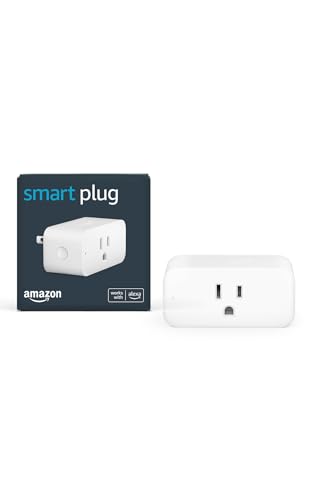
Amazon Smart Plug, Works with Alexa, Simple Setup, Endless Possibilities
As an Amazon Associate we earn from qualifying purchases. Product prices and availability are accurate as of the date/time indicated.

EIGHTREE Smart Plug WiFi Outlet Works with Alexa & Google Home, 15A, 4-Pack | Smart Home Socket with Remote Control & Timer Function, WiFi Plug for household appliances, No Hub Required, 2.4GHz WiFi Only
As an Amazon Associate we earn from qualifying purchases. Product prices and availability are accurate as of the date/time indicated.

Kasa Smart Plug HS103P4, Smart Wi-Fi Outlet, Touch Actuator, Works with Alexa, Echo, Google Home, No Hub Required, 15 Amp, UL Certified, 4-Pack, White
As an Amazon Associate we earn from qualifying purchases. Product prices and availability are accurate as of the date/time indicated.
Prices shown are approximate and for reference only. Prices change often, so please check the current price on Amazon before you buy.
Best Smart Plug vs Smart Switch for Lamps in 2026: Detailed Reviews
1. TP-Link Kasa Smart Plug HS103 — Best Smart Plug for Lamps
TP-Link’s Kasa Smart Plug HS103 is a smart plug with no hub, Wi-Fi, and a compact design, at $15 to $20. It plugs into a wall outlet, with a lamp plugged into it, so you can turn the lamp on and off with a phone, with Alexa, or with Google Assistant, without changing the wiring.
The HS103 is a good choice for a lamp, because it is cheap, it is easy to use, and it does not need a hub. It is best for a renter, as you can take it with you when you move, and you do not need to do any wiring. It is the smart plug to buy first if you want a smart plug for a lamp.
2. Lutron Caseta Smart Switch — Best Smart Switch for Lamps
Lutron’s Caseta Smart Switch is a smart switch with a hub, Wi-Fi, and a dimmer option, at $50 to $60. It replaces a wall switch, with wiring, so you can turn a lamp that is wired to that switch on and off, with a phone, with Alexa, or with Google Assistant, without unplugging the lamp.
The Caseta is a good choice for a lamp that is wired to a wall switch, as it is reliable, it has a dimmer model that can dim a lamp to a low level, and it works with a hub, the Lutron Smart Bridge, which is sold separately or in a kit. It is best for a homeowner, as it is a permanent solution, and it is more reliable than a Wi-Fi switch without a hub.
3. Amazon Smart Plug — Best Smart Plug for Alexa Users
Amazon’s Smart Plug is a smart plug with no hub, Wi-Fi, and Alexa built in, at $20 to $25. It plugs into a wall outlet, with a lamp plugged into it, so you can turn the lamp on and off with Alexa, with a phone, or with a schedule.
The Amazon Smart Plug is a good choice if you use Alexa, as it is designed for Alexa, and it is easy to set up with the Alexa app. It is a little more expensive than the TP-Link Kasa HS103, at $20 to $25 instead of $15 to $20, but it is a good alternative if you prefer Amazon.
4. TP-Link Kasa Smart Switch HS200 — Best Cheap Smart Switch for Lamps
TP-Link’s Kasa Smart Switch HS200 is a smart switch with no hub, Wi-Fi, and no dimmer, at $15 to $20, which is the cheapest smart switch here. It replaces a wall switch, with wiring, so you can turn a lamp that is wired to that switch on and off, with a phone, with Alexa, or with Google Assistant.
The HS200 is a good choice if you want a cheap smart switch, without a hub, and without a dimmer, for a lamp that does not need dimming. It is a good alternative to the Lutron Caseta if you do not want to buy a hub, or if you do not need a dimmer.
5. Wemo Mini Smart Plug — Best Smart Plug With a Compact Design
Wemo’s Mini Smart Plug is a smart plug with no hub, Wi-Fi, and a compact design, at $25 to $30, which is the most expensive smart plug here. It plugs into a wall outlet, with a lamp plugged into it, and it is small enough that it does not block the second outlet.
The Wemo Mini is a good choice if you want a compact smart plug, with a design that does not block a second outlet, and you do not mind paying $25 to $30. It is a good alternative to the TP-Link Kasa HS103 if you prefer Wemo, or if the Kasa is out of stock.
6. Leviton Decora Smart Switch, 2nd Gen — Best Smart Switch With a Dimmer and No Hub
Leviton’s Decora Smart Switch, 2nd Gen, is a smart switch with no hub, Wi-Fi, and a dimmer model, at $40 to $50. It replaces a wall switch, with wiring, so you can turn a lamp that is wired to that switch on and off, with a phone, with Alexa, or with Google Assistant, and dim it if you buy the dimmer model.
The Decora Smart Switch is a good choice if you want a smart switch with a dimmer, without a hub, for a lamp that you want to dim. It is a good alternative to the Lutron Caseta if you do not want to buy a hub, but you want a dimmer.
Best Smart Plug vs Smart Switch for Lamps Buying Guide
Choosing between a smart plug and a smart switch for lamps is about wiring, renting vs owning, dimming, and hub. A plug is easy, a switch is permanent, and a dimmer is useful for a lamp you want to dim low.
Smart Plug No Wiring Renter Take With You, Smart Switch Wiring Homeowner Permanent, and Check Dorm Office Router Rules: Choosing a Plug or a Switch for a Lamp
A smart plug needs no wiring, so it is best for a renter, as you can plug it in, use it, and take it with you when you move. A smart switch needs wiring, so it is best for a homeowner, as it is a permanent solution, and it replaces a wall switch, so you cannot take it with you easily.
Check dorm or office router rules before you buy a smart plug or a smart switch, as some networks do not allow smart home devices, or they require a separate network. Change the default password on a router and on a smart home device, as a default password is a security risk.
Most smart devices use 2.4GHz only, as 5GHz is faster but shorter range, while 2.4GHz is slower but longer range. A smart plug or a smart switch should be placed where it can reach your router on 2.4GHz, not on 5GHz, as most smart devices do not support 5GHz.
Smart Bulbs At Least 800 Lumens A19 Dim to 1 Percent, Hue Needs Bridge LIFX No Hub, Budget Less Than 15 Dollars Per Bulb Multi-Pack: Using a Smart Plug or Switch With a Smart Bulb
Smart bulbs should have at least 800 lumens, an A19 shape, and a dimming range down to 1 percent, so they can be used as a night light. A Philips Hue bulb needs a Bridge, while a LIFX bulb needs no hub, so check before you buy a smart bulb. A budget smart bulb should cost less than $15 per bulb in a multi-pack.
Do not use a smart plug or a smart switch with a smart bulb that needs a hub, unless you have the hub, as the bulb will not work without it. A smart plug can turn a smart bulb on and off, but it cannot dim it, unless the bulb itself can dim. A smart switch with a dimmer can dim a dumb bulb, but it may not work with a smart bulb, as a smart bulb needs power all the time to stay connected.
For a lamp, use a smart plug with a dumb bulb, or a smart switch with a dumb bulb, if you want to dim the lamp. Use a smart bulb with a dumb plug or switch, if you want to change the colour of the lamp, as a smart bulb can change colour, while a smart plug cannot.
Mesh Wi-Fi At Least 2500 Square Feet Centre Placement, Wi-Fi 6, 5GHz Faster Shorter vs 2.4GHz Slower Longer: Placing a Smart Plug or Switch for a Lamp
Mesh Wi-Fi should cover at least 2,500 square feet, with a centre placement, so the signal is even. Wi-Fi 6 is faster than Wi-Fi 5, and 5GHz is faster but shorter range than 2.4GHz, which is slower but longer range. Most smart devices use 2.4GHz only, so a smart plug or a smart switch should be placed where it can reach your router on 2.4GHz.
A smart plug for a lamp in a bedroom should be placed near the lamp, with a good Wi-Fi signal, so it does not drop off. A smart switch for a lamp in a living room should be placed on a wall switch that is easy to reach, with a good Wi-Fi signal, so it can be controlled from a phone.
Best Smart Plug vs Smart Switch for Lamps FAQ
What is the best smart plug vs smart switch for lamps?
The best smart plug for lamps is the TP-Link Kasa Smart Plug HS103, at $15 to $20, because it needs no hub, it is easy to use, and it is cheap. The best smart switch for lamps is the Lutron Caseta Smart Switch, at $50 to $60, because it is reliable, it has a dimmer option, and it works with a hub. Choose a smart plug if you rent or if you do not want to do wiring, and choose a smart switch if you own your home and you want a permanent solution.
Should I buy a smart plug or a smart switch for a lamp?
Buy a smart plug for a lamp if you rent, if you do not want to do wiring, or if you have a lamp that is not wired to a wall switch. Buy a smart switch for a lamp if you own your home, if you want a permanent solution, or if you have a lamp that is wired to a wall switch, like a ceiling light or a wall sconce. A smart plug is easy to take with you when you move, while a smart switch is permanent and cannot be taken easily.
Can I use a smart plug with a smart bulb?
Yes, you can use a smart plug with a smart bulb, but it is not the best combination, as a smart plug can turn a smart bulb on and off, but it cannot dim it, unless the bulb itself can dim. A smart bulb needs power all the time to stay connected, so if you turn it off with a smart plug, it will disconnect from Wi-Fi. For a lamp, use a smart plug with a dumb bulb, or a smart bulb with a dumb plug, if you want to change the colour of the lamp.
Do I need a hub for a smart plug or a smart switch for a lamp?
No, you do not need a hub for most smart plugs or smart switches for a lamp, as the TP-Link Kasa HS103, Amazon Smart Plug, Wemo Mini, TP-Link Kasa HS200, and Leviton Decora Smart Switch all work with Wi-Fi and no hub. The Lutron Caseta Smart Switch needs a hub, the Lutron Smart Bridge, which is sold separately or in a kit. A Philips Hue bulb needs a Bridge, while a LIFX bulb needs no hub, so check before you buy a smart bulb.
FAQ
What is the best smart plug vs smart switch for lamps?
Should I buy a smart plug or a smart switch for a lamp?
Can I use a smart plug with a smart bulb?
Do I need a hub for a smart plug or a smart switch for a lamp?
Related guides
- Best Cheap Memory Card Reader Under 30 in 2026: 6 Fast, Reliable Readers for SD and microSD
- Gaming Monitor vs Office Monitor for Work in 2026: 3 Gaming Monitors and 3 Office Monitors Compared for Work, With Refresh Rate, Resolution, and a Price Range
- Best Flatbed Scanner vs Document Scanner for Offices in 2026: Which Scanner Is Best for Your Office?
- Best Cheap Laptop Stand for Students in 2026: Best Cheap Laptop Stand for Students for Good Posture, Easy Study, and Simple Desk Use
More from Amazon
Programs that pair well with the guide above. Offers and eligibility are set by Amazon and may change.
Free shipping on eligible items, Prime Video and more. Eligible new members can start with a free trial.
Start a Prime free trialAd-free music streaming. Eligible new subscribers can start with a free trial.
Try Music Unlimited freeA Prime membership for ages 18-24 with a trial period. Eligibility is set by Amazon.
See Prime for Young AdultsAudiobooks and podcasts to listen to on the go. Eligible new members can start with a free trial.
Try Audible freeAs an Amazon Associate we earn from qualifying purchases.

Write Your Review
No reviews yet. Be the first to share your experience!