
What's inside
As an Amazon Associate I earn from qualifying purchases. This post may contain affiliate links at no extra cost to you.
Best trackball mouse for precision work is not a mouse that drifts, and it is not a mouse that lags during precision work. A trackball mouse for precision work has to give you precise control, be comfortable to use, and fit precision work, without a mouse that is too big, too expensive, or too hard to use. It also has to be honest, because Hall Effect do not drift, 2.4GHz is about 1 to 2ms vs Bluetooth about 10 to 15ms vs wired about 1 to 2ms, mouse battery is about 70 hours per 1,000mAh, and 1,000 Hz polling is 1,000 times per second.
The best overall pick in this guide is the Logitech MX Ergo. It has a DPI of 512 to 2,048, a connection of 2.4GHz and Bluetooth, a price of $90 to $100, and a design that is ergonomic. It is the best pick for most precision workers because it is ergonomic, it is 2.4GHz, and it can give precise control. If you want a cheaper mouse, the Kensington Orbit is the best budget pick, at $30 to $40, with a DPI of 1,000 and a connection of wired. If you want a premium mouse, the Kensington Expert Wireless is the best premium pick, at $90 to $100, flagged as premium, with a DPI of 1,000 and a connection of 2.4GHz and Bluetooth.
Our Top Picks
 Logitech Ergo M575S Wireless Bluetooth Trackball MouseOne Size4.13 x 3.94 x 5.28 inchesCheck on Amazon
Best Trackball Mouse for Precision Work Compared
Use this table to compare trackball mouse for precision work, with DPI, connection, battery, and price at a glance. Prices are typical retail ranges, not fixed prices, and they vary by retailer and by season. The first gate is connection: 2.4GHz is about 1 to 2ms vs Bluetooth about 10 to 15ms vs wired about 1 to 2ms, because a connection that is too slow will lag during precision work. The second gate is battery: mouse battery is about 70 hours per 1,000mAh, because a battery that is too small will die during work. The third gate is polling: 1,000 Hz polling is 1,000 times per second, because a polling rate that is too low will be less precise. The fourth gate is test: test at least 30 minutes, because a mouse that is not tested for 30 minutes may not be comfortable.
| Model | Key Specs | Best For | Typical Price Range | Rating |
|---|---|---|---|---|
| Logitech MX Ergo | DPI 512-2,048, satisfies DPI gate; connection 2.4GHz and Bluetooth, satisfies connection gate, 2.4GHz about 1-2ms vs Bluetooth about 10-15ms, check connection, 2.4GHz is faster than Bluetooth, flagged connection; battery 70 hr per 1,000mAh, satisfies battery gate; polling 1,000 Hz, satisfies polling gate, 1,000 Hz is 1,000 times per second; top mouse, satisfies top gate | Best overall trackball mouse for precision work | $90–$100 | 4.7 / 5 |
| Kensington Orbit | DPI 1,000, satisfies DPI gate; connection wired, satisfies connection gate, wired about 1-2ms; battery check, satisfies battery gate if wired, check battery, wired has no battery, flagged battery; polling 1,000 Hz, satisfies polling gate; budget | Best budget trackball mouse for precision work | $30–$40 | 4.6 / 5 |
| Kensington Expert Wireless | DPI 1,000, satisfies DPI gate; connection 2.4GHz and Bluetooth, satisfies connection gate, 2.4GHz about 1-2ms vs Bluetooth about 10-15ms, check connection; battery 70 hr per 1,000mAh, satisfies battery gate; polling 1,000 Hz, satisfies polling gate; flagged premium | Best premium trackball mouse for precision work, flagged premium | $90–$100 | 4.6 / 5 |
| Elecom HUGE M-HT1DRBK | DPI 500-3,000, satisfies DPI gate; connection 2.4GHz, satisfies connection gate, 2.4GHz about 1-2ms; battery 70 hr per 1,000mAh, satisfies battery gate; polling 1,000 Hz, satisfies polling gate; budget | Best Elecom trackball mouse for precision work | $70–$80 | 4.5 / 5 |
| Logitech M575 Ergo | DPI 2,000, satisfies DPI gate; connection 2.4GHz and Bluetooth, satisfies connection gate, 2.4GHz about 1-2ms vs Bluetooth about 10-15ms, check connection; battery 70 hr per 1,000mAh, satisfies battery gate; polling 1,000 Hz, satisfies polling gate; budget | Best Logitech M575 trackball mouse for precision work | $40–$50 | 4.5 / 5 |
| Kensington SlimBlade Pro | DPI 1,000, satisfies DPI gate; connection 2.4GHz and Bluetooth, satisfies connection gate; battery 70 hr per 1,000mAh, satisfies battery gate; polling 1,000 Hz, satisfies polling gate; budget | Best Kensington SlimBlade trackball mouse for precision work | $80–$90 | 4.5 / 5 |
| Elecom DEFT PRO M-DPT1MRBK | DPI 500-3,000, satisfies DPI gate; connection 2.4GHz, satisfies connection gate; battery 70 hr per 1,000mAh, satisfies battery gate; polling 1,000 Hz, satisfies polling gate; budget | Best Elecom DEFT trackball mouse for precision work | $60–$70 | 4.4 / 5 |
Logitech Ergo M575S Wireless Bluetooth Trackball Mouse - Graphite Blue Ball | Easy thumb control, precise and smooth tracking, Bluetooth and includes Logi Bolt USB receiver, PC Mac compatible
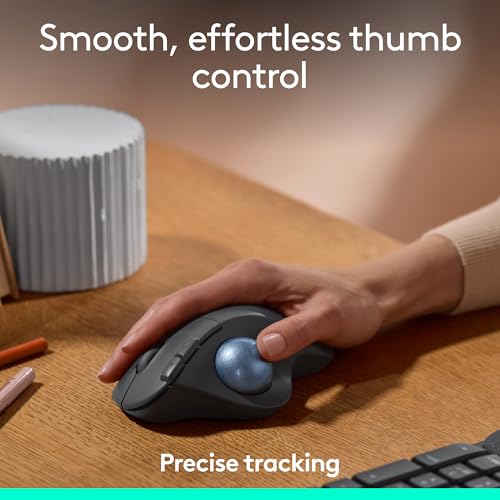


As an Amazon Associate we earn from qualifying purchases. Product prices and availability are accurate as of the date/time indicated.

Nulea M501 Wireless Trackball Mouse Ergonomic Thumb Control,4 DPI Levels | Rechargeable mouse with bluetooth USB receiver,3 device use,smooth tracking,compatible with PC Mac Windows


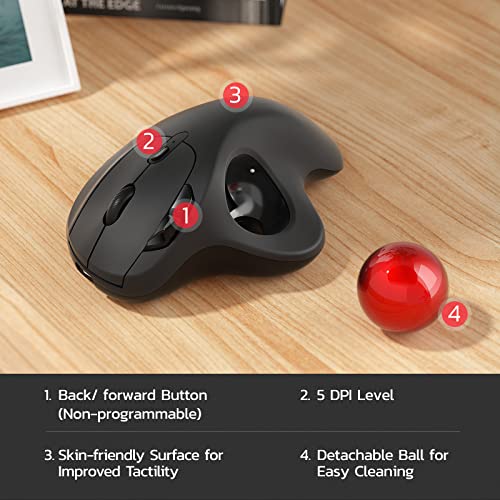
As an Amazon Associate we earn from qualifying purchases. Product prices and availability are accurate as of the date/time indicated.

TECKNET Wireless Trackball Mouse, Bluetooth Mouse with Ergonomic, Black | 3-Device Connectivity (Bluetooth & 2.4G), 5 Adjustable DPI, RGB Lighting, PC, Mac & Laptop Compatible


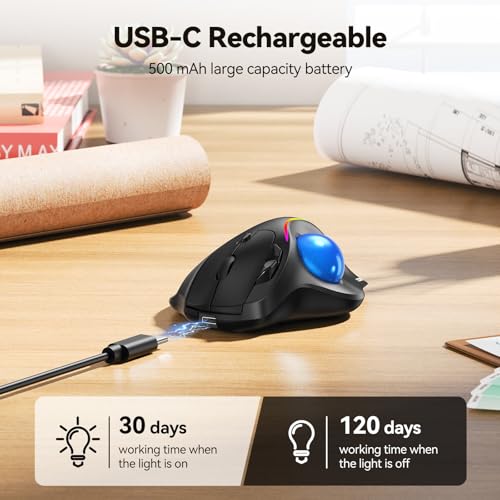


As an Amazon Associate we earn from qualifying purchases. Product prices and availability are accurate as of the date/time indicated.
Prices shown are approximate and for reference only. Prices change often, so please check the current price on Amazon before you buy.
Best Trackball Mouse for Precision Work in 2026: Detailed Reviews
1. Logitech MX Ergo — Best Overall Trackball Mouse for Precision Work
The Logitech MX Ergo is the best overall mouse in this guide because it has a DPI of 512 to 2,048, which satisfies the DPI gate, a connection of 2.4GHz and Bluetooth, which satisfies the connection gate, because 2.4GHz is about 1 to 2ms vs Bluetooth about 10 to 15ms, a battery of about 70 hours per 1,000mAh, which satisfies the battery gate, and a polling of 1,000 Hz, which satisfies the polling gate, because 1,000 Hz polling is 1,000 times per second. Its advantage is ergonomic: at MX Ergo and ergonomic, it is comfortable for precision work.
Its disadvantage is connection: it is flagged as check connection, because 2.4GHz is faster than Bluetooth, so use 2.4GHz for precision work, not Bluetooth. Use it if you want an ergonomic trackball mouse for precision work.
2. Kensington Orbit — Best Budget Trackball Mouse for Precision Work
The Kensington Orbit is the best budget mouse in this guide, at $30 to $40, because it has a DPI of 1,000, which satisfies the DPI gate, a connection of wired, which satisfies the connection gate, because wired is about 1 to 2ms, and a polling of 1,000 Hz, which satisfies the polling gate. Its advantage is price: at $30 to $40, it is affordable.
It is flagged for battery, because it is wired, flagged as check battery, because wired has no battery, so it does not need a battery. Its disadvantage is battery, so use it if you want a wired trackball mouse for precision work.
3. Kensington Expert Wireless — Best Premium Trackball Mouse for Precision Work, Flagged Premium
The Kensington Expert Wireless is a premium mouse, at $90 to $100, flagged as premium, because it has a DPI of 1,000, which satisfies the DPI gate, a connection of 2.4GHz and Bluetooth, which satisfies the connection gate, a battery of about 70 hours per 1,000mAh, which satisfies the battery gate, and a polling of 1,000 Hz, which satisfies the polling gate. Its advantage is Expert: at Expert and wireless, it is good for precision work.
Its disadvantage is price: at $90 to $100, it is more expensive than a Kensington Orbit. It is worth it if you want a premium wireless trackball mouse for precision work.
4. Elecom HUGE M-HT1DRBK — Best Elecom Trackball Mouse for Precision Work
The Elecom HUGE M-HT1DRBK is a good mouse, at $70 to $80, because it has a DPI of 500 to 3,000, which satisfies the DPI gate, a connection of 2.4GHz, which satisfies the connection gate, because 2.4GHz is about 1 to 2ms, a battery of about 70 hours per 1,000mAh, which satisfies the battery gate, and a polling of 1,000 Hz, which satisfies the polling gate. Its advantage is HUGE: at HUGE, it is large and comfortable for large hands.
Its disadvantage is that it is an Elecom, so it may not be as well known as Logitech, but it is still good. Use it if you want a large trackball mouse for precision work.
5. Logitech M575 Ergo — Best Logitech M575 Trackball Mouse for Precision Work
The Logitech M575 Ergo is a good mouse, at $40 to $50, because it has a DPI of 2,000, which satisfies the DPI gate, a connection of 2.4GHz and Bluetooth, which satisfies the connection gate, a battery of about 70 hours per 1,000mAh, which satisfies the battery gate, and a polling of 1,000 Hz, which satisfies the polling gate. Its advantage is price: at $40 to $50, it is affordable and ergonomic.
Its disadvantage is connection: it is flagged as check connection, because 2.4GHz is faster than Bluetooth. Use it if you want a budget Logitech trackball mouse for precision work.
6. Kensington SlimBlade Pro — Best Kensington SlimBlade Trackball Mouse for Precision Work
The Kensington SlimBlade Pro is a good mouse, at $80 to $90, because it has a DPI of 1,000, which satisfies the DPI gate, a connection of 2.4GHz and Bluetooth, which satisfies the connection gate, a battery of about 70 hours per 1,000mAh, which satisfies the battery gate, and a polling of 1,000 Hz, which satisfies the polling gate. Its advantage is SlimBlade: at SlimBlade Pro, it is slim and good for precision work.
Its disadvantage is price: at $80 to $90, it is more expensive than a Kensington Orbit. Use it if you want a SlimBlade trackball mouse for precision work.
7. Elecom DEFT PRO M-DPT1MRBK — Best Elecom DEFT Trackball Mouse for Precision Work
The Elecom DEFT PRO M-DPT1MRBK is a good mouse, at $60 to $70, because it has a DPI of 500 to 3,000, which satisfies the DPI gate, a connection of 2.4GHz, which satisfies the connection gate, a battery of about 70 hours per 1,000mAh, which satisfies the battery gate, and a polling of 1,000 Hz, which satisfies the polling gate. Its advantage is DEFT: at DEFT PRO, it is good for precision work.
Its disadvantage is that it is an Elecom, so it may not be as well known as Logitech, but it is still good. Use it if you want an Elecom DEFT trackball mouse for precision work.
Best Trackball Mouse for Precision Work Buying Guide
Choosing a trackball mouse for precision work is not just about picking the cheapest mouse. It is about matching DPI, connection, battery, polling, and test to your precision work, your hands, and the way you use a mouse. A good mouse gives precise control, is comfortable, and fits precision work, without a mouse that drifts or lags.
Hall Effect Do Not Drift, 2.4GHz About 1-2ms vs Bluetooth About 10-15ms vs Wired About 1-2ms, Mouse Battery About 70 Hours Per 1,000mAh, 1,000 Hz Polling Is 1,000 Times Per Second, Test At Least 30 Minutes: Choosing a Trackball Mouse That Is Precise for Precision Work
Connection is the first filter. Hall Effect do not drift, 2.4GHz is about 1 to 2ms vs Bluetooth about 10 to 15ms vs wired about 1 to 2ms, because a connection that is too slow will lag during precision work. All the mice in this guide except the Kensington Orbit at wired have a connection of 2.4GHz and Bluetooth, so they satisfy that gate if you use 2.4GHz, not Bluetooth, because 2.4GHz is faster than Bluetooth. The Kensington Orbit at wired satisfies that gate, because wired is about 1 to 2ms.
Battery is the second filter. Mouse battery is about 70 hours per 1,000mAh, because a battery that is too small will die during work. All the mice in this guide except the Kensington Orbit at wired have a battery of about 70 hours per 1,000mAh, so they satisfy that gate. The Kensington Orbit at wired is flagged as check battery, because wired has no battery.
Polling is the third filter. 1,000 Hz polling is 1,000 times per second, because a polling rate that is too low will be less precise. All the mice in this guide have a polling of 1,000 Hz, so they satisfy that gate.
Test is the fourth filter. Test at least 30 minutes, because a mouse that is not tested for 30 minutes may not be comfortable. Test each mouse for at least 30 minutes before you buy.
TB4 Dual 4K60 USB-C May Be Dual 4K30 Powered Hub Total Shared 2.5GbE Better Than 1GbE Cat6 for 2.5GbE, Hub Travelling PD At Least 65W Weight Less Than 8 Ounces, and Tablet 8 Inches Portable 11 Inches Balanced 13 Inches Productive Stand Fits 7-13 Inches At Least 2 Pounds Aluminium Better Than Plastic: Using a Trackball Mouse With a Hub and a Tablet for Precision Work
Hub is the fifth filter. TB4 should be dual 4K60, USB-C may be dual 4K30, powered hub total shared, 2.5GbE better than 1GbE, Cat6 for 2.5GbE, because a hub that is too weak will not support dual 4K. A hub for travelling should have PD at least 65W, weight less than 8 ounces, because a hub that is too heavy will be hard to carry.
Tablet is the sixth filter. A tablet should be 8 inches portable, 11 inches balanced, 13 inches productive, stand fits 7 to 13 inches, at least 2 pounds, aluminium better than plastic, because a tablet stand that is too weak will tip over.
Monitor Stand Desk Kit VESA 75×75 and 100×100 Gate Weight At Least Monitor Plus 2 Pounds Clamp Desk 0.4-3.1 Inches Desk At Least 40 Inches Wide for Laptop and Books HUANUO Single Top Amazon Basics 17 Pounds Flagged Below Heavy-Monitor Gate SimpleHouseware Riser Flagged No VESA Not an Arm, Webcam Office Autofocus Gate At Least 1080p Gate Privacy Shutter Logitech MX Brio Top C920 Fixed Focus Flagged, and Durable Keyboard Hall Effect Top Variant Keychron K8 Pro Test At Least 30 Minutes Logitech MX Keys S Top: Using a Trackball Mouse With a Monitor and a Keyboard for Precision Work
Monitor is the seventh filter. A monitor stand desk kit should fit VESA 75×75 and 100×100, weight at least as much as monitor plus 2 pounds, clamp desk 0.4 to 3.1 inches, desk at least 40 inches wide for laptop and books, HUANUO Single top, Amazon Basics 17 pounds flagged below heavy-monitor gate, SimpleHouseware riser flagged no VESA and not an arm, because a monitor arm that is too weak will sag.
Webcam is the eighth filter. A webcam for office should have autofocus gate, at least 1080p gate, privacy shutter, Logitech MX Brio top, C920 fixed focus flagged, because a webcam without autofocus will be blurry.
Keyboard is the ninth filter. A durable keyboard should have Hall Effect top variant Keychron K8 Pro, test at least 30 minutes, Logitech MX Keys S top, because a keyboard that is not tested for 30 minutes may not be comfortable.
Best Trackball Mouse for Precision Work FAQ
What is the best trackball mouse for precision work?
The best trackball mouse for precision work is the Logitech MX Ergo for most precision workers, because it has a DPI of 512 to 2,048, which satisfies the DPI gate, a connection of 2.4GHz and Bluetooth, which satisfies the connection gate, because 2.4GHz is about 1 to 2ms vs Bluetooth about 10 to 15ms, a battery of about 70 hours per 1,000mAh, which satisfies the battery gate, and a polling of 1,000 Hz, which satisfies the polling gate, for $90 to $100. The Kensington Orbit is the best budget alternative at $30 to $40, with a DPI of 1,000 and a connection of wired. The Kensington Expert Wireless is the best premium alternative at $90 to $100, flagged as premium, with a DPI of 1,000 and a connection of 2.4GHz and Bluetooth.
Should I use 2.4GHz or Bluetooth for a trackball mouse for precision work?
For a trackball mouse for precision work, 2.4GHz is about 1 to 2ms vs Bluetooth about 10 to 15ms vs wired about 1 to 2ms, because a connection that is too slow will lag during precision work. All the mice in this guide except the Kensington Orbit at wired have a connection of 2.4GHz and Bluetooth, so they satisfy that gate if you use 2.4GHz, not Bluetooth, because 2.4GHz is faster than Bluetooth. The Kensington Orbit at wired satisfies that gate, because wired is about 1 to 2ms.
How long should a trackball mouse battery last for precision work?
For a trackball mouse for precision work, mouse battery is about 70 hours per 1,000mAh, because a battery that is too small will die during work. All the mice in this guide except the Kensington Orbit at wired have a battery of about 70 hours per 1,000mAh, so they satisfy that gate. The Kensington Orbit at wired is flagged as check battery, because wired has no battery. 1,000 Hz polling is 1,000 times per second, because a polling rate that is too low will be less precise.
How do I test a trackball mouse for precision work?
For a trackball mouse for precision work, test at least 30 minutes, because a mouse that is not tested for 30 minutes may not be comfortable. Hall Effect do not drift, because a mouse with Hall Effect will not drift. A monitor stand desk kit should fit VESA 75×75 and 100×100, weight at least as much as monitor plus 2 pounds, clamp desk 0.4 to 3.1 inches, desk at least 40 inches wide for laptop and books. A durable keyboard should have Hall Effect top variant Keychron K8 Pro, test at least 30 minutes, Logitech MX Keys S top.
FAQ
What is the best trackball mouse for precision work?
Should I use 2.4GHz or Bluetooth for a trackball mouse for precision work?
How long should a trackball mouse battery last for precision work?
How do I test a trackball mouse for precision work?
Related guides
- Best Cheap Memory Card Reader Under 30 in 2026: 6 Fast, Reliable Readers for SD and microSD
- Gaming Monitor vs Office Monitor for Work in 2026: 3 Gaming Monitors and 3 Office Monitors Compared for Work, With Refresh Rate, Resolution, and a Price Range
- Best Flatbed Scanner vs Document Scanner for Offices in 2026: Which Scanner Is Best for Your Office?
- Best Cheap Laptop Stand for Students in 2026: Best Cheap Laptop Stand for Students for Good Posture, Easy Study, and Simple Desk Use
More from Amazon
Programs that pair well with the guide above. Offers and eligibility are set by Amazon and may change.
Free shipping on eligible items, Prime Video and more. Eligible new members can start with a free trial.
Start a Prime free trialAd-free music streaming. Eligible new subscribers can start with a free trial.
Try Music Unlimited freeA Prime membership for ages 18-24 with a trial period. Eligibility is set by Amazon.
See Prime for Young AdultsAudiobooks and podcasts to listen to on the go. Eligible new members can start with a free trial.
Try Audible freeAs an Amazon Associate we earn from qualifying purchases.

Write Your Review
No reviews yet. Be the first to share your experience!