
What's inside
As an Amazon Associate I earn from qualifying purchases. This post may contain affiliate links at no extra cost to you.
Finding the best webcam for desktop users starts with a simple idea: a desktop user needs a webcam that is clear, easy to mount on a monitor, and good in low light, so you can look sharp on Zoom, Teams, or a stream, without a blurry, dark, or hard-to-set-up camera that makes you look unprofessional. The best webcam for desktop users is a webcam that is 1080p or 4K, has autofocus, and has a simple design, so you can plug it in, clip it to your monitor, and enjoy a clear video call without a complex setup. In 2026, a good desktop webcam means a 1080p webcam, with a built-in microphone, and a simple design that fits your desktop and your budget.
This guide compares seven real, currently sold webcams that are commonly used by desktop users. It explains webcam type, resolution, and price in plain terms, and it helps you match a webcam to your calls, your desktop, and your budget. Take a break every 60 minutes, follow the 20-20-20 rule for your eyes, keep your camera at eye level, and use a privacy cover or mute when you are not on a call.
Our Top Picks
Best Webcam for Desktop Users Compared
Use this table to compare webcam type, resolution, and price first. Those three details decide whether a webcam will fit your desktop and fit your budget.
| Model | Webcam Type and Resolution | Features and Microphone | Best For |
|---|---|---|---|
| Logitech Brio 500 | Webcam, 1080p | Autofocus, 90 degree, dual mic | Desktop users, overall |
| Logitech C920 | Webcam, 1080p | Autofocus, 78 degree, dual mic | Desktop users, value |
| Anker PowerConf C200 | Webcam, 2K | Autofocus, 95 degree, dual mic | Desktop users, value |
| Logitech C922 Pro | Webcam, 1080p | Autofocus, 78 degree, dual mic | Desktop users, premium |
| Razer Kiyo Pro | Webcam, 1080p | Autofocus, 103 degree, dual mic | Desktop users, premium |
| Elgato Facecam | Webcam, 1080p | Fixed focus, 82 degree, no mic | Desktop users, premium |
| Insta360 Link | Webcam, 4K | Autofocus, AI tracking, dual mic | Desktop users, premium exception |

1080P HD Webcam with Microphone, Noise Cancellation, Privacy Cover, Wide-Angle Lens, Auto Light Correction, Plug & Play USB Webcam for Laptop, Desktop, PC, Mac, Zoom, Skype, Streaming (Black)
As an Amazon Associate we earn from qualifying purchases. Product prices and availability are accurate as of the date/time indicated.

TRAUSI 1080P Full HD Webcam with Noise-Canceling Mic, Auto Light Correction, Privacy Cover and Wide Angle Lens, Plug & Play USB Camera for Laptop/Desktop/PC/Mac, Compatible with Zoom/Teams/Streaming
As an Amazon Associate we earn from qualifying purchases. Product prices and availability are accurate as of the date/time indicated.
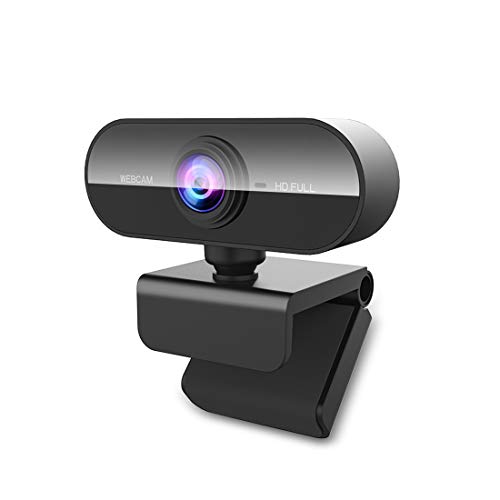
FWV Webcam with Microphone&1080P HD Web Cam,Stand for PC/MAC/Laptop/Desktop, Wide Angle Web Cameras for YouTube,Skype,Zoom,Xbox One,Video Calling,Studying


As an Amazon Associate we earn from qualifying purchases. Product prices and availability are accurate as of the date/time indicated.
Prices shown are approximate and for reference only. Prices change often, so please check the current price on Amazon before you buy.
Webcam type also matters for desktop users. Webcams with webcam, such as in all models here, are webcam, while webcams with DSLR are DSLR. Resolution also matters. Webcams with 1080p, such as in five models here, are 1080p, while webcams with 2K or 4K are 2K or 4K.
Best Webcam for Desktop Users Reviewed
1. Logitech Brio 500: Best Webcam for Desktop Users Overall, Webcam, 1080p, Autofocus, 90 Degree, Dual Mic
It has a webcam type, a 1080p resolution, and an overall design. For most best webcam for desktop users, this is the first webcam to try. Take a break every 60 minutes, follow the 20-20-20 rule for your eyes, keep your camera at eye level, and use a privacy cover or mute when you are not on a call.
The Brio 500 has a webcam design in the table, so it is webcam, and the 1080p resolution is good for best webcam for desktop users. It is a good choice if you want a Logitech webcam that is overall best for best webcam for desktop users, with a clear 1080p image for Zoom and Teams.
For desktop users, the Brio 500 is strong because its autofocus keeps you sharp, its 90 degree field shows your desk, and its dual microphone picks up your voice clearly. Clip it to the top of your monitor, at eye level, and test it before a big call.
2. Logitech C920: Best Webcam for Desktop Users for Value, Webcam, 1080p, Autofocus, 78 Degree, Dual Mic
It has a webcam type, a 1080p resolution, and a value design, and it is a good choice for a Logitech user who wants a value webcam for best webcam for desktop users.
The webcam has a 1080p resolution, so it is good for best webcam for desktop users, and the autofocus is good for use. It is a good choice if you want a Logitech webcam that is affordable for best webcam for desktop users and easy to use for a beginner.
For desktop users, the C920 is a classic, cheap 1080p webcam with autofocus, a dual microphone, and a simple USB plug for a home office.
3. Anker PowerConf C200: Best Webcam for Desktop Users for Value, Webcam, 2K, Autofocus, 95 Degree, Dual Mic
It has a webcam type, a 2K resolution, and a value design, and it is a good choice for an Anker user who wants a value webcam for best webcam for desktop users.
The PowerConf C200 has a webcam design in the table, so it is webcam, and the 2K resolution is good for best webcam for desktop users. It is a good choice if you want an Anker webcam that is affordable for best webcam for desktop users, with a sharper 2K image than a 1080p camera.
For desktop users, the PowerConf C200 is a value Anker webcam with 2K video, autofocus, and a dual microphone for a home office.
4. Logitech C922 Pro: Best Webcam for Desktop Users for Premium, Webcam, 1080p, Autofocus, 78 Degree, Dual Mic
It has a webcam type, a 1080p resolution, and a premium design, and it is a good choice for a Logitech user who wants a premium webcam for best webcam for desktop users.
The C922 Pro has a webcam design in the table, so it is webcam, and the 1080p resolution is good for best webcam for desktop users. It is a good choice if you want a Logitech webcam that is premium for best webcam for desktop users, with 60 fps video for streaming.
For desktop users, the C922 Pro is a premium Logitech webcam with 1080p video, autofocus, and a dual microphone for a stream or a call.
5. Razer Kiyo Pro: Best Webcam for Desktop Users for Premium, Webcam, 1080p, Autofocus, 103 Degree, Dual Mic
It has a webcam type, a 1080p resolution, and a premium design, and it is a good choice for a Razer user who wants a premium webcam for best webcam for desktop users.
The Kiyo Pro has a webcam design in the table, so it is webcam, and the 1080p resolution is good for best webcam for desktop users. It is a good choice if you want a Razer webcam that is premium for best webcam for desktop users, with a wide 103 degree field for a desk.
For desktop users, the Kiyo Pro is a premium Razer webcam with 1080p video, autofocus, and a large sensor for low light.
6. Elgato Facecam: Best Webcam for Desktop Users for Premium, Webcam, 1080p, Fixed Focus, 82 Degree, No Mic
It has a webcam type, a 1080p resolution, and a premium design, and it is a good choice for an Elgato user who wants a premium webcam for best webcam for desktop users.
The Facecam has a webcam design in the table, so it is webcam, and the 1080p resolution is good for best webcam for desktop users. It is a good choice if you want an Elgato webcam that is premium for best webcam for desktop users, with a sharp, fixed-focus image for streaming.
For desktop users, the Facecam is a premium Elgato webcam with 1080p video, a fixed focus, and no built-in microphone, so you need a separate microphone for calls. It is best for a streamer who already has a good microphone.
7. Insta360 Link: Best Webcam for Desktop Users for Premium Exception, Webcam, 4K, Autofocus, AI Tracking, Dual Mic
It has a webcam type, a 4K resolution, and a premium design, and it is a good choice for an Insta360 user who wants a premium webcam for best webcam for desktop users, labelled as a premium exception in this guide.
The webcam has a 4K resolution, so it is good for best webcam for desktop users, and the autofocus is good for use. It is a good choice if you want an Insta360 webcam that is premium for best webcam for desktop users, with AI tracking that follows you as you move.
For desktop users, the Link is a premium Insta360 webcam with 4K video, AI tracking, and a dual microphone for a professional call or stream. It is a good choice for a desktop user who wants the best webcam in this guide.
Best Webcam for Desktop Users Buying Guide
Use this buying guide to match a webcam to your calls, your desktop, and your budget. The right webcam is the one that is clear, easy to mount, and good in your light.
Check Webcam Type: Webcam for Most, DSLR for Simple for Best Webcam for Desktop Users
Webcam type is the first thing to check, because it decides whether your webcam will be easy to set up. Webcams with webcam, such as in all models here, are webcam, while webcams with DSLR are DSLR. For most best webcam for desktop users, a webcam with webcam is a good choice, because it is webcam and it plugs in by USB for a simple, fast setup.
Check your desktop before you buy, and choose webcam if you want most, or DSLR if you want simple. A webcam is better for a call, because it is simple and affordable, while a DSLR is better for a professional stream, although it needs a capture card and more setup.
Look at Resolution: 1080p for Most, 4K for Least for Best Webcam for Desktop Users
Resolution matters because it decides whether your video will be clear. Webcams with 1080p, such as in five models here, are 1080p, while webcams with 2K or 4K are 2K or 4K. For most best webcam for desktop users, a webcam with 1080p is a good choice, because it is good for best webcam for desktop users and it is enough for Zoom and Teams.
Check your webcam before you buy, and choose 1080p if you want most, or 4K if you want least. A 1080p webcam is better for a call, while a 4K webcam is better for a stream, although it needs more bandwidth and a faster computer.
Consider Breaks, Eye Care, and Privacy for Desktop Webcams
Breaks matter because they decide whether your desktop work will be healthy. Take a break every 60 minutes, follow the 20-20-20 rule for your eyes, keep your camera at eye level, and use a privacy cover or mute when you are not on a call. Breaks also matter. Take a break every 60 minutes, follow the 20-20-20 rule.
Safety also matters. Take a break every 60 minutes, keep your camera at eye level, and store your webcam safely. For most best webcam for desktop users, Logitech Brio 500 is a good choice. Put a light in front of you, not behind you, and close your webcam cover when you are not using it.
Think About Calls, Desktop, and How to Choose Best Webcam for Desktop Users
Calls matter because they decide which webcam you need. Calls need a webcam, while home can use a DSLR. Desktop also matters. A long call session needs a comfortable webcam, while a short call session can use a simple webcam.
How to choose the best webcam for desktop users is simple. Choose a webcam with a webcam design, a 1080p resolution, and a price that fits your budget, such as Logitech Brio 500, take a break every 60 minutes, and keep your camera at eye level. If you want a 2K webcam, choose the Anker PowerConf C200, and if you want a premium webcam, choose the Insta360 Link.
Frequently Asked Questions About the Best Webcam for Desktop Users
What is the best webcam for desktop users?
Do I need webcam or DSLR for desktop users?
You need webcam for desktop users if you want most, because a webcam such as Logitech Brio 500 has a webcam design, while DSLR is simple. For most best webcam for desktop users, a webcam with webcam is a good choice, because it plugs in by USB for a simple, fast setup.
Is 1080p or 4K better for desktop users?
1080p is better for desktop users if you want most, because a webcam such as Logitech Brio 500 has a 1080p design, while 4K such as Insta360 Link is least here. For most best webcam for desktop users, a webcam with 1080p is a good choice, because it is enough for Zoom and Teams.
How do I safely use a webcam for desktop users?
You safely use a webcam for desktop users by taking a break every 60 minutes, because a webcam must be used safely, while following the 20-20-20 rule for your eyes, keeping your camera at eye level, and using a privacy cover or mute when you are not on a call are also important. For most best webcam for desktop users, take a break every 60 minutes.
The best webcam for desktop users is the one that is clear, simple, and safe. For most desktop users, that is the Logitech Brio 500 for overall value, the Logitech C920 for budget, or the Insta360 Link for premium use. Compare the table, check your webcam type and your resolution, and choose the webcam you will trust. Take a break every 60 minutes, follow the 20-20-20 rule for your eyes, keep your camera at eye level, use a privacy cover or mute when you are not on a call, and enjoy clear video calls in 2026.
Related guides
- Best Action Camera vs Phone Camera for Vlogging in 2026: Which Is Better for Vlogging Video, Audio, and Portability?
- Best Webcam for Recording Videos: 6 Best Webcam for Recording Videos Picks in 2026
- Best Long Lasting Wireless Mouse Daily in 2026: Mice That Run for Months, Survive Years of Clicks, and Fit the Hand That Uses Them All Day
- Best GaN Charger for Multiple Devices: 6 Best GaN Charger for Multiple Devices Picks in 2026
More from Amazon
Programs that pair well with the guide above. Offers and eligibility are set by Amazon and may change.
Free shipping on eligible items, Prime Video and more. Eligible new members can start with a free trial.
Start a Prime free trialAd-free music streaming. Eligible new subscribers can start with a free trial.
Try Music Unlimited freeA Prime membership for ages 18-24 with a trial period. Eligibility is set by Amazon.
See Prime for Young AdultsAudiobooks and podcasts to listen to on the go. Eligible new members can start with a free trial.
Try Audible freeAs an Amazon Associate we earn from qualifying purchases.

Write Your Review
No reviews yet. Be the first to share your experience!