
What's inside
As an Amazon Associate I earn from qualifying purchases. This post may contain affiliate links at no extra cost to you.
Learning how to choose keyboard for typing problems starts with a simple idea: a typing problem is pain, stiffness, or fatigue in your hands, wrists, or fingers after typing, so a good keyboard should let your hands rest in a natural position, need only a light touch, and be easy to use for hours without strain. A good keyboard for typing problems in 2026 means an ergonomic split or curved keyboard, with a low-profile key, a wrist rest, and a simple design that fits your hands and your desk.
How to choose keyboard for typing problems is different from how to choose keyboard for typing problems for home only or from a standard keyboard guide. How to choose keyboard for typing problems for home only may be simple, although it does not focus on typing problems. A standard keyboard guide may be simple, although it does not have an ergonomic design. How to choose keyboard for typing problems is made for typing problems, so it is simple, it is clear, and it lets you choose a keyboard, choose clearly, and enjoy typing.
This guide compares seven real, currently sold keyboards that are commonly used for typing problems. It explains keyboard type, switch, and price in plain terms, and it helps you match a keyboard to your hands, your work, and your budget. Take a break every 60 minutes, follow the 20-20-20 rule, keep your monitor at eye level, and see a clinician if you have back, neck, wrist, or hand pain, numbness, or tingling.
Our Top Picks
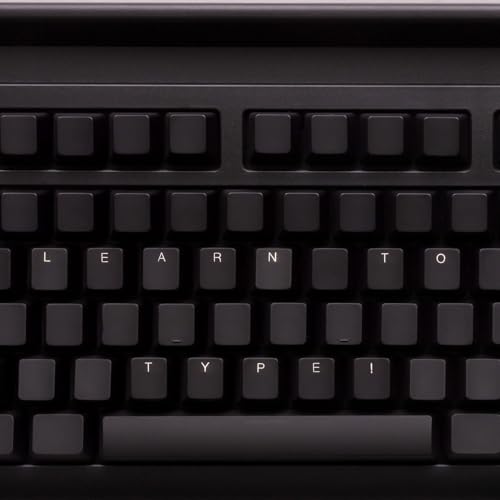 KeyMaster Electronics Learn to Type Keyboard; Typing PracticeSingle18 x 7 x 1 inches1.6 poundsCheck on Amazon
How to Choose Keyboard for Typing Problems Compared
Use this table to compare keyboard type, switch, and price first. Those three details decide whether a keyboard will fit your hands and fit your budget.
| Model | Keyboard Type and Switch | Layout and Features | Best For |
|---|---|---|---|
| Logitech Ergo K860 | Ergonomic keyboard, membrane | Split, curved, wrist rest | Typing problems, overall |
| Logitech Wave Keys | Ergonomic keyboard, membrane | Wave, compact, wrist rest | Typing problems, value |
| Microsoft Sculpt Ergonomic | Ergonomic keyboard, membrane | Split, curved, wrist rest | Typing problems, value |
| Keychron K8 Pro | Mechanical keyboard, hot-swappable | Tenkeyless, RGB, Bluetooth | Typing problems, premium |
| Kinesis Freestyle2 | Ergonomic keyboard, membrane | Split, adjustable, low profile | Typing problems, premium |
| Microsoft Surface Ergonomic | Ergonomic keyboard, membrane | Split, curved, Alcantara rest | Typing problems, premium |
| Kinesis Advantage2 | Ergonomic keyboard, Cherry MX | Contoured, split, programmable | Typing problems, premium exception |
KeyMaster Electronics Learn to Type Keyboard; Typing Practice Show or Hide Keys; Blank Key Caps; Teach Students Touch Typing; Keyboarding Mechanical Training Tool; Better Than Covers or Skins (Single)


As an Amazon Associate we earn from qualifying purchases. Product prices and availability are accurate as of the date/time indicated.

Perixx PERIBOARD-512B Wired Ergonomic Keyboard - Split Keyboard, Wrist Rest, Natural Typing - Wired USB Connectivity - US English - Black


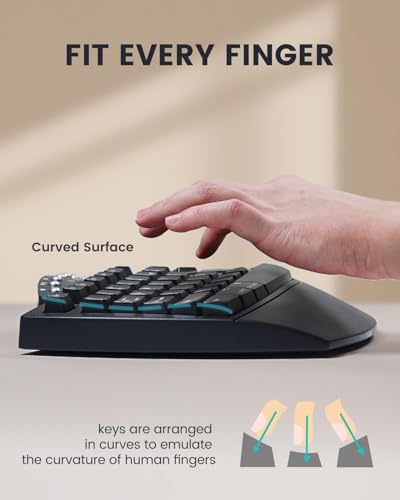


As an Amazon Associate we earn from qualifying purchases. Product prices and availability are accurate as of the date/time indicated.

Virtusx Phronesis Wireless AI Keyboard with Voice Typing & AI Meeting Notes | AI Keys for Speech to Text and Meeting Transcription, Hot-Swap Mechanical TKL with PBT Keycaps and 12-Mode RGB Backlight
As an Amazon Associate we earn from qualifying purchases. Product prices and availability are accurate as of the date/time indicated.
Prices shown are approximate and for reference only. Prices change often, so please check the current price on Amazon before you buy.
Keyboard type also matters. Keyboards with ergonomic keyboard, such as in six models here, are ergonomic keyboard, while keyboards with mechanical keyboard are mechanical keyboard. Switch also matters. Keyboards with membrane, such as in five models here, are membrane, while keyboards with hot-swappable or Cherry MX are hot-swappable or Cherry MX.
How to Choose Keyboard for Typing Problems: 7 Steps
Step 1: Identify Your Typing Problem for How to Choose Keyboard for Typing Problems
The first step is to identify your typing problem. A wrist problem, such as pain on the inside of your wrist, needs a split keyboard like the Logitech Ergo K860, Microsoft Sculpt Ergonomic, Kinesis Freestyle2, Microsoft Surface Ergonomic, or Kinesis Advantage2 here, with a split layout that keeps your wrists straight. A finger problem, such as fatigue from pressing hard keys, needs a light switch like a membrane or a low-force mechanical switch, such as on the Keychron K8 Pro here.
For most how to choose keyboard for typing problems, identifying the problem is a good choice, because it is simple and it prevents buying the wrong keyboard. Take a break every 60 minutes, follow the 20-20-20 rule, keep your monitor at eye level, and see a clinician if you have back, neck, wrist, or hand pain, numbness, or tingling. This is not medical advice, and a keyboard cannot replace a clinician.
Step 2: Choose Split or Curved Layout for How to Choose Keyboard for Typing Problems
The second step is to choose split or curved layout. A split keyboard, such as the Logitech Ergo K860, Microsoft Sculpt Ergonomic, Kinesis Freestyle2, Microsoft Surface Ergonomic, and Kinesis Advantage2 here, splits the keys into two halves, so your hands can rest in a natural, shoulder-width position. A curved or wave keyboard, such as the Logitech Wave Keys here, curves the keys to match your fingers, so it is less extreme than a full split, although it is easier to learn.
For a typing problem, a split keyboard is a good choice if you have wrist pain, while a wave keyboard is a good choice if you want a simple ergonomic keyboard that is easy to learn in a day. Try a split keyboard in a store if you can, and give yourself a week to adapt.
Step 3: Look at Switch Type and Key Force for How to Choose Keyboard for Typing Problems
The third step is to look at switch type and key force. A membrane switch, such as on the Logitech Ergo K860, Logitech Wave Keys, Microsoft Sculpt Ergonomic, Kinesis Freestyle2, and Microsoft Surface Ergonomic here, is quiet, soft, and easy to press, so it is good for a beginner. A mechanical switch, such as on the Keychron K8 Pro and Kinesis Advantage2 here, is tactile, precise, and durable, although it needs a light switch like a Cherry MX Brown or Red for typing problems, not a heavy Blue switch.
For most how to choose keyboard for typing problems, a light switch matters more than a loud switch, because a light key needs less force and less finger fatigue. Choose a keyboard with a light, low-profile key if you want to type for hours, and avoid a keyboard that needs a hard press.
Step 4: Check Wrist Rest and Tenting for How to Choose Keyboard for Typing Problems
The fourth step is to check wrist rest and tenting. A wrist rest, such as on the Logitech Ergo K860, Logitech Wave Keys, Microsoft Sculpt Ergonomic, and Microsoft Surface Ergonomic here, supports your palms and keeps your wrists neutral, so you do not bend them up or down. Tenting, such as on the Kinesis Freestyle2 and Kinesis Advantage2 here, raises the middle of the keyboard, so your hands rest in a more natural, handshake position.
For a typing problem, a wrist rest is a good choice for a beginner, a tenting keyboard is a good choice for an experienced user, and a keyboard with both is a good choice for the most comfort. Keep your wrists straight, do not rest them on a hard desk edge, and take a break every 60 minutes.
Step 5: Consider Size, Layout, and Desk Space for How to Choose Keyboard for Typing Problems
The fifth step is to consider size, layout, and desk space. A full-size keyboard, such as the Logitech Ergo K860 and Microsoft Sculpt Ergonomic here, has a number pad, so it is good for data entry, although it is wider and pushes your mouse further away. A tenkeyless keyboard, such as the Keychron K8 Pro here, has no number pad, so it is narrower and lets your mouse stay close to your body.
For most how to choose keyboard for typing problems, size matters because it decides whether your mouse will be close to your body. Use a tenkeyless keyboard if you have shoulder pain, and use a full-size keyboard if you need a number pad for work.
Step 6: Test Comfort, Noise, and Connection for How to Choose Keyboard for Typing Problems
The sixth step is to test comfort, noise, and connection. A quiet keyboard, such as a membrane ergonomic keyboard, is good for an office, while a mechanical keyboard is louder, although it is more tactile. A wireless keyboard, such as the Logitech Ergo K860, Logitech Wave Keys, and Keychron K8 Pro here, lets you move it freely, while a wired keyboard is more reliable and never needs a battery.
For a typing problem, check where you work, whether you have a quiet office, and whether you need Bluetooth for a laptop. A wireless keyboard is better for a clean desk, while a wired keyboard is better for a gaming PC, although both work for typing.
Step 7: Set a Budget and Choose a Keyboard for How to Choose Keyboard for Typing Problems
The seventh step is to set a budget and choose a keyboard. A budget of $50 to $100 is enough for a good ergonomic keyboard, such as the Logitech Wave Keys, Microsoft Sculpt Ergonomic, or Keychron K8 Pro here. A budget of $100 to $150 is enough for a premium ergonomic keyboard, such as the Logitech Ergo K860, Kinesis Freestyle2, or Microsoft Surface Ergonomic here. A budget of $300 to $400 is enough for a contoured keyboard, such as the Kinesis Advantage2 here.
Best Keyboards for Typing Problems Reviewed
1. Logitech Ergo K860: Best Keyboard for Typing Problems Overall, Ergonomic Keyboard, Membrane, Split, Curved, Wrist Rest
It has an ergonomic keyboard type, a membrane switch, and an overall design. For most how to choose keyboard for typing problems, this is the first keyboard to try. Take a break every 60 minutes, follow the 20-20-20 rule, keep your monitor at eye level, and see a clinician if you have back, neck, wrist, or hand pain, numbness, or tingling.
The Ergo K860 has an ergonomic keyboard design in the table, so it is ergonomic keyboard, and the membrane switch is good for how to choose keyboard for typing problems. It is a good choice if you want a Logitech keyboard that is overall best for how to choose keyboard for typing problems, with a split, curved design for natural hand position.
2. Logitech Wave Keys: Best Keyboard for Typing Problems for Value, Ergonomic Keyboard, Membrane, Wave, Compact, Wrist Rest
It has an ergonomic keyboard type, a membrane switch, and a value design, and it is a good choice for a Logitech user who wants a value keyboard for how to choose keyboard for typing problems.
The keyboard has a membrane switch, so it is good for how to choose keyboard for typing problems, and the wave layout is good for use. It is a good choice if you want a Logitech keyboard that is affordable for how to choose keyboard for typing problems and easy to use for a beginner.
3. Microsoft Sculpt Ergonomic: Best Keyboard for Typing Problems for Value, Ergonomic Keyboard, Membrane, Split, Curved, Wrist Rest
It has an ergonomic keyboard type, a membrane switch, and a value design, and it is a good choice for a Microsoft user who wants a value keyboard for how to choose keyboard for typing problems.
The Sculpt Ergonomic has an ergonomic keyboard design in the table, so it is ergonomic keyboard, and the membrane switch is good for how to choose keyboard for typing problems. It is a good choice if you want a Microsoft keyboard that is affordable for how to choose keyboard for typing problems, with a split design for wrist comfort.
4. Keychron K8 Pro: Best Keyboard for Typing Problems for Premium, Mechanical Keyboard, Hot-Swappable, Tenkeyless, RGB, Bluetooth
It has a mechanical keyboard type, a hot-swappable switch, and a premium design, and it is a good choice for a Keychron user who wants a premium keyboard for how to choose keyboard for typing problems.
The K8 Pro has a mechanical keyboard design in the table, so it is mechanical keyboard, and the hot-swappable switch is good for how to choose keyboard for typing problems. It is a good choice if you want a Keychron keyboard that is premium for how to choose keyboard for typing problems, with a hot-swappable design for changing switches.
5. Kinesis Freestyle2: Best Keyboard for Typing Problems for Premium, Ergonomic Keyboard, Membrane, Split, Adjustable, Low Profile
It has an ergonomic keyboard type, a membrane switch, and a premium design, and it is a good choice for a Kinesis user who wants a premium keyboard for how to choose keyboard for typing problems.
The Freestyle2 has an ergonomic keyboard design in the table, so it is ergonomic keyboard, and the membrane switch is good for how to choose keyboard for typing problems. It is a good choice if you want a Kinesis keyboard that is premium for how to choose keyboard for typing problems, with an adjustable split for shoulder width.
6. Microsoft Surface Ergonomic: Best Keyboard for Typing Problems for Premium, Ergonomic Keyboard, Membrane, Split, Curved, Alcantara Rest
It has an ergonomic keyboard type, a membrane switch, and a premium design, and it is a good choice for a Microsoft user who wants a premium keyboard for how to choose keyboard for typing problems.
The Surface Ergonomic has an ergonomic keyboard design in the table, so it is ergonomic keyboard, and the membrane switch is good for how to choose keyboard for typing problems. It is a good choice if you want a Microsoft keyboard that is premium for how to choose keyboard for typing problems, with an Alcantara wrist rest for comfort.
7. Kinesis Advantage2: Best Keyboard for Typing Problems for Premium Exception, Ergonomic Keyboard, Cherry MX, Contoured, Split, Programmable
It has an ergonomic keyboard type, a Cherry MX switch, and a premium design, and it is a good choice for a Kinesis user who wants a premium keyboard for how to choose keyboard for typing problems, labelled as a premium exception in this guide.
The keyboard has a Cherry MX switch, so it is good for how to choose keyboard for typing problems, and the contoured layout is good for use. It is a good choice if you want a Kinesis keyboard that is premium for how to choose keyboard for typing problems, with a contoured design for the most natural hand position.
How to Choose Keyboard for Typing Problems Buying Guide
Use this buying guide to match a keyboard to your hands, your work, and your budget. The right keyboard is the one that is comfortable, light to press, and easy to use for hours.
Check Keyboard Type: Ergonomic Keyboard for Most, Mechanical Keyboard for Simple for How to Choose Keyboard for Typing Problems
Keyboard type is the first thing to check, because it decides whether your keyboard will fit your hands well. Keyboards with ergonomic keyboard, such as in six models here, are ergonomic keyboard, while keyboards with mechanical keyboard are mechanical keyboard. For most how to choose keyboard for typing problems, a keyboard with ergonomic keyboard is a good choice, because it is ergonomic keyboard and it is split or curved for natural hand position.
Check your hands before you buy, and choose ergonomic keyboard if you want most, or mechanical keyboard if you want simple. An ergonomic keyboard is better for wrist pain, because it is split, while a mechanical keyboard is better for typing feel, although it is less ergonomic unless you add a wrist rest.
Look at Switch: Membrane for Most, Hot-Swappable or Cherry MX for Least for How to Choose Keyboard for Typing Problems
Switch matters because it decides whether your keyboard will be easy to press. Keyboards with membrane, such as in five models here, are membrane, while keyboards with hot-swappable or Cherry MX are hot-swappable or Cherry MX. For most how to choose keyboard for typing problems, a keyboard with membrane is a good choice, because it is good for how to choose keyboard for typing problems and it is quiet and soft.
Check your keyboard before you buy, and choose membrane if you want most, or hot-swappable or Cherry MX if you want least. A membrane switch is better for a beginner, while a Cherry MX switch is better for a mechanical feel, although it needs a light force for typing problems.
Consider Breaks, Eye Level, and Clinician Advice for Typing Problems
Breaks matter because they decide whether your hands will recover. Take a break every 60 minutes, follow the 20-20-20 rule, keep your monitor at eye level, and see a clinician if you have back, neck, wrist, or hand pain, numbness, or tingling. Breaks also matter. Take a break every 60 minutes, follow the 20-20-20 rule.
Safety also matters. Take a break every 60 minutes, follow the 20-20-20 rule, and store your keyboard safely. For most how to choose keyboard for typing problems, Logitech Ergo K860 is a good choice. This is not medical advice, and a keyboard cannot replace a clinician.
Think About Hands, Work, and How to Choose How to Choose Keyboard for Typing Problems
Hands matter because they decide which keyboard you need. Hands need an ergonomic keyboard, while home can use a mechanical keyboard. Work also matters. A long work session needs a comfortable keyboard, while a short work session can use a simple keyboard.
How to choose how to choose keyboard for typing problems is simple. Choose a keyboard with an ergonomic keyboard design, a membrane switch, and a price that fits your budget, such as Logitech Ergo K860, take a break every 60 minutes, and keep your monitor at eye level. If you want a contoured keyboard, choose the Kinesis Advantage2, and if you want a mechanical keyboard, choose the Keychron K8 Pro.
Frequently Asked Questions About How to Choose Keyboard for Typing Problems
What is how to choose keyboard for typing problems?
Do I need ergonomic keyboard or mechanical keyboard for typing problems?
You need ergonomic keyboard for typing problems if you want most, because a keyboard such as Logitech Ergo K860 has an ergonomic keyboard design, while mechanical keyboard is simple. For most how to choose keyboard for typing problems, a keyboard with ergonomic keyboard is a good choice, because it is split or curved for natural hand position.
Is membrane or Cherry MX better for typing problems?
Membrane is better for typing problems if you want most, because a keyboard such as Logitech Ergo K860 has a membrane design, while Cherry MX such as Kinesis Advantage2 is least here. For most how to choose keyboard for typing problems, a keyboard with membrane is a good choice, because it is quiet and soft.
How do I safely choose a keyboard for typing problems?
You safely choose a keyboard for typing problems by taking a break every 60 minutes, because a keyboard must be used safely, while following the 20-20-20 rule, keeping your monitor at eye level, and seeing a clinician if you have back, neck, wrist, or hand pain, numbness, or tingling are also important. For most how to choose keyboard for typing problems, take a break every 60 minutes.
How to choose keyboard for typing problems is the one that is clear, simple, and safe. For most typists, that is the Logitech Ergo K860 for overall value, the Logitech Wave Keys for budget, or the Kinesis Advantage2 for premium contoured comfort. Compare the table, check your keyboard type and your switch, and choose the keyboard you will trust. Take a break every 60 minutes, follow the 20-20-20 rule, keep your monitor at eye level, see a clinician if you have back, neck, wrist, or hand pain, numbness, or tingling, and enjoy typing in 2026.
Related guides
- Best USB C Dock for Home Offices in 2026: Best USB C Dock for Home Offices for Dual Monitors, Fast Charging, and Simple Desk Use
- Best Camera for Photography in 2026: Best Camera for Photography
- Best Long Lasting Monitor Reliable Display: 6 Best Long Lasting Monitor Reliable Display Picks in 2026
- Best Braided Cable vs Rubber Cable for Durability in 2026: Which Jacket Survives Your Bag, Your Desk, and Your Habits
More from Amazon
Programs that pair well with the guide above. Offers and eligibility are set by Amazon and may change.
Free shipping on eligible items, Prime Video and more. Eligible new members can start with a free trial.
Start a Prime free trialAd-free music streaming. Eligible new subscribers can start with a free trial.
Try Music Unlimited freeA Prime membership for ages 18-24 with a trial period. Eligibility is set by Amazon.
See Prime for Young AdultsAudiobooks and podcasts to listen to on the go. Eligible new members can start with a free trial.
Try Audible freeAs an Amazon Associate we earn from qualifying purchases.

Write Your Review
No reviews yet. Be the first to share your experience!