
What's inside
As an Amazon Associate I earn from qualifying purchases. This post may contain affiliate links at no extra cost to you.
Tablet vs laptop for students is not a question of picking the most expensive device, and it is not a question of picking a tablet and hoping it can replace a laptop for every assignment. A tablet is good for taking notes, reading, and drawing, with a touchscreen and a stylus, while a laptop is good for writing essays, coding, and multitasking, with a keyboard, a trackpad, and a full operating system. Understanding the difference before you buy will help you choose a tablet, a laptop, or both, without wasting money on a device that cannot do your coursework.
The best overall pick in this guide is the iPad Air M4 11 inch for most students who want a tablet, and the MacBook Air M4 13 inch for most students who want a laptop.
Our Top Picks
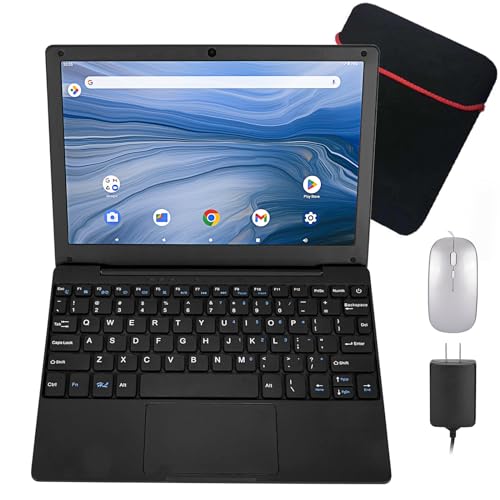 HBESTORE 10.1 Inch Mini Laptop for Kids242mm*175mm*19mm9.53 x 6.89 x 0.75 inches2.8 poundsCheck on Amazon
Tablet vs Laptop for Students Compared
Use this table to compare device type, screen size, RAM, weight, and price at a glance. The first gate is tablet size: 8 inches is portable, 11 inches is balanced, and 13 inches is productive, so an 11 inch tablet is the best balance for a student. A tablet smaller than 8 inches is flagged as too small for notes, and a tablet larger than 13 inches is flagged as too large to carry. The second gate is laptop RAM: at least 8GB for a student laptop, and at least 16GB for a premium laptop, because a laptop with less than 8GB will be slow for multitasking. A laptop with less than 8GB is flagged as below that gate. The third gate is stand: a tablet stand should fit 7 to 13 inches, hold at least 2 pounds, and be aluminium rather than plastic, because aluminium is stronger than plastic.
| Model | Key Specs | Best For |
|---|---|---|
| iPad Air M4 11 inch Tablet | Tablet; 11 in, balanced, satisfies tablet gate; 8GB RAM, satisfies student gate; weight about 1.0 lb; Apple Pencil, keyboard; iPad Air M3 discontinued 2026-03-02, M4 current | Best overall tablet for students |
| MacBook Air M4 13 inch Laptop | Laptop; 13 in, productive; 16GB RAM, satisfies premium gate at least 16GB; weight about 2.7 lb; battery about 18 hr; keyboard, trackpad | Best overall laptop for students |
| iPad 11th generation Tablet | Tablet; 11 in, balanced, satisfies tablet gate; 6GB RAM, flagged below 8GB gate for laptop, check tablet use; weight about 1.0 lb; Apple Pencil, keyboard; budget | Best budget tablet for students, flagged RAM |
| Lenovo IdeaPad Slim 3 Laptop | Laptop; 14 in, productive; 8GB RAM, satisfies student gate at least 8GB; weight about 3.0 lb; battery about 10 hr; keyboard, trackpad; budget | Best budget laptop for students |
| Microsoft Surface Pro 11 Tablet Laptop | Tablet with keyboard; 13 in, productive, satisfies tablet gate; 16GB RAM, satisfies premium gate; weight about 1.9 lb tablet, 2.5 lb with keyboard; Windows, keyboard, stylus; flagged premium | Best tablet laptop hybrid for students, flagged premium |
| Samsung Galaxy Tab S9 FE Tablet | Tablet; 10.9 in, balanced, satisfies tablet gate; 6GB RAM, flagged below 8GB gate; weight about 1.1 lb; S Pen, keyboard; Android, check apps | Best Samsung tablet for students, flagged RAM |
| Acer Aspire 5 Laptop | Laptop; 15.6 in, productive, flagged large for carrying; 8GB RAM, satisfies student gate; weight about 3.8 lb, flagged heavy; battery about 8 hr, flagged short; keyboard, trackpad | Best Acer laptop for students, flagged size and weight |
HBESTORE 10.1 Inch Mini Laptop for Kids, Android 12, Quad Core, Black | Netbook for students & home learning, 2GB RAM 64GB eMMC, IPS 1280x800 screen, 0.75kg, bag & mouse included


As an Amazon Associate we earn from qualifying purchases. Product prices and availability are accurate as of the date/time indicated.

15.6" Touchscreen 2-in-1 Laptop with 360° Flip,Core i5,16 GB RAM 256 GB SSD | Windows 11 Pro & Office 365 Lap Top Computer,USB-C,FHD,Backlit Keyboard,Fingerprint,Notebook PC for Business College Student
As an Amazon Associate we earn from qualifying purchases. Product prices and availability are accurate as of the date/time indicated.

HP 14 inch Laptop, Intel Processor N150, 4GB RAM 192GB Storage(UFS+SD Card) | 720p Webcam, 1 Year Office 365, WiFi 6, Copilot AI, Win 11 Home S, Long Battery Life,Computer for Business Student College
As an Amazon Associate we earn from qualifying purchases. Product prices and availability are accurate as of the date/time indicated.
Prices shown are approximate and for reference only. Prices change often, so please check the current price on Amazon before you buy.
Tablet vs Laptop for Students in 2026: Detailed Reviews
1. iPad Air M4 11 inch Tablet — Best Overall Tablet for Students
The iPad Air M4 11 inch is the best overall tablet in this guide because it has an 11 inch screen, which is balanced for a tablet, 8GB of RAM, which satisfies the student gate, and a weight of about 1.0 pound, which is light enough to carry all day. Note that the iPad Air M3 was discontinued on 2026-03-02, and the M4 is the current model, so do not buy an M3 expecting the latest features.
Its advantage is balance: at 11 inches, it is large enough to take notes and read, but small enough to carry in a backpack, and it works with an Apple Pencil for handwriting and a keyboard for typing. Its disadvantage is that it cannot replace a laptop for every assignment, because it has a mobile operating system, not a full desktop operating system, so some software, such as coding tools or specialised lab software, may not work on it. Use a tablet stand that fits 7 to 13 inches, holds at least 2 pounds, and is aluminium rather than plastic, because aluminium is stronger than plastic.
2. MacBook Air M4 13 inch Laptop — Best Overall Laptop for Students
Its advantage is that it can do everything a student needs: writing essays, coding, multitasking, and video calls, with a keyboard and a trackpad that are comfortable for hours.
It is worth it if you need a laptop for your coursework, especially for coding, engineering, or business. It is not worth it if you only need a tablet for notes and reading, and a budget laptop already meets your needs. RAM is important: DDR4 will not fit DDR5, so check the RAM type before you upgrade, and 16GB is the minimum for gaming, but for a student, 8GB is the minimum and 16GB is premium.
3. iPad 11th generation Tablet — Best Budget Tablet for Students, Flagged RAM
It is flagged for RAM, at 6GB, which is below the 8GB gate for a laptop, but it is a tablet, so check tablet use before you judge it. A tablet with 6GB of RAM can still take notes and read, but it may be slower for multitasking than an iPad Air with 8GB. Its disadvantage is that it has a slower chip than the iPad Air M4, so it may not last as long.
4. Lenovo IdeaPad Slim 3 Laptop — Best Budget Laptop for Students
Its disadvantage is that it has a slower processor than a MacBook Air, and its battery life is shorter, at 10 hours versus 18 hours. It is a good pick if you need a laptop for your coursework and you are on a budget. Check the RAM type before you upgrade, because DDR4 will not fit DDR5.
5. Microsoft Surface Pro 11 Tablet Laptop — Best Tablet Laptop Hybrid for Students, Flagged Premium
Its advantage is that it gives you both a touchscreen for notes and a keyboard for typing, with Windows, so it can run full desktop software.
It is worth it if you want a tablet and a laptop in one, and you need Windows software. It is not worth it if you only need a tablet or only need a laptop.
6. Samsung Galaxy Tab S9 FE Tablet — Best Samsung Tablet for Students, Flagged RAM
Its advantage is Android: if you already use Android, it integrates with your phone, and its S Pen is included, unlike an Apple Pencil which is sold separately.
It is flagged for RAM, at 6GB, which is below the 8GB gate, so it may be slower for multitasking than an iPad Air with 8GB. Its disadvantage is apps: some student apps work better on iPad than on Android, so check your apps before you buy. If your school uses iPad apps, choose an iPad. If your school uses Android apps, choose a Samsung tablet.
7. Acer Aspire 5 Laptop — Best Acer Laptop for Students, Flagged Size and Weight
Its advantage is screen size: at 15.6 inches, it is large enough to see two windows side by side, which is useful for writing essays while reading a source.
It is flagged in two ways. First, its screen is 15.6 inches, flagged as large for carrying, because it will not fit in a small backpack as easily as a 13 inch laptop. Second, its weight is about 3.8 pounds, flagged as heavy, and its battery life is about 8 hours, flagged as short, because it will not last a full day of classes without charging. If you carry your laptop all day, choose a MacBook Air at 2.7 pounds and 18 hours instead. If you mostly use it at a desk, the Aspire 5 is a good value.
Tablet vs Laptop for Students Buying Guide
Choosing a tablet vs a laptop for students is not just about picking the cheapest device. It is about matching screen size, RAM, operating system, and weight to your coursework, your major, and the way you study. A good device helps you take notes, write essays, and study, without being too heavy to carry or too slow to use.
Tablet Size 8 Inches Portable, 11 Inches Balanced, 13 Inches Productive, and Laptop RAM At Least 8GB Student and At Least 16GB Premium: Choosing a Device That Fits Your Coursework
Tablet size is the first filter. For a tablet, 8 inches is portable, 11 inches is balanced, and 13 inches is productive, so an 11 inch tablet is the best balance for a student. The iPad Air M4 at 11 inches, the iPad 11th generation at 11 inches, and the Samsung Galaxy Tab S9 FE at 10.9 inches all satisfy that gate. A tablet smaller than 8 inches is flagged as too small for notes, and a tablet larger than 13 inches is flagged as too large to carry.
Laptop RAM is the second filter. For a student laptop, use at least 8GB of RAM, and for a premium laptop, at least 16GB, because a laptop with less than 8GB will be slow for multitasking. The MacBook Air M4 at 16GB and the Surface Pro 11 at 16GB both satisfy the premium gate. The Lenovo IdeaPad Slim 3 at 8GB and the Acer Aspire 5 at 8GB both satisfy the student gate. The iPad Air M4 at 8GB also satisfies the student gate, while the iPad 11th generation at 6GB and the Galaxy Tab S9 FE at 6GB are flagged as below that gate, but they are tablets, so check tablet use.
Stand is the third filter. A tablet stand should fit 7 to 13 inches, hold at least 2 pounds, and be aluminium rather than plastic, because aluminium is stronger than plastic. Use a stand for taking notes, because it will hold your tablet at eye level, which is better for your neck than holding it in your hand.
Tablet Good for Notes, Reading, and Drawing, Laptop Good for Essays, Coding, and Multitasking: Choosing a Device That Does Your Assignments
Use is the second filter. A tablet is good for taking notes, reading, and drawing, with a touchscreen and a stylus, while a laptop is good for writing essays, coding, and multitasking, with a keyboard, a trackpad, and a full operating system. If your major is art, medicine, or law, a tablet may be better for notes and drawing. If your major is engineering, computer science, or business, a laptop may be better for coding and multitasking.
Operating system is the third filter. A tablet has a mobile operating system, such as iPadOS or Android, while a laptop has a full operating system, such as macOS or Windows. Some software, such as coding tools or specialised lab software, may not work on a tablet, so check your software before you buy a tablet. If your school requires Windows software, choose a Windows laptop or a Surface Pro, not an iPad.
Weight is the fourth filter. A tablet weighs about 1.0 pound, while a laptop weighs about 2.7 to 3.8 pounds. If you carry your device all day, a tablet is lighter and easier to carry. If you mostly use it at a desk, a laptop is heavier but it can do more. The MacBook Air at 2.7 pounds is light for a laptop, while the Acer Aspire 5 at 3.8 pounds is flagged as heavy.
CPU 6 Cores 12 Threads Sweet Spot, DDR4 Will Not Fit DDR5, and Test for At Least 30 Minutes: Using a Tablet and Laptop Together
CPU is the fifth filter. For a laptop, a CPU with 6 cores and 12 threads is the sweet spot for a student, because it can handle multitasking, coding, and video calls without being too expensive. Check the CPU before you buy, and do not buy a laptop with a CPU that is too old, because it will be slow.
RAM type is the sixth filter. DDR4 will not fit DDR5, so check the RAM type before you upgrade, and do not buy DDR4 RAM for a DDR5 laptop. If you need more RAM, buy a laptop with 16GB from the start, because some laptops have soldered RAM that cannot be upgraded.
Test is the seventh filter. Test a tablet or laptop for at least 30 minutes, with a task you do often, such as taking notes or writing an essay, to check if the keyboard, trackpad, and screen feel comfortable. A device that feels good in a shop may feel different after 30 minutes of use, especially if your hands are large or small. If you can, use both a tablet and a laptop together: a tablet for notes, and a laptop for essays.
Tablet vs Laptop for Students FAQ
What is the best tablet vs laptop for students?
If you need both, use a tablet for notes and a laptop for essays.
Can a tablet replace a laptop for students?
For students, a tablet cannot replace a laptop for every assignment, because a tablet has a mobile operating system, not a full desktop operating system, so some software, such as coding tools or specialised lab software, may not work on a tablet. A tablet is good for taking notes, reading, and drawing, with a touchscreen and a stylus. A laptop is good for writing essays, coding, and multitasking, with a keyboard, a trackpad, and a full operating system. If your major requires coding or specialised software, choose a laptop.
What size tablet should a student buy?
For a student, buy an 11 inch tablet, because 8 inches is portable, 11 inches is balanced, and 13 inches is productive, so an 11 inch tablet is the best balance for taking notes and reading. The iPad Air M4 at 11 inches, the iPad 11th generation at 11 inches, and the Samsung Galaxy Tab S9 FE at 10.9 inches all satisfy that gate. A tablet smaller than 8 inches is too small for notes, and a tablet larger than 13 inches is too large to carry. Use a tablet stand that fits 7 to 13 inches, holds at least 2 pounds, and is aluminium rather than plastic.
How much RAM should a student laptop have?
For a student laptop, use at least 8GB of RAM, and for a premium laptop, at least 16GB, because a laptop with less than 8GB will be slow for multitasking. The MacBook Air M4 at 16GB and the Surface Pro 11 at 16GB both satisfy the premium gate. The Lenovo IdeaPad Slim 3 at 8GB and the Acer Aspire 5 at 8GB both satisfy the student gate. DDR4 will not fit DDR5, so check the RAM type before you upgrade, and if you need more RAM, buy a laptop with 16GB from the start, because some laptops have soldered RAM that cannot be upgraded.
FAQ
What is the best tablet vs laptop for students?
Can a tablet replace a laptop for students?
What size tablet should a student buy?
How much RAM should a student laptop have?
Related guides
- Best Cheap Fan Upgrade for PC Case in 2026: How to Pick an Affordable Case Fan That Keeps Your PC Cool and Quiet
- Best Premium Travel Earbuds for Flights in 2026: Best Premium Travel Earbuds for Flights
- Best Durable True Wireless Earbuds Travel in 2026: 6 Best Durable True Wireless Earbuds Travel Picks for Long Battery, Water Resistance, and Reliable Travel Listening
- Best Beginner USB C Accessories Starter Kit in 2026: Best Beginner USB C Accessories Starter Kit for Easy Charging, Simple Hubs, and Clean Setup
More from Amazon
Programs that pair well with the guide above. Offers and eligibility are set by Amazon and may change.
Free shipping on eligible items, Prime Video and more. Eligible new members can start with a free trial.
Start a Prime free trialAd-free music streaming. Eligible new subscribers can start with a free trial.
Try Music Unlimited freeA Prime membership for ages 18-24 with a trial period. Eligibility is set by Amazon.
See Prime for Young AdultsAudiobooks and podcasts to listen to on the go. Eligible new members can start with a free trial.
Try Audible freeAs an Amazon Associate we earn from qualifying purchases.

Write Your Review
No reviews yet. Be the first to share your experience!