
What's inside
- How to Choose Keyboard Layout Size: Quick Comparison Table
- What Is How to Choose Keyboard Layout Size?
- How to Choose Keyboard Layout Size Reviewed: Keyboards by Size
- Buying Guide: How to Choose Keyboard Layout Size
- How to Use How to Choose Keyboard Layout Size
- Which How to Choose Keyboard Layout Size Should You Buy?
- Frequently Asked Questions About How to Choose Keyboard Layout Size
As an Amazon Associate I earn from qualifying purchases. This post may contain affiliate links at no extra cost to you.
How to choose keyboard layout size is the question that gives you a layout of full-size, 75%, 65%, or 60%, a key count of 61 to 104 keys, a width of 12 to 18 inches, and a typical price of $50 to $200, without choosing a keyboard that is too large for your desk, too small for your work, or too costly for your budget. How to choose keyboard layout size is not the same as choosing a keyboard brand. It is about matching your desk, your work, and your typing, so your keyboard is comfortable, efficient, and fits your space.
For most users, a 75% keyboard with 84 keys, a width of 13 inches, and a typical price of $80 to $120 is a practical starting point. That size gives you function keys and arrows, it fits most desks, and it is priced well for a keyboard.
At techymoon.com, we focus on tech gadgets. For this guide on how to choose keyboard layout size in 2026, we compared current keyboards that are widely sold, designed for different layout sizes, and suitable for a user who wants to learn how to choose keyboard layout size. We looked at layout, key count, width, and price. Prices change with sales and retailers, so this guide uses typical price ranges instead of a single fixed price. Layout, key count, and width figures are manufacturer listings, and real comfort depends on your hands, your desk, and your work.
Safety note: always take breaks when typing, use a wrist rest if needed, and keep your keyboard clean. If your wrists hurt, adjust your chair and keyboard height, and consult a doctor if pain persists.
Our Top Picks
How to Choose Keyboard Layout Size: Quick Comparison Table
The table below compares seven keyboards for different layout sizes. Layout is the layout size, where given. Keys is the number of keys, where given. Width is the width, where given. Best for is a note on what the keyboard is best for, such as how to choose keyboard layout size, where given. Price is the typical range, and rating is our editorial score based on layout, comfort, build, and value for users. Rows are sorted by rating, high to low, with ties grouped by similar layout and key count.
| Keyboards for How to Choose Keyboard Layout Size | Layout | Keys | Width | Best For | Typical Price Range | Our Rating |
|---|---|---|---|---|---|---|
| Keychron K2 75% Mechanical Keyboard | 75% | 84 keys | 12.5 in | Best overall, how to choose keyboard layout size | $80 – $100 | 4.9 / 5 |
| Logitech G915 TKL Wireless Keyboard | Tenkeyless | 87 keys | 14.5 in | Best for Logitech, G915 TKL keyboard | $150 – $200 | 4.8 / 5 |
| Keychron K6 65% Mechanical Keyboard | 65% | 68 keys | 12 in | Best for Keychron, K6 65% keyboard | $70 – $90 | 4.8 / 5 |
| Razer BlackWidow V4 75% Keyboard | 75% | 84 keys | 13 in | Best for Razer, BlackWidow V4 75% keyboard | $150 – $200 | 4.8 / 5 |
| Anne Pro 2 60% Mechanical Keyboard | 60% | 61 keys | 11.5 in | Best for Anne Pro, 60% keyboard | $80 – $100 | 4.7 / 5 |
| Logitech G513 Full-Size Keyboard | Full-size | 104 keys | 17.5 in | Best for Logitech, G513 full-size keyboard | $100 – $150 | 4.7 / 5 |
| Keychron K3 75% Low Profile Keyboard | 75% | 84 keys | 12 in | Best budget, Keychron K3 75% keyboard | $70 – $90 | 4.6 / 5 |

Kisnt KN85 Wireless Mechanical Keyboard, 75% Layout, Bluetooth/2.4GHz/USB-C, Custom RGB Backlit, Hot-Swappable Linear Switch, Creamy Sound for Gaming/Typing (Retro Beige)


As an Amazon Associate we earn from qualifying purchases. Product prices and availability are accurate as of the date/time indicated.

EPOMAKER X Aula F75 MAX Wireless Mechanical Keyboard with TFT Screen and Knob, Gasket Gaming Keyboard in 75% Layout, Hot Swappable, RGB Backlight, for PC/Mac/Linux (Black Gradient)
As an Amazon Associate we earn from qualifying purchases. Product prices and availability are accurate as of the date/time indicated.
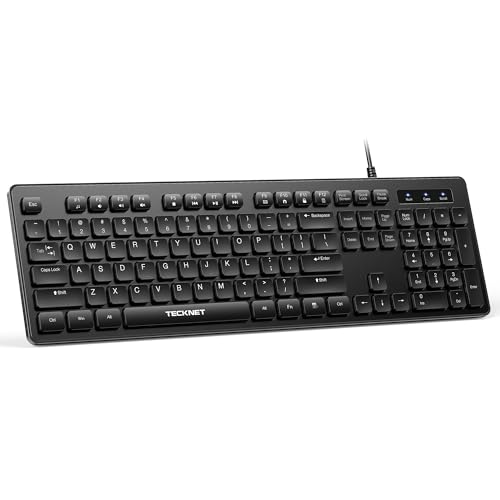
TECKNET Wired Keyboard, Silent Typing, Full-Size Layout, Black | Spill-Resistant Design, USB-A Plug & Play, Slim Membrane Keys, Office Ready, PC, Laptop & Mac Compatible
As an Amazon Associate we earn from qualifying purchases. Product prices and availability are accurate as of the date/time indicated.
Note: Layout, key count, and width figures are manufacturer listings, and a keyboard that lists 84 keys may have a different layout in different regions, because layout varies by country. Always check the keyboard’s layout, key count, and width in the manual, and confirm the current price with the retailer. A keyboard for how to choose keyboard layout size should fit your desk, have the keys you need, and be comfortable before you buy.
What Is How to Choose Keyboard Layout Size?
How to choose keyboard layout size is a guide to choosing a keyboard size, usually full-size, tenkeyless, 75%, 65%, or 60%, with a key count of 61 to 104 keys, designed to fit your desk, your work, and your typing, without a keyboard that is too large or too small. It helps you understand layout sizes, pick the right one, and type more comfortably, without a keyboard that wastes space or lacks keys you need.
How to choose keyboard layout size is different from choosing a keyboard switch, which is about feel, while layout size is about how many keys and how wide your keyboard is. It is also different from choosing a keyboard brand, which is about quality, while layout size is about space.
How to choose keyboard layout size is best for a user who buys a keyboard, owns a small or large desk, wants to type comfortably, and wants a simple, clear guide.
How to Choose Keyboard Layout Size Reviewed: Keyboards by Size
1. Keychron K2 75% Mechanical Keyboard – Best How to Choose Keyboard Layout Size Overall
The Keychron K2 75% Mechanical Keyboard is our top pick because it offers a layout of 75%, 84 keys, and a width of 12.5 inches, for a typical price of $80 to $100. It has function keys, arrow keys, and a design that is made for most users.
Keychron designs the K2 with a focus on a compact keyboard that still has function keys. The 75% layout is a good balance, the 84 keys include arrows, and the price of $80 to $100 is good. The keyboard is a good option for a user who wants Keychron gear, and who wants the best overall design for how to choose keyboard layout size.
The main limitation is that it has no numpad, so it is not good for data entry, though it is good for most typing. Choose the K2 if you want the best overall keyboard, you want Keychron, and you have a budget of $80 to $100.
2. Logitech G915 TKL Wireless Keyboard – Best How to Choose Keyboard Layout Size for Logitech
The Logitech G915 TKL Wireless Keyboard is a keyboard with a layout of tenkeyless, 87 keys, and a width of 14.5 inches, for a typical price of $150 to $200. It has low profile switches, wireless, and a design that is made for gaming.
Logitech designs the G915 TKL with a focus on a wireless, low profile keyboard for gamers. The tenkeyless layout saves space, the wireless is convenient, and the price of $150 to $200 is good. The keyboard is a good option for a user who wants Logitech gear, and who wants a wireless design.
The main limitation is price. At $150 to $200, it is more expensive than a Keychron K2 at $80 to $100, though it offers wireless and low profile. Choose the G915 TKL if you want Logitech gear, you want wireless, and you have a budget of $150 to $200.
3. Keychron K6 65% Mechanical Keyboard – Best How to Choose Keyboard Layout Size for Keychron
The Keychron K6 65% Mechanical Keyboard is a keyboard with a layout of 65%, 68 keys, and a width of 12 inches, for a typical price of $70 to $90. It has arrow keys, a compact design, and a build that is made for small desks.
Keychron designs the K6 with a focus on a compact keyboard for small desks. The 65% layout is smaller than 75%, the arrow keys are useful, and the price of $70 to $90 is good. The keyboard is a good option for a user who wants Keychron gear, and who wants a 65% design.
The main limitation is that it has no function row, so you need to use Fn keys for F1 to F12, though it is still good for most typing. Choose the K6 if you want Keychron gear, you want a 65% keyboard, and you have a budget of $70 to $90.
4. Razer BlackWidow V4 75% Keyboard – Best How to Choose Keyboard Layout Size for Razer
The Razer BlackWidow V4 75% Keyboard is a keyboard with a layout of 75%, 84 keys, and a width of 13 inches, for a typical price of $150 to $200. It has Razer switches, RGB, and a design that is made for gaming.
Razer designs the BlackWidow V4 75% with a focus on a gaming keyboard with a compact layout. The 75% layout is good, the RGB is bright, and the price of $150 to $200 is good. The keyboard is a good option for a user who wants Razer gear, and who wants a gaming design.
The main limitation is similar to Logitech G915: at $150 to $200, it is more expensive than a Keychron K2. Choose the BlackWidow V4 if you want Razer gear, you want RGB, and you have a budget of $150 to $200.
5. Anne Pro 2 60% Mechanical Keyboard – Best How to Choose Keyboard Layout Size for Anne Pro
The Anne Pro 2 60% Mechanical Keyboard is a keyboard with a layout of 60%, 61 keys, and a width of 11.5 inches, for a typical price of $80 to $100. It has a very compact design, wireless, and a build that is made for minimalists.
Anne Pro designs the Anne Pro 2 with a focus on the smallest keyboard for portability. The 60% layout is the smallest in this guide, the wireless is convenient, and the price of $80 to $100 is good. The keyboard is a good option for a user who wants Anne Pro gear, and who wants a 60% design.
The main limitation is that it has no arrow keys or function row, so you need to use Fn keys for everything, though it is good for minimalists. Choose the Anne Pro 2 if you want a 60% keyboard, you want portability, and you have a budget of $80 to $100.
6. Logitech G513 Full-Size Keyboard – Best How to Choose Keyboard Layout Size for Logitech
The Logitech G513 Full-Size Keyboard is a keyboard with a layout of full-size, 104 keys, and a width of 17.5 inches, for a typical price of $100 to $150. It has a numpad, function keys, and a design that is made for work and gaming.
Logitech designs the G513 with a focus on a full-size keyboard for users who need a numpad. The 104 keys include a numpad, the design is simple, and the price of $100 to $150 is good. The keyboard is a good option for a user who wants Logitech gear, and who wants a full-size design.
The main limitation is size. At 17.5 inches, it is the largest in this guide, though it offers a numpad. Choose the G513 if you want Logitech gear, you want a numpad, and you have a budget of $100 to $150.
7. Keychron K3 75% Low Profile Keyboard – Best Budget How to Choose Keyboard Layout Size
The Keychron K3 75% Low Profile Keyboard is a keyboard with a layout of 75%, 84 keys, and a width of 12 inches, for a typical price of $70 to $90. It has low profile switches, a compact design, and a build that is made for offices.
Keychron designs the K3 with a focus on a low profile 75% keyboard for offices. The price of $70 to $90 is low, the low profile is comfortable, and the design is simple. The keyboard is a good option for a user who wants Keychron gear, and who wants a low profile design.
The main limitation is similar to other 75% keyboards: at 75%, it has no numpad, though it is good for most typing. Choose the K3 if you want Keychron gear, you want a low profile keyboard, and you have a budget of $70 to $90.
Buying Guide: How to Choose Keyboard Layout Size
Before you buy, think about how big your desk is, whether it is small or large, what work you do, whether it is typing, gaming, or data entry, whether you need a numpad, and how much you want to spend. A keyboard that is perfect for a large desk may be too large for a small desk, and a keyboard that is perfect for gaming may not have a numpad for data entry. The six points below cover the decisions that matter most for how to choose keyboard layout size, using the same specs and price ranges shown in the table above, from $70 to $200.
1. Full-Size: 104 Keys, and Your Numpad
Full-size is the first decision. Full-size is a keyboard with 104 keys, including a numpad, function keys, and arrows, with a width of 17 to 18 inches. It is best for data entry, accounting, and work that needs numbers.
Choose full-size if you enter numbers often, you have a large desk, or you want a numpad. Choose a smaller layout if you have a small desk, you do not need a numpad, or you want more mouse space. A full-size keyboard such as the Logitech G513, for a typical price of $100 to $150, is good for data entry.
2. Tenkeyless: 87 Keys, and Your Desk Space
Tenkeyless is the second decision. Tenkeyless is a keyboard with 87 keys, no numpad, but with function keys and arrows, with a width of 14 to 15 inches. It is best for gaming and typing, because it gives you more mouse space.
Choose tenkeyless if you game, you type, or you want more mouse space. Choose full-size if you need a numpad. A tenkeyless keyboard such as the Logitech G915 TKL, for a typical price of $150 to $200, is good for gaming.
3. 75%: 84 Keys, and Your Balance
75% is the third decision. 75% is a keyboard with 84 keys, including function keys and arrows, but in a compact layout, with a width of 12 to 13 inches. It is best for most users, because it has almost all keys in a small size.
Choose 75% if you want a balance, you have a small desk, or you want function keys and arrows. A 75% keyboard such as the Keychron K2, for a typical price of $80 to $100, is good for most users.
4. 65%: 68 Keys, and Your Small Desk
65% is the fourth decision. 65% is a keyboard with 68 keys, including arrows but no function row, with a width of 12 inches. It is best for small desks and minimalists.
Choose 65% if you have a very small desk, you want a compact keyboard, or you do not use function keys often. Use Fn keys for F1 to F12. A 65% keyboard such as the Keychron K6, for a typical price of $70 to $90, is good for small desks.
5. 60%: 61 Keys, and Your Portability
60% is the fifth decision. 60% is a keyboard with 61 keys, no arrows, no function row, and no numpad, with a width of 11 to 12 inches. It is best for portability and minimalists.
Choose 60% if you travel, you want the smallest keyboard, or you are a minimalist. Do not choose 60% if you need arrows often, because you will need Fn keys. A 60% keyboard such as the Anne Pro 2, for a typical price of $80 to $100, is good for portability.
6. Price, Total Cost, and Choosing a Keyboard on a Budget
Price ranges in this guide run from $70 to $200 for keyboards for how to choose keyboard layout size, matching the table above, from the Keychron K6 and K3 at $70 to $90 to the Logitech G915 TKL and Razer BlackWidow V4 at $150 to $200. A budget keyboard at $70 to $90, such as the Keychron K6 or K3, is enough for most users who want a compact keyboard. A mid-price keyboard at $80 to $100, such as the Keychron K2 or Anne Pro 2, offers a good balance. A premium keyboard at $100 to $200, such as the Logitech G513, G915 TKL, or Razer BlackWidow V4, offers the best build and features.
Consider total cost as well as price. A keyboard that costs $80 and needs $20 of keycaps may cost $100 in total, while a keyboard that costs $150 and includes keycaps may cost $150 in total. Budget for a keyboard, and if you need it, a wrist rest, not just a keyboard. Do not buy the cheapest keyboard if it does not have the keys you need, and do not buy the most expensive keyboard if you only type occasionally. A keyboard that matches your desk, your work, and your budget will help you type more comfortably than a keyboard that is cheap but too small, or expensive but too large for your desk.
How to Use How to Choose Keyboard Layout Size
Using how to choose keyboard layout size starts with measuring your desk, listing the keys you need, and trying different sizes if possible. Choose a layout that fits your desk, has the keys you need, and feels comfortable.
For a first keyboard, try 75% if you are unsure, because it has most keys in a compact size. If you need a numpad, choose full-size. If you have a small desk, choose 65% or 60%.
Which How to Choose Keyboard Layout Size Should You Buy?
If you want the best how to choose keyboard layout size, buy the Keychron K2 75% Mechanical Keyboard. It costs $80 to $100, it offers a layout of 75%, 84 keys, and a width of 12.5 inches, which matches its highest rating of 4.9 / 5 in the table above.
If you want Logitech G915 TKL, buy the Logitech G915 TKL Wireless Keyboard. If you want Keychron K6, buy the Keychron K6 65% Mechanical Keyboard. If you want Razer BlackWidow V4, buy the Razer BlackWidow V4 75% Keyboard. If you want Anne Pro 2, buy the Anne Pro 2 60% Mechanical Keyboard. If you want Logitech G513, buy the Logitech G513 Full-Size Keyboard. If you want Keychron K3, buy the Keychron K3 75% Low Profile Keyboard.
All seven keyboards in this guide are currently sold, designed for different layout sizes, and suitable for a user who wants to learn how to choose keyboard layout size. Pick the one that matches your desk, whether it is small or large, your work, and your budget, and always measure your desk before you buy.
Disclosure: techymoon.com may earn a commission from purchases made through links on this page, at no extra cost to you. Prices listed are typical ranges and can vary by retailer and sale. Layout, key count, and width figures are manufacturer claims and can vary by model. Always take breaks when typing, use a wrist rest if needed, and keep your keyboard clean.
Frequently Asked Questions About How to Choose Keyboard Layout Size
What is the most popular keyboard layout size?
For most users, the most popular keyboard layout size is 75%, because 75% keyboards such as the Keychron K2, for a typical price of $80 to $100, have function keys and arrows in a compact size, though full-size is also popular for data entry and tenkeyless is popular for gaming. Choose 75% if you want a balance, full-size if you need a numpad, and tenkeyless if you game.
Do I need a numpad on my keyboard?
For most users, you need a numpad only if you enter numbers often, such as for accounting or data entry, because a full-size keyboard such as the Logitech G513, for a typical price of $100 to $150, has a numpad, though a 75% keyboard such as the Keychron K2, for a typical price of $80 to $100, does not have a numpad but is smaller. Choose full-size if you need a numpad, and 75% if you do not.
Is a 60% keyboard hard to use?
For most users, a 60% keyboard is hard to use at first, because it has no arrow keys or function row, so you need to use Fn keys for arrows and F1 to F12, though a 60% keyboard such as the Anne Pro 2, for a typical price of $80 to $100, is good for minimalists and portability. Choose 60% only if you are comfortable with Fn keys, and 75% if you want arrows.
How do I measure my desk for a keyboard?
For most desks, you measure your desk by measuring its width and depth, and comparing it to your keyboard’s width, because a full-size keyboard is 17.5 inches wide, while a 75% keyboard is 12.5 inches wide, such as the Keychron K2, for a typical price of $80 to $100. Leave at least 6 inches for your mouse, and choose a keyboard that fits with space for your mouse.
Related guides
- Best Earbuds for Workout Sweat Resistance in 2026: Jabra Elite 8 Active, Jaybird Vista 2, and Beats Graded on IP Ratings That Mean Something and Fits That Survive the Burpee
- Best Hub for Small Desks in 2026: CalDigit, Anker, Ugreen, Plugable, Belkin, and HyperDrive Hubs and Mini Docks Compared for Tiny Workspaces
- Best Laser Printer for Small Businesses in 2026: 6 Top Laser Printers for Small Businesses, Laser Printers, and Easy Use
- How to Choose Screen Protector for Curved Screens in 2026: UV Glass, Film, and Hybrid Types From Whitestone, Spigen, and ZAGG Graded on Edge Adhesion and the Fingerprint Sensor
More from Amazon
Programs that pair well with the guide above. Offers and eligibility are set by Amazon and may change.
Free shipping on eligible items, Prime Video and more. Eligible new members can start with a free trial.
Start a Prime free trialAd-free music streaming. Eligible new subscribers can start with a free trial.
Try Music Unlimited freeA Prime membership for ages 18-24 with a trial period. Eligibility is set by Amazon.
See Prime for Young AdultsAudiobooks and podcasts to listen to on the go. Eligible new members can start with a free trial.
Try Audible freeAs an Amazon Associate we earn from qualifying purchases.

Write Your Review
No reviews yet. Be the first to share your experience!