
What's inside
As an Amazon Associate I earn from qualifying purchases. This post may contain affiliate links at no extra cost to you.
How to choose label maker for home offices is a question that looks like a machine question and is actually a tape question, because the machine is bought once and the tape is bought forever — and the home office’s labelling life divides by what is being labelled: the file and the archive box, which want a wide, durable, laminated parish; the cable and the charger, which want a small, flexible, legible one; the kitchen jar and the storage bin, which want a pretty one at a price that forgives a household’s whole census. This guide teaches the choosing completely and compares the real, currently sold machines the home parish actually buys — DYMO’s LabelManager classes as the office’s standard, Brother’s P-touch classes as the laminated parish’s reference, NIIMBOT’s and Phomemo’s classes as the app-driven value parish — against the decisions that decide the marriage: the tape system and its running cost, in the makers’ stated classes; the keyboard against the phone against the computer as the label’s author; the print’s parish — the thermal transfer’s laminated durability against the direct thermal’s economy, in the makers’ stated terms, because a direct thermal label and a laminated label have different lifespans in the sunlit room; and the widths the machine can speak, because a label maker that cannot make the archive box’s wide label is a machine for the spice rack only. Tape types and widths, print technology, connectivity, power arrangements, and stated label durability are each maker’s specification for the current exact model and must be confirmed in that maker’s current documents before purchase. Prices are typical ranges rather than exact figures, and every machine in this table is followed in the text by its tape’s honest parish, which is where its cost lives.
The comparison fields the home parish’s proven machines across their systems. DYMO’s LabelManager classes are the office’s vernacular in its maker’s stated design: a keyboard machine in its stated terms that labels without asking any other device for permission, on its house’s tape parish in its stated classes. Brother’s P-touch classes are the laminated reference in its stated design: tapes in its documents’ stated terms whose laminated construction is the parish’s durability standard, in machines from the handheld’s keyboard parish to the computer’s connected classes in its stated arrangements. NIIMBOT’s and Phomemo’s classes are the app parish in their stated designs: small machines that print from the phone’s application in their stated arrangements, on their houses’ tape parishes, at prices that have put a label maker in a generation of kitchens. The desktop connected classes — Brother’s and DYMO’s in their stated arrangements — serve the office that labels from the computer’s chair, with the software parish in their documents for the archive’s hundreds. The choosing, as the introduction promised, is by the labelled thing first and the machine second.
The home office’s frame is the household’s whole census, stated once. The office’s labels are a decade’s: the file that will be read in ten years wants the laminated parish’s stated durability, in its maker’s terms, because a faded archive is a room of anonymous boxes; the cable’s label wants the small tape and the flexible parish; the jar’s wants the pretty and the replaceable. The machine is therefore bought against the household’s heaviest parish, with the tape’s running cost counted across the census — the archive’s hundreds of labels priced from the tape’s stated yield in its documents, not from the machine’s box — and the power’s arrangement, in the makers’ stated terms, read for the desk it will live on: the battery parish’s freedom against the adapter’s permanence. And the label’s design is part of the equipment: the machine whose fonts and frames, in its stated parish, make the label the household will actually enjoy reading is the machine whose labels get made, which is the whole point of owning one. Within that frame, the right label maker organises a household across a decade; bought by the machine’s price alone, it is a tape subscription with a keyboard attached, and this guide’s purpose is the tape’s arithmetic.
Our Top Picks
How to Choose Label Maker for Home Offices by Parish
The file and the archive: Brother P-touch laminated classes and DYMO LabelManager
For the office’s permanent record — the file, the archive box, the binder’s spine — the laminated parish is the guide’s doctrine: Brother’s P-touch classes, whose tapes in its documents’ stated terms are laminated against the years, in machines whose width classes in its stated arrangements reach the archive’s wide label; DYMO’s LabelManager classes as the keyboard parish’s standard, whose tape parish in its stated classes serves the same record at its house’s prices. Both are bought by their tape’s stated widths and yields, as the guide directs, and both will still be labelling when the app parish’s machines have been replaced twice — which is not a sneer but a parish boundary, drawn where the archive’s decade begins.
The phone’s parish: NIIMBOT and Phomemo classes
The app machines serve the household’s living labels — the jar, the bin, the cable, the child’s drawer — in their makers’ stated designs: the label designed on the phone in their stated applications, with the fonts and the frames the household enjoys, printed on their houses’ tape parishes at the value parish’s prices. Their print parish, in their makers’ stated terms, is the direct thermal’s for most of the class — the label that is crisp today and, in the sunlit room’s ordinary account, mortal across the years — which suits the jar and the bin entirely and the archive not at all, and the buyer who knows the boundary owns two happy parishes instead of one disappointed one.
The desk’s volume: the connected classes
The office that labels in hundreds — the archive project, the small business’s stock, the household’s great reorganisation — reads for the connected classes in Brother’s and DYMO’s stated arrangements: the machine driven from the computer in its documents’ terms, the software parish in its stated design that lays out the hundred labels as one job, the tape’s wider classes in its stated terms, and the cutter’s arrangements in its documents that finish them. Its price is the table’s upper parish and its arithmetic is the project’s: the hours saved against the keyboard’s letter-by-letter, priced honestly, because at the hundred-label scale the author is the cost and the tape is the footnote.
Quick Comparison: Label Makers for Home Offices
| Model | Key Specs | Best For | Typical Price Range | Rating |
|---|---|---|---|---|
| Brother P-touch D610BT Class | Stated laminated tape widths, connectivity, and print classes per Brother documents | Best label maker for home offices overall | $90 – $120 | 4.6 / 5 |
| DYMO LabelManager 280 Class | Stated tape, keyboard, and power classes per DYMO documents for the exact model | Best keyboard machine | $55 – $75 | 4.5 / 5 |
| Brother P-touch Cube Plus Class | Stated app, laminated tape, and width classes per Brother documents for the exact model | Best app machine with laminated tape | $80 – $110 | 4.5 / 5 |
| NIIMBOT B21 Class | Stated app and tape classes per NIIMBOT documents for the exact model | Best value app machine | $35 – $55 | 4.4 / 5 |
| Phomemo D30 Class | Stated app and tape classes per Phomemo documents for the exact model | Best budget label maker | $25 – $40 | 4.3 / 5 |
| DYMO LabelWriter 550 Class | Stated direct thermal and label classes per DYMO documents for the exact model | Best for shipping and volume | $120 – $160 | 4.4 / 5 |
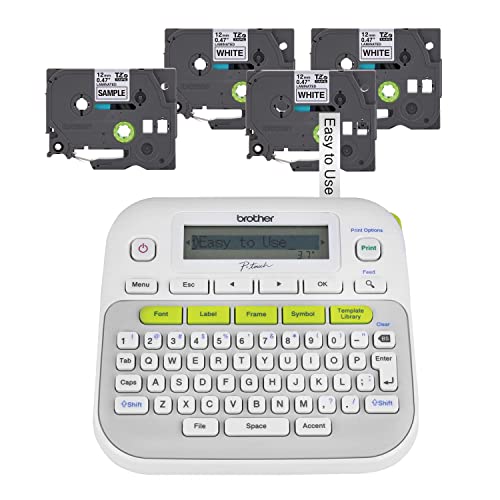
Brother P-Touch, PTD210, Easy-to-Use Label Maker Bundle (4 Label Tapes Included), White, Small
As an Amazon Associate we earn from qualifying purchases. Product prices and availability are accurate as of the date/time indicated.

SUPVAN E11 Keyboard & Bluetooth Label Maker Machine with 4 Tapes | Rechargeable, Versatile App with 30+ Fonts and 660+ Icons, Minimal Margin, Inkless, for Home, Kitchen, Office, School
As an Amazon Associate we earn from qualifying purchases. Product prices and availability are accurate as of the date/time indicated.

ORGSTA Label Maker, S001 Portable Bluetooth Label Maker Machine with Tape | Thermal Label Printer for Home, Office, School Organization, Wireless Mini Labeler, Sticker Maker, Multiple Templates, Pink
As an Amazon Associate we earn from qualifying purchases. Product prices and availability are accurate as of the date/time indicated.
Tape system, supported tape widths, print technology and stated label durability, keyboard or app or computer authoring, connectivity, power arrangement, and cutter design are each maker’s specification for the current exact model and must be confirmed in that maker’s current documents, against your labelling census, before purchase. Prices are typical street ranges as described and exclude tape, whose stated yield and price the guide directs the buyer to count. Direct thermal labels and laminated thermal-transfer labels have different lifespans, as the guide explains.
Detailed Reviews: Label Makers Worth Choosing
1. Brother P-touch D610BT Class – Best Overall
Brother’s class leads the home office table because it refuses the parish boundary: a machine in its stated design that authors at its own keyboard in its stated terms and from the computer and the phone in its stated connectivity classes, printing on the laminated tape parish in Brother’s documents — the archive’s durability standard — across the width classes in its stated arrangements that reach from the cable’s small label to the archive box’s wide one. Its stated design’s cutter and its house’s tape parish complete a machine that is the office’s decade citizen.
Its price is the table’s upper parish and its tape’s is the laminated standard’s, both stated in its row. For the office whose labels are a record, it is the finished article, and its archives will be legible at the decade’s end, which is the entire proposition stated as a result.
2. DYMO LabelManager 280 Class – Best Keyboard Machine
The LabelManager’s parish is independence: a stated design in DYMO’s documents that authors on its own keyboard in its stated terms, prints on its house’s tape parish in its stated classes, and asks nothing of the phone, the computer, or the household’s network — the label made at the shelf, where the labelling happens, by a machine that is awake before the phone has found its application. Its stated power parish in its documents suits the desk and the shelf alike.
Its tape parish is its house’s, priced in its stated ranges, and its widths in its documents serve the office’s ordinary census. For the filer who labels as they file, it is the vernacular for a reason, and its decades in the parish are its review.
3. Brother P-touch Cube Plus Class – Best App Machine with Laminated Tape
The Cube Plus is the treaty between the parishes: the app parish’s authoring in Brother’s stated application — the fonts, the frames, the phone’s ease — printing on the laminated tape parish in its documents, so the jar’s pretty label and the file’s permanent one come from the same small machine in its stated design. Its width classes in its stated arrangements serve the household’s whole census at the smaller end.
Its price sits between its two parishes, stated in its row. For the household that wants one machine and both lifespans, it is the guide’s most elegant answer, and its owners’ kitchens and archives are equally legible, which no other small machine in this table can claim.
4. NIIMBOT B21 Class – Best Value App Machine
NIIMBOT’s class is the app parish’s value reference in its stated design: a machine whose stated application parish in its documents gives the household the designed label — the frames and the fonts the jars deserve — on its house’s tape parish in its stated classes, at a price that has made it the parish’s first machine in a generation of kitchens. Its stated design’s retro parish is its own, and its owners’ affection for it is a specification the table respects.
Its print parish is the direct thermal’s in its stated terms, with that parish’s lifespan, printed on its row so the archive is not entrusted to it. Within its parish — the jar, the bin, the cable, the season’s labels — it is excellent, and its parish is most of a household’s actual labelling.
5. Phomemo D30 Class – Best Budget Label Maker
Phomemo’s class holds the budget’s floor with the app parish’s essentials in its stated design: the phone’s authoring in its stated application, its house’s tape parish in its stated classes, and a price that makes the label maker an impulse the household does not regret. Its stated parish is the small label’s — the jar’s, the cable’s, the notebook’s — in its documents’ width terms.
Its classes are the floor’s in the tape’s variety and the machine’s furniture alike, stated plainly. As the machine that starts a household labelling — with the archive’s decade reserved for the laminated rows above — it is the honest first step, and its graduates upgrade with their census already counted.
6. DYMO LabelWriter 550 Class – Best for Shipping and Volume
The LabelWriter is the office’s other species in DYMO’s stated design: a direct thermal machine in its documents’ terms for the label as a document — the shipping label, the address, the barcode’s parish in its stated classes — fed by its label rolls in its stated arrangements at the volume parish’s speed. Its home in this table is the home office that is also a small business, whose labelling is a workflow and not a tidiness.
Its labels are the direct thermal parish’s, with that parish’s lifespan, and its tape — its rolls, in its stated classes — is read in DYMO’s current documents for its exact terms, because this class’s consumables are its own ecosystem. Within its workflow it is the standard, and its parish’s parcels are its review, arriving daily.
Buying Guide: How to Choose a Label Maker for Home Offices
The tape is the product: system, width, yield, and lifespan
Choose the tape before the machine, because the machine is the tape’s dispenser and the tape is the decade’s purchase. The system first: each house’s tapes, in their makers’ stated classes, fit their own machines’ parish and no other’s, so the machine’s purchase is a marriage to a tape catalogue — its widths, its colours, its materials in its documents’ terms — and the buyer reads the catalogue as the marriage contract it is. The widths second: the household’s census priced against the machine’s stated width classes — the cable’s narrow, the file’s standard, the archive box’s and the binder’s wide — because a machine that cannot speak the archive’s width is a spice machine with ambitions. The yield third: the tape’s stated length per cartridge or roll in its documents, divided into its price, gives the label’s true cost at your label’s average length, and across the archive’s hundreds that figure is the purchase — the machine’s price amortised into a footnote by the second year. The lifespan last and decisively: the laminated thermal-transfer parish, in its makers’ stated terms, is the archive’s — resistant in its documents’ classes to the water, the light, and the years; the direct thermal parish is the living label’s — crisp, pretty, and mortal in the sunlit room’s ordinary account across the years. A household that knows which of its labels are archives buys the laminated machine for them and the app machine for the rest, or the treaty machine in this table that speaks laminated from the phone, and no household that has priced the tape first has ever been surprised by it.
The author: keyboard, phone, or computer
The label’s author is the machine’s daily character, and it is chosen by where the labelling happens. The keyboard parish — the LabelManager’s and the handheld P-touch classes’ stated designs — authors at the shelf, in the hand, without a second device: slower per label in its stated terms, instant in its availability, and the parish of the filer and the shelf-by-shelf organiser. The phone parish — the app classes’ stated arrangements — authors with the fonts, the frames, and the photographs the household enjoys, at the desk or the sofa, for the labels that are designed rather than typed: the jar’s, the bin’s, the child’s whole kingdom, at the price of the application’s parish — its account, its updates, its maker’s continued interest in its documents’ terms, which the buyer weighs as part of a connected product’s honest cost. The computer parish — the connected classes’ stated arrangements — authors the volume: the archive’s hundreds laid out as one job in the software’s stated design, the spreadsheet’s list become labels, the small business’s stock. The household’s true census usually spans two authors, and the treaty machines in this table exist because of it. Choose by the hundred labels you will actually make, in the room you will actually make them, and not by the demonstration’s charm.
Power, cutter, and the label’s finish
The remaining specifications are the machine’s manners, read in the documents with the desk in mind. The power’s arrangement, in the makers’ stated terms — the battery parish’s freedom for the shelf machine, the adapter’s permanence for the desk’s, the rechargeable’s treaty in its stated classes — decides whether the machine is awake at the moment of labelling or is a small errand first. The cutter, in its stated design — the manual’s parish, the automatic’s in its documents’ terms — decides the hundred-label job’s rhythm and the single label’s waste, because the tape’s economy includes the leader the machine spends at every print, in its stated arrangement, which the high-volume buyer reads as a cost and the occasional buyer never notices. The finish is the label’s own: the tape’s stated colours and materials in its house’s catalogue — the clear parish for the jar’s glass, the white for the file, the fabric’s and the cable’s flexible classes in their makers’ stated terms where the census needs them — because the label that suits its surface is the label that stays on it, and a labelling system whose labels peel is a household returning to the marker pen in a season. How to choose label maker for home offices is finally a tape counted across a census: the archive’s lifespan, the widths the boxes need, the author the rooms prefer, the yield priced per label — and any machine in this table, so chosen, will organise a household for a decade, which is the only promise a label has ever made and the only one it needs to keep.
Frequently Asked Questions About How to Choose a Label Maker for Home Offices
How do I choose a label maker for my home office?
By the tape, in the guide’s order. First, name the census: the files and archive boxes, the cables, the jars and bins — and mark which of them are archives, because the archive’s labels need the laminated parish’s stated durability and the living labels do not. Second, read the tape catalogues in the makers’ current documents: the widths your census needs, the materials for your surfaces, and the yield per cartridge divided into its price, which is your label’s true cost across the decade. Third, choose the author your rooms prefer — the keyboard for the shelf, the phone for the designed label, the computer for the hundred-label job — or the treaty machines that span them. Brother’s laminated classes lead this table for the office of record, DYMO’s LabelManager for the keyboard parish, the Cube Plus as the app-and-laminated treaty, and NIIMBOT’s and Phomemo’s classes for the household’s living labels at the value end. Confirm the exact model’s stated tape classes before purchase, because the machine is a marriage to its tape, and marriages should be entered with the catalogue open.
What is the difference between laminated and direct thermal labels?
Lifespan, construction, and parish — in their makers’ stated terms. A laminated label, the Brother P-touch parish’s standard, is printed by thermal transfer and sealed under a clear laminate in its stated construction: the result, in its documents’ classes, resists water, light, abrasion, and the years, which is why it is the archive’s, the file’s, and the outdoor label’s material. A direct thermal label — the app parish’s and the LabelWriter’s usual construction — is printed by heat on a coated paper or film whose image is the coating’s own reaction: crisp and inexpensive today, and in the ordinary account of the parish, mortal across the years in the sunlit, warm room, fading as the coating ages. Neither is a defect; they are two lifespans for two jobs. The jar that will be refilled and relabelled, the bin whose contents change, the season’s label — direct thermal serves them at its honest price. The archive box that will be read in a decade, the file, the asset — entrust those to the laminate, because a faded archive is a room of anonymous boxes, and anonymity is the one thing a label maker exists to prevent.
Which tape width do I need for files and storage boxes?
Two widths cover the home office’s census in the makers’ stated classes, and the machine is chosen to speak both. The standard width parish — the middle classes in the houses’ catalogues — is the file’s, the folder’s, and the jar’s: legible at the shelf’s distance, economical per label, the office’s daily bread. The wide parish — the upper classes in the catalogues of the machines that support them — is the archive box’s, the binder’s spine’s, and the storage bin’s: the label that is read across the room and across the decade, whose letters are sized for the loft’s dim and the loft’s distance. The narrow parish serves the cable and the pen pot. Read your candidate’s stated width classes in its maker’s current documents against that census before purchase, because width is a property of the machine and not of the tape alone — the narrow machine cannot speak wide however the catalogue tempts — and the household that buys its second machine for the archive’s width has paid the tuition this paragraph exists to save. The treaty in one sentence: measure your biggest label first, and let it choose the machine’s class.
Are app-based label makers worth it, or should I get one with a keyboard?
Both are worth it, in their parishes, and the honest household often ends with one of each — which this guide prints without embarrassment because the parishes are real. The app machines — NIIMBOT’s, Phomemo’s, and Brother’s Cube classes in this table — author with the phone’s fonts, frames, and ease, and they make the designed label: the jar’s, the bin’s, the child’s kingdom, the label as a small pleasure. Their honest costs are the application’s parish — the phone present, the app maintained, the account in its maker’s terms — and, for most of the class, the direct thermal label’s lifespan. The keyboard machines — the LabelManager’s and the handheld P-touch classes — author anywhere, instantly, with no second device and no account, in the filer’s hand at the shelf; their labels are plainer and their machines are awake for a decade. The office of record belongs to the keyboard and the laminated tape; the living household belongs to the app; and the Cube Plus in this table exists for the household that refuses to choose. Decide by your hundred commonest labels, made in the room you will make them in, and the parish will choose itself.
Related guides
- Best USB C Cable for Gaming in 2026: 7 Best USB C Cables for Gaming That Charge Fast and Stay Connected
- Best Earbuds for Airplane Travel in 2026: Earbuds for Airplane Travel, Travel Earbuds, and Best Airplane Earbuds
- Best Wall Charger with Multiple Ports in 2026: Wall Charger with Multiple Ports, Multi-Port Wall Chargers, and Best Multi-Port Chargers
- Best Lighting Kit for YouTube in 2026: 7 Best Lighting Kits for YouTube That Make Your Videos Look Professional
More from Amazon
Programs that pair well with the guide above. Offers and eligibility are set by Amazon and may change.
Free shipping on eligible items, Prime Video and more. Eligible new members can start with a free trial.
Start a Prime free trialAd-free music streaming. Eligible new subscribers can start with a free trial.
Try Music Unlimited freeA Prime membership for ages 18-24 with a trial period. Eligibility is set by Amazon.
See Prime for Young AdultsAudiobooks and podcasts to listen to on the go. Eligible new members can start with a free trial.
Try Audible freeAs an Amazon Associate we earn from qualifying purchases.

Write Your Review
No reviews yet. Be the first to share your experience!