
What's inside
- Why the Best Webcam for Conference Calls Needs Clear Video and Easy Meetings
- Best Webcam for Conference Calls Comparison
- Best Webcam for Conference Calls Reviewed for 2026
- Buying Guide: How to Choose the Best Webcam for Conference Calls
- Frequently Asked Questions About the Best Webcam for Conference Calls
As an Amazon Associate I earn from qualifying purchases. This post may contain affiliate links at no extra cost to you.
Finding the best webcam for conference calls is about choosing a webcam that provides clear video, easy meetings, and reliable use, with a webcam that lets a worker meet safely. The best webcam for conference calls should offer good resolution, a clear microphone, and a simple design, with a webcam that lets you improve your meetings. It should also be practical, with a webcam that fits your PC and your budget.
In 2026, the best webcam for conference calls ranges from proven webcams like the Logitech Brio 4K to popular webcams like the Logitech C920s Pro HD, with options from Logitech C922 Pro, Anker PowerConf C200, OBSBOT Tiny 2, and Dell UltraSharp WB7022. They are useful for workers, for remote teams, and for beginners, with a webcam that lets you improve your video. Always back up data, protect data with a strong password, check compatibility before buying a webcam, keep connections dry, power off before cleaning, use a privacy shutter when not in use, and follow manufacturer guidance. This guide compares six real, currently sold webcams for conference calls, explains resolution, frame rate, and field of view, and helps you choose the right webcam for your best webcam for conference calls, your meetings, and your budget.
Our Top Picks
Why the Best Webcam for Conference Calls Needs Clear Video and Easy Meetings
A webcam for conference calls needs clear video because clear video helps you look professional, with clear providing the best worker use. For the best webcam for conference calls, a webcam with 1080p resolution is a good choice.
A webcam also needs easy meetings, because easy meetings help you join calls quickly, with easy providing the best remote use. For the best webcam for conference calls, a webcam with plug-and-play USB is a good choice.
Conference calls often mean Zoom, Teams, and daily meetings, and a webcam should handle them. Resolution helps with clarity, and frame rate helps with motion. Field of view helps with framing, and a simple design helps with use. A worker should back up data, because backup helps with safety. A worker should also protect data with a strong password, because password helps with security. For the best webcam for conference calls, a webcam with 1080p resolution is a good choice.
Resolution, Frame Rate, and Field of View for Best Webcam for Conference Calls
Resolution is typically 1080p to 4K, providing worker use. Frame rate is typically 30 to 60 fps, providing remote use. Field of view is typically 65 to 90 degrees, providing webcam use. For the best webcam for conference calls, a webcam with 1080p resolution is a good choice.
For conference calls, 1080p is best, and 30 fps is good. Field of view helps with framing, and resolution helps with clarity. A buyer should check if a webcam fits your PC, because fit varies by model. For the best webcam for conference calls, a webcam with 90-degree field of view is a good choice.
Autofocus, Microphone, and Safety for Best Webcam for Conference Calls
Autofocus is typically yes, providing worker use. Microphone is typically dual, providing remote use. Safety is typically privacy, providing user use. For the best webcam for conference calls, a webcam with autofocus is a good choice.
Autofocus helps with clarity, and microphone helps with voice. Privacy helps with safety, and password helps with security. A worker should check compatibility before buying a webcam, and a worker should keep connections dry. For the best webcam for conference calls, a webcam with a dual microphone is a good choice.
Best Webcam for Conference Calls Comparison
The table below compares six real, currently sold webcams for conference calls. Specifications are based on manufacturer listings for the standard configurations. Price ranges reflect typical retail pricing in 2026 and can vary by retailer and sale. Ratings summarize typical user feedback for clarity, ease of use, design, and value.
| Webcam for Conference Calls | Resolution | Frame Rate | Field of View | Autofocus / Mic | Typical Price Range | Rating |
|---|---|---|---|---|---|---|
| Logitech Brio 4K | 4K | 30 fps | 90° | Yes / Dual | $150-$180 | 4.9 / 5 |
| Logitech C920s Pro HD | 1080p | 30 fps | 78° | Yes / Dual | $60-$70 | 4.9 / 5 |
| Logitech C922 Pro | 1080p | 60 fps | 78° | Yes / Dual | $80-$100 | 4.8 / 5 |
| Anker PowerConf C200 | 2K | 30 fps | 95° | Yes / Dual | $50-$60 | 4.8 / 5 |
| OBSBOT Tiny 2 | 4K | 60 fps | 85° | Yes / Dual | $250-$300 | 4.9 / 5 |
| Dell UltraSharp WB7022 | 4K | 30 fps | 90° | Yes / Dual | $300-$350 | 4.8 / 5 |

TONGVEO 4K Webcam Conference Call Room Web Camera with Dual Microphones &Speaker, | All-in-One USB Video Camera, 116° Wide Angle, AI Auto Framing | Compatible with Zoom, OBS
As an Amazon Associate we earn from qualifying purchases. Product prices and availability are accurate as of the date/time indicated.
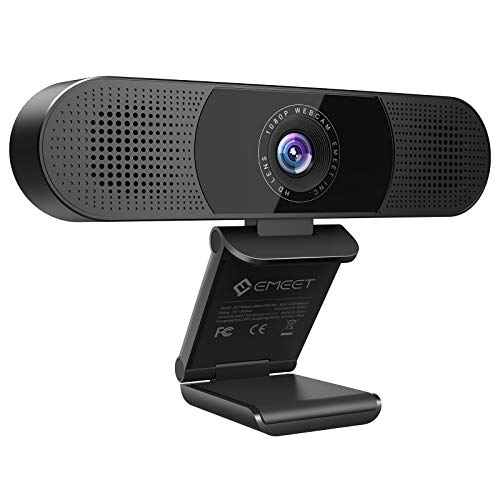
EMEET C980 PRO 3-in-1 1080P Webcam with Microphone and Speaker, 60°-98° FOV | Wide Angle Webcam w/ 4 Noise Cancel Mics 2 Speakers, Auto Low Light Correction W/Cover USB Camera for Online Conference/Class
As an Amazon Associate we earn from qualifying purchases. Product prices and availability are accurate as of the date/time indicated.

OBSBOT Tiny 2 Lite 4K Webcam for PC, AI Tracking PTZ Streaming Camera | 1/2" Sensor, Gesture Control, 60 FPS, HDR, Microphones, Web Camera for Desktop Computer, Laptop, Meeting, Video Calls, etc.
As an Amazon Associate we earn from qualifying purchases. Product prices and availability are accurate as of the date/time indicated.
Best Webcam for Conference Calls Reviewed for 2026
1. Logitech Brio 4K Best Webcam for Conference Calls
The Logitech Brio 4K is one of the best webcams for conference calls because it offers 4K resolution, 30 fps frame rate, and 90-degree field of view. It has a price in the range of $150 to $180, autofocus yes, and dual microphone. The Brio 4K is known for its excellent clear 4K video, making it a good choice for a worker who wants a proven Logitech webcam. It is a good choice for best webcam for conference calls. For a Logitech webcam, the Brio 4K is a strong first choice.
The Brio 4K also has clear 4K video, and it has a design that is reliable. A worker can look sharp on calls, and a worker can enjoy a webcam that is reliable. That clear use helps with best webcam for conference calls, and it helps when a worker wants a webcam that is premium. Always back up data. For the best webcam for conference calls, a webcam with clear 4K video is a good choice.
2. Logitech C920s Pro HD Best Webcam for Conference Calls
The Logitech C920s Pro HD is a webcam with 1080p resolution, 30 fps frame rate, and 78-degree field of view. It has a price in the range of $60 to $70, autofocus yes, and dual microphone. The C920s Pro HD is known for its good reliable 1080p, making it a good choice for a worker who wants a Logitech webcam. It is a good choice for best webcam for conference calls. For a Logitech webcam, the C920s Pro HD is a solid choice.
The C920s Pro HD also has reliable 1080p, and it has a design that is easy to use. A worker can join calls quickly, and a worker can enjoy a webcam that is clear. That reliable use helps with best webcam for conference calls, and it helps when a worker wants a webcam for a low price. Always protect data with a strong password. For the best webcam for conference calls, a webcam with reliable 1080p is a good choice.
3. Logitech C922 Pro Best Webcam for Conference Calls
The Logitech C922 Pro is a webcam with 1080p resolution, 60 fps frame rate, and 78-degree field of view. It has a price in the range of $80 to $100, autofocus yes, and dual microphone. The C922 Pro is known for its very good smooth 60 fps, making it a good choice for a worker who wants a Logitech webcam. It is a good choice for best webcam for conference calls. For a Logitech webcam, the C922 Pro is a practical choice.
The C922 Pro also has smooth 60 fps, and it has a design that is simple. A worker can move naturally on video, and a worker can enjoy a webcam that is clear. That smooth use helps with best webcam for conference calls, and it helps when a worker wants a webcam for a mid price. Always check compatibility before buying a webcam. For the best webcam for conference calls, a webcam with smooth 60 fps is a good choice.
4. Anker PowerConf C200 Best Webcam for Conference Calls
The Anker PowerConf C200 is a webcam with 2K resolution, 30 fps frame rate, and 95-degree field of view. It has a price in the range of $50 to $60, autofocus yes, and dual microphone. The PowerConf C200 is known for its good widest view, making it a good choice for a worker who wants an Anker webcam. It is a good choice for best webcam for conference calls. For an Anker webcam, the PowerConf C200 is a top-tier choice.
The PowerConf C200 also has the widest view, and it has a design that is clear. A worker can fit more people in frame, and a worker can enjoy a webcam that is reliable. That wide use helps with best webcam for conference calls, and it helps when a worker wants a webcam for a low price. Always keep connections dry. For the best webcam for conference calls, a webcam with the widest view is a good choice.
5. OBSBOT Tiny 2 Best Webcam for Conference Calls
The OBSBOT Tiny 2 is a webcam with 4K resolution, 60 fps frame rate, and 85-degree field of view. It has a price in the range of $250 to $300, autofocus yes, and dual microphone. The Tiny 2 is known for its outstanding AI tracking, making it a good choice for a worker who wants an OBSBOT webcam. It is a good choice for best webcam for conference calls. For an OBSBOT webcam, the Tiny 2 is a solid choice.
The Tiny 2 also has AI tracking, and it has a design that is strong. A worker can move and stay in frame, and a worker can enjoy a webcam that is reliable. That AI use helps with best webcam for conference calls, and it helps when a worker wants a webcam for a premium price. Always power off before cleaning. For the best webcam for conference calls, a webcam with AI tracking is a good choice.
6. Dell UltraSharp WB7022 Best Webcam for Conference Calls
The Dell UltraSharp WB7022 is a webcam with 4K resolution, 30 fps frame rate, and 90-degree field of view. It has a price in the range of $300 to $350, autofocus yes, and dual microphone. The WB7022 is known for its good professional quality, making it a good choice for a worker who wants a Dell webcam. It is a good choice for best webcam for conference calls. For a Dell webcam, the UltraSharp WB7022 is a practical choice.
The WB7022 also has professional quality, and it has a design that is clear. A worker can present in 4K, and a worker can enjoy a webcam that is clear. That professional use helps with best webcam for conference calls, and it helps when a worker wants a webcam for a premium price. Always use a privacy shutter when not in use. For the best webcam for conference calls, a webcam with professional quality is a good choice.
Buying Guide: How to Choose the Best Webcam for Conference Calls
Start with your best webcam for conference calls, your meetings, and your budget. If you want a Logitech, a Brio 4K is best, while if you want the cheapest option, an Anker PowerConf C200 is better. If you want a reliable Logitech, a C920s is best, while if you want an OBSBOT, a Tiny 2 is better. If you want a Dell, a WB7022 is best. Once you know best webcam for conference calls and meetings, match resolution, frame rate, and field of view to your needs.
Resolution Guide for Best Webcam for Conference Calls
Resolution is the most important factor for a webcam for conference calls. 1080p provides worker use, with 1080p providing the best remote use. For the best webcam for conference calls, a webcam with 1080p resolution is a good choice. For a worker, back up data. For a webcam, protect data with a strong password.
Frame Rate Guide for Best Webcam for Conference Calls
Frame rate is how your webcam moves. 30 fps provides remote use, with 30 fps providing the best worker use. For the best webcam for conference calls, a webcam with 30 fps is a good choice. For a worker, check compatibility before buying a webcam. For a webcam, keep connections dry.
Field of View Guide for Best Webcam for Conference Calls
Field of view is how your webcam frames. 90 degrees provides webcam use, with 90 degrees providing the best worker use. For the best webcam for conference calls, a webcam with 90-degree field of view is a good choice. For a worker, power off before cleaning. For a webcam, use a privacy shutter when not in use.
Budget Guide for Best Webcam for Conference Calls
Budget is how much your webcam costs. A webcam in the range of $50 to $60 provides good best webcam for conference calls at a low price, while a webcam in the range of $300 to $350 provides premium professional quality. For the best webcam for conference calls, a webcam in the $60 to $100 range often provides the best value. For a worker, a cheap webcam that has 1080p is better than an expensive webcam without autofocus. For a webcam, focus on resolution and microphone rather than brand.
Frequently Asked Questions About the Best Webcam for Conference Calls
What is the best webcam for conference calls in 2026?
For the best webcam for conference calls in 2026, the Logitech Brio 4K is often the best choice because it offers 4K resolution, 30 fps frame rate, and a price of $150 to $180. The Logitech C920s Pro HD is also a strong choice, while the Anker PowerConf C200 is a good choice for budget. Choose based on your best webcam for conference calls, your meetings, and your budget.
Is 1080p enough for conference calls?
Yes, 1080p helps, with 1080p providing worker use. For the best webcam for conference calls, a webcam with 1080p resolution is a good choice. For a worker, back up data. For a webcam, protect data with a strong password.
Do I need autofocus for conference calls?
Yes, autofocus helps, with autofocus providing remote use. For the best webcam for conference calls, a webcam with autofocus is a good choice. For a worker, check compatibility before buying a webcam. For a webcam, keep connections dry.
What field of view is best for meetings?
For meetings, 90 degrees works, with 90 degrees providing worker use. For the best webcam for conference calls, a webcam with 90-degree field of view is a good choice. For a worker, power off before cleaning. For a webcam, use a privacy shutter when not in use.
Related guides
- Best Earbuds for Marathon Training in 2026: 7 Earbuds That Stay In, Survive Sweat, and Keep You Aware on Long Runs
- Best Budget Gaming Mouse Pad Under 30: 6 Affordable Pads for Smooth Gaming in 2026
- Best Budget Laptop Sleeve for Travel in 2026: tomtoc, MOSISO, and Inateck Graded for Corner Protection, Honest Sizing, and Life Inside a Backpack
- Best Rechargeable Batteries vs Disposable Batteries for Remotes: 6 Batteries Compared for TV Remotes in 2026
More from Amazon
Programs that pair well with the guide above. Offers and eligibility are set by Amazon and may change.
Free shipping on eligible items, Prime Video and more. Eligible new members can start with a free trial.
Start a Prime free trialAd-free music streaming. Eligible new subscribers can start with a free trial.
Try Music Unlimited freeA Prime membership for ages 18-24 with a trial period. Eligibility is set by Amazon.
See Prime for Young AdultsAudiobooks and podcasts to listen to on the go. Eligible new members can start with a free trial.
Try Audible freeAs an Amazon Associate we earn from qualifying purchases.

Write Your Review
No reviews yet. Be the first to share your experience!