
What's inside
- Why Speed Matters Most for File Transfers on a USB Flash Drive
- Best USB Flash Drive for File Transfers: Read Speed, Write Speed and Capacity
- Best USB Flash Drive for File Transfers Comparison Table
- Top USB Flash Drives for File Transfers Reviewed
- Buying Guide: How to Choose the Best USB Flash Drive for File Transfers
- How to Transfer Files Fast With a USB Flash Drive
- Frequently Asked Questions
As an Amazon Associate I earn from qualifying purchases. This post may contain affiliate links at no extra cost to you.
Finding the best USB flash drive for file transfers is about choosing a drive that can move large files, such as videos, photos, and backups, quickly, with a design that is fast, durable, and compatible with your computer, whether you transfer files between a laptop and a desktop, or between a phone and a PC. A USB flash drive for file transfers should have a high read and write speed, with a design that is USB 3.2 or USB-C, and with a drive that is reliable for daily use.
This guide explains what to look for in a USB flash drive for file transfers, how to compare read speed, write speed, capacity, and interface, and which models work well in 2026. We focus on practical use for students, office workers, and creators who transfer large files, with a drive that is used for backups, for sharing, and for moving files, and with a design that is portable, durable, and affordable. Whether you transfer a 10GB video or a 100GB backup, the same principles apply: choose a drive with fast speeds, with a design that is USB 3.2, and with a drive that is large enough for your files.
Our Top Picks
Why Speed Matters Most for File Transfers on a USB Flash Drive
Speed matters most for file transfers on a USB flash drive, because a slow drive, with a read speed of 100 MB/s, can take minutes to transfer a 10GB file, with a design that is frustrating, while a fast drive, with a read speed of 400 MB/s, can transfer the same file in seconds, with a design that is efficient. A drive with a write speed of 400 MB/s, such as the SanDisk Extreme Pro, is much faster than a drive with a write speed of 50 MB/s, such as a basic USB 2.0 drive, with a design that is slow, and with a drive that is not suitable for large files.
A USB flash drive for file transfers also needs to have a fast interface, because a drive with USB 3.2 Gen 1, with a speed of up to 5 Gbps, is faster than a drive with USB 2.0, with a speed of up to 480 Mbps, and with a design that is 10 times slower. A drive with USB 3.2 Gen 2, with a speed of up to 10 Gbps, is even faster, with a design that is ideal for large files, and with a drive that is worth it if you transfer files daily. A drive with USB-C, with a design that is reversible, is also convenient, because it fits modern laptops, with a design that is easy to use.
Best USB Flash Drive for File Transfers: Read Speed, Write Speed and Capacity
Read speed matters for a USB flash drive for file transfers, because read speed determines how fast you can copy files from your drive to your computer, with a design that is important when you open a large video or a large photo library. A drive with a read speed of 400 MB/s, such as the SanDisk Extreme Pro, can read a 10GB file in about 25 seconds, with a design that is fast, while a drive with a read speed of 100 MB/s can take 100 seconds, with a design that is slow. A drive with a read speed of 300 MB/s, such as the Samsung FIT Plus, is also fast, with a design that is good for most file transfers.
Write speed also matters, because write speed determines how fast you can copy files from your computer to your drive, with a design that is important when you back up your files. A drive with a write speed of 400 MB/s is much faster than a drive with a write speed of 100 MB/s, with a design that is slow, and with a drive that can take a long time to back up a large folder. Capacity also matters, because a drive with a capacity of 256GB is enough for most file transfers, with a design that is large, while a drive with a capacity of 128GB is enough for a smaller backup, and a drive with a capacity of 512GB is better for a large video library, with a design that is spacious.
Best USB Flash Drive for File Transfers Comparison Table
| Model | Capacity | Interface | Read Speed | Write Speed | Typical Price Range | Rating |
|---|---|---|---|---|---|---|
| SanDisk Extreme Pro USB 3.2 | 256GB | USB 3.2 Gen 1 | Up to 420 MB/s | Up to 380 MB/s | $30-$40 | 4.8/5 |
| Samsung FIT Plus | 256GB | USB 3.2 Gen 1 | Up to 400 MB/s | Up to 300 MB/s | $25-$35 | 4.8/5 |
| Samsung BAR Plus | 256GB | USB 3.2 Gen 1 | Up to 400 MB/s | Up to 300 MB/s | $25-$35 | 4.7/5 |
| Kingston DataTraveler Max | 256GB | USB 3.2 Gen 2 | Up to 1000 MB/s | Up to 900 MB/s | $40-$55 | 4.7/5 |
| SanDisk Ultra Dual Drive Luxe USB-C | 256GB | USB-C, USB 3.2 Gen 1 | Up to 400 MB/s | Up to 300 MB/s | $30-$40 | 4.7/5 |
| SanDisk Ultra Flair | 128GB | USB 3.0 | Up to 150 MB/s | Up to 100 MB/s | $15-$20 | 4.6/5 |

Lexar D40E 128GB Dual USB 3.2 Gen 1 Type-C Jump Drive, Champagne Silver | USB-C Flash, Metal Housing, Swivel Design, Thumb Drive
As an Amazon Associate we earn from qualifying purchases. Product prices and availability are accurate as of the date/time indicated.
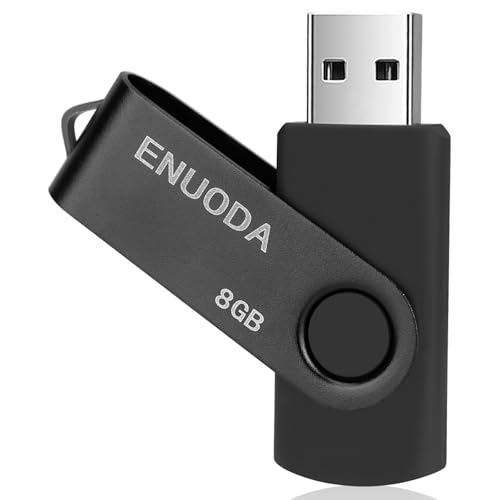
8GB Flash Drive ENUODA 1 Pack Thumb Drive 8GB USB 2.0 Memory Stick Jump Drive Pen Drive for File Storage and Data Transfer (Black)
As an Amazon Associate we earn from qualifying purchases. Product prices and availability are accurate as of the date/time indicated.
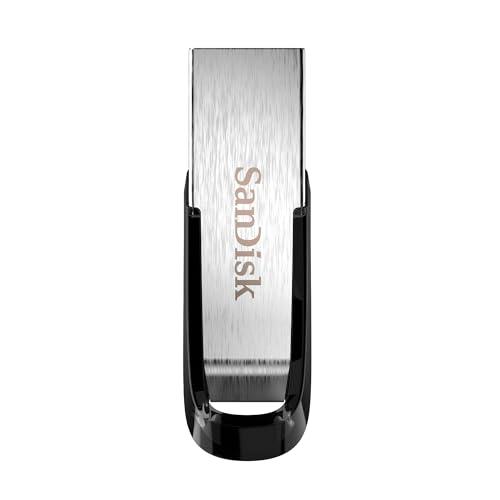
SANDISK 128GB Ultra Flair, USB-A Flash Drive, Up to 150MB/s Read Speeds | USB Flash Drive, Up to 15x Faster than standard 2.0, Password Protection, Durable, Sleek Metal Casing, USB 3.0, Silver/Black
As an Amazon Associate we earn from qualifying purchases. Product prices and availability are accurate as of the date/time indicated.
Top USB Flash Drives for File Transfers Reviewed
SanDisk Extreme Pro USB 3.2
The SanDisk Extreme Pro USB 3.2 is a flash drive with a capacity of 256GB, an interface of USB 3.2 Gen 1, a read speed of up to 420 MB/s, a write speed of up to 380 MB/s, and a price of $30 to $40. It has a design that is known for SanDisk quality, with a drive that is fast, durable, and popular with creators. It is a good choice if you want the best USB flash drive for file transfers, with a design that is fast, and with a drive that is ideal for large files.
Samsung FIT Plus
The Samsung FIT Plus is a flash drive with a capacity of 256GB, an interface of USB 3.2 Gen 1, a read speed of up to 400 MB/s, a write speed of up to 300 MB/s, and a price of $25 to $35. It has a design that is very small, with a drive that fits flush in your laptop, and with a design that is ideal for a laptop that you carry. It is a good choice if you want a USB flash drive for file transfers that is compact, with a design that is fast and with a drive that is easy to leave in your computer.
Samsung BAR Plus
The Samsung BAR Plus is a flash drive with a capacity of 256GB, an interface of USB 3.2 Gen 1, a read speed of up to 400 MB/s, a write speed of up to 300 MB/s, and a price of $25 to $35. It has a metal body, with a design that is durable, and with a drive that is known for Samsung quality. It is a good choice if you want a USB flash drive for file transfers that is durable, with a design that is metal and with a drive that is good for daily use.
Kingston DataTraveler Max
The Kingston DataTraveler Max is a flash drive with a capacity of 256GB, an interface of USB 3.2 Gen 2, a read speed of up to 1000 MB/s, a write speed of up to 900 MB/s, and a price of $40 to $55. It has a design that is the fastest in this list, with a drive that can transfer a 10GB file in seconds, and with a design that is ideal for a large video file. It is a good choice if you want the fastest USB flash drive for file transfers, with a design that is USB 3.2 Gen 2, and with a drive that is worth it if you transfer large files daily.
SanDisk Ultra Dual Drive Luxe USB-C
The SanDisk Ultra Dual Drive Luxe USB-C is a flash drive with a capacity of 256GB, an interface of USB-C and USB 3.2 Gen 1, a read speed of up to 400 MB/s, a write speed of up to 300 MB/s, and a price of $30 to $40. It has a design with two connectors, with a USB-C connector for a phone or a modern laptop, and a USB-A connector for an older computer, with a drive that is versatile. It is a good choice if you want a USB flash drive for file transfers between a phone and a PC, with a design that is dual, and with a drive that is easy to use.
SanDisk Ultra Flair
The SanDisk Ultra Flair is a flash drive with a capacity of 128GB, an interface of USB 3.0, a read speed of up to 150 MB/s, a write speed of up to 100 MB/s, and a price of $15 to $20. It has a metal body, with a design that is affordable, and with a drive that is good for a small backup. It is a good choice if you want a budget USB flash drive for file transfers, with a design that is cheap and with a drive that is good for occasional use, although it is slower than a SanDisk Extreme Pro.
Buying Guide: How to Choose the Best USB Flash Drive for File Transfers
Start with speed, interface, and your computer. Look for a drive with a read speed of at least 300 MB/s, because it will transfer a 10GB file in about 30 seconds, with a design that is fast, while a drive with a read speed of 100 MB/s will take 100 seconds, with a design that is slow. A drive with USB 3.2 Gen 1, with a speed of up to 5 Gbps, is a good minimum, with a design that is fast, while a drive with USB 3.2 Gen 2, with a speed of up to 10 Gbps, such as the Kingston DataTraveler Max, is even faster, with a design that is ideal for large files. Check your computer’s USB ports, with a design that is USB-A or USB-C, and choose a drive that fits, with a design that is compatible, or choose a dual drive, such as the SanDisk Ultra Dual Drive Luxe, with both USB-A and USB-C.
Next, check capacity, file size, and your backup needs. Look for a drive with a capacity of at least 256GB if you transfer large files, such as videos, with a design that is large, while a drive with a capacity of 128GB is enough for documents and photos, with a design that is smaller. A drive with a capacity of 512GB or 1TB is better if you back up your entire computer, with a design that is spacious, although it is more expensive. A drive that is formatted as exFAT, with a design that supports files larger than 4GB, is also important, because a drive formatted as FAT32 cannot store a file larger than 4GB, with a design that is a problem for a large video file. Most modern drives are formatted as exFAT, with a design that is ready to use.
Check durability, size, and portability. Look for a drive with a metal body, such as the Samsung BAR Plus, because it is more durable than a plastic drive, with a design that can survive a drop, and with a drive that is less likely to break. A drive that is small, such as the Samsung FIT Plus, is ideal for a laptop, with a design that fits flush and with a drive that you can leave in your computer, while a drive that is larger, such as the Kingston DataTraveler Max, is also portable, with a design that is easy to carry in your pocket. A drive with a cap, with a design that protects its connector, is also useful, because it prevents dust and damage, although a drive with a retractable connector, with a design that is built-in, is more convenient.
Consider your use, your phone, and your security. If you transfer files between a phone and a PC, choose a dual drive with USB-C, such as the SanDisk Ultra Dual Drive Luxe, with a design that fits your phone, and with a drive that is easy to use. If you transfer sensitive files, choose a drive with encryption, with a design that protects your data, and with a drive that requires a password, although most drives in this list do not have hardware encryption, so you may need to use software encryption. If you use your drive daily, choose a drive with a fast write speed, with a design that is efficient, and with a drive that is reliable, because a slow drive will waste your time.
Finally, set a realistic budget. USB flash drives for file transfers typically cost $15 to $55, depending on speed and capacity. A budget drive from $15 to $20, such as the SanDisk Ultra Flair 128GB, offers a cheap way to transfer files, with a design that is affordable, although it is slower. A mid-range drive from $25 to $40, such as the Samsung FIT Plus, Samsung BAR Plus, or SanDisk Extreme Pro 256GB, offers a good balance of speed, capacity, and price, and it is worth it if you transfer files regularly. A premium drive from $40 to $55, such as the Kingston DataTraveler Max 256GB, offers the fastest speeds, with a read speed of up to 1000 MB/s, and with a drive that is worth it if you transfer large files daily. Do not buy a drive based only on capacity. Choose one with a fast read and write speed, with a USB 3.2 interface, and with a design that fits your computer, so you can transfer your files quickly, without waiting.
How to Transfer Files Fast With a USB Flash Drive
To transfer files fast with a USB flash drive, first plug your drive into a USB 3.2 port, with a blue port, not a USB 2.0 port, with a black port, because a USB 3.2 port is faster, with a design that is 10 times faster than USB 2.0. Copy your files in batches, with a design that is efficient, and avoid copying many small files at once, because it is slower than copying a few large files. Use a drive that is formatted as exFAT, with a design that supports large files, and eject your drive safely, with a design that prevents data loss, before you unplug it. A drive that is used correctly, with a fast port and with a design that is efficient, will transfer your files quickly, with a design that is reliable.
Frequently Asked Questions
What is the fastest USB flash drive for file transfers?
The fastest USB flash drive for file transfers in this list is the Kingston DataTraveler Max, with a read speed of up to 1000 MB/s and a write speed of up to 900 MB/s, with a design that is USB 3.2 Gen 2, and with a drive that can transfer a 10GB file in about 10 seconds. A drive such as the SanDisk Extreme Pro, with a read speed of up to 420 MB/s, is also fast, with a design that is USB 3.2 Gen 1, although it is slower than the Kingston. A drive’s actual speed depends on your computer’s USB port, with a design that needs a USB 3.2 Gen 2 port to reach 1000 MB/s, and with a drive that will be slower on a USB 3.0 port. For the fastest file transfers, choose a USB 3.2 Gen 2 drive, with a design that is fast, and use a compatible port.
Is USB 3.2 faster than USB 3.0 for file transfers?
Yes, USB 3.2 is faster than USB 3.0 for file transfers, because USB 3.2 Gen 1 has a speed of up to 5 Gbps, which is the same as USB 3.0, with a design that is similar, while USB 3.2 Gen 2 has a speed of up to 10 Gbps, which is twice as fast as USB 3.0, with a design that is faster. A drive with USB 3.2 Gen 2, such as the Kingston DataTraveler Max, can transfer files at up to 1000 MB/s, with a design that is fast, while a drive with USB 3.0, such as the SanDisk Ultra Flair, can transfer files at up to 150 MB/s, with a design that is slower. For file transfers, a USB 3.2 Gen 2 drive is the best choice, with a design that is fastest, although a USB 3.2 Gen 1 drive, with a speed of up to 400 MB/s, is also good for most file transfers.
How much storage do I need on a USB flash drive for file transfers?
How much storage you need on a USB flash drive for file transfers depends on your files, with a drive of 128GB being enough for documents and photos, with a design that is small, and with a drive that is affordable, while a drive of 256GB is better for videos and backups, with a design that is large, and with a drive that is a good balance for most users. A drive of 512GB or 1TB is better if you back up your entire computer, with a design that is spacious, although it is more expensive. For most file transfers, a 256GB drive, such as the SanDisk Extreme Pro or Samsung FIT Plus, is the best choice, with a design that is large enough for a large video, and with a drive that is not too expensive.
Can I use a USB flash drive to transfer files between a phone and a PC?
Yes, you can use a USB flash drive to transfer files between a phone and a PC, if you choose a dual drive with USB-C, such as the SanDisk Ultra Dual Drive Luxe, with a design that has a USB-C connector for your phone, and a USB-A connector for your PC. A dual drive lets you copy files from your phone to your drive, with a design that is easy, and then copy them from your drive to your PC, with a design that is fast. A drive with USB-C is also compatible with modern Android phones, with a design that supports OTG, and with a drive that is easy to use. Always check your phone’s compatibility, with a design that supports USB OTG, before you buy a dual drive.
Related guides
- Best Premium Laptop Sleeve for Travel in 2026: Bellroy, WaterField, and Tomtoc Graded on Corner Protection, Airport Manners, and the Leather That Earns Its Price
- Best Gaming Keyboard for FPS Games: 6 Gaming Keyboards for FPS in 2026
- Best Wired Camera vs Wireless Camera for Homes in 2026: 7 Wired and Wireless Cameras That Keep Your Home Safe, Record Clearly, and Work Reliably
- Best Handheld Console Grip for Comfort in 2026: Handheld Console Grips for Comfort, Long Gaming Sessions, and Handheld Consoles
More from Amazon
Programs that pair well with the guide above. Offers and eligibility are set by Amazon and may change.
Free shipping on eligible items, Prime Video and more. Eligible new members can start with a free trial.
Start a Prime free trialAd-free music streaming. Eligible new subscribers can start with a free trial.
Try Music Unlimited freeA Prime membership for ages 18-24 with a trial period. Eligibility is set by Amazon.
See Prime for Young AdultsAudiobooks and podcasts to listen to on the go. Eligible new members can start with a free trial.
Try Audible freeAs an Amazon Associate we earn from qualifying purchases.

Write Your Review
No reviews yet. Be the first to share your experience!