
What's inside
- Why Most Webcams Look Bad in Low Light Rooms
- Best Webcam for Low Light Rooms: Sensor Size and Aperture Matter Most
- Best Webcam for Low Light Rooms Comparison Table
- Top Webcams for Low Light Rooms Reviewed
- Buying Guide: How to Choose the Best Webcam for Low Light Rooms
- How to Improve Your Webcam Image in a Low Light Room
- Webcams That Cope Well With Dim Rooms
- Frequently Asked Questions
As an Amazon Associate I earn from qualifying purchases. This post may contain affiliate links at no extra cost to you.
Finding the best webcam for low light rooms is about choosing a webcam that gives you a bright, clear, natural image on Zoom, Teams, and Twitch, even when your office is dim, with no overhead light, with a window behind you, or with only a small lamp. A webcam for low light rooms should have a large sensor, a wide aperture, and good low-light processing, so you do not look dark, grainy, or washed out on camera, even in a room with poor lighting.
This guide explains what to look for in a webcam for low light rooms, how to compare sensor size, aperture, resolution, and software, and which models work well in 2026. We focus on practical use for remote workers, streamers, teachers, and creators who work from a home office, a dorm, or a small studio, with a laptop or a desktop, and who want a webcam that is easy to set up, with a design that works in low light without a ring light. Whether you work at night, in a basement, or in a room with only one window, the same principles apply: choose a webcam with a large sensor, a wide aperture, and good auto-exposure.
Our Top Picks
Why Most Webcams Look Bad in Low Light Rooms
Most webcams look bad in low light rooms because they have a small sensor, with a size of 1/4 inch or smaller, and a narrow aperture, with an f-number of f/2.8 or higher, which lets in very little light, so your image becomes dark, grainy, and noisy when your room is dim. A small sensor needs a lot of light to produce a clear image, and when it does not get enough light, it increases its ISO, which causes grain, and it slows its shutter speed, which causes motion blur. A cheap webcam, such as a built-in laptop webcam, is especially bad in low light, because it has a tiny sensor and no low-light processing.
A webcam for low light rooms is better because it has a larger sensor, with a size of 1/2 inch or larger, and a wider aperture, with an f-number of f/2.0 or lower, which lets in more light, so your image is brighter and clearer, with less grain. A webcam with a large sensor, such as the Elgato Facecam Pro with a Sony Starvis sensor, or the Razer Kiyo Pro with a large sensor, can produce a clear image in a dim room, with a design that is optimised for low light, and with software that reduces noise and improves exposure. A webcam that is good in low light will also have a good auto-exposure, which adjusts brightness automatically, without overexposing your face.
Best Webcam for Low Light Rooms: Sensor Size and Aperture Matter Most
Sensor size matters most for a webcam for low light rooms, because a larger sensor gathers more light, with less noise, and with a clearer image in dim conditions. A webcam with a 1/2.8-inch sensor, such as the Logitech Brio, is better than a webcam with a 1/4-inch sensor, such as a cheap 1080p webcam, and a webcam with a 1/2-inch Sony Starvis sensor, such as the Elgato Facecam Pro, is even better, because it is designed for low light, with a high sensitivity to light. A webcam with a sensor that is too small will always look grainy in low light, no matter how good its software is.
Aperture also matters, because a wider aperture, with a lower f-number, lets in more light. A webcam with an aperture of f/2.0, such as the Razer Kiyo Pro, lets in more light than a webcam with an aperture of f/2.8, and it gives you a brighter image in a dim room, with a shallower depth of field that blurs your background slightly, which looks professional on camera. A webcam with a fixed focus is also a good choice for low light, because it does not hunt for focus in the dark, while a webcam with autofocus can struggle in low light, with a design that is slow to focus. A webcam with a large sensor and a wide aperture is the best combination for low light rooms.
Best Webcam for Low Light Rooms Comparison Table
| Model | Resolution | Sensor | Aperture | Field of View | Typical Price Range | Rating |
|---|---|---|---|---|---|---|
| Logitech Brio 4K | 4K 30fps, 1080p 60fps | Large sensor, RightLight 3 | f/2.0 | 65, 78, 90 degrees | $150-$200 | 4.7/5 |
| Razer Kiyo Pro | 1080p 60fps | Large sensor, adaptive light | f/2.0 | 80 degrees | $150-$200 | 4.7/5 |
| Elgato Facecam Pro | 4K 60fps | Sony Starvis, 1/2 in | f/2.0 | 70, 80, 90 degrees | $250-$300 | 4.8/5 |
| Logitech StreamCam Plus | 1080p 60fps | Large sensor | f/2.0 | 78 degrees | $150-$180 | 4.6/5 |
| Anker PowerConf C200 | 2K 30fps | Large sensor, AI | f/2.0 | 65, 78, 95 degrees | $50-$70 | 4.6/5 |
| Insta360 Link | 4K 30fps | 1/2 in sensor, AI tracking | f/1.8 | 79.5 degrees | $250-$300 | 4.7/5 |

4K Webcam with Ring Light & Built-in Microphone for PC Streaming | PDAF Autofocus,Supports 1080P 60FPS, Comes with Privacy Cover, Compatible with Zoom, Skype, Google Meet, Laptop Desktop Mac
As an Amazon Associate we earn from qualifying purchases. Product prices and availability are accurate as of the date/time indicated.

MELCAM 2K Webcam with Ring Light for Dark Rooms, USB Plug & Play for PC | Soft 3-level ring light lights your face, not the wall. 2K QHD, autofocus, noise-canceling mic, privacy shutter, no driver.
As an Amazon Associate we earn from qualifying purchases. Product prices and availability are accurate as of the date/time indicated.

Insta360 Link 2 Pro – 4K PTZ Webcam for PC/Mac, 1/1.3” Sensor, Low-Light, AI Tracking, HDR, Directional Noise-Canceling Mics, Supports Stream Deck, Zoom, Teams, Twitch for Streaming or Meetings
As an Amazon Associate we earn from qualifying purchases. Product prices and availability are accurate as of the date/time indicated.
Top Webcams for Low Light Rooms Reviewed
Logitech Brio 4K
The Logitech Brio 4K is a webcam with 4K at 30fps, 1080p at 60fps, a large sensor with RightLight 3, and an aperture of f/2.0. It has a price of $150 to $200, with a design that is known for good low-light performance, with a field of view that can be set to 65, 78, or 90 degrees. It is a good choice if you want a reliable webcam for low light rooms, with a design that is easy to set up and easy to use for Zoom and Teams. It is popular with remote workers who want a 4K webcam that looks clear in a dim office.
Razer Kiyo Pro
The Razer Kiyo Pro is a webcam with 1080p at 60fps, a large sensor with adaptive light, and an aperture of f/2.0. It has a price of $150 to $200, with a design that is optimised for low light, with a sensor that automatically adjusts to your lighting, and with a field of view of 80 degrees. It is a good choice if you want a webcam for low light rooms that is designed for streaming, with a design that is clear in a dark room, and with a price that is affordable for most streamers.
Elgato Facecam Pro
The Elgato Facecam Pro is a webcam with 4K at 60fps, a Sony Starvis sensor of 1/2 inch, and an aperture of f/2.0. It has a price of $250 to $300, with a design that is the best for low light in this list, with a large sensor that is designed for low light, and with a field of view that can be set to 70, 80, or 90 degrees. It is a good choice if you want the best webcam for low light rooms, with a design that is professional, with a clear, natural image, even in a very dim room. It is a practical option for serious streamers who want the best image quality.
Logitech StreamCam Plus
The Logitech StreamCam Plus is a webcam with 1080p at 60fps, a large sensor, and an aperture of f/2.0. It has a price of $150 to $180, with a design that is optimised for streaming, with a field of view of 78 degrees, and with a mount that can be used vertically for TikTok or Instagram. It is a good choice if you want a webcam for low light rooms that is good for streaming, with a design that is easy to use and with a clear image in a dim office.
Anker PowerConf C200
The Anker PowerConf C200 is a webcam with 2K at 30fps, a large sensor with AI, and an aperture of f/2.0. It has a price of $50 to $70, with a design that is affordable and easy to use, with a field of view that can be set to 65, 78, or 95 degrees. It is a good choice if you want a budget webcam for low light rooms, with a design that is surprisingly good in dim light for its price, and with AI that adjusts exposure automatically. It is a practical option for students and budget workers who want a good webcam without paying $150 or more.
Insta360 Link
The Insta360 Link is a webcam with 4K at 30fps, a 1/2-inch sensor with AI tracking, and an aperture of f/1.8. It has a price of $250 to $300, with a design that is unique, with a gimbal that tracks your face as you move, and with a wide aperture that lets in a lot of light. It is a good choice if you want a webcam for low light rooms that is also good for moving around, with a design that follows you as you present, and with a clear image in a dim room. It is a practical option for teachers and presenters who move while they talk.
Buying Guide: How to Choose the Best Webcam for Low Light Rooms
Start with sensor size, aperture, and resolution. Look for a webcam with a large sensor, at least 1/2 inch, and a wide aperture of f/2.0 or lower, because these two factors determine how much light your webcam gathers, and how clear your image will be in a dim room. A webcam with a 4K resolution, such as the Logitech Brio or Elgato Facecam Pro, will give you a sharper image than a webcam with 1080p, although 1080p at 60fps is enough for most Zoom calls, with a smooth, clear image. A webcam with a resolution of 2K, such as the Anker PowerConf C200, is a good middle ground, with a clear image and a lower price. Do not buy a webcam based only on resolution, because a 4K webcam with a small sensor will look worse in low light than a 1080p webcam with a large sensor.
Next, check low-light software, auto-exposure, and noise reduction. Look for a webcam with software that improves low-light performance, such as Logitech RightLight 3, Razer Synapse, or Elgato Camera Hub, which adjusts exposure, white balance, and noise reduction automatically, so your image is bright and clear without manual adjustment. A webcam with a good auto-exposure will brighten your face without overexposing your background, while a webcam with poor auto-exposure will make your face too dark or too bright. A webcam with a manual exposure setting, which lets you set brightness yourself, is also useful, because you can adjust it for your specific room. Test your webcam in your actual room, with your normal lighting, before your first video call, to see how it looks in low light.
Check field of view, autofocus, and mount. Look for a webcam with a field of view of 78 to 90 degrees, which is wide enough to show your face and shoulders, without showing too much of your background, and with a design that is flattering on camera. A webcam with a narrow field of view of 65 degrees is better if you want a close-up, with less background, while a webcam with a wide field of view of 95 degrees is better if you want to show a whiteboard or a second person. A webcam with autofocus is useful if you move around, although it can hunt for focus in low light, while a webcam with fixed focus is more reliable in a dim room, because it does not need to focus. A webcam with a mount that fits on your monitor, with a tripod thread, is also useful, because you can mount it on a tripod for a better angle.
Consider your lighting, background, and budget. Even the best webcam for low light rooms will look better with a small light, such as a ring light or a desk lamp, placed in front of you, with a warm, soft light that fills in shadows on your face. A webcam alone cannot fix a completely dark room, and you should add a light if your room is very dim, with a ring light costing $20 to $50, and a desk lamp costing even less. A webcam with a large sensor, such as the Elgato Facecam Pro, will look good in a dim room, but it will look even better with a small light. If you have a window behind you, close your curtains, or move your desk so the window is in front of you, not behind you, because backlighting will make your face dark, even with a good webcam.
Finally, set a realistic budget. Webcams for low light rooms typically cost $50 to $300, depending on sensor and resolution. A budget webcam from $50 to $70, such as the Anker PowerConf C200, offers excellent value for most workers, with a 2K image and good low-light performance for its price. A mid-range webcam from $150 to $200, such as the Logitech Brio, Razer Kiyo Pro, or Logitech StreamCam Plus, offers better low-light performance, with a larger sensor and a wider aperture, and it is worth it if you work in a dim office every day. A premium webcam from $250 to $300, such as the Elgato Facecam Pro or Insta360 Link, offers the best low-light performance, with a Sony Starvis sensor and a wide aperture, and it is worth it if you stream professionally. Do not buy a webcam based only on price or resolution. Choose one with a large sensor, a wide aperture, and good low-light software, so you look clear and professional, even in a dim room.
How to Improve Your Webcam Image in a Low Light Room
To improve your webcam image in a low light room, add a small light in front of you, such as a ring light or a desk lamp with a warm bulb, placed at eye level, about 3 feet in front of you, with your webcam in the centre. Close your curtains if you have a window behind you, and turn on a light in your room, so your webcam does not need to increase its ISO too much, which causes grain. Clean your webcam lens with a microfibre cloth, because a dirty lens will make your image blurry, especially in low light. Set your webcam’s exposure to manual, if possible, and adjust it until your face is bright but not overexposed, with a natural skin tone. A webcam that is used correctly, with a small light and a clean lens, will look much better in a low light room, even if it is not the most expensive webcam.
Webcams That Cope Well With Dim Rooms
A webcam with a larger sensor and good light correction keeps your face clear when the room is dark. These models take different routes to the same goal, so match the one to your desk setup.
Insta360 Link 2 Pro 4K Webcam
A 4K PTZ webcam with a 1/1.3-inch sensor and a low-light focus. AI tracking keeps you framed when you move. A strong pick for meetings in a dim home office.
As an Amazon Associate we earn from qualifying purchases at no extra cost to you.

Logitech MX Brio 4K Webcam
A 4K webcam that records 1080p at 60 frames per second and includes a Show Mode for desk demos. It is aimed at daily video calls. A tidy fit for a work-from-home monitor.

Elgato Facecam 1080p60
Uses a Sony sensor with advanced light correction and camera-style manual controls. It needs good software tuning but rewards the effort. A popular option for streamers.

Razer Kiyo Pro Webcam
An adaptive light sensor adjusts exposure as the room changes, and HDR helps balance a bright window. The wide lens has an adjustable field of view. Good for mixed lighting.
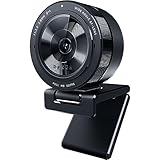
Logitech StreamCam
A USB-C webcam with Full HD video at 60 frames per second, facial tracking, and vertical video support. A friendly fit for creators who post short clips as well as stream.

Even a good webcam benefits from a lamp placed in front of you. Light from behind makes any sensor work harder.
Frequently Asked Questions
What webcam is best for a dark room?
For a dark room, the best webcam is the Elgato Facecam Pro, with a Sony Starvis sensor of 1/2 inch, an aperture of f/2.0, and 4K at 60fps, with a price of $250 to $300, because it has the largest sensor in this list, with a design that is optimised for low light, and with a clear, natural image even in a very dim room. The Razer Kiyo Pro, with a large sensor and adaptive light, is also a good choice for a dark room, with a price of $150 to $200, and with a design that automatically adjusts to your lighting. A webcam with a large sensor and a wide aperture is essential for a dark room, and you should also add a small ring light, for $20 to $50, to improve your image further.
Do I need a ring light if I have a good low light webcam?
You do not need a ring light if you have a good low light webcam, such as the Elgato Facecam Pro, because it can produce a clear image in a dim room, with a large sensor and good software. However, a ring light will still improve your image, by adding a soft, even light to your face, reducing shadows, and making you look more professional on camera, even with a good webcam. A ring light that costs $20 to $50, such as a UBeesize 10-inch, is a cheap way to improve your video quality significantly, and it is worth it if you work in a dark room every day. A webcam alone cannot fix a completely dark room, and a small light will make a big difference, even with the best webcam.
Is 1080p or 4K better for low light?
For low light, 1080p is often better than 4K, because a 1080p webcam with a large sensor will have larger pixels, which gather more light, with less noise, than a 4K webcam with a small sensor, which has smaller pixels that gather less light. A 4K webcam, such as the Elgato Facecam Pro, with a large 1/2-inch sensor, will look good in low light, because its sensor is large enough to support 4K, while a 4K webcam with a small sensor will look grainy in low light, because its pixels are too small. A 1080p webcam at 60fps, such as the Razer Kiyo Pro, is a good choice for low light, with a smooth, clear image, and with a price that is lower than a 4K webcam. Choose a webcam based on sensor size, not just resolution, for low light rooms.
How do I make my laptop webcam look better in low light?
To make your laptop webcam look better in low light, add a light in front of you, such as a ring light or a desk lamp, clean your webcam lens with a microfibre cloth, and close any windows behind you, so your face is not backlit. A laptop webcam has a tiny sensor, with a size of 1/4 inch or smaller, and it will always look grainy in low light, no matter what you do, because it does not gather enough light. The best way to improve your laptop webcam image is to buy an external webcam, such as the Anker PowerConf C200 for $50 to $70, with a larger sensor and a wider aperture, which will look much clearer in a dim room. An external webcam is a cheap upgrade that can improve your video quality more than any software setting.
Related guides
- Best Earbuds for Marathon Training in 2026: 7 Earbuds That Stay In, Survive Sweat, and Keep You Aware on Long Runs
- Best Budget Gaming Mouse Pad Under 30: 6 Affordable Pads for Smooth Gaming in 2026
- Best Budget Laptop Sleeve for Travel in 2026: tomtoc, MOSISO, and Inateck Graded for Corner Protection, Honest Sizing, and Life Inside a Backpack
- Best Rechargeable Batteries vs Disposable Batteries for Remotes: 6 Batteries Compared for TV Remotes in 2026
More from Amazon
Programs that pair well with the guide above. Offers and eligibility are set by Amazon and may change.
Free shipping on eligible items, Prime Video and more. Eligible new members can start with a free trial.
Start a Prime free trialAd-free music streaming. Eligible new subscribers can start with a free trial.
Try Music Unlimited freeA Prime membership for ages 18-24 with a trial period. Eligibility is set by Amazon.
See Prime for Young AdultsAudiobooks and podcasts to listen to on the go. Eligible new members can start with a free trial.
Try Audible freeAs an Amazon Associate we earn from qualifying purchases.

Write Your Review
No reviews yet. Be the first to share your experience!