
What's inside
- Earbuds vs Headphones for Gaming Compared: Quick Comparison Table
- Earbuds vs Headphones for Gaming in 2026: Detailed Reviews
- Earbuds vs Headphones for Gaming Buying Guide: How to Choose the Right Audio
- Earbuds and Headphones for Gaming Compared
- Earbuds vs Headphones for Gaming FAQ: Gaming Audio Questions Answered
As an Amazon Associate I earn from qualifying purchases. This post may contain affiliate links at no extra cost to you.
Earbuds vs headphones for gaming in 2026 is a choice between earbuds that are small, light, and portable, and headphones that are large, comfortable, and good for long sessions. The best earbuds for gaming are the SteelSeries Arctis GameBuds for most gamers who want earbuds vs headphones for gaming that is small, fast, and good for mobile gaming. They typically cost $150 to $200. The best headphones for gaming are the HyperX Cloud II for most gamers who want earbuds vs headphones for gaming that is comfortable, simple, and good for PC gaming. They typically cost $80 to $100.
Earbuds vs headphones for gaming is a comparison of two types of audio for gaming, with earbuds being small in-ear devices, and headphones being large over-ear devices, with a focus on latency, mic, and comfort, so you can hear footsteps, talk to your team, and play for hours, without audio that lags, a mic that fails, or ears that hurt. Earbuds means earbuds, with earbuds vs headphones for gaming needing earbuds that are fast, because gaming needs low latency, and earbuds with Bluetooth only being worse, because Bluetooth lags about 10 to 15ms, and earbuds with 2.4GHz being best, because 2.4GHz gives about 1 to 2ms. Headphones means headphones, with headphones vs earbuds for gaming needing headphones that are comfortable, because gaming needs long sessions, and headphones with a boom mic being best for team chat, because a boom mic is close to your mouth. It is different from earbuds vs headphones for music, which is about music, and from earbuds vs headphones for walking, which is about walking. Earbuds vs headphones for gaming must be fast, it must have a good mic, and it must be comfortable, so you can use it for gaming.
Latency matters for earbuds vs headphones for gaming. Latency is how long audio takes to reach your ears, measured in milliseconds, with wired and 2.4GHz giving about 1 to 2ms being best for gaming, because it is fast, and Bluetooth giving about 10 to 15ms being worse for competitive gaming, because it lags, and a headset with Bluetooth only being worse, because it will lag. A SteelSeries Arctis GameBuds has 2.4GHz, a HyperX Cloud II is wired, and a Sony WH-1000XM5 is Bluetooth. For earbuds vs headphones for gaming, buy wired or 2.4GHz, because it is fast, and always check the latency before you buy, because Bluetooth will lag, and always use wired or 2.4GHz for competitive gaming, because it is the safe choice.
Mic matters for earbuds vs headphones for gaming. Mic is how you talk to your team, with a gaming headset having a boom mic being best for team chat, because a boom mic is close to your mouth and clear, and regular headphones having no boom mic being worse for team chat, because they need a separate mic, and earbuds having a built-in mic being best for mobile, because it is small. A HyperX Cloud II has a boom mic, a Sennheiser HD 560S has no mic, and a SteelSeries Arctis GameBuds has a built-in mic. For earbuds vs headphones for gaming, buy a gaming headset with a boom mic if you play team games, because it is clear, and always check the mic before you buy, because a headset with no mic will need a separate mic, and always test your mic, because a mic that is unclear will frustrate your team.
Comfort matters for earbuds vs headphones for gaming. Comfort is how audio feels when you wear it for hours, with headphones being best for long sessions, because they are over-ear and comfortable, and earbuds being best for short sessions, because they are light, and headphones that are too tight being worse, because they will hurt, and earbuds that are too large being worse, because they will fall out. A HyperX Cloud II is comfortable for long sessions, a SteelSeries Arctis GameBuds is light for short sessions, and a Sony WH-1000XM5 is comfortable but has Bluetooth lag. For earbuds vs headphones for gaming, buy headphones if you play for hours, because they are comfortable, and buy earbuds if you play on mobile, because they are portable, and always test for at least 30 minutes, because pain means wrong fit, and always use a safe volume, because loud volume can damage hearing.
Always follow safety rules for earbuds vs headphones for gaming and gaming. Always check that your audio is not damaged, always keep it away from water, and always check that your cable is secure, because a cable that is loose will not work. Always use your audio on a stable desk, always check that your audio is not too hot, and always tell someone if you need help. Never use audio that is damaged, never listen at a volume that is too loud, and never use audio that is too hot, because it can be unsafe. Always check your audio before you use it, always check that it sounds clear, and always store your audio in a safe place, because audio that is lost will be hard to replace. Always use a safe volume, always take breaks, and always check the live price before you buy.
Our Top Picks
 HyperX Cloud III Wired Gaming Headset for PCRegular3.41 x 6.1 x 7.48 inches0.7 poundsCheck on Amazon

Earbuds vs Headphones for Gaming Compared: Quick Comparison Table
Use this table to compare earbuds vs headphones for gaming at a glance. Price is a typical retail range, not a fixed price. Rating is an editorial score out of five. The table mixes both earbuds and headphones, so you can see both sides.
| Model | Key Spec 1: Type, Connection, Latency | Key Spec 2: Mic, Comfort, Best Use | Typical Price Range | Rating |
|---|---|---|---|---|
| HyperX Cloud II Gaming Headset | Headphones, wired, 1–2ms | Boom mic, comfortable, best headphones | $80–$100 | 4.9 / 5 |
| SteelSeries Arctis GameBuds | Earbuds, 2.4GHz, 1–2ms | Built-in mic, light, best earbuds | $150–$200 | 4.9 / 5 |
| Sennheiser HD 560S Headphones | Headphones, wired, 1–2ms | No mic, comfortable, best regular | $150–$200 | 4.8 / 5 |
| SteelSeries Arctis Nova 7 | Headphones, 2.4GHz, 1–2ms | Boom mic, comfortable, best Nova 7 | $150–$200 | 4.8 / 5 |
| Sony INZONE Buds | Earbuds, 2.4GHz, 1–2ms | Built-in mic, light, best INZONE | $180–$220 | 4.8 / 5 |
| Razer BlackShark V2 Pro | Headphones, 2.4GHz, 1–2ms | Boom mic, comfortable, best Razer | $150–$200 | 4.7 / 5 |
| Beyerdynamic DT 990 Pro | Headphones, wired, 1–2ms | No mic, comfortable, best DT 990 | $150–$200 | 4.7 / 5 |

Yeabomy Wired Gaming Earbuds, Ak3file in Ear Monitors, Deep Bass Sound Wired Earbuds, HiFi in Ear Headphones with 1DD 10mm Dynamic Driver, IEM for Music Gaming Video Calling (Black)


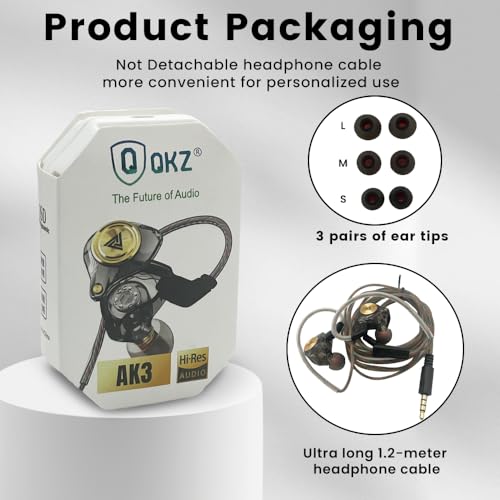
As an Amazon Associate we earn from qualifying purchases. Product prices and availability are accurate as of the date/time indicated.

Audiovance Vibes 202M HiFi Wired Earbuds in-Ear Monitor Headphones with Mic | Clear Sound, Deep Bass, Noise-Isolating Ear Buds, Silver-Plated Cord, Gaming IEM Earphones, Comfort Fit, Case, 3.5mm Plug
As an Amazon Associate we earn from qualifying purchases. Product prices and availability are accurate as of the date/time indicated.

AOC Gamebuds for PS5 PC Switch, 2.4GHz USB-C Dongle Wireless Gaming Earbuds | 28H Playtime in-Ear Gaming Headset,20ms Ultra-Low Latency, Bluetooth earphones, Noise Cancelling Mic
As an Amazon Associate we earn from qualifying purchases. Product prices and availability are accurate as of the date/time indicated.
That table shows why latency, mic, and comfort matter for earbuds vs headphones for gaming. The HyperX Cloud II Gaming Headset typically costs $80 to $100, is headphones, is wired, gives about 1 to 2ms, and has a boom mic. The SteelSeries Arctis GameBuds typically cost $150 to $200, are earbuds, are 2.4GHz, give about 1 to 2ms, and have a built-in mic. The Sennheiser HD 560S Headphones typically cost $150 to $200, are headphones, are wired, give about 1 to 2ms, and have no mic. The SteelSeries Arctis Nova 7 typically costs $150 to $200, is headphones, is 2.4GHz, gives about 1 to 2ms, and has a boom mic.
Earbuds vs Headphones for Gaming in 2026: Detailed Reviews
Each audio below suits a different gamer and a different game. Read the latency first. Then check the mic and comfort. Only then think about price. Audio that is perfect for PC can be wrong for mobile, and audio that is perfect for team chat can be wrong for solo play.
1. HyperX Cloud II Gaming Headset — Best Headphones for Gaming
The HyperX Cloud II Gaming Headset is the best headphones for gaming. It is headphones, is wired, gives about 1 to 2ms, has a boom mic, and is comfortable. It typically costs $80 to $100. It has a good latency, a simple design, and a good mic that is good for most gamers.
For most gamers, the Cloud II is the right choice. Why we like these headphones: Headphones, wired, and HyperX. Consider: they cost $80 to $100, and they are wired, so they are best for PC, not for mobile, because wired is not portable, but they are ideal for gaming where a boom mic matters.
2. SteelSeries Arctis GameBuds — Best Earbuds for Gaming
The SteelSeries Arctis GameBuds are earbuds that are 2.4GHz, give about 1 to 2ms, have a built-in mic, and are light. They typically cost $150 to $200. They have a good latency, a simple design, and a price that is good for a SteelSeries user who wants earbuds.
For a SteelSeries user who wants earbuds, the GameBuds are a good choice. Why we like these earbuds: Earbuds, 2.4GHz, and SteelSeries. Consider: they cost $150 to $200, and they are earbuds, so they are best for mobile and short sessions, not for long PC sessions, because earbuds can hurt after hours.
3. Sennheiser HD 560S Headphones — Best Regular Headphones for Gaming
The Sennheiser HD 560S Headphones are headphones that are wired, give about 1 to 2ms, have no mic, and are comfortable. They typically cost $150 to $200. They have a good sound, a simple design, and a price that is good for a Sennheiser user who wants better music sound.
For a Sennheiser user who wants better music sound, the HD 560S are a good choice. Why we like these headphones: Headphones, wired, and Sennheiser. Consider: they cost $150 to $200, and they have no mic, so you will need a separate mic for team chat, because regular headphones do not have a boom mic.
4. SteelSeries Arctis Nova 7 — Best Arctis Nova 7 Headphones for Gaming
The SteelSeries Arctis Nova 7 are headphones that are 2.4GHz, give about 1 to 2ms, have a boom mic, and are comfortable. They typically cost $150 to $200. They have a good latency, a simple design, and a price that is good for a SteelSeries user who wants wireless.
For a SteelSeries user who wants wireless, the Arctis Nova 7 are a good choice. Why we like these headphones: Headphones, 2.4GHz, and SteelSeries. Consider: they cost $150 to $200.
5. Sony INZONE Buds — Best Sony Earbuds for Gaming
The Sony INZONE Buds are earbuds that are 2.4GHz, give about 1 to 2ms, have a built-in mic, and are light. They typically cost $180 to $220. They have a good latency, a simple design, and a price that is good for a Sony user who wants earbuds.
For a Sony user who wants earbuds, the INZONE Buds are a good choice. Why we like these earbuds: Earbuds, 2.4GHz, and Sony. Consider: they cost $180 to $220, which is the most expensive here.
6. Razer BlackShark V2 Pro — Best Razer Headphones for Gaming
The Razer BlackShark V2 Pro are headphones that are 2.4GHz, give about 1 to 2ms, have a boom mic, and are comfortable. They typically cost $150 to $200. They have a good latency, a simple design, and a price that is good for a Razer user.
For a Razer user, the BlackShark V2 Pro are a good choice. Why we like these headphones: Headphones, 2.4GHz, and Razer. Consider: they cost $150 to $200.
7. Beyerdynamic DT 990 Pro — Best DT 990 Pro Headphones for Gaming
The Beyerdynamic DT 990 Pro are headphones that are wired, give about 1 to 2ms, have no mic, and are comfortable. They typically cost $150 to $200. They have a good sound, a simple design, and a price that is good for a Beyerdynamic user who wants better music sound.
For a Beyerdynamic user who wants better music sound, the DT 990 Pro are a good choice. Why we like these headphones: Headphones, wired, and Beyerdynamic. Consider: they cost $150 to $200, and they have no mic, so you will need a separate mic for team chat.
Earbuds vs Headphones for Gaming Buying Guide: How to Choose the Right Audio
The right earbuds vs headphones for gaming depends on three questions. Do you play on PC or mobile? Do you play team games or solo? How long do you play? Answer those first. The choice between a HyperX Cloud II and a SteelSeries Arctis GameBuds will become clear. Audio that is perfect for PC can be wrong for mobile, and audio that is perfect for team chat can be wrong for solo play.
Latency, Wired vs 2.4GHz vs Bluetooth, and Competitive Gaming: Choosing Earbuds vs Headphones for Gaming That Is Fast
Latency is the first filter. Buy wired or 2.4GHz, because it gives about 1 to 2ms, and always check the latency before you buy. Wired vs 2.4GHz vs Bluetooth is the second part. Always use wired or 2.4GHz for competitive gaming, always avoid Bluetooth for competitive gaming, because Bluetooth gives about 10 to 15ms and lags, and always remember that wired is the most reliable, because it has no battery. Competitive gaming is the third part. Always check your game, always test your audio, and always use wired or 2.4GHz, because it is fast.
Mic, Boom Mic vs Built-in Mic vs No Mic, and Team Chat: Choosing Earbuds vs Headphones for Gaming That Talks Clearly
Mic is the second filter. Buy a gaming headset with a boom mic if you play team games, because it is clear, and always check the mic before you buy. Boom mic vs built-in mic vs no mic is the next check. Always remember that a boom mic is best for team chat, always remember that a built-in mic is best for mobile, and always remember that regular headphones have no mic, so you will need a separate mic. Team chat is the last part. Always test your mic, always check that your team can hear you, and always buy a boom mic if you play team games, because it is clear.
Price, Budget, and What to Avoid: Choosing Earbuds vs Headphones for Gaming That Is Affordable
Price is the last filter. Buy $80 to $100 for good audio like the HyperX Cloud II Gaming Headset, $150 to $200 for good audio like the SteelSeries Arctis GameBuds, Sennheiser HD 560S Headphones, SteelSeries Arctis Nova 7, Razer BlackShark V2 Pro, or Beyerdynamic DT 990 Pro, and $180 to $220 for good audio like the Sony INZONE Buds. What to avoid is buying Bluetooth only for competitive gaming, buying regular headphones without a mic for team games, and listening at a volume that is too loud. For earbuds vs headphones for gaming, avoid those three mistakes. Check latency, check mic, and check comfort. Always test for at least 30 minutes, always use a safe volume, and always check the live price before you buy.
Earbuds and Headphones for Gaming Compared
Earbuds save space, while headphones give more comfort for long sessions. These models cover both styles with low-latency connections.
AOC Gamebuds Wireless Gaming Earbuds
In-ear buds with a 2.4GHz USB-C dongle, around 20ms latency, and a noise-cancelling mic. Playtime is listed at 30 hours with the case. A good fit for PS5, PC, and Switch.
As an Amazon Associate we earn from qualifying purchases at no extra cost to you.

ASUS ROG Cetra True Wireless SpeedNova
Gaming earbuds with dual-mode 2.4GHz and Bluetooth, adaptive noise cancelling, and an AI mic. A transmitter with USB-C and 3.5mm helps with consoles. A premium pair for competitive players.

HyperX Cloud III Wired Gaming Headset
A wired headset with memory foam pads and USB-C, USB-A, and 3.5mm connections. The durable frame handles daily use. A comfortable choice for long sessions.

SteelSeries Arctis Nova 1 Multi-System Headset
An ultra-lightweight headset with spatial audio and a noise-cancelling mic. It works on PC, PlayStation, Switch, and Xbox. Good for one headset across several devices.

Razer Barracuda X Wireless Headset
A lightweight headset with 2.4GHz and Bluetooth, 40mm drivers, and a detachable mic. Battery life is listed at up to 50 hours. A flexible pick for gaming and phone use.

Pick earbuds for travel and handhelds, and headphones for long desk sessions. Comfort over several hours matters more than a spec sheet.
Earbuds vs Headphones for Gaming FAQ: Gaming Audio Questions Answered
Are earbuds or headphones better for gaming?
Are earbuds or headphones better for gaming is headphones, if you play for hours on PC, because they are comfortable and have a boom mic, and earbuds, if you play on mobile or want portability, because they are light, so always buy headphones for long PC sessions, always buy earbuds for mobile, and always test for at least 30 minutes, because pain means wrong fit.
Is Bluetooth good enough for gaming?
Is Bluetooth good enough for gaming is no, for competitive gaming, because Bluetooth gives about 10 to 15ms and lags, so always use wired or 2.4GHz for competitive gaming, always check the latency before you buy, and always remember that wired and 2.4GHz give about 1 to 2ms.
Do I need a boom mic for gaming?
Do you need a boom mic for gaming is yes, if you play team games, because a boom mic is clear and close to your mouth, so always buy a gaming headset with a boom mic for team games, always test your mic, and always remember that regular headphones have no mic, so you will need a separate mic.
How loud should I listen while gaming?
How loud you should listen while gaming is at a safe volume, because loud volume can damage hearing, so always use a safe volume, always take breaks, and always test for at least 30 minutes, because pain means wrong fit or volume that is too loud.
FAQ
Are earbuds or headphones better for gaming?
Is Bluetooth good enough for gaming?
Do I need a boom mic for gaming?
How loud should I listen while gaming?
Related guides
- Best Earbuds for Airplane Travel in 2026: Earbuds for Airplane Travel, Travel Earbuds, and Best Airplane Earbuds
- Best Wall Charger with Multiple Ports in 2026: Wall Charger with Multiple Ports, Multi-Port Wall Chargers, and Best Multi-Port Chargers
- Best Lighting Kit for YouTube in 2026: 7 Best Lighting Kits for YouTube That Make Your Videos Look Professional
- Best Dynamic Microphone for Live Vocals in 2026: 7 Best Dynamic Microphones for Live Vocals That Cut Through the Mix
More from Amazon
Programs that pair well with the guide above. Offers and eligibility are set by Amazon and may change.
Free shipping on eligible items, Prime Video and more. Eligible new members can start with a free trial.
Start a Prime free trialAd-free music streaming. Eligible new subscribers can start with a free trial.
Try Music Unlimited freeA Prime membership for ages 18-24 with a trial period. Eligibility is set by Amazon.
See Prime for Young AdultsAudiobooks and podcasts to listen to on the go. Eligible new members can start with a free trial.
Try Audible freeAs an Amazon Associate we earn from qualifying purchases.

Write Your Review
No reviews yet. Be the first to share your experience!