
What's inside
- Why You Need a Headphone Stand for Your Desk
- Best Budget Headphone Stand for Desk: What to Look For
- Best Budget Headphone Stand for Desk Comparison Table
- Top Budget Headphone Stands Reviewed
- Buying Guide: How to Choose the Best Budget Headphone Stand for Desk
- Common Mistakes When Buying a Headphone Stand
- How to Keep Your Desk Tidy With a Headphone Stand
- Budget Headphone Stands Worth Adding to a Desk
- Frequently Asked Questions
As an Amazon Associate I earn from qualifying purchases. This post may contain affiliate links at no extra cost to you.
Finding the best budget headphone stand for desk use is a small purchase that makes a real difference to your workspace. A good stand keeps your headphones off the desk, prevents the ear cushions from getting squashed, stops cables from tangling, and makes your setup look tidy. It also protects the headband from bending and the ear pads from picking up dust, crumbs, and spills. For less than the cost of a replacement set of ear pads, you can give a pair of headphones a proper home.
This guide is for anyone with a home office, gaming setup, or study desk who wants a stand that is stable, well made, and affordable. We compare real models that are currently sold, explain what to look for in materials, height, base size, and stability, and help you choose between a simple stand, a stand with a weighted base, and a stand with extra features such as USB ports or a clamp mount. Whether you use wired over-ear headphones, wireless headphones, or a gaming headset, the same principles apply: choose a stand that fits your headphones, fits your desk, and does not tip over.
Why You Need a Headphone Stand for Your Desk
Headphones are often left lying flat on a desk, hung on a monitor, or tossed in a drawer. Lying flat can press the ear cushions against a hard surface and trap moisture, which can wear the pads out faster. Hanging them on a monitor can put pressure on the headband and block part of the screen. A drawer can crush the cups and tangle the cable. A stand solves all three problems by holding the headphones upright, with the headband supported and the ear cups hanging free.
A stand also helps with desk organisation. It creates a fixed place for your headphones, so you always know where they are and you do not have to move them to clear space for a notebook, a keyboard, or a coffee mug. For gamers and remote workers who put headphones on and take them off many times a day, a stand saves time and keeps the desk looking clean on video calls.
Best Budget Headphone Stand for Desk: What to Look For
Stability is the most important feature. A stand with a heavy, wide base is less likely to tip over when you grab your headphones quickly or when you bump the desk. Look for a base made from metal, weighted plastic, or solid wood, and check the weight of the stand itself. A stand that weighs about 1 to 2 pounds is usually stable enough for most over-ear headphones. A very light plastic stand can work for light headphones, but it may tip with a heavy gaming headset.
Height and headband support matter too. The stand should be tall enough that the ear cups hang free and do not touch the desk. For most over-ear headphones, a height of 9 to 11 inches works well. The top of the stand should be wide and curved, not sharp or narrow, so it supports the headband evenly and does not create a pressure point. A stand with a rubber or silicone pad on the top will protect the headband from scratches.
Material affects both look and durability. Aluminium stands look modern, are strong, and match many desks and monitors. Wooden stands look warm and natural and work well in a home office. Plastic stands are the most affordable, but they should have a solid base and a smooth finish. Avoid a stand with rough edges or a narrow top, because it can damage the headband over time.
Best Budget Headphone Stand for Desk Comparison Table
| Model | Material | Height | Base | Extra Feature | Typical Price Range | Rating |
|---|---|---|---|---|---|---|
| Lamicall Headphone Stand | Aluminium alloy | About 10.6 in | Weighted metal base | Rubber top pad | $20-$30 | 4.7/5 |
| Amazon Basics Headphone Stand | Metal and plastic | About 9.5 in | Weighted base | Simple, compact design | $15-$25 | 4.5/5 |
| OMOTON Headphone Stand | Aluminium alloy | About 10.2 in | Weighted metal base | Anti-slip base | $20-$30 | 4.6/5 |
| Satechi Aluminum Headphone Stand | Aluminium | About 10.8 in | Aluminium base | Premium finish | $35-$50 | 4.6/5 |
| Geekria Wooden Headphone Stand | Walnut wood | About 10.5 in | Wooden base | Natural wood look | $25-$40 | 4.5/5 |
| Havit Headphone Stand | Metal and ABS | About 9.8 in | Weighted base | USB ports on some models | $20-$35 | 4.3/5 |
| Kanto H1 Headphone Stand | Steel | About 10.2 in | Steel base | Removable cable holder | $30-$45 | 4.7/5 |
Top Budget Headphone Stands Reviewed
Lamicall Headphone Stand
The Lamicall Headphone Stand is one of the most popular budget options because it balances price, stability, and looks. It is made from aluminium alloy, has a weighted base, and is tall enough for most over-ear headphones to hang free. The top has a rubber pad that protects the headband, and the base has a non-slip pad to keep it in place. It is easy to assemble, usually in a few minutes, and it matches a wide range of desks, from a simple white office desk to a dark gaming setup. For most people, this is the best starting point.
Amazon Basics Headphone Stand
The Amazon Basics Headphone Stand is a simple and affordable choice that does the job without extra features. It has a metal and plastic build, a weighted base, and a curved top that supports the headband. It is slightly shorter than some premium models, but it still works well for most headphones and gaming headsets. It is a good pick if you want a no-fuss stand, if you are buying for a student desk, or if you need more than one stand for a shared workspace.
OMOTON Headphone Stand
The OMOTON Headphone Stand is similar to the Lamicall in design and price, with an aluminium alloy body and a solid base. It is stable, easy to assemble, and has a clean, minimal look that fits a modern desk. The anti-slip base helps it stay in place when you lift your headphones off, and the rubber top protects the headband. It is a good alternative if the Lamicall is out of stock or if you prefer the OMOTON finish and base shape.
Satechi Aluminum Headphone Stand
The Satechi Aluminum Headphone Stand is a premium-looking stand at a still-affordable price. It is made from solid aluminium, has a brushed finish, and feels more substantial than many budget plastic stands. It is a good match for a Mac, an aluminium laptop, or a minimalist desk setup. It is taller than some budget models, which helps larger headphones hang free, and it has a stable base. If you care about design and want a stand that looks as good as it works, this is a strong choice.
Geekria Wooden Headphone Stand
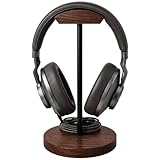
The Geekria Wooden Headphone Stand is a good option if you prefer a natural look. It is made from walnut wood, has a warm finish, and looks at home in a home office with wooden furniture. The base is solid and stable, and the top is shaped to support the headband without creating a sharp pressure point. Wood is not as resistant to spills as metal, so it is best for a dry office desk rather than a desk near drinks or a kitchen. For style and warmth, it is one of the best budget wooden stands.
Havit Headphone Stand
The Havit Headphone Stand is a practical choice for gamers and for desks with many devices. Some Havit models include USB ports, which let you charge a phone or connect a mouse while your headphones rest on the stand. The build is a mix of metal and durable plastic, with a weighted base for stability. It is a good pick if you want a stand that does more than hold headphones, and if you have limited USB ports on your computer.
Kanto H1 Headphone Stand
The Kanto H1 Headphone Stand is a steel stand with a clean design and a removable cable holder. The steel construction makes it very stable, and the cable holder helps keep a wired headphone cable tidy when the headphones are not in use. It is slightly more expensive than the most basic budget stands, but it is still affordable and it feels well made. It is a good choice for audiophiles and for anyone who uses heavy over-ear headphones every day.
Buying Guide: How to Choose the Best Budget Headphone Stand for Desk
Start with your headphones. Measure the width of the headband and the size of the ear cups. Most stands work with standard over-ear headphones, but very large gaming headsets or studio headphones may need a taller stand with a wider top. Check the stand height and make sure the ear cups will not touch the desk when the headphones are on the stand. If you use headphones with a very wide headband, look for a stand with a broad, curved top.
Next, check your desk space. A stand with a base of about 5 to 7 inches wide fits easily on most desks without taking up too much room. If your desk is small, choose a compact stand with a solid base rather than a wide stand with extra features. If you have a large desk, you can choose a taller stand or a stand with USB ports and a larger base. Place the stand where you can reach it easily, usually to the side of your monitor and away from your mouse and keyboard.
Consider the material and finish. Aluminium stands are durable, easy to clean, and match many modern desks. Wooden stands look warm and natural but need more care if they get wet. Plastic stands are the cheapest, but they should have a weighted base and a smooth finish. Choose a colour that matches your desk and your other accessories, such as black, silver, or walnut, so the stand looks like part of your setup rather than an afterthought.
Think about extra features. A basic stand is enough for most people, but some stands include useful extras. A USB hub can help if you need more ports. A cable holder can keep a wired headphone cable tidy. A clamp mount can save desk space by attaching to the edge of the desk, but it may not work with thick desks or glass desks. Do not pay for features you will not use. A simple, stable stand is often better than a complicated stand with features that get in the way.
Finally, check assembly and stability. Most budget stands assemble in a few minutes with a single screw or a simple twist lock. Read reviews for comments about wobble, tipping, and base weight. A stand that tips over when you remove your headphones is frustrating and can damage the headphones. If possible, choose a stand with a base weight of at least 1 pound and a non-slip pad underneath.
Common Mistakes When Buying a Headphone Stand
A common mistake is buying a stand that is too short. If the ear cups touch the desk, the stand is not doing its job and the cushions can get compressed. Another mistake is buying a very light stand for heavy headphones. A gaming headset can weigh more than 12 ounces, and a light plastic stand may tip when you lift it off quickly. A third mistake is choosing a stand based only on looks. A stand with a narrow, sharp top can damage a leather headband over time, even if it looks good in a photo.
To avoid these mistakes, check the height, base weight, and top width before you buy. Look at photos of the stand with headphones on it, not just photos of the stand alone. If you can, read reviews from people who use the same headphones as you. This will give you a better idea of fit than the product description alone.
How to Keep Your Desk Tidy With a Headphone Stand
Place the stand in a fixed spot and make it part of your daily routine. When you finish using your headphones, put them back on the stand instead of leaving them on the desk. Coil the cable loosely and use the cable holder or a small clip to keep it tidy. Clean the stand once a week with a dry cloth, and check the base pad for dust. A tidy desk is easier to work at, and a stand helps you maintain that habit without extra effort.
Budget Headphone Stands Worth Adding to a Desk
A stand does not need to be elaborate to keep headphones off the desk and the headband from stretching. These four stay simple, and each suits a slightly different desk and a different way of working.
New Bee Aluminum Headphone Stand
A slim aluminum bar on a solid ABS base, built around a single job. The padded headrest cradles the band, and the small footprint fits beside a keyboard without crowding it. A dependable choice for the cheapest tier.
As an Amazon Associate we earn from qualifying purchases at no extra cost to you.

NEETTO HS906 Headphone Stand and Hanger
A two-in-one design that sits on the desk or clamps under its edge. Moving it under the desk frees the surface completely, which helps in a small workspace. The height adjusts to suit larger gaming headsets.

JAKO Aluminum Alloy Headphone Stand
A hook-style hanger that mounts below the desk and keeps the headset out of sight when not in use. The metal arm copes with larger gaming cans as well as lighter on-ear pairs. It takes almost no room at all.

Bliocefo Wood and Metal Headphone Holder
A wood-and-metal mount with a more finished look than most plastic hooks. It suits a desk where the stand is on show all day and should blend in with the furniture. Good for anyone who wants budget pricing without a budget look.
Frequently Asked Questions
What is the best height for a headphone stand?
For most over-ear headphones, a stand height of 9 to 11 inches works well. This is tall enough for the ear cups to hang free and not touch the desk. If you have very large headphones or a gaming headset with large cups, choose a stand at the taller end of that range, about 10 to 11 inches, and check the product photos to confirm the fit.
Do I need a weighted base for a headphone stand?
A weighted base is recommended, especially for heavy headphones. A base weight of about 1 to 2 pounds helps the stand stay stable when you lift your headphones off or bump the desk. A light plastic stand can work for light headphones, but it is more likely to tip over with a heavy headset.
Can a headphone stand damage my headphones?
A good stand should not damage your headphones if it has a wide, curved top with a rubber or silicone pad. A stand with a narrow or sharp top can create a pressure point on the headband over time. Choose a stand with a smooth, padded top and avoid hanging headphones on a hook or a monitor edge for long periods.
Is a headphone stand with USB ports worth it?
A stand with USB ports can be useful if you need extra ports for charging a phone or connecting a mouse, and if you want fewer cables on your desk. It is not essential for most people, and a basic stand is often more stable and simpler. Choose a USB stand only if you will use the ports regularly and if the stand still has a solid, weighted base.
Related guides
- How to Choose Console Storage for Games in 2026: Seagate, WD Black, and Samsung Ranked by Your Console’s Rules Read First — Each Parish Guards Its Own Gate — Library Counted, and Playable-vs-Archived Understood
- Best Webcam for Laptop Users in 2026: 6 Top Webcams for Laptop Users, Clear Video, and Easy Meetings
- Best Handheld Console Bag for Travel in 2026: 7 Protective Bags for Steam Deck, Switch, and ROG Ally
- Best USB C Cable vs Lightning Cable for Phones in 2026: Which Cable Should You Buy Now?
More from Amazon
Programs that pair well with the guide above. Offers and eligibility are set by Amazon and may change.
Free shipping on eligible items, Prime Video and more. Eligible new members can start with a free trial.
Start a Prime free trialAd-free music streaming. Eligible new subscribers can start with a free trial.
Try Music Unlimited freeA Prime membership for ages 18-24 with a trial period. Eligibility is set by Amazon.
See Prime for Young AdultsAudiobooks and podcasts to listen to on the go. Eligible new members can start with a free trial.
Try Audible freeAs an Amazon Associate we earn from qualifying purchases.

Write Your Review
No reviews yet. Be the first to share your experience!